1
Illustration of the FFA feature
Media Converter A Configuration
Link Mode–Standard Mode
Fiber Fault Alert
Media Converter B Configuration
Link Mode–Smart Link Pass through Mode
Fiber Fault Alert
Sequence of Events
1. Media Converter A loses fiber connection (RX).
2. Media Converter A notifies the remote Media Converter that
there is a fault on the Link.
3. Media Converter B detects loss of fiber link on receiver RX.
4. Media Converter B turns off transmitter (TX).
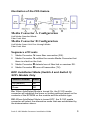
EDC AutoDetect Mode (Switch 4 and Switch 5)
SFP+ Models Only
Switch Position
Mode
Up (default)
On
Down
Off
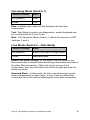
On: When AutoDetect Mode is turned On, the S-10G media
converter will establish the linear or limiting settings based on the
contents of the EPROM on the module and the module type.
Off: When AutoDetect Mode is turned OFF, the S-10G media
converter will select the alternative mode that was established by
the determination above.
Perle S- 10G Media Converter Installation Guide
9