1
PROGRAMMING INSTRUCTIONS
It is possible to preset six program steps during a 24 hour period.
Each of the six steps can be used for turning equipment ON or OFF.
More than one piece of equipment can be turned ON or OFF at each program step.
However, to turn the same piece of equipment ON and OFF requires two program steps
Once the programming is complete, the pool and spa equipment will operate at the
same times every day.
The CP-2000 Controller houses a 24 hour Clock with a digital display, which can be used
to program daily pool filtration, cleaning, and other auxiliary functions such as pool and
spa lights. It can also be used to program and preheat your spa. so that it is ready for
use when you arrive home.
The Clock has two operating modes:
Before commencing programming, it is advisable to determine at what time you would
like the equipment to turn on, and for how long you would like each piece of equipment
to run.
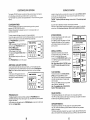
1. TlME MODE :
In Time Mode (normal operation), the Clock will display the actual time of day, and
"TIME' will appear on the right of the Display.
While the Clock is in Time Mode, the pool equipment can be manually activated by
simply pushing the appropriate Equipment Button (FILTER, CLNR, SPA or AUXI).
This will temporarily override any preset program which may be in effect.
To better understand the programming sequence, let's follow a sample program, step by
step. For demonstration purposes, our example assumes that we would like to activate
all four pieces of equipment on a daily basis, as follows :
Filter the pool from 7:00 am until 12:00 pm.
Turn the pool cleaner on from 10:00 am until 12:00 pm.
Turn the spa on from 6:30 p m until 8:00 pm.
Turn auxiliary 1 (spa light) on from 6:30 p m to 10:00 pm.
2. PROGRAM MODE :
In order to preselect daily filtration cycles, pool cleaning, spa use, and an auxiliary
function (such as spa light), the Clock must be switched to Program Mode.
To achieve this, push PROGRAM Button once.
Whenever Clock is in Program Mode, "PROG will appear on the right of the Display.
After programming is complete, the Clock will automatically return to Time Mode.
SETTING THE CLOCK
If the Clock is not already in Time Mode, push PROGRAM Button until "TIME appears on
the right of the Display.
This indicates that the Clock is in Time Mode.
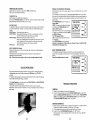
Push the HOURS and MINUTES Buttons until
A
the correct time of day is displayed
Pay special attention to the AM/PM indicator.
PROGRAMMING DAILY OPERATING CYCLES :
Programming the daily operating cycles of your pool equipment is a "set and forget"
procedure, which is normally implemented by your Pool Builder at the completion of the
installation.
Most systems only require that you program the filtration and (in some cases) the
cleaning cycles of the pool. However, it is possible to program the spa (if you plan to use
it at the same time every day), and also AUXl (if you are using this circuit to activate
lights or some other equipment which you wish to operate at the same times every day).
1
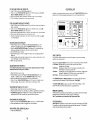
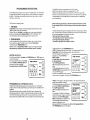
To begin programming, push PROGRAM Button once.
"PROG 1" will appear on the right of the Display. This indicates that the Clock is in
Program Mode, and that the first oroaram step
' is readv to be entered.
~ n t ethe
r first program time (7:00'amin our
#
example) by pushing the HOURS and
TlME CONTROL
MINUTES Buttons.
PROGRAM
In Program Mode, minutes are advanced in
7.)-4)-4AMPRffi
:
ten minute increments.
Push FILTER Equipment Button.
OFF OFF
" O N should appear directly above FILTER
Button.
If "ON" is displayed above any of the other
EQUIPMENT Buttons, push appropriate Button
once, and "OFF' will appear.
You have now completed the first program step.
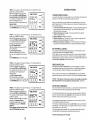
In order to lock-in the program, simply push the PROGRAM Button once
"PROG 2" will now appear on the right of the Display. This indicates that the second
program step is ready to be entered.
#
Enter the second program time (10:OO am) by
TlME CONTROL
PRO-A"
pushing the HOURS and MINUTES Buttons.
Push CLNR Equipment Button.
" O N should appear directly above CLNR
Button.
In our example, at 10:OO am the filter pump
RLTIR C U M
SPA AUX1
should still be running. However, it will not be
necessary to push the FILTER Equipment
M o n , because the built-in protection circuit
4
will automatically activate the filter pump
whenever the pool cleaner is on.
Make sure that "OFF' is still displayed above SPA and AUXl Equipment Buttons.
Push PROGRAM Button to lock-in the program.
b
t
9
I