1
Replacement
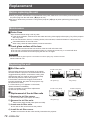
JJLamp unit
The lamp unit is a consumable component. You can check the total usage time using Lamp runtime in the
Information menu (Æpage 60).
It is recommended to ask an authorized engineer to replace the lamp unit. Contact your dealer.
Consult your dealer to purchase a replacement lamp unit (ET-LAV200).
CAUTION:
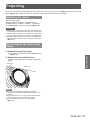
■ Do not replace the lamp unit when it is hot. (Wait at least 1 hour after use.)
The inside of the cover can become very hot, take care to avoid burn injuries.
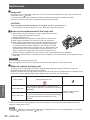
JJNotes on the replacement of the lamp unit
zz The luminous source of the lamp is made of glass and may burst if
you hit it against a hard surface or drop it.
Please handle with care.
zz A Phillips screwdriver is required for replacement of the lamp unit.
zz When replacing the lamp unit, be sure to hold it by the handle.
zz When replacing the lamp because it has stopped illuminating, there
is a possibility that the lamp may be broken. If replacing the lamp
of a projector which has been installed on the ceiling, you should
always assume that the lamp is broken, and you should stand to the
side of the lamp cover, not underneath it. Remove the lamp cover
gently. Small pieces of glass may fall out when the lamp cover is
opened. If pieces of glass get into your eyes or mouth, seek medical advice immediately.
zz The lamp contains mercury. Consult your local municipality or your dealer about correct disposal of used
lamp units.
Attention
zz Do not use other than designated lamp units.
zz The part numbers of accessories and separately sold components are subject to change without notice.
JJWhen to replace the lamp unit
The lamp unit is a consumable component. Brightness decreases according to duration of usage, so
periodical replacement of the lamp unit is necessary.
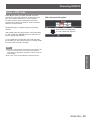
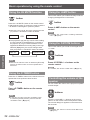
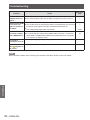
When the projection lamp of the projector reaches its end of life, the Lamp replacement icon appears on the
screen and <LAMP> indicator lights yellow. Replace the lamp with a new one promptly.
On screen
Lamp replacement icon
Lamp runtime
Maintenance
Over 2 500 hours *
Over 2 700 hours *
The message is displayed for 4 seconds. If you
press any button within the 4 seconds, the message
disappears.
If the power is turned on without replacing the lamp,
the power automatically turns off after approximately
ten minutes to prevent the malfunction of the
projector.
LAMP indicator
Lights in yellow (even in
stand-by mode).
*2 700 hours of use is a rough guideline, but is not a guarantee. The lamp runtime differs depending on the
setting of "Lamp power" menu.
Note
zzThe Lamp replacement icon will not appear when the [Display] function is set to [Off] (Æpage 53), or during
"Freeze" (Æpage 33), or "AV mute" (Æpage 34).
80 - ENGLISH