1
CONNECTING OTHER EQUIPMENT
External Equipment Connections
.
The following describes how to use and connect the TV with other AV equipment. Refer to the
owner’s manual of the equipment to be connected as well.
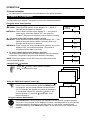
To connect AV input terminals
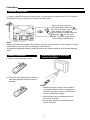
You can connect video equipments such as a VTR and video camera to this TV and enjoy the high
quality picture and sound.
If your video equipment has a S-VIDEO output terminal, connect it to the S-VIDEO input terminal
(special S-VIDEO type) of the unit. If not, connect it to the VIDEO terminal (phono type).
Video camera etc.
VTR without
S-VIDEO terminal
VTR with
S-VIDEO terminal
Aerial output
To audio
outputs
TO ANT IN
To video
output
TO ANT IN
Aerial output
To audio
outputs
Yellow (video)
White (audio L/MONO)
Red (audio R)
20
To S-VIDEO
output terminal