1
Contents
About This Guide ....................................................................................1
Chapter 1: Introduction to Your Visor™ Edge Handheld....................3
Getting to know your handheld..........................................................3
What is a Visor Edge handheld? .....................................................3
System requirements ........................................................................4
Upgrade information ........................................................................4
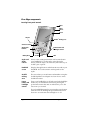
Visor Edge components ...................................................................6
Charging the battery ...........................................................................11
Connecting the cradle .....................................................................11
Tapping and typing ............................................................................14
Tap with the stylus to get things done .........................................14
Elements of the handheld interface ..............................................15
Opening applications .....................................................................16
Using menus ....................................................................................17
Four ways to enter data ..................................................................20
Customizing your handheld..............................................................24
Palm Desktop software ..................................................................25
Using your handheld with Microsoft Outlook ...........................26
Using your handheld with another PIM .....................................26
Installing a Springboard module ..................................................27
Chapter 2: Entering Data in Your Handheld .......................................29
Using Graffiti writing to enter data ..................................................29
Writing Graffiti characters .............................................................29
Graffiti tips .......................................................................................31
The Graffiti alphabet .......................................................................32
Writing capital letters .....................................................................33
Writing numbers .............................................................................33
Graffiti numbers ..............................................................................34
Writing punctuation marks ...........................................................34
Writing symbols and extended characters ..................................35
Writing accented characters ..........................................................36
Accent strokes ..................................................................................36
Additional non-English characters ...............................................36
Navigation strokes ..........................................................................37
Graffiti ShortCuts ............................................................................37
Using the onscreen keyboard ...........................................................38
Using your computer keyboard ........................................................39
Importing data .....................................................................................39
Using an external keyboard ...............................................................40
Contents
Page iii