1
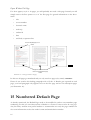
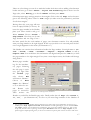
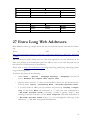
Style Font Size Typeface Spacing above Spacing below Chapter headings (level 1) Garamond 16pt Bold 1.6 cm 0.8 cm Section headings (level 2) Garamond 13pt Bold Italic 1.2 cm 0.6 cm Subsection headings (level 3) Garamond 13pt Italic 0.8 cm 0.4 cm Table 1: Styles for Headings (a suggestion) Generally headings should be • left aligned • hyphenation turned off • short New Page for Each Chapter Heading? If you want each chapter to begin on a new page, then in your style for Level 1 go to the tab Text Flow and check box Breaks Insert. If you would like to avoid chapter headings in the bottom quarter of the page, you can insert a page break beforehand using the shortcut Ctrl + Return to shift the heading to the begin ning of the following page. Alternatively you could right click the paragraph immediately following the heading and choose Paragraph › Text Flow › Options › Do not split paragraph. Provid ing the paragraph in question has a certain length (i.e. just about a quarter page), it will “pull” the heading immediately above itself along to the next page. Note: you’ve changed the format ting of this one paragraph here, not the overall Paragraph Style! Using this method consistently avoids the necessity to keep on checking the text after adding bits or taking bits out to see if any headings might have landed too low on the page. If the paragraph in question is too short, you can include the one following it by ticking also Keep with next paragraph. Blank Lines? When in a hurry it’s tempting to just add a couple of blank lines before a heading and another blank line following a heading. This is definately not the right way to go about things! It really is paramount to work systematically in the way described above. If not, the “sticking” effect, which is standard for all headings, will simply loose its purpose. Some Settings Under Tools › Options › OpenOffice.org Writer › Compatibility I would recommend unchecking three choice boxes: • Add spacing between paragraphs and tables; unchecking this option en sures that the set spacing below a paragraph and the set spacing above the paragraph 4