1
01.9.4 5:43 PM
Page 2
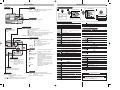
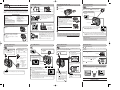
Buttons and Dial
Lens barrier
Zoom lever
Turns the camera on/off.
Shooting
Playback
: Zooms in/out.
: Displays multiple pictures at the same time (Index-display),
or enlarges pictures (close-up playback).
Print reserve: Sets trimming size.
Shutter button
Menu functions
Moving around the Menu screen
1
2
Top menu (Mode dial: “P”)
3
If you select MODE MENU in step 2
Press
MODE MENU
Note:
The Top menu and available
menu
functions
vary
depending on the mode.
(See the Reference Manual
for more details.)
to select
to select
WB
SET CARD PIC CAMERA
1 C40-QSG-EN
OFF
DRIVE
ISO
P/A/S/M
AUTO
to enter each menu
The top menu functions can be changed to
your liking in the “P”, “A/S/M” and
modes (SHORT CUT setting).
Focuses (half press) or shoots (fully press).
4
CAM
Brings up CAMERA menu
PIC
Brings up PICTURE menu
CARD
Brings up CARD menu
SET
Brings up SETUP menu
Menu functions during shooting
Adjusts the brightness of the monitor.
CAMERA
Sets the date/time.
Sets self-timer shooting or remote control shooting.
Macro/Spot button
Viewfinder
Shooting
During shooting, compose your
subject by looking through the
viewfinder.
Playback
: Activates macro mode or metering mode.
●
Macro (close-up) shooting
Wide: 0.1 m - 0.8 m (0.3 ft - 2.6 ft)/Tele: 0.25 m - 0.8 m (0.8 ft - 2.6 ft)
●
Spot metering
Meters within the AF target on the viewfinder. (Normally, digital ESP is activated.
Digital ESP meters the center of the subject and the area around it.)
●
During macro mode shooting, spot metering is activated.
: Prevents pictures from being erased accidentally.
Flash mode button
Shooting
Playback
OK
: Selects flash modes. (Normally, the flash fires in low-light and
backlight conditions.)
Minimizes “red-eye” phenomena.
Always fires.
SLOW Adjusts the flash for slow shutter speeds.
Prevents the flash from firing.
: Erases pictures one-by-one.
Menu
: Displays the menu screen or sets
selected menu items.
Shooting : When you press and hold this
button for more than one second,
the camera switches to manual
focus mode.
: The camera sets optimal focusing and exposure.
: Renders in-focus subject against a blurred
background.
Landscape-Portrait : Both subject and background are in focus.
Landscape-Scene : Suitable for taking pictures of landscapes and other
outdoor scenes landscape.
Provides vivid reproduction of blues and greens.
Night Scene
: Shoots at a slower shutter speed than normal.
Self-Portrait
: Enables you to take a picture of yourself while
holding the camera.
P
: Full automatic exposure with one press of the
shutter button.
A/S/M
: Sets controls for Aperture-priority auto exposure/
Shutter-priority auto exposure/Manual exposure.
My mode
: Activates your customized settings.
: Records movies.
Monitor
Shooting : View subjects while shooting.
Playback : Displays recorded images.
Arrow pad
Monitor button
Shooting : ● Turns the monitor on/off.
● Press quickly two times to play back the last
recorded image.
* When
is pressed with the lens barrier closed, the camera turns on
and enters the playback mode. If pressed again, the camera turns off.
Menu
: Selects/adjusts the menu functions and items.
Shooting : Sets aperture/shutter speed/exposure compensation/manual
focusing values.
Playback : Selects pictures to be displayed.
Changes the drive modes, or sets autobracketing.
Sets the measurement units (m/ft) during manual focus.
Selects items for the shortcut menu on the top menu screen.
Adjusts the ISO sensitivity. (AUTO/100/200/400)
When the mode dial is set to A/S/M: Exposure mode can be selected
from A (Aperture priority auto), S (Shutter priority auto), or M (Manual
mode).
When the mode dial is set to
: Exposure mode can be selected
from P, A, S or M.
Menu functions during playback
(still pictures)
Runs through all saved pictures one after another (slide-show).
Adjusts the flash intensity.
SLOW
NOISE
REDUCTION
DIGITAL ZOOM
Adjusts the flash for slow shutter speeds. (
SLOW2)
SLOW1/
Stores printing information required for DPOF printers.
Reduces the electrical noise on images during long exposures.
Combining the digital zoom with the 2.8x optical zoom, makes
possible zoom magnification up to approx. 7x (equivalent to 35 mm 245 mm on a 35 mm camera).
Keeps the image in focus at all times without having to press the
shutter button halfway.
(for still
pictures)
Allows approx. 4 seconds of sound recording to be attached to a
picture.
(for movies)
PANORAMA
FUNCTION
(still pictures)
SLOW/
FULLTIME AF
Mode dial
Full-auto
Portrait
OK/Menu button
DRIVE
ISO
P/A/S/M
m/ft
SHORT CUT
MOVIE PLAY (movies)
MOVIE
PLAYBACK
INDEX
EDIT
Plays back movies.
Shows 9-frame indexes of still-shots from movies in order to easily
check the movies’ contents.
Edits recorded movies.
Allows sound to be recorded while shooting movies.
Allows panorama pictures to be taken (CAMEDIA Master is required).
Changes the picture color to BLACK&WHITE, SEPIA or
WHITE/BLACK BOARD.
INFO
Changes the amount of information (ISO, White Balance, etc.) displayed on the monitor.
PLAY (still pictures)
PICTURE
Adds sound to recorded still pictures.
Sets the record mode resolution. (TIFF/SHQ,/HQ/SQ1/SQ2)
WB
Adjusts the white balance according to the light source.
(AUTO/PRESET/ )
CARD
CARD SETUP
Allows you to make fine changes to the white balance.
SHARPNESS
CONTRAST
SATURATION
Adjusts the sharpness of images.
Adjusts the contrast of images.
SETUP
Adjusts the level of color depth without changing tint.
ALL RESET
CARD
CARD SETUP
Formats cards (FORMAT), or erases all images on them (ALL
ERASE).
VOLUME
Formats cards (all images on the card are deleted).
Selects whether to keep the current camera settings when you turn
the camera off.
Sets playback sound volume, as well as the volume of the sound
selected in PW ON SETUP and PW OFF SETUP.
Sets the beep sound to OFF/LOW/HIGH.
SETUP
ALL RESET
Selects whether to keep the current camera settings when you turn
off the power.
Sets the beep sound to OFF/LOW/HIGH.
SHUTTER
SOUND
PW ON
SETUP
PW OFF
SETUP
REC VIEW
MY MODE
SETUP
SLEEP
FILE NAME
PIXEL
MAPPING
Sets the type of shutter sound effect and the volume.
PW ON
SETUP
Sets the picture displayed on the monitor and the sound output when
the power is turned on.
PW OFF
SETUP
Sets the picture displayed on the monitor and the sound output when
the power is turned off.
SCREEN
SETUP
Registers a stored picture so that you can select it in PW ON SETUP
and/or PW OFF SETUP.
Adjusts the brightness of the monitor.
Sets the picture displayed on the monitor and the sound output when
the power is turned on.
Sets the date/time.
Selects the number of frames in the index display. (4/9/16-frame)
Sets the picture displayed on the monitor and the sound output when
the power is turned off.
Selects whether to display images on the monitor while saving them to
a card.
Customizes settings, which are activated in the
mode.
OLYMPUS AMERICA INC.
Two Corporate Center Drive, Melville, NY 11747-3157, U.S.A. Tel. 631-844-5000
Phone customer support: Tel. 1-888-553-4448 (Toll-free)
Sets the sleep timer.
Determines how files and folders will be named for saved images.
(RESET/ AUTO)
Checks the CCD and image processing circuit for errors.
OLYMPUS OPTICAL CO. (EUROPA) GMBH.
Premises/Goods delivery: Wendenstrasse 14-18, 20097 Hamburg, Germany
Tel. 040-237730
Letters: Postfach 10 49 08, 20034 Hamburg, Germany