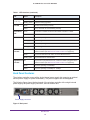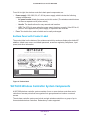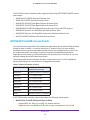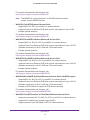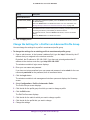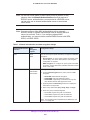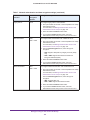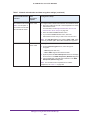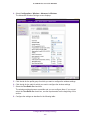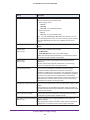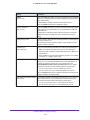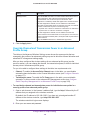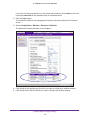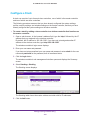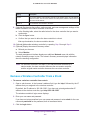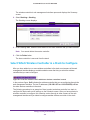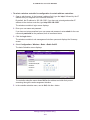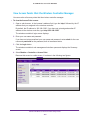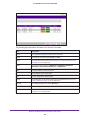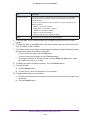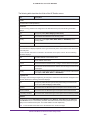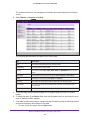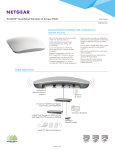
1
ProSAFE Wireless Controller WC7600 Reference Manual June, 2014 202-11414-01 350 East Plumeria Drive San Jose, CA 95134 USA ProSAFE Wireless Controller WC7600 Support Thank you for selecting NETGEAR products. After installing your device, locate the serial number on the label of your product and use it to register your product at https://my.netgear.com. You must register your product before you can use NETGEAR telephone support. NETGEAR recommends registering your product through the NETGEAR website. For product updates and web support, visit http://support.netgear.com. Phone (US & Canada only): 1-888-NETGEAR. Phone (Other Countries): Check the list of phone numbers at http://support.netgear.com/general/contact/default.aspx. Contact your Internet service provider for technical support. Compliance For regulatory compliance information, visit http://www.netgear.com/about/regulatory. See the regulatory compliance document before connecting the power supply. Trademarks NETGEAR, the NETGEAR logo, and Connect with Innovation are trademarks and/or registered trademarks of NETGEAR, Inc. and/or its subsidiaries in the United States and/or other countries. Information is subject to change without notice. © NETGEAR, Inc. All rights reserved. 2 ProSAFE Wireless Controller WC7600 Chapter 1 Introduction Key Features and Capabilities . . . . . . . . . . . . . . . . . . . . . . . . . . . . . . . . . . . . . . . . . 10 Package Contents . . . . . . . . . . . . . . . . . . . . . . . . . . . . . . . . . . . . . . . . . . . . . . . . . . . 12 Hardware Features . . . . . . . . . . . . . . . . . . . . . . . . . . . . . . . . . . . . . . . . . . . . . . . . . . 12 Front Panel Ports, Slots, and LEDs . . . . . . . . . . . . . . . . . . . . . . . . . . . . . . . . . . . 12 Back Panel Features . . . . . . . . . . . . . . . . . . . . . . . . . . . . . . . . . . . . . . . . . . . . . . . 14 Bottom Panel with Product Label . . . . . . . . . . . . . . . . . . . . . . . . . . . . . . . . . . . . 15 WC7600 Wireless Controller System Components . . . . . . . . . . . . . . . . . . . . . . . 15 NETGEAR ProSAFE Access Points . . . . . . . . . . . . . . . . . . . . . . . . . . . . . . . . . . . . . . 16 What Can You Do with the WC7600 Wireless Controller?. . . . . . . . . . . . . . . . . 18 Licenses. . . . . . . . . . . . . . . . . . . . . . . . . . . . . . . . . . . . . . . . . . . . . . . . . . . . . . . . . . . . 20 Maintenance and Support . . . . . . . . . . . . . . . . . . . . . . . . . . . . . . . . . . . . . . . . . . . . 20 Chapter 2 System Planning and Deployment Scenarios Basic and Advanced Setting Concepts . . . . . . . . . . . . . . . . . . . . . . . . . . . . . . . . . . 22 Profile Group Concepts. . . . . . . . . . . . . . . . . . . . . . . . . . . . . . . . . . . . . . . . . . . . . . . 23 Basic Profile . . . . . . . . . . . . . . . . . . . . . . . . . . . . . . . . . . . . . . . . . . . . . . . . . . . . . . 23 Advanced Profile . . . . . . . . . . . . . . . . . . . . . . . . . . . . . . . . . . . . . . . . . . . . . . . . . . 23 System Planning Concepts . . . . . . . . . . . . . . . . . . . . . . . . . . . . . . . . . . . . . . . . . . . . 25 Preinstallation Planning . . . . . . . . . . . . . . . . . . . . . . . . . . . . . . . . . . . . . . . . . . . . 25 Before You Configure a Wireless Controller . . . . . . . . . . . . . . . . . . . . . . . . . . . 25 High-Level Configuration Examples . . . . . . . . . . . . . . . . . . . . . . . . . . . . . . . . . . . . 28 Single Controller Configuration with Basic Profile Group . . . . . . . . . . . . . . . . 28 Single Controller Configuration with Advanced Profile Groups . . . . . . . . . . . 29 Stacked Controller Configuration. . . . . . . . . . . . . . . . . . . . . . . . . . . . . . . . . . . . 30 Management VLAN and Data VLAN Strategies . . . . . . . . . . . . . . . . . . . . . . . . . . 31 High-Level Deployment Scenarios . . . . . . . . . . . . . . . . . . . . . . . . . . . . . . . . . . . . . 33 Scenario Example 1: Network with Single VLAN . . . . . . . . . . . . . . . . . . . . . . . 33 Scenario Example 2: Advanced Network with VLANs and SSIDs. . . . . . . . . . 35 Scenario Example 3: Advanced Network. . . . . . . . . . . . . . . . . . . . . . . . . . . . . . 37 Chapter 3 RF Planning RF Planning Overview. . . . . . . . . . . . . . . . . . . . . . . . . . . . . . . . . . . . . . . . . . . . . . . . 41 Planning Requirements. . . . . . . . . . . . . . . . . . . . . . . . . . . . . . . . . . . . . . . . . . . . . 41 Define and Edit Buildings and Floors. . . . . . . . . . . . . . . . . . . . . . . . . . . . . . . . . . . . 42 Specify Access Point Requirements . . . . . . . . . . . . . . . . . . . . . . . . . . . . . . . . . . . . 45 View and Manage Heat Maps for Deployed Plans . . . . . . . . . . . . . . . . . . . . . . . . 48 Chapter 4 Installation and Configuration Overview Connect Your Computer to the Wireless Controller. . . . . . . . . . . . . . . . . . . . . . . 52 Log In to the Wireless Controller. . . . . . . . . . . . . . . . . . . . . . . . . . . . . . . . . . . . . . . 52 Roadmap for Initial Configuration . . . . . . . . . . . . . . . . . . . . . . . . . . . . . . . . . . . . . . 54 Roadmap for Configuring Management of Your Wireless Network. . . . . . . . . . 55 Choose a Location for the Wireless Controller . . . . . . . . . . . . . . . . . . . . . . . . . . . 57 Deploy the Wireless Controller . . . . . . . . . . . . . . . . . . . . . . . . . . . . . . . . . . . . . . . . 58 3 ProSAFE Wireless Controller WC7600 Chapter 5 Configure the System and Network Settings and Register the Licenses Configure the General Settings . . . . . . . . . . . . . . . . . . . . . . . . . . . . . . . . . . . . . . . . Manage the Time Settings . . . . . . . . . . . . . . . . . . . . . . . . . . . . . . . . . . . . . . . . . . . . Manage the IP, VLAN, and Link Aggregation Settings . . . . . . . . . . . . . . . . . . . . . Management VLAN Concepts. . . . . . . . . . . . . . . . . . . . . . . . . . . . . . . . . . . . . . . Untagged VLAN Concepts . . . . . . . . . . . . . . . . . . . . . . . . . . . . . . . . . . . . . . . . . . Link Aggregation Concepts . . . . . . . . . . . . . . . . . . . . . . . . . . . . . . . . . . . . . . . . . Configure the IP, VLAN, and Link Aggregation Settings . . . . . . . . . . . . . . . . . Manage the DHCP Server . . . . . . . . . . . . . . . . . . . . . . . . . . . . . . . . . . . . . . . . . . . . Add a DHCP Server . . . . . . . . . . . . . . . . . . . . . . . . . . . . . . . . . . . . . . . . . . . . . . . Change the Settings for a DHCP Server . . . . . . . . . . . . . . . . . . . . . . . . . . . . . . Remove a DHCP Server . . . . . . . . . . . . . . . . . . . . . . . . . . . . . . . . . . . . . . . . . . . . Register Your Licenses . . . . . . . . . . . . . . . . . . . . . . . . . . . . . . . . . . . . . . . . . . . . . . . Configure the License Server Settings . . . . . . . . . . . . . . . . . . . . . . . . . . . . . . . Register Your Licenses with the License Server . . . . . . . . . . . . . . . . . . . . . . . . Manage Certificates . . . . . . . . . . . . . . . . . . . . . . . . . . . . . . . . . . . . . . . . . . . . . . . . . Configure Log, Syslog, Alarm Notification, and Email Settings . . . . . . . . . . . . . Configure Log Settings . . . . . . . . . . . . . . . . . . . . . . . . . . . . . . . . . . . . . . . . . . . . Configure Syslog Settings . . . . . . . . . . . . . . . . . . . . . . . . . . . . . . . . . . . . . . . . . . Configure Alarm Notification Settings. . . . . . . . . . . . . . . . . . . . . . . . . . . . . . . . Configure the Email Notification Server . . . . . . . . . . . . . . . . . . . . . . . . . . . . . . 60 61 62 62 63 63 63 65 65 68 69 70 70 72 74 75 75 77 79 80 Chapter 6 Manage Security Profiles and Profile Groups Wireless Security Profile Concepts. . . . . . . . . . . . . . . . . . . . . . . . . . . . . . . . . . . . . 83 Small WLAN Networks . . . . . . . . . . . . . . . . . . . . . . . . . . . . . . . . . . . . . . . . . . . . . 83 Large WLAN Networks. . . . . . . . . . . . . . . . . . . . . . . . . . . . . . . . . . . . . . . . . . . . . 84 Profile Naming Conventions . . . . . . . . . . . . . . . . . . . . . . . . . . . . . . . . . . . . . . . . 84 Considerations Before You Configure Profiles . . . . . . . . . . . . . . . . . . . . . . . . . 84 Basic and Advanced Security Configuration Concepts . . . . . . . . . . . . . . . . . . 85 Manage Security Profiles for the Basic Profile Group . . . . . . . . . . . . . . . . . . . . . 86 Configure a Profile in the Basic Profile Group . . . . . . . . . . . . . . . . . . . . . . . . . 86 Change the Settings for a Profile in the Basic Profile Group . . . . . . . . . . . . . 90 Remove a Profile From the Basic Profile Group . . . . . . . . . . . . . . . . . . . . . . . . 91 Manage Security Profiles for Advanced Profile Groups . . . . . . . . . . . . . . . . . . . 91 Add an Advanced Profile Group . . . . . . . . . . . . . . . . . . . . . . . . . . . . . . . . . . . . . 91 Remove an Advanced Profile Group. . . . . . . . . . . . . . . . . . . . . . . . . . . . . . . . . . 93 Configure a Profile in an Advanced Profile Group . . . . . . . . . . . . . . . . . . . . . . 93 Change the Settings for a Profile in an Advanced Profile Group . . . . . . . . . . 98 Remove a Profile From an Advanced Profile Group . . . . . . . . . . . . . . . . . . . . . 99 Network Authentication and Data Encryption Options . . . . . . . . . . . . . . . . . . . . 99 Manage Authentication Servers and Authentication Server Groups. . . . . . . . 104 Authentication Server Concepts . . . . . . . . . . . . . . . . . . . . . . . . . . . . . . . . . . . 104 Configure Basic Authentication Server Settings . . . . . . . . . . . . . . . . . . . . . . 105 Configure a RADIUS Authentication Server Group . . . . . . . . . . . . . . . . . . . . 107 Remove a RADIUS Authentication Server Group . . . . . . . . . . . . . . . . . . . . . . 109 4 ProSAFE Wireless Controller WC7600 Manage MAC Authentication and MAC Authentication Groups. . . . . . . . . . . . 109 Guidelines for External MAC Authentication. . . . . . . . . . . . . . . . . . . . . . . . . . . . 110 Configure Basic Local MAC Authentication Settings . . . . . . . . . . . . . . . . . . . 110 Remove a MAC Address from a Wireless Client List . . . . . . . . . . . . . . . . . . . 112 Import a MAC List from a File . . . . . . . . . . . . . . . . . . . . . . . . . . . . . . . . . . . . . . 112 Configure a Local MAC Authentication Group . . . . . . . . . . . . . . . . . . . . . . . . 113 Remove a Local MAC Authentication Group . . . . . . . . . . . . . . . . . . . . . . . . . . . . 115 Select an ACL for a Profile in the Basic Profile Group . . . . . . . . . . . . . . . . . . 115 Select an ACL for a Profile in an Advanced Profile Group. . . . . . . . . . . . . . . 117 Chapter 7 Discover and Manage Access Points Access Point Discovery Guidelines . . . . . . . . . . . . . . . . . . . . . . . . . . . . . . . . . . . . 120 General Discovery Guidelines . . . . . . . . . . . . . . . . . . . . . . . . . . . . . . . . . . . . . . 120 Layer 3 Discovery Guidelines . . . . . . . . . . . . . . . . . . . . . . . . . . . . . . . . . . . . . . 120 Remote Access Point Discovery Guidelines. . . . . . . . . . . . . . . . . . . . . . . . . . . 121 Discover Access Points with the Discovery Wizard . . . . . . . . . . . . . . . . . . . . . . 123 Discover Access Points in Factory Default State and Access Points in a Layer 2 Subnet . . . . . . . . . . . . . . . . . . . . . . . . . . . . . . . . . . . . . . . . . 123 Discover Access Points Installed and Working in Standalone Mode in Different Layer 3 Networks . . . . . . . . . . . . . . . . . . . . . 127 Manage the Managed AP List . . . . . . . . . . . . . . . . . . . . . . . . . . . . . . . . . . . . . . . . 131 View the Managed AP List. . . . . . . . . . . . . . . . . . . . . . . . . . . . . . . . . . . . . . . . . 131 Change Access Point Information on the Managed AP List . . . . . . . . . . . . . 133 Remove Access Points from the Managed AP List. . . . . . . . . . . . . . . . . . . . . 136 Assign Access Points to Advanced Profile Groups . . . . . . . . . . . . . . . . . . . . . . . 137 Chapter 8 Manage Rogue Access Points, Guest Network Access, and Users Manage Rogue Access Points . . . . . . . . . . . . . . . . . . . . . . . . . . . . . . . . . . . . . . . . 141 Rogue Access Point Concepts . . . . . . . . . . . . . . . . . . . . . . . . . . . . . . . . . . . . . . 141 Configure Basic Rogue Detection Settings . . . . . . . . . . . . . . . . . . . . . . . . . . . 141 Classify Rogue Access Points . . . . . . . . . . . . . . . . . . . . . . . . . . . . . . . . . . . . . . 142 Import a List of Known Access Points from a File . . . . . . . . . . . . . . . . . . . . . 144 Manage Guest Network Access. . . . . . . . . . . . . . . . . . . . . . . . . . . . . . . . . . . . . . . 145 Portal Concepts . . . . . . . . . . . . . . . . . . . . . . . . . . . . . . . . . . . . . . . . . . . . . . . . . . 145 Configure a Portal . . . . . . . . . . . . . . . . . . . . . . . . . . . . . . . . . . . . . . . . . . . . . . . . 146 Manage Users, Accounts, and Passwords . . . . . . . . . . . . . . . . . . . . . . . . . . . . . . 150 User and Account Concepts . . . . . . . . . . . . . . . . . . . . . . . . . . . . . . . . . . . . . . . 150 Add a Management User . . . . . . . . . . . . . . . . . . . . . . . . . . . . . . . . . . . . . . . . . . 151 Add a WiFi User . . . . . . . . . . . . . . . . . . . . . . . . . . . . . . . . . . . . . . . . . . . . . . . . . . 152 Add a Captive Portal Account . . . . . . . . . . . . . . . . . . . . . . . . . . . . . . . . . . . . . . 154 Add a Captive Portal User . . . . . . . . . . . . . . . . . . . . . . . . . . . . . . . . . . . . . . . . . 156 Change the Settings for a User or Account. . . . . . . . . . . . . . . . . . . . . . . . . . . 158 Remove a User or Account . . . . . . . . . . . . . . . . . . . . . . . . . . . . . . . . . . . . . . . . 159 Export a List of Users or Accounts . . . . . . . . . . . . . . . . . . . . . . . . . . . . . . . . . . 160 5 ProSAFE Wireless Controller WC7600 Chapter 9 Configure Wireless and QoS Settings Basic and Advanced Wireless and QoS Configuration Concepts . . . . . . . . . . . 162 Configure the Radio . . . . . . . . . . . . . . . . . . . . . . . . . . . . . . . . . . . . . . . . . . . . . . . . 162 Configure the Radio for the Basic Profile Group . . . . . . . . . . . . . . . . . . . . . . 162 Configure the Radio for an Advanced Profile Group . . . . . . . . . . . . . . . . . . . 164 Configure Wireless Settings. . . . . . . . . . . . . . . . . . . . . . . . . . . . . . . . . . . . . . . . . . 165 Configure Wireless Settings for the Basic Profile Group. . . . . . . . . . . . . . . . 165 Override Channel and Transmission Power in the Basic Profile Group . . . . 169 Configure Wireless Settings for an Advanced Profile Group . . . . . . . . . . . . 171 Override Channel and Transmission Power in an Advanced Profile Group . . . . . . . . . . . . . . . . . . . . . . . . . . . . . . . . . . . . . . . . . . . . . . . . . . . . 175 Configure Channels . . . . . . . . . . . . . . . . . . . . . . . . . . . . . . . . . . . . . . . . . . . . . . . . . 177 Specify Radio Frequency Management . . . . . . . . . . . . . . . . . . . . . . . . . . . . . . . . 180 Radio Frequency Concepts . . . . . . . . . . . . . . . . . . . . . . . . . . . . . . . . . . . . . . . . 180 WLAN Healing Concepts . . . . . . . . . . . . . . . . . . . . . . . . . . . . . . . . . . . . . . . . . . 181 Configure Radio Frequency Management for the Basic Profile Group . . . . 181 Configure Radio Frequency Management for an Advanced Profile Group . . . . . . . . . . . . . . . . . . . . . . . . . . . . . . . . . . . . . . . . . . . . . . . . . . . . 183 Manage the Preferred Bands . . . . . . . . . . . . . . . . . . . . . . . . . . . . . . . . . . . . . . . . . 186 Configure the Preferred Band for WNDAP620 Access Points in the Basic Profile Group. . . . . . . . . . . . . . . . . . . . . . . . . . . . . . . . . . . . 186 Configure the Preferred Band for WNDAP620 Access Points in an Advanced Profile Group . . . . . . . . . . . . . . . . . . . . . . . . . . . . . . . . 187 Manage Quality of Service for an Advanced Profile Group . . . . . . . . . . . . . . . 188 Quality of Service Concepts . . . . . . . . . . . . . . . . . . . . . . . . . . . . . . . . . . . . . . . 188 Configure Quality of Service for a Profile Group. . . . . . . . . . . . . . . . . . . . . . 189 Manage Load Balancing . . . . . . . . . . . . . . . . . . . . . . . . . . . . . . . . . . . . . . . . . . . . . 192 Load Balancing Concepts . . . . . . . . . . . . . . . . . . . . . . . . . . . . . . . . . . . . . . . . . . 192 Configure Load Balancing . . . . . . . . . . . . . . . . . . . . . . . . . . . . . . . . . . . . . . . . . 193 Manage Rate Limiting . . . . . . . . . . . . . . . . . . . . . . . . . . . . . . . . . . . . . . . . . . . . . . . 194 Rate Limiting Concepts . . . . . . . . . . . . . . . . . . . . . . . . . . . . . . . . . . . . . . . . . . . 194 Configure Rate Limiting for the Basic Profile Group . . . . . . . . . . . . . . . . . . . 195 Configure Rate Limiting for an Advanced Profile Group . . . . . . . . . . . . . . . . 196 Chapter 10 Maintain the Wireless Controller and Access Points Manage the Configuration File . . . . . . . . . . . . . . . . . . . . . . . . . . . . . . . . . . . . . . . 199 Back Up the Configuration File . . . . . . . . . . . . . . . . . . . . . . . . . . . . . . . . . . . . . 199 Restore the Configuration File . . . . . . . . . . . . . . . . . . . . . . . . . . . . . . . . . . . . . 200 Upgrade the Firmware . . . . . . . . . . . . . . . . . . . . . . . . . . . . . . . . . . . . . . . . . . . . 201 Reboot the Wireless Controller . . . . . . . . . . . . . . . . . . . . . . . . . . . . . . . . . . . . . . . 204 Reset the Wireless Controller . . . . . . . . . . . . . . . . . . . . . . . . . . . . . . . . . . . . . . . . 205 Manage External Storage. . . . . . . . . . . . . . . . . . . . . . . . . . . . . . . . . . . . . . . . . . . . 206 Manage Remote Access . . . . . . . . . . . . . . . . . . . . . . . . . . . . . . . . . . . . . . . . . . . . . 207 Specify Session Time-Outs . . . . . . . . . . . . . . . . . . . . . . . . . . . . . . . . . . . . . . . . . . 209 Manage the System Logs . . . . . . . . . . . . . . . . . . . . . . . . . . . . . . . . . . . . . . . . . . . . 209 Query the System Logs . . . . . . . . . . . . . . . . . . . . . . . . . . . . . . . . . . . . . . . . . . . 210 Save the System Logs . . . . . . . . . . . . . . . . . . . . . . . . . . . . . . . . . . . . . . . . . . . . 212 6 ProSAFE Wireless Controller WC7600 Clear the System Logs . . . . . . . . . . . . . . . . . . . . . . . . . . . . . . . . . . . . . . . . . . . . 212 View Alerts and Events . . . . . . . . . . . . . . . . . . . . . . . . . . . . . . . . . . . . . . . . . . . . . . 213 View System Alerts. . . . . . . . . . . . . . . . . . . . . . . . . . . . . . . . . . . . . . . . . . . . . . . 213 View Radio Frequency Events . . . . . . . . . . . . . . . . . . . . . . . . . . . . . . . . . . . . . . 214 View Load-Balancing Events . . . . . . . . . . . . . . . . . . . . . . . . . . . . . . . . . . . . . . . 215 View Rate-Limit Events . . . . . . . . . . . . . . . . . . . . . . . . . . . . . . . . . . . . . . . . . . . 217 View Redundancy Events. . . . . . . . . . . . . . . . . . . . . . . . . . . . . . . . . . . . . . . . . . 218 View Stacking Events . . . . . . . . . . . . . . . . . . . . . . . . . . . . . . . . . . . . . . . . . . . . . 218 Manage Licenses . . . . . . . . . . . . . . . . . . . . . . . . . . . . . . . . . . . . . . . . . . . . . . . . . . . 219 View Your Licenses . . . . . . . . . . . . . . . . . . . . . . . . . . . . . . . . . . . . . . . . . . . . . . . 220 Retrieve Your Licenses . . . . . . . . . . . . . . . . . . . . . . . . . . . . . . . . . . . . . . . . . . . . 222 Reboot Access Points . . . . . . . . . . . . . . . . . . . . . . . . . . . . . . . . . . . . . . . . . . . . . . . 223 Configure Multicast Firmware Upgrade for Access Points . . . . . . . . . . . . . . . . 224 Change the Multicast Firmware Upgrade Settings . . . . . . . . . . . . . . . . . . . . 225 Disable Multicast Firmware Upgrade . . . . . . . . . . . . . . . . . . . . . . . . . . . . . . . . 226 Chapter 11 Manage Stacking and Redundancy Stacking Concepts . . . . . . . . . . . . . . . . . . . . . . . . . . . . . . . . . . . . . . . . . . . . . . . . . . 228 Configure a Stack . . . . . . . . . . . . . . . . . . . . . . . . . . . . . . . . . . . . . . . . . . . . . . . . . . 230 Remove a Wireless Controller from a Stack . . . . . . . . . . . . . . . . . . . . . . . . . . . . 232 Select Which Wireless Controller in a Stack to Configure . . . . . . . . . . . . . . . . . 233 Manage Redundancy for a Single Controller . . . . . . . . . . . . . . . . . . . . . . . . . . . 237 VRRP Redundancy Concepts . . . . . . . . . . . . . . . . . . . . . . . . . . . . . . . . . . . . . . . 237 Configure a Single Controller with Redundancy. . . . . . . . . . . . . . . . . . . . . . . 239 Manage a Redundancy Group with N:1 Redundancy . . . . . . . . . . . . . . . . . . . . . 241 VRRP N:1 Redundancy Concepts . . . . . . . . . . . . . . . . . . . . . . . . . . . . . . . . . . . 241 Configure a Redundancy Group with N:1 Redundancy . . . . . . . . . . . . . . . . . 244 Change a Redundant Controller . . . . . . . . . . . . . . . . . . . . . . . . . . . . . . . . . . . . . . 246 Remove a Redundancy Group . . . . . . . . . . . . . . . . . . . . . . . . . . . . . . . . . . . . . . . . 247 Chapter 12 Monitor the Wireless Network and Its Components Monitor the Network . . . . . . . . . . . . . . . . . . . . . . . . . . . . . . . . . . . . . . . . . . . . . . . 249 View the Network Summary Screen . . . . . . . . . . . . . . . . . . . . . . . . . . . . . . . . 249 View the Wireless Controllers in the Network . . . . . . . . . . . . . . . . . . . . . . . . 251 View the Access Points in the Network . . . . . . . . . . . . . . . . . . . . . . . . . . . . . . 253 View the Clients in the Network . . . . . . . . . . . . . . . . . . . . . . . . . . . . . . . . . . . . 258 View the Profiles in the Network . . . . . . . . . . . . . . . . . . . . . . . . . . . . . . . . . . . 262 Monitor the Wireless Controller . . . . . . . . . . . . . . . . . . . . . . . . . . . . . . . . . . . . . . 264 View the Wireless Controller Summary Screen . . . . . . . . . . . . . . . . . . . . . . . 264 View Wireless Controller Usage . . . . . . . . . . . . . . . . . . . . . . . . . . . . . . . . . . . . 266 View Access Points that the Wireless Controller Manages. . . . . . . . . . . . . . 268 View Clients on Access Points that the Wireless Controller Manages . . . . 273 View Neighboring Clients that the Wireless Controller Detects . . . . . . . . . 277 View Neighboring Access Points that the Wireless Controller Does Not Manage . . . . . . . . . . . . . . . . . . . . . . . . . . . . . . . . . . . . . . . . . . . . . . . . 279 View Security Profiles That the Wireless Controller Manages. . . . . . . . . . . 280 View DHCP Leases That Are Provided by the Wireless Controller . . . . . . . 282 7 ProSAFE Wireless Controller WC7600 View Captive Portal Users on Access Points That the Wireless Controller Manages . . . . . . . . . . . . . . . . . . . . . . . . . . . . . . . . . . . . . . 283 Monitor the SSIDs on the Wireless Controller . . . . . . . . . . . . . . . . . . . . . . . . . . 285 Monitor Local Clients in the Network. . . . . . . . . . . . . . . . . . . . . . . . . . . . . . . . . . 290 Chapter 13 Troubleshooting Troubleshoot Basic Functioning. . . . . . . . . . . . . . . . . . . . . . . . . . . . . . . . . . . . . . . 296 Power LED Is Not Lit. . . . . . . . . . . . . . . . . . . . . . . . . . . . . . . . . . . . . . . . . . . . . . 296 Status LED Never Turns Off . . . . . . . . . . . . . . . . . . . . . . . . . . . . . . . . . . . . . . . 296 Ethernet Port LEDs Are Not Lit . . . . . . . . . . . . . . . . . . . . . . . . . . . . . . . . . . . . . 297 Troubleshoot the Web Management Interface . . . . . . . . . . . . . . . . . . . . . . . . . . 297 Check the Ethernet Cabling. . . . . . . . . . . . . . . . . . . . . . . . . . . . . . . . . . . . . . . . 297 Check the IP Address Configuration . . . . . . . . . . . . . . . . . . . . . . . . . . . . . . . . 297 Check the Internet Browser . . . . . . . . . . . . . . . . . . . . . . . . . . . . . . . . . . . . . . . 298 Troubleshoot a TCP/IP Network Using the Ping Utility . . . . . . . . . . . . . . . . . . . 298 Use the Reset Button to Restore Default Settings . . . . . . . . . . . . . . . . . . . . . . . 299 Resolve Problems with Date and Time . . . . . . . . . . . . . . . . . . . . . . . . . . . . . . . . . 299 Resolve Problems with Access Points . . . . . . . . . . . . . . . . . . . . . . . . . . . . . . . . . . 300 Resolve Discovery Problems . . . . . . . . . . . . . . . . . . . . . . . . . . . . . . . . . . . . . . . 300 Resolve Connection Problems. . . . . . . . . . . . . . . . . . . . . . . . . . . . . . . . . . . . . . 300 Network Performance and Rogue Access Point Detection. . . . . . . . . . . . . . 301 Use the Diagnostic Tools on the Wireless Controller . . . . . . . . . . . . . . . . . . . . . 301 Ping an Access Point . . . . . . . . . . . . . . . . . . . . . . . . . . . . . . . . . . . . . . . . . . . . . . 301 Trace a Route to an Access Point . . . . . . . . . . . . . . . . . . . . . . . . . . . . . . . . . . . 302 Appendix A Factory Default Settings, Technical Specifications, and Passwords Requirements Factory Default Settings . . . . . . . . . . . . . . . . . . . . . . . . . . . . . . . . . . . . . . . . . . . . 305 Technical Specifications . . . . . . . . . . . . . . . . . . . . . . . . . . . . . . . . . . . . . . . . . . . . . 305 Password Requirements . . . . . . . . . . . . . . . . . . . . . . . . . . . . . . . . . . . . . . . . . . . . . 306 8 1. 1 Introduction This chapter includes the following sections: • Key Features and Capabilities • Package Contents • Hardware Features • WC7600 Wireless Controller System Components • NETGEAR ProSAFE Access Points • What Can You Do with the WC7600 Wireless Controller? • Licenses • Maintenance and Support Note: For more information about the topics covered in this manual, visit the support website at support.netgear.com. Note: Firmware updates with new features and bug fixes are made available from time to time on downloadcenter.netgear.com. Some products can regularly check the site and download new firmware, or you can check for and download new firmware manually. If the features or behavior of your product do not match what is described in this guide, you might need to update your firmware. 9 ProSAFE Wireless Controller WC7600 Key Features and Capabilities The NETGEAR ProSAFE Wireless Controller WC7600 is a high-capacity, secured wireless controller intended for medium- to large-sized businesses, higher education institutions, hospitals, and hotels. One wireless controller with the appropriate licenses can support up to 50 access points (APs) with up to 2,000 users. In a stacked configuration, a stack of three wireless controllers can support up to 6,000 users. The wireless controller supports the IEEE 802.11a/b/g/n protocols and is 802.11ac ready for future deployment. The wireless controller allows you to manage your wireless network from a central point, implement security features centrally, support Layer 2 and Layer 3 fast roaming, configure a guest access captive portal, and support voice over Wi-Fi (VoWi-Fi). The wireless controller is equipped with two 1/10 Gigabit Ethernet (1/10GbE) slots with standard SFP or SFP+ form factor for optional 10GBASE or 1000BASE GBICs. One RJ-45 Gigabit Ethernet port is available to access the wireless controller for management and for data and control communications between the wireless controller and the access points. The wireless controller provides the following key features and capabilities: • • Scalable architecture with stacking - Purchased licenses in increments of 10 or 50 access points allow for support of up to a maximum number of 300 access points on a single wireless controller in a configuration without a stack. - A maximum of three stacked wireless controllers allows for up to 150 access points (50 on each wireless controller in a stacked configuration) in a single network. - Support of 802.11a, 802.11b, 802.11g, and 802.11n modes. Ready for 802.11ac mode for future deployment. Centralized management - Single point of management for the entire wireless network. - Automatic firmware upgrade to all managed access points. - DHCP server for IP address provisioning. - Configurable management VLAN. Introduction 10 ProSAFE Wireless Controller WC7600 • • • • Security - Identity-based security authentication with an external RADIUS or LDAP (Active Directory) server, or with an internal authentication server. - Support for nine access point profile groups (one basic and eight advanced) on one wireless controller. - Support for up to 8 profiles per access point profile group and 8 profiles per radio (therefore, dual-band access points can support up to 16 profiles in one access point profile group). - Support for up to 144 profiles on one wireless controller (8 profiles per access point group and eight groups per radio). Each profile supports settings for SSID, network authentication, data encryption, client separation, VLAN, MAC ACL, and wireless QoS. - Rogue access point detection and classification. - Guest access and captive portal access with cost and expiration accounting. - Scheduled wireless on/off times. Wi-Fi Multimedia Quality of Service and advanced wireless features - Wi-Fi Multimedia (WMM) support for video, audio, and voice over Wi-Fi (VoWi-Fi). - WMM power save option. - Automatic WLAN healing mechanism ensures seamless coverage for wireless users. - Layer 2 and Layer 3 seamless roaming support. - Local Layer 2 traffic switching and Layer 3 traffic processing at access point level for fast processing. Wireless and Radio Frequency (RF) management - Automatic control of access point transmit power and channel allocation to reduce interference. - Automatic load balancing of clients across access points. - Rate limiting per profile. - Multicast and broadcast rate limiting - ARP suppression Monitoring and reporting - Monitoring of the status of the network, wireless controllers, WLANs, and clients, and network usage statistics. - Specific health monitoring of access points. - Logging and emailing of system events, RF events, load-balancing events, and rate-limiting events. - Context-sensitive search function. For a list of all features and capabilities of the wireless controller, see the datasheet that you can download from http://support.netgear.com/product/WC7600. Introduction 11 ProSAFE Wireless Controller WC7600 Package Contents The ProSAFE Wireless Controller WC7600 product package contains the following items: • ProSAFE Wireless Controller WC7600 appliance • One AC power cable • Rubber feet (four) with adhesive backing • One rack-mount kit • Straight-through Category 5 Ethernet cable • ProSAFE Wireless Controller WC7600 Installation Guide If any of the parts are incorrect, missing, or damaged, contact your NETGEAR dealer. Keep the carton, including the original packing materials, in case you need to return the product for repair. Hardware Features The front panel ports, slots, and LEDs, back panel components, and bottom label of the wireless controller are described in this section. Front Panel Ports, Slots, and LEDs The following figure shows the front panel of the wireless controller. LED Mode: Green= Link at 10G, Blink Green=10G Active, Yellow=Link at 1G, Blink Yellow=1G Active LED Mode: Left LED: Green=Link at 1G E, Yellow=Link at 10/100M Right LED:Green=Link, Green Blink=Active ID Power Status Fan Stack Master USB Console 9600,N,8,1 Reset Figure 1. Front panel The following figure shows a close-up of the left side of the front panel. USB port Digital access point counter LED Mode: Green= Link at 10G, Blink Green=10G Active, Yellow=Link at 1G, Blink Yellow=1G Active LED Mode: Left LED: Green=Link at 1G E, Yellow=Link at 10/100M Right LED:Green=Link, Green Blink=Active ID Power Status Fan Stack Master USB Reset Reset button LEDs (top to bottom): Power, Status, Fan, Stack Master Slots and LEDs for optional SFP and SFP+ GBIC module Figure 2. Front panel close-up Introduction 12 Ethernet port and LEDs ProSAFE Wireless Controller WC7600 From left to right, the wireless controller’s front panel shows the following counter, LEDs, button, ports, and slots: • Digital counter. Displays the number of connected access points that are in a healthy state. • From top to bottom: - Power LED - Status LED - Fan LED - Stack Master LED These LEDs are described in Table 1 on page 13. • Reset button. Using a sharp object, press and hold this button for about 10 seconds until the Status LED flashes and the wireless controller returns to factory default settings. If you reset the wireless controller, all configuration settings are lost and the default password is restored. • USB port. Allows for external storage for floor heat maps, which will be supported in a future release. • SFP slots. Two SFP slots for optional 10GE SFP+ or 1G SFP gigabit interface converters (GBICs), each slot with an LED. • Ethernet port. One 10/100/1000 Mbps LAN Ethernet port with an RJ-45 connector, left LED, and right LED. The Ethernet port provides switched N-way, automatic speed negotiating, auto MDI/MDIX technology. • Console port. RS232 port for connecting to an optional console terminal. The port has a DB9 male connector. The default baud rate is 9600 K. The configuration is 8 bits, no parity, and 1 stop bit. The console port is for debugging under guidance of NETGEAR technical support only. The function of each LED is described in the following table: Table 1. LED functions LED Status Description Power LED Green The green Power LED should be lit when the wireless controller is on. Off If the power LED is not lit when the wireless controller is on, check the connections and check to see if the power outlet is controlled by a wall switch that is turned off (see Power LED Is Not Lit on page 296). Yellow The wireless controller is initializing. After approximately two minutes, when the wireless controller has completed its initialization, the Status LED turns green. If the Status LED remains yellow, the initialization has failed (see Status LED Never Turns Off on page 296). Green The wireless controller has completed its initialization successfully. The Status LED should be steady green during normal operation. Status LED Introduction 13 ProSAFE Wireless Controller WC7600 Table 1. LED functions (continued) LED Status Description Status LED (continued) Off The wireless controller does not have power. Blinking yellow Firmware is being upgraded. Fan LED Green The fans are functioning correctly. Yellow One or more fans are not functioning correctly. Green The wireless controller functions as the master controller in a stack. Yellow The wireless controller functions as a slave controller in a stack. Stack Master LED SFP slot LEDs Green Left Ethernet port LED The slot is operating at 10G. Blinking green Data is being transmitted or received at 10G. Yellow The slot is operating at 1G. Blinking yellow Data is being transmitted or received at 1G. Off The port has no physical link, that is, no Ethernet cable is plugged into the wireless controller (see Ethernet Port LEDs Are Not Lit on page 297). Green The port has detected a link with a connected Ethernet device. Blinking green The port transmits or receives data. Right Ethernet Off port LED The port has no physical link, that is, no Ethernet cable is plugged into the wireless controller (see Ethernet Port LEDs Are Not Lit on page 297). Green The port is operating at 1000 Mbps. Yellow The port is operating at 100 Mbps or 10 Mbps. Back Panel Features The wireless controller comes with a single internal power supply but supports an optional second power supply for power redundancy. The power supplies are hot-swappable. The following figure shows the back panel of the wireless controller with a single internal power supply, the power supply connector, and two double fans. Power supply connector Figure 3. Back panel Introduction 14 ProSAFE Wireless Controller WC7600 From left to right, the wireless controller’s back panel components are: • • Power supply. 100–240V, 5A, 47–63 Hz power supply, which includes the following external components: - AC power socket. Attach the power cord to this socket. (The wireless controller does not have a separate on/off power switch.) - Handle. The handle allows for easy removal and insertion. - LED. The LED is lit green when the power supply functions correctly. If the LED is off, power is not supplied to the power supply, or a problem has occurred. Fans. Two double fans, each of which can be easily exchanged. Bottom Panel with Product Label The product label on the bottom of the wireless controller’s enclosure displays the default IP address, default user name, and default password, as well as regulatory compliance, input power, and other information. ProSAFE Wireless Controller WC7600 ® This device complies with part 15 of the FCC Rules and Canada CAN ICES-3 (A)/NMB-3(A). Operation is subject to the following two conditions: (1) this device may not cause harmful interference, and (2) this device must accept any interference received, including interference that may cause undesired operation. DEFAULT ACCESS 10 http://192.168.0.250 user name: admin password: password Input Rating: AC 100-240V MAC (LAN) NETGEAR, INC. 47-63Hz, 5A max. SERIAL 272-12101-02 Made in China Figure 4. Product label WC7600 Wireless Controller System Components A WC7600 wireless controller system consists of one or more wireless controllers and a collection of access points that are organized into groups based on location or network access. The wireless controller system can include a single wireless controller or a group of up to three stacked wireless controllers. Redundancy is also supported. Introduction 15 ProSAFE Wireless Controller WC7600 The WC7600 wireless controller system supports the following NETGEAR ProSAFE access point models: • WNAP210v2 ProSAFE Wireless-N Access Point • WNAP320 ProSAFE Wireless-N Access Point • WNDAP350 ProSAFE Dual Band Wireless-N Access Point • WNDAP360 ProSAFE Dual Band Wireless-N Access Point • WNDAP380R ProSAFE Dual Band Wireless-N Access Point with RFID support • WNDAP620 Premium 3x3 Dual Band Wireless-N Access Point • WNDAP660 Premium 3x3 Dual Band Concurrent Wireless-N Access Point • WN370 ProSAFE Wall Mount Wireless N Access Point NETGEAR ProSAFE Access Points You can connect access points to the wireless controller either directly with an Ethernet cable through a router or switch, or remotely through an IP network. After you have used the automatic discovery process and added access points to the managed access point list on the wireless controller, the wireless controller converts the standard access points to dependent access points by pushing firmware to the access points. From then on, you can centrally manage and monitor the access points. The following table lists the minimum firmware versions that must run on the standalone access points before you convert them to managed access points: Table 2. Minimum firmware versions Access Point Model Minimum Firmware Version on Standalone Access Point WNAP210v2 All firmware versions are supported WNAP320 2.1.1 or a newer version WNDAP350 2.1.7 or a newer version WNDAP360 2.1.6 or a newer version WNDAP380R All firmware versions are supported WNAP620 2.0.4 or a newer version WNDAP660 2.0.2 or a newer version WN370 All firmware versions are supported A WC7600 wireless controller system can support the following access points: • WNAP210v2 ProSAFE Wireless-N Access Point - Supports 802.11b, 802.11g, and 802.11n network devices. - Supports Power over Ethernet (PoE) with a power consumption of up to 5.8W. Introduction 16 ProSAFE Wireless Controller WC7600 For product documentation and firmware, visit http://support.netgear.com/product/WNAP210. Note: The WNAP210v1 cannot function in a WC7600 wireless controller system, but the WNAP210v2 can. • WNAP320 ProSAFE Wireless-N Access Point - Supports 802.11b, 802.11g, and 802.11n network devices. - Supports Power over Ethernet (PoE) with a power consumption of up to 5.8W. - Accepts optional antennas. For product documentation and firmware, visit http://support.netgear.com/product/WNAP320. • WNDAP350 ProSAFE Dual Band Wireless-N Access Point - Supports 802.11a, 802.11b, 802.11g, and 802.11n network devices. - Supports Power over Ethernet (PoE) with a power consumption of up to 10.75W. - Operates concurrently in the 2.4 GHz and 5 GHz radio bands. - Accepts optional antennas. For product documentation and firmware, visit http://support.netgear.com/product/WNDAP350. • WNDAP360 ProSAFE Dual Band Wireless-N Access Point - Supports 802.11a, 802.11b, 802.11g, and 802.11n network devices. - Supports Power over Ethernet (PoE) with a power consumption of up to 10.51W. - Operates concurrently in the 2.4 GHz and 5 GHz radio bands. - Accepts optional antennas. For product documentation and firmware, visit http://support.netgear.com/product/WNDAP360. • WNDAP380R ProSAFE Dual Band Wireless-N Access Point with RFID support - Supports 802.11a, 802.11b, 802.11g, and 802.11n network devices. - Supports Power over Ethernet (PoE) with a power consumption of up to 10.51W. - Operates concurrently in the 2.4 GHz and 5 GHz radio bands. - Accepts an RFID module for support of RFID devices and tags. For product documentation and firmware, visit http://support.netgear.com/product/WNDAP380R. • WNAP620 ProSAFE Premium 3x3 Dual Band Wireless-N Access Point - Supports concurrently 802.11a, 802.11b, 802.11g, and 802.11n network devices. - Supports 3x3 multiple input, multiple output (MIMO). - Support speeds of up to 450 Mbps for 802.11n network devices Introduction 17 ProSAFE Wireless Controller WC7600 - Supports Power over Ethernet (PoE) with a power consumption that complies with the 802.3af standard. - Operates in either the 2.4 GHz or 5 GHz radio band. - Accepts optional antennas. For product documentation and firmware, visit http://support.netgear.com/product/WNDAP620. • WNDAP660 ProSAFE Premium 3x3 Dual Band Concurrent Wireless-N Access Point - Supports 802.11a, 802.11b, 802.11g, and 802.11n network devices. - Supports 3x3 multiple input, multiple output (MIMO). - Support speeds of up to 450 Mbps for 802.11n network devices. - Supports Power over Ethernet (PoE) with a power consumption that complies with the 802.3at standard. Note: If your network does not include a PoE device that can provide the WNDAP660 access point with PoE power according to the 802.3at standard, you can instead use two ports of a PoE device that complies with the 802.3af standard. (The WNDAP660 access point has two Ethernet ports that accept PoE.) - Operates concurrently in the 2.4 GHz and 5 GHz radio bands. - Accepts optional antennas. For product documentation and firmware, visit http://support.netgear.com/product/WNDAP660. • WN370 ProSAFE Wall Mounted Wireless-N Access Point - Supports concurrently 802.11b, 802.11g, and 802.11n network devices. - Support speeds of up to 300 Mbps for 802.11n network devices - Supports Power over Ethernet (PoE) with a power consumption that complies with the 802.3af standard. - Operates in the 2.4 GHz radio band. For product documentation and firmware, visit http://support.netgear.com/product/WN370. What Can You Do with the WC7600 Wireless Controller? You can perform the following tasks with a WC7600 wireless controller: • Organize the Network - Create access point profiles. Organize access points in profiles to differentiate between SSIDs, client authentication, authentication settings, and wireless QoS settings. Introduction 18 ProSAFE Wireless Controller WC7600 - Create access point profile groups. Organize access point profiles in access point profile groups to differentiate between buildings, floors, businesses, business divisions, and so on. Easily assign access points to profile groups or change assignments. For more information, see Chapter 6, Manage Security Profiles and Profile Groups. • Discover Access Points in the Network and Provision IP Addresses and Firmware - Discover access points in the network. The access points can be in factory default state or functioning in standalone mode, but after discovery by the wireless controller and addition to the managed access point list, the access points become dependent (managed) access points. - Provision IP addresses to the access points. Use the internal DHCP server to provision IP addresses to all or selected managed access points in the network. - Upgrade access point firmware. Update and synchronize new firmware versions to all managed access points in the network. For more information, see Chapter 7, Discover and Manage Access Points. • Centrally Manage Security in the Network - Manage secure access to the network and secure data transmission. Manage client authentication, encryption, wireless client security separation, and MAC authentication in access point profiles. - Manage authentication servers for the network. Manage all internal and external authentication servers for the entire network or for access point profile groups. - Manage MAC authentication. Specify trusted and untrusted MAC addresses for the entire network. - Manage rogue access points. Manage rogue access points and their associated clients in the network. - Manage guest access. Manage guest access and captive portal access to the network. For more information, see Chapter 8, Manage Rogue Access Points, Guest Network Access, and Users. • Centrally Manage the Wireless Settings for the Network - Schedule the radios. Schedule the entire network to go offline, or schedule access point profile groups to go offline. - Manage wireless settings and channel allocation. Manage the wireless settings such as wireless mode, data rate, and channel width for the entire network or for access point profile groups, and manage channel allocation for the entire network. - Manage QoS settings. Manage QoS queue settings for data, background, video, and voice traffic for access point profile groups. - Configure RF management settings. Configure WLAN healing and wireless coverage hole detection for the entire network or for access point profile groups. For more information, see Chapter 9, Configure Wireless and QoS Settings. Introduction 19 ProSAFE Wireless Controller WC7600 • Manage Other Wireless Controllers in the Network - Manage stacking. Specify the master and slave wireless controllers in a stack and synchronize information between the wireless controller. For more information, see Chapter 11, Manage Stacking and Redundancy. • Monitor the Network and Its Components - Monitor the status of all wireless devices. View the status of the wireless controllers, access points, clients, access point profiles, and the entire network, and view network usage statistics. - Monitor network health. See which access points are healthy and which ones are down or compromised. For more information, see Chapter 12, Monitor the Wireless Network and Its Components. Licenses By default, the wireless controller comes with a trial license for five access points. You must purchase and register licenses for the access points in your network. Licenses are tied to the serial number of the wireless controller. You can purchase a single 50–access point license or licenses in 10–,or 50–access point increments for support of up to 150 access points on a single wireless controller: • 10–AP license. WC10APL • 50–AP license. WC50APL If you have three wireless controllers in a stack and want to support the maximum number of 150 access points in a stacked configuration, you must purchase three WC50APL licenses (or a combination of other licenses that add up to a total of 150 access points). For more information, see the datasheet that you can download from http://support.netgear.com/product/WC7600. For information about how to register and manage your licenses, see Register Your Licenses on page 70 and Manage Licenses on page 219. Maintenance and Support NETGEAR offers technical support seven days a week, 24 hours a day. Information about support is available on the NETGEAR ProSupport website at http://kb.netgear.com/app/answers/detail/a_id/212. Introduction 20 2. System Planning and Deployment Scenarios This chapter includes the following sections: • Basic and Advanced Setting Concepts • Profile Group Concepts • System Planning Concepts • High-Level Configuration Examples • Management VLAN and Data VLAN Strategies • High-Level Deployment Scenarios 21 2 ProSAFE Wireless Controller WC7600 Basic and Advanced Setting Concepts You can deploy the wireless controller in a small wireless network with 10 access points or in a large wireless network with up to 150 access points. Small networks require a basic configuration, but large networks can become complex and require you to configure the advanced features of the wireless controller. Depending on your network configuration, use basic settings or advanced settings to manage your access points: • Basic settings for a typical network. The basic settings work with most common network configurations. For example, all access points on the WLAN are for the same organization or business and therefore adhere to the same policies and use a few service set identifiers (SSIDs, or network names). • Advanced settings for access point profile groups. If you have a large wireless network, or if separate networks share a single WLAN, use the advanced settings to set up multiple access point profile groups with multiple security profiles (SSIDs with associated security settings). For example, a shopping mall might need several access point profile groups if several businesses share a WLAN but each business has its own network. Larger networks could require multiple access point profile groups to allow different policies per building or department. The access points could have different security profiles per building and department, for example, one for guests, one for management, and one for sales. Note: Access point profile groups are also referred to as just profile groups. Profiles, security profiles, and SSIDs (that is, SSIDs with associated security settings) are terms that are interchangeable. To accommodate all types of networks, almost all configuration menus of the web management interface are divided into basic and advanced submenus. The following figure shows an example of the Configuration > Security > Basic submenu on the left and the Configuration > Security > Advanced submenu on the right: Figure 5. Basic and advanced submenus System Planning and Deployment Scenarios 22 ProSAFE Wireless Controller WC7600 Before you start the configuration of your wireless controller, decide whether you can use a basic configuration (that is, follow the Basic submenus) or need to use an advanced configuration (that is, follow the Advanced submenus). Once you have made your choice, configuring the wireless controller should be fairly easy if you consistently follow either the Basic submenus or the Advanced submenus. Profile Group Concepts Each access point can support up to eight security profiles (16 for dual-band access points), each with its own SSID, security settings, MAC ACL, rate-limiting settings, WMM, and so on. The wireless controller follows the same architecture. A profile group on the wireless controller includes all the features that you can configure for an individual access point: up to eight profiles (16 for dual-band access points), each of which has its own SSID, security, MAC ACL, rate-limiting settings, WMM settings, and so on. Basic Profile The basic profile includes all the settings that are required to configure a fully functional access point with up to eight security profiles (16 for dual-band access points). After you have used the automatic discovery process and added access points to the managed AP list on the wireless controller, the access points are assigned by default to the basic profile group. If your network requires the wireless controller to manage multiple access points with different configurations, use the advanced profile. Advanced Profile The advanced profile lets you configure up to eight access point profile groups. Each group includes all the settings that are required to configure a fully functional access point with up to eight security profiles (16 for dual-band access points). For example, if your company has four buildings, each with a different wireless network, you simply create four profile groups. You then assign all access points in one building to one profile group, all access points in another building to a second profile group, and so on. For each profile group, you can create an individual radio on/off schedule, RF management settings, MAC ACL authentication, and an authentication server. For each radio in a profile group (2.4 GHz radio and 5 GHz radio), you can create individual wireless settings, WMM, and rate-limit settings. The following figure shows the advanced profile group architecture. The structure that is shown under Group-1 is implemented in all profile groups (that is, Group-2 through Group-8): System Planning and Deployment Scenarios 23 ProSAFE Wireless Controller WC7600 Group-2 Group-3 Group-1 Group-4 2 3 4 5 6 7 Group-7 Group-8 5 GHz radio 2.4 GHz radio 1 Group-6 Group-5 8 1 Security profiles 2 3 4 5 6 7 8 Security profiles Figure 6. Advanced profile group architecture The following figure shows an example of three access point profile groups, in which the first profile group (Group-1) has five security profiles. For each profile in this profile group, the profile name, radio mode, and authentication setting are shown. (Group-1 is the default group in the advanced profile group configuration; you must create the other profiles groups.) Figure 7. Example of profile groups with security profiles System Planning and Deployment Scenarios 24 ProSAFE Wireless Controller WC7600 System Planning Concepts This section includes the following subsections: • Preinstallation Planning • Before You Configure a Wireless Controller Preinstallation Planning Before you install any wireless controllers, determine the following: • Number of access points required to provide seamless coverage • Number of licenses required to cover all access points that must be managed • Number of wireless controllers required • 802.11 frequency band and the channels that are optimal for WiFi usage NETGEAR recommends that you perform a site survey: • To determine the current RF behavior and detect both 802.11 and non-802.11 noise, run a spectrum analysis of the channels of the site. • To determine the maximum throughput that is achievable on the client, run an access point-to-client connectivity test. • Identify potential RF obstructions and interference sources. • Determine areas where denser coverage might be required because of heavier usage. Before You Configure a Wireless Controller These sections assume that you have deployed at least one wireless controller in your network and are ready to configure the wireless controller. For information about how to deploy the wireless controller in your network, see the ProSAFE Wireless Controller WC7600 Installation Guide that you can download from http://support.netgear.com/product/WC7600. For many configurations, you can use the default wireless settings. The IP address, VLAN, DHCP server, client authentication, and data encryption settings are specific to your environment. Following are short sections that describe these settings (except for IP address settings, which are self-explanatory). For information about how to configure these settings, see the relevant sections. Management VLAN The management VLAN is the dedicated VLAN for access to the wireless controller. All traffic that is directed to the wireless controller, including HTTP, HTTPS, SNMP, and SSH traffic, is carried over the management VLAN. If the management VLAN is also configured as a tagged VLAN (the most common configuration), the packets to and from the wireless controller carry the 802.1Q VLAN header with the assigned VLAN number. If the management VLAN is marked as untagged, the packets that are sent from the wireless controller do not carry the 802.1Q header, and all System Planning and Deployment Scenarios 25 ProSAFE Wireless Controller WC7600 untagged packets that are sent to the wireless controller are treated as management VLAN traffic. Note: Use a tagged VLAN or change the tagged VLAN ID only if the hubs and switches on your LAN support 802.1Q. If they do not, and you have not configured a tagged VLAN with the same VLAN ID on the hubs and switches in your network, IP connectivity might be lost. The wireless controller must have IP connectivity with the access points through the management VLAN. If the wireless controller and the access points are on different management VLANs, external VLAN routing must allow IP connectivity between the wireless controller and the access points. For information about how to configure management VLANs, see Manage the IP, VLAN, and Link Aggregation Settings on page 62. Client VLANs Each authenticated wireless user is placed into a VLAN that determines the user’s DHCP server, IP address, and Layer 2 connection. Although you could place all authenticated wireless users into the single VLAN that is specified in the basic security profile, the wireless controller allows you to group wireless users into separate VLANs based on the wireless SSID to differentiate access to network resources. For example, you might place authorized employee users into one VLAN, and itinerant users, such as contractors or guests, into a separate VLAN. To use different VLANs, you must create different security profiles. For information about how to configure regular VLANs, see Manage the IP, VLAN, and Link Aggregation Settings on page 62. DHCP Server The wireless controller can function as a DHCP server and assign IP addresses to both wireless and wired devices that are connected to it. You can add up to 64 DHCP server pools, each assigned to a different VLAN. DHCP option 43 (vendor-specific information) must be enabled on an external DHCP server. Specifying an internal DHCP server on the wireless controller automatically enables DHCP option 43 with the IP address of the wireless controller. Client Authentication and Data Encryption A user must authenticate to the WLAN to be able to access WLAN resources. The wireless controller supports several types of security methods, including those methods that require an external RADIUS or LDAP authentication server. System Planning and Deployment Scenarios 26 ProSAFE Wireless Controller WC7600 The encryption option that you can select depends upon the authentication method that you have selected. The following table lists the authentication methods available, with their corresponding encryption options: Table 3. Authentication and encryption options Authentication Method Encryption Option Authentication Server Open System 64-bit, 128-bit, or 152-bit WEP None Shared Key 64-bit, 128-bit, or 152-bit WEP None WPA-PSK TKIP or TKIP+AES None WPA2-PSK AES or TKIP+AES None WPA-PSK and WPA2-PSK TKIP+AES None WPA TKIP or TKIP+AES One of the following authentication servers: • External RADIUS server • Internal authentication server • External LDAP server WPA2 AES or TKIP+AES One of the following authentication servers: • External RADIUS server • Internal authentication server • External LDAP server WPA and WPA2 TKIP+AES One of the following authentication servers: • External RADIUS server • Internal authentication server • External LDAP server For information about how to configure client authentication, data encryption, and authentication servers, see Chapter 6, Manage Security Profiles and Profile Groups. System Planning and Deployment Scenarios 27 ProSAFE Wireless Controller WC7600 High-Level Configuration Examples This section includes the following subsections: • Single Controller Configuration with Basic Profile Group • Single Controller Configuration with Advanced Profile Groups • Stacked Controller Configuration Single Controller Configuration with Basic Profile Group A basic configuration consists of a single wireless controller that controls a collection of access points that are organized into the basic default group. To set up a single wireless controller system with a basic profile group: Step Configuration Web Management Interface Path 1. Configure the system and network settings of the wireless controller: 1. Configure the country code of operation. Configuration > System > General 2. Configure the time settings. Configuration > System > Time 3. Configure the IP address of the wireless controller. Configuration > System > IP/VLAN 4. Verify that VLAN 1 is set as the management VLAN and is marked as untagged. By default, VLAN 1 an untagged management VLAN. 5. DHCP option 43 (vendor-specific information) must be Configuration > System > DHCP enabled on an external DHCP server. If no network DHCP Server server is accessible to the access points, configure the wireless controller’s DHCP server. Specifying an internal DHCP server on the wireless controller automatically enables DHCP option 43 with the IP address of the wireless controller. 2. Configure up to eight profiles, and for each profile, do at least the following: 1. Configure an SSID for wireless access. Configuration > Profile > Basic 2. Configure the network authentication and data encryption. 3. Assign the VLAN. 3. 4. If necessary for the selected network authentication option, configure the authentication server. Configuration > Security > Basic > Authentication Server Run the Discovery Wizard and add the access points to the managed access point list. Access Point > Discovery Wizard System Planning and Deployment Scenarios 28 ProSAFE Wireless Controller WC7600 Single Controller Configuration with Advanced Profile Groups A more complex configuration consists of a single wireless controller that controls a collection of access points that are organized in access point profile groups and might use several profiles in each access point profile group. To set up a single wireless controller system with advanced profile groups: Step Configuration Web Management Interface Path 1. Configure the system and network settings of the wireless controller: 1. Configure the country code of operation. Configuration > System > General 2. Configure the time settings. Configuration > System > Time 3. Configure the IP address of the wireless controller. Configuration > System > IP/VLAN 4. Verify that VLAN 1 is set as the management VLAN and is marked as untagged. By default, VLAN 1 an untagged management VLAN. 5. DHCP option 43 (vendor-specific information) must be Configuration > System > DHCP enabled on an external DHCP server. If no network DHCP Server server is accessible to the access points, configure the wireless controller’s DHCP server. Specifying an internal DHCP server on the wireless controller automatically enables DHCP option 43 with the IP address of the wireless controller. 2. Configure up to eight access point profile groups, and for each access point profile in a group, do at least the following: 1. Configure an SSID for wireless access. Configuration > Profile > Advanced 2. Configure the network authentication and data encryption. 3. Assign the VLAN. 4. If necessary for the selected network authentication option, configure the authentication server. Configuration > Security > Advanced > Authentication Server 3. Run the Discovery Wizard and add the access points to the managed access point list. Access Point > Discovery Wizard 4. Assign the access points to the access point profile groups (also referred to as WLAN groups). Configuration > WLAN Network System Planning and Deployment Scenarios 29 ProSAFE Wireless Controller WC7600 Stacked Controller Configuration A stacked controller configuration can consist of up to three wireless controllers and up to 150 access points. Note: If the stack members are on different floors or in different buildings, you could configure a separate access point profile group for each building or floor. To set up a stacked controller configuration: Step Configuration Web management interface path 1. On each individual wireless controller that you intend to make a stack member, configure the system and network settings of the wireless controller: 1. Configure the country code of operation. Configuration > System > General 2. Configure the time settings. Configuration > System > Time 3. Configure the IP address of the wireless controller. Configuration > System > IP/VLAN 4. Verify that VLAN 1 is set as the management VLAN and is marked as untagged. By default, VLAN 1 an untagged management VLAN. 5. DHCP option 43 (vendor-specific information) must be Configuration > System > DHCP enabled on an external DHCP server. If no network DHCP Server server is accessible to the access points, configure the wireless controller’s DHCP server. Specifying an internal DHCP server on the wireless controller automatically enables DHCP option 43 with the IP address of the wireless controller. 2. Configure the master wireless controller and deploy it in the network. Configure up to eight access point profile groups, and for each access point profile in a group, do at least the following: 1. Configure an SSID for wireless access. Configuration > Profile > Advanced 2. Configure the network authentication and data encryption. 3. Assign the VLAN. 4. If necessary for the selected network authentication option, configure the authentication server. Configuration > Security > Advanced > Authentication Server System Planning and Deployment Scenarios 30 ProSAFE Wireless Controller WC7600 Step Configuration Web management interface path 3. Configure the slave wireless controllers and deploy them in the network. For each slave wireless controller, configure up to eight access point profile groups, and for each access point profile in a group, do at least the following: 1. Configure an SSID for wireless access. Configuration > Profile > Advanced 2. Configure the network authentication and data encryption. 3. Assign the VLAN. 4. If necessary for the selected network authentication option, configure the authentication server. 4. Interconnect the wireless controllers that you intend to make members of the stack. The connection must be a wired connection but does not need to be a direct connection, that is, a switch or router can be located in between the wireless controllers that are part of a stack. 5. Configure the stacking group on the wireless controller that you intend as the master controller. 6. Synchronize all wireless controllers that are members of the stack. Configuration > Security > Advanced > Authentication Server Stacking > Stacking Management VLAN and Data VLAN Strategies If your network includes ten or more access points, NETGEAR recommends that you set up at least two VLAN groups: a management VLAN group and a data VLAN group. If your network is large, you should create a number of data VLAN groups. Setting up data VLANs for clients allows you to: • Segregate traffic by user category • Create different policies such as access policies that are based on user category System Planning and Deployment Scenarios 31 ProSAFE Wireless Controller WC7600 The following illustration shows a simplified view of how you can use VLANs to segregate traffic by user category: Management VLAN 100 Ethernet traffic Internet Finance VLAN 10 Ethernet traffic Employee VLAN 20 Ethernet traffic Network printer Backend L3 switch or router Deploy the wireless controller on a trunk port if you use the internal DHCP server PoE switch Access point WNDAP360 Wireless controller WC7600 Finance computer Finance computer Employee computer Employee computer Figure 8. Example: Use VLANs to segregate traffic by user categories The wireless controller uses the management VLAN to continually exchange packets with the access points. For large networks, if all traffic uses a single VLAN, the client traffic could potentially flood the network. If flooding occurs and the wireless controller is not able to exchange packets with the access points, the network performance can slow down, and the access points can lose their connectivity with the wireless controller. If you use the internal DHCP server of the wireless controller, you should deploy the wireless controller on a trunk port on your switch. The trunk port should have access to all VLANs. To accommodate the traffic load of the trunk, use a high-speed port on your switch as the trunk port. If you use an external DHCP server, you do not need to deploy the wireless controller on a trunk port on your switch. System Planning and Deployment Scenarios 32 ProSAFE Wireless Controller WC7600 High-Level Deployment Scenarios This section provides three deployment scenarios to illustrate how the wireless controller can function in various network configurations: • Scenario Example 1: Network with Single VLAN • Scenario Example 2: Advanced Network with VLANs and SSIDs • Scenario Example 3: Advanced Network Scenario Example 1: Network with Single VLAN The following sample scenario consists of a simple network with a wireless controller, PoE switch, Layer 3 switch or router, and access points: Management VLAN Ethernet traffic Internet All client Ethernet traffic Network printer Backend L3 switch or router Deploy the wireless controller on a trunk port if you use the internal DHCP server PoE switch Access point WNDAP360 Wireless controller WC7600 Finance computer Marketing computer Employee computer Figure 9. Example: Basic network with a single VLAN System Planning and Deployment Scenarios 33 Employee computer ProSAFE Wireless Controller WC7600 The access points and wireless controller are connected in the same subnet and use the same IP address range that is assigned for that subnet. The configuration does not include any routers between the access points and the wireless controller. The access points are connected to a PoE switch, which, in turn, is connected to the wireless controller. The uplink of the PoE switch connects to a Layer 3 switch or router that provides Internet access. To provision the wireless controller: Step Configuration Web Management Interface Path 1. Configure the system and network settings of the wireless controller: 1. Configure the country code of operation. Configuration > System > General 2. Configure the time settings. Configuration > System > Time 3. Configure the IP address of the wireless controller. Configuration > System > IP/VLAN 4. Verify that VLAN 1 is set as the management VLAN and is marked as untagged. By default, VLAN 1 an untagged management VLAN. 5. DHCP option 43 (vendor-specific information) must be Configuration > System > DHCP enabled on an external DHCP server. If no network DHCP Server server is accessible to the access points, configure the wireless controller’s DHCP server. Specifying an internal DHCP server on the wireless controller automatically enables DHCP option 43 with the IP address of the wireless controller. 2. Configure up to eight profiles, and for each profile, do at least the following: 1. Configure an SSID for wireless access. Configuration > Profile > Basic 2. Configure the network authentication and data encryption. 3. Assign the VLAN. 4. If necessary for the selected network authentication option, configure the authentication server. 3. Use any port of the wireless controller to connect the wireless PoE switch. 4. Deploy the access points and connect them to the same wireless PoE switch. Configuration > Security > Basic > Authentication Server System Planning and Deployment Scenarios 34 ProSAFE Wireless Controller WC7600 Step Configuration Web Management Interface Path 5. When the access points are operating, open the Discovery Wizard to do the following: Access Point > Discovery Wizard 1. Specify the state of the access points. The state can be either factory default in a Layer 2 network or already installed and functioning in standalone mode. 2. Run the Discovery Wizard. 3. Select the access points that you want the wireless controller to manage and add them to the managed list. Note: By default, all access points are added to the basic group and all settings from the basic group (profile definition, client authentication, authentication settings, and wireless QoS) are applied to the access points. Scenario Example 2: Advanced Network with VLANs and SSIDs The following sample scenario consists of an advanced network with a wireless controller, PoE switch, Layer 3 switch or router, access points, and several VLANs and SSIDs. The wireless controller system includes the following VLANs: • VLAN 1, the default untagged VLAN to access the wireless controller • VLAN 10, a tagged client VLAN • VLAN 20, another tagged client VLAN • VLAN 100, a tagged management VLAN Management VLAN 100 Ethernet traffic Client VLAN 10 Ethernet traffic Client VLAN 20 Ethernet traffic Wireless controller WC7600 PoE switch SSID 1 Client VLAN 10 WNDAP360 Backend L3 switch or router Internet WNDAP360 SSID 2 Client VLAN 20 Figure 10. Example: Advanced network with VLANs and SSIDs System Planning and Deployment Scenarios 35 ProSAFE Wireless Controller WC7600 The access points and wireless controller are connected in the same subnet and same VLAN and use the same IP address range that is assigned for that subnet. The configuration does not include any routers between the access points and the wireless controller. The access points are connected to a PoE switch, which, in turn, is connected to the Layer 3 switch or router that provides Internet access. This network configuration has the following prerequisites: • VLANs 10, 20, and 100 are tagged VLANs and are configured on the wireless controller and the PoE switch. • The wireless controller is connected to the PoE switch through default VLAN 1. You manage the wireless controller from a computer over VLAN 1 through the PoE switch. • The DHCP server on the wireless controller is configured in management VLAN 100 to enable the access points to receive an IP address through VLAN 100. • The PoE switch port to which the wireless controller is connected is configured as a tagged port to allow tagged traffic from VLAN 100. To provision the wireless controller: Step Configuration Web management interface path 1. Configure the basic system settings: 1. Configure the country code of operation. Configuration > System > General 2. Configure the time settings. Configuration > System > Time 3. Configure the IP address of wireless controller. Configuration > System > IP/VLAN 4. For initial discovery and configuration of the access points, temporarily configure management VLAN 100 as an untagged management VLAN on the wireless controller. 5. Change default VLAN 1 to a tagged VLAN. 2. For initial discovery and configuration of the access points, temporarily configure management VLAN 100 as an untagged management on the PoE switch. 3. Configure either the network’s DHCP server or the wireless controller’s DHCP server to use VLAN 100. If you use the wireless controller’s DHCP server: 1. Configure the IP address range for VLAN 100. 2. Configure the other DHCP server fields, including the gateway and DNS servers. Configuration > System > DHCP Server System Planning and Deployment Scenarios 36 ProSAFE Wireless Controller WC7600 Step Configuration Web management interface path 4. Configure the following profiles, and configure network authentication and data encryption for these profiles: 1. A profile with SSID 1 and VLAN 10. Configuration > Profile > Basic 2. A profile with SSID 2 and VLAN 20. 3. If necessary for the selected network authentication options, configure one or more authentication servers. 5. Connect the wireless controller to the PoE switch. 6. Before you connect the access points to the PoE switch, verify that the switch ports to which you intend to connect the access points are configured as access ports in management VLAN 100. 7. Deploy the access points and connect them to the designated PoE switch ports. 8. When the access points are operating, open the Discovery Wizard to do the following: Configuration > Security > Basic > Authentication Server Access Point > Discovery Wizard 1. Specify the state of the access points, which is factory default in a Layer 2 network. 2. Run the Discovery Wizard. 3. Select the access points that you want the wireless controller to manage and add them to the managed list. Note: By adding the access points to managed list, you enable them to receive an IP address from the DHCP server over management VLAN 100. 9. For each access point on the managed list, disable the untagged VLAN and configure VLAN 100 as the management VLAN. Doing so causes the access points to lose connectivity with the wireless controller. 10. Restore connectivity between the access points and the wireless controller by changing the PoE switch ports to which the access points are connected to tagged ports. During the discovery process, these switch ports were access ports in management VLAN 100. Scenario Example 3: Advanced Network The following sample scenario consists of an advanced network with one wireless controller, one redundant wireless controller, one core switch, two PoE switches in different buildings, access points, and several VLANs and SSIDs. These are the components in the wireless controller system: • One wireless controller • 50 access points (managed by the wireless controller through management VLAN 1) • One redundant wireless controller System Planning and Deployment Scenarios 37 ProSAFE Wireless Controller WC7600 • Four VLANs: VLAN 10, VLAN 20, VLAN 30, and VLAN 40 • Three SSIDs: SSID 1, SSID 2, and SSID 3 In this scenario, the VLANs and SSIDs are used to accommodate traffic for different user groups in a school that is spread out over two buildings. • • Building 1: - SSID 1 in VLAN 10 for staff traffic - SSID 2 in VLAN 20 for middle school students - SSID 3 in VLAN 30 for guests Building 2: - SSID 1 in VLAN 10 for staff traffic - SSID 2 in VLAN 40 for high school students - SSID 3 in VLAN 30 for guests Building 1 Internet SSID 1 Staff VLAN 10 SSID 2 Middle school VLAN 20 SSID 3 Guest VLAN 30 Backend L3 switch or router PoE switch WNDAP360 WC7600 Core switch Building 2 SSID 1 Staff VLAN 10 SSID 2 High school VLAN 40 SSID 3 Guest VLAN 30 Redundant WC7600 Staff VLAN 10 Ethernet traffic Middle school VLAN 20 Ethernet traffic High school VLAN 40 Ethernet traffic Guest VLAN 30 Ethernet traffic PoE switch WNDAP360 Figure 11. Example: Advanced network The access points and wireless controllers are connected in the same subnet and same VLAN and use the same IP address range that is assigned for that subnet. The core switch is located between the wireless controllers and the PoE switches, to which the access points are connected. The core switch provides Internet access. System Planning and Deployment Scenarios 38 ProSAFE Wireless Controller WC7600 This network configuration has the following prerequisites: • VLAN 1 is configured on the wireless controllers, core switch, and PoE switches. This VLAN is untagged. • VLANs 10, 20, and 30 are configured on the wireless controllers, core switch, and the PoE switch in Building 1. These VLANs are tagged. • VLANs 1, 10, 20, 30, and 40 are configured on the wireless controllers, core switch, and PoE switches. Except for VLAN 1, these VLANs are tagged. To provision the wireless controller: Step Configuration Web management interface path 1. Configure the basic system settings: 1. Configure the country code of operation. Configuration > System > General 2. Configure the time settings. Configuration > System > Time 3. Configure the IP address of wireless controller. Configuration > System > IP/VLAN 4. Verify that VLAN 1 is set as the management VLAN and is marked as untagged. By default, VLAN 1 an untagged management VLAN. 2. Configure the following profiles, and configure network authentication and data encryption for these profiles: 1. A profile with SSID 1 and VLAN 10. Configuration > Profile > Basic 2. A profile with SSID 2 and VLAN 20. 3. A profile with SSID 2 and VLAN 30. 4. A profile with SSID 3 and VLAN 40. 5. If necessary for the selected network authentication options, configure one or more authentication servers. 3. Configuration > Security > Basic > Authentication Server Configure the following profile groups: 1. A profile group with the name Building 1, to which you add the Configuration > Profile > Advanced following profiles: - The profile with SSID 1 and VLAN 10 - The profile with SSID 2 and VLAN 20 - The profile with SSID 2 and VLAN 30 2. A profile group with the name Building 2, to which you add the following profiles: - The profile with SSID 1 and VLAN 10 - The profile with SSID 2 and VLAN 30 - The profile with SSID 3 and VLAN 40 4. Deploy the access points and connect them to PoE switches. System Planning and Deployment Scenarios 39 ProSAFE Wireless Controller WC7600 Step Configuration Web management interface path 5. When the access points are operating, open the Discovery Wizard to do the following: Access Point > Discovery Wizard 1. Specify the state of the access points, which is factory default in a Layer 2 network. 2. Run the Discovery Wizard. 3. Select and add the access points that you want to be managed by the wireless controller to the managed list. Note: By default, all access points are added to the basic group. 6. Assign the access points to the access point profile groups (also referred to as WLAN groups) Building 1 and Building 2. Configuration > WLAN Network System Planning and Deployment Scenarios 40 3. 3 RF Planning This chapter includes the following sections: • RF Planning Overview • Define and Edit Buildings and Floors • Specify Access Point Requirements • View and Manage Heat Maps for Deployed Plans RF Planning Overview You can do the following with RF planning: • Define WLAN coverage. • Estimate the number of access points required based on signal quality and number of clients per access point. • Optimize the placement of access points for the best coverage. • Monitor WLAN coverage, rogue access points, and blacklisted clients for a plan that is in deployment. • Identify weak signal spots and dead spots from the coverage hole and add additional access points to mitigate the situation. RF planning provides a view of each floor, allowing you to specify how WiFi coverage should be provided. It then provides coverage maps and access point placement locations. Real-time calibration lets you visualize the indoor propagation of RF signals to identify areas with weak signal or dead spots and add additional access points in the right location to mitigate the weak signal or dead spots. Planning Requirements Collect the following information before using RF planning to expedite your planning efforts. • Building dimensions. • Number of floors. • Distance between floors. • Total number of users and number of users per access point. 41 ProSAFE Wireless Controller WC7600 • Radio type or types. • Desired data rates for access points. • Identify areas where you do not necessarily want coverage. • Identify areas where you cannot deploy an access point. Use a worksheet similar to the following to collect your information. Table 4. Building planning worksheet Building dimensions Height Width Number of floors User information Number of users Users per access point Radio types Access point desired signal rate 802.11b/bg/ng 802.11a/na Don’t care/don’t deploy areas Define and Edit Buildings and Floors This section explains how you can define your buildings and floors, and make modifications after you have defined them. You can add a maximum of three local buildings and three remote buildings, a total of six buildings. To define a building: 1. Select Plans > Layout. The Layout Buildings screen displays with the Local Building tab and associated screen in view. To define a remote building, click the Remote Building tab. RF Planning 42 ProSAFE Wireless Controller WC7600 . Figure 12. 2. The Buildings table shows the names of the previously defined buildings and their number of floors. 3. To add a building, click Add. The Add Building pop-up window displays. 4. Enter a name for your building in the Building Name field, and then click Add. The new building is added to the Buildings table. The name is an alphanumeric string up to 64 characters in length. 5. To define the floors of the building, select the radio button that corresponds to the building, and then click Edit. The Layout Floors screen displays: Figure 13. RF Planning 43 ProSAFE Wireless Controller WC7600 6. Define the floors as explained in the following table: Table 5. Building name and floors Setting Description Building Building Name You can modify the previously defined building name, which is an alphanumeric string up to 64 characters in length. Floors Floor Names The floor name is an alphanumeric string up to 64 characters in length. Floor Dimensions Enter the floor length in meters in the Length field; enter the floor width in meters in Width field. The default measurements for both are 40 meters. Existing Floor Map If you have imported a floor map, a very small image of the floor map is shown. Click Preview to enlarge the map. (If you did not import a floor map, the Preview button is not displayed.) New Floor Map If you have an existing floor map, import the map into the RF planning tool by clicking Browse and navigating to the location where you have stored the map. Follow the directions of your browser to import the map. Note: Background images need to be in JPEG format and cannot exceed 2048 x 2048 pixels in size. If you attempt to import a file with a larger pixel footprint, the image will not scale to fit the image area in the floor display area. Note: Images are scaled (stretched) to fit the display area. The display area aspect ratio is determined by the floor dimensions. Note: The internal flash memory of the wireless controller supports up to three floor maps. If you want to define additional floors, use external USB storage (see Manage External Storage on page 206). Note: Because background images for your floors are embedded in the XML file that defines your building, minimize the file size of the JPEGs that you use for your backgrounds. You can minimize the file size by selecting maximum compression (lowest quality) in most graphics programs. 7. To add another floor, click the + tab next to the Floor-1 name, or whatever name you have given the first floor, and define the floors as explained in Table 5 on page 44. You can add up to six floors in one building but will need external USB storage if you add more than three floor maps. 8. Click Apply to save your settings. 9. Click Back to return to the Layout Buildings screen. To edit a building: 1. Select the radio button in the Edit column that corresponds to the building that you want to edit. 2. Click Edit. RF Planning 44 ProSAFE Wireless Controller WC7600 To delete a building: 1. Select the check box that corresponds to the building that you want to delete, or select the check box at the top row of the table to delete all buildings. 2. Click Delete. Specify Access Point Requirements After you have defined the buildings and floors, you need to specify the following RF requirements for each floor and each supported access point model (WNAP210v2, WNAP320, WNDAP350, and WNDAP360): • Frequency band. The radio frequency to be used (802.11b/bg/ng or 802.11a/na). • Signal quality. The signal strength that you expect for the WLAN. This setting determines the automatic channel allocation and automatic transmission power of the access points (see the explanation in the table later in this section). • Number of client per access point. The total number of clients that you expect to be supported on each access point. • Total number of clients per floor. The total number of clients that you expect to be supported on each floor. Along with the floor dimensions, these settings determine the estimated number of access points. A screen lets you visually optimize the access point locations for best coverage. To specify the WLAN requirements for a floor, estimate the number of access points required, and view their suggested locations: 1. Select Plans > Planning. The Planning Buildings screen displays with the Local Building tab and associated screen in view. To specify the information for a remote building, click the Remote Building tab. RF Planning 45 ProSAFE Wireless Controller WC7600 . Figure 14. The Planning Buildings screen shows a tab for each building that you previously defined. For each building, the screen shows the floors that you previously defined. 2. Select the building and floor that you want to configure by clicking the corresponding tabs. 3. Specify the WLAN requirements for the floor as explained in the following table: Table 6. Floor WLAN requirements Setting Description Access Point Model Specify the access point model that you will use on the floor by selecting the WNDAP 350, WNAP 210, WNAP 320, or WNDAP 360 radio button.CHANGE SCREEN, Frequency Band Select one of the following radio buttons to specify the frequency band that the access points will function in: • 802.11b/bg/ng • 802.11a/na Signal Quality Specify the required signal quality by moving the slider or by entering a percentage in the field to the right of the slider. The minimum signal quality is 25 percent; the maximum is 100 percent. Client Per Radio Specify the expected maximum number of clients per access point by moving the slider or by entering a number in the field to the right of the slider. The maximum number of clients that you can configure per access point is 64. Total Clients Specify the expected total number of clients on the floor by moving the slider or by entering a number in the field to the right of the slider. The maximum number of total clients that you can configure on the floor is 1024. 4. Click Estimate to view the number of access points required for the settings that you entered. The number of access points displays in a pop-up window. Access points that you RF Planning 46 ProSAFE Wireless Controller WC7600 want to deploy in sentry mode are not included in this number. (For information about sentry mode, see Change Access Point Information on the Managed AP List on page 133.) After you have closed the pop-up window, the Estimated Access Points row is added to the Planning Buildings screen. 5. Click View Map to view and optimize the suggested approximate access point locations for the settings that you entered: Figure 15. Note that the planning tool provides only default placement and shows the coverage area for each access point. 6. Move the access points to optimize coverage in desired areas and avoid coverage in unwanted areas based on the floor plan. Colored circles around the access point symbols indicate the expected approximate coverage of the individual access point. The color of the circle represents the expected quality of the signal strength: a darker color indicates signal overlap with nearby access points. Note: A red color indicates the strongest coverage area: better than –50 dBm RSSI; an orange color better than -60 dBm; a yellow color better than –70 dBm; and so on. Moderate overlap is required for seamless roaming. No overlap will lead to disconnections and dead spots. You can click an access point icon and drag it to manually reposition it to see how the new location would affect the coverage. Click Cancel to undo any access point repositioning changes. Use the Zoom slider to increase or decrease the size of the map. RF Planning 47 ProSAFE Wireless Controller WC7600 7. Click Save to save the location map, or click Back to return to the Planning Buildings screen without savings changes to the location map. Note: For each floor, you can save one location map only. When you modify and save the location map, the previously saved location map is overwritten. View and Manage Heat Maps for Deployed Plans A heat map lets you view in real time, by wireless frequency band, the signal strength and wireless coverage for a building floor. The heat map shows the actual signal strengths that each access point is detecting from neighbor access points. Note: For the heat maps to work correctly, the access point placement on the floor plan needs to closely match the actual physical location of the access points. The heat map shows the following information: • Signal strength and wireless coverage, including coverage holes • Known access points that are managed by the wireless controller • Location of rogue access points • Location of clients associated with the access points • Location of blacklisted clients To view the heat map for a building floor and to adjust access points: 1. Select Plans > Deployed. The Deployed Buildings screen displays with the Local Building tab and associated screen in view. To view the information for a remote building, click the Remote Building tab. RF Planning 48 ProSAFE Wireless Controller WC7600 . Figure 16. The Deployed Buildings screen shows a tab for each building that you previously defined. For each building, the screens shows the floors that you previously defined. 2. Select the building and floor for which you want to view the heat map by clicking the corresponding tabs. 3. Click Heat Map. The heat map for the selected floor displays: Figure 17. 4. The first time you view the heat map, the access points need to be manually placed on the heat map to closely match their actual physical locations. 5. Click Apply to save the locations. Doing so regenerates the complete heat map of the floor. RF Planning 49 ProSAFE Wireless Controller WC7600 The spectrum bar at the top of the screen indicates how the colors correspond to the signal strength and wireless coverage. To view information about an access point or client on the heat map, place your pointer over the icon. The following information becomes available: • IP address • MAC address • Name • Model • Status • Power per channel • Configured and operating channel bandwidth To select another wireless frequency band, make a selection from the Frequency band drop-down list above the heat map. Use the Zoom slider to increase or decrease the size of the map. 6. Make adjustments to the wireless signal strength and coverage in real time by dragging the access point icons to new locations. The colors disappear from the heat map until you click Apply again. When you apply the new position, the heat map is refreshed based on the new location and the RF data collected from the access points. 7. Click Apply to view how your changes affect the heat map. Depending on the size of your WLAN, it might take several minutes before the heat map is updated. If you do not want to apply the changes, click Close to return to the Deployed Buildings screen. RF Planning 50 4. Installation and Configuration Overview This chapter includes the following sections: • Connect Your Computer to the Wireless Controller • Roadmap for Initial Configuration • Roadmap for Configuring Management of Your Wireless Network • Choose a Location for the Wireless Controller • Deploy the Wireless Controller 51 4 ProSAFE Wireless Controller WC7600 Connect Your Computer to the Wireless Controller To connect to the wireless controller for initial configuration, follow the steps in this section. You can also access the ProSAFE Wireless Controller WC7600 Installation Guide that you can download from http://support.netgear.com/product/WC7600. To connect your computer to the wireless controller: 1. Configure the computer with a static IP address of 192.168.0.210 and 255.255.255.0 as the subnet mask. 2. Connect the wireless controller to the computer through the network or directly to the wireless controller’s Ethernet port. 3. Connect the power cord from the wireless controller to an AC power outlet. 4. Verify that the following LEDs on the front panel are lit: LED Description Power The green Power LED is lit. If the Power LED is not lit, check the connections and check to see if the power outlet is controlled by a wall switch that is turned off. Status The Status LED is lit yellow while the wireless controller is initializing. After approximately two minutes, when the wireless controller has completed its initialization, the Status LED turns green. Fan The green Fan LED is lit, indicating that the fans are functioning correctly. Ethernet The right Ethernet port LED is lit green for a 1000 Mbps connection or yellow for a 100 Mbps or 10 Mbps connection. If it is not, make sure that the Ethernet cable is securely attached at both ends. Log In to the Wireless Controller Before you log in to the wireless controller, make sure that you have followed the steps in the previous section, Connect Your Computer to the Wireless Controller. To log in to the wireless controller, you must use a web browser such as Microsoft Internet Explorer 9 or 10, or the latest Mozilla Firefox version, or Google Chrome 24 or later with JavaScript, cookies, and SSL enabled. To log in to the wireless controller: 1. Open your browser and type http://192.168.0.250 in the browser’s address field. Installation and Configuration Overview 52 ProSAFE Wireless Controller WC7600 The wireless controller’s login screen displays: 2. When prompted, enter admin for the user name and password for the password, both in lowercase letters. 3. Click the Login button. The wireless controller’s web management interface opens and displays the Summary screen (the path is Monitor > Controller > Summary), which shows the network status and related information: For information about the network status and related information, see View the Wireless Controller Summary Screen on page 264. Installation and Configuration Overview 53 ProSAFE Wireless Controller WC7600 Roadmap for Initial Configuration After you have connected and logged in to the wireless controller, perform the initial configuration. If you are not sure how you are going to deploy the wireless controller in your network, NETGEAR recommends that you read Chapter 2, System Planning and Deployment Scenarios. This section is a roadmap for basic configuration only: It provides high-level configuration steps with references to the sections or chapters that provide detailed configuration steps. To perform the initial configuration of the wireless controller: 1. Open a web browser. In the browser’s address field, type the http:// followed by the IP address that you assigned to the wireless controller. By default, the IP address is 192.168.0.250. If you have not yet assigned another IP address to the wireless controller, type http://192.168.0.250. The wireless controller’s login screen displays. 2. Enter your user name and password. If you have not yet personalized your user name and password, enter admin for the user name and password for the password, both in lowercase letters. 3. Click the Login button. The wireless controller’s web management interface opens and displays the Summary screen. 4. Select Configuration > System > General. The General Settings screen displays. 5. Enter a name for the wireless controller and select the country in which the wireless controller is used. 6. Click the Apply button. 7. Select Configuration > System > Time. The Time Setting screen displays. 8. Select the time zone in which the wireless controller is used. Optionally, configure the NTP settings. For more information, see Manage the Time Settings on page 61. 9. Click the Apply button. 10. Select Configuration > System > IP/VLAN. The IP Settings screen displays. 11. Enter the IP settings for your network and the VLANs that you want to assign to the wireless controller. Installation and Configuration Overview 54 ProSAFE Wireless Controller WC7600 Note: A management VLAN is used for all SNMP and HTTP traffic to and from the wireless controller and managed access points. Note: Clear the Untagged VLAN check box only if the hubs and switches in your network support the VLAN (802.1Q) standard. Likewise, change the untagged VLAN value only if the hubs and switches in your network support the VLAN (802.1Q) standard. For more information, see Manage the IP, VLAN, and Link Aggregation Settings on page 62. 12. Click the Apply button. 13. If your network does not include a DHCP server, configure the wireless controller’s DHCP server. For more information, see Manage the DHCP Server on page 65. 14. Click the Apply button. The connection to the wireless controller is terminated because you have changed its IP address. 15. Reconfigure your computer with an IP address and subnet mask that is in the same IP subnet as the new IP address of the wireless controller. 16. Log back in to the wireless controller using its new IP address. Continue with the following section, Roadmap for Configuring Management of Your Wireless Network. Roadmap for Configuring Management of Your Wireless Network After you have performed the initial configuration and changed the IP address to an address that is specific to your network (see the previous section, Roadmap for Initial Configuration), you are ready to configure the wireless controller for management of your wireless network. This section is a roadmap only: It provides high-level configuration steps with references to the sections or chapters that provide detailed configuration steps. To configure the wireless controller for management of your wireless network: 1. Open a web browser. In the browser’s address field, type the http:// followed by the IP address that you assigned to the wireless controller. By default, the IP address is 192.168.0.250. If you have not yet assigned another IP address to the wireless controller, type http://192.168.0.250. The wireless controller’s login screen displays. 2. Enter your user name and password. Installation and Configuration Overview 55 ProSAFE Wireless Controller WC7600 If you have not yet personalized your user name and password, enter admin for the user name and password for the password, both in lowercase letters. 3. Click the Login button. The wireless controller’s web management interface opens and displays the Summary screen. 4. Register the licenses. For more information, see Register Your Licenses on page 70. 5. (Optional but recommended) Replace the default certificate with a custom certificate for certificate-based authentication of the internal authentication server. For more information, see Manage Certificates on page 74. 6. (Optional but recommended) Configure logs, alerts, and alarms. For more information, see Configure Log, Syslog, Alarm Notification, and Email Settings on page 75. 7. Configure security profiles: a. Configure the security profiles for the basic profile group or for advanced profile groups. For detailed configuration steps, see: • Manage Security Profiles for the Basic Profile Group on page 86. • Manage Security Profiles for Advanced Profile Groups on page 91. b. (Optional) Configure authentication servers. For more information, see Manage Authentication Servers and Authentication Server Groups on page 104. c. (Optional) Configure MAC authentication. For more information, see Manage MAC Authentication and MAC Authentication Groups on page 109. d. (Optional) Assign the authentication servers and MAC ACLs to the security profiles. For more information, see: • Manage Security Profiles for the Basic Profile Group on page 86. • Manage Security Profiles for Advanced Profile Groups on page 91. 8. Configure the managed access point list: a. Run the Discovery Wizard and add access points to the managed list. For more information, see Discover Access Points with the Discovery Wizard on page 123. b. (Optional) Configure access points that are on the managed list. For more information, see Manage the Managed AP List on page 131. Installation and Configuration Overview 56 ProSAFE Wireless Controller WC7600 c. (Optional) Assign access points to advanced profile groups: For more information, see Assign Access Points to Advanced Profile Groups on page 137. 9. (Optional) Configure rogue access point detection. For more information, see Manage Rogue Access Points on page 141. 10. (Optional) Configure a guest portal or captive portal. For more information, see Manage Guest Network Access on page 145. 11. (Optional) Configure user accounts and portal accounts. For more information, see Manage Users, Accounts, and Passwords on page 150. 12. (Optional) Configure wireless and QoS settings. For more information, see Chapter 9, Configure Wireless and QoS Settings. 13. (Optional but recommended) Back up the configuration. For more information, see Back Up the Configuration File on page 199. Choose a Location for the Wireless Controller The wireless controller is suitable for use in an office environment where it can be freestanding on its runner feet or mounted into a standard 19-inch equipment rack. Alternatively, you can rack-mount the wireless controller in a wiring closet or equipment room. A mounting kit, containing two mounting brackets and screws, is provided in the wireless controller package. Consider the following when deciding where to position the wireless controller: • The unit is accessible and cables can be connected easily. • Cabling is away from sources of electrical noise. These include lift shafts, microwave ovens, and air-conditioning units. • Water or moisture cannot enter the case of the unit. • Airflow around the unit and through the vents in the side of the case is not restricted. Provide a minimum of 25 mm or 1 inch of clearance. • The air is as free of dust as possible. • Temperature operating limits are not likely to be exceeded. Install the unit in a clean, air-conditioned environment. For information about the recommended operating temperatures for the wireless controller, see Appendix A, Factory Default Settings, Technical Specifications, and Passwords Requirements. Installation and Configuration Overview 57 ProSAFE Wireless Controller WC7600 Deploy the Wireless Controller After you have followed the steps in the Roadmap for Initial Configuration on page 54 and the Roadmap for Configuring Management of Your Wireless Network on page 55, you are ready to deploy the wireless controller in your network. To deploy the wireless controller: 1. Disconnect the wireless controller from the computer that you used for configuration. 2. (Optional) Reconfigure the computer back to its original TCP/IP settings. 3. Place the wireless controller where you intend to deploy it. 4. Connect an Ethernet cable from the wireless controller to a switch or router on your wired network. 5. Connect the power cord to the wireless controller and plug the power cord into a power outlet. The Power, Status, and Ethernet LEDs should light. If any of these do not light, see Troubleshoot Basic Functioning on page 296. Installation and Configuration Overview 58 5. Configure the System and Network Settings and Register the Licenses This chapter includes the following sections: • Configure the General Settings • Manage the Time Settings • Manage the IP, VLAN, and Link Aggregation Settings • Manage the DHCP Server • Register Your Licenses • Manage Certificates • Configure Log, Syslog, Alarm Notification, and Email Settings 59 5 ProSAFE Wireless Controller WC7600 Configure the General Settings Note: You must select the correct country or region of operation. It might not be legal to operate the access points in a country or region not shown here. If your location is not listed, check with your local government agency or check the NETGEAR website for more information about which channels to use. The General Settings screen lets you configure the basic settings of your wireless controller. To configure general settings: 1. Open a web browser. In the browser’s address field, type the http:// followed by the IP address that you assigned to the wireless controller. By default, the IP address is 192.168.0.250. If you have not yet assigned another IP address to the wireless controller, type http://192.168.0.250. The wireless controller’s login screen displays. 2. Enter your user name and password. If you have not yet personalized your user name and password, enter admin for the user name and password for the password, both in lowercase letters. 3. Click the Login button. The wireless controller’s web management interface opens and displays the Summary screen. 4. Select Configuration > System > General. The General Settings screen displays: Configure the System and Network Settings and Register the Licenses 60 ProSAFE Wireless Controller WC7600 5. Configure the settings as described in the following table: Setting Description Name Enter a unique value as the wireless controller name. NETGEAR recommends changing the name as soon as possible after setting up. The name must contain only alphabetical characters, numbers, and hyphens, and must be 31 characters or less. Country/Region From the menu, select the region of operation for the wireless controller and the access points that the wireless controller manages. This setting is crucial for optimal performance of the wireless controller. The wireless controller uses the country code to determine the best wireless settings for the access points. In the United States, the country is preset and cannot be changed on the access points. If the country or region is not set up correctly, the wireless controller might not be able to access the access points. Controller Location Code (Optional) Enter a code to identify the physical location of the wireless controller. If you use more than one wireless controller, a code is especially useful. 6. Click the Apply button. Manage the Time Settings This screen lets you configure the time-related settings of your wireless controller and managed access points. To configure time settings: 1. Open a web browser. In the browser’s address field, type the http:// followed by the IP address that you assigned to the wireless controller. By default, the IP address is 192.168.0.250. If you have not yet assigned another IP address to the wireless controller, type http://192.168.0.250. The wireless controller’s login screen displays. 2. Enter your user name and password. If you have not yet personalized your user name and password, enter admin for the user name and password for the password, both in lowercase letters. 3. Click the Login button. The wireless controller’s web management interface opens and displays the Summary screen. 4. Select Configuration > System > Time. Configure the System and Network Settings and Register the Licenses 61 ProSAFE Wireless Controller WC7600 The Time Settings screen displays: 5. Configure the settings as described in the following table: Setting Description Time Zone From the menu, select the local time zone for your country or region. Current Time This field is a nonconfigurable field that displays the current time at your location. NTP Client Select the Enable radio button to use a Network Time Protocol (NTP) server to synchronize the clock of the wireless controller and managed access points. Select the Disable radio button if you do not want to use an NTP server. Use Custom NTP Server Select the Use Custom NTP Server check box if you want to use an alternate NTP server. By default, the NETGEAR NTP server is used. Hostname/IP Address Enter the host name or IP address of the NTP server, if you are using a custom NTP server. 6. Click the Apply button. Manage the IP, VLAN, and Link Aggregation Settings You can manage the IP address, VLAN settings, and link aggregation (LAG) settings of the wireless controller. Management VLAN Concepts Management VLANs are used for all SNMP and HTTP traffic to and from the wireless controller and managed access points. For large deployments, NETGEAR recommends that the wireless controller and access points are in separate VLANs to ensure uninterrupted connectivity between the wireless controller and the access points. The wireless controller and access points share heartbeat messages to keep synchronized and share configurations and client key data to facilitate seamless roaming. Configure the System and Network Settings and Register the Licenses 62 ProSAFE Wireless Controller WC7600 Untagged VLAN Concepts When the Untagged VLAN check box is selected on the IP Settings screen, one VLAN can be configured as an untagged VLAN: • When the wireless controller sends frames associated with the untagged VLAN to the LAN (Ethernet) interface, those frames do not carry an 802.1Q VLAN header. • When the wireless controller receives untagged traffic from the LAN (Ethernet) interface, those frames are assigned to the untagged VLAN. If you clear the Untagged VLAN check box, the wireless controller tags all outgoing LAN (Ethernet) frames, and accepts only incoming frames that are tagged with known VLAN IDs. Note: Clear the Untagged VLAN check box only if the hubs and switches on your LAN support the VLAN (802.1Q) standard. Likewise, change the untagged VLAN value only if the hubs and switches on your LAN support the VLAN (802.1Q) standard. Changing either of these values results in a loss of IP connectivity if the hubs and switches on your network have not yet been configured with the corresponding VLANs. Link Aggregation Concepts If you connect the two 10GE connections of the wireless controller to a switch or router, the wireless controller supports dynamic link aggregation (802.3ad), which you can use either to increase bandwidth or to support link redundancy. You can enable the wireless controller to automatically create a single link aggregation group (LAG) in which the two links share the same speed and duplex settings. The link selection for egress traffic is based on the transmit hash policy. You can also configure a standby link in which only one link in the LAG is active. The standby link becomes active only if the active link fails. In such a situation, a failover occurs from the failed active link to the standby link, which becomes the new active link. Configure the IP, VLAN, and Link Aggregation Settings You can configure the management IP address, VLAN settings, and link aggregation (LAG) settings of the wireless controller. To configure IP, VLAN, and LAG settings: 1. Open a web browser. In the browser’s address field, type the http:// followed by the IP address that you assigned to the wireless controller. By default, the IP address is 192.168.0.250. If you have not yet assigned another IP address to the wireless controller, type http://192.168.0.250. Configure the System and Network Settings and Register the Licenses 63 ProSAFE Wireless Controller WC7600 The wireless controller’s login screen displays. 2. Enter your user name and password. If you have not yet personalized your user name and password, enter admin for the user name and password for the password, both in lowercase letters. 3. Click the Login button. The wireless controller’s web management interface opens and displays the Summary screen. 4. Select Configuration > System > IP/VLAN. The IP Settings screen displays: 5. Configure the settings as described in the following table: Setting Description IP Settings section IP Address Enter the IP address of the wireless controller. The default IP address is 192.168.0.250. To change it, enter an available IP address from the address range used on your LAN. IP Subnet Mask Enter the subnet mask value used on your LAN. The default value is 255.255.255.0. Default Gateway Enter the IP address of the gateway for your LAN. Configure the System and Network Settings and Register the Licenses 64 ProSAFE Wireless Controller WC7600 Setting Description Primary DNS Server Enter the IP address of the primary Domain Name Server (DNS) that you want to use. Secondary DNS Server Enter the IP address of the secondary DNS that you want to use. WINS Server Enter the IP address of the Windows Internet Name Service (WINS) that you want to use. Management VLAN Settings section Management VLAN Enter the management VLAN. For more information, see Management VLAN Concepts on page 62. Untagged VLAN Select the Untagged VLAN check box if the configured VLAN is untagged. For more information, see Untagged VLAN Concepts on page 63. 10G Port Settings section LAG Select the LAG radio button to enable the wireless controller to automatically create a LAG in which both links are active. The LAG radio button and Active Standby radio button are mutually exclusive. For more information, see Link Aggregation Concepts on page 63. Active Standby Select the Active Standby radio button to enable the wireless controller to automatically create a LAG in which only one link is active and the other link functions as a standby link. The Active Standby radio button and LAG radio button are mutually exclusive. For more information, see Link Aggregation Concepts on page 63. 6. Click the Apply button. Manage the DHCP Server Note: Make sure that a DHCP server is available; otherwise, the Discovery Wizard does not function correctly. If you already have a DHCP server on your network, do not enable the DHCP server on the wireless controller. The wireless controller can function as a DHCP server. You can add multiple DHCP server pools for different VLANs. By default, the wireless controller has no DHCP server pool configured but you can add one or more DHCP server pools. Add a DHCP Server The DHCP Server List screen lets you add a DHCP server pool. Configure the System and Network Settings and Register the Licenses 65 ProSAFE Wireless Controller WC7600 To add a DHCP server and configure its settings: 1. Open a web browser. In the browser’s address field, type the http:// followed by the IP address that you assigned to the wireless controller. By default, the IP address is 192.168.0.250. If you have not yet assigned another IP address to the wireless controller, type http://192.168.0.250. The wireless controller’s login screen displays. 2. Enter your user name and password. If you have not yet personalized your user name and password, enter admin for the user name and password for the password, both in lowercase letters. 3. Click the Login button. The wireless controller’s web management interface opens and displays the Summary screen. 4. Select Configuration > System > DHCP Server. The DHCP Server List screen displays. The following figure shows part of the DHCP Server List screen. Because this screen is wide, it is shown in the following two figures: Configure the System and Network Settings and Register the Licenses 66 ProSAFE Wireless Controller WC7600 The DHCP Server List shows the DHCP servers that are already configured on the wireless controller. 5. Click the Add button. The Add DHCP Server pop-up screen displays: 6. Configure the settings as described in the following table: Setting Description Enabled Select the Enabled check box to enable the DHCP server. When the check box is cleared, the DHCP server is disabled. Use VLAN Interface Select the Use VLAN Interface check box to allow the DHCP server to function with multiple VLANs. VLAN Enter the DHCP server VLAN ID. The range is between 1 and 4094. The DHCP server services this VLAN. IP Network Enter the IP address for the wireless controller in the VLAN that you have specified in the VLAN field. If you have not selected the Use VLAN Interface check box, the IP address of the wireless controller’s management VLAN is used. Subnet Mask Enter the subnet mask that is assigned to the wireless clients by the DHCP server. Default Gateway Enter the IP address of the default network gateway for all traffic beyond the local network. Start IP Enter the start IP address of the range that the DHCP server can assign. End IP Enter the end IP address of the range that the DHCP server can assign. Configure the System and Network Settings and Register the Licenses 67 ProSAFE Wireless Controller WC7600 Setting Description Use Default DNS Server Select the Use Default DNS Server check box to allow the DHCP server to use the wireless controller’s default DNS servers. The Primary DNS Server and Secondary DNS Server fields are masked out. Primary DNS Server Enter the IP address of the primary DNS server for the network. Secondary DNS Server Enter the IP address of the secondary DNS server for the network. Use Default WINS Server Select the Use Default WINS Server check box to allow the DHCP server to use the wireless controller’s default WINS server. The WINS Server field is masked out. WINS Server Enter the IP address of the WINS server for the network. 7. Click the Add button. The new DHCP server is added to the DHCP Server List. Change the Settings for a DHCP Server You can change the settings for a DHCP server. To change the settings for a DHCP server: 1. Open a web browser. In the browser’s address field, type the http:// followed by the IP address that you assigned to the wireless controller. By default, the IP address is 192.168.0.250. If you have not yet assigned another IP address to the wireless controller, type http://192.168.0.250. The wireless controller’s login screen displays. 2. Enter your user name and password. If you have not yet personalized your user name and password, enter admin for the user name and password for the password, both in lowercase letters. 3. Click the Login button. The wireless controller’s web management interface opens and displays the Summary screen. 4. Select Configuration > System > DHCP Server. The DHCP Server List screen displays. 5. Select the radio button in the Edit/Remove column that corresponds to the DHCP server for which you want to change the settings. 6. Click the Edit button. Configure the System and Network Settings and Register the Licenses 68 ProSAFE Wireless Controller WC7600 The Edit DHCP Server pop-up screen displays: 7. Change the settings. 8. Click the Apply button. Remove a DHCP Server You can remove a DHCP server. To remove a DHCP server: 1. Open a web browser. In the browser’s address field, type the http:// followed by the IP address that you assigned to the wireless controller. By default, the IP address is 192.168.0.250. If you have not yet assigned another IP address to the wireless controller, type http://192.168.0.250. The wireless controller’s login screen displays. 2. Enter your user name and password. If you have not yet personalized your user name and password, enter admin for the user name and password for the password, both in lowercase letters. 3. Click the Login button. The wireless controller’s web management interface opens and displays the Summary screen. 4. Select Configuration > System > DHCP Server. The DHCP Server List screen displays. 5. Select the radio button in the Edit/Remove column that corresponds to the DHCP server that you want to remove. 6. Click the Remove button. Configure the System and Network Settings and Register the Licenses 69 ProSAFE Wireless Controller WC7600 Register Your Licenses Make sure that your licenses cover the number of access points in your network. Before you can register your licenses, you must configure the license server settings. Note: When you install your licenses, they replace the default trial license for five access points. For more information about licenses, see Licenses on page 20 and Manage Licenses on page 219. Configure the License Server Settings Although you generally do not need to change the default license update server, you must make sure that the wireless controller can reach the license update server. To configure the license server settings: 1. Open a web browser. In the browser’s address field, type the http:// followed by the IP address that you assigned to the wireless controller. By default, the IP address is 192.168.0.250. If you have not yet assigned another IP address to the wireless controller, type http://192.168.0.250. The wireless controller’s login screen displays. 2. Enter your user name and password. If you have not yet personalized your user name and password, enter admin for the user name and password for the password, both in lowercase letters. 3. Click the Login button. The wireless controller’s web management interface opens and displays the Summary screen. 4. Select Maintenance > Licensing. 5. Click the Server Settings tab. Configure the System and Network Settings and Register the Licenses 70 ProSAFE Wireless Controller WC7600 The Server Settings screen displays: 6. Configure the settings as described in the following table: Setting Description Update From Select one of the following radio buttons to specify the license update server: • Default Update Server. The default license update server is used. • Specify Update Server. You must specify the license update server. Fill in the Server Address field. Server Address Use a Proxy Server to Connect to the Internet Enter the IP address or FQDN of the server from which you import your licenses. By default, the FQDN of the NETGEAR license server is update1.eng.netgear.com. Select the Use a Proxy Server to Connect to the Internet check box if you use a proxy server to connect to the Internet. Proxy Server Enter the IP address or FQDN of the proxy server. Proxy Port Enter the port that the proxy server uses. This Proxy Server If the proxy server requires authentication, specify the user name and password. Requires Authentication User Name Enter the user name to access the proxy server. Password Enter the password to access the proxy server. 7. Click the Apply button. Configure the System and Network Settings and Register the Licenses 71 ProSAFE Wireless Controller WC7600 Register Your Licenses with the License Server You must have purchased licenses before you can register them. For more information, see Licenses on page 20) To register your licenses: 1. Open a web browser. In the browser’s address field, type the http:// followed by the IP address that you assigned to the wireless controller. By default, the IP address is 192.168.0.250. If you have not yet assigned another IP address to the wireless controller, type http://192.168.0.250. The wireless controller’s login screen displays. 2. Enter your user name and password. If you have not yet personalized your user name and password, enter admin for the user name and password for the password, both in lowercase letters. 3. Click the Login button. The wireless controller’s web management interface opens and displays the Summary screen. 4. Make sure that the wireless controller is connected to the Internet. 5. Select Maintenance > Licensing. 6. Click the Registration tab. The Registration screen displays. The following figure shows some licenses already registered and installed. If you register licenses for the first time, the screen does not yet show any licenses. Configure the System and Network Settings and Register the Licenses 72 ProSAFE Wireless Controller WC7600 7. Complete the fields in the Customer Information section with the customer information that is associated with the key that you want to add and register. These fields are self-explanatory. 8. Complete the fields in the VAR Information section with the value-added reseller (VAR) information that is associated with the key that you want to add and register. These fields are self-explanatory. 9. In the Registration Key field at the top of the screen, enter the registration key for the license that you want to add and register. 10. Click the Add button. The license is added to the table. The key details have the same meaning as the details that are shown on the Inventory screen (see the Key Details section in the table in View Your Licenses on page 220). 11. Click the Apply button. Your license is registered. 12. To register another license, repeat these steps. Configure the System and Network Settings and Register the Licenses 73 ProSAFE Wireless Controller WC7600 Manage Certificates The internal authentication server for certificate-based authentication requires you to install a certificate on the wireless controller. A default self-signed server certificate is installed on the wireless controller. However, NETGEAR strongly recommends that you replace this default certificate with a custom certificate issued for your site or domain by a trusted certificate authority (CA). To obtain a security certificate for the wireless controller, generate and submit a certificate signing request (CSR) to the CA of your choice. Upon receiving the CA-signed server certificate, install the certificate from your computer as described in this section. Certificates must be in X.509 PEM format. To add certificates: 1. Open a web browser. In the browser’s address field, type the http:// followed by the IP address that you assigned to the wireless controller. By default, the IP address is 192.168.0.250. If you have not yet assigned another IP address to the wireless controller, type http://192.168.0.250. The wireless controller’s login screen displays. 2. Enter your user name and password. If you have not yet personalized your user name and password, enter admin for the user name and password for the password, both in lowercase letters. 3. Click the Login button. The wireless controller’s web management interface opens and displays the Summary screen. 4. Select Configuration > System > Certificates. Configure the System and Network Settings and Register the Licenses 74 ProSAFE Wireless Controller WC7600 The Add Certificates screen displays: 5. Configure the settings as described in the following table: Setting Description Password Enter the password for wireless controller certificates. Controller Key Click the Browse button, and select the controller key. Controller Certificate Click the Browse button, and select the controller certificate. CA Certificate Click the Browse button, and select the CA certificate. 6. Click the Apply button. Configure Log, Syslog, Alarm Notification, and Email Settings From the Alerts/Logs menu, you can configure the logs, syslog, and the alarms, and specify the email address from which alerts originate. Configure Log Settings For the logs, you can either configure event tracing or select a log level. These selections are mutually exclusive. Event tracing can help you to debug the wireless network. Event tracing generates logs from the wireless controller and from all controlled access points, and saves these logs in a file on the wireless controller. The file can become large quickly. Configure the System and Network Settings and Register the Licenses 75 ProSAFE Wireless Controller WC7600 To configure the log settings and view the logs: 1. Open a web browser. In the browser’s address field, type the http:// followed by the IP address that you assigned to the wireless controller. By default, the IP address is 192.168.0.250. If you have not yet assigned another IP address to the wireless controller, type http://192.168.0.250. The wireless controller’s login screen displays. 2. Enter your user name and password. If you have not yet personalized your user name and password, enter admin for the user name and password for the password, both in lowercase letters. 3. Click the Login button. The wireless controller’s web management interface opens and displays the Summary screen. 4. Select Configuration > System > Alerts/Logs > Logs/Syslog. The Log Settings screen displays: 5. In the Log Settings section of the screen, configure either event tracing or a log level (these selections are mutually exclusive): • Event tracing. To configure event tracing: a. Select the Event Tracing check box. • b. Next to Time Duration, use the menus to specify the period during which event tracing should occur. Log level. From the Log Level menu, select one of the following levels: - LOG_LEVEL_CRIT. Critical errors only are logged. - LOG_LEVEL_ERR. Noncritical errors and critical errors are logged. - LOG_LEVEL_WARN. Warnings, noncritical errors, and critical errors are logged. Configure the System and Network Settings and Register the Licenses 76 ProSAFE Wireless Controller WC7600 - LOG_LEVEL_NOTICE. Notifications, warnings, noncritical errors, and critical errors are logged. - LOG_LEVEL_INFO. Informational messages, notifications, warnings, noncritical errors, and critical errors are logged. 6. Click the Apply button. For information about saving the logs, see Save the System Logs on page 212. For information about clearing the logs, see Clear the System Logs on page 212. Configure Syslog Settings This screen lets you configure the settings to connect to a syslog server, if you have one configured in your network. Note: Before you configure the IP address of the syslog server on the wireless controller, make sure that you have set up a syslog server (such as a computer running a syslog service) and that the syslog server is available on the network. To configure syslog settings: 1. Open a web browser. In the browser’s address field, type the http:// followed by the IP address that you assigned to the wireless controller. By default, the IP address is 192.168.0.250. If you have not yet assigned another IP address to the wireless controller, type http://192.168.0.250. The wireless controller’s login screen displays. 2. Enter your user name and password. If you have not yet personalized your user name and password, enter admin for the user name and password for the password, both in lowercase letters. 3. Click the Login button. The wireless controller’s web management interface opens and displays the Summary screen. 4. Select Configuration > System > Alerts/Logs > Logs/Syslog. Configure the System and Network Settings and Register the Licenses 77 ProSAFE Wireless Controller WC7600 The Log Settings screen displays: 5. In the Syslog Settings section of the screen, configure the settings as described in the following table: Setting Description Enable Syslog Enable the syslog settings, if you have a syslog server on your network. Syslog Server IP Address Enter the IP address to which the wireless controller and managed access points send all syslogs, if the Enable Syslog check box is selected. Note: Before you configure the IP address of the syslog server on the wireless controller, make sure that you have set up a syslog server (such as a computer running a syslog service) and that the syslog server is available on the network. Server Port Number Enter the number of the port at which your syslog server is configured to listen to requests. Log Level From the Log Level menu, select one of the following levels: • LOG_LEVEL_CRIT. Critical errors only are logged. • LOG_LEVEL_ERR. Noncritical errors and critical errors are logged. • LOG_LEVEL_WARN. Warnings, noncritical errors, and critical errors are logged. • LOG_LEVEL_NOTICE. Notifications, warnings, noncritical errors, and critical errors are logged. • LOG_LEVEL_INFO. Informational messages, notifications, warnings, noncritical errors, and critical errors are logged. 6. Click the Apply button. Configure the System and Network Settings and Register the Licenses 78 ProSAFE Wireless Controller WC7600 Configure Alarm Notification Settings You can classify certain events as critical, major, normal, or minor. Some events you can classify only as critical or major. For example, on the RF Management screen, you can specify whether a coverage hole should be classified as critical or major (see Configure Radio Frequency Management for the Basic Profile Group on page 181). To configure alarm actions: 1. Open a web browser. In the browser’s address field, type the http:// followed by the IP address that you assigned to the wireless controller. By default, the IP address is 192.168.0.250. If you have not yet assigned another IP address to the wireless controller, type http://192.168.0.250. The wireless controller’s login screen displays. 2. Enter your user name and password. If you have not yet personalized your user name and password, enter admin for the user name and password for the password, both in lowercase letters. 3. Click the Login button. The wireless controller’s web management interface opens and displays the Summary screen. 4. Select Configuration > System > Alerts/Logs > Alarms. The Alarm Actions screen displays: 5. For each alarm severity (Minor, Normal, Major, and Critical), select the desired action from its corresponding Action menu. • No Action. When the alarm occurs, no action is taken. • Add To Syslog. When the alarm occurs, the wireless controller adds an entry to the syslog. • Send Email. When the alarm occurs, the wireless controller sends an email. Configure the System and Network Settings and Register the Licenses 79 ProSAFE Wireless Controller WC7600 6. For each alarm severity for which you have selected the Send Email option in the previous step, enter an email address. 7. Click the Apply button. Configure the Email Notification Server The email notification server is the location from which the email alerts originate. To configure email settings: 1. Open a web browser. In the browser’s address field, type the http:// followed by the IP address that you assigned to the wireless controller. By default, the IP address is 192.168.0.250. If you have not yet assigned another IP address to the wireless controller, type http://192.168.0.250. The wireless controller’s login screen displays. 2. Enter your user name and password. If you have not yet personalized your user name and password, enter admin for the user name and password for the password, both in lowercase letters. 3. Click the Login button. The wireless controller’s web management interface opens and displays the Summary screen. 4. Select Configuration > System > Alerts/Logs > Email Setup. The Email Configuration screen displays: 5. Configure the settings as described in the following table: Setting Description Server Address Enter the IP address of the server from which email notifications are sent. Port Enter the port number of the server from which email notifications are sent. The default port is 25. Configure the System and Network Settings and Register the Licenses 80 ProSAFE Wireless Controller WC7600 Setting Description Sender Email Address Enter the email address from which email notifications are sent. Authentication Required Select the Authentication Required check box if the email server requires authentication, and complete the User Name and Password fields. User Name Enter the user name that is associated with the email server. Password Enter the password that is associated with the email server. 6. Click the Apply button. Configure the System and Network Settings and Register the Licenses 81 6. Manage Security Profiles and Profile Groups This chapter includes the following sections: • Wireless Security Profile Concepts • Manage Security Profiles for the Basic Profile Group • Manage Security Profiles for Advanced Profile Groups • Network Authentication and Data Encryption Options • Manage Authentication Servers and Authentication Server Groups • Manage MAC Authentication and MAC Authentication Groups Note: In this chapter and in the following chapters, access point profile groups are referred to as just profile groups. Profiles, security profiles, and SSIDs (that is, SSIDs with associated security settings) are terms that are interchangeable. 82 6 ProSAFE Wireless Controller WC7600 Wireless Security Profile Concepts Profiles are sets of configurations that you can apply to an access point. The configuration includes radio parameters, load-balancing parameters, and rate-limit parameters. Each wireless radio on an access point can support 8 profiles. For example, the dual-band WNDAP660 access point can support a total of 16 profiles. Therefore, in one profile group on the wireless controller, you can configure up to 8 profiles for each radio, that is, up to 8 profiles for the 2.4 GHz radio and up to 8 profiles for the 5 GHz radio. Setting up profiles allows you to configure the WLAN network offline. Then, when the WLAN network is operating, you can push the configuration onto managed access points. You can configure profiles and profile groups without taking the state of the access points into consideration. When the access points connect to the wireless controller, the profile configurations are pushed onto the access points. An access point can be a member of one profile group only. If you move an access point from one profile group to another, the access point stops serving the SSIDs in the old profile group and starts serving the SSIDs in the new profile group. Note: If an access point is removed from its building (someone takes it home or it is stolen), the access point does not retain the configuration that it received from the wireless controller. The configuration is not stored in memory on the access point. Depending on your network needs, you can either use the basic profile group (that is, the basic configuration) or the advanced profile groups (that is, the advanced configuration). The basic profile group works well for small-scale WLAN networks; advanced profile groups are useful for larger deployments. Note: For more information about basic and advanced profile groups, see Basic and Advanced Setting Concepts on page 22. Small WLAN Networks For small WLAN networks, you can use the basic configuration with the basic profile group. All access points belong to the same group and use the same wireless, security, and QoS configurations. The basic profile group can contain up to 16 profiles for a dual-band access point, or eight profiles for a single-band access point. Each profile has its own SSID and can have its own VLAN to allow the profile to establish its own tunnel. Profiles can also share the same VLAN. For example, in an enterprise network in which all access points that are managed by the wireless controller serve the same wireless networks and have the same settings, you can use the basic configuration. Manage Security Profiles and Profile Groups 83 ProSAFE Wireless Controller WC7600 Large WLAN Networks For large network deployments that consist of different sets of WLAN networks, consider using the advanced configuration to create multiple profile groups. The access points that belong to the same profile group use the same wireless, security, and QoS configurations. The wireless controller supports up to eight profile groups. Each profile group can have its own wireless, security, and QoS configurations. Each profile group can contain up to 16 profiles for a dual-band access point, or eight profiles for a single-band access point. Using dual-band access points, the wireless controller could support a total of 128 profiles. Each profile has its own SSID and can have its own VLAN to allow the profile to establish its own tunnel. Profiles can also share the same VLAN. In larger network deployments also, you would assign guests to a separate VLAN because guests typically access only the Internet, not the business network, and do not have peer-to-peer access. Profile Naming Conventions You can use profile naming conventions that are based on user groups such as Marketing, or based on VLANs such as VLAN40, or you can use other naming conventions such as CompanyName15. Note: In the advanced configuration, you cannot change the names of profile groups. However, you can change the group names of MAC ACLs and external RADIUS servers. Considerations Before You Configure Profiles Before you create and configure profiles for the basic profile group or an advanced profile group, consider the following: • Authentication servers. If you want to use external LDAP or RADIUS authentication, or both, first configure the authentication server settings: - Configure basic server settings on the basic Authentication Server screen (see Configure Basic Authentication Server Settings on page 105). - For more complex networks, configure additional RADIUS servers on the advanced Authentication Server screen (see Configure a RADIUS Authentication Server Group on page 107). After you have configured authentication server settings, you can then assign any authentication server to a security profile in a basic profile group or advanced profile group. Manage Security Profiles and Profile Groups 84 ProSAFE Wireless Controller WC7600 Note: You can configure profiles to function with different authentication servers. For example, you could set up a guest profile with no authentication, an engineering profile that uses external RADIUS authentication, and a marketing profile that uses external LDAP authentication. You can also use additional external RADIUS servers in other profiles. • MAC authentication. If you want to use a MAC access control list (ACL) to control access of wireless clients, first create one or more MAC ACLs: - Configure the basic MAC ACL on the basic MAC Authentication screen (see Configure Basic Local MAC Authentication Settings on page 110). - For more complex networks, configure additional MAC ACLs on the advanced MAC Authentication screen (see Configure a Local MAC Authentication Group on page 113). After you have configured one or more MAC ACLs, you can then assign any MAC ACL to a security profile in a basic profile group or advanced profile group. • Cloning profiles. For faster setup, you can clone a profile and rename it. Cloning copies all settings except for the name and SSID. Basic and Advanced Security Configuration Concepts The basic security configuration model (Configuration > Security > Basic) does not apply strictly to the basic profile group, nor does the advanced security configuration model (Configuration > Security > Advanced) apply strictly to advanced profile groups. The reason is that you apply an authentication server and a MAC ACL to an individual profile and not to a profile group. • • Basic security settings. You can apply the following security settings to any profile, whether in the basic profile group or in an advanced profile group: - Basic MAC authentication (the MAC ACL group that is called basic) - Basic authentication server (the RADIUS server that is called basic-Auth or the LDAP server that is called basic-LDAP) Advanced security settings. You can apply the following security settings to any profile, whether in the basic profile group or in an advanced profile group: - Advanced MAC authentication (the MAC ACLs that are, by default, called Acl-1, Acl-2, Acl-3, and so on; you can change these default names) - Advanced authentication server (the RADIUS servers that are, by default, called Auth-1, Auth-2, Auth-3, and so on; you can change these default names) Manage Security Profiles and Profile Groups 85 ProSAFE Wireless Controller WC7600 Manage Security Profiles for the Basic Profile Group The basic profile group works well for small-scale WLAN networks. NETGEAR recommends that you read the information in the previous section, Wireless Security Profile Concepts, before you configure any profiles. Configure a Profile in the Basic Profile Group The Edit Profile (Basic) screen lets you create and configure up to eight security profiles per wireless radio (eight profiles for a single-band access point; 16 profiles for a dual-band access point). Separate profiles are applied to 802.11b/bg/ng-mode and 802.11a/na-mode radios. To add a security profile to the basic profile group and configure the security profile: 1. Open a web browser. In the browser’s address field, type the http:// followed by the IP address that you assigned to the wireless controller. By default, the IP address is 192.168.0.250. If you have not yet assigned another IP address to the wireless controller, type http://192.168.0.250. The wireless controller’s login screen displays. 2. Enter your user name and password. If you have not yet personalized your user name and password, enter admin for the user name and password for the password, both in lowercase letters. 3. Click the Login button. The wireless controller’s web management interface opens and displays the Summary screen. 4. Select Configuration > Profile > Basic > Radio. Manage Security Profiles and Profile Groups 86 ProSAFE Wireless Controller WC7600 The Edit Profile (Basic) screen displays: Click + to add another profile. Your selection from the Network Authentication menu determines the information that is displayed onscreen. Select the Local radio button to display the Local MAC ACL Group menu. Select the External radio button to display the External Radius Server menu. By default, an NG_11g-01 profile and an NG_11a-01 profile are present in the basic profile group. 5. Click the tab for the radio for which you want to add a profile. 6. Click the + button to add the profile to the basic profile group. The Add Profiles pop-up screen displays. 7. (Optional) Clone an existing profile: a. Select the Clone an existing Profile check box. The previous figure shows that you can clone an existing profile with the name VLAN10. Manage Security Profiles and Profile Groups 87 ProSAFE Wireless Controller WC7600 b. Select a profile from the Profiles menu. 8. Click the Add button. The newly created profile displays onscreen, and the tab for the new profile is automatically selected to let you configure the new profile. Note: The authentication server settings that you specify on the Authentication Server screen affect the selections that are available from the Network Authentication menu. For more information, see Manage Authentication Servers and Authentication Server Groups on page 104. If your selection from the Network Authentication menu requires authentication, a corresponding Authentication Server field displays. 9. Configure the settings as described in the following table: Setting Description Profile Definition section Name Enter a unique name to identify the profile. This value can be up to 32 alphanumeric characters. Use meaningful profile names instead of the default names. The default profile names are Profile1, Profile2, and so on, through Profile8. Wireless Network Name (SSID) Enter a unique name for the wireless network associated with this profile. Broadcast Wireless Network Name Select the Yes radio button to enable broadcast of the SSID. This is the default setting. Select the No radio button to disable broadcast of the SSID, in which case only devices that have the correct SSID can connect to the access point. Client Authentication section Note: The options that display onscreen depend on your selection from Network Authentication menu. Network Authentication From the menu, select the authentication type to be used. Table 7 on page 100 lists all the authentication type options. Data Encryption From the menu, select the data encryption type to be used. The options available for data encryption as well as other requirements such as entering a key or passphrase depend on the network authentication settings. Table 7 on page 100 lists all the data encryption options. Wireless Client Security Separation From the menu, select Disable to prevent associated wireless clients from communicating with each other, or select Enable to allow such communication. Wireless client separation is intended for hotspots and other public access situations. VLAN Enter the VLAN ID to be associated with this security profile. This VLAN ID must match the VLAN ID that is used by other network devices. Manage Security Profiles and Profile Groups 88 ProSAFE Wireless Controller WC7600 Setting Description Authentication Settings section Note: The options that display onscreen depend on the selection from Network Authentication menu. Note: The MAC ACL MAC ACL button displays only when you select Open System, Shared Key, WPA-PSK, WPA2-PSK, or WPA-PSK & WPA2-PSK from the Network Authentication menu. Select one of the following radio buttons: • Local. Use local MAC authentication. The Local MAC ACL Group menu displays so you can select a group. For more information, see Manage MAC Authentication and MAC Authentication Groups on page 109. • External. Use external MAC authentication. The External Radius Server menu displays so you can select a server. You can select either the basic-Auth RADIUS server or a RADIUS server of an advanced authentication group. You cannot use the external LDAP server. For information about setting up and enabling internal and external authentication servers, see Manage Authentication Servers and Authentication Server Groups on page 104. Note: The MAC ACL radio buttons do not display onscreen if the network authentication uses an external RADIUS server. The reason for this is that you can configure either MAC authentication with an external RADIUS server or network authentication with an external RADIUS server, but not both. That is, if you configure an external RADIUS server with WPA, WPA2, or WPA & WPA2 (or you use Legacy 802.1X), you cannot use external MAC authentication, and the MAC ACL radio buttons do not display on screen. You can still use internal MAC authentication. Note: The Captive Captive Portal Portal check box displays only when you select Open System, Shared Key, WPA-PSK, WPA2-PSK, or WPA-PSK & WPA2-PSK from the Network Authentication menu. Select the Captive Portal check box if you want to enable the captive portal. For more information, see Manage Guest Network Access on page 145. Note: If the network authentication uses a RADIUS server, whether it is a local server or an external server, you cannot configure captive portal authentication. That is, if you configure a RADIUS server with WPA, WPA2, or WPA & WPA2 (or if you use legacy 802.1X), the Captive Portal check box is not shown onscreen. Note: The Authentication Select one of the following radio buttons: Authentication Server Server • Local. Use the local authentication server. buttons and menu display • External. Use an external authentication server. only when you select WPA Select an external authentication server from the with Radius, WPA2 with Authentication Server menu. Radius, or WPA & WPA2 with Radius from the Note: For information about setting up and enabling internal Network Authentication and external authentication servers, see Manage Authentication menu. Servers and Authentication Server Groups on page 104. Manage Security Profiles and Profile Groups 89 ProSAFE Wireless Controller WC7600 Setting Description Wireless QoS section Wi-Fi Multimedia (WMM) To enable Wi-Fi Multimedia (WMM), select the Enable radio button, which is the default setting. Select the Disable button to disable the feature. For more information, see Manage Quality of Service for an Advanced Profile Group on page 188. WMM Powersave The WMM Powersave feature saves power for battery-powered equipment by increasing the efficiency and flexibility of data transmission. To enable this feature, select the Enable radio button, which is the default setting. Note: NETGEAR recommends that you do not disable the WMM Powersave feature. 10. Click the Apply button. Change the Settings for a Profile in the Basic Profile Group You can change the settings for a profile in the basic profile group. To change the settings for an existing profile: 1. Open a web browser. In the browser’s address field, type the http:// followed by the IP address that you assigned to the wireless controller. By default, the IP address is 192.168.0.250. If you have not yet assigned another IP address to the wireless controller, type http://192.168.0.250. The wireless controller’s login screen displays. 2. Enter your user name and password. If you have not yet personalized your user name and password, enter admin for the user name and password for the password, both in lowercase letters. 3. Click the Login button. The wireless controller’s web management interface opens and displays the Summary screen. 4. Select Configuration > Profile > Basic > Radio. The Edit Profile (Basic) screen displays. 5. Click the tab for the radio for which you want to change a profile. 6. Click the tab for the profile that you want to change. 7. Change the settings. For information about how to change the settings, see Configure a Profile in the Basic Profile Group on page 86. 8. Click the Apply button. Manage Security Profiles and Profile Groups 90 ProSAFE Wireless Controller WC7600 Remove a Profile From the Basic Profile Group You can remove a profile from the basic profile group. To remove an existing profile: 1. Open a web browser. In the browser’s address field, type the http:// followed by the IP address that you assigned to the wireless controller. By default, the IP address is 192.168.0.250. If you have not yet assigned another IP address to the wireless controller, type http://192.168.0.250. The wireless controller’s login screen displays. 2. Enter your user name and password. If you have not yet personalized your user name and password, enter admin for the user name and password for the password, both in lowercase letters. 3. Click the Login button. The wireless controller’s web management interface opens and displays the Summary screen. 4. Select Configuration > Profile > Basic > Radio. The Edit Profile (Basic) screen displays. 5. Click the tab for the radio for which you want to remove a profile. 6. Click the tab for the profile that you want to remove. 7. Click the Delete button. 8. Confirm that you want to remove the profile. Manage Security Profiles for Advanced Profile Groups Advanced profile groups are useful for larger deployments. NETGEAR recommends that you read the information in the Wireless Security Profile Concepts on page 83 before you configure any profile groups and profiles. Add an Advanced Profile Group The advanced Profile Group screen lets you create up to eight profile groups. For each profile group, you can create and configure up to eight security profiles per wireless radio (eight profiles for a single-band access point; 16 profiles for a dual-band access point). Separate profiles are applied to 802.11b/bg/ng-mode and 802.11a/na-mode radios. By default, all access points are assigned to the basic profile group. After you have created advanced profile groups, you can use the WLAN Network screen to reassign access points to any of these advanced profile groups (see Assign Access Points to Advanced Profile Groups on page 137). Manage Security Profiles and Profile Groups 91 ProSAFE Wireless Controller WC7600 To add an advanced profile group: 1. Open a web browser. In the browser’s address field, type the http:// followed by the IP address that you assigned to the wireless controller. By default, the IP address is 192.168.0.250. If you have not yet assigned another IP address to the wireless controller, type http://192.168.0.250. The wireless controller’s login screen displays. 2. Enter your user name and password. If you have not yet personalized your user name and password, enter admin for the user name and password for the password, both in lowercase letters. 3. Click the Login button. The wireless controller’s web management interface opens and displays the Summary screen. 4. Select Configuration > Profile > Advanced > Radio. The Profile Groups screen displays: Click + to add another profile group. 5. To add a profile group, click the + button. The new profile group displays on the Profile Groups screen. By default, an NG_11g-x1 profile and an NG_11a-x2 profile, in which x is the group number, are present in a profile group. Note: By default, profile groups are named Group-1, Group-2, Group-3, and so on. You cannot change these profile group names. Manage Security Profiles and Profile Groups 92 ProSAFE Wireless Controller WC7600 The following table describes the fields that are shown for each profile in a profile group. Setting Description Name The unique profile name. Radio The wireless radio in which the profile is operating. Authentication The authentication setting under which the profile is operating. Remove an Advanced Profile Group You can remove an advanced profile group To remove an advanced profile group: 1. Open a web browser. In the browser’s address field, type the http:// followed by the IP address that you assigned to the wireless controller. By default, the IP address is 192.168.0.250. If you have not yet assigned another IP address to the wireless controller, type http://192.168.0.250. The wireless controller’s login screen displays. 2. Enter your user name and password. If you have not yet personalized your user name and password, enter admin for the user name and password for the password, both in lowercase letters. 3. Click the Login button. The wireless controller’s web management interface opens and displays the Summary screen. 4. Select Configuration > Profile > Advanced > Radio. The Profile Groups screen displays. 5. Click the tab for the profile group that you want to remove. 6. Click the Delete button. Note: There is no separate procedure to change profile groups. You change profile groups by adding, removing, or changing profiles in the profile group. Configure a Profile in an Advanced Profile Group For each profile group, the Edit Profile (Group-X, in which X is the group number) screen lets you create and configure up to 8 security profiles per wireless radio (8 profiles for a single-band access point; 16 profiles for a dual-band access point). Separate profiles are applied to 802.11b/bg/ng-mode and 802.11a/na-mode radios. Manage Security Profiles and Profile Groups 93 ProSAFE Wireless Controller WC7600 To add a security profile to an advanced profile group and configure the security profile: 1. Open a web browser. In the browser’s address field, type the http:// followed by the IP address that you assigned to the wireless controller. By default, the IP address is 192.168.0.250. If you have not yet assigned another IP address to the wireless controller, type http://192.168.0.250. The wireless controller’s login screen displays. 2. Enter your user name and password. If you have not yet personalized your user name and password, enter admin for the user name and password for the password, both in lowercase letters. 3. Click the Login button. The wireless controller’s web management interface opens and displays the Summary screen. 4. Select Configuration > Profile > Advanced > Radio. The Profile Groups screen displays. 5. Click the Edit button. The Edit Profile (Group-X) screen displays. 6. Click the tab for the radio that for which you want to add a profile. 7. Click the + button to add the profile to the selected advanced profile group. The Add Profiles pop-up screen displays: 8. (Optional) Clone an existing profile: a. Select the Clone an existing Profile check box. b. Select a profile from the Profiles menu. 9. Click the Add button. The newly created profile displays onscreen, and the tab for the new profile is automatically selected to let you configure the new profile. Manage Security Profiles and Profile Groups 94 ProSAFE Wireless Controller WC7600 Note: The authentication server settings that you specify on the Authentication Server screen affect the selections that are available from the Network Authentication menu. For more information, see Manage Authentication Servers and Authentication Server Groups on page 104. If your selection from the Network Authentication menu requires authentication, a corresponding Authentication Server field displays. Click + to add another profile. Your selection from the Network Authentication menu determines the information that is displayed onscreen. Select the Local radio button to display the Local MAC ACL Group menu. Select the External radio button to display the External Radius Server menu. Manage Security Profiles and Profile Groups 95 ProSAFE Wireless Controller WC7600 10. Configure the settings as described in the following table: Setting Description Profile Definition section Name Enter a unique name to identify the profile. This value can be up to 32 alphanumeric characters. Use meaningful profile names instead of the default names. The default profile names are Profile1, Profile2, and so on, through Profile8. Wireless Network Name (SSID) Enter a unique name for the wireless network associated with this profile. Broadcast Wireless Network Name Select the Yes radio button to enable broadcast of the SSID. This is the default setting. Select the No radio button to disable broadcast of the SSID, in which case only devices that have the correct SSID can connect to the access point. Client Authentication section Note: The options that display onscreen depend on your selection from Network Authentication menu. Network Authentication From the menu, select the authentication type to be used. Table 7 on page 100 lists all authentication types. Data Encryption From the menu, select the data encryption type to be used. The options available for data encryption as well as other requirements such as entering a key or passphrase depend on the network authentication settings. Table 7 on page 100 lists all data encryption options. Wireless Client Security Separation From the menu, select Disable to prevent associated wireless clients from communicating with each other, or select Enable to allow such communication. Wireless client separation is intended for hotspots and other public access situations. VLAN Enter the VLAN ID to be associated with this security profile. This VLAN ID must match the VLAN ID that other network devices use. Manage Security Profiles and Profile Groups 96 ProSAFE Wireless Controller WC7600 Setting Description Authentication Settings section Note: The options that display onscreen depend on the selection from Network Authentication menu. Note: The MAC ACL MAC ACL buttons displays only when you select Open System, Shared Key, WPA-PSK, WPA2-PSK, or WPA-PSK & WPA2-PSK from the Network Authentication menu. Select one of the following radio buttons: • Local. Use local MAC authentication. The Local MAC ACL Group menu displays so you can select a group. For more information, see Manage MAC Authentication and MAC Authentication Groups on page 109. • External. Use external MAC authentication. The External Radius Server menu displays so you can select a server. You can select either the basic-Auth RADIUS server or a RADIUS server of an advanced authentication group. You cannot use the external LDAP server. For information about setting up and enabling internal and external authentication servers, see Manage Authentication Servers and Authentication Server Groups on page 104. Note: The MAC ACL radio buttons do not display onscreen if the network authentication uses an external RADIUS server. The reason for this is that you can configure either MAC authentication with an external RADIUS server or network authentication with an external RADIUS server, but not both. That is, if you configure an external RADIUS server with WPA, WPA2, or WPA & WPA2 (or you use Legacy 802.1X), you cannot use external MAC authentication, and the MAC ACL radio buttons do not display on screen. You can still use internal MAC authentication. Note: The Captive Captive Portal Portal check box displays only when you select Open System, Shared Key, WPA-PSK, WPA2-PSK, or WPA-PSK & WPA2-PSK from the Network Authentication menu. Select the Captive Portal if you want to enable the captive portal. For more information, see Manage Guest Network Access on page 145. Note: If the network authentication uses a RADIUS server, whether it is a local server or an external server, you cannot configure captive portal authentication. That is, if you configure a RADIUS server with WPA, WPA2, or WPA & WPA2 (or if you use legacy 802.1X), the Captive Portal check box is not shown onscreen. Note: The Authentication Select one of the following radio buttons: Authentication Server Server • Local. Use the local authentication server. buttons and menu display • External. Use an external authentication server. only when you select WPA Select an external authentication server from the with Radius, WPA2 with Authentication Server menu. Radius, or WPA & WPA2 with Radius from the Note: For information about setting up and enabling internal Network Authentication and external authentication servers, see Manage Authentication menu. Servers and Authentication Server Groups on page 104. Manage Security Profiles and Profile Groups 97 ProSAFE Wireless Controller WC7600 Setting Description Wireless QoS section Wi-Fi Multimedia (WMM) To enable Wi-Fi Multimedia (WMM), select the Enable radio button, which is the default setting. Select the Disable button to disable the feature. For more information, see Manage Quality of Service for an Advanced Profile Group on page 188. WMM Powersave The WMM Powersave feature saves power for battery-powered equipment by increasing the efficiency and flexibility of data transmission. To enable this feature, select the Enable radio button, which is the default setting. Select the Disable button to disable the feature. 11. Click the Apply button. Change the Settings for a Profile in an Advanced Profile Group You can change the settings for a profile in an advanced profile group. To change the settings for an existing profile to an advanced profile group: 1. Open a web browser. In the browser’s address field, type the http:// followed by the IP address that you assigned to the wireless controller. By default, the IP address is 192.168.0.250. If you have not yet assigned another IP address to the wireless controller, type http://192.168.0.250. The wireless controller’s login screen displays. 2. Enter your user name and password. If you have not yet personalized your user name and password, enter admin for the user name and password for the password, both in lowercase letters. 3. Click the Login button. The wireless controller’s web management interface opens and displays the Summary screen. 4. Select Configuration > Profile > Advanced > Radio. The Profile Groups screen displays. 5. Click the tab for the profile group for which you want to change a profile. 6. Click the Edit button. The Edit Profile screen displays. 7. Click the tab for the radio for which you want to change a profile. 8. Click the tab for the profile that you want to change. 9. Change the settings. Manage Security Profiles and Profile Groups 98 ProSAFE Wireless Controller WC7600 For information about how to change the settings, see Configure a Profile in an Advanced Profile Group on page 93. 10. Click the Apply button. Remove a Profile From an Advanced Profile Group You can remove a profile from an advanced profile group. To remove an existing profile from an advanced profile group: 1. Open a web browser. In the browser’s address field, type the http:// followed by the IP address that you assigned to the wireless controller. By default, the IP address is 192.168.0.250. If you have not yet assigned another IP address to the wireless controller, type http://192.168.0.250. The wireless controller’s login screen displays. 2. Enter your user name and password. If you have not yet personalized your user name and password, enter admin for the user name and password for the password, both in lowercase letters. 3. Click the Login button. The wireless controller’s web management interface opens and displays the Summary screen. 4. Select Configuration > Profile > Advanced > Radio. The Profile Groups screen displays. 5. Click the tab for the profile group for which you want to remove a profile. 6. Click the Edit button. The Edit Profile (Group-X) screen displays. 7. Click the tab for the radio for which you want to remove a profile. 8. Click the tab for the profile that you want to remove. 9. Click the Delete button. 10. Confirm that you want to remove the profile. Network Authentication and Data Encryption Options This section describes the detailed network authentication and data encryption options that you can select in the procedures that are described in Configure a Profile in the Basic Profile Group on page 86 and Configure a Profile in an Advanced Profile Group on page 93. Table 7 on page 100 shows the data encryption options based on the network authentication that you select on the Edit Profile (Basic) or Edit Profile (Group-X) screen, and the required configuration steps to implement the selected network authentication. Manage Security Profiles and Profile Groups 99 ProSAFE Wireless Controller WC7600 Note: On the Edit Profile (Basic) or Edit Profile (Group-X) screen, for any selection from the Network Authentication menu that requires a RADIUS server, authentication is not restricted to a RADIUS server; you can also use an internal authentication server or an external LDAP server. Note: You can configure either MAC authentication with an external RADIUS server or network authentication with an external RADIUS server, but not both. That is, if you configure external MAC authentication, you cannot use an external RADIUS server with WPA, WPA2, or WPA & WPA2. Table 7. Network authentication and data encryption settings Network Authentication Selection Data Encryption Options Configuration Steps Open None WEP You can use an open system without any encryption or with WEP encryption: • No encryption. An open system without encryption is the default setting. No further authentication and encryption configuration is required. • WEP encryption. To configure an open system with WEP encryption, see the Shared Key and WEP information further down in this table. Shared Key 64-bit WEP 128-bit WEP 152-bit WEP To configure Shared Key authentication with WEP: 1. From the Data Encryption menu, select a level of WEP encryption: - 64-bit WEP. Uses 40/64-bit encryption. - 128-bit WEP. Uses 104/128-bit encryption. - 152-bit WEP. A proprietary mode that works only with other wireless devices that support this mode. 2. (Optional) Select the Show Key check box to display the characters in the key fields. 3. Select a key radio button (Key1, Key2, Key3, or Key4). 4. Enter a key in the corresponding field: - 64-bit WEP requires a key with 10 characters. - 128-bit WEP requires a key with 26 characters. - 152-bit WEP requires a key with 32 characters. Note: For information about requirements for WEP keys, see Table 11 on page 306. Manage Security Profiles and Profile Groups 100 ProSAFE Wireless Controller WC7600 Table 7. Network authentication and data encryption settings (continued) Network Authentication Selection Data Encryption Options Configuration Steps Legacy 802.1x None To configure legacy 802.1x authentication: 1. Set up and enable an internal or external (RADIUS or LDAP) authentication server. For information, see Manage Authentication Servers and Authentication Server Groups on page 104. 2. Select the Local or External radio button. 3. If you select the External radio button, select the authentication server that you wish to use from the menu. WPA with Radius TKIP TKIP + AES To configure WPA authentication with a RADIUS server: 1. Set up and enable an internal or external (RADIUS or LDAP) authentication server. For information, see Manage Authentication Servers and Authentication Server Groups on page 104. 2. From the Data Encryption menu, select the type of encryption: - TKIP. Supports Temporal Key Integrity Protocol (TKIP) only. - TKIP + AES. Supports both TKIP and Advanced Encryption Standard (AES). 3. Select the Local or External radio button. 4. If you select the External radio button, select the authentication server that you wish to use from the menu. WPA2 with Radius AES TKIP + AES To configure WPA2 authentication with a RADIUS server: 1. Set up and enable an internal or external (RADIUS or LDAP) authentication server. For information, see Manage Authentication Servers and Authentication Server Groups on page 104. From the Data Encryption menu, select the type of encryption: - AES. Supports AES only. - TKIP + AES. Supports both TKIP and AES. 2. Select the Local or External radio button. 3. If you select the External radio button, select the authentication server that you wish to use from the menu. Manage Security Profiles and Profile Groups 101 ProSAFE Wireless Controller WC7600 Table 7. Network authentication and data encryption settings (continued) Network Authentication Selection Data Encryption Options Configuration Steps WPA & WPA2 with Radius TKIP + AES To configure WPA & WPA2 authentication with a RADIUS server: Note: Use this option if the network includes both WPA and WPA2 clients. 1. Set up and enable an internal or external (RADIUS or LDAP) authentication server. For information, see Manage Authentication Servers and Authentication Server Groups on page 104. 2. Select the Local or External radio button. 3. If you select the External radio button, select the authentication server that you wish to use from the menu. Note: The Data Encryption menu displays TKIP + AES, which is the only available option. Both TKIP and AES are supported. WPA-PSK TKIP TKIP + AES To configure WPA-PSK authentication: 1. From the Data Encryption menu, select the type of encryption: - TKIP. Supports TKIP only. - TKIP + AES. Supports both TKIP and AES. 2. (Optional) Select the Show Passphrase check box to display the characters in the WPA Passphrase (Network Key) field. 3. Type a passphrase of at least eight characters in the WPA Passphrase (Network Key) field. Note: For information about requirements for a WPA passphrase, see Table 11 on page 306. Manage Security Profiles and Profile Groups 102 ProSAFE Wireless Controller WC7600 Table 7. Network authentication and data encryption settings (continued) Network Authentication Selection Data Encryption Options Configuration Steps WPA2-PSK AES TKIP + AES To configure WPA2-PSK authentication: 1. From the Data Encryption menu, select the type of encryption: - AES. Supports AES only. - TKIP + AES. Supports both TKIP and AES. 2. (Optional) Select the Show Passphrase check box to display the characters in the WPA Passphrase (Network Key) field. 3. Type a passphrase of at least eight characters in the WPA Passphrase (Network Key) field. Note: For information about requirements for a WPA passphrase, see Table 11 on page 306. WPA-PSK & WPA2-PSK Note: Use this option if the network includes both WPA and WPA2 clients. TKIP + AES To configure WPA-PSK & WPA2-PSK authentication: 1. (Optional) Select the Show Passphrase check box to display the characters in the WPA Passphrase (Network Key) field. 2. Type a passphrase of at least eight characters in the WPA Passphrase (Network Key) field. Note: The Data Encryption menu displays TKIP + AES, which is the only available option. Both TKIP and AES are supported. Note: For information about requirements for a WPA passphrase, see Table 11 on page 306. Manage Security Profiles and Profile Groups 103 ProSAFE Wireless Controller WC7600 Manage Authentication Servers and Authentication Server Groups You can set up internal and external authentication servers and server groups that the wireless controller can use for authentication. Authentication Server Concepts You can specify three types of authentication servers: internal, external RADIUS, and external LDAP: • Internal authentication server. The wireless controller handles authentication. If you use this setting, set up WiFi clients on the User Management screen (see Manage Users, Accounts, and Passwords on page 150.) • External RADIUS server. You can define a basic external RADIUS server that you would typically use in the profiles of a basic profile group of a small-scale network. You must specify its configuration on the basic Authentication Server screen (see the next section) so that you can select this authentication option during the configuration of a profile. As part of the advanced authentication server settings, you can define multiple external RADIUS servers that you would typically use in a more complex network with many profiles. You can then assign different RADIUS servers to different profiles. By default, the external RADIUS server for the basic authentication group is called basic-Auth. You cannot change this name. By default, the external RADIUS authentication servers for the advanced authentication groups are called Auth1 through Auth8, and you can change these names. You can assign the basic-Auth server to an advanced profile group, and you can assign a RADIUS server of an advanced authentication group to the basic profile group. See the following configuration guidelines for external RADIUS servers: • - You need to add only the IP address of the wireless controller as a RADIUS client to the RADIUS server. All managed access points are then automatically known to the RADIUS server. - For configuration guidelines for external MAC authentication, see Guidelines for External MAC Authentication on page 110. - For configuration guidelines for external authentication of captive portal users, see Manage Guest Network Access on page 145. External LDAP server. You can define one external LDAP server (commonly referred to as an Active Directory [AD] server). You must specify its configuration on the basic Authentication Server screen (see the next section) so that you can select this authentication option during the configuration of a profile. By default, the external LDAP server for the basic authentication group is called basic-LDAP. You cannot change this name, and you cannot configure any LDAP servers Manage Security Profiles and Profile Groups 104 ProSAFE Wireless Controller WC7600 for the advanced authentication groups. You can assign the basic-LDAP server to both the basic profile group and to advanced profile groups. All three servers can be active so that the profiles that you set up can be configured to work with different authentication servers. For example, you could set up a guest profile with no authentication, an engineering profile that uses external RADIUS authentication, and a marketing profile that uses external LDAP authentication. Note: For authentication, you can configure and use a single LDAP server only. However, you can configure and use several RADIUS servers. The settings that you specify on the Authentication Server screen affect the selections that are available in the Network Authentication menu and the corresponding Authentication Server field on the Edit Profile screens. For information about how to configure security profiles, see Configure a Profile in the Basic Profile Group on page 86 and Configure a Profile in an Advanced Profile Group on page 93. Configure Basic Authentication Server Settings Use the basic Authentication Server screen to set up the internal authentication server, the basic external RADIUS server (which is called Auth-basic), and the external LDAP server (which is called Auth-LDAP). After you have set up these authentication servers, you can assign any of them to any profile, whether in the basic profile group or in an advanced profile group. To configure a basic authentication server: 1. Open a web browser. In the browser’s address field, type the http:// followed by the IP address that you assigned to the wireless controller. By default, the IP address is 192.168.0.250. If you have not yet assigned another IP address to the wireless controller, type http://192.168.0.250. The wireless controller’s login screen displays. 2. Enter your user name and password. If you have not yet personalized your user name and password, enter admin for the user name and password for the password, both in lowercase letters. 3. Click the Login button. The wireless controller’s web management interface opens and displays the Summary screen. 4. Select Configuration > Security > Basic > Authentication Server. Manage Security Profiles and Profile Groups 105 ProSAFE Wireless Controller WC7600 The basic Authentication Server screen displays. The following figure shows the fields for an external LDAP server: 5. Select the radio button that corresponds to the authentication server that you want to set up: • External RADIUS Server • Internal Authentication Server • External LDAP Server 6. Configure the settings that correspond to the selected authentication server as described in the following table: Setting Description External RADIUS Server Enable Authentication Select the Enable Authentication check box to enable authentication. Enable Accounting Select the Enable Accounting check box to enable accounting. Primary Server Do the following for each server: 1. Specify the IP address. Secondary Server 2. Specify the port. The default port is 1812. For information about shared secret requirements, see Table 11 on page 306. 3. Specify the shared secret. Reauthentication time (Seconds) Specify the time (in seconds) after which reauthentication occurs for all wireless clients. Update Global Key Every (Seconds) To enable update of the global key: 1. Select the Update Global Key Every (Seconds) check box. 2. Specify the interval (in seconds) after which the global key is updated for all wireless clients. Manage Security Profiles and Profile Groups 106 ProSAFE Wireless Controller WC7600 Setting Description Internal Reauthentication Time Authentication (seconds) Server Update Global Key Every (seconds) Specify the time (in seconds) after which reauthentication occurs for all wireless clients. To enable update of the global key: 1. Select the Update Global Key Every (Seconds) check box. 2. Specify the interval (in seconds) after which the global key is updated for all wireless clients. External LDAP Server When you use the internal authentication server, set up WiFi clients on the User Management screen. For information, see Manage Users, Accounts, and Passwords on page 150. Server IP Specify the IP address of the external Active Directory (AD) authentication server. Server Port Specify the port of the external AD server. The default port is 389. User Base DN Specify the user base distinguished name (DN) on the AD server. Workgroup Name Specify the workgroup name on the AD server. Admin Domain Specify the administrative domain on the AD server. Domain Admin User Specify the user name for the administrative domain. Domain Admin Password Specify the password for the administrative domain. Note: For information about password requirements, see Table 11 on page 306. 7. Click the Apply button. For information about how to add an authentication server to a security profile in the basic profile group, see Configure a Profile in the Basic Profile Group on page 86. For information about how to add an authentication server to a security profile in an advanced profile group, see Configure a Profile in an Advanced Profile Group on page 93. Configure a RADIUS Authentication Server Group For greater security flexibility, you can create up to eight external RADIUS servers to authenticate and account for different groups of users. After you have set up these authentication servers, you can assign any of them, including the basic RADIUS server, to any profile, whether in the basic profile group or in an advanced profile group. To set up a RADIUS authentication server group: 1. Open a web browser. In the browser’s address field, type the http:// followed by the IP address that you assigned to the wireless controller. By default, the IP address is 192.168.0.250. If you have not yet assigned another IP address to the wireless controller, type http://192.168.0.250. The wireless controller’s login screen displays. Manage Security Profiles and Profile Groups 107 ProSAFE Wireless Controller WC7600 2. Enter your user name and password. If you have not yet personalized your user name and password, enter admin for the user name and password for the password, both in lowercase letters. 3. Click the Login button. The wireless controller’s web management interface opens and displays the Summary screen. 4. Select Configuration > Security > Advanced > Authentication Server. The advanced Authentication Server screen displays: Click + to add another authentication group. 5. Click the + button to create an additional authentication group. The new authentication group displays on the advanced Authentication Server screen, and the tab for the new authentication is automatically selected to let you configure the new group. 6. In the Group Name field, enter a unique name for the authentication group. By default, authentication groups are named Auth-1, Auth-2, Auth-3, and so on. 7. Specify the tasks for the accounting group by selecting one or both of the following check boxes: • Enable Authentication. Enables the authentication group to authenticate users. • Enable accounting. Enables the authentication group to perform accounting for users sessions. 8. Configure the external RADIUS server for the group. For information about setting up an external RADIUS server, see the table in the previous section, Configure Basic Authentication Server Settings on page 105. 9. Click the Apply button. Manage Security Profiles and Profile Groups 108 ProSAFE Wireless Controller WC7600 For information about how to add a RADIUS authentication group to a security profile in the basic profile group, see Configure a Profile in the Basic Profile Group on page 86. For information about how to add a RADIUS authentication group to a security profile in an advanced profile group, see Configure a Profile in an Advanced Profile Group on page 93. Remove a RADIUS Authentication Server Group You can remove a RADIUS authentication server group. To remove a RADIUS authentication group: 1. Open a web browser. In the browser’s address field, type the http:// followed by the IP address that you assigned to the wireless controller. By default, the IP address is 192.168.0.250. If you have not yet assigned another IP address to the wireless controller, type http://192.168.0.250. The wireless controller’s login screen displays. 2. Enter your user name and password. If you have not yet personalized your user name and password, enter admin for the user name and password for the password, both in lowercase letters. 3. Click the Login button. The wireless controller’s web management interface opens and displays the Summary screen. 4. Select Configuration > Security > Advanced > Authentication Server. The advanced Authentication Server screen displays. 5. Click the tab for the RADIUS authentication group that you want to remove. 6. Click the Delete button. Manage MAC Authentication and MAC Authentication Groups MAC authentication lets you set up an external or a local access control list (ACL) with MAC addresses of clients to either allow or deny the network access privilege of the specified clients with the wireless controller–managed access point. The settings are applied only to managed access points. Note: The wireless controller can support an aggregate number of 4096 MAC addresses for all its local ACLs. Manage Security Profiles and Profile Groups 109 ProSAFE Wireless Controller WC7600 Guidelines for External MAC Authentication Note the following external RADIUS server guidelines: • For each MAC authentication client, you must configure a policy on the RADIUS server. • During MAC authentication, the wireless controller sends the following information to the RADIUS server: - MAC address in the format xx:xx:xx:xx:xx:xx - User name - Calling station ID • The wireless controller uses CHAP as the authentication protocol with the RADIUS server. • You can configure either MAC authentication with an external RADIUS server or network authentication with an external RADIUS server, but not both. That is, if you configure an external RADIUS server with WPA, WPA2, or WPA & WPA2, you cannot use external MAC authentication but are limited to internal MAC authentication. Configure Basic Local MAC Authentication Settings You would typically use the basic MAC authentication group in the profiles of a basic profile group of a small-scale network. However, you can assign the basic MAC authentication group to any profile, whether in the basic profile group or in an advanced profile group. The wireless controller supports a maximum of 256 MAC addresses per SSID. Note: You cannot add multicast or broadcast MAC addresses to a MAC access control list (ACL). To set up basic MAC authentication ACL: 1. Open a web browser. In the browser’s address field, type the http:// followed by the IP address that you assigned to the wireless controller. By default, the IP address is 192.168.0.250. If you have not yet assigned another IP address to the wireless controller, type http://192.168.0.250. The wireless controller’s login screen displays. 2. Enter your user name and password. If you have not yet personalized your user name and password, enter admin for the user name and password for the password, both in lowercase letters. 3. Click the Login button. The wireless controller’s web management interface opens and displays the Summary screen. Manage Security Profiles and Profile Groups 110 ProSAFE Wireless Controller WC7600 4. Select Configuration > Security > Basic > MAC ACL. The basic MAC Authentication screen displays: Note: As an option, you can import a list of MAC addresses from a file. For more information, see the next section. 5. Next to Treat ACL as, select one of the following radio buttons: • Allow. Network access is granted to the clients for which the MAC addresses are listed in the Selected Wireless Clients list. • Deny. Network access is denied to the clients for which the MAC addresses are listed in the Selected Wireless Clients list. 6. Add wireless clients to the Selected Wireless Clients list through one of the following methods: • The MAC address that you want to add is in Available Wireless Clients list, which contains wireless stations that are present in the vicinity of the access point: a. Select the MAC address from the Available Wireless Clients list. • b. Click the Move button. The MAC address that you want to add is not in Available Wireless Clients list: a. Enter the MAC address in the MAC Address field. b. Click the Add button. 7. Click the Apply button. Manage Security Profiles and Profile Groups 111 ProSAFE Wireless Controller WC7600 Remove a MAC Address from a Wireless Client List You can remove a MAC address from a wireless clients list. To remove a MAC address from a wireless clients list: 1. Open a web browser. In the browser’s address field, type the http:// followed by the IP address that you assigned to the wireless controller. By default, the IP address is 192.168.0.250. If you have not yet assigned another IP address to the wireless controller, type http://192.168.0.250. The wireless controller’s login screen displays. 2. Enter your user name and password. If you have not yet personalized your user name and password, enter admin for the user name and password for the password, both in lowercase letters. 3. Click the Login button. The wireless controller’s web management interface opens and displays the Summary screen. 4. Select Configuration > Security > Basic > MAC ACL. The basic MAC Authentication screen displays. 5. In the Selected Wireless Clients list, select the check boxes that correspond to the MAC addresses that you want to remove. 6. Click the Delete button. 7. Click the Apply button. For information about how to add a MAC ACL to a security profile in the basic profile group, see Configure a Profile in the Basic Profile Group on page 86. For information about how to add a MAC ACL to a security profile in an advanced profile group, see Configure a Profile in an Advanced Profile Group on page 93. Import a MAC List from a File You can import a precompiled list of MAC addresses from a saved file. This file must be a simple text file with one MAC address per line. To import a MAC list from a file: 1. Create a text file that includes a list of MAC addresses. Each MAC address should be on a separate line with hard returns between lines as shown in the following example: 00:00:11:11:22:29 00:00:11:11:22:28 00:00:11:11:22:27 Manage Security Profiles and Profile Groups 112 ProSAFE Wireless Controller WC7600 00:00:11:11:22:26 00:00:11:11:22:25 2. Open a web browser. In the browser’s address field, type the http:// followed by the IP address that you assigned to the wireless controller. By default, the IP address is 192.168.0.250. If you have not yet assigned another IP address to the wireless controller, type http://192.168.0.250. The wireless controller’s login screen displays. 3. Enter your user name and password. If you have not yet personalized your user name and password, enter admin for the user name and password for the password, both in lowercase letters. 4. Click the Login button. The wireless controller’s web management interface opens and displays the Summary screen. 5. Select Configuration > Security > Basic > MAC ACL. The basic MAC Authentication screen displays. 6. Click the Browse button, navigate to the file containing the list of MAC addresses, and select it. 7. Make one of the following selections from the Import MAC List from a file menu: • Merge. Merges the list of MAC addresses that you intend to import with the MAC addresses that are already present in the Selected Wireless Clients list. • Replace. Replaces the MAC addresses that are present in the Selected Wireless Clients list with the MAC addresses in the file that you intend to import. 8. Click the Import button. The wireless controller imports the MAC addresses that are in the text file into the Rogue List table. 9. Click the Apply button. Configure a Local MAC Authentication Group For greater security flexibility, you can create up to eight MAC authentication groups (MAC ACLs) to block or allow network access privilege of different clients. You can assign any MAC authentication group, including the basic MAC authentication group, to any profile, whether in the basic profile group or in an advanced profile group. The wireless controller supports a maximum of 256 MAC addresses per SSID. Note: You cannot add multicast or broadcast MAC addresses to a MAC access control list (ACL). Manage Security Profiles and Profile Groups 113 ProSAFE Wireless Controller WC7600 To set up a MAC authentication group: 1. Open a web browser. In the browser’s address field, type the http:// followed by the IP address that you assigned to the wireless controller. By default, the IP address is 192.168.0.250. If you have not yet assigned another IP address to the wireless controller, type http://192.168.0.250. The wireless controller’s login screen displays. 2. Enter your user name and password. If you have not yet personalized your user name and password, enter admin for the user name and password for the password, both in lowercase letters. 3. Click the Login button. The wireless controller’s web management interface opens and displays the Summary screen. 4. Select Configuration > Security > Advanced > MAC ACL. The advanced MAC Authentication screen displays: Click + to add another ACL group. 5. Click the + button to create an additional ACL group. 6. The new ACL group displays on the advanced MAC Authentication screen, and the tab for the new ACL is automatically selected to let you configure the new group. 7. (Optional) In the Group Name field, enter a unique name for the ACL group. By default, profile groups are named Acl-1, Acl-2, Acl-3, and so on. 8. Compile the Selected Wireless Clients list. For information about how to compile a wireless clients list, see Configure Basic Local MAC Authentication Settings on page 110. Manage Security Profiles and Profile Groups 114 ProSAFE Wireless Controller WC7600 9. Click the Apply button. For information about how to add a MAC authentication group to a security profile in the basic profile group, see Configure a Profile in the Basic Profile Group on page 86. For information about how to add a MAC authentication group to a security profile in an advanced profile group, see Configure a Profile in an Advanced Profile Group on page 93. Remove a Local MAC Authentication Group You can remove a local ACL group. To remove a local ACL group: 1. Open a web browser. In the browser’s address field, type the http:// followed by the IP address that you assigned to the wireless controller. By default, the IP address is 192.168.0.250. If you have not yet assigned another IP address to the wireless controller, type http://192.168.0.250. The wireless controller’s login screen displays. 2. Enter your user name and password. If you have not yet personalized your user name and password, enter admin for the user name and password for the password, both in lowercase letters. 3. Click the Login button. The wireless controller’s web management interface opens and displays the Summary screen. 4. Select Configuration > Security > Advanced > MAC Authentication. The advanced MAC Authentication screen displays. 5. Click the tab for the ACL group that you want to remove. 6. Click the Delete button. Select an ACL for a Profile in the Basic Profile Group MAC authentication either allows or denies network access to clients on access point that are managed through a select profile in the basic profile group. To select a local or external MAC ACL for a profile in the basic profile group: 1. Configure a local MAC ACL or an external MAC ACL on an external RADIUS server. For more information about configuring a local MAC ACL, see Configure Basic Local MAC Authentication Settings on page 110 and Configure a Local MAC Authentication Group on page 113. For more information about configuring an external MAC ACL, see Guidelines for External MAC Authentication on page 110. Manage Security Profiles and Profile Groups 115 ProSAFE Wireless Controller WC7600 2. Open a web browser. In the browser’s address field, type the http:// followed by the IP address that you assigned to the wireless controller. By default, the IP address is 192.168.0.250. If you have not yet assigned another IP address to the wireless controller, type http://192.168.0.250. The wireless controller’s login screen displays. 3. Enter your user name and password. If you have not yet personalized your user name and password, enter admin for the user name and password for the password, both in lowercase letters. 4. Click the Login button. The wireless controller’s web management interface opens and displays the Summary screen. 5. Select Configuration > Profile > Basic > Radio. The Edit Profile (Basic) screen displays. 6. Click the tab for the radio on which the profile is configured for which you want to select a MAC ACL. 7. Click the tab for the profile for which you want to select a MAC ACL. 8. On the Edit Profile screen for the selected profile, next to MAC ACL, select a local or external MAC ACL: • Local MAC ACL: a. Select the Local radio button. • b. From the Local MAC ACL Group menu, select a local MAC ACL. External MAC ACL: a. Select the External radio button. b. From the External Radius Server menu, select the external RADIUS server on which the external MAC ACL is configured. 9. Click the Apply button. At initial client authentication, the wireless controller consults the external MAC ACL. While a client roams, the wireless controller uses cached authentication information. After a client has disassociated from the access point and then attempts to reassociate, the wireless controller once again consults the external MAC ACL. Manage Security Profiles and Profile Groups 116 ProSAFE Wireless Controller WC7600 Select an ACL for a Profile in an Advanced Profile Group MAC authentication either allows or denies network access to clients on access point that are managed through a select profile in the advanced profile group. To select a local or external MAC ACL for a profile in an advanced profile group: 1. Configure a local MAC ACL or an external MAC ACL on an external RADIUS server. For more information about configuring a local MAC ACL, see Configure Basic Local MAC Authentication Settings on page 110 and Configure a Local MAC Authentication Group on page 113. For more information about configuring an external MAC ACL, see Guidelines for External MAC Authentication on page 110. 2. Open a web browser. In the browser’s address field, type the http:// followed by the IP address that you assigned to the wireless controller. By default, the IP address is 192.168.0.250. If you have not yet assigned another IP address to the wireless controller, type http://192.168.0.250. The wireless controller’s login screen displays. 3. Enter your user name and password. If you have not yet personalized your user name and password, enter admin for the user name and password for the password, both in lowercase letters. 4. Click the Login button. The wireless controller’s web management interface opens and displays the Summary screen. 5. Select Configuration > Profile > Advanced > Radio. The Profile Groups screen displays. 6. Click the tab for the profile group on which the profile is configured for which you want to select a MAC ACL. 7. Click the Edit button. The Edit Profile screen displays. 8. Click the tab for the radio on which the profile is configured for which you want to select a MAC ACL. 9. Click the tab for the profile for which you want to select a MAC ACL. 10. On the Edit Profile screen for the selected profile, next to MAC ACL, select a local or external MAC ACL: • Local MAC ACL: a. Select the Local radio button. • b. From the Local MAC ACL Group menu, select a local MAC ACL. External MAC ACL: Manage Security Profiles and Profile Groups 117 ProSAFE Wireless Controller WC7600 a. Select the External radio button. b. From the External Radius Server menu, select the external RADIUS server on which the external MAC ACL is configured. 11. Click the Apply button. At initial client authentication, the wireless controller consults the external MAC ACL. While a client roams, the wireless controller uses cached authentication information. After a client has disassociated from the access point and then attempts to reassociate, the wireless controller once again consults the external MAC ACL. Manage Security Profiles and Profile Groups 118 7. Discover and Manage Access Points 7 This chapter includes the following sections: • Access Point Discovery Guidelines • Discover Access Points with the Discovery Wizard • Manage the Managed AP List • Assign Access Points to Advanced Profile Groups IMPORTANT: Before you use the wireless controller to discover your access points and push the configurations to the access points: 1. Make sure that you have registered sufficient licenses. 2. Determine which profiles and security you require. 3. If needed, set up authentication servers and MAC authentication. 4. Complete the configuration of the profiles that you intend to use. These steps are described in Register Your Licenses on page 70 and in Chapter 6, Manage Security Profiles and Profile Groups. 119 ProSAFE Wireless Controller WC7600 Access Point Discovery Guidelines You must run the Discovery Wizard for the wireless controller to discover supported NETGEAR access points on the LAN or WAN. The wireless controller can discover access points that are still in their factory default state and access points that are already deployed in a standalone configuration. Both access points in factory default state and deployed standalone access points run standalone firmware. For information about the minimum required standalone firmware versions, see NETGEAR ProSAFE Access Points on page 16. After the access points are discovered, you can add them to the Managed AP List, enabling the wireless controller to automatically upgrade the standalone firmware of the access points to managed-mode firmware. You can then use the wireless controller to configure, manage, and monitor the managed access points. General Discovery Guidelines An access point must run at least its initial firmware release or a newer version. For firmware requirements, see NETGEAR ProSAFE Access Points on page 16. No other firmware requirements exist for the access point to function with the wireless controller. Access points in factory default state that are in the same Layer 2 network can have the same IP address and still be discovered. Depending on the configuration of the DHCP server, these access points are discovered in parallel or sequentially. DHCP option 43 (vendor-specific information) must be enabled on an external DHCP server. Specifying an internal DHCP server on the wireless controller automatically enables DHCP option 43 with the IP address of the wireless controller. Layer 3 Discovery Guidelines The following are the requirements for autodiscovery of local access points across Layer 3 networks: • All standalone access points must have SNMP and SSH enabled. (This is the default setting for access points.) • UDP port number 7890 must be unblocked in the firewall. • Each access point must have a unique IP address. (This requirement does not apply to Layer 2 discovery.) If more than one access point has the same IP address, only one of them is discovered at a time. You must add the access point to the managed list, change its IP address, and run discovery again to discover the next access point with that IP address. • DHCP option 43 (vendor-specific information) must be enabled on an external DHCP server. Specifying an internal DHCP server on the wireless controller automatically enables DHCP option 43 with the IP address of the wireless controller. Discover and Manage Access Points 120 ProSAFE Wireless Controller WC7600 How you need to configure DHCP option 43 depends on the type of external DHCP server: - Layer 3 switch as a DHCP server. If you use a Layer 3 switch as a DHCP server, specify the wireless controller’s IP address in hexadecimal format to allow the access points to receive the wireless controller’s IP address and to allow the DHCP server to assign IP addresses to the access points. The vendor-specific octets must precede the hexadecimal address. Table 8. Vendor-specific Octets Number of Controllers Octet 1 controller 02:04 2 controllers 02:08 3 controllers 02:0c To compose the address, start with the corresponding vendor-specific octet for the number of wireless controllers in the stack. Then add each of the four address octets in hexadecimal format, separated by colons. For example: 192.168.33.27 in decimal format equals c0:a8:21:1b in hexadecimal format. After you have added the vendor-specific octet for a stack with one controller, the complete address is 02:04:c0:a8:21:1b. - Linux- or Windows-based DHCP server. If you use a Linux- or Windows-based DHCP server, configure the IP address in decimal format and NETGEAR_WNC_AP as the vendor class identifier. Remote Access Point Discovery Guidelines • All standalone access points need to have SNMP and SSH enabled. • The following ports need to be unblocked in the firewall at the site where the wireless controller is located in order for the remote access points to communicate with the wireless controller: - TCP port 22. Used by Secure Shell (SSH) and Secure Copy (SCP) for the transfer of software images and large configuration files and for the transfer over a tunnel. - UDP port 69. Used by TFTP for software image upgrades of standalone access points. - UDP port 123. Used by Network Time Protocol (NTP). - UDP port 138. Used by NetBIOS to resolve names. - UDP port 161. Used by the SNMP discovery process. - UDP port 6650. Used by the control channel between the wireless controller and the remote access point. - UDP port 7890. Used by the multicast discovery process. This port does not need to be unblocked in a configuration in which remote access points are located behind a NAT router. Discover and Manage Access Points 121 ProSAFE Wireless Controller WC7600 • Enable DHCP option 43 (vendor-specific information) on the DHCP server. Specify the wireless controller’s IP address to allow the access points to receive the wireless controller’s IP address and the DHCP server to assign IP addresses to the access points. The DHCP server on the wireless controller automatically enables DHCP option 43 with its own IP address. • Access points behind a NAT router first need to be converted to managed access points and then be installed behind the NAT router. • Each access point needs to have an IP address. All access points that are the same model ship with the same default IP address. With the exception of access points in factory default state that are in the same Layer 2 network at the remote site, if more than one access point has the same IP address, then only one of them is discovered at a time. You have to add the access point to the managed list, change its IP address, and then run discovery again to discover the next access point with that IP address. • An access point needs to run at least its initial firmware release or a newer version. There are no other firmware requirements for the access point to function with the wireless controller. Tip: For management and monitoring purposes, make sure that you give the remote access points at one site the same location name and that you create and assign meaningful building and floor names. For information about creating building and floor names, see Define and Edit Buildings and Floors on page 43; for information about assigning location, building, and floor names, see Change Access Point Information on the Managed AP List on page 133. Limitations after Discovery The following limitations apply after remote access points have been discovered: • Seamless Layer 2 roaming is supported for the clients of a remote access points, but seamless Layer 3 roaming is not supported for the clients across remote access points. When clients move from one IP subnet to another at the remote site, they are disconnected from their access point and need to reconnect to another access point. • If a remote access point is disconnected from the wireless controller, for example, because the VPN connection goes down, the following occurs: - The remote access point uses its last known configuration and functions as a standalone access point while continuously attempting to reconnect to the wireless controller. - If the access point uses WPA-PSK, WPA2-PSK, or WPA-PSK & WPA2-PSK authentication, it can continue to accept new clients. If the access point uses RADIUS authentication with the local RADIUS server of the wireless controller instead of an external RADIUS server, the access point can no longer accept new clients. - If the access point is rebooted, it loses its configuration. Discover and Manage Access Points 122 ProSAFE Wireless Controller WC7600 After the connection with the wireless controller is reestablished, the remote access point functions once again as a managed access point. Discover Access Points with the Discovery Wizard The Discovery Wizard provides two methods to find access points that are not yet on the managed access point list. These methods are described in the following sections: • Discover Access Points in Factory Default State and Access Points in a Layer 2 Subnet • Discover Access Points Installed and Working in Standalone Mode in Different Layer 3 Networks CAUTION: If security is not set up, or is set up incorrectly, when the wireless controller pushes the configurations to the access points, you could accidentally wipe out all security, leaving your entire network open to access. Be sure that you set up security correctly (see Chapter 6, Manage Security Profiles and Profile Groups). Discover Access Points in Factory Default State and Access Points in a Layer 2 Subnet Access points in factory default state are access points “out of the box” that have never been employed. Access points in a Layer 2 subnet are access points that are installed and functioning in the same IP subnet as the wireless controller and that are connected to the wireless controller through a back-end Layer 2 switch. Note: Make sure that DHCP option 43 (vendor-specific information) is enabled on an external DHCP server. For more information, see General Discovery Guidelines on page 120. To discover access points in factory default state and access points in a Layer 2 subnet: 1. Open a web browser. In the browser’s address field, type the http:// followed by the IP address that you assigned to the wireless controller. By default, the IP address is 192.168.0.250. If you have not yet assigned another IP address to the wireless controller, type http://192.168.0.250. The wireless controller’s login screen displays. 2. Enter your user name and password. Discover and Manage Access Points 123 ProSAFE Wireless Controller WC7600 If you have not yet personalized your user name and password, enter admin for the user name and password for the password, both in lowercase letters. 3. Click the Login button. The wireless controller’s web management interface opens and displays the Summary screen. 4. Select Access Point > Discovery Wizard. The Discovery Wizard Step 1 of 2 : Choose state of Access Points screen displays: 5. Select the Out of Factory and L2 Subnet APs radio button. Note: The I am not sure radio button directs you to the product documentation. 6. Click the Next button. The Discovery Wizard Step 2 of 2 : Select Access Points to manage screen displays. Discover and Manage Access Points 124 ProSAFE Wireless Controller WC7600 The wireless controller searches for NETGEAR products on the LAN based on MAC address and identifies which products are supported access point models. Progress bars show the progress of the discovery process. When the discovery process is finished, the total number of access points is displayed and the table shows the access points that were discovered. For each access point, the table includes the model number, IP address, MAC address, and site. 7. To find an individual access point, enter information in the Search field. 8. To make sure that all the access points are listed, review the discovery results. The effectiveness of the discovery process depends in part on how the access points on your LAN are set up. If each access point is configured with a unique IP address and is running current firmware, discovery is simple. If the discovery results are not what you expect, check the following: • Access points that the wireless controller already manages are not in the discovery list. To view the Managed AP List, select Access Point > Managed AP List. • The access points might be in a different IP network. For information about how to discover access points in a different subnet, see Discover Access Points Installed and Working in Standalone Mode in Different Layer 3 Networks on page 127. • Access points that are in factory default mode but across a router are not detected. For information about how to discover access points across a router, see Discover Access Points Installed and Working in Standalone Mode in Different Layer 3 Networks on page 127. • Make sure that a DHCP server is available in the network or on the wireless controller. For information about the wireless controller’s DHCP server, see Manage the DHCP Server on page 65. • For more information, see Resolve Problems with Access Points on page 300. 9. To run the discovery process again, click the Restart button. 10. To designate an access point as a remote access point, from the Site menu, select Remote. By default, all discovered access points are designated as Local. The Remote and Local designations are for organization only. Note: The wireless controller cannot discover remote access points over a site-to-site VPN connection or behind a remote NAT router without a VPN connection. This capability will be added in a future release. Discover and Manage Access Points 125 ProSAFE Wireless Controller WC7600 11. Either select individual access points to be added to the managed list or select all access points to be added to the managed list: • Select individual check boxes for discovered access points that you want to add to the managed list. • Select the check box in the upper right of the table heading to add all discovered access points to the managed list. 12. Click the Add button. Depending on the type of access points that have been discovered, a screen that lets you enter or ignore a login name and password might display. 13. If necessary, enter the login name and password. The Managed AP List screen displays. Because this screen is wide, it is shown in the following two figures: After the access points are added to the Managed AP List, the wireless controller upgrades the firmware of the access points to the latest firmware that is loaded on the wireless controller, and the access points become managed access points. Depending on the number of access points that you add to the Managed AP List, this process might take several minutes. Discover and Manage Access Points 126 ProSAFE Wireless Controller WC7600 By default, the access point upgrade process uses multicast. If you need to configure a specific multicast IP address range for the upgrade process or disable multicast, see Configure Multicast Firmware Upgrade for Access Points on page 224. If one or more access points do not transition to the Connected state (see the Status column in the Managed AP List), see Resolve Problems with Access Points on page 300. For information about how to manage the Managed AP List, see Manage the Managed AP List on page 131. Discover Access Points Installed and Working in Standalone Mode in Different Layer 3 Networks Access points that are installed and working in standalone mode in different Layer 3 networks are access points that do not function in the same subnet as the wireless controller but in different IP ranges and that are connected to the wireless controller through a router. Note: Make sure that DHCP option 43 (vendor-specific information) is enabled on an external DHCP server. For more information, see Layer 3 Discovery Guidelines on page 120. If you have a large wireless network, you might have to run the Discovery Wizard several times. To discover access points in different Layer 3 networks: 1. Open a web browser. In the browser’s address field, type the http:// followed by the IP address that you assigned to the wireless controller. By default, the IP address is 192.168.0.250. If you have not yet assigned another IP address to the wireless controller, type http://192.168.0.250. The wireless controller’s login screen displays. 2. Enter your user name and password. If you have not yet personalized your user name and password, enter admin for the user name and password for the password, both in lowercase letters. 3. Click the Login button. The wireless controller’s web management interface opens and displays the Summary screen. 4. Select Access Point > Discovery Wizard. Discover and Manage Access Points 127 ProSAFE Wireless Controller WC7600 The Discovery Wizard Step 1 of 3 : Choose state of Access Points screen displays: 5. Select the Installed and working in Standalone Mode radio button. Note: The I am not sure radio button directs you to the product documentation. 6. Click the Next button. The Discovery Wizard Step 2 of 3 : Specify IP Range screen displays: 7. In the Range 1 section, fill in the Start IP and End IP fields. These IP addresses specify the range in which the wireless controller should discover access points. 8. To add more IP address ranges for the wireless controller to search in: a. Click the Add button. The screen adjusts to display a second set of Start IP and End IP fields. b. In the Range 2 section, fill in the Start IP and End IP fields. c. Click the Add button. Discover and Manage Access Points 128 ProSAFE Wireless Controller WC7600 The screen adjusts to display a third set of Start IP and End IP fields. d. In the Range 3 section, fill in the Start IP and End IP fields. 9. Click the Next button. The Discovery Wizard Step 3 of 3 : Select Access Points to manage screen displays. The wireless controller searches for NETGEAR products on the LAN based on MAC address and then identifies which products are supported access point models. A progress bar show the progress of the discovery process. When the discovery process is finished, the total number of access points is displayed and the table shows the access points that were discovered. For each access point, the table includes the model number, IP address, MAC address, and site. 10. To find an individual access point, enter information in the Search field. 11. To make sure that all the access points are listed, review the discovery results. The effectiveness of the discovery process depends in part on how the access points on your LAN are set up. If each access point is configured with a unique IP address and is running current firmware, discovery is simple. If the discovery results are not what you expect, check the following: • Access points that the wireless controller already manages are not in the discovery list. To view the Managed AP List, select Access Point > Managed AP List. • Make sure that a DHCP server is available in the network or on the wireless controller. For information about the wireless controller’s DHCP server, see Manage the DHCP Server on page 65. • If more than one access point has the same IP address, only one of them is discovered at a time. Discover and Manage Access Points 129 ProSAFE Wireless Controller WC7600 You must add the access point to the managed list, change its IP address, and run discovery again to discover the next access point with that IP address. • For more information, see Resolve Problems with Access Points on page 300. 12. To run the discovery process again, click the Restart button. 13. To designate an access point as a remote access point, from the Site menu, select Remote. By default, all discovered access points are designated as Local. The Remote and Local designations are for organization only. Note: The wireless controller cannot discover remote access points over a site-to-site VPN connection or behind a remote NAT router without a VPN connection. This capability will be added in a future release. 14. Either select individual access points to be added to the managed list or select all access points to be added to the managed list: • Select individual check boxes for discovered access points that you want to add to the managed list. • Select the check box in the upper right of the table heading to add all discovered access points to the managed list. 15. Click the Add button. Depending on the type of access points that have been discovered, a screen that lets you enter or ignore a login name and password might display. 16. If necessary, enter the login name and password. The Managed AP List screen displays. Because this screen is wide, it is shown in the following two figures: Discover and Manage Access Points 130 ProSAFE Wireless Controller WC7600 After the access points are added to the Managed AP List, the wireless controller upgrades the firmware of the access points to the latest firmware that is loaded on the wireless controller, and the access points become managed access points. Depending on the number of access points that you add to the Managed AP List, this process might take several minutes. By default, the access point upgrade process uses multicast. If you need to configure a specific multicast IP address range for the upgrade process or disable multicast, see Configure Multicast Firmware Upgrade for Access Points on page 224. If one or more access points do not transition to the Connected state (see the Status column in the Managed AP List), see Resolve Problems with Access Points on page 300. For information about how to manage the Managed AP List, see Manage the Managed AP List on page 131. Manage the Managed AP List After you have added discovered access points to the Managed AP List, you can view the status of the access points on the list, change information for selected access point on the list, and remove access points from the list. View the Managed AP List The managed AP List displays the status, IP addresses, MAC addresses, model numbers, names, and other information for the managed access points. To view the status and other information for managed access points: 1. Open a web browser. In the browser’s address field, type the http:// followed by the IP address that you assigned to the wireless controller. By default, the IP address is 192.168.0.250. If you have not yet assigned another IP address to the wireless controller, type http://192.168.0.250. The wireless controller’s login screen displays. Discover and Manage Access Points 131 ProSAFE Wireless Controller WC7600 2. Enter your user name and password. If you have not yet personalized your user name and password, enter admin for the user name and password for the password, both in lowercase letters. 3. Click the Login button. The wireless controller’s web management interface opens and displays the Summary screen. 4. Select Access Point > Managed AP List. The Managed AP List screen displays. Because this screen is wide, it is shown in the following two figures: The Managed AP List screen shows the following entries for each access point that you added to the list: Item Description IP The IP address of the access point. MAC The MAC address of the access point. Model The model of the access point. Discover and Manage Access Points 132 ProSAFE Wireless Controller WC7600 Item Description Name The name of the access point. Status Shows one of the following status options: • Authentication in progress. This status can last several minutes. • Applying configurations. • Firmware upgrade. • AP is rebooting. • Connecting. Make sure that a DHCP server is enabled in the network; otherwise, the managed access points remain in the Connecting state and do not enter the Connected state. • Connected. This status indicates normal operation. • Not Connected. The wireless controller cannot communicate with the access point at the configured IP address. The wireless controller tries to log in to managed access points each minute. If the error is temporary, the status automatically changes to Connected. If the error is prolonged, verify the access point’s IP address and network connectivity. For more information, see Resolve Problems with Access Points on page 300. Site Shows whether you designated the access point as a local or remote one: • Local. The access point is designated as a local. • Remote. The access point is designated as remote. Group Name The default group is basic. For information about changing the group for an access point, see Change Access Point Information on the Managed AP List on page 133. Capability The wireless modes that the access point supports. Note: Capability information lets you determine which access points are 802.11n mode capable but function in 802.11g mode. 2.4ghz Mode The access point’s wireless modes that function in the 2.4 GHz band. 5ghz Mode The access point’s wireless modes that function in the 5 GHz band. Change Access Point Information on the Managed AP List For each individual access point, you can change the general information, IP settings, and VLAN settings, you can switch between the internal and external antenna (if the access point supports an external antenna), and you can enter location information. To change the information for an access point on the Managed AP List: 1. Open a web browser. In the browser’s address field, type the http:// followed by the IP address that you assigned to the wireless controller. By default, the IP address is 192.168.0.250. If you have not yet assigned another IP address to the wireless controller, type http://192.168.0.250. The wireless controller’s login screen displays. 2. Enter your user name and password. Discover and Manage Access Points 133 ProSAFE Wireless Controller WC7600 If you have not yet personalized your user name and password, enter admin for the user name and password for the password, both in lowercase letters. 3. Click the Login button. The wireless controller’s web management interface opens and displays the Summary screen. 4. Select Access Point > Managed AP List. The Managed AP List screen displays. 5. Select the access point that you want to change by selecting its radio button in the Edit column of the Managed AP List. 6. Click the Edit button. The Edit Access Point screen displays: Discover and Manage Access Points 134 ProSAFE Wireless Controller WC7600 7. Configure the settings as described in the following table. Setting Description Access Point Info section Name Enter a unique value that indicates the access point name. By default, the name is netgearxxxxxx, where xxxxxx represents the last six hexadecimal digits of the access point’s MAC address. You can change the name to one that is meaningful to you. Model The model of the access point. This field is populated during the access point discovery process and cannot be changed. Group The group to which the access point is assigned. After the access point discovery process, the access point is automatically assigned to the basic group. If you have set up profile groups, you can assign the access point to another profile group by selecting one from the menu. You can also change the group assignment later on the WLAN Group Assignment screen. For more information, see Assign Access Points to Advanced Profile Groups on page 137. IP Settings These fields show the IP address and other IP settings of the access point. By default, these fields are populated during the access point discovery process. The following are the functions of the radio buttons: • enable. By default, the enable radio button is selected, allowing the access point to function as a DHCP client. The IP Settings fields are masked out, preventing you from changing the IP settings. • disable. Select the disable radio button to disable the access point’s DHCP client. The IP Settings fields become available, allowing you to change the IP settings, including changes to the access point’s IP address. IP Address The IP address of the access point. Subnet Mask The subnet mask of the access point. Default Gateway The default gateway of the access point. Primary DNS Server The primary DNS server of the access point. Secondary DNS Server The secondary DNS server of the access point. VLAN Settings section Managed VLAN Enter a VLAN ID or leave the default ID. By default, the management VLAN is 1. For more information about management VLANs, see Management VLAN on page 25 and Management VLAN Concepts on page 62. Untagged VLAN Enter a VLAN ID or leave the default ID. By default, the untagged VLAN is 1 and the Untagged VLAN check box is selected. When the wireless controller sends frames associated with the untagged VLAN to the LAN (Ethernet) interface, those frames are untagged. When the wireless controller receives untagged traffic from the LAN (Ethernet) interface, those frames are assigned to the untagged VLAN. Discover and Manage Access Points 135 ProSAFE Wireless Controller WC7600 Setting Description Wireless Settings section Antenna You can specify which antenna the access point uses by making a selection from the menu: • Internal. The access point uses its internal antenna. • External. The access point uses its external antenna or antennas. External antennas are optional antennas that do not come standard with an access point. Plan Settings section Site The site designation is always Local. Building The building designation is always Building-1, which is a fixed selection from the menu. Floor The floor designation is always Floor-1, which is a fixed selection from the menu. Location Enter a name that is meaningful to you. 8. Click the Apply button. 9. Click the Back button. The Managed AP List screen displays. Changes that you made on the Edit Access Point screen are displayed in the table. 10. If the changes do not display in the table, click the Refresh button. Remove Access Points from the Managed AP List To restore a managed access point to its original firmware and use it once again as a standalone access point, remove the access point from the Managed AP List. Log in to the access point’s web management interface, upgrade the firmware to the standalone AP firmware version, and reboot the access point. To remove an access point from the Managed AP List: 1. Open a web browser. In the browser’s address field, type the http:// followed by the IP address that you assigned to the wireless controller. By default, the IP address is 192.168.0.250. If you have not yet assigned another IP address to the wireless controller, type http://192.168.0.250. The wireless controller’s login screen displays. 2. Enter your user name and password. If you have not yet personalized your user name and password, enter admin for the user name and password for the password, both in lowercase letters. 3. Click the Login button. Discover and Manage Access Points 136 ProSAFE Wireless Controller WC7600 The wireless controller’s web management interface opens and displays the Summary screen. 4. Select Access Point > Managed AP List. The Managed AP List screen displays. 5. Select the radio button to the right of the access point that you want to remove. 6. Click the Remove button. Assign Access Points to Advanced Profile Groups By default, all access points are automatically assigned to the basic profile group. However, you can use the WLAN Group Assignment screen to assign access points to an advanced profile group. For information about how to create advanced profile groups, see Add an Advanced Profile Group on page 91. Note: Access point profile group, profile group, and WLAN group are terms that are interchangeable. To view the WLAN Group Assignment screen and assign one or more access points to another profile group: 1. Open a web browser. In the browser’s address field, type the http:// followed by the IP address that you assigned to the wireless controller. By default, the IP address is 192.168.0.250. If you have not yet assigned another IP address to the wireless controller, type http://192.168.0.250. The wireless controller’s login screen displays. 2. Enter your user name and password. If you have not yet personalized your user name and password, enter admin for the user name and password for the password, both in lowercase letters. 3. Click the Login button. The wireless controller’s web management interface opens and displays the Summary screen. Discover and Manage Access Points 137 ProSAFE Wireless Controller WC7600 4. Select Configuration > WLAN Network. The settings are explained in the following table: Setting Description IP The IP address of the access point. MAC The MAC address of the access point. Model The model of the access point. Name The name that you specified for the access point. Building The building designation is always Building-1. Floor The floor designation is always Floor-1. Status • • • • • • • Authentication in progress. This status can last several minutes. Applying configurations. Firmware upgrade. AP is rebooting. Connecting. Make sure that a DHCP server is enabled in the network; otherwise, the managed access points remain in the Connecting state and do not enter the Connected state. Connected. This status indicates normal operation. Not Connected. The wireless controller cannot communicate with the access point at the configured IP address. The wireless controller tries to log in to managed access points each minute. If the error is temporary, the status automatically changes to Connected. If the error is prolonged, verify the access point’s IP address and network connectivity. For more information, see Resolve Problems with Access Points on page 300. Remote The site designation is always Local. Group Name The profile group to which the access point is assigned. For information about creating profile groups and their associated security profiles, see Manage Security Profiles for Advanced Profile Groups on page 91. Tip: To view all members of a profile group, sort the access points by profile group. You do this by clicking the icon next to the Group Name header in the table. Discover and Manage Access Points 138 ProSAFE Wireless Controller WC7600 5. Take one of the following actions: • Assign a single access point to another group by selecting the check box to the right of the access point. • Assign a selection of access points to another group by selecting the check boxes to the right of the access points. • Assign all access points to another group by selecting the check box in the upper right of the table heading. 6. Select the group name from the Group Name menu in the table heading. 7. Click the Apply button. Discover and Manage Access Points 139 8. Manage Rogue Access Points, Guest Network Access, and Users This chapter includes the following sections: • Manage Rogue Access Points • Manage Guest Network Access • Manage Users, Accounts, and Passwords 140 8 ProSAFE Wireless Controller WC7600 Manage Rogue Access Points The wireless controller can detect rogue access points in your network, you can classify the detected rogue access points, and you can import a list of known access points. Rogue Access Point Concepts Rogue access point detection is disabled by default on the wireless controller. If you want to detect rogue access points, you must enable rogue access point detection. Scanning might affect the service availability of the access point temporarily. An access point is defined as rogue if: • The access point’s radio basic service set identifier (BSSID) is detected by any of the managed access points. • The access point transmits on the Ethernet side on the same Layer 2 as the managed access points. • At least one client is connected to the access point. Any unmanaged access point not meeting all these conditions is classified as a neighbor. The access points transmit broadcast frames on the Ethernet during the time access point radios are off-channel (and scanning). The wireless controller can detect and maintain a maximum of 512 access points, both neighboring and rogue access points. Note: If enabled, basic rogue AP detection and advanced rogue AP detection apply to all profiles, whether in the basic profile group or in any of the advanced profile groups. Configure Basic Rogue Detection Settings In a basic setup, you can set up one detection server. In an advanced setup you can create multiple detection servers (for more information, see Classify Rogue Access Points on page 142). To set up a server to detect rogue access points: 1. Open a web browser. In the browser’s address field, type the http:// followed by the IP address that you assigned to the wireless controller. By default, the IP address is 192.168.0.250. If you have not yet assigned another IP address to the wireless controller, type http://192.168.0.250. The wireless controller’s login screen displays. 2. Enter your user name and password. Manage Rogue Access Points, Guest Network Access, and Users 141 ProSAFE Wireless Controller WC7600 If you have not yet personalized your user name and password, enter admin for the user name and password for the password, both in lowercase letters. 3. Click the Login button. The wireless controller’s web management interface opens and displays the Summary screen. 4. Select Configuration > Security > Basic > Rogue AP. The basic Rogue AP screen displays: The wireless controller can support a total of up to 512 access points from the known and unknown lists combined. 5. Next to Rogue AP Detection, select the enable radio button. 6. Next to Alert Severity, select the severity of the alarm when a rogue access point is detected: • Major. A major alarm is triggered. • Minor. A minor alarm is triggered. 7. Click the Apply button. Because the neighboring and rogue access points are detected during off-channel scans, it typically takes about 30 minutes after the rogue AP detection is enabled for the neighbor and rogue access points to be detected on one channel. Once the neighbor and rogue access points are detected, the wireless controller populates the known list (that is, the database with known access points) and unknown list (that is, the database with unknown access points). Classify Rogue Access Points You can identify what could be access points from neighboring businesses that are known. As you identify access points, mark them as known or unknown so that the wireless controller does not keep finding them and flagging them. Marking the access points can help you to identify your own equipment that should be managed and the rogue access points that should be detected. A rogue access point has both a wireless and a LAN connection. A neighbor is an access point with only a wireless connection, not a LAN connection. Manage Rogue Access Points, Guest Network Access, and Users 142 ProSAFE Wireless Controller WC7600 To view and classify rogue access points: 1. Open a web browser. In the browser’s address field, type the http:// followed by the IP address that you assigned to the wireless controller. By default, the IP address is 192.168.0.250. If you have not yet assigned another IP address to the wireless controller, type http://192.168.0.250. The wireless controller’s login screen displays. 2. Enter your user name and password. If you have not yet personalized your user name and password, enter admin for the user name and password for the password, both in lowercase letters. 3. Click the Login button. The wireless controller’s web management interface opens and displays the Summary screen. 4. Select Configuration > Security > Advanced > Rogue AP. The advanced Rogue AP screen displays: The screen displays the Rogue List, which shows all detected rogue access points with essential information, including information about their last beacon. If the Rogue List has many entries that are spread out over several pages, click the Next button or the Previous button to scroll through the Rogue List. Note: As an option, you can import a list of access points from a file. For more information, see the next section. Manage Rogue Access Points, Guest Network Access, and Users 143 ProSAFE Wireless Controller WC7600 5. Classify the access points in the Rogue List: a. Do one of the following: • Select one or more check boxes that correspond to the access points. • Select all access points in the Rogue List by selecting the check box at the top of the table. b. Click one of the following two buttons, both of which are located below the Rogue List: • Known. Moves the selected access points to the known list. • Unknown. Moves the selected access points to the unknown list. 6. (Optional) For each known access point, enter a name in the Name column. A name allows access points to be more easily identified. 7. Click the Apply button. Import a List of Known Access Points from a File You can import a list of known access points from a saved file. Create a text file that includes the MAC address of each access point, one MAC address per line. The wireless controller can support a total of up to 512 access points from the known and unknown lists combined. To import a list of known access points from a file: 1. Create a text file that includes a list of MAC addresses for the access points. Each MAC address should be on a separate line with hard returns between lines as shown in the following example: 00:00:11:11:22:29 00:00:11:11:22:28 00:00:11:11:22:27 00:00:11:11:22:26 00:00:11:11:22:25 2. Open a web browser. In the browser’s address field, type the http:// followed by the IP address that you assigned to the wireless controller. By default, the IP address is 192.168.0.250. If you have not yet assigned another IP address to the wireless controller, type http://192.168.0.250. The wireless controller’s login screen displays. 3. Enter your user name and password. If you have not yet personalized your user name and password, enter admin for the user name and password for the password, both in lowercase letters. 4. Click the Login button. The wireless controller’s web management interface opens and displays the Summary screen. 5. Select Configuration > Security > Advanced > Rogue AP. Manage Rogue Access Points, Guest Network Access, and Users 144 ProSAFE Wireless Controller WC7600 The advanced Rogue AP screen displays. 6. Click the Browse button, navigate to the file containing the list of known access points, and select it. 7. Next to Import Known List, select one of the following radio buttons: • Merge. Merges the list of access points that you intend to import with the access points that are already present in the Rogue List. • Replace. Replaces the access points that are present in the Rogue List with the access points in the file that you intend to import. 8. Click the Import button. The wireless controller imports the MAC addresses that are in the text file into the Rogue List table. 9. Click the Apply button. Manage Guest Network Access Users with management (admin) credentials—for example, receptionists or hotel clerks—can provision guests. Guests must provide their email address, or both a login name and password. These latter guests are referred to as captive portal users, for which you must set up a captive portal and captive portal user credentials. Note: The URL for the portal is http://<IP address>/guest_access/index.php in which <IP address> is the IP address of the wireless controller. Portal Concepts Captive portal authentication is typically used for hotspot users and paying guests such as hotel guests who purchase access time for an Internet connection. You can configure only a single captive portal on the wireless controller. The wireless controller supports two types of portal settings: • Guest portal. Use this portal if all wireless users are allowed to access the network by supplying only their email address. You do not need to define user names and passwords for these users. • Captive portal. Use this portal type if wireless users must supply their login name and password before being allowing access the network. You must define user names and passwords for these users (see Manage Users, Accounts, and Passwords on page 150). When you configure a captive portal, you can use either the wireless controller as a local authentication server for the captive portal clients, or you can configure an external RADIUS server for authentication. Manage Rogue Access Points, Guest Network Access, and Users 145 ProSAFE Wireless Controller WC7600 Note: If the network authentication uses an external RADIUS server, you cannot configure captive portal authentication. That is, if you configure an external RADIUS server with WPA, WPA2, or WPA & WPA2 (or if you use legacy 802.1X), you cannot configure captive portal authentication; the network authentication must be Open System, Shared Key, WPA-PSK, WPA2-PSK, or WPA-PSK & WPA2-PSK (see Network Authentication and Data Encryption Options on page 99). Note these guidelines for captive portal user authentication and accounting through an external RADIUS server: • You can use either the basic-Auth RADIUS server or a RADIUS server of an advanced authentication group. You cannot use the external LDAP server. • The wireless controller uses CHAP or MS-CHAP as the authentication protocol with the authentication server. • The following RADIUS authentication variables are supported on the wireless controller: - User-Name - User-Password - WISPr-Session-Terminate-Time - Session-Timeout If you change the values for any of these variables before the wireless client disassociates from the access point, the new values are not updated on the wireless controller. • A managed access point can send accounting information to the external RADIUS server because the wireless controller functions as a proxy RADIUS client for the managed access point. The following RADIUS accounting variables are supported on the wireless controller: - Acct-Input-Octets - Acct-Output-Octets - Acct-Input-Gigawords - Acct-Input-Gigawords Configure a Portal You can configure a guest portal or captive portal with a local or external authentication server. To configure a guest portal or a captive portal: 1. Open a web browser. In the browser’s address field, type the http:// followed by the IP address that you assigned to the wireless controller. Manage Rogue Access Points, Guest Network Access, and Users 146 ProSAFE Wireless Controller WC7600 By default, the IP address is 192.168.0.250. If you have not yet assigned another IP address to the wireless controller, type http://192.168.0.250. The wireless controller’s login screen displays. 2. Enter your user name and password. If you have not yet personalized your user name and password, enter admin for the user name and password for the password, both in lowercase letters. 3. Click the Login button. The wireless controller’s web management interface opens and displays the Summary screen. 4. Select Configuration > Captive Portal. The Portal Settings screen displays. The following figure shows the settings for a captive portal. The settings for a guest portal are identical, except for the RADIUS server settings, which you cannot configure for a guest portal. Manage Rogue Access Points, Guest Network Access, and Users 147 ProSAFE Wireless Controller WC7600 5. Configure the settings as described in the following table. Setting Description Portal Settings section Portal Type Select one of the following radio buttons: • Guest. A guest portal with a field for entering an email address. Guests do not need to provide a password and can have unlimited access to the network. You do not need to configure guest accounts. • Captive. A captive portal with a field for entering a login user name and a field for entering a password. If you select this option, the Radius Server radio buttons and menu display. For information about how to configure captive portal users and accounts, see Manage Users, Accounts, and Passwords on page 150. Radius Server Select one of the following radio buttons: • Local. Use the local authentication server. Note: This setting is for a • External. Select an external authentication server from the drop-down list. captive portal only. Note: For information about setting up and enabling internal and external authentication servers, see Manage Authentication Servers and Authentication Server Groups on page 104. Max Clients Per User Specify the number of clients that a single captive portal user can open with the same the login information. The default setting is 1. The maximum number of clients that you can select from the menu is 5. Reauthentication Timeout Specify the period after which a user who has been idle must be reauthenticated. The minimum period is 30 minutes. The maximum period that you can select is through the menus is three hours. Select Placement Click the Center, Bottom, or Top button to specify the location of the login prompt on the login screen. Load Background Image (Optional) Click the Browse button to navigate to and select an image file for the background of the login screen. You can use a .gif, .,jpg, or .bmp image. EULA section EULA Text Required Select the EULA Text Required check box if you want to present the end-user license agreement (EULA) on the guest login screen or captive portal login screen so users can view the EULA before they log in. Enter the EULA text in the text field. 6. (Optional) Click the Preview button. The portal settings that you have configured display. The default URL for the captive portal is http://192.168.0.250/guest_access/index.php. 7. Click the Apply button. Manage Rogue Access Points, Guest Network Access, and Users 148 ProSAFE Wireless Controller WC7600 8. Assign the captive portal or guest portal to a security profile in the basic profile group, in an advanced profile group, or in both: • Basic profile group. Assign the captive portal or guest portal to a security profile in the basic profile group: a. Select Configuration > Profile > Basic > Radio. The Edit Profile (Basic) screen displays. b. Click the tab for the radio for which you want to assign the portal. c. Click the tab for the profile to which you want to assign the portal. d. In the Authentication Settings section of the screen, select the Captive Portal check box. The Captive Portal check box displays only when you select Open System, Shared Key, WPA-PSK, WPA2-PSK, or WPA-PSK & WPA2-PSK from the Network Authentication menu. • e. Click the Apply button. Advanced profile group. Assign the captive portal or guest portal to a security profile in an advanced profile group: a. Select Configuration > Profile > Advanced > Radio. The Profile Groups screen displays. b. Click the tab for the profile group for which you want to assign the portal. c. Click the Edit button. The Edit Profile screen displays. d. Click the tab for the radio for which you want to assign the portal. e. Click the tab for the profile to which you want to assign the portal. f. In the Authentication Settings section of the screen, select the Captive Portal check box. The Captive Portal check box displays only when you select Open System, Shared Key, WPA-PSK, WPA2-PSK, or WPA-PSK & WPA2-PSK from the Network Authentication menu. g. Click the Apply button. Manage Rogue Access Points, Guest Network Access, and Users 149 ProSAFE Wireless Controller WC7600 Manage Users, Accounts, and Passwords The wireless controller supports different types of users and accounts. You can add, change, and remove users and accounts. User and Account Concepts The wireless controller supports three types of users: management users, WiFi users (WiFi clients), and captive portal users. All of these users must provide their login name and password to be authenticated by the wireless controller’s internal authentication server and to access the wireless controller’s web management interface or wireless network. • Management users. These users have access to the wireless controller’s web management interface. The wireless controller supports four types of management users: - Administrators. Administrative users (admins) with read and write capabilities. These users can change the configuration of the wireless controller. - Read-only users. These users have access to the wireless controller’s web management interface but can access only the Monitor main navigation tab and the Help main navigation tab. These users cannot change the configuration of the wireless controller. - Guest provisioning users. These users can configure only captive portal users, that is, they can access only the User Management configuration menu tab under the Maintenance main navigation tab. - License management only users. These users can configure only licenses, that is, they can access only the License configuration menu tab under the Maintenance main navigation tab (for more information, see Manage Licenses on page 219). • WiFi users. Users with credentials to access the wireless network. These users do not need to use the captive portal or the guest portal to access the wireless network, nor is their access subject to expiration. • Captive portal users. Users with credentials to access the captive portal and who are granted temporary access or access without expiration. In addition to the users, you can also configure captive portal accounts that you use in combination with captive portal users. Accounts specify the period during which wireless access is available and the amount that is charged for it. Note: For information about password requirements, see Table 11 on page 306. Manage Rogue Access Points, Guest Network Access, and Users 150 ProSAFE Wireless Controller WC7600 Add a Management User You can add an administrator, a user who has read-only access to the wireless controller’s web management interface, a user who can provision captive portal users only, and a user who can manage licenses only. To add a management user: 1. Open a web browser. In the browser’s address field, type the http:// followed by the IP address that you assigned to the wireless controller. By default, the IP address is 192.168.0.250. If you have not yet assigned another IP address to the wireless controller, type http://192.168.0.250. The wireless controller’s login screen displays. 2. Enter your user name and password. If you have not yet personalized your user name and password, enter admin for the user name and password for the password, both in lowercase letters. 3. Click the Login button. The wireless controller’s web management interface opens and displays the Summary screen. 4. Select Maintenance > User Management. The User Management screen displays with the Management tab and associated screen in view. The following figure contains some account examples. 5. Click the Add button. Manage Rogue Access Points, Guest Network Access, and Users 151 ProSAFE Wireless Controller WC7600 The Add User pop-up screen displays. 6. Configure the user settings as described in the following table. Setting Description User Name Enter a unique user name. Only alphanumerical characters and underscore characters (_) are supported. User Type From the menu, select the type of user, which determines the users’s access to the wireless controller’s web management interface. • Administrator. Full access with read and write capabilities. • Read Only. Read-only access that is restricted to the Monitor and Help main navigation tabs. • Guest Provisioning. Access that is restricted to the User Management configuration menu tab under the Maintenance main navigation tab. • License Management Only. Access that is restricted to the License configuration menu tab under the Maintenance main navigation tab. Password Enter a password in the Password field. Confirm the password in the Confirm Password field. 7. Click the Apply button. The user is added to the table on the User Management screen. Add a WiFi User You can add a user who is allowed to access the wireless network but who does not need to go through the captive portal or the guest portal. (The web management interface refers to WiFi users as WiFi clients.) To add a WiFi user: 1. Open a web browser. In the browser’s address field, type the http:// followed by the IP address that you assigned to the wireless controller. By default, the IP address is 192.168.0.250. If you have not yet assigned another IP address to the wireless controller, type http://192.168.0.250. The wireless controller’s login screen displays. 2. Enter your user name and password. Manage Rogue Access Points, Guest Network Access, and Users 152 ProSAFE Wireless Controller WC7600 If you have not yet personalized your user name and password, enter admin for the user name and password for the password, both in lowercase letters. 3. Click the Login button. The wireless controller’s web management interface opens and displays the Summary screen. 4. Select Maintenance > User Management. The User Management screen displays with the Management tab and associated screen in view. 5. Click the WiFi Clients tab. The WiFi Client screen displays. The following figure contains some account examples. 6. Click the Add button. The Add User pop-up screen displays. Manage Rogue Access Points, Guest Network Access, and Users 153 ProSAFE Wireless Controller WC7600 7. Configure the client settings as described in the following table. Setting Description User Name Enter a unique user name. Only alphanumerical characters and underscore characters (_) are supported. Password Enter a password in the Password field. Confirm the password in the Confirm Password field. Authentication Type From the menu, select one of the following protocols: • EAP. Extensible Authentication Protocol. • PEAP. Protected EAP. 8. Click the Apply button. The client is added to the table on the User Management screen. Add a Captive Portal Account You can add a captive portal account when you have configured a captive portal but not when you have configured a guest portal. For information about configuring a portal, see Configure a Portal on page 146. To add a captive portal account: 1. Open a web browser. In the browser’s address field, type the http:// followed by the IP address that you assigned to the wireless controller. By default, the IP address is 192.168.0.250. If you have not yet assigned another IP address to the wireless controller, type http://192.168.0.250. The wireless controller’s login screen displays. 2. Enter your user name and password. If you have not yet personalized your user name and password, enter admin for the user name and password for the password, both in lowercase letters. 3. Click the Login button. The wireless controller’s web management interface opens and displays the Summary screen. 4. Select Maintenance > User Management. The User Management screen displays with the Management tab and associated screen in view. 5. Click the Captive Portal Account tab. Manage Rogue Access Points, Guest Network Access, and Users 154 ProSAFE Wireless Controller WC7600 The Captive Portal Account screen displays. The following figure contains some account examples. 6. Click the Add button. The Add Account pop-up screen displays. 7. Configure the account settings as described in the following table. Setting Description Account Name Enter a unique account name. Only alphanumerical characters and underscore characters (_) are supported. Amount Enter the total amount that is charged for the period during which access is available. Enter whole numbers only. Currency Sign Enter the currency that is associated with the amount. Manage Rogue Access Points, Guest Network Access, and Users 155 ProSAFE Wireless Controller WC7600 Setting Description Expiry From the menu, select one of the following periods, and enter a valid number in the field to the left of the menu: • Hour(s). The expiration period is measured in one or more hours. • Day(s). The expiration period is measured in one or more days. • Week(s). The expiration period is measured in one or more weeks. • Month(s). The expiration period is measured in one or more months. Print Message (Optional) Enter a message for the captive portal user. 8. Click the Apply button. The account is added to the table on the User Management screen. Add a Captive Portal User You can add a captive portal user when you have configured a captive portal but not when you have configured a guest portal. For information about configuring a portal, see Configure a Portal on page 146. To add a captive portal user: 1. Open a web browser. In the browser’s address field, type the http:// followed by the IP address that you assigned to the wireless controller. By default, the IP address is 192.168.0.250. If you have not yet assigned another IP address to the wireless controller, type http://192.168.0.250. The wireless controller’s login screen displays. 2. Enter your user name and password. If you have not yet personalized your user name and password, enter admin for the user name and password for the password, both in lowercase letters. 3. Click the Login button. The wireless controller’s web management interface opens and displays the Summary screen. 4. Select Maintenance > User Management. The User Management screen displays with the Management tab and associated screen in view. 5. Click the Captive Portal Users tab. Manage Rogue Access Points, Guest Network Access, and Users 156 ProSAFE Wireless Controller WC7600 The Captive Portal Users screen displays. The following figure contains some account examples. 6. Click the Add button. The Add User pop-up screen displays. 7. Configure the user settings as described in the following table. Setting Description User Name Enter a unique user name. Only alphanumerical characters and underscore characters (_) are supported. Manage Rogue Access Points, Guest Network Access, and Users 157 ProSAFE Wireless Controller WC7600 Setting Description Password Use one of the following methods to populate the password fields. Method one: 1. Enter a password in the Password field. 2. Confirm the password in the Confirm Password field. Method two: Click the Generate button. A password is generated automatically. Expiry Select one of the following radio buttons, all of which are mutually exclusive: • Account. Select a captive portal account from the menu. Wireless access expires according to the expiration period that is specified for the selected account (see Add a Captive Portal Account on page 154). • No Expiry. Wireless access does not expire. • Expires in. Wireless access expires within one hour. From the mins menu, select in how many minutes access expires. • Expires at. Wireless access expires at a date and time that you specify by making selections from the following menus: hr, mins, Month, Date, and Year. 8. (Optional) Click the Print button. The user information is printed. 9. Click the Apply button. The user is added to the table on the User Management screen. Change the Settings for a User or Account You can change the settings for a user or an account. To change the settings for a user or an account: 1. Open a web browser. In the browser’s address field, type the http:// followed by the IP address that you assigned to the wireless controller. By default, the IP address is 192.168.0.250. If you have not yet assigned another IP address to the wireless controller, type http://192.168.0.250. The wireless controller’s login screen displays. 2. Enter your user name and password. If you have not yet personalized your user name and password, enter admin for the user name and password for the password, both in lowercase letters. 3. Click the Login button. The wireless controller’s web management interface opens and displays the Summary screen. 4. Select Maintenance > User Management. Manage Rogue Access Points, Guest Network Access, and Users 158 ProSAFE Wireless Controller WC7600 The User Management screen displays with the Management tab and associated screen in view. 5. Click one of the following tabs: • Management • WiFi Clients • Captive Portal Account • Captive Portal Users 6. Select the radio button that corresponds to the user or account that you want to change. 7. Click the Edit button. A pop-up screen displays. 8. Change the user or account settings. 9. Click the Apply button. The settings are saved in the table on the User Management screen. Remove a User or Account You can change or remove a user or an account. However, you cannot remove a captive portal account that has one or more captive portal users associated with it. Before you can remove the account, you first must assign the users to another account. To remove a user or an account: 1. Open a web browser. In the browser’s address field, type the http:// followed by the IP address that you assigned to the wireless controller. By default, the IP address is 192.168.0.250. If you have not yet assigned another IP address to the wireless controller, type http://192.168.0.250. The wireless controller’s login screen displays. 2. Enter your user name and password. If you have not yet personalized your user name and password, enter admin for the user name and password for the password, both in lowercase letters. 3. Click the Login button. The wireless controller’s web management interface opens and displays the Summary screen. 4. Select Maintenance > User Management. The User Management screen displays with the Management tab and associated screen in view. 5. Click one of the following tabs: • Management • WiFi Clients Manage Rogue Access Points, Guest Network Access, and Users 159 ProSAFE Wireless Controller WC7600 • Captive Portal Account • Captive Portal Users 6. Select the radio button that corresponds to the user or account that you want to remove. 7. Click the Remove button. The user or account is removed from the user table. Export a List of Users or Accounts You can export a list of users or account as a comma-separated values (CSV) file. To export a list of users or accounts: 1. Open a web browser. In the browser’s address field, type the http:// followed by the IP address that you assigned to the wireless controller. By default, the IP address is 192.168.0.250. If you have not yet assigned another IP address to the wireless controller, type http://192.168.0.250. The wireless controller’s login screen displays. 2. Enter your user name and password. If you have not yet personalized your user name and password, enter admin for the user name and password for the password, both in lowercase letters. 3. Click the Login button. The wireless controller’s web management interface opens and displays the Summary screen. 4. Select Maintenance > User Management. The User Management screen displays with the Management tab and associated screen in view. 5. Click one of the following tabs: • Management • WiFi Clients • Captive Portal Account • Captive Portal Users 6. Click the Export button. The selected list is opened or saved as a zipped CSV file to a location that you specify. 7. To complete the procedure, follow the directions of your browser. Manage Rogue Access Points, Guest Network Access, and Users 160 9. Configure Wireless and QoS Settings This chapter includes the following sections: • Basic and Advanced Wireless and QoS Configuration Concepts • Configure the Radio • Configure Wireless Settings • Configure Channels • Specify Radio Frequency Management • Manage the Preferred Bands • Manage Quality of Service for an Advanced Profile Group • Manage Load Balancing • Manage Rate Limiting 161 9 ProSAFE Wireless Controller WC7600 Basic and Advanced Wireless and QoS Configuration Concepts It is important to know how to configure your network and decide which configuration model better fits your needs, basic or advanced. Once you follow one, it is easy to use the same configuration model for the wireless and Quality of Service (QoS) settings. Before you configure the wireless settings, read Basic and Advanced Setting Concepts on page 22. • • • Basic wireless settings. If you use the basic configuration model, the following wireless and QoS settings apply to all profiles in the basic profile group: - Basic radio on/off schedule - Basic wireless settings for each radio in the basic profile - Basic RF management - Basic rate limiting for each radio in the basic profile - Basic preferred band settings for the WNDAP620 access points Advanced wireless settings. If you use the advanced configuration model, you can configure the following wireless and QoS settings separately for each profile group that you have created: - Advanced radio on/off schedules for up to eight profile groups - Advanced wireless settings for each radio in up to eight profile groups - Advanced QoS settings for each radio in up to eight profile groups - Advanced RF management for up to eight profile groups - Advanced rate limiting for each radio in up to eight profile groups - Advanced preferred band settings for the WNDAP620 access points Global wireless settings. The following wireless and QoS settings apply to all profiles, whether in the basic profile group or in any of the advanced profile groups: - Basic channel allocation - Basic load balancing for each type of access point model Configure the Radio Radio On/Off is a green feature that can be used during scheduled vacations or plant shutdowns, on evenings, or on weekends. Configure the Radio for the Basic Profile Group To schedule the radio for the basic profile group: 1. Open a web browser. In the browser’s address field, type the http:// followed by the IP address that you assigned to the wireless controller. Configure Wireless and QoS Settings 162 ProSAFE Wireless Controller WC7600 By default, the IP address is 192.168.0.250. If you have not yet assigned another IP address to the wireless controller, type http://192.168.0.250. The wireless controller’s login screen displays. 2. Enter your user name and password. If you have not yet personalized your user name and password, enter admin for the user name and password for the password, both in lowercase letters. 3. Click the Login button. The wireless controller’s web management interface opens and displays the Summary screen. 4. Select Configuration > Wireless > Basic > Radio On/Off. The basic Schedule screen displays: 5. Configure the settings as described in the following table: Setting Description Current Time This field is a nonconfigurable field that displays the current time for the wireless controller. Schedule Radio On/Off You can specify either when the radio is on by selecting the On radio button or when it is off by selecting the Off radio button. Schedule at From the menus, specify the time (hours and minutes) when you want to turn the radio either on or off. Schedule On Select the check boxes for each day of the week that you want to schedule the radio to be either on or off. Duration From the menus, specify the duration (in hours and minutes) that the radio should be either on or off. 6. Click the Apply button. Configure Wireless and QoS Settings 163 ProSAFE Wireless Controller WC7600 Configure the Radio for an Advanced Profile Group You can schedule the radio for specific groups to match their network usage. For example, during registration, a school could leave the radios on for the main office or administration building, and turn off radios in buildings that contain only classrooms that are not in use. To schedule the radio for an advanced profile group: 1. Open a web browser. In the browser’s address field, type the http:// followed by the IP address that you assigned to the wireless controller. By default, the IP address is 192.168.0.250. If you have not yet assigned another IP address to the wireless controller, type http://192.168.0.250. The wireless controller’s login screen displays. 2. Enter your user name and password. If you have not yet personalized your user name and password, enter admin for the user name and password for the password, both in lowercase letters. 3. Click the Login button. The wireless controller’s web management interface opens and displays the Summary screen. 4. Select Configuration > Wireless > Advanced > Radio On/Off. The advanced Schedule screen displays: 5. Click the tab for the profile group for which you want to configure the radio. Configure Wireless and QoS Settings 164 ProSAFE Wireless Controller WC7600 6. Configure the settings as described in the following table: Setting Description Current Time This field is a nonconfigurable field that displays the current time for the wireless controller. Schedule Radio On/Off You can specify either when the radio is on by selecting the On radio button or when it is off by selecting the Off radio button. Schedule at From the menus, specify the time (hours and minutes) when you want to turn the radio either on or off. Schedule On Select the check boxes for each day of the week that you want to schedule the radio to be either on or off. Duration From the menus, specify the duration (in hours and minutes) that the radio should be either on or off. 7. Click the Apply button. Configure Wireless Settings During initial setup, you entered your country and region in the General Settings screen (see Configure the General Settings on page 60). Based on your location and environment, the wireless controller determined the best wireless settings for the discovered access points and pushed these settings to your managed access points. IMPORTANT: Unless your network and environment require that you use other wireless settings, NETGEAR recommends that you leave the wireless settings as they are. Typically, the default wireless settings do not need adjustment. Override the wireless settings only if you have a specific need, such as setting that a phone vendor specifies that is different from the default. You can configure wireless settings for the basic profile group and for advanced profile groups (see Configure Wireless Settings for an Advanced Profile Group on page 171). Configure Wireless Settings for the Basic Profile Group Two requirements exist for you to be able to configure the wireless settings on the Basic Wireless Settings screen: • You must disable automatic channel allocation for the radio on the Channel Allocation screen. For information about channel allocation, see Configure Channels on page 177. • At least one access point must be assigned to the profile group for the radio for which you want to configure the wireless settings. Configure Wireless and QoS Settings 165 ProSAFE Wireless Controller WC7600 To configure wireless settings for the basic profile group: 1. Open a web browser. In the browser’s address field, type the http:// followed by the IP address that you assigned to the wireless controller. By default, the IP address is 192.168.0.250. If you have not yet assigned another IP address to the wireless controller, type http://192.168.0.250. The wireless controller’s login screen displays. 2. Enter your user name and password. If you have not yet personalized your user name and password, enter admin for the user name and password for the password, both in lowercase letters. 3. Click the Login button. The wireless controller’s web management interface opens and displays the Summary screen. 4. Select Configuration > Wireless > Basic > Wireless. The Basic Wireless Settings screen displays: Configure Wireless and QoS Settings 166 ProSAFE Wireless Controller WC7600 5. Click the tab for the radio for which you want to configure the wireless settings. 6. Select the Turn Radio On check box. The wireless settings become accessible and you can configure them. If you cannot select the Turn Radio On check box, see the requirements are the beginning of this section. 7. Configure the settings as described in the following table: Setting Description Wireless Mode The selections that are available depend on the selected radio mode. From the menu select the wireless mode: • 802.11b/bg/ng mode: - 802.11b. - 802.11bg. - 802.11ng. This is the default setting. • 802.11a/na mode: - 802.1a. - 802.11na. This is the default setting. Note: If you select 802.11bg or 802.11b mode, both 802.11n- and 802.11g-compliant devices can connect to the access points. However, if you select 802.11ng mode, 802.11b-compliant devices cannot connect. Data Rate From the menu, select the available transmit data rates of the wireless network. Channel Width (802.11n only) From the menu, select the channel width: • 20 MHz Static. • 20/40 MHz Dynamic. This is the default setting. A wider channel improves the performance, but some legacy devices can operate only with a 20 MHz channel width. Guard Interval (802.11n only) From the menu, select a value that protects transmissions from interference. A shorter guard interval improves performance, but some legacy devices can operate only with a long guard interval. RTS Threshold (0-2347) Enter the size of the Request to Send (RTS) threshold packet. The RTS threshold is related to the transmission mechanism (CSMA/CA or CSMA/CD) for the packets. If the packet size is equal to or less than this threshold, the data frame is transmitted immediately; if the packet size is larger than the specified value, the transmitting station must send an RTS threshold packet to the receiving station, and should wait for the receiving station to return a Clear to Send (CTS) packet before sending the actual packet data. Fragmentation Length (256-2346) Enter the size that specifies the maximum fragmentation length for data packets. Packets larger than the specified fragmentation length are broken up into smaller packets before being transmitted. The fragmentation length must be an even number. Configure Wireless and QoS Settings 167 ProSAFE Wireless Controller WC7600 Setting Description Beacon Interval (100-1000) Enter the time interval for each beacon transmission that allows the access point to synchronize the wireless network. Aggregation Length (1024-65535) Enter the maximum length of aggregated MAC protocol data unit (AMPDU) packets. (802.11n only) Larger aggregation lengths could lead to better network performance. Aggregation is a mechanism used to achieve higher throughput. AMPDU (802.11n only) Select the enable radio button to allow the aggregation of several MAC frames into a single large frame to achieve higher throughput. Enabled is the default setting. Enabling AMPDU could lead to better network performance. Select the disable radio button to disable this option. RIFS Transmission (802.11n only) Select the enable radio button to enable the reduced interframe space (RIFS) option to allow transmission of successive frames at different transmit powers. Enabling RIFS could lead to better network performance. Select the disable radio button to disable this option. Disabled is the default setting. DTIM Interval (1-255) Enter the delivery traffic indication message (DTIM) or the data beacon rate that you want to use. The message period of the beacon delivery traffic indication is set in multiples of beacon intervals. Preamble Type (802.11b/bg only) Select one of the following radio buttons to specify the preamble type: • Auto. Automatically handles both long and short preambles. A short transmit preamble provides better performance. Auto is the default setting. • Long. Enables a long transmit preamble to provide a more reliable connection or a slightly longer range. Multicast/Broadcast Rate Limiting Select the enable radio button to enable multicast and broadcast rate limiting, which can increase bandwidth and minimize interference. To configure the maximum packet rate, enter a packet rate in the Multicast/Broadcast Rate Limiting Packet Count field. By default, the wireless controller uses the following maximum packets rates: • For the 2.4 Ghz radio, up to 63 packets per second. • For the 5 GHz radio, up to radio 300 packets per second. Select the disable radio button to disable multicast and broadcast rate limiting. Disabled is the default setting. Multicast/Broadcast Rate Limiting If you enable multicast and broadcast rate limiting and do not want to Packet Count use the default values, you can decrease the maximum packet rate. The wireless controller supports the following packet rates: • For the 2.4 Ghz radio, from 1 to 63 packets per second. • For the 5 GHz radio, from 1 to 300 packets per second. Configure Wireless and QoS Settings 168 ProSAFE Wireless Controller WC7600 Setting Description ARP Suppression Select the enable radio button to enable Address Resolution Protocol (ARP) suppression. ARP suppression decreases the management traffic that the wireless controller must handle. ARP suppression is enabled by default and applies to the wired interface only. With ARP suppression enabled, if the IP addresses of all wireless clients that are associated with an access point are known, the wireless controller handles ARP requests in the following ways: • A packet with a known IP address is forwarded to its destination. • A packet with an unknown IP address is dropped. With ARP suppression enabled, if the IP address of at least one wireless client that is associated with an access point is not known, the wireless controller broadcasts (that is, floods) the ARP requests into the wireless network. Select the disable radio button to disable ARP suppression. 8. Click the Apply button. Override Channel and Transmission Power in the Basic Profile Group The table on the Basic Wireless Settings screen shows the access points that are managed in the profiles of the basic profile group and to which the channel allocation and basic RF management settings apply. After you have configured the wireless settings for the basic profile group (see the previous section), you can change the channel, the transmission power, or both for individual access points in the basic profile group. For you to be able to configure these settings in the table, two requirements exist: • Channel. To enable the Access Point Channel menu in the table, you must disable automatic channel allocation on the Channel Allocation screen (see Configure Channels on page 177). • Transmission power. To enable the Tx Power menu in the table, you must disable automatic Tx power control on the basic RF Management screen (see Configure Radio Frequency Management for the Basic Profile Group on page 181). To override the channel and transmission power for individual access points in a security profile of the basic profile group: 1. Open a web browser. In the browser’s address field, type the http:// followed by the IP address that you assigned to the wireless controller. By default, the IP address is 192.168.0.250. If you have not yet assigned another IP address to the wireless controller, type http://192.168.0.250. The wireless controller’s login screen displays. 2. Enter your user name and password. Configure Wireless and QoS Settings 169 ProSAFE Wireless Controller WC7600 If you have not yet personalized your user name and password, enter admin for the user name and password for the password, both in lowercase letters. 3. Click the Login button. The wireless controller’s web management interface opens and displays the Summary screen. 4. Select Configuration > Wireless > Basic > Wireless. The Basic Wireless Settings screen displays. 5. Click the tab for the radio for which you want to configure the wireless settings. Configure Wireless and QoS Settings 170 ProSAFE Wireless Controller WC7600 6. Configure the settings in the table at the bottom of the screen as described in the following table: Setting Description AP Name The name of the access point. Access Point Channel Override these settings only if you have a specific need. From the menu, select a channel and frequency for the access point to operate in. Note: Changing a channel might temporarily affect the traffic on the access point. Note: By default, the access point’s channel and frequency are set to the ones that are enabled for the radio and profile group. If the channel and frequency are not available on the access point, the channel and frequency are set to the ones providing the highest performance. For more information, see Configure Channels on page 177. Tx Power From the menu, select the transmission power of the access point. Note: By default, the access point’s transmission power is set to the configuration that is selected on the basic RF Management screen. For more information, see Configure Radio Frequency Management for the Basic Profile Group on page 181. 7. Click the Apply button. Configure Wireless Settings for an Advanced Profile Group Two requirements exist for you to be able to configure the wireless settings on the Advanced Wireless Settings screen: • You must disable automatic channel allocation for the radio on the Channel Allocation screen. For information about channel allocation, see Configure Channels on page 177. • At least one access point must be assigned to the profile group for the radio for which you want to configure the wireless settings. To configure wireless settings for an advanced profile group: 1. Open a web browser. In the browser’s address field, type the http:// followed by the IP address that you assigned to the wireless controller. By default, the IP address is 192.168.0.250. If you have not yet assigned another IP address to the wireless controller, type http://192.168.0.250. The wireless controller’s login screen displays. 2. Enter your user name and password. If you have not yet personalized your user name and password, enter admin for the user name and password for the password, both in lowercase letters. 3. Click the Login button. The wireless controller’s web management interface opens and displays the Summary screen. Configure Wireless and QoS Settings 171 ProSAFE Wireless Controller WC7600 4. Select Configuration > Wireless > Advanced > Wireless. The Advanced Wireless Settings screen displays: 5. Click the tab for the profile group for which you want to configure the wireless settings. 6. Click the tab for the radio for which you want to configure the wireless settings. 7. Select the Turn Radio On check box. The wireless settings become accessible and you can configure them. If you cannot select the Turn Radio On check box, see the requirements are the beginning of this section. 8. Configure the settings as described in the following table: Configure Wireless and QoS Settings 172 ProSAFE Wireless Controller WC7600 Setting Description Wireless Mode The selections that are available depend on the selected radio mode. From the menu select the wireless mode: • 802.11b/bg/ng mode: - 802.11b. - 802.11bg. - 802.11ng. This is the default setting. • 802.11a/na mode: - 802.1a. - 802.11na. This is the default setting. Note: If you select 802.11bg or 802.11b mode, both 802.11n- and 802.11g-compliant devices can connect to the access points. However, if you select 802.11ng mode, 802.11b-compliant devices cannot connect. Data Rate From the menu, select the available transmit data rates of the wireless network. Channel Width (802.11n only) From the menu, select the channel width: • 20 MHz Static. • 20/40 MHz Dynamic. This is the default setting. A wider channel improves the performance, but some legacy devices can operate only with a 20 MHz channel width. Guard Interval (802.11n only) From the menu, select a value that protects transmissions from interference. A shorter guard interval improves performance, but some legacy devices can operate only with a long guard interval. RTS Threshold (0-2347) Enter the size of the Request to Send (RTS) threshold packet. The RTS threshold is related to the transmission mechanism (CSMA/CA or CSMA/CD) for the packets. If the packet size is equal to or less than this threshold, the data frame is transmitted immediately; if the packet size is larger than the specified value, the transmitting station must send an RTS threshold packet to the receiving station, and should wait for the receiving station to return a Clear to Send (CTS) packet before sending the actual packet data. Fragmentation Length (256-2346) Enter the size that specifies the maximum fragmentation length for data packets. Packets larger than the specified fragmentation length are broken up into smaller packets before being transmitted. The fragmentation length must be an even number. Beacon Interval (100-1000) Enter the time interval for each beacon transmission that allows the access point to synchronize the wireless network. Aggregation Length (1024-65535) Enter the maximum length of aggregated MAC protocol data unit (AMPDU) packets. (802.11n only) Larger aggregation lengths could lead to better network performance. Aggregation is a mechanism used to achieve higher throughput. Configure Wireless and QoS Settings 173 ProSAFE Wireless Controller WC7600 Setting Description AMPDU (802.11n only) Select the enable radio button to allow the aggregation of several MAC frames into a single large frame to achieve higher throughput. Enabled is the default setting. Enabling AMPDU could lead to better network performance. Select the disable radio button to disable this option. RIFS Transmission (802.11n only) Select the enable radio button to enable the reduced interframe space (RIFS) option to allow transmission of successive frames at different transmit powers. Enabling RIFS could lead to better network performance. Select the disable radio button to disable this option. Disabled is the default setting. DTIM Interval (1-255) Enter the delivery traffic indication message (DTIM) or the data beacon rate that you want to use. The message period of the beacon delivery traffic indication is set in multiples of beacon intervals. Preamble Type (802.11b/bg only) Select one of the following radio buttons to specify the preamble type: • Auto. Automatically handles both long and short preambles. A short transmit preamble provides better performance. Auto is the default setting. • Long. Enables a long transmit preamble to provide a more reliable connection or a slightly longer range. Multicast/Broadcast Rate Limiting Select the enable radio button to enable multicast and broadcast rate limiting, which can increase bandwidth and minimize interference. To configure the maximum packet rate, enter a packet rate in the Multicast/Broadcast Rate Limiting Packet Count field. By default, the wireless controller uses the following maximum packets rates: • For the 2.4 Ghz radio, up to 63 packets per second. • For the 5 GHz radio, up to radio 300 packets per second. Select the disable radio button to disable multicast and broadcast rate limiting. Disabled is the default setting. Multicast/Broadcast Rate Limiting If you enable multicast and broadcast rate limiting and do not want to Packet Count use the default values, you can decrease the maximum packet rate. The wireless controller supports the following packet rates: • For the 2.4 Ghz radio, from 1 to 63 packets per second. • For the 5 GHz radio, from 1 to 300 packets per second. Configure Wireless and QoS Settings 174 ProSAFE Wireless Controller WC7600 Setting Description ARP Suppression Select the enable radio button to enable Address Resolution Protocol (ARP) suppression. ARP suppression decreases the wireless broadcast traffic over the air and improves the airtime. ARP suppression is enabled by default and applies to the wireless interface. With ARP suppression enabled, if the IP addresses of all wireless clients that are associated with an access point are known, the wireless controller handles ARP requests in the following ways: • A packet with a known IP address is forwarded to its destination. • A packet with an unknown IP address is dropped. With ARP suppression enabled, if the IP address of at least one wireless client that is associated with an access point is not known, the wireless controller broadcasts (that is, floods) the ARP requests into the wireless network. Select the disable radio button to disable ARP suppression. 9. Click the Apply button. Override Channel and Transmission Power in an Advanced Profile Group The table on the Advanced Wireless Settings screen shows the access points that are managed in the profiles of an advanced profile group and to which the channel allocation and advanced RF management settings apply. After you have configured the wireless settings for an advanced profile group (see the previous section), you can change the channel, the transmission power, or both for individual access points in an advanced profile group. For you to be able to configure these settings in the table, two requirements exist: • Channel. To enable the Access Point Channel menu in the table, you must disable automatic channel allocation on the Channel Allocation screen (see Configure Channels on page 177). • Transmission power. To enable the Tx Power menu in the table, you must disable automatic Tx power control on the advanced RF Management screen (see Configure Radio Frequency Management for an Advanced Profile Group on page 183). To override the channel and transmission power for individual access points in a security profile of an advanced profile group: 1. Open a web browser. In the browser’s address field, type the http:// followed by the IP address that you assigned to the wireless controller. By default, the IP address is 192.168.0.250. If you have not yet assigned another IP address to the wireless controller, type http://192.168.0.250. The wireless controller’s login screen displays. 2. Enter your user name and password. Configure Wireless and QoS Settings 175 ProSAFE Wireless Controller WC7600 If you have not yet personalized your user name and password, enter admin for the user name and password for the password, both in lowercase letters. 3. Click the Login button. The wireless controller’s web management interface opens and displays the Summary screen. 4. Select Configuration > Wireless > Advanced > Wireless. The Advanced Wireless Settings screen displays. 5. Click the tab for the profile group for which you want to configure the wireless settings. 6. Click the tab for the radio for which you want to configure the wireless settings. Configure Wireless and QoS Settings 176 ProSAFE Wireless Controller WC7600 7. Configure the settings in the table at the bottom of the screen as described in the following table. Setting Description AP Name The name of the access point. Access Point Channel Override these settings only if you have a specific need. From the menu, select a channel and frequency for the access point to operate in. Note: Changing a channel might temporarily affect the traffic on the access point. Note: By default, the access point’s channel and frequency are set to the ones that are enabled for the radio and profile group. If the channel and frequency are not available on the access point, the channel and frequency are set to the ones providing the highest performance. For more information, see Configure Channels on page 177. Tx Power From the menu, select the transmission power of the access point. Note: By default, the access point’s transmission power is set to the configuration that is selected on the basic RF Management screen. For more information, see Configure Radio Frequency Management for an Advanced Profile Group on page 183. 8. Click the Apply button. Configure Channels CAUTION: Do not disable channel allocation unless you are debugging or an extreme situation has occurred that affects the channels. Automatic channel allocation distributes channels across the managed access points to reduce interference. Each wireless controller allocates channels for its managed access points, regardless of their configured security profiles. The wireless controller detects interference, traffic load on the access point, and neighborhood maps to determine the best channel for an access point. The wireless controller collects this information over the previous 24 hours and uses this information to determine the best possible channel for the access point. You can configure channel allocation to allow allocation of only the specified channels when channel allocation is scheduled to run. Channel allocation ensures that the access points use only the channels allowed according to administration policies. To adhere to best practices when adjusting channel allocation, NETGEAR recommends the following: • Select channels that do not overlap. For example, for 2.4 GHz, use channels 1, 6, and 11. • Schedule channel allocation once a day at times when the fewest clients are expected to be connected. Configure Wireless and QoS Settings 177 ProSAFE Wireless Controller WC7600 Channel allocation is a global feature that applies to all access points. (If you disable channel allocation, it is globally disabled for all access points.) The allocated channels also apply to all access points, irrespective of whether they are managed in profiles of the basic profile group or profiles of an advanced profile group. However, you can override the general channel allocation settings for individual access points on the Basic Wireless Settings screen and on the Advanced Wireless Settings screen. For more information, see: • Override Channel and Transmission Power in the Basic Profile Group • Override Channel and Transmission Power in an Advanced Profile Group To change the channel allocation: 1. Open a web browser. In the browser’s address field, type the http:// followed by the IP address that you assigned to the wireless controller. By default, the IP address is 192.168.0.250. If you have not yet assigned another IP address to the wireless controller, type http://192.168.0.250. The wireless controller’s login screen displays. 2. Enter your user name and password. If you have not yet personalized your user name and password, enter admin for the user name and password for the password, both in lowercase letters. 3. Click the Login button. The wireless controller’s web management interface opens and displays the Summary screen. 4. Select Configuration > Wireless > Basic > Channel Allocation. Configure Wireless and QoS Settings 178 ProSAFE Wireless Controller WC7600 The Channel Allocation screen displays: 5. Configure the settings as described in the following table: Setting Description Automatic channel allocation Ensure that the enable radio button is selected during normal operation. Automatic channel allocation distributes channels across the managed access points to reduce interference. To disable automatic channel allocation, select the disable radio button. Valid corporate channels Specify the wireless band by selecting the 2.4 GHz or 5 GHz check box. For each wireless band, the following applies: • You can remove one or more channels from the list of available channels by clearing their check boxes. For example, you might want to avoid interference with competing equipment such as in a medical environment in which medical devices use a specific channel. • You cannot add channels. The wireless controller determines available channels based on the country or region that you specified on the General Settings screen (see Configure the General Settings on page 60). Configure Wireless and QoS Settings 179 ProSAFE Wireless Controller WC7600 Setting Description Prevent channel change during Active voice call Note: If the wireless controller is prevented from reallocating a channel because it is in use, the wireless controller checks again at the next scheduled channel allocation. High Traffic Load Schedule channel allocation Run channel allocation at Note: NETGEAR recommends that you schedule channel allocation once Run channel a day at times when the fewest clients allocation every are expected to be connected. Select the enable radio button to prevent channel changes during voice calls. Select the disable radio button to allow channel changes during voice calls. Disabled is the default setting. Select the enable radio button to prevent channel changes during a high traffic load. Select the disable radio button to allow channel changes during a high traffic load. Disabled is the default setting. From the menus, select the hour and minutes when the channel allocation should run. Select the check boxes to specify the day or days when the channel allocation should run. IMPORTANT: Changing channels might temporarily affect traffic on the managed access points in the network. 6. (Optional) Click the Run Now button. The channel allocation occurs immediately and the selected channels are applied to the managed access points. This option is useful when you add a new access point or change your network. 7. Click the Apply button. If enabled, the channel allocation occurs according to the configured schedule. Specify Radio Frequency Management Radio frequency (RF) management lets you specify the transmission power settings, WLAN healing settings, and coverage hole detection settings. Radio Frequency Concepts Radio frequency (RF) management optimizes the channel allocation for access points based on clients, user data traffic, and the nearby RF environment of access points. The wireless controller periodically checks the radio neighborhood maps and detects changes in the radio neighborhood maps or loss of connectivity to the wireless controller by an access point. WLAN healing is a special feature of RF management. When you use WLAN healing, if an access point goes down or loses connectivity, other access points share its load to avoid a Configure Wireless and QoS Settings 180 ProSAFE Wireless Controller WC7600 coverage hole. In such a situation, the other access points increase their transmit power. WLAN healing is configured per security profile group and is active among access points that share a common security configuration. You can configure centralized RF management for the basic profile group on the basic RF Management screen. If you use advanced profile groups, you can use the advanced RF Management screen to customize settings for each advanced profile group. WLAN Healing Concepts The wireless controller has the capacity for automatic WLAN healing through the following features: • Automatic channel allocation. Enables the wireless controller to distribute an access point channel automatically across the access points on a floor to reduce interference. Automatic channel allocation considers interference and the traffic load on the access point, as well as the wireless mode and bandwidth (also referred to as channel width) to provide the best channel for the access point. For information about how to configure automatic channel allocation, including the option to skip automatic channel allocation during a heavy traffic load or voice activity, see Configure Channels on page 177. • Automatic transmission power. Automatically determines the optimum transmit power of an access point based on the coverage requirement. The access point scans its neighborhood to determine the RF environment to minimize neighboring access point interference, leakage across floors, and coverage holes. When you configure WLAN healing, NETGEAR recommends the following: • Configure the WLAN self-healing wait time to a value greater than the access point reboot time, which is usually one minute. Set an appropriate wait time to allow for fluctuations in the power of nearby access points when access points are rebooted. • The number of neighbors to participate in WLAN self-healing should not be large (three to four usually suffices in most deployments). Keep the number of participants low to prevent too many access points from increasing power for a single failed access point. Configure Radio Frequency Management for the Basic Profile Group You can configure the wireless transmission power, WLAN healing, and wireless coverage hole detection for the basic profile group. To configure RF management for access points in the basic profile group: 1. Open a web browser. In the browser’s address field, type the http:// followed by the IP address that you assigned to the wireless controller. By default, the IP address is 192.168.0.250. If you have not yet assigned another IP address to the wireless controller, type http://192.168.0.250. The wireless controller’s login screen displays. Configure Wireless and QoS Settings 181 ProSAFE Wireless Controller WC7600 2. Enter your user name and password. If you have not yet personalized your user name and password, enter admin for the user name and password for the password, both in lowercase letters. 3. Click the Login button. The wireless controller’s web management interface opens and displays the Summary screen. 4. Select Configuration > Wireless > Basic > RF Management. The basic RF Management screen displays: Note: The band steering option is displayed onscreen but is not supported in this release. Band steering will be supported in a future release. 5. Configure the settings as described in the following table: Setting Description TX Power Settings Default Tx Power Make a selection from the menu to specify how the transmission (Tx) power is configured on the access points: Full, Half, Quarter, Eighth, or Minimum. By default, the selection from the menu is Half. When automatic Tx power control is enabled, the selection from the menu is used as the initial power level for the access points. Configure Wireless and QoS Settings 182 ProSAFE Wireless Controller WC7600 Setting Description Automatic Tx Power Control Select the enable radio button to enable automatic Tx power control: • When a client attempts to connect to an access point at low power, the access point’s Tx power is automatically increased above the default level. • When coverage areas overlap, the access point’s Tx power is automatically decreased below default level. By default, automatic Tx power control is enabled. Select the disable radio button to disable automatic Tx power control. WLAN Healing Maximum Neighbors to Participate From the menu, select the maximum number of neighboring access in Self-healing points that increase or decrease power to cover for a failing access point. Selecting 0 (zero) disables this feature. Use close neighbors, not a distant access point, and do not use all access points. By default, the selection from the menu is 3. Self healing wait Time after AP Failure From the menu, select the number of minutes to validate (that is, wait) before confirming a failed access point and increasing transmit power to cover the area. Enter a value greater than the access point reboot time, which is usually less than one minute. By default, the selection from the menu is 1. Entering a value greater than the access point reboot time allows for fluctuations in the power of nearby access points when access points are rebooted. Coverage Hole Detection Periodic Coverage Hole Detection Select the enable radio button to allow coverage hole detection to run in the background periodically. By default, coverage hole detection is enabled. Select the disable radio button to disable this option. Alert Severity for Coverage Hole Select a radio button to specify the type of alarm severity to be associated with a coverage-hole detection event on the Logs & Alerts screen: • Critical. • Major. This is the default selection. For more information, see Configure Alarm Notification Settings on page 79. 6. Click the Apply button. Configure Radio Frequency Management for an Advanced Profile Group You can configure the wireless transmission power, WLAN healing, and wireless coverage hole detection for advanced profile groups. Configure Wireless and QoS Settings 183 ProSAFE Wireless Controller WC7600 To configure RF management for access points in an advanced profile group: 1. Open a web browser. In the browser’s address field, type the http:// followed by the IP address that you assigned to the wireless controller. By default, the IP address is 192.168.0.250. If you have not yet assigned another IP address to the wireless controller, type http://192.168.0.250. The wireless controller’s login screen displays. 2. Enter your user name and password. If you have not yet personalized your user name and password, enter admin for the user name and password for the password, both in lowercase letters. 3. Click the Login button. The wireless controller’s web management interface opens and displays the Summary screen. 4. Select Configuration > Wireless > Advanced > RF Management. The advanced RF Management screen displays: Note: The band steering option is displayed onscreen but is not supported in this release. Band steering will be supported in a future release. 5. Click the tab for the profile group for which you want to configure RF management. Configure Wireless and QoS Settings 184 ProSAFE Wireless Controller WC7600 6. Configure the settings as described in the following table. Setting Description TX Power Settings Default Tx Power Make a selection from the menu to specify how the transmission (Tx) power is configured on the access points: Full, Half, Quarter, Eighth, or Minimum. By default, the selection from the menu is Half. When automatic Tx power control is enabled, the selection from the menu is used as the initial power level for the access points. Automatic Tx Power Control Select the enable radio button to enable automatic Tx power control: • When a client attempts to connect to an access point at low power, the access point’s Tx power is automatically increased above the default level. • When coverage areas overlap, the access point’s Tx power is automatically decreased below default level. By default, automatic Tx power control is enabled. Select the disable radio button to disable automatic Tx power control. WLAN Healing Maximum Neighbors to Participate From the menu, select the maximum number of neighboring access in Self-healing points that increase or decrease power to cover for a failing access point. Selecting 0 (zero) disables this feature. Use close neighbors, not a distant access point, and do not use all access points. By default, the selection from the menu is 3. Self healing wait Time after AP Failure From the menu, select the number of minutes to validate (that is, wait) before confirming a failed access point and increasing transmit power to cover the area. Enter a value greater than the access point reboot time, which is usually less than one minute. By default, the selection from the menu is 1. Entering a value greater than the access point reboot time allows for fluctuations in the power of nearby access points when access points are rebooted. Coverage Hole Detection Periodic Coverage Hole Detection Select the enable radio button to allow coverage hole detection to run in the background periodically. By default, coverage hole detection is enabled. Select the disable radio button to disable this option. Alert Severity for Coverage Hole Select a radio button to specify the type of alarm severity to be associated with a coverage-hole detection event on the Logs & Alerts screen: • Critical. • Major. This is the default selection. For more information, see Configure Alarm Notification Settings on page 79. 7. Click the Apply button. Configure Wireless and QoS Settings 185 ProSAFE Wireless Controller WC7600 Manage the Preferred Bands This feature applies only to WNDAP620 access points. The WNDAP620 access point can function in either the 802.11b/bg/ng band or the 802.11a/na band, but does not support concurrent band operation. The preferred band feature lets you switch between the bands. The selected band applies to all WNDAP620 access points in one profile group. Configure the Preferred Band for WNDAP620 Access Points in the Basic Profile Group For WNDAP620 access points that are members of the basic profile group, you can configure the preferred band that the access points operate in. To configure the preferred band for WNDAP access points in the basic profile group: 1. Open a web browser. In the browser’s address field, type the http:// followed by the IP address that you assigned to the wireless controller. By default, the IP address is 192.168.0.250. If you have not yet assigned another IP address to the wireless controller, type http://192.168.0.250. The wireless controller’s login screen displays. 2. Enter your user name and password. If you have not yet personalized your user name and password, enter admin for the user name and password for the password, both in lowercase letters. 3. Click the Login button. The wireless controller’s web management interface opens and displays the Summary screen. 4. Select Configuration > Wireless > Basic > Preferred Band. The basic Preferred Band screen displays: Configure Wireless and QoS Settings 186 ProSAFE Wireless Controller WC7600 5. Select one of the following radio buttons: • 802.11b/bg/ng. The WNDAP620 access points function in the combined 802.11b, 802.11bg, and 802.11ng band. By default, the 802.11b/bg/ng radio button is selected. • 802.11a/na. The WNDAP620 access points function in the combined 802.11a and 802.11na band. 6. Click the Apply button. All WNDAP620 access points in the basic profile group now operate in the selected band. Configure the Preferred Band for WNDAP620 Access Points in an Advanced Profile Group For WNDAP620 access points that are members of an advanced profile group, you can configure the preferred band that the access points operate in. To configure the preferred band for WNDAP access points in an advanced profile group: 1. Open a web browser. In the browser’s address field, type the http:// followed by the IP address that you assigned to the wireless controller. By default, the IP address is 192.168.0.250. If you have not yet assigned another IP address to the wireless controller, type http://192.168.0.250. The wireless controller’s login screen displays. 2. Enter your user name and password. If you have not yet personalized your user name and password, enter admin for the user name and password for the password, both in lowercase letters. 3. Click the Login button. The wireless controller’s web management interface opens and displays the Summary screen. 4. Select Configuration > Wireless > Advanced > Preferred Band. Configure Wireless and QoS Settings 187 ProSAFE Wireless Controller WC7600 The advanced Preferred Band screen displays: 5. Select one of the following radio buttons: • 802.11b/bg/ng. The WNDAP620 access points function in the combined 802.11b, 802.11bg, and 802.11ng band. By default, the 802.11b/bg/ng radio button is selected. • 802.11a/na. The WNDAP620 access points function in the combined 802.11a and 802.11na band. 6. Click the Apply button. All WNDAP620 access points in the selected advanced profile group now operate in the selected band. Manage Quality of Service for an Advanced Profile Group Quality of Service (QoS) management lets you fine-tune priorities for different types of traffic. Quality of Service Concepts Quality of Service (QoS) works by default for the advanced profile groups. Change QoS only if you have a reason to do so, such as device vendor specifications that require you to use different QoS settings. Using QoS Wi-Fi MultiMedia (WMM) ensures that the applications that require better throughput and performance are provided special queues with higher priority. For example, video and audio applications are given higher priority over applications such as FTP. WMM defines the following four queues in decreasing order of priority: • Voice. The highest priority queue with minimum delay, which makes it ideal for applications such as voice over IP (VoIP) and streaming media. • Video. The second highest priority queue with low delay is given to this queue. Video applications are routed to this queue. Configure Wireless and QoS Settings 188 ProSAFE Wireless Controller WC7600 • Best Effort. The medium priority queue with medium delay is given to this queue. Most standard IP applications use this queue. • Background. Low priority queue with high throughput. Applications, such as FTP, that are not time-sensitive but require high throughput can use this queue. QoS prioritization and coordination of wireless medium access is enabled automatically. QoS settings on the access point control downstream traffic that flows from the access point to the client station (AP Enhanced Distributed Channel Access [EDCA] parameters) and the upstream traffic that flows from the client station to the access point (Station EDCA parameters). The Advanced QoS Settings screen lets you change the QoS settings per profile group and per radio for upstream traffic flowing from the station (that is, the wireless client) to managed access points and the downstream traffic flowing from managed access points to the station. These settings are applied only to managed access points that have the capacity to support these settings. Disabling WMM deactivates QoS control of station EDCA parameters for upstream traffic flowing from the client station to the access point. (You can change the settings for the station EDCA parameters, but these settings do not take effect until you enable WMM.) However, when WMM is disabled, you can still set some parameters for downstream traffic flowing from the access point to the client station (AP EDCA parameters), and these settings do take effect even when WMM is disabled. Configure Quality of Service for a Profile Group You can configure Quality of Service (QoS) settings for each advanced profile group. To configure the QoS settings for a profile group: 1. Open a web browser. In the browser’s address field, type the http:// followed by the IP address that you assigned to the wireless controller. By default, the IP address is 192.168.0.250. If you have not yet assigned another IP address to the wireless controller, type http://192.168.0.250. The wireless controller’s login screen displays. 2. Enter your user name and password. If you have not yet personalized your user name and password, enter admin for the user name and password for the password, both in lowercase letters. 3. Click the Login button. The wireless controller’s web management interface opens and displays the Summary screen. 4. Select Configuration > Wireless > Advanced > QoS. Configure Wireless and QoS Settings 189 ProSAFE Wireless Controller WC7600 The Advanced QoS Settings screen displays: 5. Click the tab for the profile group for which you want to configure the QoS settings. 6. Click the tab for the radio for which you want to configure the QoS settings. 7. Configure the settings as described in the following table: Setting Description AIFS Specify a wait time (in milliseconds) for data frames. Valid values for arbitration inter-frame space (AIFS) are 1 through 255. The following are the default values for the AP EDCA parameters: • Data 0 (Best Effort). 3 • Data 1 (Background). 7 • Data 2 (Video). 1 • Data 3 (Voice). 1 The following are the default values for the Station EDCA parameters: • Data 0 (Best Effort). 3 • Data 1 (Background). 7 • Data 2 (Video). 2 • Data 3 (Voice). 2 Configure Wireless and QoS Settings 190 ProSAFE Wireless Controller WC7600 Setting Description CwMin Specify an upper limit (in milliseconds) of a range from which the initial random backoff wait time is determined. Valid values for this field are 1, 3, 7, 15, 31, 63, 127, 255, 511, or 1023. The value for the minimum contention window (CwMin) must be lower than the value for the maximum contention window (CwMax). The following are the default values for the AP EDCA parameters: • Data 0 (Best Effort). 15 • Data 1 (Background). 15 • Data 2 (Video). 7 • Data 3 (Voice). 3 CwMax Specify an upper limit (in milliseconds) for the doubling of the random backoff value. Valid values for this field are 1, 3, 7, 15, 31, 63, 127, 255, 511, or 1023. The value for the maximum contention window (CwMax) must be higher than the value for minimum contention window (CwMin). The following are the default values for the AP EDCA parameters: • Data 0 (Best Effort). 63 • Data 1 (Background). 1023 • Data 2 (Video). 15 • Data 3 (Voice). 7 Max Burst Note: AP EDCA parameters only The following are the default values for the Station EDCA parameters: • Data 0 (Best Effort). 15 • Data 1 (Background). 15 • Data 2 (Video). 7 • Data 3 (Voice). 3 The following are the default values for the Station EDCA parameters: • Data 0 (Best Effort). 1023 • Data 1 (Background). 1023 • Data 2 (Video). 15 • Data 3 (Voice). 7 Specify (in milliseconds) the maximum burst length allowed for packet bursts on the wireless network. A packet burst is a collection of multiple frames transmitted without header information. Valid values for maximum burst length are 0 through 8192. The maximum burst length applies only to AP EDCA parameters. The following are the default values for the AP EDCA parameters: • Data 0 (Best Effort). 0 • Data 1 (Background). 0 • Data 2 (Video). 3008 • Data 3 (Voice). 1504 TXOP Limit Specify the transmission opportunity (TXOP) limit. The TXOP limit applies only to station AP EDCA parameters and specifies the Note: Station EDCA maximum period during which the client station client can initiate transmissions. parameters only The following are the default values for the Station EDCA parameters: • Data 0 (Best Effort). 0 • Data 1 (Background). 0 • Data 2 (Video). 3008 • Data 3 (Voice). 1504 8. Click the Apply button. Configure Wireless and QoS Settings 191 ProSAFE Wireless Controller WC7600 Manage Load Balancing Load balancing lets you balance wireless clients over the managed access points of one model, taking the following aspects into account: • The maximum number of clients that can connect to the access point model. • The received signal strength indicator (RSSI) of the wireless clients. Load Balancing Concepts Load balancing allows the wireless controller to distribute access point clients (the “load”) equally among the access points that it manages. You configure load balancing per type of access point model and per radio. By default, load balancing is disabled. When a client discovers an access point using probe requests or sends association frames, the access point determines whether to accept the client based on the number of clients that are already connected, the signal strength of the clients that are already connected, and the signal strength of the client that attempts to connect. The wireless controller performs load balancing based on the following criteria: • Maximum number of clients. If more than the maximum number of clients that you allow on a radio of an access point attempt to associate, the clients are pushed to another access point. If you want a good distribution of clients between the access points, set the maximum number of clients to a low value (compared to, for example, the total number of clients in an office or on a floor). • Signal strength or RSSI. Signal strength determines speed. For a client that is far away from an access point, the data rate is much lower than for a client that is in closer proximity to the access point. The distant client requires more time to transmit or receive data, and the delay could be too long. You can give a threshold for signal strength, which is specified as a percentage, from 0 percent to a maximum of 75 percent. RSSI percentages translate into the following power levels in dBm: • RSSI of 0% = –95 dBm (load balancing is disabled) • RSSI of 25% = –81 dBm • RSSI of 50% = –68 dBm • RSSI of 75% = –55 dBm In situations in which the throughput expectation is high, if you want only clients near an access point to associate with the access point, set the received signal strength indication (RSSI) to a high percentage. In situations in which the clients can be expected to be far away or fewer access points are available, set the RSSI to a lower value. Note: The load-balancing settings apply to all profiles, whether they are in the basic profile group or in advanced profile groups. Configure Wireless and QoS Settings 192 ProSAFE Wireless Controller WC7600 Configure Load Balancing You can configure load balancing for each model of the managed access points. To configure load balancing for all access points of one model: 1. Open a web browser. In the browser’s address field, type the http:// followed by the IP address that you assigned to the wireless controller. By default, the IP address is 192.168.0.250. If you have not yet assigned another IP address to the wireless controller, type http://192.168.0.250. The wireless controller’s login screen displays. 2. Enter your user name and password. If you have not yet personalized your user name and password, enter admin for the user name and password for the password, both in lowercase letters. 3. Click the Login button. The wireless controller’s web management interface opens and displays the Summary screen. 4. Select Configuration > Profile > Basic > Load Balancing. The Load Balancing screen displays: 5. Click the tab for the access point model for which you want to configure load balancing. Configure Wireless and QoS Settings 193 ProSAFE Wireless Controller WC7600 6. Configure the settings as described in the following table: Setting Description Max Client Drag the slider to specify or enter the maximum number of wireless clients that can connect to each radio of an access point at one time. You can select a value of 64 to allow the maximum number of clients that a radio of an access point can support. RSSI Drag the slider to specify or enter the minimum signal quality in percentage (0 to 75 percent) expected from the wireless clients that connect to the access points. A value of 0 means that this check is not enforced and load balancing is disabled. RSSI percentages translate into the following power levels in dBm: • RSSI of 0% = –95 dBm (load balancing is disabled) • RSSI of 25% = –81 dBm • RSSI of 50% = –68 dBm • RSSI of 75% = –55 dBm 7. Click the Apply button. Manage Rate Limiting Rate limiting lets you manage how the available bandwidth is distributed among the profiles in a profile group on a radio of a managed access point. Rate Limiting Concepts The number of errors during transmission and the time that a packet spends in the transmission queues determine the available bandwidth. Within a profile group (including the basic profile group), you configure rate limiting separately for each wireless radio (2.4 GHz and 5 GHz). Within a profile group, for each wireless radio, rate limiting must add up to a maximum of 100 percent. (It can be less than 100 percent.) For example, within one profile group, if four profiles use the 802.11b/bg/ng mode and two profiles use the 802.11a/na mode, you create one rate-limiting configuration for the four profiles that use the 802.11b/bg/ng mode and another rate-limiting configuration for the two profiles that use the 802.11a/na mode. The combined percentages of the four profiles that use the 802.11b/bg/ng mode cannot exceed 100 percent; similarly, the combined percentages of the two profiles that use the 802.11a/na mode cannot exceed 100 percent. On each managed access point (or on each radio in a managed dual-band access point), the available bandwidth is distributed in the specified percentages among the profiles in a profile group. The percentage that is configured for a single profile is shared among all the clients connected to it. If you do not want to configure rate limiting for a profile, configure rate limiting as 0 (zero) percent. Configuring 0 percent effectively disables rate limiting for that profile. A setting of 0 percent can work well for profiles that are used for management, administration, or testing. Configure Wireless and QoS Settings 194 ProSAFE Wireless Controller WC7600 Configure Rate Limiting for the Basic Profile Group In the basic profile group, for each radio mode (802.11b/bg/ng mode and 802.11a/na mode), rate limiting per profile adds up to a maximum of 100 percent. (It can be less than 100 percent.) To configure rate limiting for the basic profile group: 1. Open a web browser. In the browser’s address field, type the http:// followed by the IP address that you assigned to the wireless controller. By default, the IP address is 192.168.0.250. If you have not yet assigned another IP address to the wireless controller, type http://192.168.0.250. The wireless controller’s login screen displays. 2. Enter your user name and password. If you have not yet personalized your user name and password, enter admin for the user name and password for the password, both in lowercase letters. 3. Click the Login button. The wireless controller’s web management interface opens and displays the Summary screen. 4. Select Configuration > Profile > Basic > Rate Limit. The basic Rate Limit screen displays: Each wireless radio has its own tab. 5. Click the tab for the radio for which you want to configure rate limiting. 6. For each profile on a wireless radio, specify the rate limit as a percentage. You can drag the sliders to adjust the values in the Rate Limit fields to the right of the sliders. Make sure that the total percentages of all profiles on one wireless radio do not exceed 100 percent. 7. Click the Apply button. Configure Wireless and QoS Settings 195 ProSAFE Wireless Controller WC7600 Configure Rate Limiting for an Advanced Profile Group For each profile group, and for each radio mode (802.11b/bg/ng mode and 802.11a/na mode), rate limiting per profile adds up to a maximum of 100 percent. (It can be less than 100 percent.) To configure rate limiting for an advanced profile group: 1. Open a web browser. In the browser’s address field, type the http:// followed by the IP address that you assigned to the wireless controller. By default, the IP address is 192.168.0.250. If you have not yet assigned another IP address to the wireless controller, type http://192.168.0.250. The wireless controller’s login screen displays. 2. Enter your user name and password. If you have not yet personalized your user name and password, enter admin for the user name and password for the password, both in lowercase letters. 3. Click the Login button. The wireless controller’s web management interface opens and displays the Summary screen. 4. Select Configuration > Profile > Advanced > Rate Limit. The advanced Rate Limit screen displays: Each group has its own tab and each wireless radio has its own tab. 5. Click the tab for the profile group for which you want to configure rate limiting. 6. Click the tab for the radio for which you want to configure rate limiting. Configure Wireless and QoS Settings 196 ProSAFE Wireless Controller WC7600 7. For each profile on a wireless radio in the selected profile group, specify the rate limit as a percentage. You can drag the sliders to adjust the values in the Rate Limit fields to the right of the sliders. Make sure that the total percentages of all profiles on one wireless radio in the selected profile group do not exceed 100 percent. 8. Click the Apply button. Configure Wireless and QoS Settings 197 10. Maintain the Wireless Controller and Access Points 10 This chapter includes the following sections: • Manage the Configuration File • Reboot the Wireless Controller • Reset the Wireless Controller • Manage Remote Access • Specify Session Time-Outs • Manage the System Logs • View Alerts and Events • Manage Licenses • Reboot Access Points • Configure Multicast Firmware Upgrade for Access Points Note: Although the web management interface provides an Extended Storage menu tab, extended (or external) storage is not supported. Extended storage will be supported in a future release. 198 ProSAFE Wireless Controller WC7600 Manage the Configuration File This section includes the following subsections: • Back Up the Configuration File • Restore the Configuration File • Upgrade the Firmware The configuration settings of the wireless controller are stored in a configuration file on the wireless controller. This file can be saved (backed up) to a computer, retrieved (restored) from the computer, cleared to factory default settings, and replaced by a newer version (upgraded). Back Up the Configuration File Once the wireless controller is installed and works correctly, make a backup of the configuration file to a computer. If necessary, you can later restore the wireless controller settings from this file. To back up the configuration file and save a copy of the current settings: 1. Open a web browser. In the browser’s address field, type the http:// followed by the IP address that you assigned to the wireless controller. By default, the IP address is 192.168.0.250. If you have not yet assigned another IP address to the wireless controller, type http://192.168.0.250. The wireless controller’s login screen displays. 2. Enter your user name and password. If you have not yet personalized your user name and password, enter admin for the user name and password for the password, both in lowercase letters. 3. Click the Login button. The wireless controller’s web management interface opens and displays the Summary screen. 4. Select Maintenance > Backup/Restore. Maintain the Wireless Controller and Access Points 199 ProSAFE Wireless Controller WC7600 The Backup/Restore screen displays: 5. Click the Backup button. A dialog box displays, showing the file name of the backup file. The backup file has the following format: backup.tar.gz. 6. To save the configuration file, follow the instructions of your browser. Restore the Configuration File Restore only settings that were backed up from a WC7600 wireless controller. (You cannot restore settings on a WC7600 wireless controller that were backed up from a WC7520 wireless controller.) To restore the configuration file from a backed-up file: 1. Open a web browser. In the browser’s address field, type the http:// followed by the IP address that you assigned to the wireless controller. By default, the IP address is 192.168.0.250. If you have not yet assigned another IP address to the wireless controller, type http://192.168.0.250. The wireless controller’s login screen displays. 2. Enter your user name and password. If you have not yet personalized your user name and password, enter admin for the user name and password for the password, both in lowercase letters. 3. Click the Login button. The wireless controller’s web management interface opens and displays the Summary screen. 4. Select Maintenance > Backup/Restore. The Backup/Restore screen displays. 5. Click the Browse button. 6. Navigate to the saved configuration file. Maintain the Wireless Controller and Access Points 200 ProSAFE Wireless Controller WC7600 WARNING: When you click the Apply button to restore the configuration file, do not try to go online, turn off the wireless controller, shut down the computer, or do anything else to the wireless controller until the wireless controller finishes rebooting. When the Status LED turns green, wait a few more seconds before you do anything. 7. Click the Apply button. The configuration file is loaded onto the wireless controller, and the wireless controller reboots. Upgrade the Firmware The wireless controller provides two methods for upgrading its firmware: • Scheduled, automatic update • Manual update To enable you to switch the wireless controller from one firmware version to another, the wireless controller provides two boot partitions. You can configure the wireless controller to download firmware from a TFTP or FTP server and upgrade the firmware on the wireless controller when it is least disruptive. You can also download firmware manually to a computer and upload it to the wireless controller from a local file. Note: In some cases, such as a major firmware upgrade, you might need to erase the configuration and manually reconfigure the wireless controller after the firmware upgrade. To find out if you need to reconfigure the wireless controller, see the release notes for the firmware version. To upgrade the firmware: 1. Download the firmware from NETGEAR: a. Visit the NETGEAR support page for the WC7600 wireless controller at http://support.netgear.com/product/WC7600. b. Download the firmware and save it on your computer or on a network server. 2. Open a web browser. In the browser’s address field, type the http:// followed by the IP address that you assigned to the wireless controller. By default, the IP address is 192.168.0.250. If you have not yet assigned another IP address to the wireless controller, type http://192.168.0.250. The wireless controller’s login screen displays. 3. Enter your user name and password. Maintain the Wireless Controller and Access Points 201 ProSAFE Wireless Controller WC7600 If you have not yet personalized your user name and password, enter admin for the user name and password for the password, both in lowercase letters. 4. Click the Login button. The wireless controller’s web management interface opens and displays the Summary screen. 5. Select Maintenance > Upgrade > Firmware Upgrade. The Firmware Upgrade screen displays. The following figure shows the fields that display when you select the FTP radio button. When you select the TFTP or Local File radio button, fewer fields are shown. 6. Configure the settings as described in the following table: Setting Description TFTP, FTP, or Local File Select one of the following radio buttons to specify from which location the upgrade should occur. The screen adjusts to display the fields that are required for each upgrade location. • TFTP. Upgrade from a TFTP server. The Server IP and File Name server parameters fields display. • FTP. Upgrade from an FTP server. The Server IP, File Name, User Name, and Password server parameters fields display. • Local File. Upgrade from a local file that you have downloaded. The server parameter fields do not display, but the Browse button becomes available. To select the firmware upgrade file from your computer, follow the directions of your browser. Maintain the Wireless Controller and Access Points 202 ProSAFE Wireless Controller WC7600 Setting Description Server Parameters section (TFTP and FTP only) Server IP Enter the IP address of the TFTP or FTP server. File Name Enter the file name of the firmware. User Name (FTP only) Enter the user name to access the FTP server. Password (FTP only) Enter the password to access the FTP server. Boot Information section Active Partition This field is an informational field that displays the active partition and the current firmware version. Boot Partition to Upgrade Select the radio button for the partition to which the new firmware should be saved. After upgrade boot from Select the radio button for the partition from which the wireless controller should reboot after the firmware has been upgraded. Schedule section Schedule Update Status This field is an informational field that displays when the firmware upgrade occurs. If no update is scheduled, the field displays None. When to Upgrade? Select when the firmware upgrade should occur: • Later. Make selections from the menus to specify the date and time when the upgrade should occur. • Now. The upgrade occurs immediately after you click the Apply button. WARNING: When you click the Apply button and the Now radio button is selected to upgrade the firmware immediately, do not try to go online, turn off the wireless controller, shut down the computer, or do anything else to the wireless controller until the wireless controller finishes rebooting. When the Status LED turns green, wait a few more seconds before you do anything. 7. Click the Apply button. Unless you scheduled the firmware upgrade for a particular time, the firmware is upgraded immediately, and the wireless controller reboots. 8. (Optional) Verify that the wireless controller is running the latest firmware: a. Select Monitor > Network > Controller. The Controllers screen displays. b. Verify the firmware version in the Version column. Maintain the Wireless Controller and Access Points 203 ProSAFE Wireless Controller WC7600 Note: After you have upgraded the firmware, if the browser does not display the latest features of the web management interface, clear the browser’s cache, and refresh the screen. Reboot the Wireless Controller The Reboot/Reset Controllers screen lets you reset the wireless controller. To reboot the wireless controller: 1. Open a web browser. In the browser’s address field, type the http:// followed by the IP address that you assigned to the wireless controller. By default, the IP address is 192.168.0.250. If you have not yet assigned another IP address to the wireless controller, type http://192.168.0.250. The wireless controller’s login screen displays. 2. Enter your user name and password. If you have not yet personalized your user name and password, enter admin for the user name and password for the password, both in lowercase letters. 3. Click the Login button. The wireless controller’s web management interface opens and displays the Summary screen. 4. Select Maintenance > Reboot/Reset > Controllers. The Reboot/Reset Controllers screen displays: 5. Select the reboot radio button. 6. Click the Apply button. The wireless controller reboots. The reboot process is complete after several minutes when the Status LED on the front panel turns green. Maintain the Wireless Controller and Access Points 204 ProSAFE Wireless Controller WC7600 Reset the Wireless Controller You can perform a hard or soft reset of the wireless controller: • Hard reset. The settings of the wireless controller are restored to factory default settings. This reset has the same function as the Reset button on the front panel. • Soft reset. Saves the IP and VLAN addresses and managed access point list but clears all other settings such as profiles, profile groups, and authentication servers. Note: Restoring the factory default settings of the wireless controller does not restore the settings of the access points that the wireless controller manages. To reset the wireless controller: 1. Open a web browser. In the browser’s address field, type the http:// followed by the IP address that you assigned to the wireless controller. By default, the IP address is 192.168.0.250. If you have not yet assigned another IP address to the wireless controller, type http://192.168.0.250. The wireless controller’s login screen displays. 2. Enter your user name and password. If you have not yet personalized your user name and password, enter admin for the user name and password for the password, both in lowercase letters. 3. Click the Login button. The wireless controller’s web management interface opens and displays the Summary screen. 4. Select Maintenance > Reboot/Reset > Controllers. The Reboot/Reset Controllers screen displays. 5. Select the reset radio button. 6. Select one of the following radio buttons to specify a hard reset or soft reset: - hard. Restores the factory default settings to the wireless controller. The factory default settings are listed in Appendix A, Factory Default Settings, Technical Specifications, and Passwords Requirements. - soft. Clears all settings except for the IP and VLAN addresses and managed access point list. Maintain the Wireless Controller and Access Points 205 ProSAFE Wireless Controller WC7600 WARNING: When you have selected the hard radio button and you click the Apply button, do not try to go online, turn off the wireless controller, shut down the computer, or do anything else to the wireless controller until the wireless controller finishes rebooting. When the Status LED turns green, wait a few more seconds before you do anything. 7. Click the Apply button. The configuration file is restored according to the selection that you made, and the wireless controller reboots. Manage External Storage The Extended Storage screen displays information about an optionally attached external storage device such as a USB memory stick or external hard drive, and lets you mount and dismount the storage device. You can use an external storage device to store more floor heat maps and extended statistics history. To mount an external storage device and view information about the device: 1. Select Maintenance > Extended Storage. The Extended Storage screen displays. As an example, the screen shows information about an attached USB memory stick. Figure 18. 2. Attach the external storage device to the USB port on the front panel of the wireless controller. Click Mount. The storage details become visible on the Extended Storage screen. Before you remove the external storage device from the USB port, click Unmount. Maintain the Wireless Controller and Access Points 206 ProSAFE Wireless Controller WC7600 Manage Remote Access Enable SNMP to allow SNMP network management software, such as HP OpenView, to monitor the wireless controller by using SNMPv1 or SNMPv2c protocol. You can configure the wireless controller through SNMP, except for the following features: • Guest access management • RF management • Stacking management Note: The wireless controller supports SSH through the console port. However, the console port is for debugging under guidance of NETGEAR technical support only. To enable and configure SNMP: 1. Open a web browser. In the browser’s address field, type the http:// followed by the IP address that you assigned to the wireless controller. By default, the IP address is 192.168.0.250. If you have not yet assigned another IP address to the wireless controller, type http://192.168.0.250. The wireless controller’s login screen displays. 2. Enter your user name and password. If you have not yet personalized your user name and password, enter admin for the user name and password for the password, both in lowercase letters. 3. Click the Login button. The wireless controller’s web management interface opens and displays the Summary screen. 4. Select Maintenance > Remote Management > SNMP. The SNMP screen displays: Maintain the Wireless Controller and Access Points 207 ProSAFE Wireless Controller WC7600 5. Enable SNMP and configure the settings as described in the following table: Setting Description SNMP Select the SNMP check box to enable SNMP for the wireless controller. Read-Only Community Name Enter the community string that allows the SNMP manager to read the wireless controller’s MIB objects. The default setting is public. Read-Write Community Name Enter the community string that allows the SNMP manager to read and write the wireless controller’s MIB objects. The default setting is private. Trap Community Name Enter the community name that is associated with the IP address to receive traps. The default setting is trap. IP Address to Receive Traps Enter the IP address at which the SNMP manager receives traps sent from the wireless controller. Trap Port Enter the port on which the SNMP manager receives traps sent from the wireless controller. The default setting is port 162. SNMP Manager IP Enter the IP address of the SNMP manager. To allow any SNMP manager to access the wireless controller, keep this field blank. 6. Click the Apply button. Maintain the Wireless Controller and Access Points 208 ProSAFE Wireless Controller WC7600 Specify Session Time-Outs If an HTTP session times out, the user is redirected to the login screen for password verification. To specify the length of the HTTP session time-out for the wireless controller: 1. Open a web browser. In the browser’s address field, type the http:// followed by the IP address that you assigned to the wireless controller. By default, the IP address is 192.168.0.250. If you have not yet assigned another IP address to the wireless controller, type http://192.168.0.250. The wireless controller’s login screen displays. 2. Enter your user name and password. If you have not yet personalized your user name and password, enter admin for the user name and password for the password, both in lowercase letters. 3. Click the Login button. The wireless controller’s web management interface opens and displays the Summary screen. 4. Select Maintenance > Remote Management > Session Timeout. The Session Timeout screen displays: 5. In the Timeout (minutes) field, specify number of minutes before an active HTTP login session expires. The default session time-out is 5 minutes. 6. Click the Apply button. Manage the System Logs You can save the system logs that are collected on the wireless controller. You can also query the system logs for individual access points, clients, and SSIDs. If a problem or failure occurs, the system logs along with backed-up configuration settings could help determine the cause. Maintain the Wireless Controller and Access Points 209 ProSAFE Wireless Controller WC7600 Query the System Logs The information that is stored in the system logs and that you can query depends on the log settings. For information about how to configure which information is recorded and stored in the logs, see Configure Log Settings on page 75. To query the system logs for an access point, client, or SSID: 1. Open a web browser. In the browser’s address field, type the http:// followed by the IP address that you assigned to the wireless controller. By default, the IP address is 192.168.0.250. If you have not yet assigned another IP address to the wireless controller, type http://192.168.0.250. The wireless controller’s login screen displays. 2. Enter your user name and password. If you have not yet personalized your user name and password, enter admin for the user name and password for the password, both in lowercase letters. 3. Click the Login button. The wireless controller’s web management interface opens and displays the Summary screen. 4. Select Maintenance > Logs & Alerts > Logs. The Query System Logs screen displays: Maintain the Wireless Controller and Access Points 210 ProSAFE Wireless Controller WC7600 5. (Optional) In the Search field, enter the status (for example, Connected or Disconnected), IP address, MAC address, model, or name of an access point for which you want to query the logs. The table displays only the access point or access points that match the information that you entered in the Search field. 6. Take one of the following actions (you can perform one query at a time): • In the table, select the radio button for the access point for which you want to query the logs. • In the IP MAC field, enter the MAC address of the access point for which you want to query the logs. • In the Client MAC field, enter the MAC address of the wireless client for which you want to query the logs. • In the SSID field, enter the name of the SSID for which you want to query the logs. 7. Click the Query button. If any logs are available, they are displayed onscreen: 8. (Optional) Save the logs to your computer: a. Click the Save button. b. Follow the directions of your browser. The default name of the zipped log file is <IP address>-WC7600-Query.txt, in which <IP address> is the IP address of the wireless controller. 9. Click the Back button. The Query System Logs screen displays again. Maintain the Wireless Controller and Access Points 211 ProSAFE Wireless Controller WC7600 Save the System Logs You can save the system logs to a zipped log file on your computer. To save all system logs: 1. Open a web browser. In the browser’s address field, type the http:// followed by the IP address that you assigned to the wireless controller. By default, the IP address is 192.168.0.250. If you have not yet assigned another IP address to the wireless controller, type http://192.168.0.250. The wireless controller’s login screen displays. 2. Enter your user name and password. If you have not yet personalized your user name and password, enter admin for the user name and password for the password, both in lowercase letters. 3. Click the Login button. The wireless controller’s web management interface opens and displays the Summary screen. 4. Select Maintenance > Logs & Alerts > Logs. The Query System Logs screen displays. 5. Click the Save button. 6. Follow the directions of your browser. The default name of the zipped log file is <IP address>-WC7600-Logs.tgz, in which <IP address> is the IP address of the wireless controller. Clear the System Logs NETGEAR recommends that you save the system logs before you clear them. To clear the system logs: 1. Open a web browser. In the browser’s address field, type the http:// followed by the IP address that you assigned to the wireless controller. By default, the IP address is 192.168.0.250. If you have not yet assigned another IP address to the wireless controller, type http://192.168.0.250. The wireless controller’s login screen displays. 2. Enter your user name and password. If you have not yet personalized your user name and password, enter admin for the user name and password for the password, both in lowercase letters. 3. Click the Login button. Maintain the Wireless Controller and Access Points 212 ProSAFE Wireless Controller WC7600 The wireless controller’s web management interface opens and displays the Summary screen. 4. Select Maintenance > Logs & Alerts > Logs. The Query System Logs screen displays. 5. Click the Clear button. View Alerts and Events The wireless controller lets you view the following alerts and events: • System alerts. System alerts such as an access point coming up or being shut down, the wireless controller coming up or being shut down, and a firmware upgrade. • RF events. Radio frequency events such as the detection of a coverage hole, a change of channel, or a managed access point going down. • Load balancing event. Load-balancing events such as a bad RSSI for a client, or the violation of a load-balancing threshold. • Rate limiting events. Rate-limit events such as the violation of a rate-limit threshold. • Redundancy. Redundancy events such as the redundant wireless controller coming up or going down, or a failover to another wireless controller. • Stacking. Stacking events such as a secondary wireless controller (slave) coming up or going down, or two wireless controllers synchronizing. View System Alerts The wireless controller generates alerts for system events such as an access point coming up or being shut down, the wireless controller coming up or being shut down, and a firmware upgrade. To view system alerts: 1. Open a web browser. In the browser’s address field, type the http:// followed by the IP address that you assigned to the wireless controller. By default, the IP address is 192.168.0.250. If you have not yet assigned another IP address to the wireless controller, type http://192.168.0.250. The wireless controller’s login screen displays. 2. Enter your user name and password. If you have not yet personalized your user name and password, enter admin for the user name and password for the password, both in lowercase letters. 3. Click the Login button. The wireless controller’s web management interface opens and displays the Summary screen. Maintain the Wireless Controller and Access Points 213 ProSAFE Wireless Controller WC7600 4. Select Maintenance > Logs & Alerts > System Alerts. The System Alerts screen displays: 5. If the table contains many entries, navigate through the table by using the following buttons and menu that display at the bottom of the table: • To move to the next page, click the Next button. • To move to the previous page, click the Previous button. • To change the number of entries onscreen, from the Entry Per Page menu, select 20, or 40, or 60, and so on, or All. 6. (Optional) Click one of the following buttons: • Refresh. Displays the latest alerts onscreen. • Clear All. Clears all alerts from the screen and from memory. NETGEAR recommends that you save the alerts before you clear them. • Export. Saves the alerts to your computer. To save the alerts, follow the directions of your browser. View Radio Frequency Events The wireless controller generates alerts for radio frequency (RF) events such as the detection of a coverage hole, a change of channel, or a managed access point going down. To view RF events: 1. Open a web browser. In the browser’s address field, type the http:// followed by the IP address that you assigned to the wireless controller. By default, the IP address is 192.168.0.250. If you have not yet assigned another IP address to the wireless controller, type http://192.168.0.250. Maintain the Wireless Controller and Access Points 214 ProSAFE Wireless Controller WC7600 The wireless controller’s login screen displays. 2. Enter your user name and password. If you have not yet personalized your user name and password, enter admin for the user name and password for the password, both in lowercase letters. 3. Click the Login button. The wireless controller’s web management interface opens and displays the Summary screen. 4. Select Maintenance > Logs & Alerts > RF Events. The RF Events screen displays: 5. If the table contains many entries, navigate through the table by using the following buttons and menu that display at the bottom of the table: • To move to the next page, click the Next button. • To move to the previous page, click the Previous button. • To change the number of entries onscreen, from the Entry Per Page menu, select 20, or 40, or 60, and so on, or All. 6. (Optional) Click one of the following buttons: • Refresh. Displays the latest events onscreen. • Clear All. Clears all events from the screen and from memory. NETGEAR recommends that you save the events before you clear them. • Export. Saves the events to your computer. To save the events, follow the directions of your browser. View Load-Balancing Events The wireless controller generates alerts for load-balancing events such as a bad RSSI for a client, or the violation of a load-balancing threshold. Maintain the Wireless Controller and Access Points 215 ProSAFE Wireless Controller WC7600 To view load-balancing events: 1. Open a web browser. In the browser’s address field, type the http:// followed by the IP address that you assigned to the wireless controller. By default, the IP address is 192.168.0.250. If you have not yet assigned another IP address to the wireless controller, type http://192.168.0.250. The wireless controller’s login screen displays. 2. Enter your user name and password. If you have not yet personalized your user name and password, enter admin for the user name and password for the password, both in lowercase letters. 3. Click the Login button. The wireless controller’s web management interface opens and displays the Summary screen. 4. Select Maintenance > Logs & Alerts > Load Balancing. The Load Balancing screen displays: 5. If the table contains many entries, navigate through the table by using the following buttons and menu that display at the bottom of the table: • To move to the next page, click the Next button. • To move to the previous page, click the Previous button. • To change the number of entries onscreen, from the Entry Per Page menu, select 20, or 40, or 60, and so on, or All. 6. (Optional) Click one of the following buttons: • Refresh. Displays the latest events onscreen. • Clear All. Clears all events from the screen and from memory. Maintain the Wireless Controller and Access Points 216 ProSAFE Wireless Controller WC7600 NETGEAR recommends that you save the events before you clear them. • Export. Saves the events to your computer. To save the events, follow the directions of your browser. View Rate-Limit Events The wireless controller generates alerts for rate-limit events such as the violation of a rate-limit threshold. To view rate-limit events: 1. Open a web browser. In the browser’s address field, type the http:// followed by the IP address that you assigned to the wireless controller. By default, the IP address is 192.168.0.250. If you have not yet assigned another IP address to the wireless controller, type http://192.168.0.250. The wireless controller’s login screen displays. 2. Enter your user name and password. If you have not yet personalized your user name and password, enter admin for the user name and password for the password, both in lowercase letters. 3. Click the Login button. The wireless controller’s web management interface opens and displays the Summary screen. 4. Select Maintenance > Logs & Alerts > Rate Limit. The Rate Limit screen displays: Maintain the Wireless Controller and Access Points 217 ProSAFE Wireless Controller WC7600 5. If the table contains many entries, navigate through the table by using the following buttons and menu that display at the bottom of the table: • To move to the next page, click the Next button. • To move to the previous page, click the Previous button. • To change the number of entries onscreen, from the Entry Per Page menu, select 20, or 40, or 60, and so on, or All. 6. (Optional) Click one of the following buttons: • Refresh. Displays the latest events onscreen. • Clear All. Clears all events from the screen and from memory. NETGEAR recommends that you save the events before you clear them. • Export. Saves the events to your computer. To save the events, follow the directions of your browser. View Redundancy Events The wireless controller generates alerts for redundancy events such as the redundant wireless controller coming up or going down, or a failover to another wireless controller. To view redundancy events: 1. Log in to the wireless controller. For more information, see Log In to the Wireless Controller on page 52. 2. Select Maintenance > Logs & Alerts > Redundancy. The Redundancy screen displays. View Stacking Events The wireless controller generates alerts for stacking events such as a slave wireless controller coming up or going down, or two wireless controllers synchronizing. To view stacking events: 1. Open a web browser. In the browser’s address field, type the http:// followed by the IP address that you assigned to the wireless controller. By default, the IP address is 192.168.0.250. If you have not yet assigned another IP address to the wireless controller, type http://192.168.0.250. The wireless controller’s login screen displays. 2. Enter your user name and password. If you have not yet personalized your user name and password, enter admin for the user name and password for the password, both in lowercase letters. 3. Click the Login button. Maintain the Wireless Controller and Access Points 218 ProSAFE Wireless Controller WC7600 The wireless controller’s web management interface opens and displays the Summary screen. 4. Select Maintenance > Logs & Alerts > Stacking. The Stacking screen displays: 5. If the table contains many entries, navigate through the table by using the following buttons and menu that display at the bottom of the table: • To move to the next page, click the Next button. • To move to the previous page, click the Previous button. • To change the number of entries onscreen, from the Entry Per Page menu, select 20, or 40, or 60, and so on, or All. 6. (Optional) Click one of the following buttons: • Refresh. Displays the latest events onscreen. • Clear All. Clears all events from the screen and from memory. NETGEAR recommends that you save the events before you clear them. • Export. Saves the events to your computer. To save the events, follow the directions of your browser. Manage Licenses The License screen allows you to import, register, and view the licenses that you require for your network. For more information about licenses, see Licenses on page 20. The License screen consists of four separate screens: • Inventory. Provides an overview of your licenses. For information, see View Your Licenses on page 220. • Server Settings. Allows you to configure the server settings to import your licenses. For information, see Configure the License Server Settings on page 70. Maintain the Wireless Controller and Access Points 219 ProSAFE Wireless Controller WC7600 • Registration. Allows you to register your licenses. For information, see Register Your Licenses with the License Server on page 72. • Advanced. Lets you retrieve your licenses. This screen displays relevant information only if you have received a replacement unit from NETGEAR. Under normal circumstances, you do not need this screen. For information, see Retrieve Your Licenses on page 222. View Your Licenses When your licenses are installed and registered, you can view them on the Inventory screen. To view your licenses: 1. Open a web browser. In the browser’s address field, type the http:// followed by the IP address that you assigned to the wireless controller. By default, the IP address is 192.168.0.250. If you have not yet assigned another IP address to the wireless controller, type http://192.168.0.250. The wireless controller’s login screen displays. 2. Enter your user name and password. If you have not yet personalized your user name and password, enter admin for the user name and password for the password, both in lowercase letters. 3. Click the Login button. The wireless controller’s web management interface opens and displays the Summary screen. 4. Select Maintenance > Licensing. 5. Click the Inventory tab. Maintain the Wireless Controller and Access Points 220 ProSAFE Wireless Controller WC7600 The Inventory screen displays: The following table describes the fields of the screen: Setting Description Summary section Total AP License The number of access points that your licenses support. Nmode License Status Availability of the 802.11n mode license. (This license is available by default, indicated by either Preinstalled or Available.) Used License Count The number of access points that are used from the total number that your licenses support. Available License Count The number of access points that are still available from the total number that your licenses support. Key Details section Key The value of the key that unlocks the license. Maintain the Wireless Controller and Access Points 221 ProSAFE Wireless Controller WC7600 Setting Description Key Type The type of the key that determines the number of access points that are supported and the mode that is supported. Key Status The status of the key (Registering key with server or Registered). 6. (Optional) Click the Refresh button. Your license information is refreshed onscreen. Retrieve Your Licenses If NETGEAR exchanged your wireless controller for another one, your licenses no longer display on the Inventory and Registration screens. You must retrieve your licenses from the license update server. To retrieve licenses after you have received a replacement unit from NETGEAR: 1. Make sure that the wireless controller is connected to the Internet. 2. Make sure that the DNS servers are configured correctly. For information about configuring DNS servers, see Manage the IP, VLAN, and Link Aggregation Settings on page 62. 3. Open a web browser. In the browser’s address field, type the http:// followed by the IP address that you assigned to the wireless controller. By default, the IP address is 192.168.0.250. If you have not yet assigned another IP address to the wireless controller, type http://192.168.0.250. The wireless controller’s login screen displays. 4. Enter your user name and password. If you have not yet personalized your user name and password, enter admin for the user name and password for the password, both in lowercase letters. 5. Click the Login button. The wireless controller’s web management interface opens and displays the Summary screen. 6. Select Maintenance > Licensing. 7. Click the Advanced tab. Maintain the Wireless Controller and Access Points 222 ProSAFE Wireless Controller WC7600 The Advanced screen displays. 8. Click the Replace button. The wireless controller connects to the license update server and retrieves your licenses. Reboot Access Points Under normal circumstances, you do not need to reboot an access point. If a problem occurs with an access point, you can reboot it to see if this resolves the problem. To reboot an access point: 1. Open a web browser. In the browser’s address field, type the http:// followed by the IP address that you assigned to the wireless controller. By default, the IP address is 192.168.0.250. If you have not yet assigned another IP address to the wireless controller, type http://192.168.0.250. The wireless controller’s login screen displays. 2. Enter your user name and password. If you have not yet personalized your user name and password, enter admin for the user name and password for the password, both in lowercase letters. 3. Click the Login button. The wireless controller’s web management interface opens and displays the Summary screen. 4. Select Maintenance > Reboot/Reset > Access Points. Maintain the Wireless Controller and Access Points 223 ProSAFE Wireless Controller WC7600 The Reboot Access Points screen displays: 5. (Optional) In the Search field, enter the IP address, MAC address, model, or name of an access point that you want to reboot, or enter other information to narrow down the information that is displayed in the table. The table displays only the access point or access points that match the information that you entered in the Search field. 6. Take one of the following actions: • Select a single access point by selecting the check box to the right of the access point. • Make a selection of access points by selecting the check boxes to the right of the access points. • Select all access points by selecting the check box in the upper right of the table heading. 7. Click the Reboot button. The selected access point or access points are rebooted. Configure Multicast Firmware Upgrade for Access Points When you add access points to the managed list (see Chapter 7, Discover and Manage Access Points), the wireless controller upgrades the firmware of the access points to the latest firmware that is loaded on the wireless controller. By default, this firmware upgrade process uses multicast, which allows all access points to be upgraded simultaneously. If you need to, you can disable multicast and let the wireless controller use unicast for the firmware upgrade process (see Disable Multicast Firmware Upgrade on page 226). Also, if the multicast firmware upgrade process fails three times, the wireless controller automatically switches to the unicast firmware upgrade process. With the default multicast firmware upgrade process, the wireless controller distributes multicast IP addresses to the access points, enabling them to join the multicast group and to receive the firmware upgrade. Maintain the Wireless Controller and Access Points 224 ProSAFE Wireless Controller WC7600 Change the Multicast Firmware Upgrade Settings By default, the wireless controller uses IP range 239.255.0.0–239.255.0.255 for the multicast firmware upgrade process. If your network requires that the wireless controller uses a different multicast IP range, you can configure the IP range on the AP Upgrade Settings screen. To configure another multicast IP address range and port for the firmware upgrade process: 1. Open a web browser. In the browser’s address field, type the http:// followed by the IP address that you assigned to the wireless controller. By default, the IP address is 192.168.0.250. If you have not yet assigned another IP address to the wireless controller, type http://192.168.0.250. The wireless controller’s login screen displays. 2. Enter your user name and password. If you have not yet personalized your user name and password, enter admin for the user name and password for the password, both in lowercase letters. 3. Click the Login button. The wireless controller’s web management interface opens and displays the Summary screen. 4. Select Maintenance > Upgrade > AP Upgrade Settings. The AP Upgrade Settings screen displays. 5. Configure the settings as described in the following table. Setting Description Start IP Enter the start IP address of the multicast range that the wireless controller should use. End IP Enter the end IP address of the multicast range that the wireless controller should use. Port Number Enter the port number that the wireless controller should use. The default number is 69. 6. Click the Apply button. Maintain the Wireless Controller and Access Points 225 ProSAFE Wireless Controller WC7600 Disable Multicast Firmware Upgrade There might be network configurations in which you cannot use multicast. If you disable multicast on the AP Upgrade Setting screen, the firmware upgrade process uses unicast, which is a slower process because the firmware upgrade is applied to groups of access points instead of simultaneously to all access points. The time that the unicast firmware upgrade process takes depends on the network load and on the type of Ethernet interface to which the wireless controller is connected. To disable multicast firmware upgrade for access points: 1. Open a web browser. In the browser’s address field, type the http:// followed by the IP address that you assigned to the wireless controller. By default, the IP address is 192.168.0.250. If you have not yet assigned another IP address to the wireless controller, type http://192.168.0.250. The wireless controller’s login screen displays. 2. Enter your user name and password. If you have not yet personalized your user name and password, enter admin for the user name and password for the password, both in lowercase letters. 3. Click the Login button. The wireless controller’s web management interface opens and displays the Summary screen. 4. Select Maintenance > Upgrade > AP Upgrade Settings. The AP Upgrade Settings screen displays. 5. Clear the Enable Multicast check box. This check box is selected by default. 6. Click the Apply button. Maintain the Wireless Controller and Access Points 226 11. Manage Stacking and Redundancy This chapter includes the following sections: • Stacking Concepts • Configure a Stack • Remove a Wireless Controller from a Stack • Select Which Wireless Controller in a Stack to Configure • Manage Redundancy for a Single Controller • Manage a Redundancy Group with N:1 Redundancy • Change a Redundant Controller • Remove a Redundancy Group 227 11 ProSAFE Wireless Controller WC7600 Stacking Concepts The wireless controller supports stacking of up to three units for management of up to 150 access points through purchased licensing (see Licenses on page 20). In a stack, one wireless controller functions as the master controller, and the other two wireless controllers function as slave controllers. The following figure shows a stacked configuration in which you can manage up to 150 access points: 1 2 Slave controller 50 AP license Slave controller 50 AP license 3 Master controller 50 AP license Figure 19. Stacking configuration The wireless controllers that you intend to make members of the stack must be connected over a wired connection. A switch or router can be located between the wireless controllers that are part of a stack. The following procedure described the high-level configuration steps to set up a stack. To set up a stack: 1. Configure the master controller, including the system settings, profiles, security settings, and wireless settings. 2. On each slave controller, configure the system settings only. 3. On the master controller, enable stacking and add all slave controllers to the stack. 4. On the master controller, synchronize the configurations to the slave controllers. The profiles, security settings, wireless settings, administrative user name and password, and firmware image of the master controller are synchronized to the slave controllers. The managed AP list of the master controller is not synchronized. 5. On each slave controller, run the Discovery Wizard to discover the access points that the slave controller must manage and add them to the managed AP list for the slave controller. After you have configured the stack, you can change profiles, security settings, and wireless settings on the master controller, synchronize these changes with the slave controllers, and let the slave controllers push the changes to the individual access points that they manage. Manage Stacking and Redundancy 228 ProSAFE Wireless Controller WC7600 For ease of management, you can configure location-based profiles on the master controller and assign a location to each slave controller. Stacking allows wireless clients to roam from an access point that is managed by one of the controllers in the stacking group to any access point managed by the other controllers in the same stacking group. The master and slave controllers in a stack have the following capacities: • • Master controller. You can perform the following tasks: - Manage the slave controllers - Perform RF planning for the slave controllers - Configure the entire network, including access point discovery and license reinforcement - Monitor the entire network - Push new a firmware image to the slave controllers Slave controller. You can perform the following tasks: - Access the master controller’s web management interface (all controllers share the same administrative user name and password) - Configure the subnetwork - Monitor the subnetwork - Upgrade the firmware image on the slave controller only - Perform access point discovery for the subnetwork - Reinforce licenses for the subnetwork Manage Stacking and Redundancy 229 ProSAFE Wireless Controller WC7600 Configure a Stack A stack can consist of up to three wireless controllers, one of which is the master controller and two of which are slave controllers. The following procedure assumes that you have already configured the system settings, profiles, security settings, and wireless settings on the master controller, and that you have already configured the system settings on the slave controller. To create a stack by adding a slave controller to a wireless controller that functions as the master controller: 1. Open a web browser. In the browser’s address field, type the http:// followed by the IP address that you assigned to the wireless controller. By default, the IP address is 192.168.0.250. If you have not yet assigned another IP address to the wireless controller, type http://192.168.0.250. The wireless controller’s login screen displays. 2. Enter your user name and password. If you have not yet personalized your user name and password, enter admin for the user name and password for the password, both in lowercase letters. 3. Click the Login button. The wireless controller’s web management interface opens and displays the Summary screen. 4. Select Stacking > Stacking. The Stacking screen displays: The Stacking table shows the master wireless controller with its IP addresses. 5. Click the Add button. Manage Stacking and Redundancy 230 ProSAFE Wireless Controller WC7600 The Add Settings pop-up screen displays: 6. Configure the settings as explained in the following table: Setting Description Controller IP Enter the IP address of the controller. UserName The user name field is a nonconfigurable field that displays the user name with which you logged in to the web management interface of the wireless controller. Password Enter the password to access the controller. 7. Click the Add button. The wireless controller is added to the Stacking table but the local IP address is not yet shown. 8. Click the Apply button. The wireless controller functions as the slave controller and the Stacking table shows the local IP address: The Stacking table shows the following fields: Setting Description Role The role or function that the wireless controller has in the stack: either Master or Slave. Controller IP The IP address of the wireless controller. In a stacking configuration, the controller IP address is identical to the local IP address. Manage Stacking and Redundancy 231 ProSAFE Wireless Controller WC7600 Setting Description Local IP The local IP address of the wireless controller in the stacking group. This IP address remains constant. The role of the wireless controller (that is, master or slave) does not affect the local IP address. Master IP The IP address of the master in the stack. 9. (Optional) Synchronize the profiles, captive portals, and user management settings of the master controller to the slave controller in the stack: a. In the Stacking table, select the radio button for the slave controller that you want to synchronize. b. Click the Sync button. c. Confirm that you want to allow the slave controller to reboot. After synchronization, the slave controller reboots. 10. (Optional) Add another wireless controller by repeating Step 5 through Step 9. 11. (Optional) Display the network Summary screen: a. Refresh your browser. b. Select Monitor. The web management interface displays an additional Network menu tab with the network Summary screen in view. The network Summary screen displays information about the stacking configuration. Note: On the slave controller in the stack, if you add the master controller as a stack member, the slave controller becomes the new master controller, and the original master controller becomes the new slave controller. Remove a Wireless Controller from a Stack To remove a wireless controller from a stack: 1. Open a web browser. In the browser’s address field, type the http:// followed by the IP address that you assigned to the wireless controller. By default, the IP address is 192.168.0.250. If you have not yet assigned another IP address to the wireless controller, type http://192.168.0.250. The wireless controller’s login screen displays. 2. Enter your user name and password. If you have not yet personalized your user name and password, enter admin for the user name and password for the password, both in lowercase letters. 3. Click the Login button. Manage Stacking and Redundancy 232 ProSAFE Wireless Controller WC7600 The wireless controller’s web management interface opens and displays the Summary screen. 4. Select Stacking > Stacking. The Stacking screen displays: 5. In the Stacking table, select the radio button for the slave controller that you want to delete. Note: You cannot delete the master controller. 6. Click the Delete button. The slave controller is removed from the stack. Select Which Wireless Controller in a Stack to Configure After you have added one or more wireless controllers to the stack, most screens of the web management interface display a controller selection menu that lets you select the wireless controller that you want to configure: Figure 20. Controller selection menu with three wireless controllers in stack In the previous figure, Self indicates the wireless controller that you are configuring through the web management interface. The two IP addresses (192.168.0.251 and 192.168.0.252) indicate the other wireless controllers in the stack. The following procedure is an example of how to select a wireless controller in a stack to configure the basic radio on/off settings on the Schedule screen. After you have selected a wireless controller to configure, this selection carries through to other screens of the web management interface until you select to configure another wireless controller in the stack. Manage Stacking and Redundancy 233 ProSAFE Wireless Controller WC7600 To select a wireless controller for configuration in a stack with two controllers: 1. Open a web browser. In the browser’s address field, type the http:// followed by the IP address that you assigned to the wireless controller. By default, the IP address is 192.168.0.250. If you have not yet assigned another IP address to the wireless controller, type http://192.168.0.250. The wireless controller’s login screen displays. 2. Enter your user name and password. If you have not yet personalized your user name and password, enter admin for the user name and password for the password, both in lowercase letters. 3. Click the Login button. The wireless controller’s web management interface opens and displays the Summary screen. 4. Select Configuration > Wireless > Basic > Radio On/Off. The basic Schedule screen displays: The controller selection menu shows Self as the wireless controller that you are accessing through the web management interface. 5. In the controller selection menu, next to Self, click the + button. Manage Stacking and Redundancy 234 ProSAFE Wireless Controller WC7600 The IP address of the other wireless controller in the stack displays in the controller selection menu. 6. In the controller selection menu, click the IP address (192.168.0.7) of the other wireless controller in the stack. The web management interface accesses the other wireless controller in the stack. The controller selection menu shows the IP address of the other wireless controller to the left. Self is no longer shown. Note: If you select another screen in the web management interface, the controller selection menu continues to shows the IP address of the other wireless controller as the one being configured. 7. To change back to the original wireless controller, in the controller selection menu next to the IP address (192.168.0.7), click the + button. Manage Stacking and Redundancy 235 ProSAFE Wireless Controller WC7600 In the controller selection menu, Self displays to the left of the IP address. 8. In the controller selection menu, click Self. The web management interface accesses the original wireless controller in the stack. The controller selection menu once again shows Self and the IP address of the other wireless controller is no longer shown. Manage Stacking and Redundancy 236 ProSAFE Wireless Controller WC7600 Manage Redundancy for a Single Controller <<Rephrase>>The wireless controller supports N:1 redundancy with failover <<true?>> . Redundancy is implemented through the use of the Virtual Router Redundancy Protocol (VRRP). VRRP Redundancy Concepts You can configure two controllers to form a redundancy group. You then designate one controller in the redundancy group as the primary controller and the other wireless controller as the redundant controller. If the primary controller fails or is disconnected from the network, an automatic failover to the redundant controller occurs. The redundant controller then takes over all functions of the primary controller. Note: When a redundancy failover occurs, wireless clients might experience a service interruption of a few seconds. Requirements and Restrictions for Redundancy These are the requirements and restrictions for a single controller with redundancy to function correctly: • The primary controller and redundant controller must be in the same management VLAN and IP subnet. • The VRRP ID for the relationship between the primary controller and redundant controller must be unique, also in relation to any other VRRP IDs that might be used for other purposes in the network. • The primary controller and redundant controller must run the same firmware version. If the firmware versions do not match, redundancy does not work. • The licenses on the redundant controller must match those on the primary controller. If the licenses do not match, redundancy does not work. • The primary controller and redundant controller must have the same controller IP address at which they provide the service, but each controller has its own unique local IP address. Example of a Redundancy Configuration The following figure shows a configuration with a primary controller and a redundant controller before a failover has occurred. Manage Stacking and Redundancy 237 ProSAFE Wireless Controller WC7600 Before failover Primary controller controller IP 192.168.1.3 local IP 192.168.1.7 AP cloud VRRP ID 1 Redundant controller local IP 192.168.1.6 Figure 21. The following figure shows the settings on the Stacking/Redundancy screen before a failover has occurred. Figure 22. The following figure shows a configuration with a primary controller and a redundant controller after a failover has occurred: Manage Stacking and Redundancy 238 ProSAFE Wireless Controller WC7600 After failover Down controller local IP 192.168.1.7 VRRP ID 1 Active controller AP cloud controller IP 192.168.1.3 local IP 192.168.1.6 Figure 23. Configure a Single Controller with Redundancy To enable redundancy, configure the redundancy settings on both the primary and redundant controllers. To configure a single controller with redundancy: 1. Log in to the wireless controller. For more information, see Log In to the Wireless Controller on page 52. 2. Select Stacking > Stacking/Redundancy. The Stacking/Redundancy screen displays. <<show screen>> 3. Select the Enable Redundancy check box. The Stacking/Redundancy screen expands to display the Redundancy table, and the Secondary Controller Information pop-up window displays. Manage Stacking and Redundancy 239 ProSAFE Wireless Controller WC7600 4. Configure the settings as explained in the following table: Setting Description Controller IP Enter the local IP address of the redundant controller. This IP address remains assigned to the redundant controller to allow it to be identified before and after a failover. UserName The user name is a nonconfigurable field that displays the user name with which you logged in to the web management interface of the wireless controller. Password Enter the password to access the redundant controller. 5. Click the Apply button. The local IP address of the redundant controller is displayed in the Secondary IP field above the Redundancy table. 6. Configure the VRRP IDs and local IP addresses of the controllers in the stack so they can become part of the redundancy group. The settings, including the nonconfigurable fields, are explained in the following table: Setting Description Controller Role This is a nonconfigurable field that shows that the primary controller functions as the master. Controller IP This is a nonconfigurable field that shows the IP address of the primary controller. If a failover occurs, this IP address transfers to the redundant controller Manage Stacking and Redundancy 240 ProSAFE Wireless Controller WC7600 Setting Description VRRP ID [1-255] For the primary controller, enter a number from 1 through 255 as the VRRP ID. Local IP For the primary controller, enter a local IP address. If a failover occurs, this IP address remains assigned to the primary controller and does not transfer to the redundant controller to let you identify the primary controller before and after the failover. WARNING: Enabling redundancy causes the wireless controller to reboot, which might temporarily affect traffic on the managed access points in the network. 7. Click the Apply button. 8. Select Monitor > Network. The Network monitoring screens displays. 9. Click the Refresh button. The Network monitoring screen displays redundancy information. Manage a Redundancy Group with N:1 Redundancy <<Rephrase>> The wireless controller supports N:1 redundancy with failover <<true?>> . Redundancy is implemented through the use of the Virtual Router Redundancy Protocol (VRRP). VRRP N:1 Redundancy Concepts With N:1 redundancy, you can add one redundant controller for up to three controllers, that is, a redundancy group can consist of four controllers, one of which is a redundant controller. In an N:1 redundancy group with three primary controllers and one redundant controller, you could consider the redundant controller to consist of three virtual controllers, each of which has a redundancy relationship with a primary controller. You need a unique VRRP ID for each relationship. Each controller in the redundancy group has a unique controller IP address and a unique local IP address. Local addresses remain constant so a controller can always be identified before and after a failover. If the primary controller fails or is disconnected from the network, an automatic failover to the redundant controller occurs. The redundant controller then takes ownership of the controller IP address of the primary controller and takes over all functions of the primary controller. After a failover has occurred, there is no longer any redundancy available for the other primary controllers in the redundancy group. Manage Stacking and Redundancy 241 ProSAFE Wireless Controller WC7600 When the primary controller that went down and for which the redundant controller took over comes back up and is stable, a switchback occurs automatically, in which case ownership of the controller IP address is returned to the primary controller that came back up. The redundant controller reassumes its passive position, and redundancy is once again available for all primary controllers in the redundancy group. Note: When a redundancy failover occurs, wireless clients might experience a service interruption of a few seconds. Requirements and Restrictions for N:1 Redundancy These are the requirements and restrictions for N:1 redundancy to function correctly: • All controllers in a redundancy group must be in the same management VLAN and IP subnet. • The primary controllers must be stacked. • If three or four controllers are in the same redundancy group, you must configure one controller as the redundant controller and all other controllers as primary controllers. • All controllers in the redundancy group must run the same firmware version. If the firmware versions do not match, redundancy does not work. • The licenses on the redundant controller must match those on the primary controller that has the largest number of licenses. For example, in a redundancy group with two primary controllers, if one primary controller has a license for 10 access points and the other primary controller has a license for 50 access point, the redundant controller must have a license for 50 access points. If the licenses do not match, redundancy does not work. • For the relationship of each primary controller with the redundant controller, you must configure a unique VRRP ID, also in relation to any other VRRP IDs that might be used for other purposes in the network. You also must configure a unique local controller IP address for each controller in the redundancy group. • When a failover occurs and the redundant controller takes over for a primary controller, redundancy is no longer available for the other primary controllers in the redundancy group. Example of an N:1 Redundancy Configuration The following figure shows an N:1 configuration with three stacked controllers and one redundant controller before a failover has occurred. Manage Stacking and Redundancy 242 ProSAFE Wireless Controller WC7600 Figure 24. The following figure shows the N:1 settings on the Stacking/Redundancy screen before a failover has occurred. Figure 25. Manage Stacking and Redundancy 243 ProSAFE Wireless Controller WC7600 The following figure shows an N:1 configuration with three primary controllers and one redundant controller after a failover has occurred: Figure 26. Configure a Redundancy Group with N:1 Redundancy To enable N:1 redundancy, configure the redundancy settings on the primary and redundant controllers. In a N:1 redundancy group, there are two or three primary controllers. To configure N:1 redundancy: 1. Log in to the wireless controller. For more information, see Log In to the Wireless Controller on page 52. 2. Select Stacking > Stacking/Redundancy. The Stacking/Redundancy screen displays. <<show screen>> 3. Select the Enable Redundancy check box. The Stacking/Redundancy screen expands to display the Redundancy table, and the Secondary Controller Information pop-up window displays. Manage Stacking and Redundancy 244 ProSAFE Wireless Controller WC7600 4. Configure the settings as explained in the following table: Setting Description Controller IP Enter the local IP address of the redundant controller. This IP address remains assigned to the redundant controller to allow it to be identified before and after a failover. UserName The user name is a nonconfigurable field that displays the user name with which you logged in to the web management interface of the wireless controller. Password Enter the password to access the redundant controller. 5. Click the Apply button. The local IP address of the redundant controller is displayed in the Secondary IP field above the Redundancy table. 6. Configure the VRRP IDs and local IP addresses of the controllers in the stack so they can become part of the redundancy group. The settings, including the nonconfigurable fields, are explained in the following table: Setting Description Controller Role This is a nonconfigurable field that shows if the primary controller functions as a master or slave controller in the stack for which you are configuring redundancy. Controller IP This is a nonconfigurable field that shows the IP address of the primary controller. If a failover occurs, this IP address transfers to the redundant controller Manage Stacking and Redundancy 245 ProSAFE Wireless Controller WC7600 Setting Description VRRP ID [1-255] For each primary controller in the redundancy group, enter a number from 1 through 255 as the VRRP ID. This enables each primary controller to have a unique relationship with the redundant controller. Local IP For each primary controller in the redundancy group, enter a local IP address. If a failover occurs, this IP address remains assigned to the primary controller and does not transfer to the redundant controller to let you identify the primary controller before and after the failover. WARNING: Enabling redundancy causes the wireless controller to reboot, which might temporarily affect traffic on the managed access points in the network. 7. Click the Apply button. 8. Select Monitor > Network. The Network monitoring screens displays. 9. Click the Refresh button. The Network monitoring screen displays redundancy information. Change a Redundant Controller To change the redundant controller after you have configured redundancy: 1. Log in to the wireless controller. For more information, see Log In to the Wireless Controller on page 52. 2. Click the Replace button. The Replacing Controller Information pop-up window displays. Note: The Replace button displays onscreen only after a redundancy configuration has become active. The button is shown on Figure 25 on page 243. Manage Stacking and Redundancy 246 ProSAFE Wireless Controller WC7600 3. Change the settings as explained in the following table. Setting Description Controller IP Enter the local IP address of the redundant controller. This IP address remains assigned to the redundant controller to allow it to be identified before and after a failover. UserName The user name is a nonconfigurable field that displays the user name with which you logged in to the web management interface of the wireless controller. Password Enter the password to access the redundant controller. 4. Click the Apply button. The modified local IP address of the redundant controller is displayed above the Redundancy table. Remove a Redundancy Group To remove a redundancy group: 1. Log in to the wireless controller. For more information, see Log In to the Wireless Controller on page 52. 2. Clear the Enable Redundancy check box. The redundant controllers in the redundancy group reboot and return to the factory default state, except for their IP address. Manage Stacking and Redundancy 247 12. Monitor the Wireless Network and Its Components 12 This chapter includes the following sections: • Monitor the Network • Monitor the Wireless Controller • Monitor the SSIDs on the Wireless Controller • Monitor Local Clients in the Network Note: The information that is shown in the figures in this chapter is not always consistent. That is, the information in one figure might be for a different network configuration than the information in another figure. 248 ProSAFE Wireless Controller WC7600 Monitor the Network Note: The Network configuration menu tab displays under the Monitor main navigation menu tab only if you have configured stacking. If you have not configured stacking, see Monitor the Wireless Controller on page 264. You can view a summary of the status of all wireless controllers in the network and their components and view individual components: • Summary. See View the Network Summary Screen. • Controllers. View the Wireless Controllers in the Network. • Access Points. See View the Access Points in the Network. • Clients. See View the Clients in the Network. • Profiles. See View the Profiles in the Network. View the Network Summary Screen The wireless controller Summary screen provides the status of the controller stack, the network status, and an overview of the rogue access points. If you have configured stacking and log in to the web management interface, the network Summary screen displays. However, if you have not configured stacking, the wireless controller Summary screen displays (see View the Wireless Controller Summary Screen on page 264). To view the network Summary screen: 1. Open a web browser. In the browser’s address field, type the http:// followed by the IP address that you assigned to the wireless controller. By default, the IP address is 192.168.0.250. If you have not yet assigned another IP address to the wireless controller, type http://192.168.0.250. The wireless controller’s login screen displays. 2. Enter your user name and password. If you have not yet personalized your user name and password, enter admin for the user name and password for the password, both in lowercase letters. 3. Click the Login button. The wireless controller’s web management interface opens and displays the Summary screen. Monitor the Wireless Network and Its Components 249 ProSAFE Wireless Controller WC7600 4. Select Monitor > Network > Summary. The following table describes the fields of the Stacking/Redundancy Status table, the Network Status table, and the Rogue Access Points section of the screen. Item Description Stacking/Redundancy Status Role The role of the wireless controller in a stacking configuration (Master or Slave). Service IP The service IP address of the wireless controller. In a stacking configuration, the service IP address is identical to the local IP address. Local Device IP The local IP address of the wireless controller in the stacking group. This IP address remains constant. The role of the wireless controller (that is, master or slave) does not affect the local IP address. Controller Status The state of the wireless controller in the stack (Up or Down). Network Status Controller IP The IP address of each wireless controller in the network. Status The status of each wireless controller in the network (Up or Down). Monitor the Wireless Network and Its Components 250 ProSAFE Wireless Controller WC7600 Item Access Points Description Up The number of access points that a wireless controller manages and that are running correctly. This number is shown for each wireless controller in the stack and for all wireless controllers together. Down The number of access points that a wireless controller manages but cannot ping. This number is shown for each wireless controller in the stack and for all wireless controllers together. Critical The number of access points that a wireless controller manages and can ping, but either cannot log in to or for which the wireless controller has detected that the access points are different from the ones that were configured. This number is shown for each wireless controller in the stack and for all wireless controllers together. Major The number of access points that a wireless controller manages but for which the wireless controller has detected that the configuration differs from the one that it has in its own configuration. This situation can occur if an access point runs outdated firmware or the wireless controller changed the configuration while the access point was down or offline. This number is shown for each wireless controller in the stack and for all wireless controllers together. Clients The number of wireless clients that each wireless controller in the stack manages, and the total number of wireless clients that all wireless controllers in the stack manage. Rogue Access Points Rogue AP current The total number of unique rogue and unmanaged neighboring access points that are detected in the network. Rogue AP count 24hrs The total number of unique rogue and unmanaged neighboring access points that were detected over the last 24 hours in the network. 5. To sort the Stacking/Redundancy Status table, click the double triangle icon or single triangle icon next to a column header. 6. To display the latest information onscreen, click the Refresh button. View the Wireless Controllers in the Network You can monitor the stacking configuration of the wireless controllers in the network. To view the network Controllers screen: 1. Open a web browser. In the browser’s address field, type the http:// followed by the IP address that you assigned to the wireless controller. By default, the IP address is 192.168.0.250. If you have not yet assigned another IP address to the wireless controller, type http://192.168.0.250. The wireless controller’s login screen displays. Monitor the Wireless Network and Its Components 251 ProSAFE Wireless Controller WC7600 2. Enter your user name and password. If you have not yet personalized your user name and password, enter admin for the user name and password for the password, both in lowercase letters. 3. Click the Login button. The wireless controller’s web management interface opens and displays the Summary screen. 4. Select Monitor > Network > Controller. The following table explains the fields of the Controllers table on the network Controllers screen: Item Description Controller IP The IP address of the wireless controller. Name The name of the wireless controller (see Configure the General Settings on page 60). Location The location of the wireless controller (see Configure the General Settings on page 60). Type The function of the wireless controller in a stack (either Master or Slave). Version The firmware version that the wireless controller is running. Status The stacking status of the wireless controller (for example, Up or Unreachable). Config Status The firmware configuration status of the wireless controller (for example, Update Successful). Note: This field applies only to a wireless controller that functions as a slave. Config Sync Time The time that the wireless controller synchronized its firmware. Note: This field applies only to a wireless controller that functions as a slave. 5. To sort the table, click the double triangle icon or single triangle icon next to a column header. 6. To display the latest information onscreen, click the Refresh button. Monitor the Wireless Network and Its Components 252 ProSAFE Wireless Controller WC7600 View the Access Points in the Network You can monitor all managed access points in the network and see which wireless controller manages a particular access point. To view the network Access Point screen: 1. Open a web browser. In the browser’s address field, type the http:// followed by the IP address that you assigned to the wireless controller. By default, the IP address is 192.168.0.250. If you have not yet assigned another IP address to the wireless controller, type http://192.168.0.250. The wireless controller’s login screen displays. 2. Enter your user name and password. If you have not yet personalized your user name and password, enter admin for the user name and password for the password, both in lowercase letters. 3. Click the Login button. The wireless controller’s web management interface opens and displays the Summary screen. 4. Select Monitor > Network > Access Point. Because this screen is a wide screen, it is shown in the following two figures: Monitor the Wireless Network and Its Components 253 ProSAFE Wireless Controller WC7600 The following table describes the fields of the Access Point table: Item Description Select The radio button that lets you select the access point. Status The status of the access point (healthy or down). Name The name of the access point (see Change Access Point Information on the Managed AP List on page 133). Model The model of the access point (WNAP210v2, WNAP320, WNDAP350, WNDAP360, WNDAP380R, WNDAP620, or WNDAP660). MAC The MAC address of the access point. IP The IP address of the access point. Controller IP The IP address of the wireless controller that manages the access point. Site The site designation is always Local. Building The building designation is always Building-1. Floor The floor designation is always Floor-1. Location The location of the access point (see Change Access Point Information on the Managed AP List on page 133). Monitor the Wireless Network and Its Components 254 ProSAFE Wireless Controller WC7600 Item Description 2.4/5 GHz Channel The active 2.4 GHz or 5 GHz channel on the access point. This information can change after initial configuration of the access point because of automatic channel allocation. The color coding specifies the channel utilization on each radio and has the following meaning: • Green. 0–40 percent utilization. • Light green. 41–60 percent utilization. • Orange. 61–80 percent utilization. • Red. 81–100 percent utilization. • NA. The radio does not support the band. Uptime The period since the access point was last restarted. 5. To sort the table, click the double triangle icon or single triangle icon next to a column header. 6. To search the table, in the Search field, enter the information that you are looking for such as an IP address or MAC address. 7. If the table contains many entries, navigate through the table by using the following buttons and menu that display at the bottom of the table: • To move to the next page, click the Next button. • To move to the previous page, click the Previous button. • To change the number of entries onscreen, from the Entry Per Page menu, select 20, or 40, or 60, and so on, or All. 8. To display the latest information onscreen, click the Refresh button. 9. To export the table: a. Click the Export button. b. To save the file, follow the directions of your browser. 10. To display details about an access point: a. Select the radio button that corresponds to the access point for which you want to see the details. b. Click the Details button. Monitor the Wireless Network and Its Components 255 ProSAFE Wireless Controller WC7600 The AP Details pop-up screen displays. Because this screen is tall and you must scroll through it, the screen is shown in the following two figures: Monitor the Wireless Network and Its Components 256 ProSAFE Wireless Controller WC7600 The following table describes the fields of the AP Details screen: Item Description AP Info This information is self-explanatory. Profile Info For each security profile that is configured on the selected access point, the following information displays: Type The type of profile (802.11b/bg/ng or 802.11a/na). SSID The wireless network SSID for the security profile. Security The security mode (Open, WEP, WPA, WPA2, or WPA/WPA2) for the security profile. VLAN The VLAN ID or VLAN name for the security profile. Client Info The information that displays depends on the type and security of the connection that the client has to the access point. For each wireless client that is connected to the selected access point, some or all of the following information displays: MAC The MAC address of the wireless client. IP The IP address of the client. Channel The channel that the wireless client is using to connect to the access point. SSID The wireless network SSID that the wireless client is using to connect to the access point. Security The security mode that the wireless client is using to connect to the access point (Open, WEP, WPA, WPA2, or WPA/WPA2). Rogue AP Info For all rogue and unmanaged neighboring access points combined that the selected managed access point has detected, the following information displays: Type The type of profile that the rogue access point is using to connect to the access point (802.11b/bg/ng or 802.11a/na). Reported The total number of detected rogue access points in the wireless mode. In Same Channel The total number of detected rogue access points in the same channel. In Interfering Channel The total number of detected rogue access points in the interfering channel. Statistics For each type of usage (Wired Ethernet, Wireless 11ng, Wireless 11bg, Wireless 11b, Wireless 11na, Wireless 11a, or a combination), statistics about transmitted and received packets and bytes display for the selected access point. The actual statistics are self-explanatory. Note: To see all fields of the table on the AP Details screen, scroll to the right. Monitor the Wireless Network and Its Components 257 ProSAFE Wireless Controller WC7600 11. Click the OK button. The AP Details screen closes, and the network Access Point screen displays again. View the Clients in the Network You can view all clients that are connected to managed access points and see which wireless controller manages a particular access point. To view the network Clients screen: 1. Open a web browser. In the browser’s address field, type the http:// followed by the IP address that you assigned to the wireless controller. By default, the IP address is 192.168.0.250. If you have not yet assigned another IP address to the wireless controller, type http://192.168.0.250. The wireless controller’s login screen displays. 2. Enter your user name and password. If you have not yet personalized your user name and password, enter admin for the user name and password for the password, both in lowercase letters. 3. Click the Login button. The wireless controller’s web management interface opens and displays the Summary screen. 4. Select Monitor > Network > Clients. Monitor the Wireless Network and Its Components 258 ProSAFE Wireless Controller WC7600 Because this screen is a wide screen, it is shown in the following two figures: Monitor the Wireless Network and Its Components 259 ProSAFE Wireless Controller WC7600 The following table describes the fields of the network Clients table: Item Description Select The radio button that lets you select the client. MAC The MAC address of the wireless client. IP The IP address of the wireless client. Note the following: • If clients and the access point to which they are connected are in the same VLAN, all receive an IP address from the same DHCP server. • If clients and the access point to which they are connected are not in the same VLAN, you must have a DHCP server for the client VLAN. • If clients are not connected to any DHCP server, IP addresses in the 169.254.x.x. range are assigned automatically. Location The location of the access point (see Change Access Point Information on the Managed AP List on page 133) to which the wireless client is connected. AP-Name The name of the access point (see Change Access Point Information on the Managed AP List on page 133) to which the wireless client is connected. AP-IP The IP address of the access point to which the wireless client is connected. AP-MAC The MAC address of the access point to which the wireless client is connected. Client Type The wireless mode that the wireless client is using to connect to the access point (802.11ng, 802.11 bg, 802.11 b, 802.11na, or 802.11a). Usage (KBytes) The traffic usage of the wireless client in KB. RSSI The received signal strength indicator (RSSI) of the wireless client. Building The building designation is always Building-1. Floor The floor designation is always Floor-1. SSID The wireless network SSID that the wireless client is using to connect to the access point. Security The security mode (Open, WEP, WPA, WPA2, or WPA/WPA2) that the wireless client is using to connect to the access point. Controller IP The IP address of the wireless controller that manages the access point to which the wireless client is connected. Uptime The period that the client is connected to the wireless controller. 5. To sort the table, click the double triangle icon or single triangle icon next to a column header. 6. To search the table, in the Search field, enter the information that you are looking for such as an IP address or MAC address. 7. If the table contains many entries, navigate through the table by using the following buttons and menu that display at the bottom of the table: • To move to the next page, click the Next button. Monitor the Wireless Network and Its Components 260 ProSAFE Wireless Controller WC7600 • To move to the previous page, click the Previous button. • To change the number of entries onscreen, from the Entry Per Page menu, select 20, or 40, or 60, and so on, or All. 8. To display the latest information onscreen, click the Refresh button. 9. To export the table: a. Click the Export button. b. To save the file, follow the directions of your browser. 10. To display details about a client: a. Select the radio button that corresponds to the clients for which you want to see the details. b. Click the Details button. The Client Details pop-up screen displays: The following table describes the fields of the Client Details screen: Item Description MAC The MAC address of the wireless client. Access Point The name of the access point to which the wireless client is connected. BSSID The MAC address of the access point’s radio to which the wireless client is connected. SSID The wireless network SSID that the wireless client is using to connect to the access point. Frequency The channel frequency that the wireless client is using to connect to the access point. Monitor the Wireless Network and Its Components 261 ProSAFE Wireless Controller WC7600 Item Description Auth The security mode that the wireless client is using to connect to the access point (Open, WEP, WPA, WPA2, or WPA/WPA2). Client Type The wireless mode that the wireless client is using to connect to the access point (802.11ng, 802.11bg, 802.11b, 802.11na, or 802.11a). Cipher The type of encryption that the wireless client is using (WEP, AES, TKIP, or TKIP + AES). AID The association ID of the client. RSSI The received signal strength indicator (RSSI) of the wireless client. Tx Power The transmit power of the wireless client. Tx Rate The transmit rate in Mbps of the wireless client. Tx Bytes The number of bytes that the wireless client transmitted. Rx Rate The receive rate in Mbps of the wireless client. Rx Bytes The number of bytes that the wireless client received. Tx Packets The number of packets that the wireless client transmitted. Rx Packets The number of packets that the wireless client received. 11. Click the Cancel button. The Client Details screen closes, and the network Clients screen displays again. Note: The Locate button is not functional in this release. The location functionality will be added in a later release. View the Profiles in the Network You can view all security profiles on the managed access points and see which wireless controller manages a particular access point. To view the network Profiles screen: 1. Open a web browser. In the browser’s address field, type the http:// followed by the IP address that you assigned to the wireless controller. By default, the IP address is 192.168.0.250. If you have not yet assigned another IP address to the wireless controller, type http://192.168.0.250. The wireless controller’s login screen displays. 2. Enter your user name and password. If you have not yet personalized your user name and password, enter admin for the user name and password for the password, both in lowercase letters. 3. Click the Login button. Monitor the Wireless Network and Its Components 262 ProSAFE Wireless Controller WC7600 The wireless controller’s web management interface opens and displays the Summary screen. 4. Select Monitor > Network > Profiles. The following table describes the fields of the Profiles table: Item Description SSID The wireless network SSID for the security profile. Profile Name The name of the security profile. Security The security mode (Open, WEP, WPA, WPA2, or WPA/WPA2) for the security profile. Radio Mode The wireless mode for the security profile (802.11b/bg/ng or 802.11a/na). Status The status of the security profile (Active or Inactive). No.of APs The number of access points that are attached to the security profile. No.of Clients The number of clients that are attached (through the access points) to the security profile. Group Name The name of the group of which the security profile is a member. Controller IP The IP address of the wireless controller that manages the access point on which the profile is configured. 5. To sort the table, click the double triangle icon or single triangle icon next to a column header. 6. To search the table, in the Search field, enter the information that you are looking for such as an IP address or MAC address. Monitor the Wireless Network and Its Components 263 ProSAFE Wireless Controller WC7600 7. If the table contains many entries, navigate through the table by using the following buttons and menu that display at the bottom of the table: • To move to the next page, click the Next button. • To move to the previous page, click the Previous button. • To change the number of entries onscreen, from the Entry Per Page menu, select 20, or 40, or 60, and so on, or All. 8. To display the latest information onscreen, click the Refresh button. 9. To export the table: a. Click the Export button. b. To save the file, follow the directions of your browser. Monitor the Wireless Controller You can view a summary of the status of a wireless controller and its components and view individual components: • Summary. See View the Wireless Controller Summary Screen. • Usage. See View Wireless Controller Usage. • Access Points. See View Access Points that the Wireless Controller Manages. • Clients. See View Clients on Access Points that the Wireless Controller Manages. • Neighboring Clients. See View Neighboring Clients that the Wireless Controller Detects. • Neighboring APs. See View Neighboring Access Points that the Wireless Controller Does Not Manage. • Profiles. See View Security Profiles That the Wireless Controller Manages. • DHCP Lease. See View DHCP Leases That Are Provided by the Wireless Controller. • Captive Portal Users. See View Captive Portal Users on Access Points That the Wireless Controller Manages. View the Wireless Controller Summary Screen You can view an overview of the activity on the wireless controller. When you log in to the web management interface, the wireless controller Summary screen displays. However, if you have configured stacking, the network Summary screen displays (see View the Network Summary Screen on page 249). To view the wireless controller Summary screen: 1. Open a web browser. In the browser’s address field, type the http:// followed by the IP address that you assigned to the wireless controller. By default, the IP address is 192.168.0.250. If you have not yet assigned another IP address to the wireless controller, type http://192.168.0.250. Monitor the Wireless Network and Its Components 264 ProSAFE Wireless Controller WC7600 The wireless controller’s login screen displays. 2. Enter your user name and password. If you have not yet personalized your user name and password, enter admin for the user name and password for the password, both in lowercase letters. 3. Click the Login button. The wireless controller’s web management interface opens and displays the Summary screen. 4. Select Monitor > Controller > Summary. The following table describes the fields of the Network Status, Wireless Clients, Most Active APs, Most Active Clients and Most Active SSIDs tables of the screen. The Controller Info section is self-explanatory. Item Description Network Status Total Alarms Up The total number of managed devices that are running correctly. Down The total number of managed devices that cannot be pinged. Critical The wireless controller can ping these managed devices, but either cannot log in or has detected that these devices are different from the ones that were configured. Major The number of managed devices for which the configuration differs from the one that is set on the wireless controller. This situation occurs most likely because the device runs outdated firmware or the wireless controller changed the configuration while the device was down or offline. Wireless Clients Open The number of wireless clients that are connected to managed access points using security profiles configured with open mode. WEP The number of wireless clients that are connected to managed access points using security profiles configured with WEP. WPA The number of wireless clients that are connected to managed access points using security profiles configured with WPA. Monitor the Wireless Network and Its Components 265 ProSAFE Wireless Controller WC7600 Item Description WPA2 The number of wireless clients that are connected to managed access points using security profiles configured with WPA2. Most Active APs For the most active access points, the following information displays: Name The name of the access point (see Change Access Point Information on the Managed AP List on page 133). Model The model of the access point (WNAP210v2, WNAP320, WNDAP350, WNDAP360, WNDAP380R, WNDAP620, or WNDAP660). MAC The MAC address of the access point. Clients The number of clients that are associated with the access point. Most Active Clients For the most active clients, the following information displays: MAC The MAC address of the wireless client. SSID The wireless network SSID that the wireless client is using to connect to the access point. Usage (KBytes) The traffic usage of the wireless client in KB. Most Active SSIDs For the most active SSIDs, the following information displays: SSID The name of the wireless network SSID. Clients The number of clients that are using the SSID. 5. To sort a table, click the double triangle icon or single triangle icon next to a column header. 6. To display the latest information onscreen, click the Refresh button. View Wireless Controller Usage The screen displays graphics that show the access point usage, SSID usage, and number of clients on the wireless controller. Note: Adobe Flash player 10 or later is required to display the graphics. To view the Usage screen: 1. Open a web browser. In the browser’s address field, type the http:// followed by the IP address that you assigned to the wireless controller. By default, the IP address is 192.168.0.250. If you have not yet assigned another IP address to the wireless controller, type http://192.168.0.250. Monitor the Wireless Network and Its Components 266 ProSAFE Wireless Controller WC7600 The wireless controller’s login screen displays. 2. Enter your user name and password. If you have not yet personalized your user name and password, enter admin for the user name and password for the password, both in lowercase letters. 3. Click the Login button. The wireless controller’s web management interface opens and displays the Summary screen. 4. Select Monitor > Controller > Usage. Data for the 2.4 GHz network (for the combined 802.11b-, 802.11bg-, and 802.11ng-modes) is shown in purple; data for the 5 GHz network (for the combined 802.11a- and 802.11na-modes) is shown in green. The screen shows the following graphs: • AP Usage. Displays the 2.4 GHz and 5 GHz traffic usage in MB for access points. • SSID Usage. Displays the 2.4 GHz and 5 GHz traffic usage in MB for SSIDs. • Number of Clients. Displays the total number of clients, number of clients in the 2.4 GHz network, and number of clients in the 5 GHz network over a period. 5. To display the latest information onscreen, click the Refresh button. Monitor the Wireless Network and Its Components 267 ProSAFE Wireless Controller WC7600 View Access Points that the Wireless Controller Manages You can monitor all access points that the wireless controller manages. To view the Access Point screen: 1. Open a web browser. In the browser’s address field, type the http:// followed by the IP address that you assigned to the wireless controller. By default, the IP address is 192.168.0.250. If you have not yet assigned another IP address to the wireless controller, type http://192.168.0.250. The wireless controller’s login screen displays. 2. Enter your user name and password. If you have not yet personalized your user name and password, enter admin for the user name and password for the password, both in lowercase letters. 3. Click the Login button. The wireless controller’s web management interface opens and displays the Summary screen. 4. Select Monitor > Controller > Access Point. Because this screen is a wide screen, it is shown in the following two figures: Monitor the Wireless Network and Its Components 268 ProSAFE Wireless Controller WC7600 The following table describes the fields of the Access Point table: Item Description Select The radio button that lets you select the access point. Status The status of the access point (healthy or down). Name The name of the access point (see Change Access Point Information on the Managed AP List on page 133). Model The model of the access point (WNAP210v2, WNAP320, WNDAP350, WNDAP360, WNDAP380R, WNDAP620, or WNDAP660). MAC The MAC address of the access point. IP The IP address of the access point. Site The site designation is always Local. Group The profile group to which the access point is assigned (see Assign Access Points to Advanced Profile Groups on page 137). Building The building designation is always Building-1. Floor The floor designation is always Floor-1. Location The location of the access point (see Change Access Point Information on the Managed AP List on page 133). Monitor the Wireless Network and Its Components 269 ProSAFE Wireless Controller WC7600 Item Description 2.4/5 GHz Channel The active 2.4 GHz or 5 GHz channel on the access point. This information can change after initial configuration of the access point because of automatic channel allocation. The color coding specifies the channel utilization on each radio and has the following meaning: • Green. 0–40 percent utilization. • Light green. 41–60 percent utilization. • Orange. 61–80 percent utilization. • Red. 81–100 percent utilization. • NA. The radio does not support the band. Uptime The period since the access point was last restarted. 5. To sort the table, click the double triangle icon or single triangle icon next to a column header. 6. To search the table, in the Search field, enter the information that you are looking for such as an IP address or MAC address. 7. If the table contains many entries, navigate through the table by using the following buttons and menu that display at the bottom of the table: • To move to the next page, click the Next button. • To move to the previous page, click the Previous button. • To change the number of entries onscreen, from the Entry Per Page menu, select 20, or 40, or 60, and so on, or All. 8. To display the latest information onscreen, click the Refresh button. 9. To export the table: a. Click the Export button. b. To save the file, follow the directions of your browser. 10. To display details about an access point: a. Select the radio button that corresponds to the access point for which you want to see the details. b. Click the Details button. Monitor the Wireless Network and Its Components 270 ProSAFE Wireless Controller WC7600 The AP Details pop-up screen displays. Because this screen is tall and you must scroll through it, the screen is shown in the following two figures: Monitor the Wireless Network and Its Components 271 ProSAFE Wireless Controller WC7600 The following table describes the fields of the AP Details screen: Item Description AP Info This information is self-explanatory. Profile Info For each security profile that is configured on the selected access point, the following information displays: Type The type of profile (802.11b/bg/ng or 802.11a/na). SSID The wireless network SSID for the security profile. Security The security mode (Open, WEP, WPA, WPA2, or WPA/WPA2) for the security profile. VLAN The VLAN ID or VLAN name for the security profile. Client Info The information that displays depends on the type and security of the connection that the client has to the access point. For each wireless client that is connected to the selected access point, some or all of the following information displays: MAC The MAC address of the wireless client. IP The IP address of the client. Channel The channel that the wireless client is using to connect to the access point. SSID The wireless network SSID that the wireless client is using to connect to the access point. Security The security mode that the wireless client is using to connect to the access point (Open, WEP, WPA, WPA2, or WPA/WPA2). Rogue AP Info For all rogue and unmanaged neighboring access points combined that the selected managed access point has detected, the following information displays: Type The type of profile that the rogue access point is using to connect to the access point (802.11b/bg/ng or 802.11a/na). Reported The total number of detected rogue access points in the wireless mode. In Same Channel The total number of detected rogue access points in the same channel. In Interfering Channel The total number of detected rogue access points in the interfering channel. Statistics For each type of usage (Wired Ethernet, Wireless 11ng, Wireless 11bg, Wireless 11b, Wireless 11na, Wireless 11a, or a combination), statistics about transmitted and received packets and bytes display for the selected access point. The actual statistics are self-explanatory. Note: To see all fields of the table on the AP Details screen, scroll to the right. Monitor the Wireless Network and Its Components 272 ProSAFE Wireless Controller WC7600 11. Click the OK button. The AP Details screen closes, and the Access Point screen displays again. View Clients on Access Points that the Wireless Controller Manages You can view all clients that are connected to access points that the wireless controller manages. To view the Clients screen: 1. Open a web browser. In the browser’s address field, type the http:// followed by the IP address that you assigned to the wireless controller. By default, the IP address is 192.168.0.250. If you have not yet assigned another IP address to the wireless controller, type http://192.168.0.250. The wireless controller’s login screen displays. 2. Enter your user name and password. If you have not yet personalized your user name and password, enter admin for the user name and password for the password, both in lowercase letters. 3. Click the Login button. The wireless controller’s web management interface opens and displays the Summary screen. 4. Select Monitor > Controller > Clients. Monitor the Wireless Network and Its Components 273 ProSAFE Wireless Controller WC7600 Because this screen is a wide screen, it is shown in the following two figures: Monitor the Wireless Network and Its Components 274 ProSAFE Wireless Controller WC7600 The following table describes the fields of the Clients table: Item Description Select The radio button that lets you select the client. MAC The MAC address of the wireless client. IP The IP address of the wireless client. Note the following: • If clients and the access point to which they are connected are in the same VLAN, all receive an IP address from the same DHCP server. • If clients and the access point to which they are connected are not in the same VLAN, you must have a DHCP server for the client VLAN. • If clients are not connected to any DHCP server, IP addresses in the 169.254.x.x. range are assigned automatically. Location The location of the access point (see Change Access Point Information on the Managed AP List on page 133) to which the wireless client is connected. AP-Name The name of the access point (see Change Access Point Information on the Managed AP List on page 133) to which the wireless client is connected. AP-IP The IP address of the access point to which the wireless client is connected. AP-MAC The MAC address of the access point to which the wireless client is connected. Client Type The wireless mode that the wireless client is using to connect to the access point (802.11ng, 802.11 bg, 802.11 b, 802.11na, or 802.11a). Usage (KBytes) The traffic usage of the wireless client in KB. RSSI The received signal strength indicator (RSSI) of the wireless client. Building The building designation is always Building-1. Floor The floor designation is always Floor-1. SSID The wireless network SSID that the wireless client is using to connect to the access point. Security The security mode (Open, WEP, WPA, WPA2, or WPA/WPA2) that the wireless client is using to connect to the access point. Uptime The period that the client is connected to the wireless controller. 5. To sort the table, click the double triangle icon or single triangle icon next to a column header. 6. To search the table, in the Search field, enter the information that you are looking for such as an IP address or MAC address. 7. If the table contains many entries, navigate through the table by using the following buttons and menu that display at the bottom of the table: • To move to the next page, click the Next button. • To move to the previous page, click the Previous button. Monitor the Wireless Network and Its Components 275 ProSAFE Wireless Controller WC7600 • To change the number of entries onscreen, from the Entry Per Page menu, select 20, or 40, or 60, and so on, or All. 8. To display the latest information onscreen, click the Refresh button. 9. To export the table: a. Click the Export button. b. To save the file, follow the directions of your browser. 10. To display details about a client: a. Select the radio button that corresponds to the clients for which you want to see the details. b. Click the Details button. The Client Details pop-up screen displays: The following table describes the fields of the Client Details screen: Item Description MAC The MAC address of the wireless client. Access Point The name of the access point to which the wireless client is connected. BSSID The MAC address of the access point’s radio to which the wireless client is connected. SSID The wireless network SSID that the wireless client is using to connect to the access point. Frequency The channel frequency that the wireless client is using to connect to the access point. Monitor the Wireless Network and Its Components 276 ProSAFE Wireless Controller WC7600 Item Description Auth The security mode that the wireless client is using to connect to the access point (Open, WEP, WPA, WPA2, or WPA/WPA2). Client Type The wireless mode that the wireless client is using to connect to the access point (802.11ng, 802.11bg, 802.11b, 802.11na, or 802.11a). Cipher The type of encryption that the wireless client is using (WEP, AES, TKIP, or TKIP + AES). AID The association ID of the client. RSSI The received signal strength indicator (RSSI) of the wireless client. Tx Power The transmit power of the wireless client. Tx Rate The transmit rate in Mbps of the wireless client. Tx Bytes The number of bytes that the wireless client transmitted. Rx Rate The receive rate in Mbps of the wireless client. Rx Bytes The number of bytes that the wireless client received. Tx Packets The number of packets that the wireless client transmitted. Rx Packets The number of packets that the wireless client received. 11. Click the Cancel button. The Client Details screen closes, and the Clients screen displays again. Note: The Locate button is not functional in this release. The location functionality will be added in a later release. View Neighboring Clients that the Wireless Controller Detects You can monitor clients that the wireless controller detects and that are attached to known or rogue access points. To view the Neighboring Clients screen: 1. Open a web browser. In the browser’s address field, type the http:// followed by the IP address that you assigned to the wireless controller. By default, the IP address is 192.168.0.250. If you have not yet assigned another IP address to the wireless controller, type http://192.168.0.250. The wireless controller’s login screen displays. 2. Enter your user name and password. If you have not yet personalized your user name and password, enter admin for the user name and password for the password, both in lowercase letters. 3. Click the Login button. Monitor the Wireless Network and Its Components 277 ProSAFE Wireless Controller WC7600 The wireless controller’s web management interface opens and displays the Summary screen. 4. Select Monitor > Controller > Neighboring Clients. The following table describes the fields of the Neighboring Clients table: Item Description Locate Not applicable. The location functionality will be added in a later release. MAC The MAC address of the neighboring client. RSSI The received signal strength indicator (RSSI) of the neighboring client. Rogue Shows whether or not (Yes or No) the neighboring client is connected to a rogue access point. 5. To sort the table, click the double triangle icon or single triangle icon next to a column header. 6. To search the table, in the Search field, enter the information that you are looking for such as an IP address or MAC address. 7. If the table contains many entries, navigate through the table by using the following buttons and menu that display at the bottom of the table: • To move to the next page, click the Next button. • To move to the previous page, click the Previous button. • To change the number of entries onscreen, from the Entry Per Page menu, select 20, or 40, or 60, and so on, or All. 8. To display the latest information onscreen, click the Refresh button. 9. To export the table: a. Click the Export button. b. To save the file, follow the directions of your browser. Monitor the Wireless Network and Its Components 278 ProSAFE Wireless Controller WC7600 Note: The Locate button is not functional in this release. The location functionality will be added in a later release. View Neighboring Access Points that the Wireless Controller Does Not Manage You can monitor the access points that the wireless controller detects but does not manage. To view the Rogue AP screen: 1. Open a web browser. In the browser’s address field, type the http:// followed by the IP address that you assigned to the wireless controller. By default, the IP address is 192.168.0.250. If you have not yet assigned another IP address to the wireless controller, type http://192.168.0.250. The wireless controller’s login screen displays. 2. Enter your user name and password. If you have not yet personalized your user name and password, enter admin for the user name and password for the password, both in lowercase letters. 3. Click the Login button. The wireless controller’s web management interface opens and displays the Summary screen. 4. Select Monitor > Controller > Neighbor AP. The following table describes the fields of the Rogue AP table: Item Description Select The radio button that lets you select the access point. MAC The MAC address of the rogue access point. SSID The wireless network SSID that the rogue access point is using. Channel The channel that the access point is using. Privacy The security of the access point (Secured or Unsecured). Monitor the Wireless Network and Its Components 279 ProSAFE Wireless Controller WC7600 Item Description Last Beacon The last beacon that the access point transmitted. Type The category that the access point belongs to (Neighbor AP or Rogue AP). Classification The status of the access point (Known or Unknown). Name The name of the access point, if a name is assigned. 5. To sort the table, click the double triangle icon or single triangle icon next to a column header. 6. To search the table, in the Search field, enter the information that you are looking for such as an IP address or MAC address. 7. If the table contains many entries, navigate through the table by using the following buttons and menu that display at the bottom of the table: • To move to the next page, click the Next button. • To move to the previous page, click the Previous button. • To change the number of entries onscreen, from the Entry Per Page menu, select 20, or 40, or 60, and so on, or All 8. To display the latest information onscreen, click the Refresh button. 9. To export the table: a. Click the Export button. b. To save the file, follow the directions of your browser. Note: The Locate button is not functional in this release. The location functionality will be added in a later release. View Security Profiles That the Wireless Controller Manages You can monitor all security profiles on the access points that the wireless controller manages. To view the Profiles screen: 1. Open a web browser. In the browser’s address field, type the http:// followed by the IP address that you assigned to the wireless controller. By default, the IP address is 192.168.0.250. If you have not yet assigned another IP address to the wireless controller, type http://192.168.0.250. The wireless controller’s login screen displays. 2. Enter your user name and password. If you have not yet personalized your user name and password, enter admin for the user name and password for the password, both in lowercase letters. 3. Click the Login button. Monitor the Wireless Network and Its Components 280 ProSAFE Wireless Controller WC7600 The wireless controller’s web management interface opens and displays the Summary screen. 4. Select Monitor > Controller > Profiles. The following table describes the fields of the Profiles table: Item Description SSID The wireless network SSID for the security profile. Profile Name The name of the security profile. Security The security mode (Open, WEP, WPA, WPA2, or WPA/WPA2) for the security profile. Radio Mode The wireless mode for the security profile (802.11b/bg/ng or 802.11a/na). Status The status of the security profile (Active or Inactive). No.of APs The number of access points that are attached to the security profile. No.of Clients The number of clients that are attached (through the access points) to the security profile. Group Name The name of the group of which the security profile is a member. 5. To sort the table, click the double triangle icon or single triangle icon next to a column header. 6. To search the table, in the Search field, enter the information that you are looking for such as an IP address or MAC address. 7. If the table contains many entries, navigate through the table by using the following buttons and menu that display at the bottom of the table: • To move to the next page, click the Next button. Monitor the Wireless Network and Its Components 281 ProSAFE Wireless Controller WC7600 • To move to the previous page, click the Previous button. • To change the number of entries onscreen, from the Entry Per Page menu, select 20, or 40, or 60, and so on, or All. 8. To display the latest information onscreen, click the Refresh button. 9. To export the table: a. Click the Export button. b. To save the file, follow the directions of your browser. View DHCP Leases That Are Provided by the Wireless Controller You can view the current DHCP clients that have been allocated IP addresses by the DHCP server on the wireless controller. To view the DHCP Leases screen: 1. Open a web browser. In the browser’s address field, type the http:// followed by the IP address that you assigned to the wireless controller. By default, the IP address is 192.168.0.250. If you have not yet assigned another IP address to the wireless controller, type http://192.168.0.250. The wireless controller’s login screen displays. 2. Enter your user name and password. If you have not yet personalized your user name and password, enter admin for the user name and password for the password, both in lowercase letters. 3. Click the Login button. The wireless controller’s web management interface opens and displays the Summary screen. 4. Select Monitor > Controller > DHCP Lease. Monitor the Wireless Network and Its Components 282 ProSAFE Wireless Controller WC7600 The following table describes the fields of the DHCP Leases table: Item Description Host Name The host name of the DHCP client. IP The IP address that is allocated to the DHCP client. End Time The DHCP lease end time for the DHCP client. End Date The DHCP lease end date for the DHCP client. MAC The MAC address of the DHCP client. VLAN The VLAN name or number that the DHCP server and DHCP client are using to connect. 5. To sort the table, click the double triangle icon or single triangle icon next to a column header. 6. To search the table, in the Search field, enter the information that you are looking for such as an IP address or MAC address. 7. If the table contains many entries, navigate through the table by using the following buttons and menu that display at the bottom of the table: • To move to the next page, click the Next button. • To move to the previous page, click the Previous button. • To change the number of entries onscreen, from the Entry Per Page menu, select 20, or 40, or 60, and so on, or All. 8. To display the latest information onscreen, click the Refresh button. 9. To export the table: a. Click the Export button. b. To save the file, follow the directions of your browser. View Captive Portal Users on Access Points That the Wireless Controller Manages You can view the current guests and users that are logged in to a captive portal on the access points that the wireless controller manages. To view the Captive Portal Users screen: 1. Open a web browser. In the browser’s address field, type the http:// followed by the IP address that you assigned to the wireless controller. By default, the IP address is 192.168.0.250. If you have not yet assigned another IP address to the wireless controller, type http://192.168.0.250. The wireless controller’s login screen displays. 2. Enter your user name and password. Monitor the Wireless Network and Its Components 283 ProSAFE Wireless Controller WC7600 If you have not yet personalized your user name and password, enter admin for the user name and password for the password, both in lowercase letters. 3. Click the Login button. The wireless controller’s web management interface opens and displays the Summary screen. 4. Select Monitor > Controller > Captive Portal Users. The following table describes the fields of the Captive Portal Users table: Item Description User Name The login name of the user. Account Name The account name, if any, that is associated with the user. IP The IP address of the user. MAC The MAC address of the device with which the user is logged in. Login Time The time that the user logged in. Expiry Time The time when the login access expires. 5. To sort the table, click the double triangle icon or single triangle icon next to a column header. 6. To search the table, in the Search field, enter the information that you are looking for such as an IP address or MAC address. 7. If the table contains many entries, navigate through the table by using the following buttons and menu that display at the bottom of the table: • To move to the next page, click the Next button. • To move to the previous page, click the Previous button. • To change the number of entries onscreen, from the Entry Per Page menu, select 20, or 40, or 60, and so on, or All. 8. To display the latest information onscreen, click the Refresh button. Monitor the Wireless Network and Its Components 284 ProSAFE Wireless Controller WC7600 9. To clear all information from the screen and from memory, click the Clear All button. NETGEAR recommends that you save the information before you clear the information. 10. To export the table: a. Click the Export button. b. To save the file, follow the directions of your browser. Monitor the SSIDs on the Wireless Controller You can monitor all access points that function in an SSID. To monitor an active SSID in the network: 1. Open a web browser. In the browser’s address field, type the http:// followed by the IP address that you assigned to the wireless controller. By default, the IP address is 192.168.0.250. If you have not yet assigned another IP address to the wireless controller, type http://192.168.0.250. The wireless controller’s login screen displays. 2. Enter your user name and password. If you have not yet personalized your user name and password, enter admin for the user name and password for the password, both in lowercase letters. 3. Click the Login button. The wireless controller’s web management interface opens and displays the Summary screen. 4. Select Monitor > WLAN. The SSID Mapping screen displays: 5. From the Active SSID present menu, select an SSID. Monitor the Wireless Network and Its Components 285 ProSAFE Wireless Controller WC7600 The Active SSID table for the selected SSID displays. Because this screen is a wide screen, it is shown in the following two figures: The following table describes the fields of the Active SSID table with access points: Item Description Select The radio button that lets you select the access point. Name The name of the access point (see Change Access Point Information on the Managed AP List on page 133). Location The location of the access point (see Change Access Point Information on the Managed AP List on page 133). Status The status of the access point (healthy or down). MAC The MAC address of the access point. Monitor the Wireless Network and Its Components 286 ProSAFE Wireless Controller WC7600 Item Description IP The IP address of the access point. Model The model of the access point (WNAP210v2, WNAP320, WNDAP350, WNDAP360, WNDAP380R, WNDAP620, or WNDAP660). Building The building designation is always Building-1. Floor The floor designation is always Floor-1. 2.4 GHz Channel The configured 2.4 GHz channel on the access point. This information can change after initial configuration of the access point because of automatic channel allocation. 5 GHz Channel The configured 5 GHz channel on the access point. This information can change after initial configuration of the access point because of automatic channel allocation. Uptime The period since the access point was last restarted. 6. To sort the table, click the double triangle icon or single triangle icon next to a column header. 7. To search the table, in the Search field, enter the information that you are looking for such as an IP address or MAC address. 8. If the table contains many entries, navigate through the table by using the following buttons and menu that display at the bottom of the table: • To move to the next page, click the Next button. • To move to the previous page, click the Previous button. • To change the number of entries onscreen, from the Entry Per Page menu, select 20, or 40, or 60, and so on, or All. 9. To export the table: a. Click the Export button. b. To save the file, follow the directions of your browser. 10. To display details about an access point: a. Select the radio button that corresponds to the access point for which you want to see the details. b. Click the Details button. Monitor the Wireless Network and Its Components 287 ProSAFE Wireless Controller WC7600 The AP Details pop-up screen displays. Because this screen is tall and you must scroll through it, the screen is shown in the following two figures: Monitor the Wireless Network and Its Components 288 ProSAFE Wireless Controller WC7600 The following table describes the fields of the AP Details screen: Item Description AP Info This information is self-explanatory. Profile Info For each security profile that is configured on the selected access point, the following information displays: Type The type of profile (802.11b/bg/ng or 802.11a/na). SSID The wireless network SSID for the security profile. Security The security mode (Open, WEP, WPA, WPA2, or WPA/WPA2) for the security profile. VLAN The VLAN ID or VLAN name for the security profile. Client Info The information that displays depends on the type and security of the connection that the client has to the access point. For each wireless client that is connected to the selected access point, some or all of the following information displays: MAC The MAC address of the wireless client. IP The IP address of the client. Channel The channel that the wireless client is using to connect to the access point. SSID The wireless network SSID that the wireless client is using to connect to the access point. Security The security mode that the wireless client is using to connect to the access point (Open, WEP, WPA, WPA2, or WPA/WPA2). Rogue AP Info For all rogue and unmanaged neighboring access points combined that the selected managed access point has detected, the following information displays: Type The type of profile that the rogue access point is using to connect to the access point (802.11b/bg/ng or 802.11a/na). Reported The total number of detected rogue access points in the wireless mode. In Same Channel The total number of detected rogue access points in the same channel. In Interfering Channel The total number of detected rogue access points in the interfering channel. Statistics For each type of usage (Wired Ethernet, Wireless 11ng, Wireless 11bg, Wireless 11b, Wireless 11na, Wireless 11a, or a combination), statistics about transmitted and received packets and bytes display for the selected access point. The actual statistics are self-explanatory. Note: To see all fields of the table on the AP Details screen, scroll to the right. Monitor the Wireless Network and Its Components 289 ProSAFE Wireless Controller WC7600 11. Click the OK button. The AP Details screen closes, and the SSID Mapping screen displays again. Monitor Local Clients in the Network You can monitor the clients that have been accepted into the wireless network. The Local Client List screen shows all clients in the network, that is, all clients that all wireless controllers in the network manage. Note: Although the web management interface provides a Blacklisted Clients submenu link, monitoring of blacklisted clients is not supported. Monitoring of blacklisted clients will be supported in a future release. To view the clients in the network: 1. Open a web browser. In the browser’s address field, type the http:// followed by the IP address that you assigned to the wireless controller. By default, the IP address is 192.168.0.250. If you have not yet assigned another IP address to the wireless controller, type http://192.168.0.250. The wireless controller’s login screen displays. 2. Enter your user name and password. If you have not yet personalized your user name and password, enter admin for the user name and password for the password, both in lowercase letters. 3. Click the Login button. The wireless controller’s web management interface opens and displays the Summary screen. 4. Select Monitor > Clients > Local Client List. Monitor the Wireless Network and Its Components 290 ProSAFE Wireless Controller WC7600 Because this screen is a wide screen, it is shown in the following two figures: Monitor the Wireless Network and Its Components 291 ProSAFE Wireless Controller WC7600 The following table describes the fields of the Clients table on the Local Client List screen: Item Description Select The radio button that lets you select the client. MAC The MAC address of the wireless client. IP The IP address of the wireless client. Location The location of the access point (see Change Access Point Information on the Managed AP List on page 133) to which the wireless client is connected. AP-Name The name of the access point (see Change Access Point Information on the Managed AP List on page 133) to which the wireless client is connected. AP-IP The IP address of the access point to which the wireless client is connected. AP MAC The MAC address of the access point to which the wireless client is connected. Client Type The wireless mode that the wireless client is using to connect to the access point (802.11ng, 802.11bg, 802.11b, 802.11na, or 802.11a). Usage (KBytes) The traffic usage of the wireless client in KB. RSSI The received signal strength indicator (RSSI) of the wireless client. Building The building designation is always Building-1. Floor The floor designation is always Floor-1. SSID The wireless network SSID that the wireless client is using to connect to the access point. Security The security mode (Open, WEP, WPA, WPA2, or WPA/WPA2) that the wireless client is using to connect to the access point. Uptime The period that the client is connected to the wireless controller. 5. To sort the table, click the double triangle icon or single triangle icon next to a column header. 6. To search the table, in the Search field, enter the information that you are looking for such as an IP address or MAC address. 7. If the table contains many entries, navigate through the table by using the following buttons and menu that display at the bottom of the table: • To move to the next page, click the Next button. • To move to the previous page, click the Previous button. • To change the number of entries onscreen, from the Entry Per Page menu, select 20, or 40, or 60, and so on, or All. 8. To export the table: a. Click the Export button. b. To save the file, follow the directions of your browser. Monitor the Wireless Network and Its Components 292 ProSAFE Wireless Controller WC7600 9. To display details about a client: a. Select the radio button that corresponds to the clients for which you want to see the details. b. Click the Details button. The Client Details pop-up screen displays: The following table describes the fields of the Client Details screen: Item Description MAC The MAC address of the wireless client. Access Point The name of the access point to which the wireless client is connected. BSSID The MAC address of the access point’s radio to which the wireless client is connected. SSID The wireless network SSID that the wireless client is using to connect to the access point. Frequency The channel frequency that the wireless client is using to connect to the access point. Auth The security mode that the wireless client is using to connect to the access point (Open, WEP, WPA, WPA2, or WPA/WPA2). Client Type The wireless mode that the wireless client is using to connect to the access point (802.11ng, 802.11bg, 802.11b, 802.11na, or 802.11a). Cipher The type of encryption that the wireless client is using (WEP, AES, TKIP, or TKIP + AES). AID The association ID of the client. Monitor the Wireless Network and Its Components 293 ProSAFE Wireless Controller WC7600 Item Description RSSI The received signal strength indicator (RSSI) of the wireless client. Tx Power The transmit power of the wireless client. Tx Rate The transmit rate in Mbps of the wireless client. Tx Bytes The number of bytes that the wireless client transmitted. Rx Rate The receive rate in Mbps of the wireless client. Rx Bytes The number of bytes that the wireless client received. Tx packets The number of packets that the wireless client transmitted. Rx Packets The number of packets that the wireless client received. 10. Click the Cancel button. The Client Details screen closes, and the Local Client List screen displays again. Note: The Locate button is not functional in this release. The location functionality will be added in a later release. Monitor the Wireless Network and Its Components 294 13. 13 Troubleshooting This chapter includes the following sections: • Troubleshoot Basic Functioning • Troubleshoot the Web Management Interface • Troubleshoot a TCP/IP Network Using the Ping Utility • Use the Reset Button to Restore Default Settings • Resolve Problems with Date and Time • Resolve Problems with Access Points • Use the Diagnostic Tools on the Wireless Controller 295 ProSAFE Wireless Controller WC7600 Troubleshoot Basic Functioning After you turn on power to the wireless controller, the following sequence of events should occur: 1. When power is first applied, verify that the Power LED is lit green and that the Status LED is lit yellow. 2. After approximately two minutes, verify the following: a. The Status LED is lit green. b. The left Ethernet port LED is lit for any local port that is connected. If the port’s left LED is lit, a link has been established to the connected device. If the port is connected to a 1000 Mbps device, verify that the port’s right LED is green. If the port functions at 100 Mbps, the right LED is yellow. If the port functions at 10 Mbps, the right LED is off. If any of these conditions do not occur, see to the appropriate following section. Power LED Is Not Lit If the Power and other LEDs are off when your wireless controller is turned on, make sure that the power cord is correctly connected to your wireless controller and that the power supply adapter is correctly connected to a functioning power outlet. If the error persists, you have a hardware problem and should contact NETGEAR technical support. Status LED Never Turns Off When the wireless controller is powered on, the Status LED is lit yellow for approximately two minutes and then turns green when the wireless controller has completed its initialization. If the Status LED remains yellow, a fault has occurred within the wireless controller. If the Status LED is yellow more than several minutes after power-up, try the following: • Turn off the power, and turn it on again to see if the wireless controller recovers. • Reset the wireless controller’s configuration to factory default settings. Doing so sets the wireless controller’s IP address to 192.168.0.250. For more information, see Reboot the Wireless Controller on page 204. If the error persists, you might have a hardware problem and should contact NETGEAR technical support. Troubleshooting 296 ProSAFE Wireless Controller WC7600 Ethernet Port LEDs Are Not Lit If the Ethernet LEDs do not light when the Ethernet connection is made, check the following: • Make sure that the Ethernet cable connections are secure at the wireless controller and at the hub, switch, or router. • Make sure that power is turned on to the connected hub, switch, or router. • Be sure that you are using the correct cables. Troubleshoot the Web Management Interface If you are unable to access the wireless controller’s web management interface from a computer on your local network, try to isolate the problem. You can most likely solve the problem by following the suggestions that are described in the following sections. Check the Ethernet Cabling Check the Ethernet connection between the computer and the wireless controller as described in the previous section (see Ethernet Port LEDs Are Not Lit). Check the IP Address Configuration Make sure that your computer’s IP address is on the same subnet as the wireless controller. If you are using the recommended addressing scheme, make sure that your computer has a static IP address of 192.168.0.210 and a subnet of 255.255.255.0. Note: If your computer’s IP address is shown as 169.254.x.x: Windows and Mac operating systems generate and assign an IP address if the computer cannot reach a DHCP server. These autogenerated addresses are in the range of 169.254.x.x. If your IP address is in this range, check the connection from the computer to the wireless controller and reboot your computer. If the wireless controller’s IP address has been changed and you do not know the current IP address, reset the wireless controller’s configuration to factory default settings. The factory default IP address of the wireless controller is 192.168.0.250. For more information, see Reboot the Wireless Controller on page 204. If you do not want to revert to the factory default settings and lose your configuration settings, you could use one of the following methods to discover the IP address of the wireless controller: • Reboot the wireless controller and use a sniffer to capture packets sent during the reboot. Look at the ARP packets to locate the wireless controller’s LAN interface address. Troubleshooting 297 ProSAFE Wireless Controller WC7600 • Run an IP scanner application in your network to discover the IP address of the wireless controller. • Connect a serial cable between a computer and the wireless controller, and use the ipconfig command to discover the IP address of the wireless controller. Check the Internet Browser If the Ethernet cabling and IP address configuration are fine, the Internet browser might prevent you from accessing the web management interface. Check the following: • Make sure that you are using the http://address login rather than the https://address login. • Make sure that your browser has Java, JavaScript, or ActiveX enabled. If you are using Internet Explorer, click the Refresh button to be sure that the Java applet is loaded. • Try quitting the browser and launching it again. • Make sure that you are using the correct login information. The factory default login name is admin, and the password is password. Make sure that Caps Lock is off when entering this information. If the wireless controller does not save changes you have made in the web management interface, check the following: • When entering configuration settings, be sure to click the Apply button before moving to another tab or screen, or your changes are lost. • Click the Refresh button or Reload button in your web browser. The changes might have occurred, but the web browser might be caching the old configuration. After you have upgraded the firmware, if the browser does not display the latest features of the web management interface, clear the browser’s cache, and refresh the screen. Troubleshoot a TCP/IP Network Using the Ping Utility Most TCP/IP terminal devices and routers contain a ping utility that sends an echo request packet to the designated device. The device then responds with an echo reply. You can troubleshoot a TCP/IP network by using the ping utility in your computer. You can ping the wireless controller from your computer to verify that the LAN path to your wireless controller is set up correctly. To ping the wireless controller from a computer running Windows: 1. From the Windows toolbar, click the Start button, and select Run. 2. In the field provided, type ping followed by the IP address of the wireless controller, as in this example: ping 192.168.0.250 3. Click the OK button. You should see a message like the following one: Troubleshooting 298 ProSAFE Wireless Controller WC7600 Pinging <IP address> with 32 bytes of data If the path is working, you see this message: Reply from < IP address >: bytes=32 time=NN ms TTL=xxx If the path is not working, you see this message: Request timed out If the path is not functioning correctly, you could have one of the following problems: • Wrong physical connections Make sure that the Ethernet LEDs are lit. If they are off, follow the instructions in Ethernet Port LEDs Are Not Lit on page 297. • Wrong network configuration - Verify that the Ethernet card driver software and TCP/IP software are both installed and configured on your computer. - Verify that the IP address for your wireless controller and your computer are correct and that the addresses are on the same subnet. Use the Reset Button to Restore Default Settings If you can access the wireless controller, you can use the Reboot/Reset Controllers screen (the path is Maintenance > Backup/Restore) to perform a soft or hard reset (see Reboot the Wireless Controller on page 204). If you can no longer access the wireless controller, press the Reset button on the front panel (see Front Panel Ports, Slots, and LEDs on page 12) to restore the factory default settings. To clear all data and restore the factory default values: 1. Press and hold the Reset button for about eight seconds until the Status LED turns on and begins to blink. 2. Release the Reset button. The reboot process is complete after several minutes when the Status LED on the front panel goes off. Note: After restoring the factory default configuration, the wireless controller’s default LAN IP address is 192.168.0.250, the default login user name is admin, and the default login password is password. Resolve Problems with Date and Time The Time Settings screen displays the current date and time of day (see Manage the Time Settings on page 61). The wireless controller uses the Network Time Protocol (NTP) to obtain the current time from one of several network time servers on the Internet. Each entry in the log is stamped with the date and time of day. Troubleshooting 299 ProSAFE Wireless Controller WC7600 When the date shown is January 1, 2000, the wireless controller has not yet successfully reached a network time server. Verify that the wireless controller can reach the Internet. If you have completed configuring the wireless controller, wait at least five minutes and check the date and time again. Resolve Problems with Access Points If you encounter access point discovery or connection problems, the information in this section might help you to resolve these problems. Resolve Discovery Problems If the wireless controller does not discover any or all access points, check the configuration of the wireless controller and access points. For all access points, check the following: • Make sure that the wireless controller is connected to the LAN (see Ethernet Port LEDs Are Not Lit on page 297). • Make sure that you have entered the correct IP range if the access points function in different VLANs, are behind an IP subnet, or are already installed and working in standalone mode (see Access Point Discovery Guidelines on page 120). • Make sure that the access points run at least their initial firmware release or a newer version. For firmware requirements, see NETGEAR ProSAFE Access Points on page 16. For local access points that are installed across a Layer 3 network, check the following: • Verify that access points that are already installed and working in standalone mode have SSH and SNMP enabled (which is the default setting). • Make sure that UDP port number 7890 is unblocked in the firewall. • Except for access points in factory default state that are in the same Layer 2 network, if more than one access point has the same IP address, only one of them is discovered at a time. You must add the access point to the managed list, change its IP address, and run discovery again to discover the next access point with that IP address. • Make sure that DHCP option 43 (vendor-specific information) is enabled on an external DHCP server. (Specifying an internal DHCP server on the wireless controller automatically enables DHCP option 43 with the IP address of the wireless controller.) For more information, see Access Point Discovery Guidelines on page 120. Resolve Connection Problems When an access point is converted from standalone AP mode to managed AP mode, its static IP address is changed to an IP address that a DHCP server has issued, either a DHCP server in the network or a DHCP server that is configured on the wireless controller. This change occurs to ensure that each managed access point has a unique IP address. Troubleshooting 300 ProSAFE Wireless Controller WC7600 If the network does not include a DHCP server or if the access point cannot reach the DHCP server, the access point remains in the Connecting state, attempting to obtain an IP address. If the network does not include a DHCP server, configure one on the wireless controller (see Manage the DHCP Server on page 65). When a DHCP server becomes available, the access point can transition from the Connecting state to the Connected state. If the Power LED of an access point blinks amber, the access point has lost its connection to the wireless controller. In this situation, check the network connectivity between the access point and the wireless controller. Network Performance and Rogue Access Point Detection When rogue access point detection is enabled, access points intermittently go off channel for short periods, which can affect network performance. The default rogue access point detection interval is 30 minutes. This interval is not configurable. Use the Diagnostic Tools on the Wireless Controller As part of the diagnostics functions on the wireless controller, you can ping a managed access point from the wireless controller or trace its route from the wireless controller. Ping an Access Point You can ping an access point to see if the wireless controller can reach the access point. To ping an access point: 1. Open a web browser. In the browser’s address field, type the http:// followed by the IP address that you assigned to the wireless controller. By default, the IP address is 192.168.0.250. If you have not yet assigned another IP address to the wireless controller, type http://192.168.0.250. The wireless controller’s login screen displays. 2. Enter your user name and password. If you have not yet personalized your user name and password, enter admin for the user name and password for the password, both in lowercase letters. 3. Click the Login button. The wireless controller’s web management interface opens and displays the Summary screen. 4. Select Diagnostics > Ping. Troubleshooting 301 ProSAFE Wireless Controller WC7600 The Ping screen displays: 5. In the Ping Count field, enter the number of ping packets to be sent. The default number is 10. 6. From the Access Point menu, select the access point to be pinged. After you have made your selection, the IP address of the access point displays in the IP Address field. 7. Click the Start button. The results are shown in the Ping Result field. Trace a Route to an Access Point You can trace a route to verify the route from the wireless controller to an access point. To trace a route to an access point: 1. Open a web browser. In the browser’s address field, type the http:// followed by the IP address that you assigned to the wireless controller. By default, the IP address is 192.168.0.250. If you have not yet assigned another IP address to the wireless controller, type http://192.168.0.250. The wireless controller’s login screen displays. 2. Enter your user name and password. If you have not yet personalized your user name and password, enter admin for the user name and password for the password, both in lowercase letters. Troubleshooting 302 ProSAFE Wireless Controller WC7600 3. Click the Login button. The wireless controller’s web management interface opens and displays the Summary screen. 4. Select Diagnostics > Trace Route. The Trace Route screen displays: 5. From the Access Point menu, select the access point for which you want to trace the route. After you have made your selection, the IP address of the access point displays in the IP Address field. 6. Click the Start button. The results are shown in the TraceRoute Result field. Troubleshooting 303 A. Factory Default Settings, Technical Specifications, and Passwords Requirements This appendix includes the following sections: • Factory Default Settings • Technical Specifications • Password Requirements 304 A ProSAFE Wireless Controller WC7600 Factory Default Settings You can restore the wireless controller to its factory default settings on the Reboot/Reset Controllers screen (see Reboot the Wireless Controller on page 204) or by using the Reset button on the front panel (see Use the Reset Button to Restore Default Settings on page 299). The wireless controller returns to the factory configuration settings that are shown in the following table: Table 9. Factory default settings for the wireless controller Feature Login LAN Default Setting User login URL http:192.168.0.250 User name (case-sensitive) admin Login password (case-sensitive) password LAN IP 192.168.0.250 Subnet mask 255.255.255.0 Default gateway 192.168.0.1 DHCP server pools None Time zone USA Pacific Standard Time (PST) Time zone adjusted for daylight saving time Enabled SNMP Enabled Technical Specifications The following table lists the technical and physical specifications. Table 10. Technical and physical specifications Feature Default Setting Electrical specifications • • Dimensions (W x H x D) cm 43 cm x 4.3 cm x 44 cm (Fits in a 1U rack) Dimensions (W x H x D) in. 16.92 in. x 1.7 in. x 17.32 in. (Fits in a 1U rack) Weight • • Operating temperatures 0° to 45°C (32° to 113°F) Operating humidity 90% maximum relative humidity 100–240V, 5A, 47–63 Hz, universal input with IEC 320 connector Typical power consumption 165 W With one power supply: 6.32 kg (13.94 lb) With an optional second power supply: 7.57 kg (16.68 lb) Factory Default Settings, Technical Specifications, and Passwords Requirements 305 ProSAFE Wireless Controller WC7600 Table 10. Technical and physical specifications (continued) Feature Default Setting Storage temperatures –20° to 70°C (–4° to 158°F) Storage humidity 95% maximum relative humidity, noncondensing Major regulatory compliance CCC Note: For more information, see the ProSAFE Wireless Controller WC7600 data sheet at http://support.netgear.com/product/WC7600. Password Requirements The following table lists the password requirements. Table 11. Password requirements Web Management Interface Path Select Maintenance > User Management. 1. Select Maintenance > User Management. User Type or Data Encryption • • • • Restrictions Allowed Characters Section in This Manual Length Administrator Alphanumerics and Up to 31 special characters Read Only Guest Provisioning License Management Only Captive portal user Alphanumerics and Up to 31 special characters WiFi user Alphanumerics only 2. Click the Captive Portal Users tab. 1. Select Maintenance > User Management. Up to 31 2. Click the WiFi Clients tab. Factory Default Settings, Technical Specifications, and Passwords Requirements 306 See Manage Users, Accounts, and Passwords on page 150. ProSAFE Wireless Controller WC7600 Table 11. Password requirements (continued) Web Management Interface Path Basic profile: 3. Make a selection from the Network Authentication menu. WPA-PSK Restrictions Section in This Manual Allowed Characters Length Hexadecimal 10 fixed 128-bit WEP Hexadecimal 26 fixed 152-bit WEP Hexadecimal 32 fixed TKIP Alphanumerics and Up to 63 special characters, excluding quotes Shared Key 64-bit WEP 1. Select Configuration > Profile > Basic > Radio. 2. Select a profile. User Type or Data Encryption TKIP + AES WPA2-PSK AES See Manage Security Profiles for the Basic Profile Group on page 86. TKIP + AES WPA-PSK TKIP + AES & WPA2-PSK Advanced profile: Shared Key 64-bit WEP 1. Select Configuration > Profile > Advanced > Radio. 2. Select a group. 3. Click Edit. WPA-PSK 10 fixed 128-bit WEP Hexadecimal 26 fixed 152-bit WEP Hexadecimal 32 fixed TKIP Alphanumerics and Up to 63 special characters, excluding quotes TKIP + AES 4. Select a profile. 5. Make a selection from the Network Authentication menu. Hexadecimal WPA2-PSK AES TKIP + AES See Manage Security Profiles for Advanced Profile Groups on page 91. WPA-PSK TKIP + AES & WPA2-PSK Select Configuration > External Security > Authentication RADIUS Server. Server External LDAP Server Shared Secret Domain Admin User Alphanumerics and Up to 127 See Manage Authentication special characters Servers and Authentication Alphanumerics and Up to 32 Server Groups on special characters page 104. Factory Default Settings, Technical Specifications, and Passwords Requirements 307