1
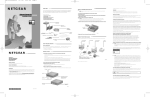
Connect the Network Cables
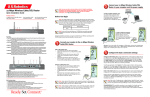
Using the appropriate UTP cable, connect any port on a network hub to the port
on the network card.
Note: One of the ports on NETGEAR hubs is switchable between
Normal (MDI-X) and Uplink (MDI) with a Normal/Uplink push
button. If you are using this switchable port on a NETGEAR hub to
connect to a PC or the network card, make sure the Normal/Uplink
push button is set to Normal.
PC with network
card installed
Power adapter
PC with network
card installed
Printer
(optional)
Hub
RJ-45
connector
RJ-45
connector
Category 5 10/100 Mbps UTP cables*
*Use the cables provided or any Category 5 UTP cable.
Maximum length = 100 meters (300 feet)
7995FB
Model FA310TX Network Card Installation Guide