1
NEC Display Solutions of America, Inc.
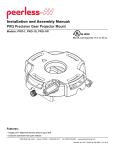
Installation and Assembly Manual:
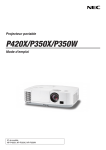
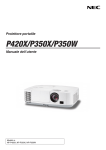
Custom Ceiling Mount for NEC M260X, M260W, M271X, M300X,
M300W M300XS, M300WS, M311X, M311W, P350X, P350W, P420X
Projectors
Model: MP300CM
Features:
• ImageLockTM alignment prevents picture sag or drift
• Wrench access slot for easier flush mount installations
Max UL Load Capacity: 50 lb (22.7 kg)
• Exclusive aluminum track quick release
1 of 10
Visit the Peerless Web Site at www.peerlessmounts.com
ISSUED: 10-01-10 SHEET #: 056-9034-4 07-29-11
For customer care call 1-800-865-2112
NOTE: Read entire instruction sheet before you start installation and assembly.
WARNING
• Do not begin to install your Peerless product until you have read and understood the instructions and warnings
contained in this Installation Sheet. If you have any questions regarding any of the instructions or warnings, please
call Peerless customer care at 1-800-865-2112.
• This product should only be installed by someone of good mechanical aptitude, has experience with basic building
construction, and fully understands these instructions.
• Make sure that the supporting surface will safely support the combined load of the equipment and all attached
hardware and components.
• Never exceed the Maximum UL Load Capacity. See page 1.
• If mounting to wood joist ceilings, make sure that mounting screws are anchored into the center of the joist. Use of
an "edge to edge" stud finder is highly recommended.
• Always use an assistant or mechanical lifting equipment to safely lift and position equipment.
• Tighten screws firmly, but do not overtighten. Overtightening can damage the items, greatly reducing their holding
power.
• This product is intended for indoor use only. Use of this product outdoors could lead to product failure and personal
injury.
• This product was designed and intended to be mounted to the following supporting surfaces checked below with
the hardware included in this product as specified in the installation sheet. To mount this product to an alternative
supporting surface, contact Peerless customer care at 1-800-865-2112.
• This product was designed to be installed on the following ceiling construction only;
CEILING CONSTRUCTION
ADDITIONAL HARDWARE REQUIRED
x
x
x
None
None
None
Contact Customer Service
Contact Customer Service
Contact Customer Service
Wood Stud
Wood Joist
Solid Concrete Cinder Block Brick Other or unsure?
Tools Needed for Assembly
• stud finder ("edge to edge" stud finder is recommended)
• phillips screwdriver
• drill
• 5/16" bit for concrete surface
• 5/32" bit for wood studs
• level
Table of Contents
Parts List.................................................................................................................................................................................3
Installation to Extension Columns / Ceiling Plate....................................................................................................................4
Installation to Wood Joist Ceilings...........................................................................................................................................5
Installation to Concrete Ceilings..............................................................................................................................................6
Installation to Threaded Rods..................................................................................................................................................7
Attaching Adapter Plate to Projector.......................................................................................................................................8
Attaching Adapter Plate to Projector Mount............................................................................................................................9
Projector Alignment...............................................................................................................................................................10
2 of 10
Visit the Peerless Web Site at www.peerlessmounts.com
ISSUED: 10-01-10 SHEET #: 056-9034-4 07-29-11
For customer care call 1-800-865-2112
Before you start check the parts list to insure all of the parts shown are included.
Parts List
A
B
C
D
E
F
G
AA
BB
CC
DD
EE
Description
projectormountassembly
4mmsecurityallenwrench
#10-32x3/8"serratedwasherheadsocketpinscrew
#10-32x1/4"socketpinscrew
flatwasher
#14x2.5phillipshexheadwoodscrew
concreteanchor
adapterplate
M4x16mmserratedsocketpinscrew
retainingspacer
2mmallenwrench
connectionblock
Qty.
1
1
2
1
2
2
2
1
3
3
1
1
A
Part #
054-2171
560-9646
520-2151
520-2196
540-1078
5S1-015-C04
590-0320
055-2985
510-2087
590-2009
560-1097
580-4065
NOTE: Actual parts may appear slightly different than illustrated.
C
B
D
AA
E
F
G
BB
CC
DD
EE
3 of 10
Visit the Peerless Web Site at www.peerlessmounts.com
ISSUED: 10-01-10 SHEET #: 056-9034-4 07-29-11
For customer care call 1-800-865-2112
Installation to Extension Column / Ceiling Plate
1
NOTE: Refer to accompanying instructions with ceiling plates (sold separately) for installing these models to ceiling.
Screw projector mount assembly (A) onto extension column as shown in figure 1.1. Tighten swivel stop screw
against extension column, flush mount tube or reducer using 4 mm security allen wrench (B) as shown in figure
1.2.
NOTE: Swivel stop screw is used to jam against threads of extension column, flush mount tube or reducer to
prevent any excess movement of projector mount assembly (A). Do not overtighten screw; overtightening screw
will damage threads making it difficult to separate products.
Skip to step 5.
1-1/2" EXTENSION COLUMN
(SOLD SEPARATELY)
(UL LISTED EXT OR AEC SERIES)
A
ARROW INDICATES
FRONT OF MOUNT
fig. 1.1
CMJ 455
(SOLD SEPARATELY)
SWIVEL STOP SCREW
fig. 1.2
4 of 10
Visit the Peerless Web Site at www.peerlessmounts.com
ISSUED: 10-01-10 SHEET #: 056-9034-4 07-29-11
For customer care call 1-800-865-2112
Installation To Wood Joist Ceilings
WARNING
• Installer must verify that the supporting surface will safely support the combined load of the equipment and all
attached hardware and components.
• Tighten wood screws so that projector mount assembly is firmly attached, but do not overtighten. Overtightening
can damage the screws, greatly reducing their holding power.
• Never tighten in excess of 80 in. • lb (9 N.M.).
• Make sure that mounting screws are anchored into the center of the stud. The use of an "edge to edge" stud finder
is highly recommended.
• Hardware provided is for attachment of mount through standard thickness drywall or plaster into wood studs.
Installers are responsible to provide hardware for other types of mounting situations (not evaluated by UL).
2
Place projector mount assembly (A) on ceiling as a template and mark the center of the two mounting holes.
Make sure that the mounting holes are in the center of the wood joist. Drill two 5/32" (4 mm) dia. holes to a
minimum depth of 2.5" (64 mm). Attach projector mount assembly (A) with two #14 x 2.5" wood screws (F) and
two flat washers (E) as shown in figure 2.1 or figure 2.2 depending on joist orientation.
NOTE: Mounting slots on projector mount assembly allow for 30° (±15°) of swivel adjustment before fully securing
wood screws.
Tighten wood screws (F) using 3/8" (10mm) socket wrench, phillips screwdriver or 10mm open end wrench until
projector mount assembly (A) is firmly attached.
Skip to step 5.
WOOD JOIST
ACCESS SLOT FOR
OPEN END WRENCH
ALLOWS TIGHTENING
OF WOOD SCREW
WOOD JOIST
FRONT OF
MOUNT
A
A
E
ARROW ON TOP OF
PROJECTOR MOUNT
ASSEMBLY INDICATES
FRONT OF MOUNT
E
F
F
fig. 2.2
fig. 2.1
5 of 10
Visit the Peerless Web Site at www.peerlessmounts.com
ISSUED: 10-01-10 SHEET #: 056-9034-4 07-29-11
For customer care call 1-800-865-2112
Installation to Concrete Ceilings
WARNING
• Concrete must be 2000 psi density minimum. Lighter density concrete may not hold concrete anchor.
• Make sure that the supporting surface will safely support the combined load of the equipment and all attached
hardware and components.
3
Place projector mount assembly (A) on ceiling
as a template and mark the center of the two
mounting holes. Drill two 5/16" (8mm) dia. holes
to a minimum depth of 2-1/2" (64mm). Attach
projector mount assembly (A) using two concrete
anchors (G), two flat washers (E), and two #14 x
2-1/2" wood screws (F) as shown in figure 3.1.
1
concrete
surface
G
Drill holes and insert anchors (G).
NOTE: Mounting slots on projector mount
assembly allow for 30° (±15°) of swivel adjustment
before fully securing wood screws.
Tighten wood screws (F) using 3/8" (10mm) socket
or open end wrench or phillips screwdriver until
projector mount assembly (A) is firmly attached.
A
2
G
F E
Place plate (A) over anchors (G) and secure with screws (F).
3
WARNING
• Tighten wood screws firmly, but do not overtighten. Overtightening can damage the screws, greatly
reducing their holding power.
Tighten all fasteners.
• Never tighten in excess of 80 in • lb (9 N.M.).
WARNING
CONCRETE CEILING
• Always attach concrete anchors directly to loadbearing concrete.
CUTAWAY VIEW
• Never attach concrete anchors to concrete covered
with plaster, drywall, or other finishing material.
If mounting to concrete surfaces covered with a
finishing surface is unavoidable (not evaluated by
UL), the finishing surface must be counterbored
as shown below. Be sure concrete anchors do not
pull away from concrete when tightening screws. If
plaster/drywall is thicker than 5/8", custom fasteners
must be supplied by installer (not evaluated by UL).
INCORRECT
concrete
A
plaster/
dry wall
G
CORRECT
A
concrete
A
E
F
plaster/
dry wall
fig. 3.1
6 of 10
Visit the Peerless Web Site at www.peerlessmounts.com
ARROW ON TOP
OF PROJECTOR
MOUNT ASSEMBLY INDICATES FRONT
OF MOUNT
ISSUED: 10-01-10 SHEET #: 056-9034-4 07-29-11
For customer care call 1-800-865-2112
Installation to Threaded Rod
(Not evaluated by UL - Professional installation only)
4
Thread two 1/4-20 hex thin nylon-insert locknuts (not included) on two 1/4-20 threaded rods (not included) to the
desired height of projector mount assembly. Attach projector mount assembly (A) to the two 1/4-20 threaded rods
using two 1/4-20 hex thin nylon-insert locknuts as shown in figure 4.1 or figure 4.2.
1/4-20 THREADED ROD
(NOT INCLUDED)
1/4-20 THREADED ROD
(NOT INCLUDED)
1/4-20 HEX THIN
NYLON-INSERT
LOCKNUT (NOT INCLUDED)
1/4-20 HEX THIN
NYLON-INSERT
LOCKNUT (NOT INCLUDED)
A
A
ARROW
INDICATES
FRONT OF
MOUNT
ARROW
INDICATES
FRONT OF
MOUNT
fig. 4.1
1/4-20 HEX THIN
NYLON-INSERT
LOCKNUT (NOT INCLUDED)
1/4-20 HEX THIN
NYLON-INSERT
LOCKNUT (NOT INCLUDED)
7 of 10
Visit the Peerless Web Site at www.peerlessmounts.com
fig. 4.2
ISSUED: 10-01-10 SHEET #: 056-9034-4 07-29-11
For customer care call 1-800-865-2112
Attaching Adapter Plate to Projector
5
Align shoulder on connection block (EE) opposite
notch in adapter plate (AA). Attach adapter plate
(AA) to connection block (EE) using two #10-32 x
3/8" serrated washer head socket pin screws (C)
as shown in figure 5.1. Tighten screws using 4 mm
allen wrench (B).
EE
NOTCH INDICATES
FRONT OF PROJECTOR
SHOULDER
AA
C
fig. 5.1
6
Flip projector upside down and attach adapter plate (AA) using four serrated socket pin screws (BB) and retaining
spacers (CC) as shown below. Tighten using 4 mm allen wrench (B).
NOTE: Retaining spacers (CC) go between the projector and adapter plate (AA).
BB
AA
CC
8 of 10
Visit the Peerless Web Site at www.peerlessmounts.com
ISSUED: 10-01-10 SHEET #: 056-9034-4 07-29-11
For customer care call 1-800-865-2112
Attaching Adapter Plate to Projector Mount
WARNING
• Do not lift more weight than you can handle. Use additional man power or mechanical lifting equipment to safely
handle placement of the screen.
7
Slide connection block (EE) with projector into projector mount assembly (A) as shown. Tighten captive screw to
secure projector to projector mount assembly (A).
FRONT OF MOUNT
ARROW INDICATES
FRONT OF MOUNT
A
EE
CAPTIVE SCREW
8
IMPORTANT: For security installations, insert one #10-32 x 1/4" socket pin screw (D) through projector mount
assembly (A) and into connection block (EE) as shown in detail 1. Tighten screw using 4mm security allen
wrench (B).
A
EE
D
DETAIL 1
9 of 10
Visit the Peerless Web Site at www.peerlessmounts.com
ISSUED: 10-01-10 SHEET #: 056-9034-4 07-29-11
For customer care call 1-800-865-2112
Projector Alignment
9
To adjust yaw (swivel) for wood stud, concrete ceiling, and threaded rod mounting applications: Loosen
wood screws (F) if flush mounted to wood joists (page 5) or concrete ceilings (page 6), or loosen locknuts on
threaded rods (page 7), until projector mount can be rotated. Rotate mount to desired position and retighten
screws or locknuts.
To adjust yaw (swivel) for extension column applications: Loosen screw on projector mount assembly (A)
indicated below until projector mount can be rotated. Rotate mount to desired position and retighten screw.
To adjust pitch (forward and backward tilt): Turn knob on back of mount as shown below. Pull knob out and
turn by hand for easy adjustment or insert #2 phillips screwdriver in end of knob and turn.
To adjust roll (side to side tilt): Turn knob on side of mount as shown below. Pull knob out and turn by hand for
easy adjustment or insert #2 phillips screwdriver in end of knob and turn.
A
ARROW INDICATES
FRONT OF MOUNT
KNOB FOR PITCH
ADJUSTMENT
BACK OF MOUNT
SCREW FOR YAW (SWIVEL) STOP
(REFER TO STEP 1, INSTALLATION
TO EXTENSION COLUMNS, FIG. 1.2)
9-1
KNOB FOR ROLL
ADJUSTMENT
To prevent tampering with the pitch and roll adjustments: Tighten the two tamper resistant security screws
on the projector mount assembly using 4 mm security allen wrench (B) to lock the pitch and roll adjustments as
shown below. Note: Tighten screws firmly, but do not overtighten. Overtightening can damage the mount.
CAUTION
• Do not adjust pitch or roll while tamper resistant security screws are fully engaged.
• Loosen the two tamper resistant security screws one complete turn before adjusting the projector mount assembly
or damage may occur.
TO LOCK PITCH, TIGHTEN
TAMPER RESISTANT
SECURITY SCREW
SIDE VIEW
10 of 10
Visit the Peerless Web Site at www.peerlessmounts.com
ISSUED: 10-01-10 SHEET #: 056-9034-4 07-29-11
For customer care call 1-800-865-2112
© 2011, Peerless Industries, Inc. All rights reserved.
All other brand and product names are trademarks or registered trademarks of their respective owners.