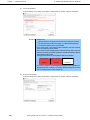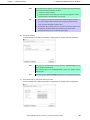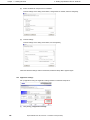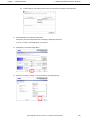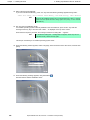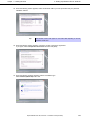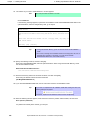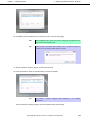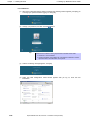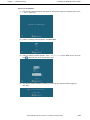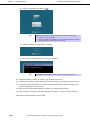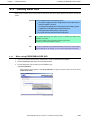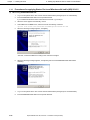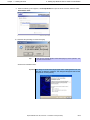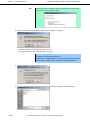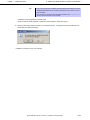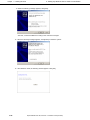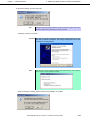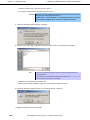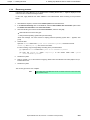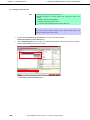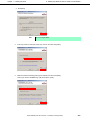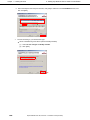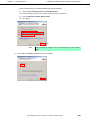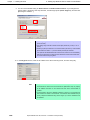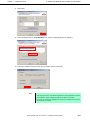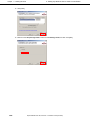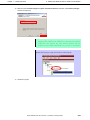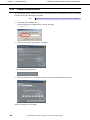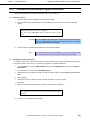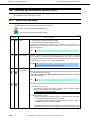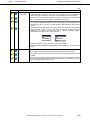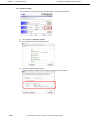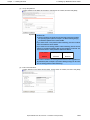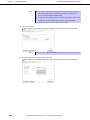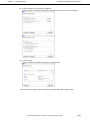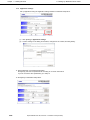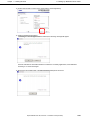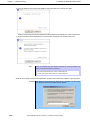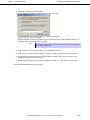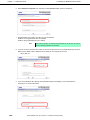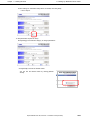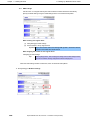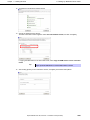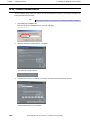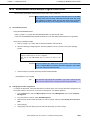
1
NEC Express Server Express5800 Series Express5800/R120d-1M, R120d-2M EXP291, EXP292 Installation Guide (Windows) Model Number: R120d-1M N8100-1794F R120d-2M N8100-1793F Chapter 1 Installing Windows Chapter 2 Installing the Bundled Software 10.021.01-102.01 April 2012, First Edition © NEC Corporation 2012 Documents Provided with This Product Documents Provided with This Product Documents for this product are provided as accompanying booklets ( within EXPRESSBUILDER DVD ( ) and as electronic manuals ( PDF ) stored ). Precautions for Use Describes points of caution to ensure the safe use of this server. Read these cautions before using this server. Getting Started Describes how to use this server, from unpacking to operations. Refer to this guide as you begin for an overview of this server. EXPRESSBUILDER PDF User’s Guide Chapter 1: General Description Chapter 2: Preparations Chapter 3: Setting Up Your Server Chapter 4: Appendix PDF PDF Installation of additional options, connection of peripheral devices, and ideal location for this server System BIOS configurations and summary of EXPRESSBUILDER Specifications and other information Installation Guide (Windows) Chapter 1: Installing Windows Installation of Windows and drivers, and important information for installation Chapter 2: Installing the Bundled Software Installation of bundled software, such as NEC ESMPRO and Universal RAID Utility Maintenance Guide Chapter 1: Maintenance Chapter 2: Convenient Features Chapter 3: Appendix PDF Overviews, names, and functions of the server’s parts Server maintenance and troubleshooting Useful features and the detail of system BIOS settings, RAID Configuration Utility, and EXPRESSBUILDER Error messages and Windows Event Logs Other documents Provides the detail of NEC ESMPRO, Universal RAID Utility, and the other features. 2 Express5800/R120d-1M, R120d-2M Installation Guide (Windows) Contents Contents Documents Provided with This Product ................................................................................................................. 2 Contents ................................................................................................................................................................ 3 Notations Used in This Document ......................................................................................................................... 6 Notations used in the text.............................................................................................................................. 6 Optical disk drives ......................................................................................................................................... 6 Hard disk drives ............................................................................................................................................ 6 Removable media ......................................................................................................................................... 6 Abbreviations of Operating Systems (Windows) ........................................................................................... 7 Trademarks ........................................................................................................................................................... 8 Regulatory Notices ................................................................................................................................................ 9 Warnings and Additions to This Document .......................................................................................................... 10 Latest editions ............................................................................................................................................. 10 Installing Windows ............................................................................................................................................... 11 1. Before Starting Setup .................................................................................................................................. 12 1.1 Starting EXPRESSBUILDER ........................................................................................................... 12 1.2 Supported Windows OS................................................................................................................... 13 1.3 Service Pack Support ...................................................................................................................... 14 1.4 Mass Storage Controllers Supported by EXPRESSBUILDER ......................................................... 15 1.5 When Using a Mass Storage Controller Not Supported by EXPRESSBUILDER ................................................... 16 2. Setting Up the Operating System ................................................................................................................ 17 3. Setting Up Windows Server 2008 R2 .......................................................................................................... 18 3.1 Before Starting Setup ....................................................................................................................... 18 3.2 Setting Up of Pre-installed Model .................................................................................................... 22 3.2.1 Before Starting Setup (Status at purchase) ........................................................................ 22 3.2.2 Setup Procedure ................................................................................................................ 23 3.3 Setup with EXPRESSBUILDER....................................................................................................... 26 3.3.1 Setup flow .......................................................................................................................... 27 3.3.2 Requirements for Setup ..................................................................................................... 28 3.3.3 Setup procedure ................................................................................................................ 29 3.4 Setup with OS Standard Installer ..................................................................................................... 41 3.4.1 Setup flow .......................................................................................................................... 42 3.4.2 Requirements for Setup ..................................................................................................... 43 3.4.3 Setup procedure ................................................................................................................ 44 3.5 Installing Starter Pack ...................................................................................................................... 57 3.5.1 When using EXPRESSBUILDER DVD .............................................................................. 57 3.5.2 When using Internal Flash Memory ................................................................................... 59 3.6 Setting Up Device Drivers ................................................................................................................ 65 3.6.1 Installing the LAN and BACS (teaming) drivers ................................................................. 65 3.6.2 Setting up LAN drivers ....................................................................................................... 66 3.6.3 Setting up team/LiveLink ................................................................................................... 67 3.6.4 Graphics accelerator driver ................................................................................................ 78 3.6.5 When using a SCSI controller (N8103-107)....................................................................... 79 3.6.6 When using a SAS controller (N8103-104A/142)............................................................... 79 3.6.7 When using a RAID Controller (N8103-160)...................................................................... 79 3.6.8 When using a Fibre Channel controller (N8190-153/154).................................................. 79 3.7 Installing the Bundled Software ....................................................................................................... 80 3.8 License Authentication ..................................................................................................................... 81 3.9 Applying Service Pack ..................................................................................................................... 83 3.10 Installation When Multiple Logical Drives Exist ................................................................................ 84 Express5800/R120d-1M, R120d-2M Installation Guide (Windows) 3 Contents 4 4. Setting Up Windows Server 2008 ............................................................................................................... 86 4.1 Before Starting Setup ....................................................................................................................... 86 4.2 Setup with EXPRESSBUILDER....................................................................................................... 90 4.2.1 Setup flow .......................................................................................................................... 91 4.2.2 Requirements for Setup ..................................................................................................... 92 4.2.3 Setup procedure ................................................................................................................ 93 4.3 Setup with OS Standard Installer ................................................................................................... 105 4.3.1 Setup flow ........................................................................................................................ 106 4.3.2 Requirements for Setup ................................................................................................... 107 4.3.3 Setup procedure .............................................................................................................. 108 4.4 Installing Starter Pack .................................................................................................................... 121 4.4.1 When using EXPRESSBUILDER DVD ............................................................................ 121 4.4.2 When using Internal Flash Memory ................................................................................. 123 4.5 Setting Up Device Drivers .............................................................................................................. 129 4.5.1 Installing the LAN and BACS (teaming) drivers ............................................................... 129 4.5.2 Setting up LAN drivers ..................................................................................................... 130 4.5.3 Setting up team/LiveLink ................................................................................................. 131 4.5.4 Graphics accelerator driver .............................................................................................. 143 4.5.5 When using a SCSI controller (N8103-107)..................................................................... 144 4.5.6 When using a SAS controller (N8103-104A/142)............................................................. 144 4.5.7 When using a RAID Controller (N8103-160).................................................................... 144 4.5.8 When using a Fibre Channel controller (N8190-153/154)................................................ 144 4.6 Specifying PAE Option ................................................................................................................... 145 4.7 Installing the Bundled Software ..................................................................................................... 146 4.8 License Authentication ................................................................................................................... 147 4.9 Applying Service Pack ................................................................................................................... 150 4.10 Installation When Multiple Logical Drives Exist .............................................................................. 151 5. Setting Up Windows Server 2003 R2 x64 Edition ..................................................................................... 153 5.1 Before Starting Setup ..................................................................................................................... 153 5.2 Setup with OS Standard Installer ................................................................................................... 156 5.2.1 Setup flow ........................................................................................................................ 157 5.2.2 Requirements for Setup ................................................................................................... 158 5.2.3 Setup procedure .............................................................................................................. 159 5.3 Installing Starter Pack .................................................................................................................... 169 5.3.1 Procedures for applying Starter Pack and Windows x64 hotfix (KB) 921411 ................... 170 5.3.2 Recovery process ............................................................................................................ 181 5.4 Setting Up Device Drivers .............................................................................................................. 182 5.4.1 Installing the LAN and BACS (teaming) drivers ............................................................... 182 5.4.2 Setting up LAN drivers ..................................................................................................... 184 5.4.3 Setting up team/LiveLink ................................................................................................. 185 5.4.4 When using a SCSI controller (N8103-107)..................................................................... 196 5.4.5 When using a SAS controller (N8103-104A/142)............................................................. 196 5.4.6 When using a RAID Controller (N8103-160).................................................................... 196 5.4.7 Graphics accelerator driver .............................................................................................. 197 5.5 Installing the Bundled Software ..................................................................................................... 197 5.6 License Authentication ................................................................................................................... 198 5.7 Installation When Multiple Logical Drives Exist .............................................................................. 199 6. Setting Up Windows Server 2003 ............................................................................................................. 200 6.1 Before Starting Setup ..................................................................................................................... 200 6.2 Setup with EXPRESSBUILDER..................................................................................................... 203 6.2.1 Setup flow ........................................................................................................................ 204 6.2.2 Requirements for Setup ................................................................................................... 205 6.2.3 Setup procedure .............................................................................................................. 206 6.3 Setup with OS Standard Installer ................................................................................................... 218 6.3.1 Setup flow ........................................................................................................................ 219 6.3.2 Requirements for Setup ................................................................................................... 220 6.3.3 Setup procedure .............................................................................................................. 221 6.4 Installing Starter Pack .................................................................................................................... 231 6.4.1 Procedure to apply Windows Server 2003 hotfix: KB921411 ........................................... 232 6.4.2 Recovery process ............................................................................................................ 243 6.5 Setting Up Device Drivers .............................................................................................................. 244 6.5.1 Installing the LAN and BACS (teaming) drivers ............................................................... 244 6.5.2 Setting up LAN drivers ..................................................................................................... 246 Express5800/R120d-1M, R120d-2M Installation Guide (Windows) Contents 6.6 6.7 6.8 6.9 6.5.3 Setting up team/LiveLink ................................................................................................. 247 6.5.4 Graphics accelerator driver .............................................................................................. 259 6.5.5 When using a SCSI controller (N8103-107)..................................................................... 259 6.5.6 When using a SAS controller (N8103-104A/142)............................................................. 259 6.5.7 When using a RAID Controller (N8103-160).................................................................... 259 Specifying PAE Option ................................................................................................................... 260 Installing the Bundled Software ..................................................................................................... 261 License Authentication ................................................................................................................... 262 Reinstallation When Multiple Logical Drives Exist ......................................................................... 263 7. Setup for Solving Problems....................................................................................................................... 265 7.1 Specifying Memory Dump Settings (Debug Information) ............................................................... 265 7.1.1 For Windows Server 2008 R2 .......................................................................................... 265 7.1.2 For Windows Server 2008 ............................................................................................... 267 7.1.3 For Windows Server 2003 ............................................................................................... 269 7.2 How to Create a User-mode Process Dump File ........................................................................... 271 7.2.1 For Windows Server 2008 R2 and Windows Server 2008 ............................................... 271 7.2.2 For Windows Server 2003 (setting up Dr. Watson) .......................................................... 272 7.3 Installing Network Monitor.............................................................................................................. 273 7.3.1 For Windows Server 2008 R2 and Windows Server 2008 ............................................... 273 7.3.2 For Windows Server 2003 ............................................................................................... 274 8. Windows OS Parameter File ..................................................................................................................... 275 8.1 Creating Windows OS Parameter File ........................................................................................... 275 8.1.1 How to create a parameter file ......................................................................................... 276 Installing the Bundled Software ......................................................................................................................... 285 1. Bundled Software for the Server ............................................................................................................... 286 1.1 NEC ESMPRO Agent (for Windows) ............................................................................................. 286 1.2 NEC ESMPRO Agent Extension .................................................................................................... 287 1.3 BMC Configuration ........................................................................................................................ 287 1.4 NEC ExpressUpdate Agent............................................................................................................ 287 1.5 Universal RAID Utility .................................................................................................................... 288 1.5.1 Setup of Universal RAID Utility ........................................................................................ 288 1.5.2 Management by NEC ESMPRO Manager ....................................................................... 289 1.6 NEC Product Info Collection Utility ................................................................................................ 290 1.6.1 Installation........................................................................................................................ 290 1.6.2 Uninstallation ................................................................................................................... 290 2. Bundled Software to be applied to PC for Management ........................................................................... 291 2.1 NEC ESMPRO Manager................................................................................................................ 291 Express5800/R120d-1M, R120d-2M Installation Guide (Windows) 5 Notations Used in This Document Notations Used in This Document Notations used in the text In addition to safety-related symbols urging caution, 3 other types of notations are used in this document. These notations have the following meanings. Important Indicates critical items that must be followed when handling the server or operating software. If the procedures described are not followed, server failure, data loss, and other serious malfunctions could occur. Note Indicates items that must be confirmed when handling the server or operating software. Tips Indicates information that is helpful to keep in mind when using this server. Optical disk drives This server is equipped with one of the following drives, depending on the order at the time of purchase. These drives are referred to as optical disk drives in this document. • DVD-ROM drive • DVD Super MULTI drive Hard disk drives Unless otherwise stated, hard disk drives (HDD) described in this document refers to the following. • Hard disk drives (HDD) • Solid state drive (SSD) Removable media Unless otherwise stated, removable media described in this document refer to the following. • USB memory • Flash FDD 6 Express5800/R120d-1M, R120d-2M Installation Guide (Windows) Notations Used in This Document Abbreviations of Operating Systems (Windows) Windows Operating Systems are referred to as follows. Refer to Chapter 1 (1.2 Supported Windows OS) for detailed information. Notations in this document Official names of Windows Windows Server 2008 R2 Standard Windows Server 2008 R2 Windows Server 2008 R2 Enterprise Windows Server 2008 *1 Windows Server 2008 Standard Windows Server 2008 Enterprise Windows Server 2003 R2 Standard x64 Edition Windows Server 2003 R2 x64 Edition Windows Server 2003 R2 Enterprise x64 Edition Windows Server 2003 R2 *2 Windows Server 2003 *2 Windows Server 2003 R2 Standard Windows Server 2003 R2 Enterprise Windows Server 2003 Standard Windows Server 2003 Enterprise Windows 7 Professional 64-bit(x64) Edition Windows 7 Windows 7 Professional 32-bit(x86) Edition Windows Vista Business 64-bit(x64) Edition Windows Vista Windows Vista Business 32-bit(x86) Edition Windows XP Professional x64 Edition Windows XP Windows XP Professional Windows PE *3 Windows Preinstallation Environment *1: Includes 64-bit and 32-bit Editions unless otherwise stated. The following appears on EXPRESSBUILDER. • • Windows Server 2008 64-bit Edition: Windows Server 2008 32-bit Edition: Windows Server 2008 x64 Windows Server 2008 x86 *2: Unless otherwise stated, Windows Server 2003 R2 and Windows Server 2003 are collectively referred to as Windows Server 2003. *3: Used as an installation platform only. Express5800/R120d-1M, R120d-2M Installation Guide (Windows) 7 Trademarks Trademarks EXPRESSSCOPE is a registered trademark of NEC Corporation. Microsoft, Windows, Windows Server, Windows Vista, and MS-DOS are registered trademarks or trademarks of Microsoft Corporation in the United States and other countries. Intel, Pentium, and Xeon are registered trademarks of Intel Corporation of the United States. AT is a registered trademark of International Business Machines Corporation of the United States and other countries. Adaptec, its logo, and SCSI Select are registered trademarks or trademarks of Adaptec, Inc. of the United States. LSI and the LSI logo design are trademarks or registered trademarks of LSI Corporation. Adobe, the Adobe logo, and Acrobat are trademarks of Adobe Systems Incorporated. DLT and DLTtape are trademarks of Quantum Corporation of the United States. PCI Express is a trademark of Peripheral Component Interconnect Special Interest Group. Linux is a trademark or registered trademark of Linus Torvalds in Japan and other countries. Red Hat® and Red Hat Enterprise Linux are trademarks or registered trademarks of Red Hat, Inc. in the United States and other countries. All other product, brand, or trade names used in this publication are the trademarks or registered trademarks of their respective trademark owners. 8 Express5800/R120d-1M, R120d-2M Installation Guide (Windows) Regulatory Notices Regulatory Notices FCC Statement This equipment has been tested and found to comply with the limits for a Class A digital device, pursuant to Part 15 of the FCC Rules. These limits are designed to provide reasonable protection against harmful interference when the equipment is operated in a commercial environment. This equipment generates, uses, and can radiate radio frequency energy and, if not installed and used in accordance with the instruction manual, may cause harmful interference to radio communications. Operation of this equipment in a residential area is likely to cause harmful interference in which case the user will be required to correct the interference at his own expense. CE Statement This is a Class A product. In domestic environment this product may cause radio interference in which case the user may be required to take adequate measures (EN55022). BSMI Statement Express5800/R120d-1M, R120d-2M Installation Guide (Windows) 9 Warnings and Additions to This Document Warnings and Additions to This Document 1. Unauthorized reproduction of the contents of this document, in part or in its entirety, is prohibited. 2. The contents of this document may change without prior notice. 3. Do not make copies or alter the document content without permission from NEC Corporation. 4. Every effort has been made to ensure the completeness of this document. However, if you have any concerns, or discover errors or omissions, please contact your retailer. 5. Regardless of these 4 items, NEC Corporation assumes no responsibility for effects resulting from operations. 6. The sample values used in this document are not the actual values. Keep this document nearby so that you may refer to it as necessary. Latest editions This document was created based on the information available at the time of its creation. The screen images, messages, and procedures may differ from the actual screens, messages, and procedures. Substitute as appropriate when content has been modified. The most recent version of User’s Guide, as well as other related documents, is also available for download from the following website. http://www.nec.com/ 10 Express5800/R120d-1M, R120d-2M Installation Guide (Windows) NEC Express5800 Series Express5800/R120d-1M, R120d-2M 1 Installing Windows This chapter describes how to install Windows. Read through this chapter to set up the system correctly. 1. Before Starting Setup Describes the Service Packs and mass storage controllers that support EXPRESSBUILDER supplied with this product. 2. Setting Up the Operating System Describes the flow chart of setting up the operating system. 3. Setting Up Windows Server 2008 R2 Describes how to set up Windows Server 2008 R2. 4. Setting Up Windows Server 2008 Describes how to set up Windows Server 2008. 5. Setting Up Windows Server 2003 R2 x64 Edition Describes how to set up Windows Server 2003 R2 x64 Edition. 6. Setting Up Windows Server 2003 Describes how to set up Windows Server 2003. 7. Setting Up for Solving Problems Describes the features that must be set up in advance so that the server can recover from any trouble immediately and precisely. 8. Windows OS Parameter File Describes how to set up the operating system by using the parameter file. Express5800/R120d-1M, R120d-2M Installation Guide (Windows) 11 Chapter 1 1. Before Starting Setup Installing Windows 1. Before Starting Setup This section describes the points of using EXPRESSBUILDER (contained in this product) to set up Windows operating systems. Important If you have purchased your server by BTO and ordered to install Windows, a COA (Certificate of Authenticity) label that describes your product key is stuck on your server. The product key is required when setting up or re-installing the OS. Do not intentionally peel off or damage the label. The product key cannot be reissued in any occasion. It is recommended to take a note of product key and store it carefully with other accessories. 1.1 Starting EXPRESSBUILDER Use the attached EXPRESSBUILDER to reconfigure the RAID System or re-install the OS. Start EXPRESSBUILDER by either of the following two ways according to the media in which the EXPRESSBUILDER is stored. Refer to Chapter 2 (5. Details of EXPRESSBUILDER) in the Maintenance Guide for more information. With the pre-installation model, you do not need to start the EXPRESSBUILDER. EXPRESSBUILDER DVD Insert the DVD to the optical disk drive of the server, and then reboot by turning off and on the server or by pressing <Ctrl> + <Alt> + <Delete> keys. Internal Flash Memory (optional) Press <F3> key when the following message appears on POST screen. At this time, be sure to remove a bootable disc from the optical disk drive. Press <F2> SETUP, <F3> Internal Flash Memory, <F4> ROM Utility, <F12> Network 12 Express5800/R120d-1M, R120d-2M Installation Guide (Windows) Chapter 1 1.2 1. Before Starting Setup Installing Windows Supported Windows OS EXPRESSBUILDER supports the following editions of Windows operating systems: See the next section (1.3 Service Pack Support) for Service Pack. Name of Windows OS Windows Server 2008 R2 Windows Server 2008 Windows Server 2003 R2 x64 Edition Windows Server 2003 R2 Windows Server 2003 Supported Windows Server 2008 R2 Standard Windows Server 2008 R2 Enterprise Windows Server 2008 Standard Windows Server 2008 Enterprise Windows Server 2003 R2 Standard x64 Edition Windows Server 2003 R2 Enterprise x64 Edition Windows Server 2003 R2 Standard Windows Server 2003 R2 Enterprise Windows Server 2003 Standard − Windows Server 2003 Enterprise − : Supported − : Not Supported Express5800/R120d-1M, R120d-2M Installation Guide (Windows) 13 Chapter 1 1.3 1. Before Starting Setup Installing Windows Service Pack Support The following combination of operating system installation media and Service Packs are supported by EXPRESSBUILDER. Service Pack Windows Server 2008 R2 Service Pack 1 Included NO Service Pack + Service Pack 1 NO Service Pack Service Pack Windows Server 2008 Service Pack 2 Included NO Service Pack + Service Pack 2 NO Service Pack Service Pack Windows Server 2003 R2 x64 Edition Service Pack 2 Included NO Service Pack + Service Pack 2 NO Service Pack − Service Pack Windows Server 2003 R2 Service Pack 2 Included NO Service Pack +Service Pack 2 NO Service Pack − : Supported − : Not Supported Note 14 You can install the Service Pack on the server. When the Service Pack is not attached to your system, prepare it by yourself. Express5800/R120d-1M, R120d-2M Installation Guide (Windows) Chapter 1 1.4 1. Before Starting Setup Installing Windows Mass Storage Controllers Supported by EXPRESSBUILDER The table below lists the controllers for this server, supported by the supplied EXPRESSBUILDER. If an optional board not mentioned below is connected, set it up while referring to the instructions supplied with the board and Chapter 1 (1.5 When Using a Mass Storage Controller Not Supported by EXPRESSBUILDER). Windows Server Windows Server Windows Server Windows Server 2008 2003 R2 x64 Edition 2003 2008 R2 OS RAID Controllers supporting EXPRESSBUILDER OS installation N8103-149 RAID Controller (512MB, RAID 0/1) N8103-150 RAID Controller (512 MB RAID 0/1/5/6) N8103-151 RAID Controller (1GB, RAID 0/1/5/6) N8103-107 SCSI controller N8103-104A SAS controller N8103-142 SAS controller N8103-160 RAID controller (1GB, RAID 0/1/5/6) N8190-153 Fibre Channel controller (1 ch) * * N8190-154 Fibre Channel controller (2 ch) * * Other options : Supported by EXPRESSBUILDER * : Supported by accessory of optional board Express5800/R120d-1M, R120d-2M Installation Guide (Windows) 15 Chapter 1 1.5 1. Before Starting Setup Installing Windows When Using a Mass Storage Controller Not Supported by EXPRESSBUILDER To install the Windows when using a mass storage controller not supported by EXPRESSBUILDER (such as the newest RAID controller), follow the steps below. You do not need to perform the following instructions usually. 1. Have the instructions for the mass storage controller ready. Note If the contents of this document differ from that of the mass storage controller, prioritize the contents of the controller’s document. 2. If you use a RAID Controller, follow the controller instructions to configure the RAID System. 3. If you want to set up by using EXPRESSBUILDER, go to Step 4. Refer to (setup with OS standard installer) section of each OS and click [Skip] in RAID settings. 4. Boot from EXPRESSBUILDER. 5. Select Configure EXPRESSBUILDER settings from Top Menu, and then select Load a driver into EXPRESSBUILDER from the menu. Next, click [Next]. Insert the media in which the driver for the mass storage controller is copied, select the destination, and then click [Perform]. Tips By selecting this option, the driver supplied by the CD-ROM or removable media is loaded, and you can proceed with the EXPRESSBUILDER setup. 6. Setup the RAID System according to "Setup with EXPRESSBUILDER" for each OS. 16 − Click [Skip] in RAID settings. − Confirm that Apply drivers for mass storage controller appears under Selected applications in Application settings. Express5800/R120d-1M, R120d-2M Installation Guide (Windows) Chapter 1 2. 2. Setting Up the Operating System Installing Windows Setting Up the Operating System See the figure below to find a section appropriate to your OS installation. Start Is the first setup after purchase? No Yes Re-installation Hard disk drive status at purchase Not installed Pre-installed Execute Setup with EXPRESSBUILDER? No Yes Setup of Pre-installed Model Windows Server 2008 R2 Chapter 1 (3.2) Setup with EXPRESSBUILDER Windows Server 2008 R2 Chapter 1 (3.3) Windows Server 2008 Chapter 1 (4.3) Windows Server 2003 R2 Chapter 1 (6.3) Setup with OS standard installer Windows Server 2008 R2 Chapter 1 (3.4) Windows Server 2008 Chapter 1 (4.4) Windows Server 2003 R2 Chapter 1 (5.2) x64 Edition Windows Server 2003 R2 Chapter 1 (6.4) Setup for solving problems Windows Server 2008 R2 Chapter 1 (7) Windows Server 2008 Windows Server 2003 R2 x64 Edition Windows Server 2003 End Express5800/R120d-1M, R120d-2M Installation Guide (Windows) 17 Chapter 1 3. Setting Up Windows Server 2008 R2 Installing Windows 3. Setting Up Windows Server 2008 R2 Set up Windows Server 2008 R2. 3.1 Before Starting Setup Read through the cautions explained here before starting setup. : Setting up of Pre-installed model : Confirm during Setup with EXPRESSBUILDER : Confirm during Setup with OS standard installer (1/4) Setup Items to confirm Windows family The following editions of the Windows Server 2008 R2 family may be installed. • Windows Server 2008 R2 Standard • Windows Server 2008 R2 Enterprise Inquiries about installing other editions may be made at your sales representative. For information about Service Packs, refer to Chapter 1 (1.2 Service Pack Support). Hardware configuration The following hardware configurations require special procedures. ― • Reinstalling to a mirrored volume ― • Peripheral devices such as RDX/MO ― • DAT, LTO, and similar media ― • Reinstalling to hard disk drives that have been upgraded to dynamic disks ― • Connecting to multiple hard disk drives (logical drives) 18 Disable the mirroring and reset to the basic disk. After installation, enable the mirroring again. Use [Computer Management] – [Disk Management] to create, disable, or remove the mirrored volume. Remove an MO device before installing an OS. Some peripheral devices need to be halted before installation. Refer to the manual provided with the peripheral devices for how to set a device appropriate to installation. Do not set media that is unnecessary to installation during setup. If the hard disk drive has been upgraded to a dynamic disk, the operating system cannot be reinstalled to it with the existing partitions. Set up the operating system with the OS standard installer. For details on installing operating systems to a system in which multiple logical drives exist, refer to Chapter 1 (3.8 Installation When Multiple Logical Drives Exist). Express5800/R120d-1M, R120d-2M Installation Guide (Windows) Chapter 1 3. Setting Up Windows Server 2008 R2 Installing Windows (2/4) Setup ― Items to confirm System partition size The system partition size can be calculated by using the following formula. Size required to install the OS + paging file size + dump file size + application size Full installations Size required to install the OS = 15,600 MB ( Windows Server 2008 R2 + Service Pack 1) = 8,400 MB ( Windows Server 2008 R2 with Service Pack 1) = 8,000 MB ( Windows Server 2008 R2) Paging file size (recommended) = installed memory size × 1.5 Dump file size = installed memory size + 300 MB Application size = as required by the application Server Core installations Size required to install the OS = 11,100 MB ( Windows Server 2008 R2 + Service Pack 1) = 3,700 MB ( Windows Server 2008 R2 with Service Pack 1) = 3,500 MB ( Windows Server 2008 R2) Paging file size (recommended) = installed memory size × 1.5 Dump file size = installed memory size + 300 MB Application size = as required by the application For example, if the installed memory size is 1 GB (1,024 MB) and Full installation is selected, the partition size is calculated as follows: 8,000 MB + (1,024 MB × 1.5) + 1,024 MB + 300 MB + application size = 10,860 MB + application size The above mentioned partition size is the minimum partition size required for system installation. Ensure that the partition size is sufficient for system operations. The following partition sizes are recommended. Full installations : 32,768 MB (32 GB) or more Server Core installations : 10,240MB (10 GB) or more *1 GB = 1,024 MB Note • The above paging file sizes are recommended for collecting debug information (dump file). The initial size of the Windows partition paging file must be large enough to store dump files. Make sure you set a sufficient paging file size. If the paging file is insufficient, there will be a virtual memory shortage that may result in an inability to collect correct debug information. • Regardless of the sizes of internal memory and write debug information, the maximum size of the dump file is "size of internal memory + 300 MB". • When installing other applications or other items, add the amount of space needed by the application to the partition. Express5800/R120d-1M, R120d-2M Installation Guide (Windows) 19 Chapter 1 3. Setting Up Windows Server 2008 R2 Installing Windows (3/4) Setup ― Items to confirm System partition size If the partition size for installing the system is smaller than the size required for installation + paging file size, expand the partition size or add another disk. If your system does not have a sufficient dump file size, divide the required file space into multiple disks by performing the following steps. 1. Set the system partition size to a size sufficient to install the OS and paging file. 2. Write the debug information of the dump file onto another disk by referring to 7. Setup for Solving Problems. If there is not enough disk space to write the debug information, set the partition size to a size sufficient to install the OS and paging file, and then add another disk for the dump file. Tips When creating a new partition, Windows OS assigns an initial boot partition of 100 MB. For example, when making a partition of 40,960 MB (40 GB), usable space will be 40,960 MB – 100 MB = 40,860 MB. Free space System Partition (40,860 MB) Boot Partition (100 MB) The boot partition is not recognized from the operating system. ― Using BitLocker If using BitLocker, note the following. • Be sure to keep the recovery password secure. Do not keep it near a server running BitLocker. • To reinstall the operating system into a partition that is encrypted with BitLocker, delete the BitLocker-encrypted partition prior to reinstallation. • Microsoft releases software updates for BitLocker encryption. If using BitLocker, it is important that you read through the information provided by Microsoft. Also read through the checklist published by Microsoft. For details, visit http://support.microsoft.com/kb/975496/en-us. Important If the recovery password is not entered, the OS cannot be started, and the content of the partition encrypted by BitLocker cannot be referenced any more. The recovery password might be required at startup of the OS after the following: Installing Service Pack 20 − Replacement of motherboard − Initialization of trusted platform module (TPM) − Change of BIOS setting • If the OS installation media contains Service Pack 1, you need not apply the service pack again. • You can install the Service Pack on the server. When the Service Pack is not attached to your system, prepare it by yourself. Express5800/R120d-1M, R120d-2M Installation Guide (Windows) Chapter 1 3. Setting Up Windows Server 2008 R2 Installing Windows (4/4) Setup ― Items to confirm License authentication License authentication might be required, depending on the installation of Windows. For details, refer to 3.7 License Authentication. Note • Activate within 30 days following installation. • A virtual product key is used when installing in a virtual environment. It is not used when directly installing an operating system to a physical server. Express5800/R120d-1M, R120d-2M Installation Guide (Windows) 21 Chapter 1 3. Setting Up Windows Server 2008 R2 Installing Windows 3.2 Setting Up of Pre-installed Model If you specify "pre-installation" in BTO (Build to Order), your server will be shipped with partitions created, operating system and all the necessary software installed. This section describes how to setup your server of pre-installed model when power of the server is turned on for the first time. For re-set up, use EXPRESSBUILDER or OS standard installer. Note 3.2.1 The Scalable Networking Pack (SNP) feature is set to "Disabled" on pre-installed model. The setting of SNP function may affect the system performance. Contact your sales representative for details. Before Starting Setup (Status at purchase) Confirm the following before starting setup. The hardware configuration of the server (including partition size of hard disk drive) and software installed in hard disk drive depends on your order made before purchase (BTO). The figure below shows structure of the partition created in hard disk drive. System Partition (40,860 MB) Free space ハードディスクドライブ Boot Partition (100 MB) The boot partition is not recognized from the operating system. 22 Express5800/R120d-1M, R120d-2M Installation Guide (Windows) Chapter 1 3.2.2 3. Setting Up Windows Server 2008 R2 Installing Windows Setup Procedure Follow the steps below to setup your server. 1. Power on peripheral devices then the server to run Windows. After a while, Setup Windows screen appears. (1) When the following window appears, select a language, and then click [Next]. (2) When the following window appears, select a language, enter information for the other items, and then click [Next]. (3) On Agree Software License Agreement screen, read the license terms carefully. If you agree, select [I accept the license terms], and then click [Start]. Express5800/R120d-1M, R120d-2M Installation Guide (Windows) 23 Chapter 1 3. Setting Up Windows Server 2008 R2 Installing Windows (4) If you prompted to change password upon completion of setup of Windows Server 2008 R2, click [OK]. (5) Enter your new password, and click Tips . Password must satisfy the following conditions: • Password must have at least 6 characters. • Password must contain at least three of the following categories : numeric characters, upper-case alphabetic characters, lower-case alphabetic characters, or symbols. (6) 24 Click [OK] on the screen shown below. Express5800/R120d-1M, R120d-2M Installation Guide (Windows) Chapter 1 3. Setting Up Windows Server 2008 R2 Installing Windows (7) After logon the system, set the user information on Initial Configuration Tasks screen. 2. Specify the details of network driver according to Chapter 1 (3.6 Setting Up Device Drivers). 3. Install optional device drivers as needed according to the Instruction Manual provided with the optional device. 4. Provide settings for bundled software and verify them. The bundled software listed below have been installed on your server. • NEC ESMPRO Agent • Universal RAID Utility • Microsoft Visual C++ 2005 SP1 Redistributable Package (x86) * (Use the x86 package whatever the CPU architecture may be.) Refer to Chapter 2 (Installing Bundled Software). * This component has already been installed when you install Universal RAID Utility. 5. Apply Service Pack as needed according to Chapter 1 (3.9 Applying Service Pack). 6. Provide setup according to the instructions described in Chapter 1 (7. Setup for Solving Problems). Setup for pre-installed model is now complete. Express5800/R120d-1M, R120d-2M Installation Guide (Windows) 25 Chapter 1 3.3 3. Setting Up Windows Server 2008 R2 Installing Windows Setup with EXPRESSBUILDER This section describes how to install Windows with EXPRESSBUILDER. This feature automatically recognizes the RAID Controller connected to the server and configures the RAID System, so you must complete the hardware installation of the server by following " User’s Guide ". Important • Setup with EXPRESSBUILDER may delete all data of the hard disk drive depending on the settings. Pay attention to input parameters. You must be especially careful when configuring the following: − RAID settings wizard − Partition Settings in the Windows Setup wizard Backing up user data, as needed, is recommended. • Before starting setup, be sure to disconnect hard disk drives from the RAID Controller that is not to be setup. Install those hard disk drives after setup has completed. Conducting setup with hard disk drives being connected with RAID Controller may cause existing data to be erased unintentionally. It is recommended to make backup copy of user data before starting setup. Note Tips The Scalable Networking Pack (SNP) function is disabled on systems that have been installed by using EXPRESSBUILDER. The setting of SNP function may affect the system performance. Contact your sales representative for details. • Setup with EXPRESSBUILDER allows you to use a pre-specified parameter file or save the parameters specified in setup as a parameter file on a removable media or Internal Flash Memory (if purchased optionally). • For details on creating a parameter file, refer to 8 Windows OS Parameter File. 26 Express5800/R120d-1M, R120d-2M Installation Guide (Windows) Chapter 1 3.3.1 3. Setting Up Windows Server 2008 R2 Installing Windows Setup flow Setup Selection Menu Parameter Setup Menu Setup Execution Screen Configure RAID system Create and format the Windows system partition Remove the CD/DVD-ROM or removable media Copy Windows drivers ↓ Copy the selected application Insert the OS installation media Automatic installation Agree to the terms of the license ↓ Log on Process that requires input or selection Process that proceeds automatically End of installation Express5800/R120d-1M, R120d-2M Installation Guide (Windows) 27 Chapter 1 3.3.2 3. Setting Up Windows Server 2008 R2 Installing Windows Requirements for Setup Prepare the following media and instruction manuals before starting setup. Either of the following OS installation media • NEC operating system installation media (hereafter referred to as Backup DVD-ROM) • Microsoft operating system installation media (hereafter referred to as Windows Server 2008 R2 DVD-ROM) First Steps Guide Either of the following EXPRESSBUILDER • EXPRESSBUILDER DVD • Internal Flash Memory (If "Internal Flash Memory" is installed) Prepare if needed: − Removable media for Windows OS parameter file − Service Pack (If the OS installation media contains Service Pack 1, you need not apply the service pack again.) Tips • EXPRESSBUILDER may be distributed in Internal Flash Memory. EXPRESSBUILDER can be run from Internal Flash Memory if it is installed in the server. • If you are using a server with Internal Flash Memory installed, you can install the OS without using EXPRESSBUILDER DVD. . 28 Express5800/R120d-1M, R120d-2M Installation Guide (Windows) Chapter 1 3.3.3 3. Setting Up Windows Server 2008 R2 Installing Windows Setup procedure During Setup with EXPRESSBUILDER, parameters are specified through the wizard. You can also save the parameters as one file (a parameter file) to removable media. Note • Read through the items in Chapter 1 (3.1 Before Starting Setup) prior to installing Windows. • If modifying or adding network adapters or other drivers, refer to Chapter 1 (3.6 Setting Up Device Drivers). 1. Turn peripheral device power on, and then turn the server power on. 2. Start EXPRESSBUILDER according to Chapter 1 (1.1 Starting EXPRESSBUILDER). 3. When the following message appears, select Os installation *** default ***. You will automatically advance to step 4, with no need for further input. 4. Select English on the language selection window, and then click [OK]. Express5800/R120d-1M, R120d-2M Installation Guide (Windows) 29 Chapter 1 3. Setting Up Windows Server 2008 R2 Installing Windows 5. When the Windows PE software license agreement window appears, click [Yes]. Note 6. Unless you agree these terms, you cannot use EXPRESSBUILDER. Select Set up this computer from Top Menu of EXPRESSBUILDER, and then click [Next]. 7. Set parameters on this menu according to your requirement. When not using parameter file: Go to Step 8. When using a parameter file: Go to Step 9. Note When setting up again, parameter input via the wizard can be omitted by loading the saved parameter file. 8. If you do not use a parameter file, select an OS from the pull-down menu in [Install Windows], and click [Next]. On this dialog, select "Windows Server 2008 R2" from the pull-down menu. → Go to Step 10. 30 Express5800/R120d-1M, R120d-2M Installation Guide (Windows) Chapter 1 3. Setting Up Windows Server 2008 R2 Installing Windows 9. If you use a parameter file, select Load a parameter file and click [Next]. Load a parameter file according to displayed instructions. Confirm settings on Parameter Setup Menu as needed, then click [Next]. → Go to Step 13. 10. Set parameters required for setup. Click [Settings] of the relevant category to change parameters. Express5800/R120d-1M, R120d-2M Installation Guide (Windows) 31 Chapter 1 3. Setting Up Windows Server 2008 R2 Installing Windows Click [Default] to restore the default values. You can see the default values by clicking [Default values]. 10-1 RAID settings Use this menu to configure RAID System with the RAID Controller detected automatically. Specify the RAID settings using the RAID settings wizard on Parameter Setup Menu. When creating new logical drives (1) Click [Settings] in RAID settings. (2) Use the wizard to set up logical drives. Important If you proceed with wizard, the existing RAID system is destructed and the contents of hard disk drive will be erased. When skipping the creation of new logical drives Click [Skip] in RAID settings. When the RAID settings wizard is terminated, Parameter Setup Menu appears again. 32 Express5800/R120d-1M, R120d-2M Installation Guide (Windows) Chapter 1 3. Setting Up Windows Server 2008 R2 Installing Windows 10-2 Windows settings Set up Windows by using the Windows settings wizard on Parameter Setup Menu. (1) Click [Settings] in Windows settings. (2) Click [Next] in the Windows settings wizard. (3) Specify the Windows basic settings. Change settings for "Edition" and "Time Zone" as needed, and click [Next]. Express5800/R120d-1M, R120d-2M Installation Guide (Windows) 33 Chapter 1 3. Setting Up Windows Server 2008 R2 Installing Windows (4) Set up the partitions. Confirm settings on the dialog shown below, change them as needed, and then click [Next]. Important • Partition size − Specify a partition size larger than the minimum required for installing the operating system. (Refer to Chapter 1 (3.1 Before Starting Setup).) − The maximum partition size is 2,097,152 MB. • If you select Create a new partition under Partitioning, the entire contents of the hard disk drive will be deleted. • If you select Use the existing partition under Partitioning, data in the boot partition (if it exists) and system partition is formatted and deleted. Data in other partitions will be kept. The figure below shows in which partitions data will be deleted. Boot partition Deleted system partition User data partition Deleted Retained • You cannot reinstall to an existing partition that has been upgraded to a Dynamic Disk (refer to Chapter 1 (3.1 Before Starting Setup)). Do not select Use the existing partition under Partitioning. (5) Enter user information. Confirm settings on the dialog shown below, change them as needed, and then click [Next]. 34 Express5800/R120d-1M, R120d-2M Installation Guide (Windows) Chapter 1 3. Setting Up Windows Server 2008 R2 Installing Windows Note For Windows Server 2008 R2, you must enter a computer name and administrator password that satisfies the following conditions: − Contains 6 or more characters − Contains characters from at least three of the following categories: numbers, uppercase letters, lowercase letters, and symbols. Tips The Computer name has been assigned by automatic assignment function. If you need to assign another computer name, remove the checkmark from "Auto", and enter the desired computer name. If a parameter file is used for setup or if you return to a previous screen, •••••• is displayed in the Administrator password and Confirm Administrator password text boxes even if no value has been entered. (6) Set up the network. Confirm settings on the dialog shown below, change them as needed, and then click [Next]. Note Even when an optional network board is connected, Custom setting list only shows standard network boards. After finishing Setup with EXPRESSBUILDER, specify the optional network settings again. Tips (7) The order of entry in Custom settings may differ from the numbering of LAN ports. Enter the domain or workgroup name to be used. Confirm settings on the dialog shown below, change them as needed, and then click [Next]. Express5800/R120d-1M, R120d-2M Installation Guide (Windows) 35 Chapter 1 3. Setting Up Windows Server 2008 R2 Installing Windows (8) Select the Windows components for installation. Confirm settings on the dialog shown below, change them as needed, and then click [Next]. (9) Confirm settings. Confirm settings on the dialog shown below, and click [Finish]. When the Windows settings wizard is terminated, Parameter Setup Menu appears again. 10-3 Application settings Set up applications using the Application settings wizard in Parameter Setup Menu. (1) Click [Setting] in Application settings. 36 Express5800/R120d-1M, R120d-2M Installation Guide (Windows) Chapter 1 3. Setting Up Windows Server 2008 R2 Installing Windows (2) Confirm settings on the dialog shown below, change them as needed, and click [Finish]. 11. Save parameters on Parameter Setup Menu. Click [Save], and save the parameter file according to displayed instructions. If you do not need to save parameters, go to Step 12. 12. Click [Next] on Parameter Setup Menu. 13. Confirm the summary of setup on the screen below, and click [Perform]. Express5800/R120d-1M, R120d-2M Installation Guide (Windows) 37 Chapter 1 3. Setting Up Windows Server 2008 R2 Installing Windows 14. Install the additional applications. If Installing the OS and applications is selected, the following message will appear. Insert the CD-ROM or removable media that contains the necessary applications, and install them according to displayed messages. 15. Remove the removable media or DVD(EXPRESSBUILDER) from the server. 38 Express5800/R120d-1M, R120d-2M Installation Guide (Windows) Chapter 1 3. Setting Up Windows Server 2008 R2 Installing Windows 16. Insert the Windows Server 2008 R2 DVD-ROM into the optical disk drive, and then click [OK]. Windows Server 2008 R2 and selected applications will be installed automatically and restart several times. 17. When the software license agreement window appears, select I accept the license terms, and then click [Start] (Full installation only). 18. When the following message appears, press <Ctrl> + <Alt> + <Del> keys. 19. Follow displayed instructions to log on to the system. Full installations: When the following screen appears, enter your password into the text box, and then click Express5800/R120d-1M, R120d-2M Installation Guide (Windows) . 39 Chapter 1 3. Setting Up Windows Server 2008 R2 Installing Windows Server Core installations: When the following screen appears, enter your password into the text box, and then click . 20. Click [OK] in the Setup Complete window. 21. Follow the instructions described in Chapter 1 (3.6 Setting Up Device Drivers) to set up the device drivers. 22. For optional devices whose driver has not been installed, install the device drivers according to the instructions supplied in the driver manual. 23. Apply Service Pack as needed according to Chapter 1 (3.9 Applying Service Pack). 24. Execute setup by following the instructions described in Chapter 1 (7. Setup for Solving Problems). Setup with EXPRESSBUILDER is now complete. 40 Express5800/R120d-1M, R120d-2M Installation Guide (Windows) Chapter 1 3.4 3. Setting Up Windows Server 2008 R2 Installing Windows Setup with OS Standard Installer This section describes how to install Windows with OS Standard Installer. This feature automatically recognizes the RAID Controller connected to the server and configures the RAID System, so you must complete the hardware installation of the server by following "User’s Guide ". Important Setup with OS standard Installer may delete all data of the hard disk drive depending on the settings. Pay attention to input parameters. You must be especially careful when configuring the following: − RAID settings wizard Backing up user data, as needed, is recommended. Tips • Setup with OS Standard Installer allows you to use a pre-specified parameter file or save the parameters specified in setup as a parameter file on a removable media or Internal Flash Memory (if purchased optionally). • For details on creating a parameter file, refer to 8 Windows OS Parameter File. Express5800/R120d-1M, R120d-2M Installation Guide (Windows) 41 Chapter 1 3.4.1 3. Setting Up Windows Server 2008 R2 Installing Windows Setup flow Setup Selection Menu Parameter Setup Menu Setup Execution Screen Configure RAID System Copy the OEM drivers (if required) Insert the OS installation media Restart (automatically) Installation Process that requires input or selection Log on Process that proceeds automatically Install Starter Pack End of installation 42 Express5800/R120d-1M, R120d-2M Installation Guide (Windows) Chapter 1 3.4.2 3. Setting Up Windows Server 2008 R2 Installing Windows Requirements for Setup Prepare the following media and instruction manuals before starting setup. Either of the following OS installation media • NEC operating system installation media (hereafter referred to as Backup DVD-ROM) • Microsoft operating system installation media (hereafter referred to as Windows Server 2008 R2 DVD-ROM) First Steps Guide Either of the following EXPRESSBUILDER • EXPRESSBUILDER DVD • Internal Flash Memory (If "Internal Flash Memory " is installed) Prepare if needed: − Removable media for Windows OS parameter file − Service Pack (If the OS installation media contains Service Pack 1, you need not apply the service pack again.) Tips • EXPRESSBUILDER may be distributed in Internal Flash Memory. EXPRESSBUILDER can be run from Internal Flash Memory if it is installed in the server. • If you are using a server with Internal Flash Memory installed, you can install the OS without using EXPRESSBUILDER DVD. Express5800/R120d-1M, R120d-2M Installation Guide (Windows) 43 Chapter 1 3.4.3 3. Setting Up Windows Server 2008 R2 Installing Windows Setup procedure This section describes the procedure for installing Windows Server 2008 R2 with OS standard installer. Note Read through the items in Chapter 1 (3.1 Before Starting Setup) prior to installing Windows. 1. Turn peripheral device power on, and then turn the server power on. 2. Start EXPRESSBUILDER according to Chapter 1 (1.1 Starting EXPRESSBUILDER). 3. When the following message appears, select Os installation *** default ***. You will automatically advance to step 4, with no need for further input. 4. Select English on the language selection window, and then click [OK]. 5. When the Windows PE software license agreement window appears, click [Yes]. Note 44 Unless you agree these terms, you cannot use EXPRESSBUILDER. Express5800/R120d-1M, R120d-2M Installation Guide (Windows) Chapter 1 3. Setting Up Windows Server 2008 R2 Installing Windows 6. Select Set up this computer from Top Menu of EXPRESSBUILDER, and then click [Next]. 7. Set parameters on this menu according to your requirement. When not using parameter file: Go to Step 8. When using a parameter file: Go to Step 9. Note When setting up again, parameter input via the wizard can be omitted by loading the saved parameter file. 8. If you do not use a parameter file, select an OS from the pull-down menu in [Install Windows], and click [Next]. On this dialog, select "Windows Server 2008 R2" from the pull-down menu. → Go to Step 10. 9. If you use a parameter file, select [Load a parameter file] and click [Next]. Load a parameter file according to displayed instructions. Express5800/R120d-1M, R120d-2M Installation Guide (Windows) 45 Chapter 1 3. Setting Up Windows Server 2008 R2 Installing Windows Confirm settings on Parameter Setup Menu as needed, then click [Next]. → Go to Step16. 10. Set parameters required for setup. Click [Settings] of the relevant category to change parameters. Click [Default] to restore the default values. You can see the default values by clicking [Default values]. 46 Express5800/R120d-1M, R120d-2M Installation Guide (Windows) Chapter 1 3. Setting Up Windows Server 2008 R2 Installing Windows 10-1 RAID settings Use this menu to configure RAID System with the RAID Controller detected automatically. Specify the RAID settings using the RAID settings wizard on Parameter Setup Menu. When creating new logical drives (1) Click [Settings] in RAID settings. (2) Use the wizard to set up logical drives. Important If you proceed with wizard, the existing RAID system is destructed and the contents of hard disk drive will be erased. When skipping the creation of a new logical drives Click [Skip] in RAID settings. 11. Click [Settings] in Windows settings. Express5800/R120d-1M, R120d-2M Installation Guide (Windows) 47 Chapter 1 3. Setting Up Windows Server 2008 R2 Installing Windows 12. Click [Next] in the Windows settings wizard. 13. Specify the Windows basic settings. The basic information window appears. Select Use OS standard installer, and then click [Next]. 14. Confirm settings on the confirmation window, and click [Finish]. 48 Express5800/R120d-1M, R120d-2M Installation Guide (Windows) Chapter 1 3. Setting Up Windows Server 2008 R2 Installing Windows 15. Click [Next] on Parameter Setup Menu. 16. Confirm the summary of setup on the screen below, and click [Perform]. 17. Continue setup according to displayed message. When the following message appears, set OS installation media, and click [OK]. Express5800/R120d-1M, R120d-2M Installation Guide (Windows) 49 Chapter 1 3. Setting Up Windows Server 2008 R2 Installing Windows 18. Reboot the server automatically. If you use Internal Flash Memory, press <F3> key when the following message appears during POST. Press <F2> Setup, <F3> Internal Flash Memory, <F4> ROM Utility, <F12> Network Note Since the OS installation media is set in the optical disk drive in Step 17, boot the system from the optical disk drive having higher boot priority, not from Internal Flash Memory. 19. Run from the OS installation media. If a bootable operating system is already installed on the hard disk drive, press <Enter> key while the message “Press any key to boot from CD or DVD…” is displayed on the top of the screen. When the boot sequence proceeds, the message “Windows is loading files…” appears. Note If “Windows is loading files...” message does not appear, <Enter> key was not pressed correctly. Reboot and retry again. This step is unnecessary if no bootable operating system exists. 20. When the following window appears, select a language, enter information for the other items, and then click [Next]. 21. When the following message appears, click [Install Now Windows Server 2008 R2 installation starts. 50 Express5800/R120d-1M, R120d-2M ]. Installation Guide (Windows) Chapter 1 3. Setting Up Windows Server 2008 R2 Installing Windows 22. When the following window appears, select the Windows edition you have purchased and your preferred installation method. Tips The Windows versions that appear on the screen differ depending on the OS installation media used. 23. When the following window appears, confirm the content of the license agreement. If you agree, select I accept the license terms and then click [Next]. 24. When the following message appears, select the installation type. Select Custom (advanced) in this case. Express5800/R120d-1M, R120d-2M Installation Guide (Windows) 51 Chapter 1 3. Setting Up Windows Server 2008 R2 Installing Windows 25. The “Where do you want to install Windows?” window appears. Note Go to Step 29 if RAID Controller is not used. Click Load Driver. If the following message appears, replace the OS installation media and EXPRESSBUILDER DVD in the optical disk drive, and then click [Browse]. Next, go to step 26. Load Driver To install the driver needed to access your hard drive, insert the installation media containing the driver files, and then click OK. Note: The installation media can be a floppy disk, CD, DVD, or USB flash drive. [Browse] [OK] [Cancel] Tips • If using Internal Flash Memory, you do not need to remove the OS installation media. • At this time, a message “The Installation media can be a floppy disk, CD, DVD, or USB flash drive.” Appears on the screen, you must use the supplied EXPRESSBUILDER DVD or Internal Flash Memory. 26. Specify the following locations, and then click [OK]. When using EXPRESSBUILDER, select the optical disk drive. When using Internal Flash Memory, select the volume of INTER-FLASH. N8103-149/150/151 RAID Controller : \021\win\winnt\oemfd\ws2008r2\megasas2 27. Select the necessary driver from the driver list shown, and then click [Next]. When using the N8103-149/150/151 RAID Controller [LSI MegaRAID SAS 9267-8i] 28. If you used EXPRESSBUILDER DVD, remove it and then insert the OS installation media. Tips If you have not replaced the OS installation media after loading the driver, the following message may appear. If it appears, replace the OS installation media, and then click [Refresh]. 29. When the following window appears, select the disk in which the partition will be created, and then click Drive options (advanced). If a partition has already been created, go to step 32. 52 Express5800/R120d-1M, R120d-2M Installation Guide (Windows) Chapter 1 3. Setting Up Windows Server 2008 R2 Installing Windows 30. Click [New], enter the partition size into the size input box, and then click [Apply]. Note When installing the OS to a disk of over 2,097,152 MB (2 TB), the partition size can only be set to 2,097,152 MB or less. Tips When creating a new partition and installing the OS, a 100 MB boot partition is created. When the following window appears, click [OK]. 31. Select the partition created in step 30, and then click [Format]. 32. In the window below, select the created partition, and then click [Next]. Tips The number of partitions displayed differs depending on the hardware configuration. When the following message appears, Windows installation starts automatically. Express5800/R120d-1M, R120d-2M Installation Guide (Windows) 53 Chapter 1 3. Setting Up Windows Server 2008 R2 Installing Windows 33. After a Full installation of Windows Server 2008 R2 is completed, the following window appears, prompting you to change your password before logging on. Click [OK]. 34. Change your password, and then click the [ ] button. Full installations: 54 Express5800/R120d-1M, R120d-2M Installation Guide (Windows) Chapter 1 3. Setting Up Windows Server 2008 R2 Installing Windows Server Core installations: Tips Passwords must fulfill the following requirements in Windows Server 2008 R2. − Contains 6 or more characters − Contains characters from at least three of the following categories: numbers, uppercase letters, lowercase letters, and symbols. 35. When the following message appears, click [OK]. 36. Confirm the following according to the settings selected (displayed) in Step 22. Full installations: When the Initial Configuration Tasks window appears after you log on, enter the user information. Express5800/R120d-1M, R120d-2M Installation Guide (Windows) 55 Chapter 1 3. Setting Up Windows Server 2008 R2 Installing Windows Server Core installations: The command prompt will appear. Set the user information. Tips For detailed setup procedures, refer to the Microsoft “Step by Step Guide”. 37. Install Starter Pack by referring to Chapter 1 (3.4 Installing Starter Pack). 38. Install drivers and specify detailed settings by referring to Chapter 1 (3.5 Setting Up Device Drivers). 39. For optional devices whose driver has not been installed, install the device drivers according to the instructions supplied in the driver manual. 40. Apply Service Pack as needed according to Chapter 1 (3.9 Applying Service Pack). 41. Execute setup by following the instructions described in Chapter 1 (7. Setup for Solving Problems). Setup with OS standard installer is now complete. 56 Express5800/R120d-1M, R120d-2M Installation Guide (Windows) Chapter 1 3. Setting Up Windows Server 2008 R2 Installing Windows 3.5 Installing Starter Pack Starter Pack contains drivers customized for this server. Be sure to apply Starter Pack before running the system. Important Also install Starter Pack in the following cases. − The system configurations have changed (when internal option devices have been added or removed) If a dialog box prompting you to restart appears after changing system configurations, click [No] and then install Starter Pack. − If the system was restored using a restore process − If a system has been restored using the backup tool Note The Scalable Networking Pack (SNP) function is disabled upon Starter Pack installation is complete. The setting of SNP function may affect the system performance. Tips If the OS is installed by using EXPRESSBUILDER, Starter Pack is already applied. If the configuration is not changed, you do not need to apply Starter Pack again. When using EXPRESSBUILDER DVD 3.5.1 1. Log on to the system with the built-in administrator, which has administrative privileges. 2. Insert EXPRESSBUILDER DVD into the optical disk drive. 3. Proceed application step according to the installation type. Full installations When Autorun Menu appears, click Set up Windows to open the short-cut menu and then select Install Starter Pack. Express5800/R120d-1M, R120d-2M Installation Guide (Windows) 57 Chapter 1 3. Setting Up Windows Server 2008 R2 Installing Windows Server Core installations (1) From the command prompt, type the following command. (for example, D drive.) Cd /d D:\021\win\winnt\bin C:\Users\administrator>cd /d D:\021\win\winnt\bin (2) Enter the following, and then press <Enter> key. Pkgsetup.vbs D:\021\win\winnt\bin>pkgsetup.vbs 4. The setup message appears. Tips Although it may take several minutes for the above window to appear, wait for the window to appear without attempting any further operation. Read the message that appears, and then click [OK]. Starter Pack installation starts. Note 58 If you chose Full installation, the following progress message will appear while Starter Pack is being installed. Wait a moment until the update is complete. Express5800/R120d-1M, R120d-2M Installation Guide (Windows) Chapter 1 3. Setting Up Windows Server 2008 R2 Installing Windows 5. When the following message appears, Starter Pack installation is complete. Follow the instructions in the message, and remove EXPRESSBUILDER DVD. 6. Click [OK] and then restart the system. Installation of Starter Pack is now complete. 3.5.2 When using Internal Flash Memory (Optional "Internal Flash Memory " is required) 1. After installing the operating system, the system will restart. 2. Use Internal Flash Memory to run EXPRESSBUILDER. When “Press <F2> Setup, <F3> Internal Flash Memory, <F4> ROM Utility, <F12> Network” appears during POST, press <F3> key. Note At this time, be sure to remove the DVD from the optical disk drive. 3. When the following message appears, select Os installation *** default ***. You will automatically advance to the next window, with no need for further input. Express5800/R120d-1M, R120d-2M Installation Guide (Windows) 59 Chapter 1 3. Setting Up Windows Server 2008 R2 Installing Windows 4. Select English on the language selection window, and then click [OK]. 5. When the Windows PE software license agreement window appears, click [Yes]. Note 6. 60 Unless you agree these terms, you cannot use EXPRESSBUILDER. Select Invoke various utilities from Top Menu of EXPRESSBUILDER, and then click [Next]. Express5800/R120d-1M, R120d-2M Installation Guide (Windows) Chapter 1 3. Setting Up Windows Server 2008 R2 Installing Windows 7. Select Install Starter Pack to installed Windows and then click [Next]. 8. Select the installed Windows from the drop-down list, and then click [Perform]. 9. When the following confirmation window appears, read the content and then click [Yes]. Note The following window will appear if Starter Pack has been installed. Read the message, and then click [Yes]. Express5800/R120d-1M, R120d-2M Installation Guide (Windows) 61 Chapter 1 3. Setting Up Windows Server 2008 R2 Installing Windows 10. After copying the files, the following window appears. Click [Close]. The server then restarts. Note 62 You do not need to press <F3> key at this time. Express5800/R120d-1M, R120d-2M Installation Guide (Windows) Chapter 1 3. Setting Up Windows Server 2008 R2 Installing Windows 11. Proceed application step according to the installation type. Full installations After Windows starts, the following window appears. Click [OK]. Server Core installations (1) Enter the following command at the command prompt, and then specify the drive letter of System Drive (usually, C drive). Cd /d C:\StartPKG\bin C:\Users\administrator>cd /d C:\StartPKG\bin (2) Enter the following, and then press <Enter> key. Pkgsetup.vbs C:\StartPKG\bin>pkgsetup.vbs 12. Read the message that appears, and then click [OK]. Tips Although it may take several minutes for the above window to appear, wait for the window to appear without attempting any further operation. Express5800/R120d-1M, R120d-2M Installation Guide (Windows) 63 Chapter 1 3. Setting Up Windows Server 2008 R2 Installing Windows Installation of Starter Pack starts. Note If you chose Full installation, the following progress message appears while Starter Pack is being installed. Wait a moment until the update is complete. When the following message appears, Starter Pack installation is complete. 13. Click [OK] to restart the system. Installation of Starter Pack is now complete. 64 Express5800/R120d-1M, R120d-2M Installation Guide (Windows) Chapter 1 3. Setting Up Windows Server 2008 R2 Installing Windows 3.6 Setting Up Device Drivers Install and set up device drivers provided for the standard configuration. For details regarding the installation and setup of a driver for an optional device, refer to the manual supplied with the optional device. 3.6.1 (1) Installing the LAN and BACS (teaming) drivers LAN and BACS drivers LAN and BACS driver are installed at the time for Windows pre-installed model. If EXPRESSBUILDER is used for setup, the LAN and BACS driver will automatically be installed. If the OS standard installer is used for setup, install Starter Pack to install the LAN and BACS driver. Important Note WOL is supported by the standard network adapters only. • To change the LAN or BACS driver settings, log on to the system from a local console using an administrator’s account. Remotely changing the settings by using the operating system’s remote desktop feature is not supported. • Be sure to select the Internet Protocol (TCP/IP) check box when specifying an IP address. (2) Optional LAN board / Riser Card This server supports the following optional LAN boards / Riser Card. The drivers for LAN boards / Riser Card are automatically installed using the OS plug-and-play function. Optional LAN boards: N8104-128/132/138 Optional Riser Card: N8104-135 (3) Network adapter name After installing the LAN drivers, the following network adapter names will be displayed by the Device Manager or BACS. Network adapters for the standard configuration Broadcom NetXtreme Gigabit Ethernet #xx* If connecting with an optional LAN board: [N8104-128] Broadcom BCM57711 NetXtreme II 10 GigE (NDIS VBD Client) #xx* [N8104-132/138] Broadcom NetXtreme Gigabit Ethernet #xx* If connecting with an optional Riser Card: [N8104-135] Broadcom NetXtreme Gigabit Ethernet #xx* * If there are adapters with the same name, a different identification number will be assigned to xx. Tips The ID for N8104-128 might be a number of two or more digits. This is due to the LAN driver specifications and not an error. This number cannot be changed. Express5800/R120d-1M, R120d-2M Installation Guide (Windows) 65 Chapter 1 3.6.2 (1) 3. Setting Up Windows Server 2008 R2 Installing Windows Setting up LAN drivers Setting link speed The transfer rate and duplex mode of the network adapter must be the same as those of the switching hub. Follow the procedure below to specify the transfer rate and duplex mode. 1. Open the Device Manager. 2. Expand Network Adapters, and then double-click the name of the network adapter you want to set. The properties of the network adapter will be displayed. 3. Select the Advanced tab, and then set the Speed & Duplex values to the same as those of the switching hub. 4. Click [OK] in the Network Adapter Properties dialog box. 5. Restart the system. The link speed setting is now complete. (2) Setting the iSCSI Offload Engine (if using N8104-128) If using N8104-128 with the server, iSCSI Offload Engine must be set to off. Follow the procedure below to set it. 1. Double-click the Broadcom Control Suite3 icon on the Control Panel window. Broadcom Advanced Control Suite3 starts. 2. Select Device Management under Explorer View, and then N8104-128 network adapter from System device (VBD). 3. Select the Configurations tab, and then expand Resource Reservations. 4. Remove a checkmark from [iSCSI Offload Engine] under [Pre-Allocated Resource], if checked. Then, click [Apply]. 5. Complete steps 2 to 4 for each N8104-128 network adapter. 6. Restart the system. iSCSI Offload Engine setup is now complete. Important 66 Please refer to “N8104-128 LAN Driver Installation Guide” that is attached to the LAN boards to configure N8104-128. Express5800/R120d-1M, R120d-2M Installation Guide (Windows) Chapter 1 3.6.3 3. Setting Up Windows Server 2008 R2 Installing Windows Setting up team/LiveLink Note • When deleting the team, refer to Chapter 1 (3.6.3 Setting up team/LiveLink) – (4) Procedure for deleting team. When replacing the motherboard or a LAN board, follow these steps to remove the team and then create it again after replacement. • Be sure to specify the same Jumbo Mtu (Jumbo Packet) setting to all the adapters that compose a team. (1) Team types The following team types are supported. • Smart Load Balancing and Failover (without Standby Member) All adapters that compose the team perform communication. If a communication failure occurs on an adapter, other adapters that compose the team continue the communication. When the adapter on which the communication failure occurred recovers, it joins the team again and resumes the communication. • Smart Load Balancing (Auto-Failback Disable) (with Standby Member) Among the adapters that compose the team, primary adapters except the standby member perform communication. If a communication failure occurs, the standby member continues the communication. When the adapter on which the communication failure occurred recovers, it joints the team again and the standby adapter returns to the standby state. (2) LiveLink LiveLink is a function that detects communication route failures of adapters. It periodically investigates the communication status of specified destinations (IP address). Link packets are sent from each adapter within a team. If a response to the transmission of a link packet within the specified range is not detected, it is identified as a communication route failure and adapter communication is stopped. When a response to the submission of a link packet is detected, communication LiveLink identifies communication as having been recovered, and communication using that adapter automatically resumes. Note You must set up LiveLink when you create a team. Express5800/R120d-1M, R120d-2M Installation Guide (Windows) 67 Chapter 1 (3) 3. Setting Up Windows Server 2008 R2 Installing Windows Setting up team/LiveLink Note • The team must be composed of two adapters. • Possible combinations of network adapters that compose the team are as follows. − Between standard network adapters. − Between N8104-128 adapters − Between LAN card/riser cards excluding N8104-128 − A standard network adapter and LAN board / Riser Card(N8104-128 does not include.) Tips To edit a team, right-click on the BACS team, and then select Edit TEAM. Then refer to step 3 and later in Chapter 1 (3.6.3 Setting up team/LiveLink) – (3) Setting up team to edit the team. 1. Double-click the Broadcom Control Suite3 icon on the Control Panel window. Broadcom Advanced Control Suite3 starts. 2. Select Team Management from the left menu, right-click the adapter to be used for the team, and then select Create a Team from the short-cut menu. The Broadcom Teaming wizard appears. 68 Express5800/R120d-1M, R120d-2M Installation Guide (Windows) Chapter 1 3. Setting Up Windows Server 2008 R2 Installing Windows 3. Click [Next]. Note 4. Do not use Expert Mode. Enter any name into the team name entry column, and then click [Next]. 5. Make sure that the following team type is selected, and then click [Next]. Team type: Smart Load Balancing WITH and Failover (SLB) Express5800/R120d-1M, R120d-2M Installation Guide (Windows) 69 Chapter 1 3. Setting Up Windows Server 2008 R2 Installing Windows 6. Select the adapters that compose the team, click [Add] to add them to the Team Members area, and then click [Next]. 7. Proceed according to your desired team type. − Smart Load Balancing and Failover (without Standby Member) (1) Select Do not configure a standby member. (2) Click [Next]. (1) (2) 70 Express5800/R120d-1M, R120d-2M Installation Guide (Windows) Chapter 1 3. Setting Up Windows Server 2008 R2 Installing Windows − Smart Load Balancing (Auto-Failback Disable) (with Standby Member) (1) Select Use the following member as a standby member. (2) Select the adapter that is to be a standby member from the drop-down list. (3) Select Enable Auto-Failback Disable mode. (4) Click [Next]. (1) (2) (3) (4) Note 8. Enable Auto-Failback Disable mode is cleared while editing the team. Select it again. Select Yes for Configure LiveLink?, and then click [Next]. Express5800/R120d-1M, R120d-2M Installation Guide (Windows) 71 Chapter 1 3. Setting Up Windows Server 2008 R2 Installing Windows 9. You can use the default setting for Probe interval and Probe maximum retries. If you change these values, select a value from each drop-down list, click the target probe (Probe Target xx), and then click [Edit Target IP Address…]. Tips • The setting range of Probe interval (link packet transmission interval) is 1 to 60 (units: seconds). • The setting range of Probe maximum retries (link packet retry count) is 1 to 10 (times). • Switching a path upon detection of a communication path error by LiveLink takes (Probe maximum retries + 1) x Probe interval (seconds) at maximum. If an optional LAN board detects that a link is down, failover occurs immediately after the link goes down. It takes the time specified for Probe interval (seconds) to recover from the link going down. 10. In the Target xx text box, enter the IP address of the alive monitoring server, and then click [OK]. Note • Target xx must be the same broadcast domain as that specified for the data communication IP and LiveLink communication IP (described in step 13). Specify an IP address that exists on the network and with which communication is possible. • If communication with the IP address specified in Target xx is not possible, the team will also be unable to communicate. It is therefore recommended that you specify multiple IP addresses using Probe Target. Up to four IP addresses can be specified. 72 Express5800/R120d-1M, R120d-2M Installation Guide (Windows) Chapter 1 3. Setting Up Windows Server 2008 R2 Installing Windows 11. Click [Next]. 12. Select an adapter from the Team Members area, and then click [Edit Member IP Address…]. 13. Enter the IP address used for LiveLink communication, and then click [OK]. Note • Be sure to specify an IP address for LiveLink communication for all the adapters that compose the team. The address specified here is the IP address for LiveLink communication. Specify a different IP address for data communication. • For Target xx, specify an IP address that is unique on the network and with which communication is possible. Express5800/R120d-1M, R120d-2M Installation Guide (Windows) 73 Chapter 1 3. Setting Up Windows Server 2008 R2 Installing Windows 14. Click [Next]. 15. Make sure that Skip manage VLAN is selected under Manage VLAN, and then click [Next]. 74 Express5800/R120d-1M, R120d-2M Installation Guide (Windows) Chapter 1 3. Setting Up Windows Server 2008 R2 Installing Windows 16. Make sure that Commit changes to system and Exit the wizard is selected under Commit changes, and then click [Finish]. Note When the message below appears, select [Yes]. “Applying the changes will temporarily interrupt the network connection. The process may take several minutes and the connection will resume afterwards. Do you want to continue?” Tips After creating a team, if the teaming adapter displays like the following image, perform steps 8 through 14 again and correct the LiveLink settings. 17. Restart the system. Express5800/R120d-1M, R120d-2M Installation Guide (Windows) 75 Chapter 1 3. Setting Up Windows Server 2008 R2 Installing Windows 18. After the system starts, follow step 1 to start Broadcom Control Suite3 and confirm that a team has been created. Confirm the team settings on the Information window to the right. − Smart Load Balancing and Failover (without Standby Member) − Smart Load Balancing (Auto-Failback Disable) (with Standby Member) Team setup is now complete. 76 Express5800/R120d-1M, R120d-2M Installation Guide (Windows) Chapter 1 (4) 3. Setting Up Windows Server 2008 R2 Installing Windows Procedure for deleting team Tips You must delete teams from Broadcom Control Suite3. You cannot delete the team from the team adapter displayed in the Device Manager. 1. Double-click Broadcom Control Suite3 in the Control Panel window. Broadcom Advanced Control Suite3 starts. 2. Click Team Management from the left menu, right-click the team name under Teams, and then select Delete Team from the short-cut menu. Tips When the message below appears, select [Yes]. “The selected team will be deleted from system, do you want to proceed? NOTE: 3. Insert EXPRESSBUILDER DVD into the optical disk drive. If Autorun Menu appears, close the menu. Tips 4. Applying the changes will temporarily interrupt the network connection. The process may take several minutes and the connection will resume afterwards.” You do not have to insert EXPRESSBUILDER DVD if Starter Pack was installed from Internal Flash Memory. Proceed to the next step. Double-click addlvlanstats.vbs in the following folder. − When using EXPRESSBUILDER DVD: Optical disk drive:\021\win\winnt\ws2008x64\lan − If Starter Pack was installed from Internal Flash Memory: System drive:\StartPKG\ws2008x64\lan Express5800/R120d-1M, R120d-2M Installation Guide (Windows) 77 Chapter 1 3. Setting Up Windows Server 2008 R2 Installing Windows 5. When the following message appears, click [OK]. 6. Eject EXPRESSBUILDER DVD from the optical disk drive, and then restart the system. Team deletion is now complete. 3.6.4 Graphics accelerator driver The graphics accelerator driver for standard configurations is installed when Starter Pack is installed from EXPRESSBUILDER. The graphic accelerator driver is automatically installed on pre-installed model or during setup with EXPRESSBUILDER. Tips The graphics accelerator driver is only enabled in Full installations. Standard VGA is used in the case of Server Core installation. To reinstall drivers separately, complete the following steps. 1. Insert EXPRESSBUILDER DVD into the optical disk drive. If Autorun Menu appears, close the menu. Tips You do not have to insert EXPRESSBUILDER DVD if Starter Pack was installed from Internal Flash Memory. 2. From the Start menu, point to All programs, Accessories, and then select Explorer. 3. Double-click the install.bat icon in the following folder. − When using EXPRESSBUILDER DVD: Optical disk drive:\021\win\winnt\ws2008x64\video − If Starter Pack was installed from Internal Flash Memory: System drive:\StartPKG\ws2008x64\video You will be prompted to confirm the End User License Agreement during this process. Click the [ACCEPT] button and continue. 4. Eject EXPRESSBUILDER DVD from the optical disk drive, and then restart the system. Graphic accelerator driver installation is now complete. 78 Express5800/R120d-1M, R120d-2M Installation Guide (Windows) Chapter 1 3.6.5 3. Setting Up Windows Server 2008 R2 Installing Windows When using a SCSI controller (N8103-107) The driver for SCSI controller N8103-107 is automatically installed by Windows Plug-and-Play. 3.6.6 When using a SAS controller (N8103-104A/142) The driver for SAS controller N8103-104A/142 is automatically installed by Windows Plug-and-Play. 3.6.7 When using a RAID Controller (N8103-160) The driver for RAID Controller N8103-160 is automatically installed by Windows Plug-and-Play. 3.6.8 When using a Fibre Channel controller (N8190-153/154) The driver for Fibre Channel controller N8190-153/154 is automatically installed by Windows Plug-and-Play. Express5800/R120d-1M, R120d-2M Installation Guide (Windows) 79 Chapter 1 3. Setting Up Windows Server 2008 R2 Installing Windows 3.7 Installing the Bundled Software The supplied EXPRESSBUILDER DVD contains the server monitoring software NEC ESMPRO Agent and system management software NEC ESMPRO Manager. You can install NEC ESMPRO Agent automatically by performing Setup with EXPRESSBUILDER. Open the Programs or Control Panel window from the Start menu, and make sure that the folders for the utilities you have installed are contained. If you did not install them at the time of Setup with EXPRESSBUILDER, refer to Chapter 2 Installing the Bundled Software to install the software separately. 80 Express5800/R120d-1M, R120d-2M Installation Guide (Windows) Chapter 1 3. Setting Up Windows Server 2008 R2 Installing Windows 3.8 License Authentication To use Windows Server 2008 R2, confirm whether the license has been authenticated, and if it has not, perform the license authentication procedure. The following describes the license authentication procedure. (1) Full installations 1. Open the Control Panel from the Start menu, click System and Security, and then select System. If the following message appears, Windows has already been activated on your system. You do not need to complete this procedure. 2. For installation from Backup DVD-ROM, replace the product key. When the following window appears, click Change product key. Express5800/R120d-1M, R120d-2M Installation Guide (Windows) 81 Chapter 1 3. Setting Up Windows Server 2008 R2 Installing Windows 3. When the following window appears, enter the product key found on the COA label, and then click [Next]. 4. Follow the instructions in the following message to start the license authentication process. Windows activation is now complete. (2) Server Core installations 1. At the command prompt, enter the following, and then press <Enter> key. slmgr –dli If the following message appears, Windows has already been activated on your system. You do not need to complete this procedure. Click [OK] to finish. 82 Express5800/R120d-1M, R120d-2M Installation Guide (Windows) Chapter 1 3. Setting Up Windows Server 2008 R2 Installing Windows 2. For installation from Backup DVD-ROM, replace the product key At the command prompt, enter the following, and then press <Enter> key. Set the product key found on the COA label in PID. slmgr –ipk PID 3. Obtain an installation ID for Windows activation. At the command prompt, enter the following, and then press <Enter> key. slmgr –dti 4. Reference %systemroot%\system32\sppui\phone.inf for the telephone number of the license authentication customer service. 5. Call the above number, inform the representative of the installation ID which you obtained in step 3, and receive a confirmation ID. 6. Type the confirmation ID you received in step 5. At the command prompt, enter the following, and then press <Enter> key. CID is the confirmation ID that you received from customer service. slmgr –atp CID Windows activation is now complete. 3.9 Applying Service Pack When applying Service Pack 1, refer to "About Windows Server 2008 R2 and Windows 7 Service Pack 1". http://www.58support.nec.co.jp/global/download/w2008r2/sp1.html Express5800/R120d-1M, R120d-2M Installation Guide (Windows) 83 Chapter 1 3. Setting Up Windows Server 2008 R2 Installing Windows 3.10 Installation When Multiple Logical Drives Exist Before starting installation, backup data for future use in case of data loss. Important Before starting setup, be sure to disconnect hard disk drives from the RAID Controller that is not to be setup. Install those hard disk drives after setup has completed. Conducting setup with hard disk drives being connected with RAID Controller may cause existing data to be erased unintentionally. (1) Installation process − Setup with EXPRESSBUILDER Refer to Chapter 1 (3.2 Setup with EXPRESSBUILDER), and proceed with setup. In this case, EXPRESSBUILDER installs the Windows on the first detected hard disk drive or logical drive. − Setup with OS standard installer 1. Refer to Chapter 1 (3.3 Setup with OS Standard Installer), and start setup. 2. When the following message appears, select the partition to which you want to install the operating system. Select the location to which Windows will be installed The order and numbers of the disks displayed on the screen might not match the server’s slot of the hard disk drives. Distinguish between the hard disk drives by viewing the hard disk drive capacity and partition size displayed on the screen, and then select a drive to install the Windows system. Selecting an improper drive might cause an unintentional corruption of the existing data. Be careful when selecting a hard disk drive on which to install the system. Important • For details, refer to the following Microsoft website: http://support.microsoft.com/kb/937251/en-us • You cannot edit the drive letters for the system volume or boot volume after setup is complete. Make sure that the drive letters assigned in this window are correct, and then proceed with setup. 3. Refer to Chapter 1 (3.4 Setup with OS Standard Installer), and proceed to setup Windows with OS standard installer and the instructions. Tips 84 The drive letter might change after installation. If you want to change the drive letter, use the procedure shown in Changing drive letter assignments below. Express5800/R120d-1M, R120d-2M Installation Guide (Windows) Chapter 1 (2) 3. Setting Up Windows Server 2008 R2 Installing Windows Changing drive letter assignments To change the drive letter, follow the steps below. But these steps cannot change drive letter assignments for the system volume or boot volume. If you want to change them, re-install the Windows. 1. From the Start menu, right-click Computer and then select Management. Next, launch Server Manager. 2. From the window on the left, select Storage and then Disk Management. 3. Right-click the volume whose drive letter you want to change, and then select Change drive letter and path. 4. Click [Change]. 5. Click [Assign next drive letter], and then select the drive letter you want to assign. 6. Click [OK]. 7. When the following message appears, read the contents and then click [OK]. Some programs are dependent on drive letters, and may not run properly. Continue? 8. Close the Server Manager. Express5800/R120d-1M, R120d-2M Installation Guide (Windows) 85 Chapter 1 4. Setting Up Windows Server 2008 Installing Windows 4. Setting Up Windows Server 2008 Set up Windows Server 2008. 4.1 Before Starting Setup Read through the cautions explained here before starting setup. : Confirm during Setup with EXPRESSBUILDER : Confirm during Setup with OS standard installer (1/5) Setup Items to confirm Windows family Hardware configuration The following editions of the Windows Server 2008 family may be installed. • Windows Server 2008 Standard 64-bit (x64) Edition • Windows Server 2008 Enterprise 64-bit (x64) Edition • Windows Server 2008 Standard 32-bit (x86) Edition • Windows Server 2008 Enterprise 32-bit (x86) Edition Inquiries about installing other editions may be made at your sales representative. For information about Service Packs, refer to 1.3 Service Pack Support. The following hardware configurations require special procedures. • Reinstalling to a mirrored volume Disable the mirroring and reset to the basic disk. After installation, enable the mirroring again. Use [Computer Management] – [Disk Management] to create, disable, or remove the mirrored volume. • Peripheral devices such as RDX/MO Remove an MO device before installing an OS. Some peripheral devices need to be halted before installation. Refer to the manual provided with the peripheral devices for how to set a device appropriate to installation. • DAT, LTO, and similar media Do not set media that is unnecessary to installation during setup. • Connecting to multiple hard disk drives (logical drives) For details on reinstalling operating systems to a system in which multiple logical drives exist, refer to Chapter 1 (4.10 Installation When Multiple Logical Drives Exist). 86 Express5800/R120d-1M, R120d-2M Installation Guide (Windows) Chapter 1 4. Setting Up Windows Server 2008 Installing Windows (2/5) Setup Items to confirm System partition size <Windows Server 2008 64-bit Edition> The system partition size can be calculated by using the following formula. Size required to install the OS + paging file size + dump file size + application size Full installations Size required to install the OS = 11,600 MB (Windows Server 2008) = 12,300 MB (Windows Server 2008 with Service Pack 2) = 16,720 MB (Windows Server 2008 + Service Pack 2) Paging file size (recommended) = installed memory size × 1.5 Dump file size = installed memory size + 300 MB Application size = as required by the application Server Core installations Size required to install the OS = 4,100 MB (Windows Server 2008) = 12,300 MB (Windows Server 2008 with Service Pack 2) = 9,300 MB (Windows Server 2008 + Service Pack 2) Paging file size (recommended) = installed memory size × 1.5 Dump file size = installed memory size + 300 MB Application size = as required by the application For example, if the installed memory size is 1 GB (1,024 MB) and Full installation is selected, the partition size is calculated as follows: 11,600 MB + (1,024 MB × 1.5) + 1,024 MB + 300 MB + application size = 14,460 MB + application size Note • The above paging file sizes are recommended for collecting debug information (dump file). The initial size of the boot volume paging file must be large enough to store dump files. Make sure you set a sufficient paging file size. If the paging file is insufficient, there will be a virtual memory shortage that may result in an inability to collect correct debug information. • Regardless of the sizes of internal memory and write debug information, the maximum size of the dump file is "size of internal memory + 300 MB". • When installing other applications or other items, add the amount of space needed by the application to the partition. If the partition size for installing the system is smaller than the size required for installation + paging file size, expand the partition size or add another disk. If your system does not have a sufficient dump file size, divide the required file space into multiple disks by performing the following steps. 1. Set the system partition size to a size sufficient to install the OS and paging file. 2. Write the debug information of the dump file onto another disk by referring to Chapter 1 (7. Setup for Solving Problems). If there is not enough disk space to write the debug information, set the partition size to a size sufficient to install the OS and paging file, and then add another disk for the dump file. Express5800/R120d-1M, R120d-2M Installation Guide (Windows) 87 Chapter 1 4. Setting Up Windows Server 2008 Installing Windows (3/5) Setup Items to confirm System partition size <Windows Server 2008 32-bit Edition> The system partition size can be calculated by using the following formula. Size required to install the OS + paging file size + dump file size + application size Full installations Size required to install the OS = 6,300 MB (Windows Server 2008) = 9,300 MB (Windows Server 2008 with Service Pack 2) = 9,400 MB (Windows Server 2008 + Service Pack 2) Paging file size (recommended) = installed memory size × 1.5 Dump file size = installed memory size + 300 MB Application size = as required by the application Server Core installations Size required to install the OS = 2,200 MB (Windows Server 2008) = 9,300 MB (Windows Server 2008 with Service Pack 2) = 5,300 MB (Windows Server 2008 + Service Pack 2) Paging file size (recommended) = installed memory size × 1.5 Dump file size = installed memory size + 300 MB Application size = as required by the application For example, if the installed memory size is 1 GB (1,024 MB) and Full installation is selected, the partition size is calculated as follows: 6,300 MB + (1,024 MB × 1.5) + 1,024 MB + 300 MB + application size = 9,160 MB + application size Note • The above paging file sizes are recommended for collecting debug information (dump file). The initial size of the boot volume paging file must be large enough to store dump files. Make sure you set a sufficient paging file size. If the paging file is insufficient, there will be a virtual memory shortage that may result in an inability to collect correct debug information. • A paging file size of 4096 MB or greater cannot be specified for one partition in some system configurations. If a message prompting you to specify a value smaller than 4096 MB appears, specify 4095 MB. • If the mounted memory size is 2 GB or greater, the maximum size of the dump file is "2048 MB + 300 MB". • When installing other applications or other items, add the amount of space needed by the application to the partition. If the partition size for installing the system is smaller than the size required for installation + paging file size, expand the partition size or add another disk. If your system does not have a sufficient dump file size, divide the required file space into multiple disks by performing the following steps. 1. Set the system partition size to a size sufficient to install the OS and paging file. 2. Write the debug information of the dump file onto another disk by referring to Chapter 1 (7. Setup for Solving Problems). If there is not enough disk space to write the debug information, set the partition size to a size sufficient to install the OS and paging file, and then add another disk for the dump file. 88 Express5800/R120d-1M, R120d-2M Installation Guide (Windows) Chapter 1 4. Setting Up Windows Server 2008 Installing Windows (4/5) Setup Items to confirm Upgrade to Windows Server 2008 In-place upgrade from Windows Server 2003 to Windows Server 2008 is not recommended because it overwrites the files and registries and might make an unexpected effect on the system and applications. If you want to use Windows Server 2008, back up the necessary data before installing Windows Server 2008. Tips Using BitLocker In-place upgrade refers to overwriting an existing OS (in this case, Windows 2003) with another OS (Windows Server 2008). If using BitLocker, note the following. • Before installing an OS, be sure to create the following two partitions in the hard disk drive: − System partition (to store the loader) − Boot partition (to store the OS) Note For details, refer to the following document provided in Microsoft TechNet: BitLocker Drive Encryption Step-by-Step Guide • Be sure to keep the recovery password secure. Do not keep it near a server running BitLocker. Important If the recovery password is not entered, the OS cannot be started, and the content of the partition encrypted by BitLocker cannot be referenced any more. The recovery password might be required at startup of the OS after the following: − Replacement of motherboard − Initialization of trusted platform module (TPM) − Change of BIOS setting • To reinstall the operating system into a partition that is encrypted with BitLocker, delete the BitLocker-encrypted partition prior to reinstallation. Installing Service Pack You can install the Service Pack on the server. When the Service Pack is not attached to your system, prepare it by yourself. License authentication License authentication might be required, depending on the installation of Windows. For details, refer to Chapter 1 (4.8 License Authentication). Note • Activate within 60 days following installation. • A virtual product key is used when installing in a virtual environment. It is not used when directly installing an operating system to a physical server. Express5800/R120d-1M, R120d-2M Installation Guide (Windows) 89 Chapter 1 4.2 4. Setting Up Windows Server 2008 Installing Windows Setup with EXPRESSBUILDER This section describes how to install Windows with EXPRESSBUILDER. This feature automatically recognizes the RAID Controller connected to the server and configures the RAID System, so you must complete the hardware installation of the server by following "User’s Guide ". Important • Setup with EXPRESSBUILDER may delete all data of the hard disk drive depending on the settings. Pay attention to input parameters. You must be especially careful when configuring the following: − RAID settings wizard − Partition Settings in the Windows Setup wizard Backing up user data, as needed, is recommended. • Before starting setup, be sure to disconnect hard disk drives from the RAID Controller that is not to be setup. Install those hard disk drives after setup has completed. Conducting setup with hard disk drives being connected with RAID Controller may cause existing data to be erased unintentionally. It is recommended to make backup copy of user data before starting setup. Note Tips 90 The Scalable Networking Pack (SNP) function is disabled on systems that have been installed by using EXPRESSBUILDER. The setting of SNP function may affect the system performance. Contact your sales representative for details. • Setup with EXPRESSBUILDER allows you to use a pre-specified parameter file or save the parameters specified in setup as a parameter file on a removable media or Internal Flash Memory (if purchased optionally). • For details on creating a parameter file, refer to Chapter 1 (8 Windows OS Parameter File). Express5800/R120d-1M, R120d-2M Installation Guide (Windows) Chapter 1 4.2.1 4. Setting Up Windows Server 2008 Installing Windows Setup flow Setup Selection Menu Parameter Setup Menu Setup Execution Screen Configure RAID system Create and format the Windows system partition Remove the CD/DVD-ROM or removable media Copy Windows drivers ↓ Copy the selected application Insert the OS installation media Automatic installation Agree to the terms of the license ↓ Log on Process that requires input or selection Process that proceeds automatically End of installation Express5800/R120d-1M, R120d-2M Installation Guide (Windows) 91 Chapter 1 4.2.2 4. Setting Up Windows Server 2008 Installing Windows Requirements for Setup Prepare the following media and instruction manuals before starting setup. Either of the following OS installation media • NEC operating system installation media (hereafter referred to as Backup DVD-ROM) • Microsoft operating system installation media (hereafter referred to as Windows Server 2008 R2 DVD-ROM) First Steps Guide Either of the following EXPRESSBUILDER • EXPRESSBUILDER DVD • Internal Flash Memory (If "Internal Flash Memory" is installed) Prepare if needed: − Removable media for Windows OS parameter file − Service Pack (If the OS installation media contains Service Pack 1, you need not apply the service pack again.) Tips • EXPRESSBUILDER may be distributed in Internal Flash Memory. EXPRESSBUILDER can be run from Internal Flash Memory if it is installed in the server. • If you are using a server with Internal Flash Memory installed, you can install the OS without using EXPRESSBUILDER DVD. 92 Express5800/R120d-1M, R120d-2M Installation Guide (Windows) Chapter 1 4.2.3 4. Setting Up Windows Server 2008 Installing Windows Setup procedure During Setup with EXPRESSBUILDER, parameters are specified through the wizard. You can also save the parameters as one file (a parameter file) to removable media. Note Read through the items in Chapter 1 (4.1 Before Starting Setup) prior to installing Windows. 1. Turn peripheral device power on, and then turn the server power on. 2. Start EXPRESSBUILDER according to Chapter 1 (1.1 Starting EXPRESSBUILDER). 3. When the following message appears, select Os installation *** default ***. You will automatically advance to step 4, with no need for further input. 4. Select English on the language selection window, and then click [OK]. Express5800/R120d-1M, R120d-2M Installation Guide (Windows) 93 Chapter 1 4. Setting Up Windows Server 2008 Installing Windows 5. When the Windows PE software license agreement window appears, click [Yes]. Note Unless you agree these terms, you cannot use EXPRESSBUILDER. 6. Select Setup this computer from Top Menu of EXPRESSBUILDER, and then click [Next]. 7. Set parameters on this menu according to your requirement. When not using parameter file: Go to Step 8. When using a parameter file: Go to Step 9. Note When setting up again, parameter input via the wizard can be omitted by loading the saved parameter file. 8. If you do not use a parameter file, select an OS from the pull-down menu in [Install Windows], and click [Next]. On this dialog, select "Windows Server 2008 x86" from the pull-down menu. → Go to Step 10. 94 Express5800/R120d-1M, R120d-2M Installation Guide (Windows) Chapter 1 4. Setting Up Windows Server 2008 Installing Windows 9. If you use a parameter file, select [Load a parameter file] and click [Next]. Load a parameter file according to displayed instructions. Confirm settings on Parameter Setup Menu as needed, then click [Next]. → Go to Step 13. 10. Set parameters required for setup. Click [Settings] of the relevant category to change parameters. Express5800/R120d-1M, R120d-2M Installation Guide (Windows) 95 Chapter 1 4. Setting Up Windows Server 2008 Installing Windows Click [Default] to restore the default values. You can see the default values by clicking [Default values]. 10-1 RAID settings Use this menu to configure RAID System with the RAID Controller detected automatically. Specify the RAID settings using the RAID settings wizard on Parameter Setup Menu. When creating new logical drives (1)Click [Settings] in RAID settings. (2) Use the wizard to set up logical drives. Important If you proceed with wizard, the existing RAID system is destructed and the contents of hard disk drive will be erased. When skipping the creation of new logical drives Click [Skip] in RAID settings. When the RAID settings wizard is terminated, Parameter Setup Menu appears again. 96 Express5800/R120d-1M, R120d-2M Installation Guide (Windows) Chapter 1 4. Setting Up Windows Server 2008 Installing Windows 10-2 Windows settings Set up Windows by using the Windows settings wizard on Parameter Setup Menu. (1) Click [Settings] in Windows settings. (2) Click [Next] in the Windows settings wizard. (3) Specify the Windows basic settings. Change settings for "Edition" and "Time Zone" as needed, and click [Next]. Express5800/R120d-1M, R120d-2M Installation Guide (Windows) 97 Chapter 1 4. Setting Up Windows Server 2008 Installing Windows (4) Set up the partitions. Confirm settings on the dialog shown below, change them as needed, and then click [Next]. Important • Partition size − Specify a partition size larger than the minimum required for installing the operating system. (Refer to Chapter 1 (4.1 Before Starting Setup).) − The maximum partition size is 2,097,152 MB. • If you select Create a new partition under Partitioning, the entire contents of the hard disk drive will be deleted. • If you select Use the existing partition under Partitioning, data in the first partition is formatted and deleted. Data in other partitions will be kept. The figure below shows in which partitions data will be deleted. First partition Second partition Third partition Deleted Retained Retained • You cannot reinstall to an existing partition that has been upgraded to a Dynamic Disk (refer to Chapter 1 (4.1 Before Starting Setup)). Do not select Use the existing partition under Partitioning. (5) 98 Enter user information. Confirm settings on the dialog shown below, change them as needed, and then click [Next]. Express5800/R120d-1M, R120d-2M Installation Guide (Windows) Chapter 1 4. Setting Up Windows Server 2008 Installing Windows Note For Windows Server 2008, you must enter a computer name and administrator password that satisfies the following conditions: − Contains 6 or more characters − Contains characters from at least three of the following categories: numbers, uppercase letters, lowercase letters, and symbols. Tips The Computer name has been assigned by automatic assignment function. If you need to assign another computer name, remove the checkmark from "Auto", and enter the desired computer name. If a parameter file is used for setup or if you return to a previous screen, •••••• is displayed in the Administrator password and Confirm Administrator password text boxes even if no value has been entered. (6) Set up the network. Confirm settings on the dialog shown below, change them as needed, and then click [Next]. Tips (7) The order of entry in Custom settings may differ from the numbering of LAN ports. Enter the domain or workgroup name to be used. Confirm settings on the dialog shown below, change them as needed, and then click [Next]. Express5800/R120d-1M, R120d-2M Installation Guide (Windows) 99 Chapter 1 4. Setting Up Windows Server 2008 Installing Windows (8) Select the Windows components for installation. Confirm settings on the dialog shown below, change them as needed, and then click [Next]. (9) Confirm settings. Confirm settings on the dialog shown below, and click [Finish]. When the Windows settings wizard is terminated, Parameter Setup Menu appears again. 100 Express5800/R120d-1M, R120d-2M Installation Guide (Windows) Chapter 1 4. Setting Up Windows Server 2008 Installing Windows 10-3 Application settings Set up applications using the Application settings wizard in Parameter Setup Menu. (1) Click [Settings] in Application settings. (2) Confirm settings on the dialog shown below, change them as needed, and click [Finish]. 11. Save parameters on Parameter Setup Menu. Click [Save], and save the parameter file according to displayed instructions. If you do not need to save parameters, go to Step 12. 12. Click [Next] on Parameter Setup Menu. Express5800/R120d-1M, R120d-2M Installation Guide (Windows) 101 Chapter 1 4. Setting Up Windows Server 2008 Installing Windows 13. Confirm the summary of setup on the screen below, and click [Perform]. 14. Install the additional applications. If Installing the OS and applications is selected, the following message will appear. Insert the CD-ROM or removable media that contains the necessary applications, and install them according to displayed messages. 15. Remove the removable media or DVD(EXPRESSBUILDER) from the server. 102 Express5800/R120d-1M, R120d-2M Installation Guide (Windows) Chapter 1 4. Setting Up Windows Server 2008 Installing Windows 16. Insert the Windows Server 2008 DVD-ROM into the optical disk drive, and then click [OK]. Windows Server 2008 and selected applications will be installed automatically and restart several times. 17. When the software license agreement window appears, select I accept the license terms, and then click [Next]. 18. When the message "Thank you" appears, click [Start]. Tips It may take several minutes until the logon window appears. Wait until it appears, even though nothing changes on the screen. 19. When the following message appears, press <Ctrl> + <Alt> + <Del> keys. Express5800/R120d-1M, R120d-2M Installation Guide (Windows) 103 Chapter 1 4. Setting Up Windows Server 2008 Installing Windows 20. Follow displayed instructions to log on to the system. Full installations: When the following screen appears, enter your password into the text box, and then click . Server Core installations: When the following screen appears, click Other User. When the following screen appears, enter administrator into User text box and the specified password into Password text box, and then click . 21. Click [OK] in the Setup Complete window. 22. Follow the instructions described in Chapter 1 (4.5 Setting Up Device Drivers) to set up the device drivers supplied with this server as standard. 23. For optional devices whose driver has not been installed, install the device drivers according to the instructions supplied in the driver manual. 24. Apply Service Pack as needed according to Chapter 1 (4.9 Applying Service Pack). 25. Execute setup by following the instructions described in Chapter 1 (7. Setup for Solving Problems). Setup with EXPRESSBUILDER is now complete. 104 Express5800/R120d-1M, R120d-2M Installation Guide (Windows) Chapter 1 4.3 4. Setting Up Windows Server 2008 Installing Windows Setup with OS Standard Installer This section describes how to install Windows with OS Standard Installer. This feature automatically recognizes the RAID Controller connected to the server and configures the RAID System, so you must complete the hardware installation of the server by following "User’s Guide". Important Setup with OS standard Installer may delete all data of the hard disk drive depending on the settings. Pay attention to input parameters. You must be especially careful when configuring the following: − RAID settings wizard Backing up user data, as needed, is recommended. Tips • Setup with OS Standard Installer allows you to use a pre-specified parameter file or save the parameters specified in setup as a parameter file on a removable media or Internal Flash Memory (if purchased optionally). • For details on creating a parameter file, refer to 8 Windows OS Parameter File. Express5800/R120d-1M, R120d-2M Installation Guide (Windows) 105 Chapter 1 4.3.1 4. Setting Up Windows Server 2008 Installing Windows Setup flow Setup Selection Menu Parameter Setup Menu Setup Execution Screen Configure RAID system Copy the OEM drivers (if required) Insert the OS installation media Restart (automatically) Installation Process that requires input or selection Log on Process that proceeds automatically Install Starter Pack End of installation 106 Express5800/R120d-1M, R120d-2M Installation Guide (Windows) Chapter 1 4.3.2 4. Setting Up Windows Server 2008 Installing Windows Requirements for Setup Prepare the following media and instruction manuals before starting setup. Either of the following OS installation media • NEC operating system installation media (hereafter referred to as Backup DVD-ROM) • Microsoft operating system installation media (hereafter referred to as Windows Server 2008 DVD-ROM) First Steps Guide Either of the following EXPRESSBUILDER • EXPRESSBUILDER DVD • Internal Flash Memory (If "Internal Flash Memory " is installed) Prepare if needed: • Removable media for Windows OS parameter file • Service Pack (If the OS installation media contains Service Pack 1, you need not apply the service pack again.) Tips • EXPRESSBUILDER may be distributed in Internal Flash Memory. EXPRESSBUILDER can be run from Internal Flash Memory if it is installed in the server. • If you are using a server with Internal Flash Memory installed, you can install the OS without using EXPRESSBUILDER DVD. Express5800/R120d-1M, R120d-2M Installation Guide (Windows) 107 Chapter 1 4.3.3 4. Setting Up Windows Server 2008 Installing Windows Setup procedure This section describes the procedure for installing Windows Server 2008 with OS standard installer. Note Before starting setup, refer to Chapter 1 (4.1 Before Starting Setup). It describes how to make partitions. 1. Turn peripheral device power on, and then turn the server power on. 2. Start EXPRESSBUILDER according to Chapter 1 (1.1 Starting EXPRESSBUILDER). 3. When the following message appears, select Os installation *** default ***. You will automatically advance to step 4, with no need for further input. 4. Select English on the language selection window, and then click [OK]. 5. When the Windows PE software license agreement window appears, click [Yes]. Note 108 Unless you agree these terms, you cannot use EXPRESSBUILDER. Express5800/R120d-1M, R120d-2M Installation Guide (Windows) Chapter 1 4. Setting Up Windows Server 2008 Installing Windows 6. Select Set up this computer from Top Menu of EXPRESSBUILDER, and then click [Next]. 7. Set parameters on this menu according to your requirement. When not using parameter file: Go to Step 8. When using a parameter file: Go to Step 9. Note When setting up again, an already saved parameter file can be read, so that you can skip inputting parameters in the wizard. 8. If you do not use a parameter file, select an OS from the pull-down menu in [Install Windows], and click [Next]. On this dialog, select "Windows Server 2008 x86" from the pull-down menu. → Go to Step 10. 9. If you use a parameter file, select [Load a parameter file] and click [Next]. Load a parameter file according to displayed instructions. Express5800/R120d-1M, R120d-2M Installation Guide (Windows) 109 Chapter 1 4. Setting Up Windows Server 2008 Installing Windows Confirm settings on Parameter Setup Menu as needed, then click [Next]. → Go to Step 16. 10. Set parameters required for setup. Click [Settings] of the relevant category to change parameters. Click [Default] to restore the default values. You can see the default values by clicking [Default values]. 110 Express5800/R120d-1M, R120d-2M Installation Guide (Windows) Chapter 1 4. Setting Up Windows Server 2008 Installing Windows 10-1 RAID settings Use this menu to configure RAID System with the RAID Controller detected automatically. Specify the RAID settings using the RAID settings wizard on Parameter Setup Menu. When creating new logical drives (1) Click [Settings] in RAID settings. (2) Use the wizard to set up logical drives. Important If you proceed with wizard, the existing RAID system is destructed and the contents of hard disk drive will be erased. When skipping the creation of a new logical drives Click [Skip] in RAID settings. 11. Click [Settings] in Windows settings. Express5800/R120d-1M, R120d-2M Installation Guide (Windows) 111 Chapter 1 4. Setting Up Windows Server 2008 Installing Windows 12. Click [Next] in the Windows settings wizard. 13. Specify the Windows basic settings. The basic information window appears. Select Use OS standard installer, and then click [Next]. 14. Confirm settings on the confirmation window, and click [Finish]. 112 Express5800/R120d-1M, R120d-2M Installation Guide (Windows) Chapter 1 4. Setting Up Windows Server 2008 Installing Windows 15. Click [Next] on Parameter Setup Menu. 16. Confirm the summary of setup on the screen below, and click [Perform]. 17. Continue setup according to displayed message. When the following message appears, set OS installation media and click [OK]. 18. The server reboots automatically. If you use Internal Flash Memory, press <F3> key when the following message appears during POST. Press <F2> Setup, <F3> Internal Flash Memory, <F4> ROM Utility, <F12> Network Note Since the OS installation media is set in the optical disk drive in Step 17, boot the system from the optical disk drive having higher boot priority, not from Internal Flash Memory. Express5800/R120d-1M, R120d-2M Installation Guide (Windows) 113 Chapter 1 4. Setting Up Windows Server 2008 Installing Windows 19. Run from the OS installation media. If a bootable operating system is already installed on the hard disk drive, press <Enter> key while the message "Press any key to boot from CD or DVD…" is displayed on the top of the screen. When the boot sequence proceeds, the message "Windows is loading files…" appears. Note If “Windows is loading files...” message does not appear, <Enter> key was not pressed correctly. Reboot and retry again. This step is unnecessary if no bootable operating system exists. 20. When the following window appears, select a language, enter information for the other items, and then click [Next]. 21. When the following message appears, click [Install Now Windows Server 2008 installation starts. ]. 22. When the following window appears, enter the product key and then click [Next]. Note that this window does not appear if you use Backup DVD-ROM for installation. 114 Express5800/R120d-1M, R120d-2M Installation Guide (Windows) Chapter 1 4. Setting Up Windows Server 2008 Installing Windows 23. When the following window appears, select the Windows edition you have purchased. Select I have selected the edition of Windows that I purchased check box, and then click [Next]. If the product key was entered, only the corresponding editions are displayed. Tips The Windows versions that appear on the screen differ depending on the OS installation media used. 24. When the following window appears, confirm the content of the license agreement. If you agree, select I accept the license terms and then click [Next]. 25. When the following message appears, select the installation type. Select Custom (advanced) in this case. Express5800/R120d-1M, R120d-2M Installation Guide (Windows) 115 Chapter 1 4. Setting Up Windows Server 2008 Installing Windows 26. The "Where do you want to install Windows?" window appears. Note Go to Step 30 if RAID Controller is not used. Click Load Driver. If the following message appears, replace the OS installation media and EXPRESSBUILDER DVD in the optical disk drive, and then click [Browse]. Next, go to step 27. Load Driver To install the driver needed to access your hard drive, insert the installation media containing the driver files, and then click OK. Note: The installation media can be a floppy disk, CD, DVD, or USB flash drive. [Browse] [OK] [Cancel] Tips • If using Internal Flash Memory, you do not need to remove the OS installation media. • At this time, a message "The Installation media can be a floppy disk, CD, DVD, or USB flash drive." appears on the screen, you must use the supplied EXPRESSBUILDER DVD or Internal Flash Memory. 27. Specify one of the following locations, and then click [OK]. When using EXPRESSBUILDER, select the optical disk drive. When using Internal Flash Memory, select the volume of INTER-FLASH. N8103-149/150/151 RAID Controller : − Windows Server 2008 64-bit Edition \021\win\winnt\oemfd\ws2008x64\megasas2 − Windows Server 2008 32-bit Edition \021\win\winnt\oemfd\ws2008\megasas2 28. Select the necessary driver from the driver list shown, and then click [Next]. When using the N8103-149/150/151 RAID Controller [LSI MegaRAID SAS 9267-8i] 29. If you used EXPRESSBUILDER DVD, remove it and then insert the OS installation media. 116 Express5800/R120d-1M, R120d-2M Installation Guide (Windows) Chapter 1 4. Setting Up Windows Server 2008 Installing Windows 30. Select the disk in which the partition will be created, and then click Drive options (advanced) Important If a partition has already been created, go to step 33. 31. Click [New], enter the partition size into the size input box, and then click [Apply]. Note When installing the OS to a disk of over 2,097,152 MB (2 TB), the partition size can only be set to 2,097,152 MB or less. 32. Select the partition created in step 31, and then click [Format]. 33. In the window below, select the created partition, and then click [Next]. When the following message appears, Windows installation starts automatically. Tips At this time, if EXPRESSBUILDER DVD is still in the optical disk drive, a message prompting you to replace it with an OS installation media appears. Remove EXPRESSBUILDER DVD and then insert the OS installation media. Install Windows – Insert Disc Please insert Windows installation disc 1. OK Cancel 34. The content displayed differs depending on what you selected in step 23. Confirm the following, and then proceed. Express5800/R120d-1M, R120d-2M Installation Guide (Windows) 117 Chapter 1 4. Setting Up Windows Server 2008 Installing Windows Full installations: (1) After setup of Windows Server 2008 is completed, the following window appears, prompting you to change your password before logging on. Click [OK]. (2) Change your password, and then click the [ Tips ] button. Passwords must fulfill the following requirements in Windows Server 2008. − Contains 6 or more characters − Contains characters from at least three of the following categories: numbers, uppercase letters, lowercase letters, and symbols. 118 (3) When the following message appears, click [OK]. (4) When the Initial Configuration Tasks window appears after you log on, enter the user information. Express5800/R120d-1M, R120d-2M Installation Guide (Windows) Chapter 1 4. Setting Up Windows Server 2008 Installing Windows Server Core installations: (1) If the following message appears after Windows Server 2008 setup has completed, press <Ctrl> + <Alt> + <Del> keys. (2) When the following message appears, click Other User. (3) When the following window appears, enter administrator into the User text box and then . Password entry is not required at this time. click (4) The following window appears, prompting you to change your password before logging on. Click [OK]. Express5800/R120d-1M, R120d-2M Installation Guide (Windows) 119 Chapter 1 4. Setting Up Windows Server 2008 Installing Windows (5) Change your password, and then click [ Tips ]. Passwords must fulfill the following requirements in Windows Server 2008. − Contains 6 or more characters − Contains characters from at least three of the following categories: numbers, uppercase letters, lowercase letters, and symbols. (6) When the following message appears, click [OK]. (7) The command prompt will appear. Set the user information. Tips For detailed setup procedures, refer to the Microsoft "Step by Step Guide". 35. Install Starter Pack by referring to Chapter 1 (4.4 Installing Starter Pack). 36. Install drivers and specify detailed settings by referring to Chapter 1 (4.5 Setting Up Device Drivers). 37. For optional devices whose driver has not been installed, install the device drivers according to the instructions supplied in the driver manual. 38. Apply Service Pack as needed according to Chapter 1 (4.9 Applying Service Pack). 39. Execute setup by following the instructions described in Chapter 1 (7. Setup for Solving Problems). Setup with OS standard installer is now complete. 120 Express5800/R120d-1M, R120d-2M Installation Guide (Windows) Chapter 1 4.4 4. Setting Up Windows Server 2008 Installing Windows Installing Starter Pack Starter Pack contains drivers customized for this server. Be sure to apply Starter Pack before running the system. Important Also install Starter Pack in the following cases. − The system configurations have changed (when internal option devices have been added or removed) If a dialog box prompting you to restart appears after changing system configurations, click [No] and then install Starter Pack. − If the system was restored using a restore process − If a system has been restored using the backup tool Note The Scalable Networking Pack (SNP) function is disabled upon Starter Pack installation is complete. The setting of SNP function may affect the system performance. Contact your sales representative for details. Tips 4.4.1 If the OS is installed by using EXPRESSBUILDER, Starter Pack is already applied. If the configuration is not changed, you do not need to apply Starter Pack again. When using EXPRESSBUILDER DVD 1. Log on to the system with the built-in administrator, which has administrative privileges. 2. Insert EXPRESSBUILDER DVD into the optical disk drive. 3. Proceed application step according to the installation type. For Full installations When Autorun Menu appears, click Set up Windows to open the short-cut menu and then select Install Starter Pack. Express5800/R120d-1M, R120d-2M Installation Guide (Windows) 121 Chapter 1 4. Setting Up Windows Server 2008 Installing Windows Server Core installations (1) Enter the following command at the command prompt, and then specify the optical disk drive letter (for example, D drive). cd /d D:\021\win\winnt\bin C:\Users\administrator>cd /d D:\021\win\winnt\bin (2) Enter the following, and then press <Enter> key. pkgsetup.vbs D:\021\win\winnt\bin>pkgsetup.vbs 4. The setup message appears. Tips Although it may take several minutes for the above window to appear, wait for the window to appear without attempting any further operation. Read the message that appears, and then click [OK]. Starter Pack installation starts. Note 122 If you chose Full installation, the following progress message will appear while Starter Pack is being installed. Wait a moment until the update is complete. Express5800/R120d-1M, R120d-2M Installation Guide (Windows) Chapter 1 4. Setting Up Windows Server 2008 Installing Windows 5. When the following message appears, Starter Pack installation is complete. Follow the instructions in the message, and remove EXPRESSBUILDER DVD. 6. Click [OK] and then restart the system. Installation of Starter Pack is now complete. 4.4.2 When using Internal Flash Memory (Optional "Internal Flash Memory " is required) 1. After installing the operating system, the system will restart. 2. Use Internal Flash Memory to run EXPRESSBUILDER. When "Press <F2> Setup, <F3> Internal Flash Memory, <F4> ROM Utility, <F12> Network" appears during POST, press <F3> key. Note At this time, be sure to remove the DVD from the optical disk drive. 3. When the following message appears, select Os installation *** default ***. You will automatically advance to the next window, with no need for further input. Express5800/R120d-1M, R120d-2M Installation Guide (Windows) 123 Chapter 1 4. Setting Up Windows Server 2008 Installing Windows 4. Select English on the language selection window, and then click [OK]. 5. When the Windows PE software license agreement window appears, click [Yes]. Note 6. 124 Unless you agree these terms, you cannot use EXPRESSBUILDER. Select Invoke various utilities from Top Menu of EXPRESSBUILDER, and then click [Next]. Express5800/R120d-1M, R120d-2M Installation Guide (Windows) Chapter 1 4. Setting Up Windows Server 2008 Installing Windows 7. Select Install Starter Pack to installed Windows and then click [Next]. 8. Select the installed Windows from the drop-down list, and then click [Perform]. Express5800/R120d-1M, R120d-2M Installation Guide (Windows) 125 Chapter 1 4. Setting Up Windows Server 2008 Installing Windows 9. When the following confirmation window appears, read the content and then click [Yes]. Note The following window will appear if Starter Pack is already installed. Read the message, and then click [Yes]. 10. After copying the files, the following window appears. Click [Close]. The server then restarts. Note 126 You do not need to press <F3> key at this time. Express5800/R120d-1M, R120d-2M Installation Guide (Windows) Chapter 1 4. Setting Up Windows Server 2008 Installing Windows 11. Proceed application step according to the installation type. Full installations After Windows starts, the following window appears. Click [OK]. Server Core installations (1) Enter the following command at the command prompt, and then specify the drive letter of System Drive (usually C drive). cd /d C:\StartPKG\bin C:\Users\administrator>cd /d C:\StartPKG\bin (2) Enter the following, and then press <Enter> key. pkgsetup.vbs C:\StartPKG\bin>pkgsetup.vbs 12. Read the message that appears, and then click [OK]. Tips Although it may take several minutes for the above window to appear, wait for the window to appear without attempting any further operation. Express5800/R120d-1M, R120d-2M Installation Guide (Windows) 127 Chapter 1 4. Setting Up Windows Server 2008 Installing Windows Installation of Starter Pack starts. Note If you chose Full installation, the following progress message appears while Starter Pack is being installed. Wait a moment until the update is complete. When the following message appears, Starter Pack installation is complete. 13. Click [OK] to restart the system. Installation of Starter Pack is now complete. 128 Express5800/R120d-1M, R120d-2M Installation Guide (Windows) Chapter 1 4. Setting Up Windows Server 2008 Installing Windows 4.5 Setting Up Device Drivers Install and set up device drivers provided for the standard configuration. For details regarding the installation and setup of a driver that is not described here, refer to the manual supplied with the driver. 4.5.1 (1) Installing the LAN and BACS (teaming) drivers LAN and BACS drivers If EXPRESSBUILDER is used for setup, the LAN and BACS driver will automatically be installed. If the OS standard installer is used for setup, install Starter Pack to install the LAN and BACS driver. Important Note WOL is supported by the standard network adapters only. • To change the LAN or BACS driver settings, log on to the system from a local console using an administrator's account. Remotely changing the settings by using the operating system’s remote desktop feature is not supported. • Be sure to select the Internet Protocol (TCP/IP) check box when specifying an IP address. (2) Optional LAN board / Riser Card This server supports the following optional LAN boards / Riser Card. The drivers for LAN boards / Riser Card are automatically installed using the OS plug-and-play function. Optional LAN boards: N8104-128/132/138 Optional Riser Card: N8104-135 (3) Network adapter name After installing the LAN drivers, the following network adapter names will be displayed by the Device Manager or BACS. Network adapters for the standard configuration Broadcom NetXtreme Gigabit Ethernet #xx* If connecting with an optional LAN board: [N8104-128] Broadcom BCM57711 NetXtreme II 10 GigE (NDIS VBD Client) #xx* [N8104-132/138] Broadcom NetXtreme Gigabit Ethernet #xx * If connecting with an optional Riser Card: [N8104-135] Broadcom NetXtreme Gigabit Ethernet #xx * * If there are adapters with the same name, a different identification number will be assigned to xx. Tips The ID for N8104-128 might be a number of two or more digits. This is due to the LAN driver specifications and not an error. This number cannot be changed. Express5800/R120d-1M, R120d-2M Installation Guide (Windows) 129 Chapter 1 4.5.2 (1) 4. Setting Up Windows Server 2008 Installing Windows Setting up LAN drivers Setting link speed The transfer rate and duplex mode of the network adapter must be the same as those of the switching hub. Follow the procedure below to specify the transfer rate and duplex mode. 1. Open the Device Manager. 2. Expand Network Adapters, and then double-click the name of the network adapter you want to set. The properties of the network adapter will be displayed. 3. Select the Advanced tab, and then set the Speed & Duplex values to the same as those of the switching hub. 4. Click [OK] in the Network Adapter Properties dialog box. 5. Restart the system. The link speed setting is now complete. Proceed to set up WOL. (2) Setting the iSCSI Offload Engine (if using N8104-128) If using N8104-128 with the server, iSCSI Offload Engine must be set to off. Follow the procedure below to set it. 1. Double-click the Broadcom Control Suite3 icon on the Control Panel window. Broadcom Advanced Control Suite3 starts. 2. Select Device Management under Explorer View, and then N8104-128 network adapter from System device (VBD). 3. Select the Configurations tab, and then expand Resource Reservations. 4. Remove a checkmark from [iSCSI Offload Engine] under [Pre-Allocated Resource], if checked. Then, click [Apply]. 5. Complete steps 2 to 4 for each N8104-128 network adapter. 6. Restart the system. iSCSI Offload Engine setup is now complete. Important 130 Pleas refer “N8104-128 LAN Driver Installation Guide” that is attached to the LAN boards to configure N8104-128. Express5800/R120d-1M, R120d-2M Installation Guide (Windows) Chapter 1 4.5.3 4. Setting Up Windows Server 2008 Installing Windows Setting up team/LiveLink Note • You must set up LiveLink when setting up a team. Teams that are not configured for LiveLink are not supported. • When deleting the team, refer to Chapter 1 (4.5.3 Setting up team/LiveLink) - (4) Procedure for deleting team. When replacing the motherboard or a LAN board, follow these steps to remove the team and create it again after replacement. • Be sure to specify the same Jumbo Mtu (Jumbo Packet) setting to all the adapters that compose a team (1) Team types The following team types are supported. • Smart Load Balancing and Failover (without Standby Member) All adapters that compose the team perform communication. If a communication failure occurs on an adapter, other adapters that compose the team continue the communication. When the adapter on which the communication failure occurred recovers, it joins the team again and resumes the communication. • Smart Load Balancing (Auto-Failback Disable) (with Standby Member) Among the adapters that compose the team, primary adapters except the standby member perform communication. If a communication failure occurs, the standby member continues the communication. When the adapter on which the communication failure occurred recovers, it joints the team again and the standby adapter returns to the standby state. (2) LiveLink LiveLink is a function that detects communication route failures of adapters. It periodically investigates the communication status of specified destinations (IP address). Link packets are sent from each adapter within a team. If a response to the transmission of a link packet within the specified range is not detected, it is identified as a communication route failure and adapter communication is stopped. When a response to the submission of a link packet is detected, communication LiveLink identifies communication as having been recovered, and communication using that adapter automatically resumes. Note You must set up LiveLink when you create a team. Express5800/R120d-1M, R120d-2M Installation Guide (Windows) 131 Chapter 1 (3) 4. Setting Up Windows Server 2008 Installing Windows Setting up team/LiveLink Note • The team must be composed of two adapters. • Possible combinations of network adapters that compose the team are as follows. − Between standard network adapters. − Between N8104-128 adapters − Between LAN card/ riser cards excluding N8104-128 − A standard network adapter and LAN board / Riser Card(N8104-128 does not include.) Tips To edit a team, right-click on the BACS team, and then select Edit TEAM. Then refer to step 3 and later in Chapter 1 (4.5.3 Setting up team/LiveLink) - (3) Setting up team/LiveLink to edit the team. 1. Double-click the Broadcom Control Suite3 icon on the Control Panel window. Broadcom Advanced Control Suite3 starts. 2. Select Team Management from the left menu, right-click the adapter to be used for the team, and then select Create a Team from the short-cut menu. The Broadcom Teaming wizard appears. 132 Express5800/R120d-1M, R120d-2M Installation Guide (Windows) Chapter 1 4. Setting Up Windows Server 2008 Installing Windows 3. Click [Next]. Note Do not use Expert Mode. 4. Enter any name into the team name entry column, and then click [Next]. 5. Make sure that the following team type is selected, and then click [Next]. Team type: Smart Load Balancing (TM) and Failover (SLB) Express5800/R120d-1M, R120d-2M Installation Guide (Windows) 133 Chapter 1 4. Setting Up Windows Server 2008 Installing Windows 6. Select the adapters that compose the team, click [Add] to add them to the Team Members area, and then click [Next]. 7. Proceed according to your desired team type. − Smart Load Balancing and Failover (without Standby Member) (1) Select Do not configure a standby member. (2) Click [Next]. (1) (2) 134 Express5800/R120d-1M, R120d-2M Installation Guide (Windows) Chapter 1 4. Setting Up Windows Server 2008 Installing Windows − Smart Load Balancing (Auto-Failback Disable) (with Standby Member) (1) Select Use the following member as a standby member. (2) Select the adapter that is to be a standby member from the drop-down list. (3) Select Enable Auto-Failback Disable mode. (4) Click [Next]. (1) (2) (3) (4) Note Enable Auto-Failback Disable mode is cleared while editing the team. Select it again. 8. Select Yes for Configure LiveLink?, and then click [Next]. Express5800/R120d-1M, R120d-2M Installation Guide (Windows) 135 Chapter 1 4. Setting Up Windows Server 2008 Installing Windows 9. You can use the default setting for Probe interval and Probe maximum retries. If you change these values, select a value from each drop-down list, click the target probe (Probe Target xx), and then click [Edit Target IP Address…]. Tips • The setting range of Probe interval (link packet transmission interval) is 1 to 60 (units: seconds). • The setting range of Probe maximum retries (link packet retry count) is 1 to 10 (times). • Switching a path upon detection of a communication path error by LiveLink takes (Probe maximum retries + 1) x Probe interval (seconds) at maximum. If an optional LAN board detects that a link is down, failover occurs immediately after the link goes down. It takes the time specified for Probe interval (seconds) to recover from the link going down. 10. In the Target xx text box, enter the IP address of the alive monitoring server, and then click [OK]. Note • Target xx must be the same broadcast domain as that specified for the data communication IP and LiveLink communication IP (described in step 13). Specify an IP address that exists on the network and with which communication is possible. • If communication with the IP address specified in Target xx is not possible, the team will also be unable to communicate. It is therefore recommended that you specify multiple IP addresses using Probe Target. Up to four IP addresses can be specified. 136 Express5800/R120d-1M, R120d-2M Installation Guide (Windows) Chapter 1 4. Setting Up Windows Server 2008 Installing Windows 11. Click [Next]. 12. Select an adapter from the Team Members area, and then click [Edit Member IP Address…]. 13. Enter the IP address used for LiveLink communication, and then click [OK]. Note • Be sure to specify an IP address for LiveLink communication for all the adapters that compose the team. The address specified here is the IP address for LiveLink communication. Specify a different IP address for data communication. • For Target xx, specify an IP address that is unique on the network and with which communication is possible. Express5800/R120d-1M, R120d-2M Installation Guide (Windows) 137 Chapter 1 4. Setting Up Windows Server 2008 Installing Windows 14. Click [Next]. 15. Make sure that Skip manage VLAN is selected under Manage VLAN, and then click [Next]. 138 Express5800/R120d-1M, R120d-2M Installation Guide (Windows) Chapter 1 4. Setting Up Windows Server 2008 Installing Windows 16. Make sure that Commit changes to system and Exit the wizard is selected under Commit changes, and then click [Finish]. Note When the message below appears, select [Yes]. "Applying the changes will temporarily interrupt the network connection. The process may take several minutes and the connection will resume afterwards. Do you want to continue?" Tips After creating a team, if the teaming adapter displays like the following image, perform steps 8 through 14 again and correct the LiveLink settings. 17. Restart the system. Express5800/R120d-1M, R120d-2M Installation Guide (Windows) 139 Chapter 1 4. Setting Up Windows Server 2008 Installing Windows 18. After the system starts, follow step 1 to start Broadcom Control Suite3 and confirm that a team has been created. Confirm the team settings on the Information window to the right. − Smart Load Balancing and Failover (without Standby Member) − Smart Load Balancing (Auto-Failback Disable) (with Standby Member) Team setup is now complete. 140 Express5800/R120d-1M, R120d-2M Installation Guide (Windows) Chapter 1 (4) 4. Setting Up Windows Server 2008 Installing Windows Procedure for deleting team Note You must delete teams from Broadcom Control Suite3. You cannot delete the team from the team adapter displayed in the Device Manager. 1. Double-click Broadcom Control Suite3 in the Control Panel window. Broadcom Advanced Control Suite3 starts. 2. Click Team Management from the left menu, right-click the team name under Teams, and then select Delete Team from the short-cut menu. Note When the message below appears, select [Yes]. "The selected team will be deleted from system, do you want to proceed? NOTE: 3. Applying the changes will temporarily interrupt the network connection. The process may take several minutes and the connection will resume afterwards." Insert EXPRESSBUILDER DVD into the optical disk drive. If Autorun Menu appears, close the menu window. Tips You do not have to insert EXPRESSBUILDER DVD if Starter Pack was installed from Internal Flash Memory. Proceed to the next step. Express5800/R120d-1M, R120d-2M Installation Guide (Windows) 141 Chapter 1 4. Setting Up Windows Server 2008 Installing Windows 4. Double-click addlvlanstats.vbs in the following folder. − When using EXPRESSBUILDER DVD: <Windows Server 2008 64-bit Edition> Optical disk drive:\021\win\winnt\ws2008x64\lan <Windows Server 2008 32-bit Edition> Optical disk drive:\021\win\winnt\ws2008\lan − If Starter Pack was installed from Internal Flash Memory: <Windows Server 2008 64-bit Edition> System drive:\StartPKG\ws2008x64\lan <Windows Server 2008 32-bit Edition> System drive:\StartPKG\ws2008\lan 5. When the following message appears, click [OK]. 6. Eject EXPRESSBUILDER DVD from the optical disk drive, and then restart the system. Team deletion is now complete. 142 Express5800/R120d-1M, R120d-2M Installation Guide (Windows) Chapter 1 4.5.4 4. Setting Up Windows Server 2008 Installing Windows Graphics accelerator driver The graphics accelerator driver for standard configurations is installed when Starter Pack is installed from EXPRESSBUILDER. If you completed Setup with EXPRESSBUILDER, then the graphics accelerator driver has been automatically installed. Tips The graphics accelerator driver is only enabled in Full installations. Standard VGA is used in the case of Server Core installation. To reinstall drivers separately, complete the following steps. 1. Insert EXPRESSBUILDER DVD into the optical disk drive. If Autorun Menu appears, close the menu window. Tips You do not have to insert EXPRESSBUILDER DVD if Starter Pack was installed from Internal Flash Memory. 2. From the Start menu, point to All programs, Accessories, and then select Explorer. 3. Double-click the install.bat icon in the following folder. When using EXPRESSBUILDER DVD: − Windows Server 2008 64-bit Edition Optical disk drive:\021\win\winnt\ws2008x64\video − Windows Server 2008 32-bit Edition Optical disk drive:\021\win\winnt\ws2008\video If Starter Pack was installed from Internal Flash Memory: − Windows Server 2008 64-bit Edition System drive:\StartPKG\ws2008x64\video − Windows Server 2008 32-bit Edition System drive:\StartPKG\ws2008\video Continue installation according to the onscreen messages. You will be prompted to confirm the End User License Agreement during this process. Click the [ACCEPT] button and continue. 4. Eject EXPRESSBUILDER DVD from the optical disk drive, and then restart the system. Graphic accelerator driver installation is now complete. Express5800/R120d-1M, R120d-2M Installation Guide (Windows) 143 Chapter 1 4.5.5 4. Setting Up Windows Server 2008 Installing Windows When using a SCSI controller (N8103-107) The driver for SCSI controller N8103-107 is automatically installed by Windows Plug-and-Play. 4.5.6 When using a SAS controller (N8103-104A/142) The driver for SAS controller N8103-104A/142 is automatically installed by Windows Plug-and-Play. 4.5.7 When using a RAID Controller (N8103-160) The driver for RAID Controller N8103-160 is automatically installed by Windows Plug-and-Play. 4.5.8 When using a Fibre Channel controller (N8190-153/154) The driver for Fibre Channel controller N8190-153/154 is automatically installed by Windows Plug-and-Play. 144 Express5800/R120d-1M, R120d-2M Installation Guide (Windows) Chapter 1 4.6 4. Setting Up Windows Server 2008 Installing Windows Specifying PAE Option If the server can mount a memory of more than 4 GB in a 32-bit system, specify the PAE option settings to use that memory. Important The PAE option is not supported by Windows Server 2008 Standard. For Windows Server 2008, the PAE option can be specified by using the Bcdedit.exe file. Follow the procedure below to specify the PAE option. 1. Select Run from the Start menu. 2. Enter cmd.exe in the Open text box, and then click [OK] to start the command prompt. 3. Execute the following command at the command prompt: bcdedit /set pae forceenable 4. Restart the system. The above setting is applied after restart. 5. Execute the following command at the command prompt: bcdedit Make sure that pae ForceEnable is added to Windows Boot Loader. Specification of the PAE option settings is now complete. For details about Bcdedit.exe, refer to the following: Boot Configuration Data Editor Frequently Asked Questions http://technet.microsoft.com/en-us/library/cc721886(WS.10).aspx Express5800/R120d-1M, R120d-2M Installation Guide (Windows) 145 Chapter 1 4. Setting Up Windows Server 2008 Installing Windows 4.7 Installing the Bundled Software The supplied EXPRESSBUILDER DVD contains the server monitoring software NEC ESMPRO Agent and system management software NEC ESMPRO Manager. You can install NEC ESMPRO Agent automatically by performing Setup with EXPRESSBUILDER. Open the Programs or Control Panel window from the Start menu, and make sure that the folders for the utilities you have installed are contained. If you did not install them at the time of Setup with EXPRESSBUILDER, refer to Chapter 2 Installing the Bundled Software to install the software separately. 146 Express5800/R120d-1M, R120d-2M Installation Guide (Windows) Chapter 1 4.8 4. Setting Up Windows Server 2008 Installing Windows License Authentication To use Windows Server 2008, confirm whether the license has been authenticated, and if it has not, perform the license authentication procedure. The following describes the license authentication procedure. (1) Full installations 1. Select Run from the Start menu. Enter the following, and then press <Enter> key. slui If the following message appears, Windows has already been activated on your system. You do not need to complete this procedure. Click [Close] to exit. Express5800/R120d-1M, R120d-2M Installation Guide (Windows) 147 Chapter 1 4. Setting Up Windows Server 2008 Installing Windows 2. For installation from Backup DVD-ROM, replace the product key. When the following window appears, click Change product key. 3. When the following window appears, enter the product key found on the COA label, and then click [Next]. 4. Follow the instructions in the following message to start the license authentication process. Windows activation is now complete. 148 Express5800/R120d-1M, R120d-2M Installation Guide (Windows) Chapter 1 (2) 4. Setting Up Windows Server 2008 Installing Windows Server Core installations 1. At the command prompt, enter the following, and then press <Enter> key. slmgr -dli If the following message appears, Windows has already been activated on your system. You do not need to complete this procedure. Click [OK] to finish. 2. For installation from Backup DVD-ROM, replace the product key. At the command prompt, enter the following, and then press <Enter> key. Set the product key found on the COA label in PID. slmgr -ipk PID 3. Obtain an installation ID for Windows activation. At the command prompt, enter the following, and then press <Enter> key. slmgr -dti 4. Reference %systemroot%\system32\slui\phone.inf for the telephone number of the license authentication customer service. 5. Call the above number, inform the representative of the installation ID which you obtained in step 3, and receive a confirmation ID. 6. Type the confirmation ID you received in step 5. At the command prompt, enter the following, and then press <Enter> key. CID is the confirmation ID that you received from customer service. slmgr -atp CID Windows activation is now complete. Express5800/R120d-1M, R120d-2M Installation Guide (Windows) 149 Chapter 1 4.9 4. Setting Up Windows Server 2008 Installing Windows Applying Service Pack When applying Service Pack 2, refer to the following Microsoft website: http://support.microsoft.com/kb/948465/en-us 150 Express5800/R120d-1M, R120d-2M Installation Guide (Windows) Chapter 1 4. Setting Up Windows Server 2008 Installing Windows 4.10 Installation When Multiple Logical Drives Exist Before starting installation, backup data for future use in case of data loss. Important Before starting setup, be sure to disconnect hard disk drives from the RAID Controller that is not to be setup. Install those hard disk drives after setup has completed. Conducting setup with hard disk drives being connected with RAID Controller may cause existing data to be erased unintentionally. (1) Installation process − Setup with EXPRESSBUILDER Refer to Chapter 1 (4.2 Setup with EXPRESSBUILDER), and proceed with setup. In this case, EXPRESSBUILDER installs the Windows on the first detected hard disk drive or logical drive. − Setup with OS standard installer 1. Refer to Chapter 1 (4.3 Setup with OS Standard Installer), and start setup. 2. When the following message appears, select the partition to which you want to set up the operating system. Select the location to which Windows will be installed The order and numbers of the disks displayed on the screen might not match the server’s slot of the hard disk drives. Distinguish between the hard disk drives by viewing the hard disk drive capacity and partition size displayed on the screen, and then select a drive to install the Windows system. Selecting an improper drive might cause an unintentional corruption of the existing data. Be careful when selecting a hard disk drive on which to install the system. Important • For details, refer to the following Microsoft website: http://support.microsoft.com/kb/937251/en-us • You cannot edit the drive letters for the system volume or boot volume after setup is complete. Make sure that the drive letters assigned in this window are correct, and then proceed with setup. 3. Refer to Chapter 1 (4.3 Setup with OS Standard Installer), and proceed to setup Windows with OS standard installer and the instructions. Tips The drive letter might change after installation. If you want to change the drive letter, use the procedure shown in Changing drive letter assignments below. Express5800/R120d-1M, R120d-2M Installation Guide (Windows) 151 Chapter 1 (2) 4. Setting Up Windows Server 2008 Installing Windows Changing drive letter assignments To change the drive letter, follow the steps below. But these steps cannot change drive letter assignments for the system volume or boot volume. If you want to change them, re-install the Windows. 1. From the Start menu, right-click Computer and then select Management. Next, launch Server Manager. 2. From the window on the left, select Storage and then Disk Management. 3. Right-click the volume whose drive letter you want to change, and then select Change drive letter and path. 4. Click [Change]. 5. Click [Assign next drive letter], and then select the drive letter you want to assign. 6. Click [OK]. 7. When the following message appears, read the contents and then click [OK]. Some programs are dependent on drive letters, and may not run properly. Continue? 8. Close the Server Manager. 152 Express5800/R120d-1M, R120d-2M Installation Guide (Windows) Chapter 1 5. Setting Up Windows Server 2003 R2 x64 Edition Installing Windows 5. Setting Up Windows Server 2003 R2 x64 Edition Set up Windows Server 2003 R2 x64 Edition. 5.1 Before Starting Setup Read through the cautions explained here before starting setup. : Confirm during Setup with EXPRESSBUILDER : Confirm during Setup with OS standard installer (1/3) Setup − Items to confirm Windows family The following editions of the Windows Server 2003 family may be installed. • Windows Server 2003 R2 Standard x64 Edition • Windows Server 2003 R2 Enterprise x64 Edition Inquiries about installing other editions may be made at your sales dealer or maintenance service company. When applying Service Pack 1, refer to the following About Windows Server 2008 R2 and Windows 7 Service Pack 1: Note − License authentication Setup with EXPRESSBUILDER cannot be used. If Windows Server 2003 R2 x64 Edition is installed from a backup CD, the license is already activated. If Windows Server 2003 R2 x64 Edition is installed from an OS CD instead of a backup CD, a product key is required for license authentication. At this time, the product key must be the same as that indicated on the COA label of Windows Server 2003 R2 x64 Edition. For details, refer to Chapter 1 (5.6 License Authentication). Important • Activate within 30 days following installation. The system might be locked if 30 days have passed without activation. Hardware configuration − When installing Windows Server 2003 R2 x64 Edition using the OS standard installer, the following hardware configurations require special procedures. • When using the OEM drivers, be sure to change the boot order of the Flash FDD on the BIOS settings as follows: Select Boot, Floppy Drive BBS priorities, Boot Option #1, and then specify the Flash FDD used. Note Change as instructed in Chapter 1 (5.2.3 Setup procedure). Express5800/R120d-1M, R120d-2M Installation Guide (Windows) 153 Chapter 1 5. Setting Up Windows Server 2003 R2 x64 Edition Installing Windows (2/3) Setup − Items to confirm Hardware configuration • Notes on using N8103-149/150/151 on Windows2003: 1) When a battery is used: The following message may appear on POST screen at reboot if Service Pack2 is not yet applied. It is not the problem. cache data recovered successfully 2) When no battery is used: - Set the cache mode of RAID Controller to the default setting (AutoSwitch or WriteThrough) until Service Pack 2 is applied. - To operate the RAID Controller in WriteBack mode, change setting to WriteBack after Service Pack 2 is applied. * The default cache mode of RAID Controller is AutoSwitch. It will not change to WriteBack mode unless it is changed manually at or after creation of VD. − • Connecting MO devices − • DAT, LTO, and similar media Installing Windows while an MO device is connected can result in installation failure. Remove the MO device, and then start installation from the beginning. Do not set media that is unnecessary to installation during setup. − • Connecting to multiple hard disk drives (Logical Drives) − • Reinstallation to a dynamic disk: For details on installing operating systems to a system in which multiple Logical Drives exist, refer to Chapter 1 (5.7 Installation When Multiple Logical Drives Exist). When installing the OS on a hard disk drive with multiple partitions that was upgraded to a dynamic drive and you wish to retain the existing partition configuration and data areas, note the following: Normal (system) Normal Data area (partition to be retained) - Select the partition on which the OS was previously installed. - Select Leave the current file system intact (no change) for the OS partition format. − Service Pack Before applying a Service Pack, make sure that Windows Server 2003 R2 Edition DISC 2 has been installed. − Use Starter Pack when you apply a Service Pack from the Service Pack 2 CD-ROM. − If you used OS installation media including Service Pack 2 for installation, you do not have to install Service Pack 2 again. 154 Express5800/R120d-1M, R120d-2M Installation Guide (Windows) Chapter 1 5. Setting Up Windows Server 2003 R2 x64 Edition Installing Windows (3/3) Setup − Items to confirm System partition size The system partition size can be calculated by using the following formula. Size required to install the OS + paging file size + dump file size + application size Size required to install the OS = 4,100 MB (Windows Server 2003 R2 x64 Edition with Service Pack 2) = 5,900 MB (Windows Server 2003 R2 x64 Edition + Service Pack 2 CD-ROM) Paging file size (recommended) = installed memory size × 1.5 Dump file size = installed memory size + 1 MB Application size = as required by the application For example, if the installed memory size is 1 GB (1,024 MB) and Full installation is selected, the partition size is calculated as follows: 4,100 MB + (1,024 MB × 1.5) + 1,024 MB + 1 MB + application size = 6,661 MB + application size Note • The above paging file sizes are recommended for collecting debug information (dump file). The initial size of the boot volume paging file must be large enough to store dump files. Make sure you set a sufficient paging file size. If the paging file is insufficient, there will be a virtual memory shortage that may result in an inability to collect correct debug information. • Regardless of the sizes of internal memory and write debug information, the maximum size of the dump file is "size of internal memory + 1 MB". • When installing other applications or other items, add the amount of space needed by the application to the partition. If the partition size for installing the system is smaller than the size required for installation + paging file size, expand the partition size or add another disk. If your system does not have a sufficient dump file size, divide the required file space into multiple disks by performing the following steps. 1. Set the system partition size to a size sufficient to install the OS and paging file. 2. Write the debug information of the dump file onto another disk by referring to 7. Setup for Solving Problems. If there is not enough disk space to write the debug information, set the partition size to a size sufficient to install the OS and paging file, and then add another disk for the dump file. − Setup with OS standard installer Dialog boxes might appear several times during installation, but it does not affect system installation. Click [Yes] on such dialog boxes, and continue installation according to the displayed messages. Express5800/R120d-1M, R120d-2M Installation Guide (Windows) 155 Chapter 1 5.2 5. Setting Up Windows Server 2003 R2 x64 Edition Installing Windows Setup with OS Standard Installer This section describes how to install Windows with OS Standard Installer. This feature automatically recognizes the RAID Controller connected to the server and configures the RAID System, so you must complete the hardware installation of the server by following "User’s Guide". Important Setup with OS standard Installer may delete all data of the hard disk drive depending on the settings. Pay attention to input parameters. You must be especially careful when configuring the following: − RAID settings wizard Backing up user data, as needed, is recommended. Tips 156 • Setup with OS Standard Installer allows you to use a prespecified parameter file or save the parameters specified in setup as a parameter file on a removable media or Internal Flash Memory (if purchased optionally). • For details on creating a parameter file, refer to Chapter 1 (8 Windows OS Parameter File). Express5800/R120d-1M, R120d-2M Installation Guide (Windows) Chapter 1 5.2.1 5. Setting Up Windows Server 2003 R2 x64 Edition Installing Windows Setup flow Setup Selection Menu Parameter Setup Menu Setup Execution Screen Configure RAID System Copy the OEM drivers (if required) Insert the OS installation media Restart (automatically) Installation Process that requires input or selection Log on Process that proceeds automatically Install Starter Pack End of installation Express5800/R120d-1M, R120d-2M Installation Guide (Windows) 157 Chapter 1 5.2.2 5. Setting Up Windows Server 2003 R2 x64 Edition Installing Windows Requirements for Setup Prepare the following media and instruction manuals before starting setup. Either of the following OS installation media • Backup CD-ROM Windows Server 2003 R2, Standard x64 Edition DISC 1 (hereafter referred to as Backup CD-ROM DISC 1), and Microsoft Windows Server 2003 R2 Standard x64 Edition DISC 2 (x2) (hereafter referred to as Windows Server 2003 R2 Edition x64 DISC 2) • Backup CD-ROM Windows Server 2003 R2, Enterprise x64 Edition DISC 1 (hereafter referred to as Backup CD-ROM DISC 1), and Microsoft Windows Server 2003 R2, Enterprise x64 Edition DISC 2 (x2) (hereafter referred to as Windows Server 2003 R2 x64 Edition DISC 2) • Microsoft Windows Server 2003 R2, Standard x64 Edition DISC 1 (hereafter referred to as Windows Server 2003 R2 x64 Edition DISC 1), and Microsoft Windows Server 2003 R2 Standard x64 Edition DISC 2 (x2) (hereafter referred to as Windows Server 2003 R2 x64 Edition DISC 2) • Microsoft Windows Server 2003 R2, Enterprise x64 Edition DISC 1 (hereafter referred to as Windows Server 2003 R2 x64 Edition DISC 1), and Microsoft Windows Server 2003 R2 Enterprise x64 Edition DISC 2 (x2) (hereafter referred to as Windows Server 2003 R2 x64 Edition DISC 2) Windows Server 2003 Editions Service Pack 2 (CD-ROM) First Steps Guide Either of the following EXPRESSBUILDER • EXPRESSBUILDER DVD • Internal Flash Memory (If "Internal Flash Memory" is installed) Prepare if needed: • Removable media for Windows OS parameter file • Flash FDD for creating OEM drivers (Windows Server 2003 x64 Edition) Note OEM drivers are necessary if a RAID Controller or optional board is connected. Use a Flash FDD as the removable media to create OEM drivers. Tips • EXPRESSBUILDER may be distributed in Internal Flash Memory. EXPRESSBUILDER can be run from Internal Flash Memory if it is installed in the server. • If you are using a server with Internal Flash Memory installed, you can install the OS without using EXPRESSBUILDER DVD. 158 Express5800/R120d-1M, R120d-2M Installation Guide (Windows) Chapter 1 5.2.3 5. Setting Up Windows Server 2003 R2 x64 Edition Installing Windows Setup procedure This section describes the procedure for installing Windows Server 2003 R2 x64 Edition using the OS standard installer. Note Read through the items in Chapter 1 (5.1 Before Starting Setup) prior to installing Windows. 1. Turn peripheral device power on, and then turn the server power on. 2. Start EXPRESSBUILDER according to Chapter 1 (1.1 Starting EXPRESSBUILDER). 3. When the following message appears, select Os installation *** default ***. 4. Select English on the language selection menu, and then click [OK]. Express5800/R120d-1M, R120d-2M Installation Guide (Windows) 159 Chapter 1 5. Setting Up Windows Server 2003 R2 x64 Edition Installing Windows 5. When the Windows PE software license agreement window appears, click [Yes]. Note 6. Select Setup this computer from Top Menu, of EXPRESSBUILDER, and then click [Next]. 7. Set parameters on this menu according to your requirement. When not using parameter file: Go to Step 8. When using a parameter file: Go to Step 9. Note 8. 160 Unless you agree these terms, you cannot use EXPRESSBUILDER. When setting up again, parameter input via the wizard can be omitted by loading the saved parameter file. If you do not use a parameter file, select an OS from the pull-down menu in [Install Windows], and click [Next]. On this dialog, select "Windows Server 2003 R2 x64 Edition" from the pull-down menu. → Go to Step 10. Express5800/R120d-1M, R120d-2M Installation Guide (Windows) Chapter 1 Installing Windows 9. 5. Setting Up Windows Server 2003 R2 x64 Edition If you use a parameter file, select [Load a parameter file] and click [Next]. Load a parameter file according to on-screen instructions. Confirm settings on Parameter Setup Menu as needed, then click [Next]. → Go to Step 16. 10. Set parameters required for setup. Click [Settings] of the relevant category to change parameters. Express5800/R120d-1M, R120d-2M Installation Guide (Windows) 161 Chapter 1 5. Setting Up Windows Server 2003 R2 x64 Edition Installing Windows Click [Default] to restore the default values. You can see the default values by clicking [Default values]. 10-1 RAID settings Use this menu to configure RAID System with the RAID Controller detected automatically. Specify the RAID settings using the RAID settings wizard on Parameter Setup Menu. When creating new logical drives (1) Click [Settings] in RAID settings. (2) Use the wizard to set up logical drives. Important If you proceed with wizard, the existing RAID system is destructed and the contents of hard disk drive will be erased. When skipping the creation of new logical drives Click [Skip] in RAID settings. 162 Express5800/R120d-1M, R120d-2M Installation Guide (Windows) Chapter 1 5. Setting Up Windows Server 2003 R2 x64 Edition Installing Windows 11. Click [Settings] in Windows settings. 12. Click [Next] in the Windows settings wizard. 13. Specify the Windows basic settings The basic information window appears. Select Use OS standard installer, and then click [Next]. If copying the OEM drivers to the removable media, select Copy the OEM drivers into the removable media. Tips If you copied the OEM drivers to a Flash FDD, format it to FAT16. Express5800/R120d-1M, R120d-2M Installation Guide (Windows) 163 Chapter 1 5. Setting Up Windows Server 2003 R2 x64 Edition Installing Windows 14. Confirm settings on the confirmation window, and click [Finish]. 15. Click [Next] on Parameter Setup Menu. 16. Confirm the summary of setup on the screen below, and click [Perform]. The server automatically restarts. Note • If you select the Copy the OEM drivers into the removable media check box, insert a Flash FDD into the server and then click [Perform]. • Do not remove the media while copying OEM drivers. 164 Express5800/R120d-1M, R120d-2M Installation Guide (Windows) Chapter 1 5. Setting Up Windows Server 2003 R2 x64 Edition Installing Windows 17. Continue setup according to on-screen message. If the Copy the OEM drivers to the removable media checkbox is selected in step 13, the following window appears. Follow the onscreen instructions and continue the operation. When the following message appears, set OS installation media, and click [OK]. 18. The server automatically restarts. To use OEM driver, change boot priority of Flash FDD on BIOS settings, after restarting the server. Select Boot, Floppy Drive BBS priorities, Boot Option #1, and then specify the Flash FDD used. 19. Run from the OS installation media. If a bootable operating system is already installed on the hard disk drive, press <Enter> key while the message “Press any key to boot from CD or DVD…” is displayed on the top of the screen. The boot sequence proceeds and the following message appears. Note If this message does not appear, reboot the server and retry. This step is unnecessary if no bootable operating system exists. Express5800/R120d-1M, R120d-2M Installation Guide (Windows) 165 Chapter 1 5. Setting Up Windows Server 2003 R2 x64 Edition Installing Windows 20. If a RAID Controller or optional SCSI Controller is used, press <F6> key while either of the following messages is displayed. If not, go to step 27 without pressing <F6> key. "Setup is inspecting your computer's hardware configuration" (on the top of the screen) "Press F6 if you need to install a third party SCSI or RAID driver…" (on the bottom of the screen) Tips • Note that nothing changes on the screen even when <F6> key is pressed. • If the OEM drivers list is not displayed at step 22,24 or 26, check the boot order of the Flash FDD on BIOS settings. 21. The following message appears. If N8103-149/150/151 RAID Controller is connected, press <S> key and go to step 22. If not, go to step 23. 22. Select the following from the driver list, and then press <Enter> key. LSI MegaRAID SAS RAID Controller Driver The screen shown in step 21 appears. Go to step 23. 23. If N8103-107 is connected, press <S> key and go to step 24. If not, go to step 25. 24. Select Adaptec Ultra320 SCSI Cards (Windows 64-bit), and then press <Enter> key. Note If the following message appears, press <S> key to proceed. The driver you provided seems to be newer than the Windows default driver. Windows already has a driver that you can use for “Adaptec Ultra 320 SCSI Cards (Windows 64-bit)” Unless the device manufacturer prefers that you use the driver on the floppy disk, you should use the driver in Windows. The screen shown in step 21 appears again. Go to step 25. 25. If N8103-104A is connected, press <S> key and go to step 26. If not, press <Enter> key and go to step 27. 166 Express5800/R120d-1M, R120d-2M Installation Guide (Windows) Chapter 1 5. Setting Up Windows Server 2003 R2 x64 Edition Installing Windows 26. Select LSI Fusion-MPT SAS Driver (Server 2003 x64), and then press <Enter> key. The screen shown in step 21 appears again. Press <Enter> key and go to step 27. 27. When the following message appears, press <Enter> key to start Windows setup. The following screen is displayed for setting the partition of Windows. If the partition created is shown as "G:", delete the partition "G:" . If it is shown as "C:", you do not need to delete the partition. Important Pay attention to a partition you are going to delete. Create a partition again by pressing <C> key. The creation of partition completes when the new partition is created in drive "C:", as shown below. Important • A partition in which you install Windows must be created in drive "C:". • When installing Windows Server 2003 R2 Edition to a disk of over 2,097,152 MB (2 TB), the partition size can only be set to 2,097,152 MB or less. Tips The server automatically restarts after copying files. Do not remove the CD-ROM and the Flash FDD. After this, follow the onscreen instructions to continue setup. For details, refer to "First Step Guide" supplied with the OS. Tips When a driver is selected from the drive list, a message indicating that the driver has not passed logo testing might appear, but this does not affect the setup. Click [OK] to continue setup. Express5800/R120d-1M, R120d-2M Installation Guide (Windows) 167 Chapter 1 5. Setting Up Windows Server 2003 R2 x64 Edition Installing Windows 28. The server automatically restarts after installing Windows Server 2003 R2 x64 Edition. 29. The Windows Setup dialog box appears after log on. Important Be sure to install the Windows Server 2003 R2 x64 Edition DISC 2 according to the following steps even if the dialog box does not appear. 30. Insert the Windows Server 2003 R2 x64 Edition DISC 2 into the optical disk drive. Check the settings, and then click [OK]. 31. When the installation procedure completes, remove the Windows Server 2003 R2 x64 Edition DISC 2 from the optical disk drive and then restart the server. 32. Install Starter Pack by referring to Chapter 1 (5.3 Installing Starter Pack (Service Pack)). 33. Install drivers and specify detailed settings by referring to Chapter 1 (5.4 Setting Up Device Drivers). 34. For optional devices whose driver has not been installed, install the device drivers according to the instructions supplied in the driver manual. 35. Execute setup by following the instructions described in Chapter 1 (7. Setup for Solving Problems). Setup with OS standard installer is now complete. 168 Express5800/R120d-1M, R120d-2M Installation Guide (Windows) Chapter 1 5.3 5. Setting Up Windows Server 2003 R2 x64 Edition Installing Windows Installing Starter Pack After installing Windows Server 2003 R2 x64 Edition, follow the steps below to install Starter Pack and Windows x64 hotfix: KB921411. Starter Pack contains drivers customized for this server. Be sure to apply Starter Pack before running the system. Important • Also install Starter Pack and Windows x64 hotfix: KB921411 in the following cases: − The system configurations have changed (when internal option devices have been added or removed) If a dialog box prompting you to restart appears after changing system configurations, click [No] and then update the system. − If the system was restored using a restore process − If a system has been restored using the backup tool • Be sure to install Service Pack 2 (CD-ROM) from Starter Pack. • If you used a Windows Server 2003 x64 Edition CD-ROM including Service Pack 2 for installation, you do not have to install Service Pack 2 again. Note Before applying a Service Pack, make sure that Windows Server 2003 R2 is displayed in the system properties window. Tips If you used the Windows Server 2003 x64 Edition CD-ROM including Service Pack 2 for installation, you do not have to install Windows x64 hotfix: KB921411 again. Install Starter Pack after applying Windows x64 hotfix: KB921411. If Windows Server 2003 R2 x64 Edition is operated in the following environment, the system might halt while returning from the hibernation state: − The system is in a multi-processor configuration − Service Pack 2 has not been installed To set hibernation, apply Service Pack 2 or KB902839 hotfix*. * KB902839 can be obtained from the following website: http://support.microsoft.com/kb/902839/en-us Express5800/R120d-1M, R120d-2M Installation Guide (Windows) 169 Chapter 1 5. Setting Up Windows Server 2003 R2 x64 Edition Installing Windows 5.3.1 Procedures for applying Starter Pack and Windows x64 hotfix (KB) 921411 (1) When using EXPRESSBUILDER DVD 1. Log on to the system with a user account that has administrative privileges (such as Administrator). 2. Insert EXPRESSBUILDER DVD into the optical disk drive. If you installed the Windows Server 2003 with Service Pack 2, go to step 9. 3. When the menu appears automatically, close it. 4. Select Run from the Start menu, and then execute the following command: Optical disk drive:\021\win\winnt\w2k3amd\qfe\enu\kb921411.exe 5. When the following message appears, click [Next]. After this, continue installation according to the onscreen messages. 170 6. When the following message appears, click [Finish] and remove EXPRESSBUILDER DVD before restarting. 7. Log on to the system with a user account that has administrative privileges (such as Administrator). 8. Insert EXPRESSBUILDER DVD into the optical disk drive. Express5800/R120d-1M, R120d-2M Installation Guide (Windows) Chapter 1 5. Setting Up Windows Server 2003 R2 x64 Edition Installing Windows 9. When the following menu appears, click Setup Windows to open the short-cut menu, and then select Install Starter Pack. 10. Read the setup message, and then click [OK]. Tips Wait until the message appears without attempting any further operation. This may take several minutes. Starter Pack installation starts. Important The dialog box shown below might appear while installing Starter Pack, but this does not affect the installation. This dialog box disappears after several seconds. Do not click [Cancel]. Express5800/R120d-1M, R120d-2M Installation Guide (Windows) 171 Chapter 1 5. Setting Up Windows Server 2003 R2 x64 Edition Installing Windows Note The following progress message will appear while Starter Pack is being installed. Wait a moment until the update is complete. 11. When the following message appears, Starter Pack installation is complete. To apply the Service Pack, click [Yes] and go to step 12. To not apply the Service Pack, click [No] and go to step 14. Important If you are using OS installation media that does not contain Service Pack 2, click [Yes]. You must apply Service Pack 2. If Starter Pack is being reinstalled in an environment where Service Pack 2 has already been installed, you do not need to reinstall Service Pack 2. 12. When the following message appears, click [Yes]. 13. When the following dialog box appears, specify the Service Pack to apply and then click [Open]. 172 Express5800/R120d-1M, R120d-2M Installation Guide (Windows) Chapter 1 5. Setting Up Windows Server 2003 R2 x64 Edition Installing Windows Tips • If you use a Service Pack CD-ROM, when the dialog box above appears, remove EXPRESSBUILDER DVD from the optical disk drive and then insert the Service Pack CD-ROM. • The extension of the Service Pack applicable to Starter Pack is *.exe or *.msu. No other Service Pack files can be installed. Installation of the specified Service Pack starts. When the Service Pack installation completion window appears, restart the system. 14. When the following message prompts you to restart the server , click [Yes] and remove media from the optical disk drive before restarting. Installation of Starter Pack is now complete. Express5800/R120d-1M, R120d-2M Installation Guide (Windows) 173 Chapter 1 (2) 5. Setting Up Windows Server 2003 R2 x64 Edition Installing Windows When using Internal Flash Memory (Required only when optional "Internal Flash Memory" is installed) 1. After installing the operating system, restart the server. 2. When "Press <F2> Setup, <F3> Internal Flash Memory, <F4> ROM Utility, <F12> Network" appears during POST, press <F3> key. Note 3. • Be sure to remove bootable media from the optical disk drive. When the following message appears, select Os installation *** default ***. 4. Select English on the language selection menu, and then click [OK]. 174 Express5800/R120d-1M, R120d-2M Installation Guide (Windows) Chapter 1 5. Setting Up Windows Server 2003 R2 x64 Edition Installing Windows 5. When the Windows PE software license agreement window appears, click [Yes]. Note 6. Unless you agree these terms, you cannot use EXPRESSBUILDER. Select Invoke various utilities from Top Menu of EXPRESSBUILDER, and then click [Next]. 7. Select Install Starter Pack to installed Windows and then click [Next]. Express5800/R120d-1M, R120d-2M Installation Guide (Windows) 175 Chapter 1 5. Setting Up Windows Server 2003 R2 x64 Edition Installing Windows 8. Select the installed Windows from the drop-down list, and then click [Perform]. 9. Read the message and then click [Yes]. Note The following window will appear if Starter Pack is already installed. Read the message, and then click [Yes]. 176 Express5800/R120d-1M, R120d-2M Installation Guide (Windows) Chapter 1 5. Setting Up Windows Server 2003 R2 x64 Edition Installing Windows 10. After copying the files, the following window appears. Click [Close]. The server restarts. Note You do not need to press <F3> key at this time. 11. Log on to the system with a user account that has administrative privileges (such as Administrator). Important The screen as shown below appears when Windows starts. Do not click [OK] on this screen. Proceed to Step 12. If you click [OK], "KB921411" will not be applied. Go to Step 16, and click [Cancel] on the screen to install Starter Pack. Then, perform from Step 1 of (2) When using Internal Flash Memory. If you installed the Windows Server 2003 with Service Pack 2, go to step 15. 12. Select Run from the Start menu, and then execute the following command: System drive:\StartPKG\w2k3amd\qfe\enu\kb921411.exe Express5800/R120d-1M, R120d-2M Installation Guide (Windows) 177 Chapter 1 Installing Windows 5. Setting Up Windows Server 2003 R2 x64 Edition 13. When the following message appears, click [Next]. After this, continue installation according to the onscreen messages. 14. When the following message appears, click [Finish] to restart the system. 15. After Windows starts, the following window appears. Click [OK]. 178 Express5800/R120d-1M, R120d-2M Installation Guide (Windows) Chapter 1 5. Setting Up Windows Server 2003 R2 x64 Edition Installing Windows 16. Read the message, and then click [OK]. Tips Although it may take several minutes for the above window to appear, wait for the window to appear without attempting any further operation. Installation of Starter Pack starts. Important The dialog box shown below might appear while installing Starter Pack, but this does not affect the installation. This dialog box disappears after several seconds. Do not click [Cancel]. Note The following progress message appears while Starter Pack is being installed. Wait a moment until the update is complete. When the following message appears, Starter Pack installation is complete. Express5800/R120d-1M, R120d-2M Installation Guide (Windows) 179 Chapter 1 5. Setting Up Windows Server 2003 R2 x64 Edition Installing Windows To apply the Service Pack, click [Yes] and go to step 17. To not apply the Service Pack, click [No] and go to step 19. Important If you are using OS installation media that does not contain Service Pack 2, click [Yes]. You must apply Service Pack 2. If Starter Pack is being reinstalled in an environment where Service Pack 2 has already been installed, you do not need to reinstall Service Pack 2. 17. When the following message appears, click [Yes]. 18. When the following dialog box appears, specify the Service Pack to install and then click [Open]. Tips • When the window above appears, insert the Service Pack CD-ROM into the optical disk drive. • The extension of the Service Pack applicable to Starter Pack is *.exe or *.msu. No other Service Pack files can be installed. Installation of the specified Service Pack starts. When the Service Pack installation completion window appears, restart the system. 19. When the following message prompts you to restart the system, click [Yes]. Installation of Starter Pack is now complete. 180 Express5800/R120d-1M, R120d-2M Installation Guide (Windows) Chapter 1 5.3.2 5. Setting Up Windows Server 2003 R2 x64 Edition Installing Windows Recovery process If Windows x64 hotfix: KB921411 is not applied before installing Starter Pack, “!” might be displayed on the USB root hub in the Device Manager window. In this case, apply Windows x64 hotfix: KB921411 and install Starter Pack according to the procedure below. 1. Start Windows Explorer, and then select Folder Options from the Tool menu. 2. In the Advanced settings area on the View tab, select the Show hidden files and folders option button for Hidden files and folders under Files and Folders. 3. Clear the following check boxes under Files and Folders, and then click [OK]. − Hide extensions for known file types − Hide protected operating system files (recommended) When the message “You have chosen to display protected operating system files…” appears, click [Yes]. 4. Check the files. Open the drivers folder under System drive:\WINDOWS\system32, and make sure that usbhub.sys and usbport.sys are stored in the folder. If a file is missing, copy the target file(s) according to the procedure below. (1) Open the dllcache folder under System drive:\WINDOWS\system32. (2) Copy the usbhub.sys and/or usbport.sys to the drivers folder under System drive:\WINDOWS\system32. 5. Restart the system. 6. Refer to Chapter 1 (5.3.1 Procedures for applying Starter Pack and Windows x64 hotfix (KB) 921411) to install Starter Pack. 7. Restart the system. The recovery process is now complete. Note If the system files and hidden files still do not display, select the check boxes that were cleared in step 3. Express5800/R120d-1M, R120d-2M Installation Guide (Windows) 181 Chapter 1 5. Setting Up Windows Server 2003 R2 x64 Edition Installing Windows 5.4 Setting Up Device Drivers Install and set up device drivers provided for the standard configuration. For details regarding the installation and setup of an optional device driver, refer to the manual supplied with the optional device. 5.4.1 (1) Installing the LAN and BACS (teaming) drivers LAN and BACS drivers If the OS standard installer is used for setup, install Starter Pack to install the LAN and BACS driver. Important • To use the BACS, Microsoft .NET Framework Version 2.0 must be installed. To install Microsoft .NET Framework 2.0, insert EXPRESSBUILDER DVD to the optical disk drive, select Setup Windows and then Install the .NET Framework Ver2.0 Redistributable Package(x64) from the autorun menu. • WOL is supported by the standard network adapters only. Note • To change the LAN or BACS driver settings, log on to the system from a local console using an administrator's account. Remotely changing the settings by using the operating system’s remote desktop feature is not supported. • Be sure to select the Internet Protocol (TCP/IP) check box when specifying an IP address. (2) Optional LAN board / Riser Card This server supports the following optional LAN boards / Riser Card. The drivers for LAN boards / Riser Card are automatically installed using the OS plug-and-play function. Optional LAN boards: N8104-132/138 Optional Riser Card: N8104-135 If [! Ethernet Controller] is displayed in Device Manager after LAN card or riser card has been installed, you need to install the driver in the following procedure. 1. Set EXPRESSBUILDER DVD in optical disk drive. When the Autorun menu appears, close the window. Tips 2. If you apply Starter Pack from Internal Flash Memory, you do not need to set EXPRESSBUILDER DVD. Launch Device Manager, and double-click [! Ethernet Controller]. The [Ethernet Controller Properties] appears. 3. Click [Update Driver] in [Driver] tab. [Hardware Update Wizard] appears. 182 4. Select [No, do not connect now.], and click [Next]. 5. Select [Install from a list or specific location], and click [Next]. Express5800/R120d-1M, R120d-2M Installation Guide (Windows) Chapter 1 5. Setting Up Windows Server 2003 R2 x64 Edition Installing Windows 6. Select [Search for the best driver in these locations], and [Include this location in the search]. Enter the following location and click [Next]. ● When using EXPRESSBUILDER DVD: Optical disk drive: \021\win\winnt\w2k3amd\lan\bcom\drvinst\14060401\x64\win2003\x64 ● When applying Starter Pack from Internal Flash Memory: System drive: \StartPKG\w2k3amd\lan\bcom\drvinst\14060401\x64\win2003\x64 Note Be sure to uncheck the [Search removable media (floppy, CD-ROM...)] check box, if checked. 7. Click [Finish]. 8. When you have applied LAN driver to every [! Ethernet Controller], remove EXPRESSBUILDER DVD from the optical disk drive, and restart the system. Installing Starter Pack now completes. Important (3) [! Ethernet Controller] may not be displayed in Device Manager after LAN card or riser card has been installed. In such a case, the LAN driver is installed automatically. Make sure that the network adapter name for LAN card/riser card is found on [(Network Adapter Name)] under [Network Adapters] tab. Network adapter name After installing the LAN drivers, the following network adapter names will be displayed by the Device Manager or BACS. Network adapters for the standard configuration Broadcom NetXtreme Gigabit Ethernet #xx* If connecting with an optional LAN board: [N8104-132/138] Broadcom NetXtreme Gigabit Ethernet #xx* If connecting with an optional Riser Card: [N8104-135] Broadcom NetXtreme Gigabit Ethernet #xx* * If there are adapters with the same name, a different identification number will be assigned to xx. Express5800/R120d-1M, R120d-2M Installation Guide (Windows) 183 Chapter 1 5.4.2 (1) 5. Setting Up Windows Server 2003 R2 x64 Edition Installing Windows Setting up LAN drivers Setting link speed The transfer rate and duplex mode of the network adapter must be the same as those of the switching hub. Follow the procedure below to specify the transfer rate and duplex mode. 1. Open the Device Manager. 2. Expand Network Adapters, and then double-click the name of the network adapter you want to set. The properties of the network adapter will be displayed. 3. Select the Advanced tab, and then set the Speed & Duplex values to the same as those of the switching hub. 4. Click [OK] in the Network Adapter Properties dialog box. 5. Restart the system. Network adapter setup is now complete. 184 Express5800/R120d-1M, R120d-2M Installation Guide (Windows) Chapter 1 5.4.3 5. Setting Up Windows Server 2003 R2 x64 Edition Installing Windows Setting up team/LiveLink Note • You must set up LiveLink when setting up a team. Teams that are not configured for LiveLink are not supported. • When deleting the team, refer to Chapter 1 (5.4.3 Setting up team/LiveLink) - (4) Procedure for deleting team. When replacing the motherboard or a LAN board, follow these steps to remove the team and create it again after replacement. • Be sure to specify the same Jumbo Mtu (Jumbo Packet) setting to all the adapters that compose a team (1) Team types The following team types are supported. • Smart Load Balancing and Failover (without Standby Member) All adapters that compose the team perform communication. If a communication failure occurs on an adapter, other adapters that compose the team continue the communication. When the adapter on which the communication failure occurred recovers, it joins the team again and resumes the communication. • Smart Load Balancing (Auto-Failback Disable) (with Standby Member) Among the adapters that compose the team, primary adapters except the standby member perform communication. If a communication failure occurs, the standby member continues the communication. When the adapter on which the communication failure occurred recovers, it joints the team again and the standby adapter returns to the standby state. (2) LiveLink LiveLink is a function that detects communication route failures of adapters. It periodically investigates the communication status of specified destinations (IP address). Link packets are sent from each adapter within a team. If a response to the transmission of a link packet within the specified range is not detected, it is identified as a communication route failure and adapter communication is stopped. When a response to the submission of a link packet is detected, communication LiveLink identifies communication as having been recovered, and communication using that adapter automatically resumes. Note You must set up LiveLink when you create a team. Express5800/R120d-1M, R120d-2M Installation Guide (Windows) 185 Chapter 1 (3) 5. Setting Up Windows Server 2003 R2 x64 Edition Installing Windows Setting up team/LiveLink Note • The team must be composed of two adapters. • Possible combinations of network adapters that compose the team are as follows. − Between standard network adapters. − Between LAN boards and Riser Card. − A standard network adapter and LAN boards / Riser Card Tips To edit a team, right-click on the BACS team, and then select Edit TEAM. Then refer to step 3 and later in Chapter 1 (5.4.3 Setting up team/LiveLink) - (3) Setting up team/LiveLink to edit the team. 1. Double-click the Broadcom Control Suite3 icon on the Control Panel window. Broadcom Advanced Control Suite3 starts. 2. Select Team Management from the left menu, right-click the adapter to be used for the team, and then select Create a Team from the short-cut menu. The Broadcom Teaming wizard appears. 186 Express5800/R120d-1M, R120d-2M Installation Guide (Windows) Chapter 1 5. Setting Up Windows Server 2003 R2 x64 Edition Installing Windows 3. Click [Next]. Note Do not use Expert Mode. 4. Enter any name into the team name entry column, and then click [Next]. 5. Make sure that the following team type is selected, and then click [Next]. Team type: Smart Load Balancing (TM) and Failover (SLB) Express5800/R120d-1M, R120d-2M Installation Guide (Windows) 187 Chapter 1 5. Setting Up Windows Server 2003 R2 x64 Edition Installing Windows 6. Select the adapters that compose the team, click [Add] to add them to the Team Members area, and then click [Next]. 7. Proceed according to your desired team type. − Smart Load Balancing and Failover (without Standby Member) (1) Select Do not configure a standby member. (2) Click [Next]. (1) (2) 188 Express5800/R120d-1M, R120d-2M Installation Guide (Windows) Chapter 1 5. Setting Up Windows Server 2003 R2 x64 Edition Installing Windows − Smart Load Balancing (Auto-Failback Disable) (with Standby Member) (1) Select Use the following member as a standby member. (2) Select the adapter that is to be a standby member from the drop-down list. (3) Select Enable Auto-Failback Disable mode. (4) Click [Next]. (1) (2) (3) (4) Note 8. Enable Auto-Failback Disable mode is cleared while editing the team. Select it again. Select Yes for Configure LiveLink?, and then click [Next]. Express5800/R120d-1M, R120d-2M Installation Guide (Windows) 189 Chapter 1 5. Setting Up Windows Server 2003 R2 x64 Edition Installing Windows 9. You can use the default setting for Probe interval and Probe maximum retries. If you change these values, select a value from each drop-down list, click the target probe (Probe Target xx), and then click [Edit Target IP Address…]. Tips • The setting range of Probe interval (link packet transmission interval) is 1 to 60 (units: seconds). • The setting range of Probe maximum retries (link packet retry count) is 1 to 10 (times). • Switching a path upon detection of a communication path error by LiveLink takes (Probe maximum retries + 1) x Probe interval (seconds) at maximum. If an optional LAN board detects that a link is down, failover occurs immediately after the link goes down. It takes the time specified for Probe interval (seconds) to recover from the link going down. 10. In the Target xx text box, enter the IP address of the alive monitoring server, and then click [OK]. Note • Target xx must be the same broadcast domain as that specified for the data communication IP and LiveLink communication IP (described in step 13). Specify an IP address that exists on the network and with which communication is possible. • If communication with the IP address specified in Target xx is not possible, the team will also be unable to communicate. It is therefore recommended that you specify multiple IP addresses using Probe Target. Up to four IP addresses can be specified. 190 Express5800/R120d-1M, R120d-2M Installation Guide (Windows) Chapter 1 5. Setting Up Windows Server 2003 R2 x64 Edition Installing Windows 11. Click [Next]. 12. Select an adapter from the Team Members area, and then click [Edit Member IP Address…]. 13. Enter the IP address used for LiveLink communication, and then click [OK]. Note • Be sure to specify an IP address for LiveLink communication for all the adapters that compose the team. The address specified here is the IP address for LiveLink communication. Specify a different IP address for data communication. • For Target xx, specify an IP address that is unique on the network and with which communication is possible. Express5800/R120d-1M, R120d-2M Installation Guide (Windows) 191 Chapter 1 Installing Windows 5. Setting Up Windows Server 2003 R2 x64 Edition 14. Click [Next]. 15. Make sure that Skip manage VLAN is selected under Manage VLAN, and then click [Next]. 192 Express5800/R120d-1M, R120d-2M Installation Guide (Windows) Chapter 1 5. Setting Up Windows Server 2003 R2 x64 Edition Installing Windows 16. Make sure that Commit changes to system and Exit the wizard is selected under Commit changes, and then click [Finish]. Note When the message below appears, select [Yes]. "Applying the changes will temporarily interrupt the network connection. The process may take several minutes and the connection will resume afterwards. Do you want to continue?" Tips After creating a team, if the teaming adapter displays like the following image, perform steps 8 through 14 again and correct the LiveLink settings. 17. Restart the system. Express5800/R120d-1M, R120d-2M Installation Guide (Windows) 193 Chapter 1 5. Setting Up Windows Server 2003 R2 x64 Edition Installing Windows 18. After the system starts, follow step 1 to start Broadcom Control Suite3 and confirm that a team has been created. Confirm the team settings on the Information window to the right. − Smart Load Balancing and Failover (without Standby Member) − Smart Load Balancing (Auto-Failback Disable) (with Standby Member) Team setup is now complete. 194 Express5800/R120d-1M, R120d-2M Installation Guide (Windows) Chapter 1 (4) 5. Setting Up Windows Server 2003 R2 x64 Edition Installing Windows Procedure for deleting team Note You must delete teams from Broadcom Control Suite3. You cannot delete the team from the team adapter displayed in the Device Manager. 1. Double-click Broadcom Control Suite3 in the Control Panel window. Broadcom Advanced Control Suite3 starts. 2. Click Team Management from the left menu, right-click the team name under Teams, and then select Delete Team from the short-cut menu. Tips When the message below appears, select [Yes]. "The selected team will be deleted from system, do you want to proceed? NOTE: 3. Insert EXPRESSBUILDER DVD into the optical disk drive. If an autorun menu appears, close the menu window. Important 4. Applying the changes will temporarily interrupt the network connection. The process may take several minutes and the connection will resume afterwards." You do not have to insert EXPRESSBUILDER DVD if Starter Pack was installed from Internal Flash Memory. Proceed to the next step. Double-click addlvlanstats.vbs in the following folder. − When using EXPRESSBUILDER DVD: Optical disk drive:\021\win\winnt\w2k3amd\lan − If Starter Pack was installed from Internal Flash Memory: System drive:\StartPKG\w2k3amd\lan Express5800/R120d-1M, R120d-2M Installation Guide (Windows) 195 Chapter 1 5. Setting Up Windows Server 2003 R2 x64 Edition Installing Windows 5. When the following message appears, click [OK]. 6. Eject EXPRESSBUILDER DVD from the optical disk drive, and then restart the system. Team deletion is now complete. 5.4.4 When using a SCSI controller (N8103-107) The driver for SCSI controller is installed when you apply "Starter Pack". 5.4.5 When using a SAS controller (N8103-104A/142) The driver for SAS controller is installed when you apply "Starter Pack". 5.4.6 When using a RAID Controller (N8103-160) The driver for RAID Controller is installed when you apply "Starter Pack". Note, however, If RAID Controller (N8103-149/150/151/160) is already used, the driver is automatically installed. 196 Express5800/R120d-1M, R120d-2M Installation Guide (Windows) Chapter 1 5.4.7 5. Setting Up Windows Server 2003 R2 x64 Edition Installing Windows Graphics accelerator driver The graphics accelerator driver for standard configurations is installed when Starter Pack is installed from EXPRESSBUILDER. To reinstall drivers separately, complete the following steps. 1. Insert EXPRESSBUILDER DVD into the optical disk drive. If an autorun menu appears, close the menu window. Tips You do not have to insert EXPRESSBUILDER DVD if Starter Pack was installed from Internal Flash Memory. 2. From the Start menu, point to All programs, Accessories, and then select Explorer. 3. Double-click the install.bat icon in the following folder. When using EXPRESSBUILDER DVD: Optical disk drive:\021\win\winnt\w2k3amd\video If Starter Pack was installed from Internal Flash Memory: System drive:\StartPKG\w2k3amd\video You will be prompted to confirm the End User License Agreement during this process. Click the [ACCEPT] button and continue. 4. Eject EXPRESSBUILDER DVD from the optical disk drive, and then restart the system. Graphic accelerator driver installation is now complete. 5.5 Installing the Bundled Software The supplied EXPRESSBUILDER DVD contains the server monitoring software NEC ESMPRO Agent and system management software NEC ESMPRO Manager. Refer to Chapter 2 Installing the Bundled Software to install the software separately. Express5800/R120d-1M, R120d-2M Installation Guide (Windows) 197 Chapter 1 5. Setting Up Windows Server 2003 R2 x64 Edition Installing Windows 5.6 License Authentication To use Windows Server 2003 R2 x64 Edition, the license must be authenticated in advance. Following describes the license authentication procedure. Tips Following this procedure is not required if you use Backup CD-ROM for installation. 1. Select Run from the Start menu. Enter the following to the Open text box, and then click [OK]. oobe/msoobe /a 2. When the following message appears, click [Next]. The following message appears. 3. Follow the instructions in the following message to start the license authentication process. Windows activation is now complete. 198 Express5800/R120d-1M, R120d-2M Installation Guide (Windows) Chapter 1 5. Setting Up Windows Server 2003 R2 x64 Edition Installing Windows 5.7 Installation When Multiple Logical Drives Exist Before starting installation, backup data for future use in case of data loss. (1) Installation process 1. Follow the steps to start installation with OS standard installer. 2. When the following message appears, select the partition to which you want to set up the operating system. The following list shows the existing partitions and unpartitioned space on this computer. Use the UP and DOWN ARROW keys to select an item in the list. Important You cannot edit the drive letters for the system volume or boot volume after setup is complete. Make sure that the drive letters assigned in this window are correct, and then proceed with setup. 3. Follow the steps to proceed with installation with OS standard installer. Tips (2) The drive letter might change after installation. If you want to change the drive letter, use the procedure shown in Changing drive letter assignments below. Changing drive letter assignments To change the drive letter, follow the steps below. But these steps cannot change drive letter assignments for the system volume or boot volume. If you want to change them, re-install the Windows. 1. From the Start menu, right-click My Computer and then select Management. Next, launch Computer Management. 2. From the window on the left, select Disk Management. 3. Right-click the volume whose drive letter you want to change, and then select Change drive letter and path. 4. Click [Change]. 5. Click [Assign next drive letter], and then select the drive letter you want to assign. 6. Click [OK]. 7. When the following message appears, read the contents and then click [OK]. Changing the drive letter of a volume might cause programs to no longer run. Are you sure you want to change this drive letter? 8. Close the Computer Management window. Express5800/R120d-1M, R120d-2M Installation Guide (Windows) 199 Chapter 1 6. Setting Up Windows Server 2003 Installing Windows 6. Setting Up Windows Server 2003 Set up Windows Server 2003 and the system. 6.1 Before Starting Setup Read through the cautions explained here before starting setup. : Confirm during Setup with EXPRESSBUILDER : Confirm during Setup with OS standard installer (1/3) Setup Items to confirm Windows family The following editions of the Windows Server 2003 family may be installed. • Windows Server 2003 R2 Standard Edition • Windows Server 2003 R2 Enterprise Edition Inquiries about installing other editions may be made at your sales dealer or maintenance service company. For information about Service Packs, refer to 1.3 Service Pack Support. Note License authentication Setup with EXPRESSBUILDER cannot be used. If Windows Server 2003 is installed from a backup CD, the license is already activated. If Windows Server 2003 is installed from an OS CD instead of a backup CD, a product key is required for license authentication. At this time, the product key must be the same as that indicated on the COA label of Windows Server 2003. For details, refer to Chapter 1 (6.7 License Authentication). Important Hardware configuration Activate within 30 days following installation. The system might be locked if 30 days have passed without activation. The following hardware configurations require special procedures. • When using OEM drivers, be sure to change the boot order of the Flash FDD on the BIOS settings as follows: Select Boot, Floppy Drive BBS priorities, Boot Option #1, and then specify the Flash FDD used. Note Change as instructed in Chapter 1 (6.2.3 Setup procedure). • Notes on using N8103-149/150/151 on Windows2003: 1) When a battery is used: The following message may appear on POST screen at reboot if Service Pack2 is not yet applied. It is not the problem. cache data recovered successfully 2) When no battery is used: - Set the cache mode of RAID Controller to the default setting (AutoSwitch or WriteThrough) until Service Pack 2 is applied. - To operate the RAID Controller in WriteBack mode, change setting to WriteBack after Service Pack 2 is applied. * The default cache mode of RAID Controller is AutoSwitch. It will not change to WriteBack mode unless it is changed manually at or after creation of VD. 200 Express5800/R120d-1M, R120d-2M Installation Guide (Windows) Chapter 1 6. Setting Up Windows Server 2003 Installing Windows (2/3) Setup Items to confirm Hardware configuration • Connecting MO devices Installing Windows while an MO device is connected can result in installation failure. Remove the MO device, and then start installation from the beginning. • DAT, LTO, and similar media Do not set media that is unnecessary to installation during setup. • Connecting to multiple hard disk drives (Logical Drives) For details on reinstalling operating systems to a system in which multiple Logical Drives exist, refer to Chapter 1 (6.8 Reinstallation When Multiple Logical Drives Exist). • Reinstallation to a dynamic disk: When installing the OS on a hard disk drive with multiple partitions that was upgraded to a dynamic drive and you wish to retain the existing partition configuration and data areas, note the following: Normal (system) Normal Data area (partition to be retained) - Select the partition on which the OS was previously installed. - Select Leave the current file system intact (no change) for the OS partition format. Service Pack If Windows Server 2003 R2 is already installed, make sure that Windows Server 2003 R2 Edition DISC 2 has been installed before applying a Service Pack. Use Starter Pack when you apply a Service Pack from the Service Pack 2 CD-ROM. If you used OS installation media including Service Pack 2 for installation, you do not have to install Service Pack 2 again. Express5800/R120d-1M, R120d-2M Installation Guide (Windows) 201 Chapter 1 6. Setting Up Windows Server 2003 Installing Windows (3/3) Setup Items to confirm System partition size The system partition size can be calculated by using the following formula. Size required to install the OS + paging file size + dump file size + application size Size required to install the OS = 3,500 MB (Windows Server 2003 R2 with Service Pack 2) = 5,300 MB (Windows Server 2003 R2 + Service Pack 2) Paging file size (recommended) = installed memory size × 1.5 Dump file size = installed memory size + 12 MB Application size = as required by the application For example, if the installed memory size is 1 GB (1,024 MB), the partition size is calculated as follows: 3,500 MB + (1,024 MB × 1.5) + 1,024 MB + 12 MB + application size = 6,072 MB + application size Note • The above paging file sizes are recommended for collecting debug information (dump file). The initial size of the boot volume paging file must be large enough to store dump files. Make sure you set a sufficient paging file size. If the paging file is insufficient, there will be a virtual memory shortage that may result in an inability to collect correct debug information. • The maximum paging file size that can be specified for one partition is 4095 MB. If 1.5 times of the mounted memory size exceeds 4095 MB, specify 4095 MB. • If the mounted memory size is 2 GB or greater, the maximum size of the dump file is “2048 MB + 12 MB”. • When installing other applications or other items, add the amount of space needed by the application to the partition. If the partition size for installing the system is smaller than the size required for installation + paging file size, expand the partition size or add another disk. If your system does not have a sufficient dump file size, divide the required file space into multiple disks by performing the following steps. 1. Set the system partition size to a size sufficient to install the OS and paging file. 2. Write the debug information of the dump file onto another disk by referring to 7. Setup for Solving Problems. If there is not enough disk space to write the debug information, set the partition size to a size sufficient to install the OS and paging file, and then add another disk for the dump file. − Setup with OS standard installer Dialog boxes might appear several times during installation, but it does not affect system installation. Click [Yes] on such dialog boxes, and continue installation according to the displayed messages. Upgrade to Windows Server 2003 R2 In-place upgrade from Windows Server 2003 to Windows Server 2003 R2 is not recommended because it overwrites the files and registries and might cause an unexpected effect on the system and applications. If you want to use Windows Server 2003 R2, back up the necessary data before installing Windows Server 2003 R2. Tips 202 In-place upgrade refers to overwriting an existing OS (in this case, Windows 2003) with another OS (Windows Server 2003 R2). Express5800/R120d-1M, R120d-2M Installation Guide (Windows) Chapter 1 6.2 6. Setting Up Windows Server 2003 Installing Windows Setup with EXPRESSBUILDER This section describes how to install Windows with EXPRESSBUILDER. This feature automatically recognizes the RAID Controller connected to the server and configures the RAID System, so you must complete the hardware installation of the server by following "User’s Guide ". Important • Setup with EXPRESSBUILDER may delete all data in the hard disk drive depending on the settings. Pay attention to input parameters. You must be especially careful when configuring the following: − RAID settings wizard − Partition Settings in the Windows Setup wizard Backing up user data, as needed, is recommended. • Before starting setup, be sure to disconnect hard disk drives from the RAID Controller that is not to be setup. Install those hard disk drives after setup has completed. Conducting setup with hard disk drives being connected with RAID Controller may cause existing data to be erased unintentionally. It is recommended to make backup copy of user data before starting setup. Tips • Setup with EXPRESSBUILDER allows you to use a prespecified parameter file or save the parameters specified in setup as a parameter file on a removable media or Internal Flash Memory (if purchased optionally). • For details on creating a parameter file, refer to Chapter 1 (8 Windows OS Parameter File). Express5800/R120d-1M, R120d-2M Installation Guide (Windows) 203 Chapter 1 6.2.1 6. Setting Up Windows Server 2003 Installing Windows Setup flow Setup Selection Menu Parameter Setup Menu Setup Execution Screen Configure RAID system Create and format the Windows system partition Remove the CD/DVD-ROM or removable media Copy Windows drivers ↓ Copy the selected application Insert the OS installation media Automatic installation Agree to the terms of the license ↓ Log on Process that requires input or selection Process that proceeds automatically End of installation 204 Express5800/R120d-1M, R120d-2M Installation Guide (Windows) Chapter 1 6.2.2 6. Setting Up Windows Server 2003 Installing Windows Requirements for Setup Prepare the following media and instruction manuals before starting setup. Either of the following OS installation media • Backup CD-ROM Windows Server 2003 R2, Standard Edition DISC 1 (hereafter referred to as Backup CD-ROM DISC 1), and Microsoft Windows Server 2003 R2 Standard Edition DISC 2 (x2) (hereafter referred to as Windows Server 2003 R2 DISC 2) • Backup CD-ROM Windows Server 2003 R2, Enterprise Edition DISC 1 (hereafter referred to as Backup CD-ROM DISC 1), and Microsoft Windows Server 2003 R2 Enterprise Edition DISC 2 (x2) (hereafter referred to as Windows Server 2003 R2 DISC 2) • Microsoft Windows Server 2003 R2, Standard Edition DISC 1 (hereafter referred to as Windows Server 2003 CD-ROM), and Microsoft Windows Server 2003 R2 Standard Edition DISC 2 (x2) (hereafter referred to as Windows Server 2003 R2 DISC 2) • Microsoft Windows Server 2003 R2, Enterprise Edition DISC 1 (hereafter referred to as Windows Server 2003 CD-ROM), and Microsoft Windows Server 2003 R2 Enterprise Edition DISC 2 (x2) (hereafter referred to as Windows Server 2003 R2 DISC 2) First Steps Guide Either of the following EXPRESSBUILDER • EXPRESSBUILDER DVD • Internal Flash Memory (If "Internal Flash Memory" is installed) Windows Server 2003 Service Pack (CD-ROM) Prepare if needed: • Removable media for Windows OS parameter file Tips • EXPRESSBUILDER may be distributed in Internal Flash Memory. EXPRESSBUILDER can be run from Internal Flash Memory if it is installed in the server. • If you are using a server with Internal Flash Memory installed, you can install the OS without using EXPRESSBUILDER DVD. Express5800/R120d-1M, R120d-2M Installation Guide (Windows) 205 Chapter 1 6.2.3 6. Setting Up Windows Server 2003 Installing Windows Setup procedure During Setup with EXPRESSBUILDER, parameters are specified through the wizard. You can also save the parameters as one file (a parameter file) to removable media. Note 206 Read through the items in Chapter 1 (6.1 Before Starting Setup) prior to installing Windows. 1. Turn peripheral device power on, and then turn the server power on. 2. Start EXPRESSBUILDER according to Chapter 1 (1.1 Starting EXPRESSBUILDER). 3. When the following message appears, select Os installation *** default ***. You will automatically advance to step 4, with no need for further input. 4. Select English on the language selection window, and then click [OK]. Express5800/R120d-1M, R120d-2M Installation Guide (Windows) Chapter 1 6. Setting Up Windows Server 2003 Installing Windows 5. When the Windows PE software license agreement window appears, click [Yes]. Note Unless you agree these terms, you cannot use EXPRESSBUILDER. 6. Select Setup this computer from Top Menu of EXPRESSBUILDER, and then click [Next]. 7. Set parameters on this menu according to your requirement. When not using parameter file: Go to Step 8. When using a parameter file: Go to Step 9. Note When setting up again, parameter input via the wizard can be omitted by loading the saved parameter file. 8. If you do not use a parameter file, select an OS from the pull-down menu in [Install Windows], and click [Next]. On this dialog, select "Windows Server 2003 R2" from the pull-down menu. → Go to Step 10. Express5800/R120d-1M, R120d-2M Installation Guide (Windows) 207 Chapter 1 6. Setting Up Windows Server 2003 Installing Windows 9. If you use a parameter file, select [Load a parameter file] and click [Next]. Load a parameter file according to on-screen instructions. Confirm settings on Parameter Setup Menu as needed, then click [Next]. → Go to Step 13. 10. Set parameters required for setup. Click [Settings] of the relevant category to change parameters. 208 Express5800/R120d-1M, R120d-2M Installation Guide (Windows) Chapter 1 6. Setting Up Windows Server 2003 Installing Windows Click [Default] to restore the default values. You can see the default values by clicking [Default values]. 10-1 RAID settings Use this menu to configure RAID System with the RAID Controller detected automatically. Specify the RAID settings using the RAID settings wizard on Parameter Setup Menu. When creating new logical drives (1)Click [Settings] in RAID settings. (2) Use the wizard to set up logical drives. Important If you proceed with wizard, the existing RAID system is destructed and the contents of hard disk drive will be erased. When skipping the creation of new logical drives Click [Skip] in RAID settings. When the RAID settings wizard is terminated, Parameter Setup Menu appears again. Express5800/R120d-1M, R120d-2M Installation Guide (Windows) 209 Chapter 1 6. Setting Up Windows Server 2003 Installing Windows 10-2 Windows settings Set up Windows by using the Windows settings wizard on Parameter Setup Menu. 210 (1) Click [Settings] in Windows settings. (2) Click [Next] in the Windows settings wizard. (3) Specify the Windows basic settings. Change settings for "Edition" and "Time Zone" as needed, and click [Next]. Express5800/R120d-1M, R120d-2M Installation Guide (Windows) Chapter 1 6. Setting Up Windows Server 2003 Installing Windows (4) Set up the partitions. Confirm settings on the dialog shown below, change them as needed, and then click [Next]. Important • Partition size − Specify a partition size larger than the minimum required for installing the operating system. (Refer to Chapter 1 (6.1 Before Starting Setup).) − The maximum partition size is 2,097,152 MB. • If you select Create a new partition under Partitioning, the entire contents of the hard disk drive will be deleted. • If you select Use the existing partition under Partitioning, data in the first partition is formatted and deleted. Data in other partitions will be kept. The figure below shows in which partitions data will be deleted. First partition Second partition Third partition Deleted Retained Retained • You cannot reinstall to an existing partition that has been upgraded to a Dynamic Disk (refer to Chapter 1 (6.1 Before Starting Setup)). Do not select Use the existing partition under Partitioning. (5) Enter user information. Confirm settings on the dialog shown below, change them as needed, and then click [Next]. Express5800/R120d-1M, R120d-2M Installation Guide (Windows) 211 Chapter 1 6. Setting Up Windows Server 2003 Installing Windows Tips The Computer name has been assigned by automatic assignment function. If you need to assign another computer name, remove the checkmark from "Auto", and enter the desired computer name. If a parameter file is used for setup or if you return to a previous screen, •••••• is displayed in the Administrator password and Confirm Administrator password text boxes even if no value has been entered. (6) Set up the network. Confirm settings on the dialog shown below, change them as needed, and then click [Next]. Tips (7) 212 The order of entry in Custom settings may differ from the numbering of LAN ports. Enter the domain or workgroup name to be used. Confirm settings on the dialog shown below, change them as needed, and then click [Next]. Express5800/R120d-1M, R120d-2M Installation Guide (Windows) Chapter 1 6. Setting Up Windows Server 2003 Installing Windows (8) Select the Windows components for installation. Confirm settings on the dialog shown below, change them as needed, and then click [Next]. (9) Confirm settings. Confirm settings on the dialog shown below, and click [Finish]. When the Windows settings wizard is terminated, Parameter Setup Menu appears again. Express5800/R120d-1M, R120d-2M Installation Guide (Windows) 213 Chapter 1 6. Setting Up Windows Server 2003 Installing Windows 10-3 Application settings Set up applications using the Application settings wizard in Parameter Setup Menu. (1) Click [Setting] in Application settings. (2) Confirm settings on the dialog shown below, change them as needed, and click [Finish]. 11. Save parameters on Parameter Setup Menu. Click [Save], and save the parameter file according to on-screen instructions. If you do not need to save parameters, go to Step 12. 12. Click [Next] on Parameter Setup Menu. 214 Express5800/R120d-1M, R120d-2M Installation Guide (Windows) Chapter 1 6. Setting Up Windows Server 2003 Installing Windows 13. Confirm the summary of setup on the screen below, and click [Perform]. 14. Install the additional applications. If Installing the OS and applications is selected, the following message will appear. Insert the CD-ROM or removable media that contains the necessary applications, and install them according to on-screen messages. 15. Remove the removable media or DVD(EXPRESSBUILDER) from the server. Express5800/R120d-1M, R120d-2M Installation Guide (Windows) 215 Chapter 1 6. Setting Up Windows Server 2003 Installing Windows 16. Insert the Windows Server 2003 DVD-ROM into the optical disk drive, and then click [OK]. Windows Server 2003 and selected applications will be installed automatically and restart several times. 17. Confirm the license terms displayed on the screen below. Click [Yes] if you accept these terms. Tips If any OS CD-ROM other than Backup CD-ROM, the following message may appear. Click [OK] and enter the product key. The setup script file does not contain a valid Product ID. Contact your system administrator for a valid Product ID. Windows Server 2003 and the specified application programs are automatically installed. Logon the system. Important 216 The dialog box shown below may appear during installation. You can ignore this dialog until the Setup Complete window appears. Express5800/R120d-1M, R120d-2M Installation Guide (Windows) Chapter 1 6. Setting Up Windows Server 2003 Installing Windows 18. Click [OK] in the Setup Complete window. 19. When installation completes, the [Windows Setup] screen appears. Insert the Windows Server 2003 R2 DISC 2 into the optical disk drive. Check the settings, and then click [OK]. When the installation procedure completes, remove the Windows Server 2003 R2 Edition DISC 2 from the optical disk drive and then restart the system. Tips To install the service pack, be sure to apply Windows Server 2003 R2 DISC 2 before applying Starter Pack. 20. Install Starter Pack by referring to Chapter 1 (6.3 Installing Starter Pack). 21. Install drivers and specify detailed settings by referring to Chapter 1 (6.4 Setting Up Device Drivers). 22. For optional devices whose driver has not been installed, install the device drivers according to the instructions supplied in the driver manual. 23. Execute setup by following the instructions described in Chapter 1 (7. Setup for Solving Problems). Setup with EXPRESSBUILDER is now complete. Express5800/R120d-1M, R120d-2M Installation Guide (Windows) 217 Chapter 1 6.3 6. Setting Up Windows Server 2003 Installing Windows Setup with OS Standard Installer This section describes how to install Windows with OS Standard Installer. This feature automatically recognizes the RAID Controller connected to the server and configures the RAID System, so you must complete the hardware installation of the server by following "User’s Guide ". Important • Setup with OS standard Installer may delete all data in the hard disk drive depending on the settings. Pay attention to input parameters. You must be especially careful when configuring the following: − RAID settings wizard Backing up user data, as needed, is recommended. Tips 218 • Setup with OS Standard Installer allows you to use a prespecified parameter file or save the parameters specified in setup as a parameter file on a removable media or Internal Flash Memory (if purchased optionally). • For details on creating a parameter file, refer to Chapter 1 (8 Windows OS Parameter File). Express5800/R120d-1M, R120d-2M Installation Guide (Windows) Chapter 1 6.3.1 6. Setting Up Windows Server 2003 Installing Windows Setup flow Setup Selection Menu Parameter Setup Menu Setup Execution Screen Configure RAID System Copy the OEM drivers (if required) Insert the OS installation media Restart (automatically) Installation Process that requires input or selection Log on Process that proceeds automatically Install Starter Pack End of installation Express5800/R120d-1M, R120d-2M Installation Guide (Windows) 219 Chapter 1 6.3.2 6. Setting Up Windows Server 2003 Installing Windows Requirements for Setup Prepare the following media and instruction manuals before starting setup. Operating system installation media (prepare one of the following) • Backup CD-ROM Windows Server 2003 R2, Standard Edition DISC 1 (hereafter referred to as Backup CD-ROM DISC 1), and Microsoft Windows Server 2003 R2 Standard Edition DISC 2 (x2) (hereafter referred to as Windows Server 2003 R2 DISC 2) • Backup CD-ROM Windows Server 2003 R2, Enterprise Edition DISC 1 (hereafter referred to as Backup CD-ROM DISC 1), and Microsoft Windows Server 2003 R2 Enterprise Edition DISC 2 (x2) (hereafter referred to as Windows Server 2003 R2 DISC 2) • Microsoft Windows Server 2003 R2, Standard Edition DISC 1 (hereafter referred to as Windows Server 2003 CD-ROM), and Microsoft Windows Server 2003 R2 Standard Edition DISC 2 (x2) (hereafter referred to as Windows Server 2003 R2 DISC 2) • Microsoft Windows Server 2003 R2, Enterprise Edition DISC 1 (hereafter referred to as Windows Server 2003 CD-ROM), and Microsoft Windows Server 2003 R2 Enterprise Edition DISC 2 (x2) (hereafter referred to as Windows Server 2003 R2 DISC 2) Windows Server 2003 Service Pack (CD-ROM) First Steps Guide Either of the following EXPRESSBUILDER • EXPRESSBUILDER DVD • Internal Flash Memory (If "Internal Flash Memory " is installed) Prepare if needed: • Removable media for Windows OS parameter file • Flash FDD for creating OEM drivers (Windows Server 2003) Note OEM drivers are is necessary if a RAID Controller or optional board is connected. Use a Flash FDD as the removable media to create OEM drivers. Tips • EXPRESSBUILDER may be distributed in Internal Flash Memory. EXPRESSBUILDER can be run from Internal Flash Memory if it is installed in the server. • If you are using a server with Internal Flash Memory installed, you can install the OS without using EXPRESSBUILDER DVD. 220 Express5800/R120d-1M, R120d-2M Installation Guide (Windows) Chapter 1 6.3.3 6. Setting Up Windows Server 2003 Installing Windows Setup procedure This section describes the procedure for installing Windows Server 2003 using the OS standard installer. Note Before starting setup, refer to 6.1 Before Starting Setup. It describes how to make partitions. 1. Turn peripheral device power on, and then turn the server power on. 2. Start EXPRESSBUILDER according to Chapter 1 (1.1 Starting EXPRESSBUILDER). 3. When the following message appears, select Os installation *** default ***. 4. Select English on the language selection menu, and then click [OK]. 5. When the Windows PE software license agreement window appears, click [Yes]. Note Unless you agree these terms, you cannot use EXPRESSBUILDER. Express5800/R120d-1M, R120d-2M Installation Guide (Windows) 221 Chapter 1 6. Setting Up Windows Server 2003 Installing Windows 6. Select Setup this computer from Top Menu of EXPRESSBUILDER, and then click [Next]. 7. Set parameters on this menu according to your requirement. When not using parameter file: Go to Step 8. When using a parameter file: Go to Step 9. Note When setting up again, an already saved parameter file can be read, so that you can skip inputting parameters in the wizard 8. If you do not use a parameter file, select an OS from the pull-down menu in [Install Windows], and click [Next]. On this dialog, select "Windows Server 2003 R2" from the pull-down menu. → Go to Step 10. 9. If you use a parameter file, select [Load a parameter file] and click [Next]. Load a parameter file according to on-screen instructions. 222 Express5800/R120d-1M, R120d-2M Installation Guide (Windows) Chapter 1 6. Setting Up Windows Server 2003 Installing Windows Confirm settings on Parameter Setup Menu as needed, then click [Next]. → Go to Step 16. 10. Set parameters required for setup. Click [Settings] of the relevant category to change parameters. Click [Default] to restore the default values. You can see the default values by clicking [Default values]. Express5800/R120d-1M, R120d-2M Installation Guide (Windows) 223 Chapter 1 6. Setting Up Windows Server 2003 Installing Windows 10-1 RAID settings Use this menu to configure RAID System with the RAID Controller detected automatically. Specify the RAID settings using the RAID settings wizard on Parameter Setup Menu. When creating new logical drives (1) Click [Settings] in RAID settings. (2) Use the wizard to set up logical drives. Important If you proceed with wizard, the existing RAID system is destructed and the contents of hard disk drive will be erased. When skipping the creation of new logical drives Click [Skip] in RAID settings. Tips Use the [Skip] button if, after modifying the settings with the RAID settings wizard, you want to install the existing configurations without modifying them. When the RAID settings wizard is terminated, return to Parameter Setup Menu. 11. Click [Settings] in Windows settings. 224 Express5800/R120d-1M, R120d-2M Installation Guide (Windows) Chapter 1 6. Setting Up Windows Server 2003 Installing Windows 12. Click [Next] in the Windows settings wizard. 13. Specify the Windows basic settings The basic information window appears. Select Use OS standard installer, and then click [Next]. If copying the OEM drivers to the removable media, select Copy the OEM drivers into the removable media. Tips If you copied the OEM drivers to a Flash FDD, format it to FAT16. 14. After clicking [Finish] on the confirmation window, click [Next] in Parameter Setup Menu. Express5800/R120d-1M, R120d-2M Installation Guide (Windows) 225 Chapter 1 6. Setting Up Windows Server 2003 Installing Windows 15. Click [Next] on Parameter Setup Menu. 16. Confirm the summary of setup on the screen below, and click [Perform]. The server automatically restarts. Note • If you select the Copy the OEM drivers into the removable media check box, insert a Flash FDD into the server and then click [Perform]. • Do not remove the media while copying OEM drivers. 17. Continue setup according to on-screen message. If the Copy the OEM drivers to the removable media checkbox is selected in step 13, the following window appears. Follow the onscreen instructions and continue the operation. 226 Express5800/R120d-1M, R120d-2M Installation Guide (Windows) Chapter 1 6. Setting Up Windows Server 2003 Installing Windows When the following message appears, set OS installation media, and click [OK]. 18. The server automatically restarts. To use OEM driver, change boot priority of Flash FDD on BIOS settings, after restarting the server. Select Boot, Floppy Drive BBS priorities, Boot Option #1, and then specify the Flash FDD used. 19. Run from the OS installation media. If a bootable operating system is already installed on the hard disk drive, press <Enter> key while the message "Press any key to boot from CD or DVD…" is displayed on the top of the screen. The boot sequence proceeds and the following message appears. Note If this message does not appear, reboot the server and retry. This step is unnecessary if no bootable operating system exists. 20. If a RAID Controller or optional SCSI Controller is used, press <F6> key while either of the following messages is displayed. If not, go to step27 without pressing <F6> key. "Setup is inspecting your computer's hardware configuration" (on the top of the screen) "Press F6 if you need to install a third party SCSI or RAID driver…" (on the bottom of the screen) Tips • Note that nothing changes on the screen even when the <F6> key is pressed. • If the OEM drivers list is not displayed at step 22, 24 or 26, check the boot order of the Flash FDD on BIOS settings. Express5800/R120d-1M, R120d-2M Installation Guide (Windows) 227 Chapter 1 6. Setting Up Windows Server 2003 Installing Windows 21. The following message appears. If N8103-149/150/151 RAID Controller is connected, press <S> key and go to step 22. If not, go to step 23. 22. Select the following from the driver list, and then press <Enter> key. LSI MegaRAID SAS RAID Controller Driver The screen shown in step 21 appears. Go to step 23. 23. If N8103-107 is connected, press <S> key and go to step 24. If not, go to step 25. 24. Select Adaptec Ultra320 SCSI Cards (Windows 32-bit), and then press <Enter> key. Note If the following message appears, press <S> key to proceed. The driver you provided seems to be newer than the Windows default driver. Windows already has a driver that you can use for “Adaptec Ultra 320 SCSI Cards (Windows 32-bit)” Unless the device manufacturer prefers that you use the driver on the floppy disk, you should use the driver in Windows. The screen shown in step 21 appears again. Go to step 25. 25. If N8103-104A is connected, press <S> key and go to step 26. If not, press <Enter> key and go to step 27. 26. Select LSI Fusion-MPT SAS Driver (Server 2003 32-bit), and then press <Enter> key. The screen shown in step 21 appears again. Press <Enter> key and go to step 27. 228 Express5800/R120d-1M, R120d-2M Installation Guide (Windows) Chapter 1 6. Setting Up Windows Server 2003 Installing Windows 27. When the following message appears, press <Enter> key to start Windows setup. The following screen is displayed for setting the partition of Windows. If the partition created is shown as "G:", delete the partition "G:". If it is shown as "C:", you do not need to delete the partition. Important Pay attention to a partition you are going to delete. Create a partition again by pressing <C> key. The creation of partition completes when the new partition is created in drive "C:", as shown below. Important • A partition in which you install Windows must be created in drive "C:". • When installing Windows Server 2003 to a disk of over 2,097,152 MB (2 TB), the partition size can only be set to 2,097,152 MB or less. Tips The server automatically restarts after copying files. Do not remove the CD-ROM and the Flash FDD. After this, follow the onscreen instructions to continue setup. For details, refer to "First Step Guide" supplied with the OS. Tips When a driver is selected from the drive list, a message indicating that the driver has not passed logo testing might appear, but this does not affect the setup. Click [OK] to continue setup. 28. The server automatically restarts after installing Windows Server 2003 R2. Express5800/R120d-1M, R120d-2M Installation Guide (Windows) 229 Chapter 1 6. Setting Up Windows Server 2003 Installing Windows 29. The Windows Setup dialog box appears after log on. Important Be sure to install the Windows Server 2003 R2 DISC 2 according to the following steps even if the dialog box does not appear. 30. Insert the Windows Server 2003 R2 DISC 2 into the optical disk drive. Check the settings, and then click [OK]. 31. When the installation procedure completes, remove the Windows Server 2003 R2 Edition DISC 2 from the optical disk drive and then restart the server. 32. Install Starter Pack by referring to Chapter 1 (6.3 Installing Starter Pack (Service Pack)). 33. Install drivers and specify detailed settings by referring to Chapter 1 (6.4 Setting Up Device Drivers). 34. For optional devices whose driver has not been installed, install the device drivers according to the instructions supplied in the driver manual. 35. Execute setup by following the instructions described in Chapter 1 (7. Setup for Solving Problems). Setup with OS standard installer is now complete. 230 Express5800/R120d-1M, R120d-2M Installation Guide (Windows) Chapter 1 6.4 6. Setting Up Windows Server 2003 Installing Windows Installing Starter Pack After installing Windows Server 2003, be sure to install Starter Pack and Windows Server 2003 hotfix: knowledge base (KB) 921411. Starter Pack contains drivers customized for this server. Be sure to apply Starter Pack before running the system. Important • Starter Pack and Windows Server 2003 hotfix: KB921411 must also be installed in the following cases. Be sure to install Starter Pack and Windows x64 hotfix: KB921411 in the following cases: − The system configurations have changed (when internal option devices have been added or removed) If a dialog box prompting you to restart appears after changing system configurations, click [No] and then update the system. − If the system was restored using a restore process − If a system has been restored using the backup tool • Be sure to install Service Pack 2 (CD-ROM) from Starter Pack. • If you used a Windows Server 2003 CD-ROM including Service Pack 2 for installation, you do not have to install Service Pack 2 again. Note For Windows Server 2003 R2, make sure that Windows Server 2003 R2 is displayed in the system properties window before applying a Service Pack. Tips If you used the Windows Server 2003 CD-ROM including Service Pack 2 for installation, you do not have to install Windows Server 2003 hotfix: KB921411. Express5800/R120d-1M, R120d-2M Installation Guide (Windows) 231 Chapter 1 6.4.1 (1) 6. Setting Up Windows Server 2003 Installing Windows Procedure to apply Windows Server 2003 hotfix: KB921411 When using EXPRESSBUILDER DVD 1. Log on to the system with a user account that has administrative privileges (such as Administrator). 2. Insert EXPRESSBUILDER DVD into the optical disk drive. If you installed the Windows Server 2003 with Service Pack 2, go to step 9. 3. When the menu appears automatically, close it. 4. Select Run from the Start menu, and then execute the following command: Optical disk drive:\021\win\winnt\dotnet\qfe\enu\kb921411.exe 5. When the following message appears, click [Next]. After this, continue installation according to the onscreen messages. 6. When the following message appears, click [Finish] and remove EXPRESSBUILDER DVD before restarting. 232 7. Log on to the system with a user account that has administrative privileges (such as Administrator). 8. Insert EXPRESSBUILDER DVD into the optical disk drive. Express5800/R120d-1M, R120d-2M Installation Guide (Windows) Chapter 1 6. Setting Up Windows Server 2003 Installing Windows 9. When the following menu appears, click Setup Windows to open the short-cut menu and then select Install Starter Pack. 10. Read the setup message, and then click [OK]. Tips Wait until the message appears without attempting any further operation. This may take several minutes. Starter Pack installation starts. Important The dialog box shown below might appear while installing Starter Pack, but this does not affect the installation. This dialog box disappears after several seconds. Do not click [Cancel]. Express5800/R120d-1M, R120d-2M Installation Guide (Windows) 233 Chapter 1 6. Setting Up Windows Server 2003 Installing Windows Note The following progress message will appear while Starter Pack is being installed. Wait a moment until the update is complete. 11. When the following message appears, Starter Pack installation is complete. To apply the Service Pack, click [Yes] and go to step 12. To not apply the Service Pack, click [No] and go to step 14. Important If you are using OS installation media that does not contain Service Pack 2, click [Yes]. You must apply Service Pack 2. If Starter Pack is being reinstalled in an environment where Service Pack 2 has already been installed, you do not need to reinstall Service Pack 2. 12. When the following message appears, click [Yes]. 234 Express5800/R120d-1M, R120d-2M Installation Guide (Windows) Chapter 1 6. Setting Up Windows Server 2003 Installing Windows 13. When the following dialog box appears, specify the Service Pack to apply and then click [Open]. Tips • If you use a Service Pack CD-ROM, when the dialog box above appears, remove EXPRESSBUILDER DVD from the optical disk drive and then insert the Service Pack CD-ROM. • The extension of the Service Pack applicable to Starter Pack is *.exe or *.msu. No other Service Pack files can be installed. Installation of the specified Service Pack starts. When the Service Pack installation completion window appears, restart the system. 14. When the following message prompts you to restart the server, click [Yes] and remove media from the optical disk drive before restarting. Installation of Starter Pack is now complete. Express5800/R120d-1M, R120d-2M Installation Guide (Windows) 235 Chapter 1 (2) 6. Setting Up Windows Server 2003 Installing Windows When using Internal Flash Memory (Required only when optional "Internal Flash Memory" is installed) 1. After installing the operating system, restart the server. 2. When "Press <F2> Setup, <F3> Internal Flash Memory, <F4> ROM Utility, <F12> Network" appears during POST, press <F3> key. Note • Be sure to remove bootable media from the optical disk drive. 3. When the following message appears, select Os installation *** default ***. 4. Select English on the language selection menu, and then click [OK]. 236 Express5800/R120d-1M, R120d-2M Installation Guide (Windows) Chapter 1 6. Setting Up Windows Server 2003 Installing Windows 5. When the Windows PE software license agreement window appears, click [Yes]. Note Unless you agree these terms, you cannot use EXPRESSBUILDER. 6. Select Invoke various utilities from Top Menu of EXPRESSBUILDER, and then click [Next]. 7. Select Install Starter Pack to installed Windows and then click [Next]. Express5800/R120d-1M, R120d-2M Installation Guide (Windows) 237 Chapter 1 6. Setting Up Windows Server 2003 Installing Windows 8. Select the installed Windows from the drop-down list, and then click [Perform]. 9. Read the message and then click [Yes]. Note The following window will appear if Starter Pack is already installed. Read the message, and then click [Yes]. 238 Express5800/R120d-1M, R120d-2M Installation Guide (Windows) Chapter 1 6. Setting Up Windows Server 2003 Installing Windows 10. After copying the files, the following window appears. Click [Close]. The server restarts. Note You do not need to press <F3> key at this time. 11. Log on to the system with a user account that has administrative privileges (such as Administrator). Important The screen as shown below appears when Windows starts. Do not click [OK] on this screen. Proceed to Step 12. If you click [OK], "KB921411" will not be applied. Go to Step 16, and click [Cancel] on the screen to install Starter Pack. Then, perform from Step 1 of (2) When using Internal Flash Memory. If you installed the Windows Server 2003 with Service Pack 2, go to step 15. 12. Select Run from the Start menu, and then execute the following command: System drive:\StartPKG\dotnet\qfe\enu\kb921411.exe Express5800/R120d-1M, R120d-2M Installation Guide (Windows) 239 Chapter 1 6. Setting Up Windows Server 2003 Installing Windows 13. When the following message appears, click [Next]. After this, continue installation according to the onscreen messages. 14. When the following message appears, click [Finish] to restart the system. 15. After Windows starts, the following window appears. Click [OK]. 240 Express5800/R120d-1M, R120d-2M Installation Guide (Windows) Chapter 1 6. Setting Up Windows Server 2003 Installing Windows 16. Read the message, and then click [OK]. Tips Although it may take several minutes for the above window to appear, wait for the window to appear without attempting any further operation. Installation of Starter Pack starts. Important The dialog box shown below might appear while installing Starter Pack, but this does not affect the installation. This dialog box disappears after several seconds. Do not click [Cancel]. Note The following progress message appears while Starter Pack is being installed. Wait a moment until the update is complete. When the following message appears, Starter Pack installation is complete. Express5800/R120d-1M, R120d-2M Installation Guide (Windows) 241 Chapter 1 6. Setting Up Windows Server 2003 Installing Windows To apply the Service Pack, click [Yes] and go to step 17. To not apply the Service Pack, click [No] and go to step 19. Important If you are using OS installation media that does not contain Service Pack 2, click [Yes]. You must apply Service Pack 2. If Starter Pack is being reinstalled in an environment where Service Pack 2 has already been installed, you do not need to reinstall Service Pack 2. 17. When the following message appears, click [Yes]. 18. When the following dialog box appears, specify the Service Pack to install and then click [Open]. Tips • When the window above appears, insert the Service Pack CD-ROM into the optical disk drive. • The extension of the Service Pack applicable to Starter Pack is *.exe or *.msu. No other Service Pack files can be installed. Installation of the specified Service Pack starts. When the Service Pack installation completion window appears, restart the system. 19. When the following message prompts you to restart the system, click [Yes]. Installation of Starter Pack is now complete. 242 Express5800/R120d-1M, R120d-2M Installation Guide (Windows) Chapter 1 6.4.2 6. Setting Up Windows Server 2003 Installing Windows Recovery process If Windows Server 2003 hotfix: KB921411 is not applied before installing Starter Pack, "!" might be displayed on the USB root hub in the Device Manager window. In this case, apply Windows Server 2003 hotfix: KB921411 and install Starter Pack according to the procedure below. 1. Start Windows Explorer, and then select Folder Options from the Tool menu. 2. In the Advanced settings area on the View tab, select the Show hidden files and folders option button for Hidden files and folders under Files and Folders. 3. Clear the following check boxes under Files and Folders, and then click [OK]. − Hide extensions for known file types − Hide protected operating system files (recommended) When the message "You have chosen to display protected operating system files…" appears, click [Yes]. 4. Check the files. Open the drivers folder under System drive:\WINDOWS\system32, and make sure that usbhub.sys and usbport.sys are stored in the folder. If a file is missing, copy the target file(s) according to the procedure below. (1) Open the dllcache folder under System drive:\WINDOWS\system32. (2) Copy the usbhub.sys and/or usbport.sys to the drivers folder under System drive:\WINDOWS\system32. 5. Restart the system. 6. Refer to Chapter 1 (6.3.1 Procedure to apply Windows Server 2003 hotfix: KB921411) to install Starter Pack. 7. Restart the system. The recovery process is now complete. Note If the system files and hidden files still do not display, select the check boxes that were cleared in step 3. Express5800/R120d-1M, R120d-2M Installation Guide (Windows) 243 Chapter 1 6. Setting Up Windows Server 2003 Installing Windows 6.5 Setting Up Device Drivers Install and set up device drivers provided for the standard configuration. For details regarding the installation and setup of an optional device driver, refer to the manual supplied with the optional device. 6.5.1 (1) Installing the LAN and BACS (teaming) drivers LAN and BACS drivers If EXPRESSBUILDER is used for setup, the LAN and BACS driver will automatically be installed. If the OS standard installer is used for setup, install Starter Pack to install the LAN and BACS driver. Important • To use the BACS, Microsoft .NET Framework Version 2.0 must be installed. To install Microsoft .NET Framework 2.0, insert EXPRESSBUILDER DVD to the optical disk drive, select Setup Windows and then Install the .NET Framework Ver2.0 Redistributable Package(x86) from the autorun menu. • WOL is supported by the standard network adapters only. Note • To change the LAN or BACS driver settings, log on to the system from a local console using an administrator's account. Remotely changing the settings by using the operating system’s remote desktop feature is not supported. • Be sure to select the Internet Protocol (TCP/IP) check box when specifying an IP address. (2) Optional LAN board / Riser Card This server supports the following optional LAN boards / Riser Card. The drivers for LAN boards / Riser Card are automatically installed using the OS plug-and-play function. Optional LAN boards: N8104-132/138 Optional Riser Card: N8104-135 If [! Ethernet Controller] is displayed in Device Manager after LAN card or riser card has been installed, you need to install the driver in the following procedure. 1. Set EXPRESSBUILDER DVD in optical disk drive. When the Autorun menu appears, close the window. Tips 2. If you apply Starter Pack from Internal Flash Memory, you do not need to set EXPRESSBUILDER DVD. Launch Device Manager, and double-click [! Ethernet Controller]. The [Ethernet Controller Properties] appears. 3. Click [Update Driver] in [Driver] tab. [Hardware Update Wizard] appears. 244 4. Select [No, do not connect now.], and click [Next]. 5. Select [Install from a list or specific location], and click [Next]. Express5800/R120d-1M, R120d-2M Installation Guide (Windows) Chapter 1 6. Setting Up Windows Server 2003 Installing Windows 6. Select [Search for the best driver in these locations], and [Include this location in the search]. Enter the following location and click [Next]. ● When using EXPRESSBUILDER DVD: Optical diskdrive:\021\win\winnt\dotnet\lan\bcom\drvinst\14060401\ia32\win2003\ia32 ● When applying Starter Pack from Internal Flash Memory: System drive: \StartPKG\dotnet\lan\bcom\drvinst\14060401\ia32\win2003\ia32 Note Be sure to uncheck the [Search removable media (floppy, CD-ROM...)] check box, if checked. 7. Click [Finish]. 8. When you have applied LAN driver to every [! Ethernet Controller], remove EXPRESSBUILDER DVD from the optical disk drive, and restart the system. Installing Starter Pack now completes. Important (3) [! Ethernet Controller] may not be displayed in Device Manager after LAN card or riser card has been installed. In such a case, the LAN driver is installed automatically. Make sure that the network adapter name for LAN card/riser card is found on [(Network Adapter Name)] under [Network Adapters] tab. Network adapter name After installing the LAN drivers, the following network adapter names will be displayed by the Device Manager or BACS. Network adapters for the standard configuration Broadcom NetXtreme Gigabit Ethernet #xx* If connecting with an optional LAN board: [N8104-132/138] Broadcom NetXtreme Gigabit Ethernet #xx* If connecting with an optional Riser Card: [N8104-135] Broadcom NetXtreme Gigabit Ethernet #xx* * If there are adapters with the same name, a different identification number will be assigned to xx. Express5800/R120d-1M, R120d-2M Installation Guide (Windows) 245 Chapter 1 Setting up LAN drivers 6.5.2 (1) 6. Setting Up Windows Server 2003 Installing Windows Setting link speed The transfer rate and duplex mode of the network adapter must be the same as those of the switching hub. Follow the procedure below to specify the transfer rate and duplex mode. 1. Open the Device Manager. 2. Expand Network Adapters, and then double-click the name of the network adapter you want to set. The properties of the network adapter will be displayed. 3. Select the Advanced tab, and then set the Speed & Duplex values to the same as those of the switching hub. 4. Click [OK] in the Network Adapter Properties dialog box. 5. Restart the system. The link speed setting is now complete. Proceed to set up WOL. 246 Express5800/R120d-1M, R120d-2M Installation Guide (Windows) Chapter 1 6.5.3 6. Setting Up Windows Server 2003 Installing Windows Setting up team/LiveLink Note • You must set up LiveLink when setting up a team. Teams that are not configured for LiveLink are not supported. • When deleting the team, refer to Chapter 1 (6.4.3 Setting up team/LiveLink) - (4) Procedure for deleting team. When replacing the motherboard or a LAN board, follow these steps to remove the team and create it again after replacement. • Be sure to specify the same Jumbo Mtu (Jumbo Packet) setting to all the adapters that compose a team. (1) Team types The following team types are supported. • Smart Load Balancing and Failover (without Standby Member) All adapters that compose the team perform communication. If a communication failure occurs on an adapter, other adapters that compose the team continue the communication. When the adapter on which the communication failure occurred recovers, it joins the team again and resumes the communication. • Smart Load Balancing (Auto-Failback Disable) (with Standby Member) Among the adapters that compose the team, primary adapters except the standby member perform communication. If a communication failure occurs, the standby member continues the communication. When the adapter on which the communication failure occurred recovers, it joints the team again and the standby adapter returns to the standby state. (2) LiveLink LiveLink is a function that detects communication route failures of adapters. It periodically investigates the communication status of specified destinations (IP address). Link packets are sent from each adapter within a team. If a response to the transmission of a link packet within the specified range is not detected, it is identified as a communication route failure and adapter communication is stopped. When a response to the submission of a link packet is detected, communication LiveLink identifies communication as having been recovered, and communication using that adapter automatically resumes. Note You must set up LiveLink when you create a team. Express5800/R120d-1M, R120d-2M Installation Guide (Windows) 247 Chapter 1 (3) 6. Setting Up Windows Server 2003 Installing Windows Setting up team/LiveLink Note • The team must be composed of two adapters. • Possible combinations of network adapters that compose the team are as follows. − Between standard network adapters. − Between LAN board and Riser Card − A standard network adapter and LAN boards / Riser Card Tips To edit a team, right-click on the BACS team, and then select Edit TEAM. Then refer to step 3 and later in Chapter 1 (6.4.3 Setting up team/LiveLink) - (3) Setting up team/LiveLink to edit the team. 1. Double-click the Broadcom Control Suite3 icon on the Control Panel window. Broadcom Advanced Control Suite3 starts. 2. Select Team Management from the left menu, right-click the adapter to be used for the team, and then select Create a Team from the short-cut menu. The Broadcom Teaming wizard appears. 248 Express5800/R120d-1M, R120d-2M Installation Guide (Windows) Chapter 1 6. Setting Up Windows Server 2003 Installing Windows 3. Click [Next]. Note Do not use Expert Mode. 4. Enter any name into the team name entry column, and then click [Next]. 5. Make sure that the following team type is selected, and then click [Next]. Team type: Smart Load Balancing (TM) and Failover (SLB) Express5800/R120d-1M, R120d-2M Installation Guide (Windows) 249 Chapter 1 6. Setting Up Windows Server 2003 Installing Windows 6. Select the adapters that compose the team, click [Add] to add them to the Team Members area, and then click [Next]. 7. Proceed according to your desired team type. − Smart Load Balancing and Failover (without Standby Member) (1) Select Do not configure a standby member. (2) Click [Next]. (1) (2) 250 Express5800/R120d-1M, R120d-2M Installation Guide (Windows) Chapter 1 6. Setting Up Windows Server 2003 Installing Windows − Smart Load Balancing (Auto-Failback Disable) (with Standby Member) (1) Select Use the following member as a standby member. (2) Select the adapter that is to be a standby member from the drop-down list. (3) Select Enable Auto-Failback Disable mode. (4) Click [Next]. (1) (2) (3) (4) Note Enable Auto-Failback Disable mode is cleared while editing the team. Select it again. 8. Select Yes for Configure LiveLink?, and then click [Next]. Express5800/R120d-1M, R120d-2M Installation Guide (Windows) 251 Chapter 1 6. Setting Up Windows Server 2003 Installing Windows 9. You can use the default setting for Probe interval and Probe maximum retries. If you change these values, select a value from each drop-down list, click the target probe (Probe Target xx), and then click [Edit Target IP Address…]. Tips • The setting range of Probe interval (link packet transmission interval) is 1 to 60 (units: seconds). • The setting range of Probe maximum retries (link packet retry count) is 1 to 10 (times). • Switching a path upon detection of a communication path error by LiveLink takes (Probe maximum retries + 1) x Probe interval (seconds) at maximum. If an optional LAN board detects that a link is down, failover occurs immediately after the link goes down. It takes the time specified for Probe interval (seconds) to recover from the link going down. 10. In the Target xx text box, enter the IP address of the alive monitoring server, and then click [OK]. Note • Target xx must be the same broadcast domain as that specified for the data communication IP and LiveLink communication IP (described in step 13). Specify an IP address that exists on the network and with which communication is possible. • If communication with the IP address specified in Target xx is not possible, the team will also be unable to communicate. It is therefore recommended that you specify multiple IP addresses using Probe Target. Up to four IP addresses can be specified. 252 Express5800/R120d-1M, R120d-2M Installation Guide (Windows) Chapter 1 6. Setting Up Windows Server 2003 Installing Windows 11. Click [Next]. 12. Select an adapter from the Team Members area, and then click [Edit Member IP Address…]. 13. Enter the IP address used for LiveLink communication, and then click [OK]. Note • Be sure to specify an IP address for LiveLink communication for all the adapters that compose the team. The address specified here is the IP address for LiveLink communication. Specify a different IP address for data communication. • For Target xx, specify an IP address that is unique on the network and with which communication is possible. Express5800/R120d-1M, R120d-2M Installation Guide (Windows) 253 Chapter 1 6. Setting Up Windows Server 2003 Installing Windows 14. Click [Next]. 15. Make sure that Skip manage VLAN is selected under Manage VLAN, and then click [Next]. 254 Express5800/R120d-1M, R120d-2M Installation Guide (Windows) Chapter 1 6. Setting Up Windows Server 2003 Installing Windows 16. Make sure that Commit changes to system and Exit the wizard is selected under Commit changes, and then click [Finish]. Note When the message below appears, select [Yes]. "Applying the changes will temporarily interrupt the network connection. The process may take several minutes and the connection will resume afterwards. Do you want to continue?" Tips After creating a team, if the teaming adapter displays like the following image, perform steps 8 through 14 again and correct the LiveLink settings. 17. Restart the system. Express5800/R120d-1M, R120d-2M Installation Guide (Windows) 255 Chapter 1 6. Setting Up Windows Server 2003 Installing Windows 18. After the system starts, follow step 1 to start Broadcom Control Suite3 and confirm that a team has been created. Confirm the team settings on the Information window to the right. − Smart Load Balancing and Failover (without Standby Member) − Smart Load Balancing (Auto-Failback Disable) (with Standby Member) Team setup is now complete. 256 Express5800/R120d-1M, R120d-2M Installation Guide (Windows) Chapter 1 (4) 6. Setting Up Windows Server 2003 Installing Windows Procedure for deleting team Note You must delete teams from Broadcom Control Suite3. You cannot delete the team from the team adapter displayed in the Device Manager. 1. Double-click Broadcom Control Suite3 in the Control Panel window. Broadcom Advanced Control Suite3 starts. 2. Click Team Management from the left menu, right-click the team name under Teams, and then select Delete Team from the short-cut menu. Note When the message below appears, select [Yes]. "The selected team will be deleted from system, do you want to proceed? NOTE: 3. Applying the changes will temporarily interrupt the network connection. The process may take several minutes and the connection will resume afterwards." Insert EXPRESSBUILDER DVD into the optical disk drive. If an autorun menu appears, close the menu window. Important You do not have to insert EXPRESSBUILDER DVD if Starter Pack was installed from Internal Flash Memory. Proceed to the next step. Express5800/R120d-1M, R120d-2M Installation Guide (Windows) 257 Chapter 1 6. Setting Up Windows Server 2003 Installing Windows 4. Double-click addlvlanstats.vbs in the following folder. − When using EXPRESSBUILDER DVD: Optical disk drive:\021\win\winnt\dotnet\lan − If Starter Pack was installed from Internal Flash Memory: System drive:\StartPKG\dotnet\lan 5. 6. When the following message appears, click [OK]. Eject EXPRESSBUILDER DVD from the optical disk drive, and then restart the system. Team deletion is now complete. 258 Express5800/R120d-1M, R120d-2M Installation Guide (Windows) Chapter 1 6.5.4 6. Setting Up Windows Server 2003 Installing Windows Graphics accelerator driver The graphics accelerator driver for standard configurations is installed when Starter Pack is installed from EXPRESSBUILDER. To reinstall drivers separately, complete the following steps. 1. Insert EXPRESSBUILDER DVD into the optical disk drive. If an autorun menu appears, close the menu window. Tips You do not have to insert EXPRESSBUILDER DVD if Starter Pack was installed from Internal Flash Memory. 2. From the Start menu, point to All programs, Accessories, and then select Explorer. 3. Double-click the install.bat icon in the following folder. When using EXPRESSBUILDER DVD: Optical disk drive: \021\win\winnt\dotnet\video If Starter Pack was installed from Internal Flash Memory: System drive:\StartPKG\dotnet\video You will be prompted to confirm the End User License Agreement during this process. Click the [ACCEPT] button and continue. 4. 6.5.5 Eject EXPRESSBUILDER DVD from the optical disk drive, and then restart the system. When using a SCSI controller (N8103-107) The driver for SCSI controller is installed when you apply "Starter Pack". If you setup the server using EXPRESSBUILDER while the SCSI controller N8103-107 is connected, the driver for SCSI controller is installed automatically. 6.5.6 When using a SAS controller (N8103-104A/142) The driver for SAS controller is installed when you apply "Starter Pack". If you setup the server using EXPRESSBUILDER while the SAS controller N8103-104A/142 is connected, the driver for SAS controller is installed automatically. 6.5.7 When using a RAID Controller (N8103-160) The driver for RAID Controller is installed when you apply "Starter Pack". If the server is setup with EXPRESSBUILDER, the driver for RAID Controller is installed automatically. Also if RAID Controller (N8103-149/150/151/160) is already used, the driver is automatically installed. Express5800/R120d-1M, R120d-2M Installation Guide (Windows) 259 Chapter 1 6.6 6. Setting Up Windows Server 2003 Installing Windows Specifying PAE Option If the server can mount a memory of more than 4 GB in a 32-bit system, specify the PAE option settings to use that memory. Important The PAE option is not supported by all products. Refer to the following knowledge base to confirm whether your product supports the PAE option: KB291988 A description of the 4 GB RAM Tuning feature and the Physical Address Extension parameter For Windows Server 2003, the PAE option can be specified by editing the Boot.ini file. The following shows an example of editing the Boot.ini file. 1. From the Start menu, point to Settings and then click Control Panel. 2. Double-click the System icon in the Control Panel window. The System Properties dialog box appears. 3. Select the Advanced tab, and then click [Settings] under Startup and Recovery. 4. Click [Edit] in the System startup area on the Startup and Recovery dialog box, and then open the Boot.ini file. 5. Add /PAE to operating systems, and then save the Boot.ini file. Boot.ini example: [boot loader] timeout=30 default=multi(0)disk(0)rdisk(0)partition(2)\WINDOWS [operating systems] multi(0)disk(0)rdisk(0)partition(2)\WINDOWS="Windows Server 2003" /fast detect multi(0)disk(0)rdisk(0)partition(2)\WINDOWS="Windows Server 2003, PAE" /fastdetect/PAE C:\CMDCONS\BOOTSECT.DAT="Microsoft Windows Recovery Console" /cmdcons Editing of the Boot.ini file is now complete. Tips 260 You can specify an OS to start up automatically from the Default operating system drop-down list in the Startup and Recovery dialog box. Express5800/R120d-1M, R120d-2M Installation Guide (Windows) Chapter 1 6.7 6. Setting Up Windows Server 2003 Installing Windows Installing the Bundled Software The supplied EXPRESSBUILDER DVD contains the server monitoring software NEC ESMPRO Agent and system management software NEC ESMPRO Manager. Refer to Chapter 2 Installing the Bundled Software to install the software separately. Tips Some utilities should be installed into PC for Management on the network. For details, refer to Chapter 2 Installing the Bundled Software. Express5800/R120d-1M, R120d-2M Installation Guide (Windows) 261 Chapter 1 6.8 6. Setting Up Windows Server 2003 Installing Windows License Authentication To use Windows Server 2003, the license must be authenticated in advance. The following describes the license authentication procedure. Tips Following this procedure is not required if you use Backup CD-ROM for installation. 1. Select Run from the Start menu. Enter the following to the Open text box, and then click [OK]. oobe/msoobe /a 2. When the following message appears, click [Next]. The following message appears. 3. Follow the instructions in the following message to start the license authentication process. License authentication is now complete. 262 Express5800/R120d-1M, R120d-2M Installation Guide (Windows) Chapter 1 6. Setting Up Windows Server 2003 Installing Windows 6.9 Reinstallation When Multiple Logical Drives Exist Before starting reinstallation, backup data for future use in case of data loss. Important Before starting setup, be sure to disconnect hard disk drives from the RAID Controller that is not to be setup. Install those hard disk drives after setup has completed. Conducting setup with hard disk drives being connected with RAID Controller may cause existing data to be erased unintentionally. (1) Reinstallation process Setup with EXPRESSBUILDER Refer to Chapter 1 (6.2 Setup with EXPRESSBUILDER), and proceed with setup. In this case, EXPRESSBUILDER installs the Windows on the first detected hard disk drive or logical drive. Setup with OS standard installer 1. Refer to Chapter 1 (6.3 Setup with OS Standard Installer), and start setup. 2. When the following message appears, select the partition to which you want to set up the operating system. The following list shows the existing partitions and unpartitioned space on this computer. Use the UP and DOWN ARROW keys to select an item in the list. Important You cannot edit the drive letters for the system volume or boot volume after setup is complete. Make sure that the drive letters assigned in this window are correct, and then proceed with setup. 3. Follow the steps to proceed with Setup with OS standard installer. Reinstallation is now complete. Tips (2) The drive letter might change after reinstallation. If you want to change the drive letter, use the procedure shown in Changing drive letter assignments below. Changing drive letter assignments To change the drive letter, follow the steps below. But these steps cannot change drive letter assignments for the system volume or boot volume. If you want to change them, re-install the Windows. 1. From the Start menu, right-click My Computer and then select Management. Next, launch Computer Management. 2. From the window on the left, select Disk Management. 3. Right-click the volume whose drive letter you want to change, and then select Change drive letter and path. 4. Click [Change]. 5. Click [Assign next drive letter], and then select the drive letter you want to assign. Express5800/R120d-1M, R120d-2M Installation Guide (Windows) 263 Chapter 1 6. Setting Up Windows Server 2003 Installing Windows 6. Click [OK]. 7. When the following message appears, read the contents and then click [OK]. Changing the drive letter of a volume might cause programs to no longer run. Are you sure you want to change this drive letter? 8. Close the Computer Management window. Changing drive letter assignments is now complete. 264 Express5800/R120d-1M, R120d-2M Installation Guide (Windows) Chapter 1 7. Setup for Solving Problems Installing Windows 7. Setup for Solving Problems This section describes the features that must be set up in advance so that the server can recover from any trouble immediately and precisely. 7.1 Specifying Memory Dump Settings (Debug Information) This section describes the procedures for collecting a memory dump (debug information) in the server. Important • Cautions concerning memory dumps Memory dumps must be collected by a staff member from the maintenance service company. Customers only need to specify the settings for the memory dump. • If any trouble occurs after specifying the settings below and you attempt to restart the system to save the memory dump, a message informing you that the system is short of virtual memory might appear. However, this message can be ignored and you can proceed with the restart. If you restart the system a second time, the memory dump might not be stored normally. 7.1.1 For Windows Server 2008 R2 Follow the procedure below to specify the memory dump settings. 1. Select Control Panel from the Start menu. The Control Panel window appears. 2. Click System and Security on the Control Panel window. Tips If View by is not Category, select System from Control Panel directly. 3. Click System. 4. Click Advanced system settings. The System Properties dialog box appears. 5. Select the Advanced tab, and then click [Settings] under Startup and Recovery. 6. Specify the folder to store the debug information in the Dump file: text box. Example: To store the debug information in D drive under the file name MEMORY.DMP: D:\MEMORY.DMP Note the following when specifying a dump file. • For the Write debugging information drop-down list, we recommend specifying Complete memory dump. If the mounted memory size is greater than 2 GB, however, Complete memory dump cannot be specified because it is not displayed on the drop-down list. In this case, specify Kernel memory dump instead. • Specify a drive that has a free space of at least "the memory capacity mounted on the server + 300 MB". • If you attempt to add memory that will cause the mounted memory size to exceed 2 GB, specify Kernel memory dump from the Write debugging information drop-down list before adding the memory. The size of the debug information (memory dump) to be collected Express5800/R120d-1M, R120d-2M Installation Guide (Windows) 265 Chapter 1 7. Setup for Solving Problems Installing Windows changes if memory is added. Make sure that the free space of the drive to store the debug information (memory dump) is sufficient. 7. Click [Settings] under Performance. The Performance Options dialog box appears. 8. Click the Advanced tab on the Performance Options dialog box. 9. Click [Change] under Virtual memory. 10. Clear the Automatically manage paging file size for all drives check box, and then select the Custom size option button. 11. In the Paging file size for each drive group box, specify as follows: For the Initial size text box, specify a value equal to or greater than the Recommended value shown in the Total paging file size for all drives area. For the Maximum size text box, specify a value equal to or greater than the value specified in the Initial size text box. After specifying the above values, click [Set]. Note the following when specifying a paging file size. • The above paging file sizes are recommended for collecting debug information (dump file). The initial size of the Windows partition paging file must be large enough to store dump files. Make sure to set a sufficient paging file size. If the paging file size is insufficient, correct debug information might not be able to be collected due to a shortage of virtual memory. • For details about the Recommended value in the Total paging file size for all drives area, refer to System partition size in Before Starting Setup. When memory is added, re-specify the paging file according to the increased memory size. 12. Click [OK]. A message to restart the system might appear, depending on the modifications made. In this case, restart the system. Specification of the memory dump settings is now complete. 266 Express5800/R120d-1M, R120d-2M Installation Guide (Windows) Chapter 1 7.1.2 7. Setup for Solving Problems Installing Windows For Windows Server 2008 Follow the procedure below to specify the memory dump settings. 1. Select Control Panel from the Start menu, and then click System. The System dialog box appears. 2. Click Advanced system settings. The System Properties dialog box appears. 3. Select the Advanced tab, and then click [Settings] under Startup and Recovery. 4. Specify the folder to store the debug information in the Dump file: text box. Example: To store the debug information in D drive under the file name MEMORY.DMP: D:\MEMORY.DMP Note the following when specifying a dump file. For Windows Server 2008 64-bit (x64) Edition • For the Write debugging information drop-down list, we recommend specifying Complete memory dump. If the mounted memory size is greater than 2 GB, however, Complete memory dump cannot be specified because it is not displayed on the drop-down list. In this case, specify Kernel memory dump instead. • Specify a drive that has a free space of at least "the memory capacity mounted on the server + 300 MB". If you attempt to add memory that will cause the mounted memory size to exceed 2 GB, specify Kernel memory dump from the Write debugging information drop-down list before adding the memory. The size of the debug information (memory dump) to be collected changes if memory is added. Make sure that the free space of the drive to store the debug information (memory dump) is sufficient. For Windows Server 2008 32-bit (x86) Edition • For the Write debugging information drop-down list, we recommend specifying Complete memory dump. If the mounted memory size is greater than 2 GB, however, Complete memory dump cannot be specified because it is not displayed on the drop-down list. In this case, specify Kernel memory dump instead. • Specify a drive that has a free space of at least "the memory capacity mounted on the server + 300 MB" (or 2048 MB + 300 MB if the memory size exceeds 2 GB).If you attempt to add memory that will cause the mounted memory size to exceed 2 GB, specify Kernel memory dump from the Write debugging information drop-down list before adding the memory. The size of the debug information (memory dump) to be collected changes if memory is added. Make sure that the free space of the drive to store the debug information (memory dump) is sufficient. 5. Click [Settings] under Performance. The Performance Options dialog box appears. 6. Click the Advanced tab on the Performance Options dialog box. 7. Click [Change] under Virtual memory. 8. Clear the Automatically manage paging file size for all drives check box, and then select the Custom size option button. Express5800/R120d-1M, R120d-2M Installation Guide (Windows) 267 Chapter 1 7. Setup for Solving Problems Installing Windows 9. In the Paging file size for each drive group box, specify as follows: For the Initial size text box, specify a value equal to or greater than the Recommended value shown in the Total paging file size for all drives area. For the Maximum size text box, specify a value equal to or greater than the value specified in the Initial size text box. After specifying the above values, click [Set]. Note the following when specifying a paging file size. • The above paging file sizes are recommended for collecting debug information (dump file). The initial size of the boot volume paging file must be large enough to store dump files. Make sure to set a sufficient paging file size. If the paging file size is insufficient, correct debug information might not be able to be collected due to a shortage of virtual memory. • For details about the Recommended value in the Total paging file size for all drives area, refer to System partition size in Before Starting Setup. • When memory is added, re-specify the paging file according to the increased memory size. 10. Click [OK]. A message to restart the system might appear, depending on the modifications made. In this case, restart the system. Specification of the memory dump settings is now complete. 268 Express5800/R120d-1M, R120d-2M Installation Guide (Windows) Chapter 1 7.1.3 7. Setup for Solving Problems Installing Windows For Windows Server 2003 Follow the procedure below to specify the memory dump settings. Tips Although the procedure below uses Windows Server 2003 as an example, Windows Server 2003 R2 x64 Edition can be set up using the same procedure. 1. Select Control Panel from the Start menu, and then click System. The System Properties dialog box appears. 2. Click the Advanced tab. 3. Click [Settings] under Startup and Recovery. 4. Specify the folder to store the debug information in the Dump file: text box. Example: To store the debug information in D drive under the file name MEMORY.DMP: D:\MEMORY.DMP Note the following when specifying a dump file. For Windows Server 2003 R2 x64 Edition • For the Write debugging information drop-down list, we recommend specifying Complete memory dump. If the mounted memory size is greater than 2 GB, however, Complete memory dump cannot be specified because it is not displayed on the drop-down list. In this case, specify Kernel memory dump instead. • Specify a drive that has a free space of at least "the memory capacity mounted on the server + 1 MB". If you attempt to add memory that will cause the mounted memory size to exceed 2 GB, specify Kernel memory dump from the Write debugging information drop-down list before adding the memory. The size of the debug information (memory dump) to be collected changes if memory is added. Make sure that the free space of the drive to store the debug information (memory dump) is sufficient. For Windows Server 2003 • For the Write debugging information drop-down list, we recommend specifying Complete memory dump. If the mounted memory size is greater than 2 GB, however, Complete memory dump cannot be specified because it is not displayed on the drop-down list. In this case, specify Kernel memory dump instead. • Specify a drive that has a free space of at least "the memory capacity mounted on the server + 12 MB" (or 2048 MB + 12 MB if the memory size exceeds 2 GB).If you attempt to add memory that will cause the mounted memory size to exceed 2 GB, specify Kernel memory dump from the Write debugging information drop-down list before adding the memory. The size of the debug information (memory dump) to be collected changes if memory is added. Make sure that the free space of the drive to store the debug information (memory dump) is sufficient. 5. Click [Settings] under Performance. The Performance Options dialog box appears. 6. Click the Advanced tab on the Performance Options dialog box. 7. Click [Change] under Virtual memory. Express5800/R120d-1M, R120d-2M Installation Guide (Windows) 269 Chapter 1 7. Setup for Solving Problems Installing Windows 8. For the Initial size text box in the Paging file size for selected drive group box, specify a value equal to or greater than the Recommended value shown in the Total paging file size for all drives area, and then click [Set]. Note the following when specifying a paging file size. 9. • The above paging file sizes are recommended for collecting debug information (dump file). The initial size of the boot volume paging file must be large enough to store dump files. Make sure to set a sufficient paging file size. If the paging file size is insufficient, correct debug information might not be able to be collected due to a shortage of virtual memory. • For details about the Recommended value in the Total paging file size for all drives area, refer to System partition size in Before Starting Setup. When memory is added, re-specify the paging file according to the increased memory size. Click [OK]. A message to restart the system might appear, depending on the modifications made. In this case, restart the system. Specification of the memory dump settings is now complete. 270 Express5800/R120d-1M, R120d-2M Installation Guide (Windows) Chapter 1 7. Setup for Solving Problems Installing Windows 7.2 How to Create a User-mode Process Dump File 7.2.1 For Windows Server 2008 R2 and Windows Server 2008 The user-mode process dump file records information when an application error occurs. If an application error occurs, obtain user-mode process dump information using the following procedures without closing the pop-up window that reported the error: 1. Right-click an empty area of the taskbar and then click Task Manager, or press <Ctrl> + <Shift> + <Esc> keys to start Task Manager. 2. Click the Processes tab. 3. Right-click the name of the process that you want to obtain dump information for, and then click Create Dump File. 4. A dump file for the process is created in the following folder: C:\Users\user name\AppData\Local\Temp Tips The folder above may be treated as a hidden folder. If the folder is not displayed, perform the following: • For Windows Server 2008 R2: Open Explorer, click Organize and then Folder and search options. Click the View tab and then select the Show hidden files, folders, and drives check box. • For Windows Server 2008: Open Explorer, select Folder and search options from the Tools menu. Click the View tab and then select the Show hidden files and folders option button. Once the user-mode process dump file has been created, obtain the file from the folder shown in step 4. For details about how to create a user-mode process dump file, visit the following Microsoft Support web page: How to create a user-mode process dump file in Windows Server 2008 http://support.microsoft.com/kb/949180 Tips For Windows Server 2008 R2 and Windows Server 2008, because Dr. Watson is replaced by Problem Reports and Solutions, it is not possible to obtain a crash dump file by executing Dr. Watson. Use the procedure above to obtain information equivalent to a crash dump file. User-mode process dump file creation is now complete. Express5800/R120d-1M, R120d-2M Installation Guide (Windows) 271 Chapter 1 7.2.2 7. Setup for Solving Problems Installing Windows For Windows Server 2003 (setting up Dr. Watson) Dr. Watson for Windows is a debugger for application errors. If an application error is detected, Dr. Watson analyzes the system and records the diagnostic information (log). Follow the procedure below for collecting diagnostic information. 1. Select Run from the Start menu. 2. Enter drwtsn32.exe in the Open text box, and then click [OK]. The Dr. Watson for Windows dialog box appears. 3. Specify the path to save the diagnostic information file in the Log File Path text box. The diagnostic information file is saved under the file name DRWTSN32.LOG. Note A network path cannot be specified. Specify a path on the local computer. 4. Specify the path to save the crash dump file into the Crash Dump text box. Tips A crash dump file is a binary file that can be read by Windows Debugger. 5. For Crash Dump Type, select the Full option button. 6. In the Options group box, select the following check boxes: − Dump Symbol Table − Dump All Thread Context − Append To Existing Log File − Create Crash Dump File For details about the function of each option, refer to the online help. 7. Click [OK]. Dr. Watson setup is now complete. 272 Express5800/R120d-1M, R120d-2M Installation Guide (Windows) Chapter 1 7.3 7. Setup for Solving Problems Installing Windows Installing Network Monitor Utilizing Network Monitor helps you investigate and manage network troubles. 7.3.1 (1) For Windows Server 2008 R2 and Windows Server 2008 Setting up Network Monitor Tips Windows Server 2008 R2 and Windows Server 2008 do not provide Network Monitor. To capture network traces on Windows Server 2008 R2 or Windows Server 2008, Microsoft Network Monitor must be installed using the procedure described below. 1. Download Network Monitor from the following Microsoft web page: http://support.microsoft.com/kb/933741/en-us 2. Run the downloaded file to start the installer. Follow the onscreen instructions to install Network Monitor. Tips If the Security Alert message appears, click [Run]. In the setup format selection window, select Complete. Network Monitor installation is now complete. Tips (2) To uninstall Network Monitor, use Programs and Features. Capturing network traces 1. Select Microsoft Network Monitor from the Start menu to start Network Monitor. 2. On the Start Page tab, click [Create a new capture tab... ]. Or, select New from the File menu, and then click [Capture…]. A new tab for capturing network traces is created. 3. On the Select Networks pane, select the network whose traces are to be captured. 4. Select Start from the Capture menu to start capturing the network traces. 5. Select Stop from the Capture menu to stop capturing the network traces. 6. Select Save As… from the File menu. The Save As dialog box appears. Select All captured frames from Frame selection, and then enter the folder and file names. Tips The default folder is as follows: C:\Users\<User name>\Documents\Network Monitor 3\Captures 7. Click [Save]. The network trace file is created in the folder specified in step 6. The setup for capturing network traces is now complete. Express5800/R120d-1M, R120d-2M Installation Guide (Windows) 273 Chapter 1 7.3.2 7. Setup for Solving Problems Installing Windows For Windows Server 2003 Utilizing Network Monitor helps you investigate and manage network failures. 1. From the Start menu, point to Settings and then click Control Panel. The Control Panel window appears. 2. Double-click the Add/Remove Programs icon. The Add/Remove Programs dialog box appears. 3. Click the Add/Remove Windows Components icon. The Windows Components Wizard dialog box appears. 4. Select Management and Monitoring Tools under Components, and then click [Details]. The Management and Monitoring Tools dialog box appears. 5. Select the Network Monitor Tools check box under Subcomponents of Management and Monitoring Tools, and then click [OK]. 6. The Windows Components Wizard dialog box appears again. Click [Next]. 7. When a message prompting you to insert an installation disk appears, insert the required CD into the optical disk drive and then click [OK]. Tips The message prompting insertion of the disk states that it is required to insert the CD with the label Service Pack 1 CD-ROM. For Windows Server 2003 R2, however, insert Windows Server 2003 R2 DISC 1 into the optical disk drive. 8. Click [Finish] in the Windows Components Wizard dialog box. 9. Click the [Close] button in the Add/Remove Programs dialog box. 10. Close the Control Panel window. Network Monitor installation is now complete.To start Network Monitor, point to Programs and then Management Tools from the Start menu, and then select Network Monitor. For details about how to operate Network Monitor, refer to the online help. 274 Express5800/R120d-1M, R120d-2M Installation Guide (Windows) Chapter 1 8. Windows OS Parameter File Installing Windows 8. Windows OS Parameter File This section describes a parameter file for Windows OS. 8.1 Creating Windows OS Parameter File If a parameter file is used when performing Setup with EXPRESSBUILDER, a series of setup procedures from installing of the OS to installing several utilities can be executed automatically just by pressing keys for confirmation. The settings from the previous installation can also be used when re-installing the system. It is therefore recommended to use a parameter file to set up the server. Tips Windows can be installed without a parameter file. A parameter file can be created or modified during Setup with EXPRESSBUILDER. Express5800/R120d-1M, R120d-2M Installation Guide (Windows) 275 Chapter 1 8.1.1 8. Windows OS Parameter File Installing Windows How to create a parameter file This section describes how to specify the setup information necessary for OS installation and how to create a parameter file. Follow the procedure described below. Important Do not remove EXPRESSBUILDER DVD from the drive while creating a parameter file. Tips A parameter file can be created when using the following operating systems: − Windows Server 2008 R2 (Full installation) − Windows Server 2008 (Full installation) − Windows Server 2003 x64 Edition, Windows Server 2003 − Windows 7 − Windows Vista − Windows XP x64 Edition, Windows XP 276 1. Start the OS. 2. Insert the supplied EXPRESSBUILDER DVD into the optical disk drive. Autorun Menu automatically appears. 3. Right-click on the window or click Set up Windows to open the short-cut menu. 4. Select Create a parameter file for Windows OS. Express5800/R120d-1M, R120d-2M Installation Guide (Windows) Chapter 1 8. Windows OS Parameter File Installing Windows The following window appears. 5. Specify the parameters according to the following procedure. Tips • To modify an existing parameter file, click Load a Parameter file on the setup selection menu. • To cancel parameter file creation in the middle, click [ the dialog box. 6. ] on the upper right of Set parameters required for setup. Click [Settings] of the relevant category to change parameters. Click [Default] to restore the default values. Express5800/R120d-1M, R120d-2M Installation Guide (Windows) 277 Chapter 1 8. Windows OS Parameter File Installing Windows You can see the default values by clicking [Default values]. 6-1 RAID settings Use this menu to configure RAID System with the RAID Controller detected automatically. Specify the RAID settings using the RAID settings wizard on Parameter Setup Menu. Important The number of Physical Devices displayed on the RAID settings wizard is the upper limit supported by the RAID Controller. Make sure that the number of actually connected Physical Devices does not exceed this value. When creating new logical drives (1) Click [Settings] in RAID settings. (2) Use the wizard to set up the logical drives. Important If you proceed with wizard, the existing RAID system is destructed and the contents of hard disk drive will be erased. When skipping the creation of new logical drives Click [Skip] in RAID settings. Return to Parameter Setup Menu. Proceed to Windows setup. 278 Express5800/R120d-1M, R120d-2M Installation Guide (Windows) Chapter 1 8. Windows OS Parameter File Installing Windows 6-2 Windows settings Set up Windows by using the Windows settings wizard on Parameter Setup Menu. (1) Click [Settings] in Windows settings. (2) Click [Next] in the Windows settings wizard. (3) Specify the Windows basic settings. Change settings for "Edition" and "Time Zone" as needed, and click [Next]. (4) Set up the partitions. Confirm settings on the dialog shown below, change them as needed, and then click [Next]. Express5800/R120d-1M, R120d-2M Installation Guide (Windows) 279 Chapter 1 8. Windows OS Parameter File Installing Windows Important • Some data in the hard disk drive might be deleted depending on the system settings. Pay attention to input parameters. Backing up user data, as needed, is recommended. • Partition size − Specify a partition size larger than the minimum required for installing the operating system. (Refer to Chapter 1 (Before Starting Setup).) − The maximum partition size is 2,097,152 MB. • If you select Create a new partition under Partitioning, the entire contents of the hard disk drive will be deleted. • If you select Use the existing partition under Partitioning, data in the boot partition (if it exists) and system partition is formatted and deleted. Data in other partitions will be kept. The figure below shows in which partitions data will be deleted. Boot partition Deleted system partition User data partition Deleted Retained • You cannot reinstall to an existing partition that has been upgraded to a Dynamic Disk (refer to Chapter 1 (Before Starting Setup)). Do not select Use the existing partition under Partitioning. • The following message might be displayed when a created parameter file is loaded. In this event, installation using an existing partition cannot be executed. Select Create a new partition under Partitioning for installation. If there is a data partition, it will be deleted. 280 Express5800/R120d-1M, R120d-2M Installation Guide (Windows) Chapter 1 8. Windows OS Parameter File Installing Windows (5) Enter user information. The user information window appears. Enter the user information, and then click [Next]. Note For Windows Server 2008 R2/Windows 2008, you must enter a computer name and administrator password that satisfies the following conditions: − Contains 6 or more characters − Contains characters from at least three of the following categories: numbers, uppercase letters, lowercase letters, and symbols. Tips The Computer name has been assigned by automatic assignment function. If you need to assign another computer name, remove the checkmark from "Auto", and enter the desired computer name. Do not enter the same name for Computer name and User name fields. Do not enter "Administrator" nor "Guest" in User name field. If a parameter file is used for setup or if you return to a previous screen, •••••• is displayed in the Administrator password and Confirm Administrator password text boxes even if no value has been entered. (6) Set up the network. Confirm settings on the dialog shown below, change them as needed, and then click [Next]. Tips The order of entry in Custom settings may differ from the numbering of LAN ports. Express5800/R120d-1M, R120d-2M Installation Guide (Windows) 281 Chapter 1 8. Windows OS Parameter File Installing Windows Note Even when an optional network board is connected, the custom setting list only shows standard network boards. When an optional network board has been mounted, the optional network board may need to be configured for the custom settings. After finishing Setup with EXPRESSBUILDER, specify the network settings again. (7) Enter the domain or workgroup name to be used. Confirm settings on the dialog shown below, change them as needed, and then click [Next]. (8) Select the Windows components for installation. Confirm settings on the dialog shown below, change them as needed, and then click [Next]. (9) Confirm settings. Confirm settings on the dialog shown below, and click [Finish]. 282 Express5800/R120d-1M, R120d-2M Installation Guide (Windows) Chapter 1 8. Windows OS Parameter File Installing Windows Return to Parameter Setup Menu. Proceed to application setup. 6-3 Application settings Set up applications using the Application settings wizard in Parameter Setup Menu. (1) Click [Settings] in Application settings. (2) Confirm settings on the dialog shown below, change settings as needed, and click [Finish]. 7. Save parameters on Parameter Setup menu. Click [Save], and save the parameter file onto the removable media according to on-screen instructions. Express5800/R120d-1M, R120d-2M Installation Guide (Windows) 283 Chapter 1 8. Windows OS Parameter File Installing Windows When the following message appears, click [Yes] to complete parameter file creation. Parameter file creation is now complete. 284 Express5800/R120d-1M, R120d-2M Installation Guide (Windows) NEC Express5800 Series Express5800/R120d-1M, R120d-2M 2 Installing the Bundled Software This chapter provides brief explanation of bundled software and how to install them. 1. Bundled software for the server Describes the bundled software to be installed in the server system. 2. Bundled software applied to PC for Management Describes the bundled software to be installed in "PC for Management" that is used to monitor and manage the server system. Express5800/R120d-1M, R120d-2M Installation Guide (Windows) 285 Chapter 2 Installing the Bundled Software 1. 1. Bundled Software for the Server Bundled Software for the Server This section introduces the software bundled in the server package. For details, refer to the software documents. 1.1 NEC ESMPRO Agent (for Windows) NEC ESMPRO Agent (for Windows) is an application used to monitor the server. It is automatically installed when a Windows OS is installed by using EXPRESSBUILDER. When installing NEC ESMPRO Agent (for Windows) individually, refer to NEC ESMPRO Agent Installation Guide (Windows) in EXPRESSBUILDER. 286 Express5800/R120d-1M, R120d-2M Installation Guide (Windows) Chapter 2 1.2 Installing the Bundled Software 1. Bundled Software for the Server NEC ESMPRO Agent Extension NEC ESMPRO Agent Extension allows you to manage this server remotely by the server’s BMC connecting with NEC ESMPRO Manager. For details about how to install NEC ESMPRO Agent Extension, refer to "NEC ESMPRO Agent Extension Installation Guide" in EXPRESSBUILDER. 1.3 BMC Configuration BMC Configuration enables you to specify configurations to this server’s BMC. For details about how to install BMC Configuration, refer to "BMC Configuration User’s Guide" in EXPRESSBUILDER. 1.4 NEC ExpressUpdate Agent NEC ExpressUpdate Agent enables you to manage and update the versions of the firmware and software installed in this server. By using NEC ExpressUpdate, you can install the downloaded packages easily. For details about how to install NEC ExpressUpdate Agent, refer to "NEC ExpressUpdate Agent Installation Guide" in EXPRESSBUILDER. Tips Updates are available for some firmware and software that do not support NEC ExpressUpdate. Refer to the following website to install these packages: http://www.nec.com/global/prod/express/index.html Express5800/R120d-1M, R120d-2M Installation Guide (Windows) 287 Chapter 2 Installing the Bundled Software 1.5 1. Bundled Software for the Server Universal RAID Utility Universal RAID Utility is an application used to manage and monitor the following RAID Controllers: • • • • N8103-149 RAID Controller (512 MB, RAID 0/1) N8103-150 RAID Controller (512 MB, RAID 0/1/5/6) N8103-151 RAID Controller (1GB, RAID 0/1/5/6) N8103-160 RAID Controller (1GB, RAID 0/1/5/6) For details about how to install and operate Universal RAID Utility and its functions, refer to "Universal RAID Utility User’s Guide" in EXPRESSBUILDER. If the system requirements (such as the operating system) for Universal RAID Utility described in Universal RAID Utility User’s Guide differ from User’s Guide of the server, follow User’s Guide of the server. 1.5.1 Setup of Universal RAID Utility This section describes setup of Universal RAID Utility. (1) Setup for BTO (Built To Order) models If you purchased a BTO model configured with a RAID System, Universal RAID Utility is already installed. You do not need to install Universal RAID Utility for such models. (2) Setup with EXPRESSBUILDER You can easily install Universal RAID Utility by using EXPRESSBUILDER. When you execute Setup with EXPRESSBUILDER, Universal RAID Utility is installed along with Windows. Select Universal RAID Utility in the application selection dialog box during setup. (3) Setup using Universal RAID Utility setup program The Universal RAID Utility setup program can be launched from the autorun menu of EXPRESSBUILDER. From the autorun menu, select Set up software and then Universal RAID Utility. For Windows, the following runtime components are required: − Microsoft .NET Framework 2.0 to 3.5 − Microsoft Visual C++ 2005 SP1 library runtime component These applications can also be installed from the autorun menu. To install Microsoft .NET Framework 2.0, select Set up Windows and then Install .NET Framework Ver2.0 Redistribution Package (x86) (Install .NET Framework Ver2.0 Redistribution Package (x64) in the case of x64) from the autorun menu. 288 Express5800/R120d-1M, R120d-2M Installation Guide (Windows) Chapter 2 Installing the Bundled Software 1. Bundled Software for the Server To install the Microsoft Visual C++ 2005 SP1 library runtime component, select Set up Windows and then Install Microsoft Visual C++ 2005 SP1 Redistribution Package (x86) (use x86 regardless of the CPU architecture) from the autorun menu. 1.5.2 • Microsoft .NET Framwork To use the RAID Viewer and Log Viewer, Microsoft .NET Framework Version 2.0 to 3.5 or later is required. Windows Server 2008 and Windows Server 2008 R2 include .NET Framework 2.0 to 3.5. Therefore, .NET Framework does not need to be installed when using these operating systems. • Microsoft Visual C++ 2005 SP1 library runtime component To use the RAID Viewer, Microsoft Visual C++ 2005 SP1 library runtime component is required. Windows Server 2008 R2 includes Microsoft Visual C++ 2005 SP1 library. Therefore, Microsoft Visual C++ SP1 library runtime component does not need to be installed when using these operating systems. Management by NEC ESMPRO Manager NEC ESMPRO Manager Ver. 5.5 or later is used to remotely reference and monitor the RAID System that is managed by Universal RAID Utility. For details about NEC ESMPRO Manager, refer to “NEC ESMPRO Manager Installation Guide”. Express5800/R120d-1M, R120d-2M Installation Guide (Windows) 289 Chapter 2 Installing the Bundled Software 1.6 1. Bundled Software for the Server NEC Product Info Collection Utility NEC Product Info Collection Utility can collect various information related to the server all at once. This utility allows you to collect server information(Product Info) for maintenance. Installation 1.6.1 You can install this utility by using the following steps. 1. Log on to Windows, and then insert EXPRESSBUILDER into the optical disk drive. The autorun menu appears automatically. 2. From the autorun menu, select Set up Software and then Product Info Collection Utility. Installation of this utility starts. After this, follow the instructions in the dialog boxes until installation is complete. (By default, this utility is installed in the C:\ezclct folder.) Tips • Log on to the system with an account that has administrator privilege. • The installation drive requires a free space of at least 2.5 GB. Uninstallation 1.6.2 • When the server is not in a Server Core configuration: From Control Panel, select Add/Remove Programs and then Product Info Collection Utility (Vx.x.x). After this, follow the instructions in the dialog boxes until uninstallation is complete. • When the server is in the Server Core configuration: Execute the following command at the command prompt: Wmic product where name="Product Info Collection Utility" call uninstall 290 Express5800/R120d-1M, R120d-2M Installation Guide (Windows) Chapter 2 Installing the Bundled Software 2. 2. Bundled Software applied to PC for Management Bundled Software to be applied to PC for Management This section describes the bundled software required to configure PC for Management used to manage the server system. 2.1 NEC ESMPRO Manager NEC ESMPRO Manager remotely controls and monitors the server hardware and RAID System. To use these features, install the bundled software such as NEC ESMPRO Agent on the server. For details about the system requirements of NEC ESMPRO Manager and how to install it, refer to "NEC ESMPRO Manager Installation Guide" in EXPRESSBUILDER. Express5800/R120d-1M, R120d-2M Installation Guide (Windows) 291