1
raidcmd
Step 1
Execute the "optctrl" command with -dst
option and the defined parameters.
-c : Number of RAID Controller for which Device Standby
Time is set.
-dst : Select 0.5, 1, 2, 4, or 8 hours to change the Device
Standby Time.
Ex. Changes the value of Device Standby Time to
"2hours" (RAID Controller Number is 1).
raidcmd optctrl -c=1 -dst=2
Step 2
The property of the RAID Controller
changes after the setting has been changed
successfully.
[Device Standby Time]: Value after change
1
2
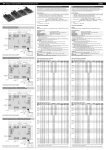
> raidcmd optctrl -c=1 -dst=2
>
> raidcmd property -tg=rc -c=1
RAID Controller #1
ID
: 0
Vendor
: LSI Corporation
Model
: LSI MegaRAID SAS 9267-8i
Firmware Version
: 3.140.05-1294
Cache Size
: 1,024MB
Premium Feature
: CacheCade
Battery Status
: Normal
Rebuild Priority
: Middle
Consistency Check Priority : Middle
Patrol Read
: Enable
Patrol Read Priority
: High
Buzzer Setting
: Disable
Power Saving(Hot Spare)
: Enable
Device Standby Time
: 2 hours
>
Use the “property” command to see the property of the RAID Controller.
-tq: Specify rc to see the property of the RAID Controller.
-c: The Number of the RAID Controller of which you are going to check the property.
Ex. Referring to property of the RAID Controller (RAID Controller Number 1)
raidcmd property -tg=rc -c=1
Only a single parameter can be set at a time. If execute "optctrl" command with -psd option
and -dst option at the same time, command is failed.
104