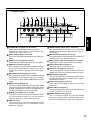
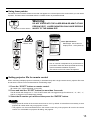
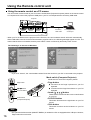
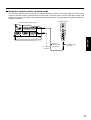
1
Setting-up
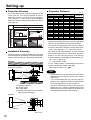
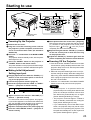
Projection Schemes
Projection Distances
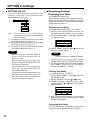
Any of the following four projection schemes can be
used with the PT-L6510E/L6600E projector
depending on user's needs or viewing conditions.
Use “OPTION 1” menu (chosen from the MAIN
MENU) to choose the appropriate projection scheme
(see page 34).
Projection Scheme 2
Ceiling mount
(Default position)
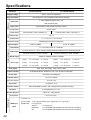
Projection distance: L
Diagonal length Height (SH) Width (SW) Wide (LW) Telephoto (LT)
0.76
1.02
1.27
1.52
2.03
2.54
3.05
3.56
4.06
4.57
5.08
5.51
6.10
6.60
7.11
7.62
0.46
0.61
0.76
0.91
1.22
1.52
1.83
2.13
2.44
2.75
3.05
3.35
3.66
3.96
4.27
4.57
0.61
0.81
1.02
1.22
1.63
2.03
2.44
2.84
3.25
3.66
4.06
4.47
4.88
5.28
5.69
6.10
—
1.4
1.8
2.1
2.9
3.6
4.3
5.1
5.8
6.6
7.3
8.1
8.8
9.5
10.3
11.0
1.4
1.9
2.4
2.9
3.9
4.9
5.9
6.9
7.9
8.9
9.9
10.9
11.9
12.9
13.9
14.9
Height
position: H
0.02 to 0.22
0.03 to 0.30
0.04 to 0.38
0.05 to 0.45
0.06 to 0.60
0.08 to 0.76
0.09 to 0.91
0.11 to 1.06
0.12 to 1.21
0.14 to 1.37
0.15 to 1.52
0.17 to 1.67
0.18 to 1.82
0.20 to 1.98
0.21 to 2.13
0.23 to 2.28
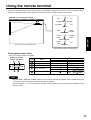
Setting-up dimensions which are not given in the above
table can be calculated using the formulas below.
If the screen size (diagonal) is SD, then the following
formulas is first used to obtain the screen width (SW).
SW = (SD x 0.0254) x 4 ÷ 5 (SD unit is inches)
The value for SW obtained above can then be used
with the following function to calculate the projection
distance for the wide lens position (LW) and the
projection distance for the telephoto lens position (LT).
LW = 1.831 x SW - 0.071
LT = 2.449 x SW - 0.066
For 16 : 9 aspect rations, the following formal can be
used to calculate the screen width (SW).
SW = (SD x 0.0254) x 16 ÷ 327
;;;
;
Projection Scheme 1
Rear projection Front projection
Table standing
Unit : m
Screen Size (4 : 3)
Installation Geometry
After the projector is roughly positioned, picture size
and vertical picture positioning can be finely adjusted
with the powered zoom lens and lens tilt mechanism.
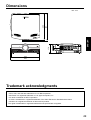
346
With optional ceiling mount
bracket (ET-PKL6500)
438
Side view
H
Note
L
SH
276
L
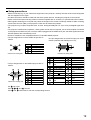
IN
OUT
L
IN
R
IN
S-VIDEO IN
R/R-Y/PR
VIDEO
G/Y
AUDIO IN
B/B-Y/PB
SYNC/HD
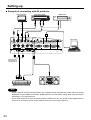
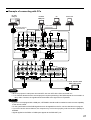
DVI-D
OUT
RGB
AUDIO AUDIO
IN
USB
OUT
IN
SERIAL
VD
RGB 1 IN
IN
H
OUT
RGB 2 IN
OUT
RGB OUT
REMOTE
> PC <
WIRED
TBMU152
Screen
L: Projection distance
SH: Image height
SW: Image width
H: Distance from centre of lens to bottom
edge of projected image.
Top view
Screen
314
87.5
157
SW
L
175
[unit : mm]
18
• The dimensions in the table above and the values
obtained from the above formulas may contain
slight errors.
• It is recommended that you use the projection
distance for the wide lens position (except in cases
where the diagonal picture size is 0.762 m).
• The above dimensions are the case when the
aspect ratio is 4:3. When an SXGA signal is input
and projected, the right and left ends of the picture
will be blanked the aspect ratio will be 5:4.