1
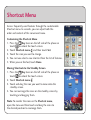
Editing a Video
Edit videos with Dare. Shorten lengthy videos, create still
images to be added to My Pictures, and add fade in and
out effects.
Key twice on the left side of the phone or
1. Press the
to unlock the touch screen.
touch
2. Touch Shortcut menu , then touch My Videos
.
3. Select a video by touching the box to the left of the
video image.
4. Touch Options
, and then touch Edit & Save.
5. Choose one of the editing options and customize your
video.