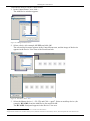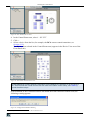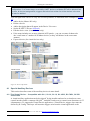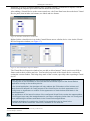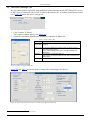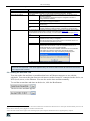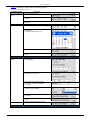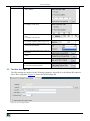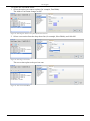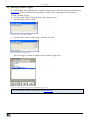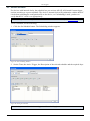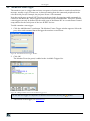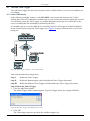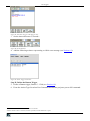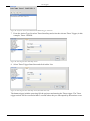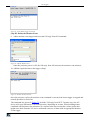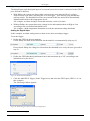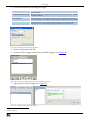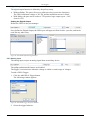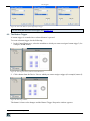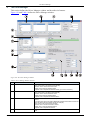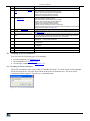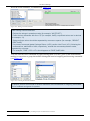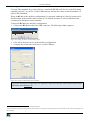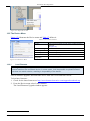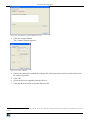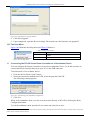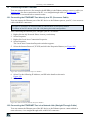
1
Kramer Electronics, Ltd. Kramer K-Config Guide Revision 6 Software Version 1.0.3.x Intended for Kramer Technical Personnel or External System Integrators. To check that you have the latest version, go to the DOWNLOADS section of our Web site at: http://www.kramerelectronics.com/support/?soft=k-config U Contents Contents 1 1.1 1.2 1.3 1.4 1.5 1.6 1.7 1.8 1.9 1.9.1 1.9.2 2 2.1 2.2 2.3 3 3.1 3.2 3.3 4 4.1 4.1.1 4.1.2 5 5.1 5.1.1 5.1.2 5.1.3 5.2 5.2.1 5.3 6 6.1 6.2 6.3 6.4 6.5 6.6 6.7 6.7.1 6.7.2 6.8 6.8.1 6.8.2 6.8.3 6.9 6.9.1 6.10 6.11 6.11.1 6.11.2 Introduction Applicable Room Controllers Available Commands for Room Control Ports Trigger Types Available Actions, Labels and Button Number Limits How to Save a Project Quick Start Initial Planning Glossary Defining the System System Requirements for the Kramer K-Config Operating Systems Kramer K-Config Software Installation Installing the “.NET Framework” Revision 2.0 Software Installing the USB Driver Installing Kramer K-Config Software The Peripheral Device Drivers Downloading the Drivers Importing xml Templates Importing the Drivers Defining the Control Room Special Auxiliary Devices The Virtual Device – Compatible with SL-1, SL-10, SL-12, SL-14RC, RC-74DL, SV-551 and SV-552 The RC-4 Remote Controller – Compatible with SL-1, SL-10, SL-12 and SV-552 Tab Area Settings Defining the Port Manager Defining the Ethernet Ports Setting the Volume Properties Uploading EDID Information The Device Settings Tab Setting the Date and Time The Web Settings Tab The Triggers The Built-in Triggers Adding Actions to a Trigger Replacing an Action Adding a Custom Trigger Set the Schedule The Monitor Event Trigger The Add Timer Trigger Power ON Example System Inactivity Example The GPI/O Trigger Digital Input Digital Output Analog Input The Button Trigger Button Behavior The Knob Turning Trigger Action Type The Port Command Action Type The Relay Command (Port Switch) Action Type 1 1 2 3 4 4 5 6 6 7 7 7 7 7 7 8 9 9 9 9 11 14 14 18 19 19 22 23 23 24 25 27 28 28 29 31 33 34 35 36 36 40 43 44 46 46 47 48 50 50 50 51 i Contents 6.11.3 6.11.4 6.11.5 6.11.6 6.11.7 6.11.8 6.11.9 6.11.10 6.11.11 6.11.12 7 8 9 9.1 9.1.1 9.1.2 9.1.3 9.1.4 9.2 9.2.1 9.2.2 10 10.1 10.1.1 10.1.2 10.1.3 10.2 10.2.1 10.3 11 12 12.1 12.2 The Button Light Action Type The Button Ignore Action Type The Set LCD Label Action Type The Switcher Command Action Type The Power Amplifier Action Type The Panel Lock Action Type The Timer Start/Stop Action Type The LEDs Light Action Type The States Action Type The Delay Action Type Write the Configuration Set K-NET IDs The Driver Manager Creating a Driver Command Creating a Serial Command Creating an IR Command Creating Serial Range Commands Kramer Machines Serial Commands Defining Queries Setting the Query Details (for Lamp Hours) Setting the Power Query The Kramer K-Config Menus The File Menu Starting a New Project Saving a Project Import/Export Devices The Device Menu Load Firmware The Help Menu Connecting the RC-6X Series Room Controller as a Standalone Device Connecting via the ETHERNET Connecting the ETHERNET Port directly to a PC (Crossover Cable) Connecting the ETHERNET Port via a Network Hub (Straight-Through Cable) 51 52 52 53 53 53 54 54 55 57 58 59 60 61 61 63 65 71 73 75 78 81 81 81 82 82 84 84 86 86 87 87 87 Figures Figure 1: Media Room Components List Figure 2: USB Driver Notice Figure 3: Driver Database Notice Figure 4: Setting a Working Directory Figure 5: Change Working Directory Window Figure 6: USB Driver Installation Notice Figure 7: The Driver Manager Window Prior to Installing the Drivers Figure 8: Importing the Driver Files Figure 9: Loading the Drivers Figure 10: Adding the Master Device Figure 11: The Master Device View Figure 12: The Auxiliary Device View Figure 13: The Remote Control Device View Figure 14: Configuration Mismatch Warning Figure 15: Device Operations Figure 16: The Basic Virtual Device Front Panel Figure 17: The Virtual Device Properties Window Figure 18: Custom Virtual Device Appearance in K-Config Figure 19: Editing the Virtual Device Appearance (Step 1) Figure 20: Editing the Virtual Device Appearance (Step 2) Figure 21: The “DVD Control” Virtual Device Front Panel ii 6 7 8 8 8 9 10 10 11 12 12 13 13 13 14 15 15 16 16 16 17 KRAMER: SIMPLE CREATIVE TECHNOLOGY Contents Figure 22: Setting the LCD and Button Label Names Figure 23: Final Appearance of the “DVD Control” Virtual Device Front Panel in K-Config Figure 24: The RC-4 Remote Controller Figure 25: The Port Manager Figure 26: The Drivers Tree Window Figure 27: Selecting a Driver Figure 28: Assigning a Driver to a Port Figure 29: Writing a Port Description Figure 30: Serial Settings Window Figure 31: The Port Commands Figure 32: The Assigned Driver in the Control Room Area Figure 33: Ethernet Settings Example Figure 34: Ethernet Port in the Port Command List Figure 35: Ethernet Port in the Port Command List (Select Command) Figure 36: Set Volume Properties Figure 37: Selecting the EDID File Figure 38: Loading the EDID File Figure 39: EDID File Uploaded Figure 40: The Device Settings Tab Figure 41: Device Selection Dialog Box Figure 42: The Device Settings Tab (Device with Time Server Options Connected) Figure 43: Web Settings Window Figure 44: The Standard Built-in Triggers List Figure 45: Selecting the Action Type (Port Command in this example) Figure 46: Selecting the Port Figure 47: Selecting the Command Figure 48: Action Description Figure 49: The New Action in the Action List Figure 50: The Action List Figure 51: The All On Trigger (with actions assigned) Figure 52: Button 6 - Click Action List Figure 53: Selecting the Action to be replaced from the Action List Figure 54: Selecting a New Action Figure 55: The New Action Added Figure 56: The Trigger Name Window Figure 57: Writing a Trigger Name Figure 58: The New Custom Trigger in the Available Triggers List Figure 59: The Scheduling Window Figure 60: Setting the Schedule Figure 61: The Monitor Events Trigger Window Figure 62: Adding a Monitor Event to the Available Triggers List Figure 63: Timer Trigger Flowchart – Power ON Example Figure 64: The Timer Trigger Name Window (Power ON) Figure 65: The Timer Trigger in the Triggers List Figure 66: Set the Timeout Figure 67: Timer Trigger Action List Figure 68: Projector Power ON Command in the Button Trigger Action List Figure 69: Selecting the Timer Start/Stop Action Figure 70: Selecting the Timer Start/Stop Action (Start State Selected) Figure 71: Active Button Trigger Action List Figure 72: Add the Monitor Event Figure 73: Monitor Event Action List Figure 74: Timer Trigger Flowchart – Inactivity Example Figure 75: The Timer Trigger Name Window (Inactivity) Figure 76: The Timer Trigger in the Triggers List Figure 77: Set the Timeout Figure 78: Timer Trigger Action List Figure 79: Button 1 Action List Figure 80: Add the Stop Timer Action 17 17 18 19 20 20 20 21 21 21 21 22 22 22 23 23 23 23 24 24 24 27 28 29 29 30 30 30 30 31 31 32 32 32 33 33 33 34 34 35 35 36 36 37 37 37 38 38 38 39 39 39 40 40 41 41 41 41 42 iii Contents Figure 81: Move the Stop Timer Action Figure 82: Add the Start Timer Action Figure 83: Button 1 Action List with Timer Triggers Figure 84: The Add GPI/O Trigger Button Figure 85: Selecting GPI/O via the Port Manager Figure 86: Selecting Digital Input for a Temperature Sensor Figure 87: GPI/O Threshold Window Figure 88: GPI/O Trigger Properties Window for Digital Input Figure 89: GPI/O Trigger Timeout (Digital Input) Figure 90: Selecting the GPI/O Trigger from the Available Triggers List Figure 91: Adding Actions to the GPI/O Trigger Figure 92: The GPI/O Defined as Digital Output Figure 93: The GPI/O Trigger Properties Window Figure 94: Select the Behavior of the Digital Input Trigger Figure 95: Selecting the Device from the Control Room List Figure 96: Selecting a Button Figure 97: The Button Trigger Properties Window Figure 98: Select the Button Behavior Figure 99: Button Trigger Properties Window (Activate while Pressed) Figure 100: Button Trigger Properties Window (Toggle 1-2-3-4) Figure 101: The Toggle Number in the Action List Figure 102: Button Trigger Properties Window (States) Figure 103: The State Num in the Action List Figure 104: Knob-Turning Trigger Figure 105: Port Commands Figure 106: The Relay Actions (Port Switch) Figure 107: Button Light Actions Figure 108: Button Color Selection Figure 109: Button Ignore States Figure 110: Set LCD Label Text Figure 111: Switcher Commands Figure 112: Power Amplifier Commands Figure 113: Panel Lock States Figure 114: Unlock Message Figure 115: Unlock PIN Code Figure 116: Timer Start/Stop States Figure 117: LEDs Light States Figure 118: Select LEDs to Light Figure 119: Definition of 4 States Figure 120: The States Action Type Figure 121: Setting the State Action List Figure 122: Setting the State Action List Figure 123: Using States in an Action List Figure 124: The Delay Action Type Figure 125: Loading a Configuration Figure 126: New Configuration Warning Window Figure 127: Configuration Mismatch Warning Figure 128: The K-NET ID Connect Window Figure 129: Setting K-NET ID Figure 130: The Driver Manager Window Figure 131: New Serial Command Window Figure 132: Writing a Serial Command Figure 133: Coloring the Serial Commands Figure 134: Setting the Device as an Auxiliary Device Figure 135: Connect to IR Capture Device Window Figure 136: New IR Command Window Figure 137: IR Command Area Window Figure 138: IR Emitter Wiring Figure 139: Defining a New Vendor, Device and Revision iv 42 42 42 43 43 43 44 44 45 45 45 46 46 47 47 47 48 48 48 49 49 49 49 50 51 51 51 52 52 52 53 53 53 54 54 54 54 55 55 56 56 56 57 57 58 58 59 59 59 60 61 62 62 63 63 64 64 64 65 KRAMER: SIMPLE CREATIVE TECHNOLOGY Contents Figure 140: Set the New Command Table Name Figure 141: The New Command Table Name Figure 142: The Table Details Window Figure 143: Setting the Number of Command Rows Figure 144: Entering a command Figure 145: Writing the Commands Figure 146: Selecting Every 3 Rows Figure 147: Logarithmic Row Selection Figure 148: Setting the LED Levels Figure 149: Adding Actions to a Trigger via the Command Table Figure 150: Setting a Specific Volume Level Figure 151: Selecting the LED Level Behavior Figure 152: Adding the Commands Table to the List Figure 153: VP-725XLA Serial Command Tables Figure 154: VP-725XLA Master_Volume Command Table Figure 155: Selecting commands 0 to 4 Figure 156: Selecting commands 0 to 4 and 8 to 11 Figure 157: The Selecting commands in the Port Command Area Figure 158: Queries Area Figure 159: Query Command Details Windows (for Lamp Hours and Power, respectively) Figure 160: Queries Area Figure 161: Query Details Window Figure 162: Writing the Query Command (Lamp Hours) Figure 163: Query Format Window (Lamp Hours) Figure 164: Alerts Window (Lamp Hours) Figure 165: Writing the Query Command (Power) Figure 166: Query Format Window (Power) Figure 167: Expected Result Table (Power) Figure 168: Alerts Window (Power) Figure 169: The File Menu Figure 170: New Project Warning Figure 171: Project Save as Window Figure 172: Import Devices Figure 173: Select Virtual Device to Save Figure 174: Export Device xml File Figure 175: Export Device xml Figure 176: The Device Menu Figure 177: Load Firmware Upgrade Window (SV-551) Figure 178: Connect Window Figure 179: Load Firmware Upgrade Window Figure 180: The Help Menu Figure 181: Transforming to the Standalone Configuration Figure 182: Local Area Connection Properties Window Figure 183: Internet Protocol (TCP/IP) Properties Window 65 66 66 67 67 68 68 69 69 70 70 70 71 71 71 72 72 73 73 74 75 75 76 76 77 78 79 80 80 81 81 81 82 83 83 84 84 85 85 86 86 86 87 87 v Contents Tables Table 1: Applicable Room Controllers Table 2: Room Controller Commands Available Table 3: Available Triggers for Room Controllers Table 4: Room Controller Devices Limitation Table 5: Glossary Table 6: Connect Dialog Box Table 7: The Device Settings Tab Features Table 8: Setting the Date and Time Table 9: Driver Manager Window Features Table 10: Query Format Details Table 11: Lamp Hour Query Response Formats Table 12: Projector Query Response (Lamp Hours) Table 13: Lamp Hour Query Format Details Table 14: Power Query Response Formats Table 15: Projector Query Response (Power) Table 16: File Menu Features Table 17: Device Menu Features Table 18: Help Menu Features 1 2 3 4 6 24 25 26 60 74 75 76 77 78 79 81 84 86 Table of References and Information Regarding Site-CTRL and Web Access MainPage Password Web Settings All Off / All On Triggers Custom Triggers Power On / Power Off Commands Grouping Commands in the Web Page Queries / Display Status Closing Site-CTRL and Web Access before Firmware Upgrade 21 25 27 28 33 61 61 73 84 Trademarks: © 2013Kramer Electronics Ltd. All rights reserved. Microsoft and Windows are either registered trademarks or trademarks of Microsoft Corporation in the United States and/or other countries. Android is a trademark of Google Inc. iOS is a registered trademark of Apple Inc. vi KRAMER: SIMPLE CREATIVE TECHNOLOGY Introduction 1 Introduction Welcome to Kramer Electronics! Since 1981, Kramer Electronics has been providing a world of unique, creative, and affordable solutions to the vast range of problems that confront the video, audio, presentation, and broadcasting professional on a daily basis. In recent years, we have redesigned and upgraded most of our line, making the best even better! Our 1,000-plus different models now appear in 11 groups 1 that are clearly defined by function. Congratulations on purchasing your Kramer room controller device, which is ideal for controlling A/V equipment and media room items. The configuration software is part of the package and includes the Kramer K-Config Guide2. The Kramer K-Config software lets you set a sequence of actions in a trigger (a macro) and assign them to any of the configurable buttons on any of the relevant RC devices, a schedule or an event. The RC buttons can be configured prior to installation 1.1 Applicable Room Controllers The K-Config Software is used to configure several types of room controllers 3 in a room control system, and applies to the Master Room Controllers 4 (Master RC), Auxiliary (Aux) devices and standalone devices as defined in Table 1: Table 1: Applicable Room Controllers Unit Used as Master RC SV-552 SV-551 SL-1 SL-10 SL-12 SL-14RC/N RC-74DL RC-63/RC-62 Series RC-53 series RC-54DL RC-13TC Virtual Device WP-500 WP-501 RC-2 RC-2C RC-52/N/A RC-5B2, RC-5B4 RC-3TB/U VP-31KSi VP-81KSi FC-29 Used as K-Net AUX device Used as Standalone Room Controller When no Aux K-NET devices are defined for this unit in the control room tree, the K-NET port will remain compatible with the RC-3TB/RC-3TBU button extensions inserts. See note 1 Can be used for limited automatic control over the display device Used only for learning IR commands from IR RC Note 1: Can extend SL-14RC only, when no other K-Net AUX devices are connected 1 GROUP 1: Distribution Amplifiers; GROUP 2: Switchers and Routers; GROUP 3: Control Systems; GROUP 4: Format/Standards Converters; GROUP 5: Range Extenders and Repeaters; GROUP 6: Specialty AV Products; GROUP 7: Scan Converters and Scalers; GROUP 8: Cables and Connectors; GROUP 9: Room Connectivity; GROUP 10: Accessories and Rack Adapters; GROUP 11: Sierra Products 2 Download up-to-date Kramer user manuals and guides from the Internet at this URL: http://www.kramerelectronics.com 3 For each Kramer machine, the installation process is described in a separate user manual. You can download the up-to-date Kramer user manuals and guides at: http://www.kramerelectronics.com 4 Defined as Masters in Master-Auxiliary Device setups 1 Introduction 1.2 Available Commands for Room Control Ports Since each Room Controller includes different ports 1, you will find that not all the available commands apply to your room controller. Table 2 defines the sections that apply to each room controller: Table 2: Room Controller Commands Available Machine IR OUT 6.11.1 RS-232 6.11.1 RC-2 RC-2C RC-52 RC-52N/A SV-551 SV-552 SL-1 RC-6x RC-6xL SL-14RC/N RC-74DL RS-485 6.11.1 Ethernet 6.11.1 GPI/O 6.8 Relay 6.11.2 Switcher 6.11.6 Power Amplifier 6.11.7 LCD Label 6.11.5 See note 1 See note 1 See note 1 See note 1 See note 1 See note 1 See note 1 RC-53D RC-53DLC RC-54DL RC-5B2, RC-5B4 RC-3TB/U RC-13TC WP-500 WP-501 VP-81KSI SL-10 See note 3 VP-31KSI SL-12 Button Light 6.11.3 See note 1 See note 1 See note 1 See note 1 Virtual Device Machine Ignore Button 6.11.4 Panel Lock 6.11.8 RC-2 RC-2C RC-52 RC-52N/A SV-551 See note1 See note1 SV-552 See note1 See note1 SL-1 See note1 See note1 RC-6x RC6xL SL-14RC/N RC-74DL RC-53D RC-53DLC RC-54DL RC-5B2, RC-5B4 Delay 6.11.12 Timer Start/Stop 6.11.9 States 6.11.11 LEDs Light 6.11.10 See note 1 See note 1 See note 1 See note 1 See note 1 See note 1 See note 2 RC-3TB/U RC-13TC WP-500 WP-501 VP-31SKi VP-81KSI SL-12 See note1 See note1 SL-10 See note1 See note1 Virtual Device See note 1 See note 1 See note 1 See note 1 Note 1: This command can be available, depending on the auxiliary device connected to the Master room controller Note 2: Only for digital models (for example, the RC-63DL) Note 3: The device mimics the button light commands of SL-14RC 1 For example, the RC-2 includes only an RS-232 port, so the other commands are not available for this machine 2 KRAMER: SIMPLE CREATIVE TECHNOLOGY Introduction 1.3 Trigger Types Available Table 3 lists the types of triggers that can be used for each room controller. Section 6 describes K-Config triggers in detail. Table 3: Available Triggers for Room Controllers Unit Device Startup All Off / All On (from Site-CTRL) Device Inactivity Custom (from Web page or scheduled) Buttons Knob Up / Down Scheduler Monitor Serial Input GPI/O RC-2 RC-2C RC-52 RC-52N/A SV-551 See note 1 See note 1 SV-552 See note 1 See note 1 SL-1 See note 1 See note 1 RC-6x RC-6xL SL-14RC/N See note 4 RC-74DL See note 4 RC-53D RC-53DLC RC-54DL RC-5B2, RC-5B4 See note 4 See note 5 RC-3TB/U RC-13TC WP-500 WP-501 VP-31KSI See note 2 See note 3 VP-81KSI See note 2 See note 3 SL-12 See note 1 See note 1 See note 4 SL-10 See note 1 See note 1 See note 4 Note 1: This command can be available, depending on the auxiliary device connected to the Master room controller Note 2: In the VP-81KSI, this trigger is activated when the first PC Graphics signal is detected on any one of its 8-input channels Note 3: In the VP-81KSI, this trigger is activated when there is no active PC Graphics signal on any of its 8-input channels for a user defined period of time Note 4: Available only if defined as a Master room controller Note 5: The device mimics the button triggers of SL-14RC 3 Introduction 1.4 Actions, Labels and Button Number Limits Table 4 lists the limit to the number of actions you can add to an action list as well as the number of buttons and labels in a Virtual Device when it is assigned to a specific Master RC: Table 4: Room Controller Devices Limitation Device Maximum Actions in each Action List Maximum Number of Aux Device Kramer Devices Maximum Number of Buttons in each Virtual Device when Unit is used as Master RC Virtual Devices Maximum number of labels in Master RC + Aux Devices (Kramer Aux and Virtual Devices defined) RC-2 4 – – – – RC-2C 8 – – – – RC-52 8 – – – – RC-52N/A 8 – – – – SV-551 See note 1 2 1 32 10 SV-552 See note 1 4 2 64 (32 per virtual device) 40 SL-1 See note 1 2 1 32 10 RC-6x See note 1 2 – – 6 SL-14RC/N See note 1 2 1 32 10 RC-74DL See note 1 4 2 64 (32 per virtual device) 40 RC-53D See note 1 – – – – RC-53DLC See note 1 – – – – RC-54DL See note 1 RC-5B2, RC-5B4 See note 1 RC-3TB/U See note 1 RC-13TC See note 1 2 – – 6 WP-500 See note 1 – – – – WP-501 See note 1 – – – – VP-81KSI 8 – – – – SL-12 See note 1 4 2 64 (32 per virtual device) 40 SL-10 See note 1 4 2 64 (32 per virtual device) 40 VP-31KSI Note 1: The number of actions is not limited by the software. Note that adding a large number of actions may slow the device response. 1.5 How to Save a Project When saving, writing or opening a new project, follow these important rules: • In order to make uploading the project as stable as possible, projects are saved automatically before writing a configuration to a device. This behavior may overwrite the existing project. If you want to keep the previous configuration as well, be sure to rename the project before writing it to the device • Always change a project name via “Save as” in the software. If the project name is changed outside the K-Config software (for example, via the Rename function in a Windows folder view), it will not open correctly in K-Config • When quitting K-Config, the open project will not be saved automatically. If needed, save the open project before quitting K-Config • When opening a new project, you will be asked to name it by saving it. The default project name that appears in the “Save as” window will be the name of the currently open Project. It is recommended to change the name of the filename, otherwise the new project will overwrite the current project 4 KRAMER: SIMPLE CREATIVE TECHNOLOGY Introduction 1.6 Quick Start To configure your Room Controller, follow these basic steps: Set the System Section 1 Install the Software Section 2 Install the Drivers Section 3 Define the Control Room Section 4 Define the Port Manager Section 5 Set the Triggers Section 6 Write the Configuration Section 7 Other Topics: Set K-NET IDs Section 8 The Driver Manager Section 9 The Menus Section 10 Connecting a Standalone Device Section 11 Connecting via the Ethernet Section 12 5 Introduction 1.7 Initial Planning Carefully plan your RC system layout to ensure a smooth and easy configuration and installation (refer to the separate user manuals 1), by: • Defining your requirements • Listing the peripheral devices and room items that will be included in the system • Planning the location of each device • Planning the function of each device Make a detailed list of the functions and commands required of the system devices, for example: Figure 1: Media Room Components List Once this list is finalized and approved, you can proceed with the configuration and installation process. Note that you can create a configuration file for a certain control setup without connecting the relevant Master or room controller to your PC 2 1.8 Glossary The glossary in Table 5 defines common terms used throughout this manual: Table 5: Glossary Action: Action Types: Driver: Monitor Event: Port Manager: Trigger: GPI/O A command that performs an action (for example, Mute the sound on the power amplifier). Actions are grouped into Action Types based on their function (for example, Button Light) Select an Action Type from the list to display its available ports and commands (for example, selecting the Relay command lists the ports and actions relevant for this action type) A user defined protocol that allows Kramer’s control products to communicate with a hardware peripheral, for example, a projector A special case of Trigger which contains a sequence of commands that only runs when a predetermined port event occurs (for example, the projector Power On command initiates a series of actions contained in the "Power" Monitor Event trigger) The Port Manager window lists the available ports, lets you write a description and assign a default driver for each port, as well as determine which port will appear in the Web Access Main page A sequence of commands (Action List) that can be run automatically, manually via the Web, or based on a schedule (for example, Device Startup) General Purpose Input/Output is a port that can be configured by the K-Config software 1 Refer to the separate user manual(s) and guides, which you can download at http://www.kramerelectronics.com 2 “Dry Configuration” 6 KRAMER: SIMPLE CREATIVE TECHNOLOGY Kramer K-Config Software Installation 1.9 Defining the System This section defines the minimum requirements for the Kramer K-Config and describes how to install your system. 1.9.1 System Requirements for the Kramer K-Config The system minimum requirements include: • 400MHz or faster processor • 128MB or more RAM • At least 300MB free hard disk space • Network connection for configuring devices or USB • Microsoft.NET® Framework 2.0 Service Pack 1, automatically installed (see Section 2.1) 1.9.2 Operating Systems Microsoft® Windows XP®, Microsoft Vista (32 or 64 bit) or Microsoft Windows 7 (32 or 64 bit) are the recommended operating systems 1. Other Windows versions are not supported. 2 Kramer K-Config Software Installation To install the software, do the following: • Check that “.NET Framework” Revision 2.0 software is installed or install it if it is missing (see Section 2.1) • Install the USB driver (see Section 2.2) • Install the Kramer K-Config software (see Section 2.3) 2.1 Installing the “.NET Framework” Revision 2.0 Software Prior to using the Kramer K-Config software, make sure that the “.NET Framework” Revision 2.0 software is installed on your PC. If it is not, you need to install it: • If you have a fast Internet connection, this software is automatically installed during the installation of the Kramer K-Config software • If you do not have a fast Internet connection, insert the CD-ROM into the CD-ROM drive, double click the dotnetfx.exe 2 file and follow the on-screen instructions 3 2.2 Installing the USB Driver If you wish to configure the RC device by connecting it via a USB cable, you need to download and install the USB driver. Otherwise you will be prompted to do so when starting the Kramer K-Config software: Figure 2: USB Driver Notice Install the Kramer USB driver from the installation disc or from our Web site at http://www.kramerelectronics.com/support/downloads.asp. 1 Windows NT does not support .NET 2.0 and cannot be used 2 File names are liable to change 3 Installation may take about 15 minutes 7 Kramer K-Config Software Installation 2.3 Installing Kramer K-Config Software To download Kramer K-Config 1 from the Internet: 1. Go to http://www.kramerelectronics.com/support/downloads.asp and download the file: “Kramer K-Config.zip” from the DOWNLOADS section. 2. Extract the file “Kramer K-Config.zip” package, which includes the Kramer K-Config application setup and the Kramer device drivers 2, to a folder (for example, C:\Program Files\Kramer K-Config). 3. Install the Kramer K-Config application. When running Setup, you are prompted to set the working directory (see Figure 3): Figure 3: Driver Database Notice 4. Click OK. The following window appears (see Figure 4): Figure 4: Setting a Working Directory 5. Select or create a new working directory 3 (see Figure 5). Figure 5: Change Working Directory Window 6. Continue to run the setup according to the installation instructions. 1 File names are liable to change from time to time 2 Mostly for matrix switchers and switchers 3 The working directory will keep the information that is essential for operating the software. This information will remain unchanged while upgrading the software 8 KRAMER: SIMPLE CREATIVE TECHNOLOGY The Peripheral Device Drivers 3 The Peripheral Device Drivers The RC system peripheral devices have device drivers that let them communicate with computers. The device driver needs to be installed so that the computer can recognize it and control it. The Kramer K-Config software uses driver commands to control these peripheral devices. Check—according to your list of peripheral devices—that you have all the required drivers: • Kramer machines have drivers that are provided within the package • Other peripheral device drivers that are included in the package If the peripheral device that you are using is not included in the drivers package, you can manually write the relevant commands, as described in Section 9.1. Driver commands that have a data range (for example, volume adjustment) can be written into the Tables area, as described in Section 9.1 This section describes how to: • Download the drivers of the peripheral devices (see Section 3.1) • Install the drivers (see Section 3.3) 3.1 Downloading the Drivers Download the required drivers to a folder, for example, C:\Media-Room-1\Peripheral Device Drivers. 3.2 Importing xml Templates Import the device template xml files via the Import Device item in the File menu. The device templates (for real or virtual devices) are added to the Master/Auxiliary device list (and folder). For further details, see Section 10.1.3. 3.3 Importing the Drivers The peripheral device drivers are installed via the Driver Manager window, defined in Figure 130 and Table 9: To access the Driver Manager window: 1. Open the Kramer K-Config program. 2. If the USB driver is not installed, the following window will appear: Figure 6: USB Driver Installation Notice 3. From the File menu, click Driver Manager. The Driver Manager 1 window appears (see Figure 7). 1 The Driver Manager window features and functions are described in Section 9 9 The Peripheral Device Drivers Figure 7: The Driver Manager Window Prior to Installing the Drivers 4. Click Import Drivers. The Open window appears (see Figure 8). Figure 8: Importing the Driver Files 5. Select the drivers that you need and click OK. The Driver Manager window shows the selected drivers (vendors, devices, revisions and commands are specified), see Figure 9: 10 KRAMER: SIMPLE CREATIVE TECHNOLOGY Defining the Control Room Figure 9: Loading the Drivers 6. Click OK (or Apply and then OK). The drivers are now installed 1. The Driver Manager features are defined in Section 9 4 Defining the Control Room You can define the control devices setup in the room via the Control Room. Depending on the Master RC, up to four Aux K-NET devices and two Virtual Devices can be used in the same control setup. At any point you can right click a control device to perform further functions. It is recommended to open a new project before defining the control room. At any point, you can save (or save as…) the project, see Section 1.5. In the following example the SV-552 is selected as the Master room controller, the RC-63DL is the connected auxiliary panel 2 and the RC-4 is the IR remote control transmitter. 1 The driver commands appear in the Web Access page 2 Some of the devices in the Add Device list (for example, the WP-500) do not accept auxiliary devices 11 Defining the Control Room To define the devices via the Control Room: 1. In the Control Room 1 area, click +. The Add Device window appears: Figure 10: Adding the Master Device 2. Select a device (for example, SV-552) and click OK. The selected device name appears in the Control Room area, and the image of the device appears in the Device View area of the Front Panel tab: Figure 11: The Master Device View 3. Select the Master device (1 - SV-552) and Click + again 2. Select an auxiliary device (for example, RC-63DL) from the Add Device list and click OK. The RC-63DL front panel appears in the Device View area. 1 Right click the “Control Room” area to rename it or to add a new Master device 2 Right click the master device to add an auxiliary device, delete the master device and auxiliary devices, add a description and set the K-NET™ ID 12 KRAMER: SIMPLE CREATIVE TECHNOLOGY Defining the Control Room Figure 12: The Auxiliary Device View 4. In the Control Room area, select 1 - SV-552 1. 5. Click +. 6. Select a device from the list (for example, the RC-4 remote control transmitter, see Section 4.1.2). The RC-4 (when selected in the Control Room area) appears in the Device View area of the Front Panel tab). Figure 13: The Remote Control Device View To add additional auxiliary devices (depending on the Master RC selected, up to four Aux KNET devices and two Virtual Devices can be used in the same control setup, see Table 4), repeat the above steps If the definition of the Control Room does not match the actual connected control room, the following warning appears: Figure 14: Configuration Mismatch Warning 1 It is necessary to select the Master controller to add an additional device 13 Defining the Control Room Note: Be sure that your control room setup tree is correct before continuing with the configuration. If, at a later stage, an auxiliary K-NET device or a Master RC will be deleted from the tree, all the port assignments, triggers and action lists written for all the devices in the tree will also be deleted You can right-click a device to carry out several operations, as illustrated in the examples in Figure 15: • Add a device (Master RC only) • Delete a device • Add a description that will appear in the Device View area • Set the K-NET™ ID (see Section 8) • Edit the device view (virtual device only) • If the setup includes two or more identical AUX panels – you can set some of them to be the “exact same as” another AUX/Master device (so they will behave in the exact same manner) • Export a device (for virtual devices only) Master Room Controller Master Room Controller Auxiliary Device Auxiliary Device Virtual Device Virtual Device Figure 15: Device Operations 4.1 Special Auxiliary Devices This section describes some of the auxiliary devices in more detail. 4.1.1 The Virtual Device – Compatible with SL-1, SL-10, SL-12, SL-14RC, RC-74DL, SV-551 and SV-552 A virtual auxiliary application can be developed 1 by the installer and used as a virtual user room control interface under a common OS (iOS®, Android™ and so on) to control room functions via IT infrastructures. To support the Virtual Device application, a Virtual Device triggers layer must be defined by K-Config. This layer will associate triggers sent from the virtual application to the 1 See the Kramer "Virtual Device Build Guidelines" on our Web site at http://www.kramerelectronics.com 14 KRAMER: SIMPLE CREATIVE TECHNOLOGY Defining the Control Room Master RC to a series of control actions. Once you have created a Virtual Device layout, it can be shared using the Import/Export XML function under the File menu. After adding a Virtual Device to the room control tree 1, the Front Panel area shows the basic Virtual Device panel, that includes six buttons, two labels and two frames: Figure 16: The Basic Virtual Device Front Panel Right click the virtual device icon in the Control Room area to edit the device view via the Virtual Device Properties window (see Figure 17) Figure 17: The Virtual Device Properties Window The Virtual Device Properties window lets you add or delete buttons 2, labels (active text field) or frames and set their position and size. You can also keep track of the virtual device versions by setting the version number. This helps keep track of the version, especially when exporting a virtual device. Note, that the exact appearance of the Virtual Device triggers layer in K-Config has no real correlation to the look-and-feel and button layout of the Virtual Device application running on the auxiliary device. In the virtual application, the developer will only address the ID Numbers of the buttons and labels that were defined in K-Config as part of the Virtual Device, but their appearance in KConfig have no significance or relation to the appearance of these buttons and labels in the virtual application. The appearance of the layout functions of the configured Virtual Device make the representation of this trigger layer easy and straightforward to use when configuring Action lists in K-Config and when addressing the buttons and labels in the Virtual Device applications. Complete guidelines for creating the Virtual Device application can be found in the " Virtual Device Build Guidelines" document, available on our Web site. 1 You can add up to two virtual devices (as determined by the Master RC) 2 You can add up to 32 buttons 15 Defining the Control Room For example, you can change the appearance of the virtual front panel as illustrated in Figure 18: Figure 18: Custom Virtual Device Appearance in K-Config To change the appearance of the virtual device front panel, as illustrated in Figure 18, do the following 1: 1. In the Virtual Device Properties window, delete buttons 6, 5 and 4 (the order will always be from the higher number to the lower 2), frame 2 and frame 1, and Label 2, as illustrated in Figure 19: Figure 19: Editing the Virtual Device Appearance (Step 1) 2. Set the size of the front panel, the size of the buttons (up to 32 buttons can be added), the label size and their position, as well as the Device Name (see Figure 20): Figure 20: Editing the Virtual Device Appearance (Step 2) The Virtual Device appears in the Front Panel area (see Figure 21): 1 You do not have to follow the subsequent steps in the same order 2 Always delete items from the highest number to the lowest 16 KRAMER: SIMPLE CREATIVE TECHNOLOGY Defining the Control Room Figure 21: The “DVD Control” Virtual Device Front Panel 3. Right click the label and buttons to name them (see Figure 23): Figure 22: Setting the LCD and Button Label Names Figure 23 illustrates the final appearance of the virtual device: Figure 23: Final Appearance of the “DVD Control” Virtual Device Front Panel in K-Config Note: The Virtual Device View button sizes, as well as their name and location in K-Config have no functional meaning in the Virtual Device application. Only the number of defined buttons (three) and the label (interactive field text) are correlated to the Virtual Device application. 17 Defining the Control Room 4.1.2 The RC-4 Remote Controller – Compatible with SL-1, SL-10, SL-12 and SV-552 The RC-4 remote controller transmitter (see Figure 24) is used to control the RC devices in the room 1. Each button on the remote control can trigger a series of actions that are defined by the Kramer K-Config Software. To activate a series of actions, point the transmitter at the front panel receiver of the room controller device, or, alternatively, you can point the RC-4 at an external remote IR receiver available separately (C-A35M/IRR-50). An extension cable, for an extended range of up to 60 meters is also available (C-A35M/A35F-50). Figure 24: The RC-4 Remote Controller 1 Download up-to-date Kramer user manuals from the Internet at this URL: http://www.kramerelectronics.com 18 KRAMER: SIMPLE CREATIVE TECHNOLOGY Tab Area Settings 5 Tab Area Settings The tab area includes the: • Machine front panel – shows the front panel of the selected machine and if available, lets you configure a button trigger • Port Manager (see Section 5.1) • Device Settings (see Section 5.2) • Web settings (see Section 5.3) 5.1 Defining the Port Manager The Port Manager tab defines the ports on the selected K-NET device (Master RC or Aux K-NET device) or standalone room controller and lets you write a description and assign a default driver to each port. Note that ports on auxiliary devices can be used only for sending outgoing commands from the auxiliary device to an AV device. If you need to use Monitor event triggers or Queries functions, which rely on bidirectional communication, connect the AV device to the K-Net master device. For similar reasons, GPI/O ports on the auxiliary devices will be disabled. To define the port manager (for example, a projector driver that is connected to the RS-232 9-pin D-sub port of an SV-552), do the following: 1. In the Control Room area, select 1-SV-552. 2. Select the Port Manager tab. Figure 25: The Port Manager 3. Click the Driver area next to [1-SV-552] RS-232.D_Type. 4. The following window opens: 19 Tab Area Settings Figure 26: The Drivers Tree Window 5. Select and double-click the relevant manufacturer. 6. Select the desired driver and click OK. Figure 27: Selecting a Driver 7. The projector driver is assigned to the RS-232 port: Figure 28: Assigning a Driver to a Port 8. If required, click the Description field to change the description: 20 KRAMER: SIMPLE CREATIVE TECHNOLOGY Tab Area Settings Figure 29: Writing a Port Description 9. In the same way add a driver to each of the other ports. 10. Click the Properties field to define the Serial settings for the serial ports: Figure 30: Serial Settings Window 11. When defining the ports of a Master RC which is Site-CTRL compatible, check the radio button “Main” to select the port which will appear in the main display of the Master RC Web pages 1. The same display device will be monitored in the Site-CTRL overview page. 12. If required, change the data field manually (although it changes automatically when setting the driver), by clicking the relevant properties field: The assigned driver automatically appears in the Port Command tab when the relevant port is selected. In the example above, RS-232.D_Type port is selected and the command drop-down list includes all the driver commands (see Figure 31): Figure 31: The Port Commands You can, at any time, change the driver either via the Port Manager tab or the Port Driver area. The assigned driver also appears in the Control Room area under the device it is connected to, as illustrated in Figure 32: Figure 32: The Assigned Driver in the Control Room Area 1 The same display device will be monitored in the Site-CTRL overview page 21 Tab Area Settings 5.1.1 Defining the Ethernet Ports The Ethernet ports let you send serial commands via the Ethernet port to up to three IP addresses located on the same subnet. To define an Ethernet port, do the following 1. Set the Ethernet port Driver and Description. 2. Click the Properties field to define the Ethernet settings: Figure 33: Ethernet Settings Example 3. The Ethernet port appears in the Port Command list and can be used to send any commands or triggers to the device. Figure 34: Ethernet Port in the Port Command List Figure 35: Ethernet Port in the Port Command List (Select Command) 22 KRAMER: SIMPLE CREATIVE TECHNOLOGY Tab Area Settings 5.1.2 Setting the Volume Properties Set the volume properties for SV-551 and SV-552 (analog or digital), as illustrated in Figure 36. Figure 36: Set Volume Properties Set the volume control to: Analog, if the volume of the integrated amplifier is controlled by an external analog audio knob (via the SV-551/SV-552 10k volume level input port, connected either to an analog audio knob of a K-NET Aux device like the RC-63AL, or any other compatible volume level knob) Digital, if the volume of the integrated power audio amplifier is controlled by an auxiliary device with a digital knob (for example, RC-63DL). In this case, the Amplifier port should be “connected” in the port manager to the relevant RC-63DL to achieve volume control. For digital audio level control, select the auxiliary device that will control the audio 5.1.3 Uploading EDID Information You can upload EDID information (created with the Kramer EDID Designer application, for compatible devices) via the Port Manager tab. For example, to load the EDID for the WP-501, click the driver area: Figure 37: Selecting the EDID File Select the EDID file to upload and click Open: Figure 38: Loading the EDID File The EDID file is uploaded: Figure 39: EDID File Uploaded The EDID information will be uploaded together with the entire open configuration project, after clicking the “Write Configuration” button. 23 Tab Area Settings 5.2 The Device Settings Tab Device setting readout is possible with standalone room controllers and K-NET Master RC or Aux K-NET devices connected with a K-NET cable to their Master RC, as defined in the Room Control tree. Figure 40 shows the device settings tab: Figure 40: The Device Settings Tab 1. Click Connect To Device: The Connect window appears (see Figure 41). 2. Select the connection method to the standalone controller or Master RC. Table 6: Connect Dialog Box Feature Function Connection Method Area Check to select the connection to the device via the Ethernet, USB or Serial port Ethernet Area IP: Type the IP address of the device to which you want to connect. Port: shows the port number. Factory Default Address Button: Click to reset the IP address to its default value USB Area Port: select the communication USB port. Refresh Ports: click to check if there are ports ready to connect on the Kramer device Serial Select Port: select the communication port Figure 41: Device Selection Dialog Box Figure 42 and Table 7 define the device settings after connecting to the device 1: U U U U 26F Figure 42: The Device Settings Tab (Device with Time Server Options Connected) 1 The actual visible settings change according to the device 24 KRAMER: SIMPLE CREATIVE TECHNOLOGY Tab Area Settings Table 7: The Device Settings Tab Features Feature Function Device General Settings Area Device ETH Settings Area Includes the device information (master and auxiliary device) Device Secure Settings: Secure Mode: 27F User pass: Admin Pass OFF – the product definitions and configuration can be changed without requiring a password ON – a password is required to change the configuration and view or change the device definitions This password lets you view the device definitions in Web Access and SiteCTRL without changing the definitions Lets you change the device definitions and configuration via Web Access and K-Config Unlock Keypad PIN code: Date and Time 1 Ethernet information (If required, you can change information) and DHCP Enabled 2 Set the key sequence to press to unlock the keypad in case it is locked by a trigger (activated by pressing a button, a schedule or via Web Access) This area applies to devices with an Ethernet connection and time server settings options and lets you set the device’s internal clock to use with the scheduler (see Section 6.5). The date and time can be set either manually, via a local server or via the Ethernet (see Section 5.2.1) Read date and time Click button to read the device’s current date and time Check Set from PC on Write Configuration to have the date and time Set Date and Time updated whenever writing a configuration. Click the Set Now button to set the time from a connected PC Clock or to use a Custom Date (selected by the user) DST Daylight Saving Time or Summer Time correction. Set to ON if necessary Set the time zone relevant to UTC (Coordinated Universal Time). Timezone The time zone can be set from -13 to +12 hours relative to UTC in 15 minute intervals (00, 15, 30 or 45 minute intervals). For example, the time zone in Adelaide, Australia is UTC +9:30, therefore 9:30 needs to be entered in Timezone for that particular location. If the value entered is out of range, the following message appears: 28F U U U U Sync Date and Time Check “No Sync” or “From Server Address” Note that the Date and Time area appears only for devices that include an Ethernet connector and support this function 5.2.1 Setting the Date and Time 56B You can set the date and time on machines that have an Ethernet connector to use with the scheduler. You can set the time from several sources such as from a PC connected to the device, an NTP (local) server, or the Ethernet. You can also set the time and date manually. To read the current date and time on the device, click the Read button: The device time and date appears: 1 Dynamic Host Configuration Protocol: Allows the network administrator to distribute IP addresses from a central point and automatically send a new IP address when an Ethernet point is plugged into a different network location 2 Since the button number does not appear on the actual keypad, the system integrator should inform the user regarding the key sequence 25 Tab Area Settings Table 8 summarizes date and time setting options: Table 8: Setting the Date and Time Set Date and Time Procedure From a connected PC 1. Click the “Set Now” button. Clock 2. Click Read (from device) to check the updated values. If you want the time and date to be set whenever writing a configuration, check “Set from PC on Write Configuration”. Manually 1. Click the dropdown box. 2. Select the desired date and time from the dropdown box. For example, select January 10th. 3. Click the Set Now button. 4. Click Read (from device) to check the updated values. From an NTP (local) server 1. In the Sync Date and Time area, check “From Server Address”. 2. Type the IP address. For example, 192.168.0.6 3. Set the time zone according to UTC. For example, the time in Jerusalem is UTC +2:00 4. Set the DST to ON (for adjusting the time to the “summer” clock) if required. 5. Click the Read (from server) button (below the IP number). 6. Click Read (from device) to check the updated values. The device updated date and time appear 26 KRAMER: SIMPLE CREATIVE TECHNOLOGY Tab Area Settings Set Date and Time From the Ethernet Procedure 1. In the Sync Date and Time area, check “From Server Address”. 2. Type the IP address. For example, 64.90.182.55 3. Enter the Gateway 1 in the Device ETH Settings area. For example, 192.168.0.254 4. Set the time zone according to UTC. For example, the time in Athens is UTC +2:00 5. Set the DST to ON (for adjusting the time to the “summer” clock) if required. 6. Click the Read (from server) button (below the IP number). 7. Click Read (from device) to check the updated values. The device updated date and time appear In case there was a problem reading the date and time, the following message appears: 5.3 The Web Settings Tab The Web settings are used to set the Web page language, logo and so on for Master RCs that are Site-CTRL compatible. Figure 43 shows the Web Settings tab: Figure 43: Web Settings Window 1 Done by the Network administartor 27 The Triggers 6 The Triggers A trigger comprises a series of actions that can be activated by an event, a press of a button or a preset schedule. In addition to the four built-in triggers (see Section 6.1), the Kramer K-Config also lets you create other custom triggers. 6.1 The Built-in Triggers The built-in triggers are important for proper operation of the system: • The All Off and All On triggers – the actions assigned to the All Off and All On triggers apply to the On and Off actions in the Site-CTRL Management Tool software, as well as in the built-in Web pages Macro tab • The Device Startup trigger – lets you assign a series of actions that will define the status of the room system following power-up, and will constitute the basic system state 1. For example, define the light status of the OFF button of the device upon power up; set the main display status to OFF and so on • The Device Inactivity trigger – lets you define the room status in case of device inactivity 2 for a defined period (from 0 to 180 minutes). For example, power down the main display and then roll up the projector screen Figure 44: The Standard Built-in Triggers List You can: Delete a trigger 3 Clear the trigger actions Move a trigger up in the trigger list Move a trigger up in the trigger list Copy the actions from a selected trigger Paste actions to a selected trigger Edit a Monitor Event trigger 1 For VP-81KSI only, startup is defined as detection of a PC-Graphics input signal 2 No button was pressed on a standalone controller or any K-NET device. Note that, for VP-81KSI only, inactivity relates to the incoming syncs on the PC Graphics input channels 3 This button does not apply to the built-in triggers 28 KRAMER: SIMPLE CREATIVE TECHNOLOGY The Triggers 6.2 Adding Actions to a Trigger To add actions to a trigger (for example, to the built-in All On trigger), do the following: 1. In the Trigger area, select the All On trigger. 2. Select the Action Type 1 (for example, Port Command). Figure 45: Selecting the Action Type (Port Command in this example) 3. Select the desired port (for example, RS-232.D_Type): Figure 46: Selecting the Port As illustrated in Figure 46, the SV-552, RC-63AL, RC-63DL and SL-12 ports appear in the list because they are included in the system. Each action type shows the relevant commands for all the machines included in the system. In this example, the system includes SV-552, RC-63DL, RC-4 (see Section 4.1.2), RC-63AL, SL-12, RC-53DLC and 2 Virtual Devices (see Section 4.1.1). The Port Command includes actions for the SV-552, RC-63DL, RC-63AL and SL-12 (there are no ports on the RC-4, RC-53DLC or the Virtual Device). 4. Select the Command (for example, Power: On): 1 Selecting an Action Type from the list displays the list of its available commands 29 The Triggers Figure 47: Selecting the Command The Description area specifies the action to be added to the action list Figure 48: Action Description 5. Click the Add to List button. The action is added to the Action List area (the name of the active trigger appears at the top of the list): Figure 49: The New Action in the Action List 6. Select the “Add New Action” line in the action list and repeat the above procedure to add additional commands 1: Figure 50: The Action List 1 To replace a command, see Section 6.3) 30 KRAMER: SIMPLE CREATIVE TECHNOLOGY The Triggers You can: Delete an action Copy an action Move actions up or down Once a Trigger is assigned with actions, its font is bold and no longer italic: Figure 51: The All On Trigger (with actions assigned) If the assigned driver has a table linked to it via the Driver Manager, it will appear in the Port Command area (see Figure 149). 6.3 Replacing an Action This section describes how to replace an existing action. In the following example, the Button 1 – Fast Blink action is replaced with Button 1 – Off. Figure 52 illustrates an existing action list: Figure 52: Button 6 - Click Action List 31 The Triggers To replace the Fast Blink action: 1. Select the action you want to replace (for example, Fast Blink). The Add to List button changes to OK. Figure 53: Selecting the Action to be replaced from the Action List 2. Select a new action from the drop-down list (for example, Slow Blink), and click OK: Figure 54: Selecting a New Action The new action replaces the previous one: Figure 55: The New Action Added 32 KRAMER: SIMPLE CREATIVE TECHNOLOGY The Triggers 6.4 Adding a Custom Trigger A custom trigger, when added to the Available Triggers list, can be included in the schedule (see Section 6.5) or activated from the Web pages (in Site-CTRL-compatible room controllers). To add a Custom Trigger: 1. Click the Add Custom Trigger button (in the Triggers area). The following window appears: Figure 56: The Trigger Name Window 2. Type the name of the custom trigger, and then click OK: Figure 57: Writing a Trigger Name The new trigger (in black) is added to the Available Triggers list: Figure 58: The New Custom Trigger in the Available Triggers List You can now add actions to this trigger (see Section 6.2). 33 The Triggers 6.5 Set the Schedule For devices with internal clocks, the schedule lets you activate All Off, All On and Custom trigger actions according to a preset schedule. The device's internal clock will synchronize with the host PC clock when uploading the configuration file to the device, so if scheduling is used, you have to verify that the PC clock is set appropriately. Before setting the schedule, you need to set the device’s date and time (see Section 5.2.1) To set a schedule, do the following: 1. Click the Set Schedule button. The Scheduling window appears: Figure 59: The Scheduling Window 2. Set the Time, the Active Trigger, the Description of the selected schedule and the required days: Figure 60: Setting the Schedule If required, you can edit or delete a trigger and then click Apply. 34 KRAMER: SIMPLE CREATIVE TECHNOLOGY The Triggers 6.6 The Monitor Event Trigger The monitor event is a trigger that activates a sequence of actions when a certain selected driver message, usually a reply of some sort, is detected coming from the connected peripheral on the relevant serial port (for example, the projector Power: Off command). Note that serial ports on Aux K-NET devices can be used only for outgoing serial commands, in contrast to the Master RC which supports bidirectional serial communication. Therefore, monitor event triggers can only be defined for the serial ports of the Master RC in a certain Room Control setup and not for the serial ports of the Aux K-NET devices. To add a monitor event trigger: 1. Click the Add Monitor Event button. The Monitor Events Trigger window appears. Select the port, driver and command that will trigger the monitor event actions: Figure 61: The Monitor Events Trigger Window 2. Click OK. The Monitor Event (in green) is added to the Available Triggers list: Figure 62: Adding a Monitor Event to the Available Triggers List You can edit the trigger to respond to a different command by clicking the button. 3. Add actions to the trigger (see Section 6.2). 35 The Triggers 6.7 The Add Timer Trigger The Add Timer trigger lets the control system wait for a defined time or event to occur and then act accordingly. 6.7.1 Power ON Example In the following example, button 3 on the RC-63DL is used to turn the projector ON. If after sending the power ON command no suitable reply is received from the projector during the selected 5-second time period, the Timer trigger is executed (displaying some type of a visible alert to the user or resending the ON commands, as defined by the user). If a suitable reply is received within the 5-second time period, it will trigger a predefined Monitor Event action list which stops the Timer trigger (see Figure 63) and prevents the alert or error from being sent. Figure 63: Timer Trigger Flowchart – Power ON Example This setup includes three simple steps: Step I: Define the Timer Trigger Step II: Define the Button trigger (which includes the Timer Trigger Start state) Step III: Define the Monitor Event Trigger (which includes the Timer Trigger Stop state) Step I: Define the Timer Trigger 1. Click the Add Timer button. The Timer Trigger Name window appears. Type the Trigger name (for example, PRJON): Figure 64: The Timer Trigger Name Window (Power ON) 2. Click OK. The Timer trigger appears (in red) in the available triggers list: 36 KRAMER: SIMPLE CREATIVE TECHNOLOGY The Triggers Figure 65: The Timer Trigger in the Triggers List 3. Set the timer timeout to 5 seconds 1: Figure 66: Set the Timeout 4. Add the following actions 2 representing a visible error message (see Section 6.2): Figure 67: Timer Trigger Action List Step II: Define the Button Trigger 5. Define a Button trigger, Button 3 - Click (see Section 6.8). 6. From the Action Type list select Port Command and add the projector power ON command: 1 5 seconds is a sufficient time for the command to be executed 2 Button 3 blinks in red for 5 seconds (to indicate a problem) and then illuminates in green 37 The Triggers Figure 68: Projector Power ON Command in the Button Trigger Action List 7. From the Action Type list select Timer Start/Stop and select the relevant Timer Trigger (in this example, Timer - PRJON: Figure 69: Selecting the Timer Start/Stop Action 8. Select Timer Trigger State Start and click Add to List: Figure 70: Selecting the Timer Start/Stop Action (Start State Selected) The button trigger includes powering ON the projector and starting the Timer trigger. The Timer trigger actions will be executed within 5 seconds unless they are interrupted by the monitor event. 38 KRAMER: SIMPLE CREATIVE TECHNOLOGY The Triggers Figure 71: Active Button Trigger Action List Step III: Define the Monitor Event 9. Add a monitor event trigger and select the ON reply from ON command: Figure 72: Add the Monitor Event Once the projector power is ON, the ON reply from ON activates the monitor event action(s): 10. Add the required action to the trigger (Stop): Figure 73: Monitor Event Action List Once the projector replies, the monitor event command is executed, the timer trigger is stopped and normal operation is carried on. The command list, shown in Figure 72, includes "ON reply from OFF". In some cases, the AV device will reply differently to the same question, depending on its state. When building timers combined with monitor event structures, be certain to take into account the various replies that might come back from the AV device and handle each one of them with an appropriate Monitor Event trigger. 39 The Triggers 6.7.2 System Inactivity Example In this example, the Timer trigger is used to perform a sequence of actions if no signals are fed into the AV room system for a predefined time period (for example, 20 minutes, see Figure 74). A switcher (for example – the Kramer VP-411DS) will send out a dedicated serial command once all PC sources are disconnected. We will use this command to trigger a 20 minute timer. Each action list will start with a command to stop this timer. In the System Inactivity timer we will shut down the display device and perform other shut off tasks. Figure 74: Timer Trigger Flowchart – Inactivity Example To indicate inactivity, you have to add a “Stop” trigger prior to the sequence of actions and a “Start” trigger upon completion of the actions sequence. This setup includes two steps: Step I: Define the Timer Trigger (which will be used for all the triggers) Step II: Define the Button (and other) triggers Step I: Define the Timer Trigger 1. Click the Add Timer button. The Timer Trigger Name window appears. Type the Trigger name (for example, System inactivity): Figure 75: The Timer Trigger Name Window (Inactivity) 2. Click OK. The Timer trigger (in red) appears in the available triggers list: 40 KRAMER: SIMPLE CREATIVE TECHNOLOGY The Triggers Figure 76: The Timer Trigger in the Triggers List 3. Set the timeout to 20 minutes 1: Figure 77: Set the Timeout 4. Add the following actions 2 (see Section 6.2): Figure 78: Timer Trigger Action List Step II: Define the button (or other) Trigger 5. Select a trigger from the Triggers list (for example, Button 1): Figure 79: Button 1 Action List 1 Or any other preferred time period 2 You can also add other actions, such as turning the lights off, powering down the projector, and so on 41 The Triggers 6. Add the Stop Timer trigger: Figure 80: Add the Stop Timer Action 7. Move the Stop Timer trigger before the sequence of actions for this trigger: Figure 81: Move the Stop Timer Action 8. Add the Start Timer trigger: Figure 82: Add the Start Timer Action 9. Figure 83 shows the Button 1 trigger action list: Figure 83: Button 1 Action List with Timer Triggers 10. In the same way, you can add the Stop and Start actions to each trigger. Adding the Stop action prior to the actual action list, stops the System inactivity trigger. The Start action that follows the action sequence starts the 20 minute timer and will be active until a button will be pressed or a trigger activated within the 20 minute period. 42 KRAMER: SIMPLE CREATIVE TECHNOLOGY The Triggers 6.8 The GPI/O Trigger The GPI/O (General Purpose Input/Output) port can be configured via the K-Config software. Using GPI/O, you can select a wide range of states that can trigger a series of actions, for example, when an alarm is set or if the room temperature exceeds a certain value. Only GPI/O ports on the Master RC can be used in the Room Control setup. Once the Master RC is set, the GPI/O trigger button appears: Figure 84: The Add GPI/O Trigger Button The GPI/O functionality is defined in the port manager as follows (see Figure 85): • Analog input, digital input and digital output • With or without the internal pull-up 1 resistor • Threshold setup Figure 85: Selecting GPI/O via the Port Manager To set GPI/O, do the following: 1. In the Control Room area, select the Master RC that includes the GPI/O feature (for example, SL-12). 2. Select the Port Manager tab. 3. In the desired GPI/O port, set the functionality of the port and name the port in the description box (for example, Temperature High for Digital Input, see Figure 86). You have to set the port functionality before you add commands to action lists. Figure 86: Selecting Digital Input for a Temperature Sensor 1 In the K-Config software this term is referred to as Pullup (as opposed to “pull-up”) 43 The Triggers 6.8.1 Digital Input The digital input reads the digital input of an external sensor device that is connected to the GPI/O port, and can be defined: • With Pullup: the system can detect either a short circuit (activating the Hi to Lo trigger – closed circuit) or no short (activating the Lo to Hi trigger – open circuit) using the internal pull-up resistor. The threshold levels are not relevant in this case and will be automatically adjusted and locked to their appropriate levels For example, an alarm closing a circuit that activates a series of actions • Without Pullup: the system detects the voltage levels and translates them to High or Low according to the user defined threshold levels. For example, a high temperature alarm that exceeds the maximum voltage threshold Setting the Digital Input In this example, an alarm setting causes a short circuit, thus activating a trigger. To set the trigger: 1. Define the GPI/O in the port manager. Check Pullup for short circuit detection; the threshold is set automatically (skip step 2): Do not check Pullup for voltage level detection; the threshold to be set by the user (proceed to step 2): 2. Define the GPI/O threshold (minimum from 0 and maximum up to 30V) according to the indication set by the device 1. Figure 87: GPI/O Threshold Window 3. Click the Add GPI/O Trigger (in the Trigger area) and select the GPI/O port (GPI/O 1 or 2 in this example). The following window appears: Figure 88: GPI/O Trigger Properties Window for Digital Input 1 Other voltages will not activate the trigger 44 KRAMER: SIMPLE CREATIVE TECHNOLOGY The Triggers 4. Select the condition for activating the trigger: 1 2 Level moved from High to Low Closing the circuit or the voltage exceeding its maximum defined value activates the trigger immediately Level Moved from Low to High Opening the circuit or the voltage decreasing below its minimum defined value activates the trigger immediately Level is High for: Circuit remains open or the voltage exceeding its maximum defined value and staying there for a set period of time (see Figure 89); the trigger is activated on the first occurrence Level is Low for: Circuit remains closed or the voltage decreasing below its minimum defined value and staying there for a set period of time; the trigger is activated on the first occurrence 1 2 1 2 1 2 Figure 89: GPI/O Trigger Timeout (Digital Input) 5. Set the Timeout and click OK. 6. Select the GPI/O trigger from the list of available triggers (see Figure 90): Figure 90: Selecting the GPI/O Trigger from the Available Triggers List 7. Add actions to the new trigger (see Figure 91). Figure 91: Adding Actions to the GPI/O Trigger 1 Pullup checked 2 Pullup not checked 45 The Triggers 6.8.2 Digital Output The digital output function is defined by the pull-up setup: • Without Pullup: The port will act as a solid state relay (open/close functions) The GPI/O maximum voltage is 30V DC and the maximum current is 50mA • With Pullup: the port can be used as a TTL positive logic output (open: ~2.4V; closed:~0.2V) Setting the Digital Output Define the GPI/O in the port manager: Once defined as Digital Output, the GPI/O port will appear in Port Switch ->port list, and can be used like any other relay: Figure 92: The GPI/O Defined as Digital Output 6.8.3 Analog Input The analog input accepts an analog signal from an auxiliary device: The pullup and threshold features are disabled. The trigger is activated once when the voltage is within a certain range of voltages. To add a GPI/O Trigger: 1. Click the Add GPI/O Trigger button. The following window appears: Figure 93: The GPI/O Trigger Properties Window 2. Select the trigger behavior: 46 KRAMER: SIMPLE CREATIVE TECHNOLOGY The Triggers Figure 94: Select the Behavior of the Digital Input Trigger You can now add actions to this trigger (see Section 6.2). 6.9 The Button Trigger A button trigger is created when a selected button is pressed. To create a button trigger, do the following: 1. In the Control Room tree, select the machine to which you want to assign a button trigger 1 (for example, the RC-63A): Figure 95: Selecting the Device from the Control Room List 2. Click a button from the Device View to which you want to assign a trigger (for example, button 2): Figure 96: Selecting a Button The button’s frame color changes and the Button Trigger Properties window appears: 1 Applicable buttons are colored light blue 47 The Triggers Figure 97: The Button Trigger Properties Window 3. Select the type of behavior (see Section 6.9.1): Figure 98: Select the Button Behavior 4. Add actions to the trigger (see Section 6.2). 6.9.1 Button Behavior You can select one of four button behavior options: • Activate on Release: activates the trigger upon release • Activate while Pressed: the trigger is activated again and again as long as the button is pressed. You can set the trigger delay time (Start After…), as well as the repetition delay time (Repeat Every…), see Figure 99 Figure 99: Button Trigger Properties Window (Activate while Pressed) • Toggle 1-2-3-4: select the number of toggle states (from 2 to 10). With each press of the button, the next toggle is activated 1. When in the last toggle, the next press of the button will activate the first toggle once again. It is recommended that you assign a button color command to each trigger so that you can identify each toggle by the color of the button. Figure 100 shows the toggle behavior Window: 1 Upon completion of that toggle 48 KRAMER: SIMPLE CREATIVE TECHNOLOGY The Triggers Figure 100: Button Trigger Properties Window (Toggle 1-2-3-4) When selecting the Toggle option, a sequence of actions is written for each toggle, as appears in the Action List: Figure 101: The Toggle Number in the Action List • States: select the number of states from 2 to 4 Figure 102: Button Trigger Properties Window (States) Select the States button behavior and write a sequence of actions for each state, as appears in the Action List: Figure 103: The State Num in the Action List Each state is independent of the other. The state behavior lets you determine which sequence of actions (as defined for each state) will be carried out the next time this button is pressed. Section 6.11.11 describes how to use the State action. 49 The Triggers 6.10 The Knob Turning Trigger A Knob Turning trigger is created when clicking a digital volume button (for example, the SL-14RC volume knob) + (clockwise rotation) and/or – (counterclockwise rotation): Figure 104: Knob-Turning Trigger This trigger (after adding actions) will be activated when turning the volume button up or down (Knob Turn down in Figure 104). This type of knob trigger is especially useful when trying to control audio amplifiers or similar devices using serial command tables (see Section 9.1.3). Simply add the command table to the action list that is assigned to the knob. Note – when controlling the built-in amplifier of the SV-551/SV-552 via the digital knob of the RC-63D series or RC-53D series units, you do not need to configure the digital knob behavior via the knob turning trigger. All you have to do is to associate the digital audio knob of the user interface unit with the SV-551/SV-552 audio amplifier on their port manager tab. 6.11 Action Type The Action Type area automatically lists the actions available for the control room (see Table 2) tree built in the previous steps. The action types let you assign the specific actions to a trigger, change a current action in a trigger, and set a delay time for carrying out the trigger. This section describes the different action types. 6.11.1 The Port Command Action Type The Port Command actions refer to the RS-232, RS-485, IR out ports and Ethernet (when defined for Master RCs in the Port Manager, see Section 5.1.1). The selected driver commands appear in the Command drop-down list. Note: when selecting Port Command, the first port of the Master RC will be shown on the Port drop down list. Even if this is the port you want to use, you have to select it in the drop down list. 50 KRAMER: SIMPLE CREATIVE TECHNOLOGY The Triggers Figure 105 shows the port command actions 1: Figure 105: Port Commands 6.11.2 The Relay Command (Port Switch) Action Type Figure 106 shows the available relay port actions (also applicable for GPI/O ports configured as Digital Out): Figure 106: The Relay Actions (Port Switch) 6.11.3 The Button Light Action Type Figure 107 shows the available button actions and Figure 108 shows the available button colors for each button: Figure 107: Button Light Actions 1 The driver appears automatically if it was predefined via the Port Manager tab. Otherwise, you have to click the Driver area to select the driver for the selected port 51 The Triggers Select the button light from the Color Selection Window 1: Figure 108: Button Color Selection Some machines buttons accept a limited selection of colors or are preset to one color (for example, the RC-53D or the RC-2C. 6.11.4 The Button Ignore Action Type Figure 109 shows the available button ignore states: Figure 109: Button Ignore States Set the selected button state to Ignore to disable it. Unignore enables the button. For example, disable the source selection button when the projector is OFF; this command will prevent source switching while the projector is OFF. 6.11.5 The Set LCD Label Action Type The Set LCD Label command lets you type in new text labels to the LCD button labels for the available devices in the control room, see Figure 110: Figure 110: Set LCD Label Text 1 Not available for the RC-53 Series 52 KRAMER: SIMPLE CREATIVE TECHNOLOGY The Triggers 6.11.6 The Switcher Command Action Type The switcher commands let you switch any of the inputs to the output, see Figure 111: Figure 111: Switcher Commands 6.11.7 The Power Amplifier Action Type The volume amplifier commands let you mute the audio, turn the volume up or down or set the volume level. For example, Figure 112 shows the Volume Set action: Figure 112: Power Amplifier Commands 6.11.8 The Panel Lock Action Type The Panel Lock action type lets you select a device in the control room (for example, RC-63AL) and then lock or unlock its front panel buttons: Figure 113: Panel Lock States Note: When locking a Master unit that is connected to a keypad you can define panel unlock via a different button (for example, lock and then unlock the SV-551 Master unit via the Button 1 RC-63AL keypad). A locked keypad can be released only via a schedule or a custom macro, or by pressing the keypad sequence PIN code that is defined in the Device Properties (see Figure 115) dialog box. 53 The Triggers If you try to unlock the panel by one of its buttons, the following message appears: Figure 114: Unlock Message Figure 115 shows the unlock PIN code: Figure 115: Unlock PIN Code 6.11.9 The Timer Start/Stop Action Type Once the Timer triggers are defined, the Timer Start/Stop states will appear and will let you start the timer that activates/deactivates the Timer trigger actions, see Section 6.7. Figure 116: Timer Start/Stop States 6.11.10 The LEDs Light Action Type The LEDs light (located next to a digital audio knob) states lets you select a device in the control room and set the behavior of the LEDs, see Figure 117. Figure 117: LEDs Light States You can set the LEDs animation to go up or down or you can set one of the five LEDs to light, see Figure 118. 54 KRAMER: SIMPLE CREATIVE TECHNOLOGY The Triggers Figure 118: Select LEDs to Light 6.11.11 The States Action Type The States action type appears in the action type list only after the button behavior is defined as States (see Section 6.9.1). The States action type lets you select the state of a button, and by that determine the action list (written for each state) that will be carried out the next time the button will be pressed. Upon system startup, all states and toggles are set to State #1. In the following example, button 3 behavior includes 4 states: Figure 119: Definition of 4 States 1. Click OK. Button 3 appears in the Available Triggers list: 55 The Triggers Figure 120: The States Action Type 2. Set the command list for each state: Figure 121: Setting the State Action List 3. Set the next state number and define the action list for that state. Figure 122: Setting the State Action List Once the state action lists are defined, you can activate a state via the States action type in other triggers. For example, when pressing button 1 of the virtual device (see Figure 123): • Relay 1 on the SV-552 opens • Button 3 blinks slowly • The state 2 of button 3 on the RC-62EL is selected, determining the action list that will be carried out the next time button 3 on RC-62EL is pressed • The system waits 10 seconds 56 KRAMER: SIMPLE CREATIVE TECHNOLOGY The Triggers Figure 123: Using States in an Action List 6.11.12 The Delay Action Type The Delay action type lets you set a delay time of up to 60 seconds between actions (see Figure 117). Figure 124: The Delay Action Type 57 Write the Configuration 7 Write the Configuration Once the configuration is ready, you can write it to the device, via the “Write Configuration” button. Note that: • In Master-Auxiliaries configurations, the configuration file is always written to the Master • When using a standalone room controller, the configuration file is written to the room controller In case you have written a configuration file to a device and it is now connected as an auxiliary device to another master, you have to define the device as an auxiliary device and upload an updated configuration file to the Master. To write a configuration to the device, do the following: 1. Connect the PC to the Master or the standalone room controller. 2. From the Device menu, select Connect to verify proper USB or LAN connection. 3. If required, from the File menu, select Open Project 1… The Open window appears (see Figure 125): Figure 125: Loading a Configuration 4. Click Open. 5. Click the Write Configuration button 2 or in the Device menu, click Write Configuration. If the device is not connected to the PC, the Connect window appears. After connecting the device, the following window appears: Figure 126: New Configuration Warning Window 6. Click Yes to write the configuration to the device. 1 Skip this step if you have the desired configuration loaded 2 The Write Configuration button is enabled only when the device is connected 58 KRAMER: SIMPLE CREATIVE TECHNOLOGY Set K-NET IDs 8 Set K-NET IDs In a room setup, the auxiliary devices connected to the Master RC are daisy chained via K-NET and need to be assigned a K-NET ID by K-Config 1. To set the K-NET ID to an auxiliary device: 1. Right click the required auxiliary device in the Control room area and select Set K-NET ID. The following window appears: Figure 127: Configuration Mismatch Warning 2. Connect the auxiliary device directly to the PC (via USB) and then click OK. The Connect window appears: Figure 128: The K-NET ID Connect Window 3. Click OK to connect. The setting K-NET ID window appears. Figure 129: Setting K-NET ID 4. Click OK to set the ID number. 1 The ID number of the Master RC is always 1 and the ID numbers allocated to the Virtual devices are 11 and 12 59 The Driver Manager 9 The Driver Manager This section defines the Driver Manager window and describes its features. Figure 130 and Table 9 define the Driver Manager window: Figure 130: The Driver Manager Window Table 9: Driver Manager Window Features # 60 Feature 1 Vendors Area 2 Devices Area 3 Revisions Area 4 Driver Area Function Lists the available vendors New: click to enter a new vendor name manually Rename: click to rename the vendor name Delete: click to erase the selected vendor Duplicate: click to duplicate the selected vendor (you can then rename it) Lists the devices of a selected vendor (in the Vendors area) New: click to enter a new device name manually Rename: click to rename the device name Delete: click to erase the selected device Duplicate: click to duplicate the selected device Lists the revision of a selected device, as per the user preferences. It serves no internal K-Config function but can be used to distinguish between several drives used for the same AV device (with and without queries, for example) New: click to enter a new revision manually Rename: click to rename the revision number Delete: click to erase the selected revision Duplicate: click to duplicate the revision Displays the selected Vendor, Device Model and Revision. Lets you set the Revision Date KRAMER: SIMPLE CREATIVE TECHNOLOGY The Driver Manager # Feature 5 6 Command Area IR Commands Area (see Section 9.1.2) 7 Serial Commands Area (see Section 9.1.1) 8 9 Tables (see Section 9.1.3) Queries 10 Device Default Power Commands Area 11 Drivers Area 12 Groups Area 13 Serial Settings Area 14 15 16 OK Button Cancel Button Apply Button Function Displays the command type and command string Lists the IR command names for a specific device New: click to enter a new command name manually Rename: click to rename the Command editing tab Delete: click to erase the selected command Duplicate: click to duplicate an IR command Lists the outgoing (for control over) and incoming (for Monitor Events) serial command names for a specific device New: click to enter a new command name manually Rename: click to rename the Command editing tab Delete: click to erase the selected command Duplicate: click to duplicate a serial command Up/Down: move a command up or down , respectively Right click a serial command to color it red, green, blue or black (this is convenient for grouping command types), see Figure 133 Displays the list of command tables Displays the Queries list. Select a query and click Query Details to display the details (see Section 9.1.3) Set the command that will execute the projector’s Power off and Power On command in the Web pages (in the Web Access Devices tab). Select a Serial or IR command form the lists, and then press "Set command" On or Off to assign Import Drivers…: Click to import one or more driver files Export Driver…: Click to export a driver file Include a set of serial or IR commands into a group that will be displayed as such in the Web pages Select the serial settings for the device: the Baud Rate, the Data Bits, the Parity and the Stop Bits Apply changes and close window Close window without applying changes Apply changes without closing the window 9.1 Creating a Driver Command You can write the following types of commands: • Serial commands (see Section 9.1.1) • IR commands (see Section 9.1.2) • Serial range commands (see Section 9.1.3) 9.1.1 Creating a Serial Command The serial commands can be sent via RS-232 and RS-485 ports. To create a new serial command for the selected device, click the New button in the Serial Commands area. The New Serial Command window appears. Type the new command name: Figure 131: New Serial Command Window 61 The Driver Manager Write the serial command , as illustrated in Figure 132. 1 Figure 132: Writing a Serial Command When writing a serial command: - Enclose the strings in quotation marks (for example, "MUTE OFF") - Prefix the hex characters with 0x or "$" (for example, 0x0D), unprefixed values are in decimal (for example, 13) - String and byte values should be separated by commas or spaces (for example, "BRIGHT DEC",0x0D) - If a protocol command states Carriage Return (<CR>) and/or Line Feed (<LF>) following the command line, add 0x0D or 0x0A, respectively, outside the command quotation marks, separated by a comma. For example, “PWR” <CR> <LF> should appear as “PWR”,0x0D,0x0A You can color the serial commands by right-clicking them (red, blue, green or the default black), making it convenient to group them and to distinguish between outgoing and incoming commands (see Figure 133). Figure 133: Coloring the Serial Commands By default, protocol commands for Kramer machines are colored black for outgoing commands, red for feedback and green for queries 1 Note that if the serial command appears with a pink background, the command format is incorrect 62 KRAMER: SIMPLE CREATIVE TECHNOLOGY The Driver Manager 9.1.2 Creating an IR Command To create IR commands for a selected device, connect the FC-29 or RC device (with IR learning capability) directly1 to your PC via the USB connector and use the remote control transmitter 2 to learn its IR commands. When an RC-6x (in the auxiliary configuration) is connected, although it is directly connected, it should remain in the auxiliary state because if it is defined as master, it will not function when reconnected to the Master room controller. To keep the RC-6x in the auxiliary configuration: 1. Connect the RC-6x directly to the USB connector. The following window appears: Figure 134: Setting the Device as an Auxiliary Device 2. Click NO to keep the device in the auxiliary configuration. 3. Complete the connection of the device via the USB port: Figure 135: Connect to IR Capture Device Window If you have a problem connecting to the USB port, make sure that you have installed the Kramer USB driver (see Section 2.2). 1 Whether it is defined as an auxiliary device or a standalone Master 2 Of the machine from which you want to learn the IR commands. For example, use the DVD remote control transmitter to write the DVD commands to the driver manager 63 The Driver Manager To create a new IR command for the RC device: 1. Click the New button in the IR commands area to type the new command name. The following window appears: Figure 136: New IR Command Window 2. In the Command area, click the Connect to IR Capture Device button, select the port and click OK. 3. Click the Read IR button to read the command. The command area displays the following message: “Ready for reading IR command. Please send IR command to the device”. 4. Press the appropriate button on the remote control transmitter. The command area displays the following message: “IR command reading”. The IR command appears, as illustrated in Figure 137: Figure 137: IR Command Area Window You can test the IR command by connecting the RC unit IR terminal block connectors to the device via the IR emitter, and then clicking the IR-Out Testing button. Figure 138 shows how to connect the IR emitter 1. The white striped side connects to IR OUT, the black side connects to the Ground, and the LED Emitter Shell is affixed to the IR sensor window with the adhesive layer. Figure 138: IR Emitter Wiring Note: The dual IR emitter emits a weaker IR signal that may not be detected by some devices 1 Using the Kramer 3.5mm to IR Emitter Control Cable (C-A35/IRE-10) 64 KRAMER: SIMPLE CREATIVE TECHNOLOGY The Driver Manager 9.1.3 Creating Serial Range Commands It is useful to write serial commands to a table if they include an adjustment range (for example, the volume level data ranges from 0 to 64). The table command table includes a list of indexed serial commands in sequence (the line number) that the controller should send out once reaching this line. In the action lists, the configurator will be able to jump to a certain line (useful on device startup to specify the line to use as the startup state), move up one line and move down on line. These options make it very easy to control range based AV settings (volume, brightness and so on). The three actions associated with the Table structure can be part of any action list - turn of a volume knob on an RC device or any button on an RC device or even a timer trigger. The Table also lets you link the volume LEDs to the range level. For example, driver commands that define the volume level (from 0 to 64) can be inserted in the Table area in the Driver Manager window. The table is then included in a trigger that lets you change the volume level to a set value with each press of a button or turn of the knob (for digital audio). To create a Command Table: 1. In the driver manager, define the Vendor, Device and Revision: Figure 139: Defining a New Vendor, Device and Revision 2. Define a new command table name (the name should not include spaces): Figure 140: Set the New Command Table Name 65 The Driver Manager 3. Click OK. Figure 141: The New Command Table Name 4. Click the Table Details button: Figure 142: The Table Details Window The Driver Table window lets you: • Select the number of commands (rows) in the table (up to 300) • Write and display the command string in Hex, Decimal or ASCII formats • Auto Select the relevant rows • Set the LED Level To write commands to the table: 1. Select the number of rows you need (for the volume adjustment example, 14 rows are recommended): 66 KRAMER: SIMPLE CREATIVE TECHNOLOGY The Driver Manager Figure 143: Setting the Number of Command Rows You can change the number of rows at any time. 2. Enter the command data according to the protocol: For example, a certain LCD Display command format is: [Command1][Command2][ ][Set ID][ ][Data][CR] Data ranges from 0 to 64. The specific command for the Volume Control (for a Data value of 35) is: [k][f][ ][Set ID][ ][Data][Cr]: “kf 1 ”,0x35,0x0D. 3. Click the Command Data area and write the command to the Driver Table: Figure 144: Entering a command 67 The Driver Manager 4. Add the following commands. If the data range in this example is from 0 to 64, you can gradually change the data in steps 1 (for example, 0, 5, 10, 15 and so on): Figure 145: Writing the Commands You can now enable or disable specific commands, as needed (for example to set the rate of increase or decrease of the volume) by selecting which commands should be used when traveling UP/DN in the table with the relevant K-Config Action commands: For example, select every 3 rows: Figure 146: Selecting Every 3 Rows 1 If you find that you have not selected the exact number of rows, you can add or delete a row at any time 68 KRAMER: SIMPLE CREATIVE TECHNOLOGY The Driver Manager You can also do this logarithmically, for example, to increase the volume at a fast rate in the lower range and slower in the higher range. Select the approximate number of steps you need (the table calculates the optimal number): Figure 147: Logarithmic Row Selection 5. Set the LED Level: Figure 148: Setting the LED Levels The Levels indicate the number of LEDs that light for each data command. You can set the LEDs to light only in sequence. For example, one LED will light for data commands up to 30. Two LEDs will light up to data command 50, and so on. 69 The Driver Manager 6. When the table is complete, click OK. You can create several sets of tables for different commands. Once the table is ready, you can use the commands table to set the volume to an exact value in a trigger. You can add actions to a trigger via the command table: 1. Select the Port and Driver and then select the command table: Figure 149: Adding Actions to a Trigger via the Command Table 2. Set the behavior of the table commands to go gradually up, down, or set to a specific value. If you click Set, you can choose a specific volume level: Figure 150: Setting a Specific Volume Level 3. Select None if you do not want the LEDs to behave as defined in the commands table (see Figure 148), or select the RC device whose LEDs should behave as defined in the table: Figure 151: Selecting the LED Level Behavior 70 KRAMER: SIMPLE CREATIVE TECHNOLOGY The Driver Manager 4. Add the Command table to the list Figure 152: Adding the Commands Table to the List You can create several other tables for different commands, or combine different command levels in the same table. 9.1.4 Kramer Machines Serial Commands Kramer machine drivers are automatically set to create serial command tables. For example, when importing the Kramer VP-437xl driver, the Output_Volume serial command table appears automatically. When importing the VP-725XLA driver for example, several command tables appear automatically and are ready to use: Figure 153: VP-725XLA Serial Command Tables The Master_Volume table for example, includes 41 rows of commands: Figure 154: VP-725XLA Master_Volume Command Table 71 The Driver Manager You can select a group of commands , for example, from 0 to 4 in the Auto Select Rows area and click the Set button: 1 Figure 155: Selecting commands 0 to 4 You can add a second group of commands by checking the Keep current selection box and click Apply or OK to save settings: Figure 156: Selecting commands 0 to 4 and 8 to 11 1 You can also select groups of commands in manually created tables 72 KRAMER: SIMPLE CREATIVE TECHNOLOGY The Driver Manager The selected list of commands will appear when setting commands in the port command area: Figure 157: The Selecting commands in the Port Command Area 9.2 Defining Queries Queries are used to define the Site-CTRL monitored operation parameters (such as the projector lamp hours and the power status of the main display device). During normal operation, a query1, derived from the protocol of the main display, is sent to the main display, regarding its lamp hours and/or power status. The main display sends the relevant serial command back to the Master RC which includes the parameter details; the Master RC interprets these commands according to the definition in the Query Details window and sends the real time status to the Site-CTRL and Web Access. The list of queries appears in the Queries area in the Driver Manager: • The Lamp Hour query monitors the lamp usage (in hours) of the main display (see Section 9.2.1) • The Power query monitors the power status of the main display (see Section 9.2.2) To open the Query Details window: 1. Select the desired Query (Lamp Hour or Power) in the Queries area (for example, select Lamp Hour): Figure 158: Queries Area 2. Click the Query Details button. The Query Details window appears: 1 Or question 73 The Driver Manager Figure 159: Query Command Details Windows (for Lamp Hours and Power, respectively) 3. Type the Query command that will be sent to the projector. 4. In the Query Format tab set the parameters to decode the projector response. 5. In the Alerts tab, enable the alerts. The Query format tab is used to set the query response format, as defined in Table 10. Note that the first three fields in the query format tab (Begin, Terminated and Stop Value) always determine the bytes relevant to the response and the last three fields how to understand the response. Table 10: Query Format Details Feature Function Notes To start with the first byte, select 0; to start from the second byte, select 1, and so on The number selected can be considered as the number of characters that should be ignored from the beginning of the response Begin Set the byte from which the response starts Terminated END_OF_RES: the data ends with the final character in the packet BY_CHAR: a certain character will define the end of the response (for example, “A”) BY_LENGTH: the response will always have a set number of characters The stop value will be defined according to the type of termination selected: For END_OF_RES: N/A For BY_CHAR: the character that defines the end of the response For BY_LENGTH: the number of fixed characters that comprise the response Select according to the main display protocol BINARY_HEX, ASCII, ASCII_Base_16 or BIT format Endian Type: select little or big, to define the response Little Endian: the response value received from reading direction the byte with lowest value to the largest BIT number: when selecting the BIT answer format, set the Big Endian: the response value received from BIT number (0,…,7) the byte with highest value to the lowest HOURS, MINUTES, SECONDS, USE_LOOK_UP_TABLE For the Power query always select the (relevant to the power query, see Section 9.2.2), or NONE USE_LOOK_UP_TABLE (an arbitrary number without units) For the Lamp Hours query, select the correct time unit None is N/A Stop Value Answer Format: Endian Type/ Bit Num Response Units: Section 9.2.1 shows how to set the query details for the Lamp Hours query and Section 9.2.2 shows how to set the query details for the Power query. 74 KRAMER: SIMPLE CREATIVE TECHNOLOGY The Driver Manager 9.2.1 Setting the Query Details (for Lamp Hours) The protocol of the main display determines the format in which the numerical value response to the Lamp hours query is received. This response can appear in one of three formats, as defined in Table 11: Table 11: Lamp Hour Query Response Formats Main Display Response format Example (for lamp hours) “1979” or 0x31,0x39,0x37,0x39 As a hexadecimal numerical “7BB” or string 0x37,0x42,0x42 0x07,0xBB (big As Byte values Endian) As a numerical string In the Query Format Table: Select the first three fields in the window to cut the relevant chars from the response Select the first three fields in the window to cut the relevant chars from the response Select the first three fields in the window to cut the relevant bytes If the byte with the highest value is first, select the Endian byte to be Big Endian; if the lowest byte is first, select Little Endian Set Format to: ASCII ASCII_16 BINARY_HEX The following example shows how to set a projector Lamp Hour query. To open the Query Details window: 1. Select the Lamp Hour query in the Queries area: Figure 160: Queries Area 2. Click the Query Details button. The Query Details window appears: Figure 161: Query Details Window 3. In the Query Command Details tab, type the query command (for example, 03H 8CH 00H 00H 00H 8FH 1) that will be sent to the projector: 1 The command written is specific to the projector used, and can be found in the protocol for that projector 75 The Driver Manager Figure 162: Writing the Query Command (Lamp Hours) The Query Format is set to encode the projector response, as defined in Table 12: Table 12: Projector Query Response (Lamp Hours) The projector response is: 23H 8CH 01H xxH 10H DATA01 ... DATA16 The lamp hours (in seconds) appears in: DATA01…DATA04, which corresponds to: DATA01 30H DATA02 2AH DATA03 00H DATA04 00H 10800 Seconds An actual response could be: 23H 8CH 01H 00H 10H 30H 2AH 00H 00H... Figure 163 shows the Query Format: Figure 163: Query Format Window (Lamp Hours) 76 KRAMER: SIMPLE CREATIVE TECHNOLOGY The Driver Manager Table 13 shows the query format details: Table 13: Lamp Hour Query Format Details Feature Begin Terminated Stop Value Answer Format: Endian Type/ Bit Num Response Units: Function Lamp Hour Example The lamp hour data starts with the byte in position 5, that is, the first four characters are ignored END_OF_RES: the data ends with the final character in the packet By Length: the response will always include BY_CHAR: a certain character will define the end of the response four bytes (a fixed length) (for example, “A”) BY_LENGTH: the response will always have a set number of characters The stop value will be defined according to the type of termination Four bytes only selected: For END_OF_RES: N/A For BY_CHAR: the character that defines the end of the response For BY_LENGTH: the number of fixed characters that comprise the response BINARY_HEX, ASCII, ASCII_Base_16 or BIT BINARY_HEX Endian Type: select little or big, to define the response reading Little Endian: the response starts from the direction byte with lowest value to the largest BIT number: when selecting the BIT answer format, set the BIT number HOURS, MINUTES, SECONDS, USE_LOOK_UP_TABLE (relevant SECONDS: the lamp hours will appear in to the power query, see Section 9.2.2), or NONE (an arbitrary seconds number without units, not relevant to lamp hours) Set the byte from which the response starts 4. In the Alerts tab, check Alert Enabled, to let the room controller continuously monitor the lamp hours. 5. In the Alerts tab, set the alert values, see Figure 164. You can find the Max Lamp Hour value in the projector’s manual. The warning and critical values are set according to the control room requirements. In this example, the projector maximum lamp hours are 3000 hours. Figure 164: Alerts Window (Lamp Hours) 77 The Driver Manager 9.2.2 Setting the Power Query The protocol of the main display determines the format in which the numerical value response to the Power query is received. This response can appear in one of three formats, as defined in Table 14: Table 14: Power Query Response Formats Main Display Response Format Example In the Query Format Table: Set Format to: Select the first three fields in the window to cut the relevant ASCII chars from the response Set Response Unit to USE_LOOK_UP_TABLE Type the response string command in the Query Command Details between quotation marks Select the first three fields in the window to get the relevant BINARY_HEX As Byte values See Table 15 bytes (selecting the bytes that change between answers is sufficient) Set Response Unit to USE_LOOK_UP_TABLE Type the response bytes in the Query Command Details as a series of numbers (hex/decimal) separated by commas Off = 0x45,0x83 Select the relevant byte in the first field; select terminated Two relevant states answer the ASCII_16 query, that are differed by one bit On = 0x45,0x82 BY_LENGTH and Stop Value 1 within the byte Set Response Unit to USE_LOOK_UP_TABLE Insert values of 0 and 1 in the Expected Result Table and choose the relevant Status for each value As a string “PWR OFF” “PWR ON” In the following example, the projector power status alerts are set. 1. Select the Power Query. 2. Click the Query Details button. 3. In the Query Command Details tab, write the query command (for example, 00H 85H 00H 00H 01H 01H 87H 1) that will be sent to the projector: Figure 165: Writing the Query Command (Power) 1 The command written is specific to the projector used, and can be found in the protocol for that projector 78 KRAMER: SIMPLE CREATIVE TECHNOLOGY The Driver Manager The Query Format is set to encode the projector response, as defined in Table 15: Table 15: Projector Query Response (Power) The projector response is: 20H 85H 01H xxH 10H DATA01 ... DATA16 The projector status of operation appears in DATA06: DATA06: 00H Idling 04H Power On 05H Cooling 06H Idling (error occurrence) An actual response could be: 20H 85H 01H 00H 10H 00H 01H 00H 00H 00H 04H FFH FFH FFH FFH 4. In the Query Format tab, set the query format, see Figure 166: Figure 166: Query Format Window (Power) 5. In the Query Command Details tab, fill in the look up table (the Expected Result Table in the Query Command Details tab). The lookup table lets you match a command string (from the projector protocol) to a projector state 1 and assign a status that will appear in Site-CTRL and the Web pages. The example in Figure 167 shows, for example, that the command 0x04 matches the On state and that means that the status is OK; the command 0x06 matches an Error state and the Error status is assigned and will appear in Site-CTRL and the Web pages. 1 On and STBY states are built-in and you can add other states as required (for example, Cooling, Error and so on) 79 The Driver Manager Figure 167: Expected Result Table (Power) 6. In the Alerts tab, check Alert Enabled, to let the room controller continuously monitor the power status. Figure 168: Alerts Window (Power) 80 KRAMER: SIMPLE CREATIVE TECHNOLOGY The Kramer K-Config Menus 10 The Kramer K-Config Menus This section describes the Kramer K-Config menus. 10.1 The File Menu Figure 169 illustrates the File menu and Table 16 defines it: Table 16: File Menu Features Menu Command New Project 1 Open Project Save Project Save as Project Figure 169: The File Menu 10.1.1 Function Click to create a new setup, see Section 2 10.1.1 . Load Configuration … Open an existing setup Click to save the current setup Save the setup under a different name Click to load a saved configuration. Import Devices… Click to import a new or existing device Export Device… Click to export a device Driver Manager … Change Working Directory… Exit Click to open the Driver Manager window 3 4 5 6 Click to set the new working directory . Click to exit the program. Starting a New Project To start a new project, do the following: 1. Click the New Project button in the file menu, the following window appears: Figure 170: New Project Warning 2. The Save as Window appears to let you save the new project under a new name: Figure 171: Project Save as Window 1 A Project includes the configuration and the drivers 2 This will discard the active configuration 3 A configuration does not include the drivers 4 To import one or several new and/or revised device layouts to K-Config, virtual device layouts created in other K-Config installations 5 To export virtual device layouts to other K-Config installations 6 The working directory can be changed at any time 81 The Kramer K-Config Menus 10.1.2 Saving a Project When saving, writing or opening a new project, follow these important rules: • In order to make uploading the project as stable as possible, projects are saved automatically before writing a configuration to a device. This behavior may overwrite the existing project. If you want to keep the previous configuration as well, be sure to rename the project before writing it to the device • Always change a project name via “Save as” in the software. If the project name is changed outside the K-Config software (for example, via the Rename function in a Windows folder view), it will not open correctly in K-Config • When quitting K-Config, the open project will not be saved automatically. If needed, save the open project before quitting K-Config • When opening a new project, you will be asked to name it by saving it. The default project name that appears in the “Save as” window will be the name of the currently open Project. It is recommended to change the name in the filename, otherwise the new project will overwrite the current project 10.1.3 Import/Export Devices 83B K-Config lets you import or export device templates via the import/Export Device feature in the File menu. This feature allows you to import a newly released control device to the Control Room list (Master/Auxiliary) without having to upgrade the K-Config. You can also share virtual device layouts that were created in K-Config by exporting and importing them to a different room installation. To Import a device: 1. Select Import Devices… in the File menu, and select the device (or devices) you want to import 1. The following window appears: 6F Figure 172: Import Devices 1 Only Kramer xml files will appear on the list 82 KRAMER: SIMPLE CREATIVE TECHNOLOGY The Kramer K-Config Menus 2. Click Open. If the device already exists on your list, you will get the following message: Otherwise the device will be added to the list. To export a device: 1. Select Export Devices… in the File menu, and select the device (or devices) you want to export. The following window appears: Figure 173: Select Virtual Device to Save 2. Click OK. The following window appears: Figure 174: Export Device xml File You can also export a virtual device by right clicking it and selecting Export Device Xml: 83 The Kramer K-Config Menus Figure 175: Export Device xml 10.2 The Device Menu Figure 176 illustrates the Device menu and Table 17 defines it: Table 17: Device Menu Features Menu Command 1 Read Configuration 1 Reads the configuration from the device Load Firmware Clear Device Configuration Load file for firmware upgrade. Removes the configuration from the device Disconnect Write Configuration Figure 176: The Device Menu 10.2.1 Function Click to connect to a device via an IP number, a USB connector or a serial port (see Figure 178) Click to disconnect the device Writes the configuration to the device Connect… Load Firmware Warning: Before uploading a new firmware to a device, make certain that the firmware you have selected matches the connected device. In some cases, it will be possible to upload firmware that does not match a device, resulting in inoperability of the device. Prior to firmware upgrade, disconnect the device from Site-CTRL and Web Access. To load new firmware: 1. Check for the latest firmware at: http://www.kramerelectronics.com/support/downloads.asp 2. From the Device menu select Load Firmware. The Load Firmware Upgrade window appears: 1 Active only when a device is connected 84 KRAMER: SIMPLE CREATIVE TECHNOLOGY The Kramer K-Config Menus Figure 177: Load Firmware Upgrade Window (SV-551) 3. Click the Connect button. The Connect Window appears: Figure 178: Connect Window 4. Choose the connection method according to the cable connection you have made between the PC and your product. 5. Click OK. 6. Select the device to upgrade from the list box 1. 7. Click the Browse button to find the firmware file. 1 When selecting a room controller device such as RC-6x, you have to select the connection method: Direct connection or Connection via SV-551 via K-NET 85 Connecting the RC-6X Series Room Controller as a Standalone Device Figure 179: Load Firmware Upgrade Window 8. Click Start Upgrade. 9. Upon completion, open the Device Settings Tab to make sure the firmware was upgraded 1. 10.3 The Help Menu Figure 180 illustrates the Help menu and Table 18 defines it: Table 18: Help Menu Features Menu Command Check for updates About Kramer K-Config Function Check on the Kramer Electronics Web site for software updates. Shows the current software version. Figure 180: The Help Menu 11 Connecting the RC-6X Series Room Controller as a Standalone Device You can configure the Room Controller to be used as a standalone device. To do this you have to connect the Room controller directly to your PC via the USB connector. To define an RC-6X as a Master device: 1. From the Device Menu, click Connect…. 2. Select the connection method to be USB, select the port and click OK. The following warning appears: Figure 181: Transforming to the Standalone Configuration 3. Click Yes. When in the standalone mode, you can write the actions directly to RC-6X by clicking the Write Configuration button. To exit the standalone mode open the Device menu and select Set as Aux. 1 If the firmware number remains the same, close the Device Properties windows, disconnect and then reconnect the device, and open the Device Properties window again to check the Firmware number 86 KRAMER: SIMPLE CREATIVE TECHNOLOGY Connecting via the ETHERNET 12 Connecting via the ETHERNET You can connect the device (for example, the SV-551) via the Ethernet using a crossover cable (see Section 12.1) for direct connection to the PC, or a straight through cable (see Section 12.2) for connection via a network hub or network router. 12.1 Connecting the ETHERNET Port directly to a PC (Crossover Cable) You can connect the Ethernet port of the RC device to the Ethernet port on your PC, via a crossover cable with RJ-45 connectors. This type of connection is recommended for identification of the factory default IP Address of the RC device (192.168.1.39) during the initial configuration After connecting the Ethernet port, configure your PC as follows: 1. Right-click the My Network Places icon on your desktop. 2. Select Properties. 3. Right-click Local Area Connection Properties. 4. Select Properties. The Local Area Connection Properties window appears. 5. Select the Internet Protocol (TCP/IP) and click the Properties Button (see Figure 182). Figure 182: Local Area Connection Properties Window 6. Select Use the following IP Address, and fill in the details as shown in Figure 183. 7. Click OK. Figure 183: Internet Protocol (TCP/IP) Properties Window 12.2 Connecting the ETHERNET Port via a Network Hub (Straight-Through Cable) You can connect the Ethernet port of the RC device to the Ethernet port on a network hub or network router, via a straight-through cable with RJ-45 connectors. 87