1
VinylJet 36TM
Printer Reference Guide
Text P/N 219476-1
Copyright © Eastman Kodak Company, 2002
NOVAJET®, KODAK ®, ENCAD ®, CadJet®, Extreme Color Printing™, VinylJet™,
and Quality Imaging Supplies™ are trademarks of Eastman Kodak Company.
Other trademarks are the property of their respective owners.
Except as provided below, no part of this manual may be copied or distributed,
transmitted, transcribed, stored in a retrieval system, or translated in any human
or computing language, in any form or by any means, electronic, mechanical,
magnetic or otherwise, or disclosed to a third party without the express written
permission of Encad, Inc., 6059 Cornerstone Court West, San Diego, CA 92121,
U.S.A.
Certain manuals are distributed by Eastman Kodak Company in an electronic
format on CD-ROM or over the internet. The registered user of a KODAK or
ENCAD product whose manuals are distributed in this fashion may print one
copy for their personal use only.
Revision History
Beta
September 6, 2002
VinylJet 36TM Reference Guide
WARRANTY CLAIMS
United States
ENCAD warrants its printers (“P RODUCT ”) to be free from defects in workmanship and materials for a period of one year from the date of purchase. In order to submit a Warranty claim, please
contact the ENCAD Help Desk at (858) 452-4350.
ENCAD reserves the right to make changes or improvements to Products, without incurring any
obligation to similarly alter Products previously purchased.
Buyer’s sole and exclusive rights pursuant to this Warranty shall be for the repair or replacement
of defective Product. ENCAD specifically disclaims any and all other warranties, expressed or
implied, including but not limited to, implied warranties of merchantability and fitness for a particular purpose. In no event shall ENCAD be liable for any loss of profit or other commercial damages, special, incidental or consequential damages, or any other damages or claims, whatsoever.
This Warranty gives Buyer specific legal rights, and Buyer may also have other rights that vary
from state to state.
This Warranty applies only to printers purchased from ENCAD, or authorized ENCAD distributors or dealers. The intent of this Warranty is to repair or replace defective Products subjected to
normal wear and tear, when operated according to ENCAD instructions.
This warranty does not cover damage to the Product resulting from the following:
·
·
·
·
·
Accident or negligence.
Unauthorized modification of the Product.
Adverse environmental conditions.
Service of the Product by other than an ENCAD authorized service provider.
Unauthorized or improper use, including but not limited to:
- Use in applications for which the Product was not designed.
- Using cartridges or ink other than those supplied by ENCAD.
- Lubricating any part of the printer.
Internationally: Contact your dealer or distributor for warranty information.
Extended Warranty: An extended warranty is available for your ENCAD printer. Contact your
dealer/distributor or ENCAD for further details.
ii
VinylJet 36TM Reference Guide
FCC Statement (U.S.A.)
The United States Federal Communications Commission has specified that the following notice be brought
to the attention of users of ENCAD printers.
FEDERAL COMMUNICATIONS COMMISSION RADIO AND TELEVISION INTERFERENCE FOR CLASS
A DEVICE
Statement
This equipment has been tested and found to comply with the limits for a Class A digital device, pursuant to
Part 15 of the FCC Rules. These limits are designed to provide reasonable protection against harmful
interference in a residential installation. This equipment generates, uses, and can radiate radio frequency
energy, and if not installed and used in accordance with the instructions, may cause harmful interference to
radio communications.
User Instructions:
If the equipment does cause harmful interference to radio or television reception, which can be determined
by turning the equipment on and off, the user is encouraged to try to correct the interference by one of the
following measures:
•
Reorient or relocate the receiving antenna.
•
Increase the separation between the equipment and receiver.
•
Connect the equipment into an outlet on a circuit different from that to which the receiver is connected.
•
Consult the dealer or an experienced radio/TV technician for help.
Changes or modifications not expressly approved by ENCAD could void the user’s authority to operate
the equipment.
Note: This product was FCC certified under test conditions that included the use of shielded I/O cables and
connectors between system components. To be in compliance with FCC regulations, the user must use
shielded cables and connectors and install them properly.
VDE statement
Hiermit wird bescheinigt, daß der Drucker in Übereinstimmung mit den Bestimmungen der BMPTAmstbIVfg 234/1991 funkentstört ist. Der vorschriftsmäßige Betrieb mancher Geräte (z.B.
Meßsender) kann allerdings gewissen Einschränkungen unterliegen. Beachten Sie deshalb die
Hinweise in der Bedienungsanleitung.
Dem Zentralamt für Zulassungen im Fernmeldewesen würde den Inverkehrbringen dieses Gerätes
angezeigt und die Berechtigung zur Überprüfung der Serie auf die Einhaltung der Bestimmungen
eingeräumt.
iii
VinylJet 36TM Reference Guide
Industry Canada
This Class A digital apparatus meets all requirements of the Canadian InterferenceCausing Equipment Regulations.
Cet apparell numérique de la classe A respecte toutes les exigences du Réglement sur le
matériel brouilleur du Canada.
Material safety data sheet
To obtain information on the proper use, handling, and disposal of any ENCAD
AquaVinyl (AV) ink, consult the material safety data sheet included in the ink kit or obtain
a copy from ENCAD at:
6059 Cornerstone Court West
San Diego, California 92121-3734
(858) 452-4350
International users should contact their local dealer or distributors.
General operating safety
The use of a <HAR> cord set (rated 10A, 250VAC) with the proper plug configuration
for the country where the device will be used, is required for continued safety compliance.
Ein harmonisiertes (<HAR>) Netzkabel (min. 10A, 250V~) mit dem vorgeschriebenen
Netzstecker für das entsprechende Land in dem das Gerät installiert wird, ist unbedingt
notwendig für die elektrische Sicherheit.
El uso de cable poder <marcado HAR> (capacidad de 10A, 250V~), con el enchufe
apropiado para el país donde se use el producto, es requerido para acatamiento de
seguridad eléctrica.
L' emploi d' un cordon surmoulé <HAR> (estimé 10A, 250V CA) avec la configuration
de la fiche convenable pour le pays où l' appareil sera utilisé, est exigé pour la
conformité à la sécurité continuée.
iv
VinylJet 36TM Reference Guide
For your safety
This section provides safety guidelines. Test results indicate safe Federal agencies emissions
levels per OSHA-PEL and ACGIH-TLV.
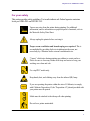
Vapors may arise from the printer during printing. For additional
information, and for information on proper disposal of materials, refer to
the Materials Safety Data Sheet.
Always unplug the printer before servicing it.
Proper room ventilation and housekeeping are required. This is
accomplished by providing fresh air circulation into the room, not
necessarily by a filtration and/or external ventilation device.
“Vapors” which arise during printing may adhere to certain surfaces.
Please be sure to clean any residue with soap and water to keep your
working area clean and safe.
Use vinyl/PVC media only.
Keep hands, hair, and clothing away from the infrared (IR) lamp.
Prop 65
If you are operating the printer within the state of California, to comply
with California Proposition 65, the “Proposition 65” placard provided with
your printer must be posted.
Media must be attached to the takeup roll when printing.
Do not leave printer unattended.
v
VinylJet 36TM Reference Guide
Manual conventions
➪
!
✓
Indicates a procedure for you to follow in order to perform a specific function.
Read the accompanying explanatory text before following the step-by-step
procedure.
Indicates a warning. Ignoring the warning can damage the printer or result in an
unsatisfactorily printed image.
Indicates a tip or suggestion that can make using the printer easier or improve
your printed images.
Other reference materials
In addition to this guide, the following additional documentation is included with your
printer:
Quick Start Guide - Tells you how to attach the printer stand, load media, install cartridges, and connect the printer to your computer.
CD-ROM - contains the following:
Documents
EFPU Guide
Reference Manual
Maintenance Guide
Quality Primer
Applications
EFPU
Windows 95/98/NT/2000/ME Drivers
Flexibanner (Trial Version on separate CD)
Other
Demo Files
vi
VinylJet 36TM Reference Guide
Contents
Chapter 1 Printer setup ........................................... 1-1
Printing ........................................................................................... 1-2
Obtaining quality results ................................................................... 1-2
Caring for your ink and cartridges ...................................................... 1-3
Chapter 2 Printer options ........................................ 2-1
Returning to the default settings ........................................................ 2-1
Printing the settings ......................................................................... 2-1
Important notes about image size vs. dpi ............................................ 2-1
Color mode .................................................................................... 2-2
Choosing quality mode options .......................................................... 2-2
Choosing feed media options ............................................................ 2-3
Media counter .................................................................................. 2-3
Choosing paper options .................................................................... 2-4
Auto-load delay ................................................................................ 2-4
Save media ..................................................................................... 2-5
Auto-Wipe ....................................................................................... 2-5
Defining user setup .......................................................................... 2-5
Choosing a language ........................................................................ 2-6
Choosing ink options ........................................................................ 2-7
Printer default settings ...................................................................... 2-9
Chapter 3 Printing ................................................... 3-1
Chapter 4 HP-GL/2................................................... 4-1
CAD printing modes ......................................................................... 4-1
Printing vector data .......................................................................... 4-1
Accessing HP-GL/2 features ............................................................. 4-2
Palette select .................................................................................. 4-2
Control ............................................................................................ 4-3
Rotation .......................................................................................... 4-3
Reprints .......................................................................................... 4-4
Nesting ........................................................................................... 4-5
Nest time ........................................................................................ 4-6
Ink limit ........................................................................................... 4-7
vii
VinylJet 36TM Reference Guide
Appendix A Installing additional memory............... A-1
Acceptable SIMM sizes ................................................................... A-1
SIMM installation ............................................................................ A-1
Appendix B Menu tree ............................................ B-1
Main menu at a glance ....................................................................
Main menu .....................................................................................
Feed media menu ...........................................................................
Setup menu at a glance (Bold indicates the default) ...........................
Utility menu at a glance (Bold indicates the default) ...........................
Setup menu ....................................................................................
Utility menu ....................................................................................
B-1
B-2
B-2
B-3
B-4
B-5
B-8
Appendix C Technical information ......................... C-1
Appendix D Error messages ................................... D-1
Cartridge errors ............................................................................... D-1
Appendix E Troubleshooting ...................................E-1
roubleshooting quick list .................................................................. E-1
Isolating problems ........................................................................... E-1
Printer health .................................................................................. E-2
Data Transfer .................................................................................. E-9
Application Software ....................................................................... E-11
Calling for Help .............................................................................. E-13
Customer Technical Support ........................................................... E-14
viii
Printer setup
1
This Reference Guide describes the VinylJet 36TM printer. This chapter provides an
overview of the printer. Refer to the Quick Start Guide for setup instructions.
The printer is a wide-format color inkjet printer that gives you professional-quality output
on uncoated vinyl, using aqueous-based inks. Designed specifically for the needs of small
sign shops, the VinylJet 36 lets you experience the value of exceptional, full color graphics
on banners and signs designed for outdoor use.
VinylJet 36TM Reference Guide
Printing
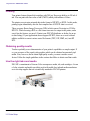
Your printer features thermal ink cartridges with 208 jets. Reservoirs hold up to 500 ml of
ink. You can print with four colors of ink (CMYK) which yield millions of colors.
The printers accept raster-oriented data in the format of HP RTL or HPGL. In this mode,
printing begins immediately after the first complete line of HP RTL data is received.
There are many Raster Image Processors (RIPs) which convert Postscript or CGM to
HP RTL. When choosing a RIP or a file format converter for output to the printer, make
sure it has the features you need. (Contact your ENCAD distributor or dealer for an upto-date listing.) If your applications do not support HP RTL, there are several software
utilities available to convert various raster file formats (TIFF, GIF, BMP, etc.) into HP
RTL.
Obtaining quality results
You have probably seen a demonstration of your printer's capabilities or sample output. If
so, you are aware of the superb color graphics which can be obtained on uncoated vinyl
media. Note, however, that to obtain high-quality results, you must consider several
factors. Follow the simple guidelines in the sections that follow to obtain excellent results.
Use the right inks and media
ENCAD’s commitment to Extreme Color encompasses media, ink, and cartridges. A team
of color scientists and media specialists work with world class ink and media manufacturers to develop supplies that are scientifically matched to ENCAD printers.
1-2 Printer Setup
VinylJet 36TM Reference Guide
Caring for your ink and cartridges
• Handle cartridges only on the plastic areas. Touching the copper electrical interconnect
or the inkjets can damage the cartridge.
• Use only AV ink intended for the VinylJet36. Do not mix inks.
• Do not shake ink refill containers.
• Store ink and cartridges in the same environment as the printer whenever possible.
• If you remove a cartridge from the printer, do not leave it exposed to the air for an
extended period because the jets may clog. Replace the original tape on the jet plate.
Place the cartridge in a cartridge garage or sealed plastic bag and store it in a closed
area at room temperature. Keep it out of direct sunlight.
• Open new cartridges only when you are ready to install them.
• Use only ENCAD-brand ink refills and cartridges.
• Drawings containing both black and color elements require alignment of the cartridges
to each other as described in the Quick Start Guide.
Choose the right media
The VinylJet 36 is designed to print ONLY on uncoated vinyl media, not on paper.
Caring for your media
Store media in its original packaging in a cool, dry area until you are ready to use it. The
environment should be stable; i.e., no extremes of heat and cold, and non-condensing
humidity. If conditions are outside the operating ranges recommended for the printer, allow
the media to acclimate in the operating environment for at least 48 hours before using it.
If you remove a roll of media from the printer, be sure to store it in a manner which keeps
it clean and dust-free. Ideally, you should return it to its original packaging for storage.
Print on the correct side! Roll media is wound with the printable side out.
Handle with care! Handle your media carefully to avoid creases, scrapes, and tears.
Avoid crushing or damaging roll media edges.
Printer Setup 1-3
VinylJet 36TM Reference Guide
Choose the correct printing mode
By choosing from a variety of color, quality, and resolution modes, you can make choices
between drawing quality, colors, and speed. When printing images with large areas of
color, always choose one of the enhanced printing modes (Enhanced or Best).
Use the right software
The quality of the software driver or the RIP can be very important, especially when
printing continuous tone images. Error diffusion or stochastic screening algorithms can
yield photo-like images, even when these images are scaled to full size. Software without
advanced imaging features may produce images which are grainy when enlarged.
1-4 Printer Setup
Printer options
2
You can define printer options through your application software or by choosing settings
from the printer's control panel. The following printer options are described in this
chapter:
•
Initialize (return to printer default settings)
•
Print Mode
•
Paper Options
•
User Se tup
Returning to the default settings
Pressing the Setup/User Setup /Init Settings buttons returns all printer options to the
factory defaults. All saved user settings are lost. The table at the end of this chapter
shows the printer defaults.
Printing the settings
Pressing the Setup/User Setup/Print Settings buttons causes the printer to print a
listing of its current settings. Be sure to have media loaded before you start.
Important notes about image size vs. dpi
The printer always prints at 600 dpi. DPI (dots per inch) refers to the resolution at which
your image is created, not the resolution at which it is printed. If your image is created at
300 dpi, it will print at 1/4 the size of the original. Therefore, you will want to save it at
600 dpi before printing.
VinylJet 36TM Reference Guide
Color mode
Color mode refers to whether you are printing in color, grayscale or monochrome.
➪
To choose the color mode
1
Press Setup/Print Mode/Color Mode.
2
Choose Color, Mono, or Gray.
3
Press OK.
Choosing quality mode options
Your printer offers several print quality modes which let you make choices between
speed and quality.
The quality mode you use depends on various factors, such as your software application and whether you’re printing in color or monochrome. Each quality mode directly
affects the printing speed and quality of the image you print, so you should understand
the differences.
Each of the quality modes attempts to strike a balance between speed and quality,
with the quality mode providing quality images at a reasonable printing speed for most
users. Whenever you choose a quality mode other than Enhanced, you will choose to
emphasize either speed or quality. Draft and Enhanced modes are suited for jobs
with light solid fills. These modes are not recommended for printing images, because
bleeding may occur in areas of heavy fills or dark shading when printed with these
modes.
There are four print quality modes.
Draft - A 30% ink depletion mode. This mode generally is used when speed is more
important than quality. Use it to check position, layout, color, etc. It will rarely be used
for finished quality images.
Enhanced - Fast, better than average quality.
Photo - This setting is for fast, average quality (default)
Best - For images that have sections of high quality continuous tone where quality is
more important than printing speed.
2-2 Printer Options
VinylJet 36TM Reference Guide
➪
To choose print quality
1
Press Setup/Print Mode/Quality Mode.
2
Choose the desired quality.
3
Press OK.
Choosing feed media options
Feed media options allow you to:
• advance the media*
• display/enter Media Counter values
*Media feeding and loading are described in the Quick Start Guide.
Media counter
Media Counter gives you a means of estimating the amount of media left on a roll.
When a new roll of media, or a used roll where the remaining length is known, is installed
on the printer, you can enter the length of the roll into the printer's front panel display. As
the printer prints, this amount is decremented. You can view the estimated amount of
media remaining on the printer's front panel display. When you are ready to remove the
roll, you can print the estimated amount of media remaining on the roll. When you reload
this media, you can use this figure to enter into the printer's front panel display. The
media counter can be reset to 0 to avoid confusion if it is not being used. The media
counter will not decrement below 0. The current value of the media counter is maintained across power cycles but is not stored as a user parameter.
➪
To enter a media length value
1
Press Feed Media/Media Counter.
2
3
Set the media length.
Press OK.
Printer Options 2-3
VinylJet 36TM Reference Guide
➪
➪
➪
To display the current value
1
Press Feed Media/Display Counter.
2
View the current value.
3
Press EXIT.
To print the current value
1
Press Feed Media/Display Counter.
2
Press Print Counter.
3
Press EXIT.
To reset the media counter
1
Press Feed Media/Media Counter.
2
Press Reset Counter.
3
Press OK.
Choosing paper options
Paper options let you define the following:
•
Auto-Load Delay
• Save Media
•
Auto-Wipe
Auto-load delay
Auto-Load Delay lets you set the time between when the printer senses the media and
when printing starts. This lets you manually reposition the media if necessary. The
default is 6 seconds, selectable from a range of 1-12 seconds.
➪
To set auto-load delay
1
Press Setup/Paper Option/Auto-Load Delay.
2
Choose the delay time.
3
Press OK.
2-4 Printer Options
VinylJet 36TM Reference Guide
Save media
When the Save Media is On (the default), the media advances only as far as needed to
print the image. With the Save Media option turned off, the printer advances the length of
a standard sheet, for example, 24x36 or 36x48 inches.
➪
To turn off Save Media
1
Press Setup/Paper Option/Save Media.
2
Choose Off.
3
Press OK.
Auto-Wipe
The cartridge jet plates are periodically wiped during printing. The default for this function is ON. If you are having problems with banding, you can sometimes solve the
problem by setting the wiper to OFF; however, this can cause clogging of the inkjets.
➪
To turn off the wiper
1
Press Setup/Paper Option/Auto-Wipe.
2
Choose Off.
3
Press OK.
Defining user setup
You can save the options you use most frequently so you don’t have to reconfigure the
printer each time you print an image. You can define up to eight different combinations of
options and save them with a user number ranging from 1-8. Select the user number you
want to use before sending an image to the printer.
Note: If your printer driver has host-controlled settings, the user setup may be overridden. If possible, disable the driver control settings.
You can save settings for the following options:
• Auto-Wipe On or Off
•
Quality Mode
• Color Mode
•
Save Media On or Off
Printer Options 2-5
VinylJet 36TM Reference Guide
➪
➪
To save user setup
1
Press Setup/User Setup/Save User.
2
Scroll to the number for the user settings.
3
Press OK.
To use a previously saved user setting
1
Press Setup/User Setup/Select User.
2
Scroll to the number for the user settings (i.e., user 1, user 2, etc.) to use.
3
Press OK.
Choosing a language
Printer menus and options can be displayed in the following languages: English, German,
French, Italian, Portuguese, Spanish, traditional and simplified Chinese, Japanese, and
Korean.
➪
To choose a language
1
Press Setup/User Setup/Language.
2
Choose the language to display.
3
Press OK.
Printing the settings
Pressing the SetupMenu/User Setup Menu/Print Settings buttons causes the printer
to print a listing of its current settings and configuration. Be sure to have media loaded
before you start.
Returning to the default settings
Pressing the Setup Menu/User Setup Menu/Init Settings buttons returns all printer
options to the factory defaults. All saved user settings are lost. The table at the end of
this chapter shows the printer defaults.
2-6 Printer Options
VinylJet 36TM Reference Guide
LCD contrast
The LCD Contrast function lets you adjust the brightness of the control panel. The range
is 1-16, where 16 is less contrast. The default is 9. Note that if brightness is set too high,
you may not be able to see the text displayed on the control panel.
➪
To set LCD contrast
1
Press Setup/User Setup/LCD Contrast.
2
Choose the contrast value.
3
Press OK.
Choosing ink options
Ink options let you define the following:
• Ink reduction
• Ink Preheat
•
Dry EOP • Manual EOP
Ink reduction
Ink reduction lets you reduce the percentage of ink laid down by the printer. This feature
applies only to HPGL/2 format images (vector-based images) and has no effect on
continuous tone images. It is especially useful for images with large amounts of printed
area and helps to avoid bleeding or oversaturating the media. It does, however, change
the appearance of colors, so you may want to run a small test print.
➪
To set ink reduction
1
Press Setup/Ink Option/Ink Reduction.
2
3
Choose a reduction percentage - 12.5, 25%, 37.5, or 50%.
Press OK.
Printer Options 2-7
VinylJet 36TM Reference Guide
Ink preheat
Cartridge heat settings are optimized for media being printed in a standard office
environment. If you are experiencing banding, poor fills, or too much dot gain, and you
have tried all other means to correct these conditions, you may want to experiment
with the ink preheat settings. These will vary depending on the ambient temperature
where the printer is located and the media used.
When you adjust the ink settings, you are increasing or decreasing the heat from the
default temperature. Pressing the + (plus) button increases the temperature, pressing (minus) decreases it. When you have reached the limits of the temperature range, the
panel will display either MAX or OFF. These settings are saved in the printer. If you
change to a different type of ink, you may need to change the heater settings to
accommodate the new ink type.
Only the default setting is recommended. However, if you are working in a cold or dry
environment, try turning the heat up for a larger dot size. If the heat is turned up too
far, the ink may run or sputter. Settings which are too low may result in reverse
ghosting. If you are working in a humid or hot environment, turn the heat down for a
smaller dot size. Generally a change of one or two increments is all that is needed.
➪
To set the ink preheat time
1
Press Setup/Ink Option/Ink Preheat.
2
Choose a preheat value.
3
Press OK.
Dry EOP
End of page dry ON enables the printer at the completion of the print job to automatically advance the media at the printing speed 12 inches to fully pass the IR heater. The
media is then fed back into the printer at 25% of the normal reserve speed to avoid
cockling on the retract move. End of Page dry OFF does not perform this at job
completion and should be used when multiple plots are being printed.
➪
To set dry EOP
1
Press Setup/Ink Option/EOP Dry.
2
Choose On.
3
Press OK.
2-8 Printer Options
VinylJet 36TM Reference Guide
Printer default settings
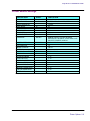
USER SETTINGS
COLOR MODE
QUALITY MODE
AUTO-LOAD DELAY
SAVE MEDIA
CALIB XY
SELECT USER
SAVE USER
UNITS SELECT
LANGUAGE
DEFAULT
COLOR
PHOTO
6
ON
ON
1
1
ENGLISH
ENGLISH
SYSTEM SETTINGS
DEFAULT
OTHER OPTIONS
MONO, GRAY
DRAFT, PHOTO, ENHANCED, BEST
1-12 SEC.
OFF
OFF
1 TO 8
1 TO 8
METRIC
GERMAN, FRENCH, ITALIAN, SPANISH,
PORTUGUESE, JAPANESE. TRADITIONAL AND
SIMPLIFIED CHINESE, KOREAN
OTHER OPTIONS
LCD CONTRAST
MEDIA COUNTER
DRY EOP
CALIBRATION SETTINGS
DEADBAND
SLOW DEADBAND
CYAN VERTICAL
MAGENTA VERTICAL
YELLOW VERTICAL
CYAN HORIZONTAL
MAGENTA HORIZONTAL
YELLOW HORIZONTAL
PAPER AXIS
9
0
ON
DEFAULT
N/A
0
0
0
0
0
0
0
33.00
1-16
1-500 FT.
OFF
OTHER OPTIONS
0…20
-2…+2
-9…+9
-9…+9
-9…+9
-9…+9
-9…+9
-9…+9
32-34
Printer Options 2-9
Printing
3
The way you print from your computer depends on the driver or RIP you have installed.
Your printer comes with a Windows driver and one RIP:
•
Windows driver for general use
•
EFPU
•
Flexibanner (trial version)
Printing a file
The Windows driver allows you to print from virtually any Windows-based application.
➪
To print a file using the Windows driver
1
Open the file from within an application.
2
3
Choose File/Print.
Select your printer.
4
Click Features.
5
From here, Page Setup and Advanced tabs allow you to adjust printer specific
options for your print file. Generally, you should only need to set paper size and
orientation options.
6
Click OK, then click OK again to send your file to the printer.
Notes about printing
Print only on untreated vinyl. This printer is not intended for printing on coated vinyl or
other media.
This printer is not designed for unattended operation. Be sure that the media weight bar is
placed on the media as shown in the Quick Start Guide. This keeps the media the correct
distance from the IR bulb and helps to assure proper ink curing.
VinylJet 36TM Reference Guide
End of Print function
The End of Print function moves the last part of a print down under the IR bulb to cure it.
However, this does not work at the end of a roll. Vinyl media is taped to the core of the
supply roll. Before printing, be sure there is sufficient media left on the roll to do the print
and advance the entire print past the IR bulb to cure it. You can determine whether there
is sufficient media by choosing Feed Media Menu/Media Counter.
3-2 Printing
HP-GL/2
4
This chapter discusses setting printing parameters generally used with vectorbased files, including palette selection, printer control, rotation, reprints, nest time,
nest enable, and ink limit.
ENCAD's implementation of HP-GL/2 supports vector/raster merge and
conforms to "The HP-GL/2 and HP RTL Reference Guide, Third Edition" by
Hewlett-Packard Company (Addison-Wesley, 1997, ISBN 0-201-31014-7).
Please refer to this guide for details on HP-GL/2 commands.
Printing modes
Your printer offers several print modes which let you make choices between
speed and quality. The procedure for selecting print modes is described in Chapter 2.
The print mode you use depends on various factors, such as your drawing
application, whether you’re printing in color or monochrome, and what type of
media you’re using. Each print mode directly affects the printing speed and
quality of the image you print, so you should understand the differences.
Draft or Photo modes are suited for drawings with light solid fills. These modes
are not recommended for continuous tone printing images, because bleeding may
occur in areas of heavy fills or dark shading when printed with these modes.
Printing vector data
When printing vector data, you can control certain options from your software
application, or you can assign control to the printer and set its options. Whether
you assign control to the software (the default) or the printer depends on your
personal preferences. You might choose to override software control because the
software is not providing the features you want.
VinylJet 36TM Reference Guide
Accessing HP-GL/2 features
The following functions are available from the HP-GL/2 menu: palette select,
printer vs. software control, rotation, ink reduction (see Chapter 2), reprints, nest
time, nest enable, and ink limit.
➪
To access HP-GL/2 features
1
2
From the main menu, choose Setup Menu/HP-GL/2 Options.
Press Select.
The HP-GL/2 Options menu displays with further options.
Palette select
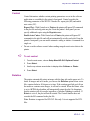
Palette select lets you choose either the HP-GL/2 or AutoCAD palette. Both
palettes allow 256 active colors with eight colors predefined. The predefined
colors for each palette are shown in the following table.
Pen 0
Pen 1
Pen 2
Pen 3
Pen 4
Pen 5
Pen 6
Pen 7
➪
4-2 HP-GL/2
HP-GL/2
AutoCAD
White
Black
Red
Green
Yellow
Blue
Magenta
Cyan
White
Red
Yellow
Green
Cyan
Blue
Magenta
Black
To choose a palette type
1
From the main menu, choose Setup menu/HP-GL/2 Options/Palette.
2
Press Select.
3
Use the up or down arrow button to display either AutoCAD or HP-GL/2.
4
Press Select.
VinylJet 36TM Reference Guide
Control
Control determines whether certain printing parameters are set in the software
application or overridden by the printer's front panel. Control overrides the
following parameters of the HP-GL/2 header file: repeat plot (RP) and enable
auto cutter (EC).
Repeat Plot: With Control set to Printer, the printer will ignore RP commands
in the plot file and only print one plot. From the printer's front panel you can
specify additional copies using the Reprints menu.
Enable Auto Cutter: With Control set to Printer, the printer will ignore EC
commands in the plot file and will not automatically cut after each plot. From the
printer's front panel, you can enable automatic cutting or initiate a command for a
single cut.
✓ Do not override software control when sending merged raster/vector data to the
printer.
➪
To set control
1
From the main menu, choose Setup Menu/HP-GL/2 Options/Control.
2
Press Select.
3
Use the up or down arrow button to display either Software or Printer.
4
Press Select.
Rotation
The printer automatically prints an image with the long side on the paper axis. To
better fit images and save media, you can use the Rotation option to turn vector
files counterclockwise 90 degrees at a time. If the rotation specified won't fit on
the media or contains raster images, it will not be rotated. When the Rotate value
is set to AUTO, the algorithm will automatically rotate the plot if it determines
that the rotation will save media (regardless of whether Nesting is enabled). If
Rotate is set to 0, the plot will not be rotated. The Control function does not
override the RO command in the plot file.
Note: Rotation is supported for HP-GL/2 files only. It is not supported for RTL
files.
HP-GL/2
4-3
VinylJet 36TM Reference Guide
➪
To rotate the image
1
From the main menu, choose Setup Menu/HP-GL/2 Options/Rotation.
2
Press Select.
3
Use the up or down arrow button to display the desired rotation angle (0, 90,
180, 270, Auto).
4
Press Select.
Reprints
You can print up to 99 copies of a specific vector file. When Reprint is set to 0,
only one image is printed.
➪
4-4 HP-GL/2
To make multiple prints
1
From the main menu, choose Setup Menu/HP-GL/2 Options/Reprints.
2
Press Select.
3
Use the up or down arrow button to display the desired number of reprints (0
to 99).
4
Press Select.
VinylJet 36TM Reference Guide
Nesting
Nesting allows the user to save media by printing multiple plots along the horizontal width of the media. This feature makes the most efficient use of
consumables and reduces the time required to print multiple plots.
When nesting is active, HP-GL/2 plots will be stored within the printer, accumulating in a nest. Printing will only begin when a nest becomes full, when a nesting
timeout occurs, if printer memory is exhausted, or when a plot that is incompatible with the current nest is received.
A nest is full when the printer determines that no further jobs can be fitted across
the page.
Nest timeouts are governed by the Nest Time parameter, which is set via the
printer’s front panel.
If the printer runs out of memory, the current nest will be printed immediately,
so that memory may be reclaimed for use by new plots.
An incompatible plot is either a non-HP-GL/2 plot or an HP-GL/2 plot which
has different job characteristics than the current nest, such as quality, dpi, or
margins.
If any of the following plot parameters are different between one plot and the
next, the last plot will be incompatible with the current nest, causing the nest to
begin printing immediately.
The following parameters are monitored for nest compatibility:
•
•
•
•
•
•
•
•
•
•
Print quality;
Number of passes;
Print direction;
Speed;
Color mode;
DPI;
Dry time;
Margins;
Wipe on/off; and
Media Save.
HP-GL/2
4-5
VinylJet 36TM Reference Guide
The following parameters will not affect nesting:
• Ink limiting;
• Replots;
• If Auto Rotation is enabled, then the nesting algorithm is free to rotate
the plot if it determines that doing so will save media. Plots are sequentially fitted across the page from right to left; and
• The HP-GL/2 EC command can be used to control cutting. If any plot in
a nest has the cutter enabled, the plotter will cut after the nest.
➪
To enable nesting
1
From themainmenu, choose Setup Menu/HP-GL/2 Options/Nest Enable.
2
Press Select.
3
Use the up or down arrow button to display Nest On or Off.
4
Press Select.
Nest time
Nest time is the amount of time the printer waits for the next plot to fill the
current nest.
The printer will begin printing whenever the printer has been idle for the specified time interval. The time is reset whenever a print job is received.
➪
4-6 HP-GL/2
To define nesting wait time
1
From the main menu, choose Setup Menu/HP-GL/2 Options/Nest Time.
2
Press Select.
3
Use the up or down arrow button to display the desired nest time.
4
Press Select.
VinylJet 36TM Reference Guide
Ink limit
The printer can assign an ink limit to polygon fills and wide vectors. This helps
prevent bleeding. The default for this option is On. If you are using high quality
media, this option may not be needed and can be turned off.
➪
To enable the ink limit
1
From the main menu, choose Setup Menu /HP-GL/2 Options/Ink Limit.
2
Press Select.
3
Use the up or down arrow button to display ON.
4
Press Select.
HP-GL/2
4-7
Installing additional memory
A
The VinylJet 36 ships with 32 MB of DRAM, upgradable to a maximum of 128 MB, 64
MB per socket. Additional memory helps to free the host computer more quickly.
Acceptable SIMM sizes
Printer memory may be upgraded by installing 72-pin 60 nanosecond (or faster) SIMMs
that are either 32 or 36 bits wide. (The printer does not use parity bits.) The SIMMs must
not exceed a height of 2 inches (5 cm) and must conform to JEDEC Std. 21-C, release 4.
The printer will accept 4 MB, 8 MB, 16 MB, 32 MB or 64 MB SIMMs. Recommended
SIMMs are ENCAD P/N 210610 (32MB SIMM).
SIMM installation
The SIMMs are located on the MPCB inside the right cover. The MPCB comes with
one SIMM slot empty and a 32 MB RAM SIMM installed on the board. The following
procedures describe how to remove the right cover, remove any currently installed
SIMM(s), install new SIMM(s) and replace the cover. You will need a #2 Phillips screwdriver to complete the procedures.
!
➪
ALWAYS UNPLUG THE POWER CORD BEFORE BEGINNING.
! To avoid static damage to the printer, never touch the circuit board or its components
without first touching the bright metal portions of the printer. Static damage is more likely
when the relative humidity is low. If possible, wear a grounding strap when touching the
circuit board.
To remove the right cover
1
Disconnect the power and the interface cables.
2
Remove the printer's top cover.
3
4
Remove the three screws under the right side of the printer which attach the right side
cover and the two screws which attach the cover to the right plate.
Slide back the pin that holds the right cover to the rear cover.
5
Move the right cover, being careful to clear the parallel port on the back of the unit.
6
Carefully disconnect the ribbon cable from the connector on the PC board and the
other two cables that go to the cover.
VinylJet 36TM Reference Guide
➪
➪
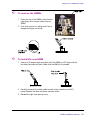
To remove the SIMMs
1
Facing the top of the SIMMs, push the side
clips gently to the outside (away from the
SIMM).
2
Push over and pull out, being careful not to
damage the fingers on the top.
To install the new SIMM
1
Insert at a 45 degree angle and slowly push the SIMM to a 90o angle until the
two side clips snap into place. Make sure the SIMM is fully seated.
2
Carefully reconnect the ribbon cable harness to the connector on the PC
board. Reattach the other connectors removed earlier.
3
Reinstall the right cover and top cover.
Installing additional memory A-2
Menu tree
B
This section contains an overview of the printer's menu tree. Text items in italics indicate
that selecting the option gives access to a menu with further options. Items in bold are
the default option.
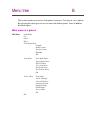
Main menu at a glance
Main Menu
Load Media
Cut
Pause
Reset
Feed Media Menu
Forward
Media Counter
Display Counter
Backward
Exit
Setup Menu
Print Mode Menu
Paper Option Menu
HP-GL/2 Menu
User Setup Menu
Ink Option Menu
Serial Comm Menu
Exit
Utility Menu
Prime Menu
Access Cartridge
Color Calib Menu
Calibration Menu
Display Settings
Print Settings
Service Menu
Exit
Exit
VInylJet 36TM Reference Manual
Main menu
Load Media
moves media into or away from the platen.
Cut
cuts media.
Pause
provides access to further options for canceling print jobs, reinitializing
the printer, or examining the job.
Reset
clears the print buffer. When cancelling a print, first remove it from the
computer's print queue, then press the Reset button on the printer.
Feed Media Menu
provides access to further options for moving the media forward or
backward and entering/displaying media length values.
Setup Menu
provides access to further submenus for setting printing options.
Utility Menu
provides access to further submenus for calibration and other functions.
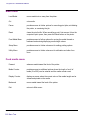
Feed media menu
Forward
advances media toward the front of the printer.
Media Counter
provides access to additional options where the length of a roll of
media (0 to 500') can be entered and the media counter reset.
Display Counter
displays a screen where the current value of the media length can be
viewed and printed on the media.
Backward
moves media toward the back of the printer.
Exit
returns to Main menu.
B-2 Menu Tree
VInylJet 36TM Reference Manual
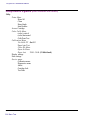
Setup menu at a glance (Bold indicates the default)
Setup
Print Mode Menu
Color Mode
Quality Mode
Exit
Color, mono, gray
draft, photo, enhanced, best
Paper Option Menu
Auto-Load Delay
Save Media
Auto-Wipe
Exit
1-12, 6
On/Off
On/Off
HPGL/2 Menu
Palette Select
Control
Rotation
Nesting Menu
Reprints
Ink Limit
Exit
User Setup Menu
Select User
Save User
Units Select
Language
Init Settings
Print Settings
LCD Contrast
Exit
Ink Option Menu
Ink Reduction
Ink Preheat Menu
EOP_Dry
Exit
HP-GL/2, AutoCAD
Software, Printer
90, 180, 270, Auto
0...99 (0)
On/Off
1-8, 1
1-8, 1
English, Metric
English, German, French, Italian, Spanish, Portuguese,
Japanese, simplified and traditional Chinese, Korean
1-16, 9 (16 is less contrast)
0, 12.5, 25, 37.5, 50
-7 (off) to 7 (max) for each cartridge (0)
On, Off
Menu Tree B-3
VInylJet 36TM Reference Manual
Utility menu at a glance (Bold indicates the default)
Utility
Prime Menu
Prime All
Clean
Prime Single
Start Routine
Access Cartridge
Color Calib Menu
(color) vertical
(color) horizontal
Calib Print Test
Calibration Menu
Use Calib XY On/Off
Paper Axis Test
Color Db Menu
Open Jet Menu
Paper Axis
32.00 - 34.00 (33.00 default)
Display settings
Print settings
Service menu
Calibration menu
Diagnostics menu
About
Cartridge Info
Test Print
B-4 Menu Tree
VInylJet 36TM Reference Manual
Setup menu
Print Mode Menu
provides access to options for color, quality, dots per inch, and EOP
dry.
Paper Option Menu
provides access to options for loading paper.
HP-GL/2 Menu
provides access to options for setting HP-GL/2 features.
User Setup Menu
provides access to options for defining and saving user settings.
Ink Option Menu
provides access to options for setting ink reduction and dry time.
Serial Comm Menu
provides access to options for setting communications parameters.
Exit
returns to the main menu.
Print Mode
Color mode
provides access to a further menu to select color (default), monochrome, or grayscale printing.
Quality mode
provides access to a further menu to select the print mode.
Exit
returns to the Setup menu.
Paper Option Menu
Auto-Load Delay
provides access to a further menu to change the delay between when
the media is positioned for loading and when loading occurs. This
allows users to adjust the media if necessary. Select 1-12 seconds.
Default = 6.
Save Media
provides access to a further menu to turn Save media On (default) or
Off. When set to On, printing will stop at the end of the image rather
than scrolling out the full paper size.
Auto-Wipe
provides access to a further menu to turn the Auto-wipe function On or
Off (default). When on, the cartridges are wiped during printing.
Exit
returns to the Setup menu.
Menu Tree B-5
VInylJet 36TM Reference Manual
HP-GL/2 Menu
Palette Select
provides access to a further menu to select an AutoCAD color palette
or a generic HP-GL/2 palette.
Control
determines whether certain printing parameters are set in the software
application or overridden by the printer's front panel display.
Rotation
provides access to a further menu to enable rotation and set the
rotation angle.
Nesting Menu
provides access to a further menu that controls nesting.
Reprints
controls the number of copies that are printed.
Ink Limit
limits the amount of ink that is used in polygon fills and wide vectors.
Exit
returns to the Setup menu.
User Setup Menu
Select user
provides access to a further menu to select a previously saved user
configuration. Default = User 1.
Save user
provides access to a further menu to save the current printer configuration to the selected user number. Default = User 1.
Units select
provides access to a further menu to choose the calibration units:
English (default) or Metric.
Language
provides access to a further menu to select the language used for the
display. Choose from English (default), German, French, Italian,
Spanish, Portuguese, Japanese, simplified and traditional Chinese,
Korean.
Init settings
returns the printer to its default settings. All previously saved options
are erased.
Print settings
prints the current printer settings.
LCD contrast
lets you select the contrast level of the display. Range is 1-16, 9
(default) (16 is less contrast)
Exit
returns to the Setup menu.
B-6 Menu Tree
VInylJet 36TM Reference Manual
Ink Option Menu
Ink reduction
(applies to HPGL/2 only) provides access to a further menu in which to
set the percentage by which to decrease the amount of ink emitted to
help prevent bleeding or pooling of ink. Options are 0, 12.5, 25, 37.5,
and 50.
Ink preheat
provides access to a further menu in which you can select the cartridge for which you want to set the preheat value. Then you can set
the ink preheat value for each cartridge. Options are -7 (off) to 7 (max)
(default = 0).
EOP_Dry
EOP (End of page drying) ON enables the printer at the completion of
the print job to automatically advance the media at the printing speed
12 inches to fully pass the IR heater. The media is then fed back into
the printer at 25% of the normal reserve speed to avoid cockling on
the retract move. End of Page dry OFF does not perform this at job
completion and should be used when multiple copies are being
printed.
Exit
returns to the Setup menu.
Menu Tree B-7
VInylJet 36TM Reference Manual
Serial Comm Menu (Bold indicates the default)
For use by technical support only.
Baud rate
provides access to a further menu to select the baud rate: 9600
(default), 19200, 38400.
Data bits
7, 8
Parity bits
provides access to a further menu to select parity: None (default),
Even, Odd.
Exit
returns to the Setup menu.
Utility menu
Prime Menu
provides access to further selections for prime single, prime all, start
routine, and clean.
Access Cartridge
moves the ink carriage away from the service station for installing and
replacing cartridges and the media cutter.
Color Calib Menu
provides access to further menus for printing the color calibration test
pattern and for entering values determined by examining the test
patterns.
Calibration Menu
provides access to a further menu for calibration options and diagnostics.
Display Settings
displays information such as media and page width and height, on
time, and cumulative plot time.
Print Settings
prints information such as media size, firmware revision, RAM size,
and plot hours.
Service Menu
provides access to the Service menu (technical support only)
Exit
returns to the Main menu.
B-8 Menu Tree
VInylJet 36TM Reference Manual
Prime menu
Prime All
Prints the prime pattern for each cartridge.
Prime Single
Provides access to a further menu in which you can choose to prime
an individual cartridge.
Start Routine
Prints a recovery pattern/jet status plot.
Clean (Color)
Causes the selected cartridge to clear its jets by expelling a small
amount of ink into the service station.
Clean All
Clears the jets for all the cartridges. Select this function whenever the
printer has been idle for four hours or more.
Color Calibration Menu
(Color) Vertical
lets you enter the number which corresponds to the best vertical
alignment in the test pattern for the C, M, and Y cartridges.
(Color) Horizontal
lets you enter the number which corresponds to the best horizontal
alignment in the test pattern for C, M, and Y cartridges.
Calib Print Test
prints the current heads, current horizontal head to head, and other
calibration patterns described in the Quick Start Guide.
Calibration Menu (Bold indicates the default)
Use Calib XY
provides access to a further menu in which you can set this function
On (default) or Off.
Paper Axis Test
prints the paper axis test pattern.
Color Db Menu
provides access to a further set of menus in which you can print the
color deadband test pattern and set deadband velocity compensation
for each cartridge.
Open Jet Menu
provides access to a further set of menus in which you can print the jet
status pattern and set the compensation for jets in each cartridge.
Paper Axis
provides access to a further menu in which to enter values determined
by examining the paper axis test pattern.
Menu Tree B-9
VInylJet 36TM Reference Manual
Service Menu (Bold indicates the default)
Calibration Menu
provides access to calibration options.
Diagnostics Menu
provides access to a further set of menus for performing diagnostics
(tech support only) and for printing the color test.
About
provides information about the printer's firmware version, BROM, RAM,
and printer size.
Cartridge Info
provides information about the type and color of ink in each cartridge
stall, and the extent to which the cartridge is used. Cartridge usage is
displayed in milliliters. The display changes in 2ml increments. 300ml
indicates that the cartridge should be replaced. When 700ml is
displayed, the cartridge will stop functioning.
Test Print
automatically prints a test file stored in ROM on the printer. Use only
under direction of technical support.
Exit
returns to the Main menu.
B-10 Menu Tree
Technical information
MEDIA TYPES:
Untreated calendared vinyl, cast vinyl,
banner vinyl
MEDIA ROLL PARAMETERS:
Inner roll core: 2" +/- 1/16", and 3" +/- 1/16"
with adapter
Max. outside roll diameter: 6"
Max. roll width: 36"
Max. media weight: 60 lbs.
RESOLUTION:
600 x 600 dpi
FEATURES:
Power feed and takeup
8 user-savable settings
Power PC 33 MHZ processor
Ink cartridges (4)
500 ml ink reservoirs (4)
Two sets of ink lines (8)
Ink priming system
LINE LENGTH ACCURACY:
+/- 0.2% in paper and carriage axis.
Image frame length (x-axis) variation
+/- 0.2% and with (y-axis) variation +/-0.06%
+/-0.024" (.6mm).
BUFFER:
Two 72-pin, 32-bit wide DRAM sockets.
32 MB standard.User upgradeable to 128
MB, 60 ns or faster, ENCAD approved.
C
INTERFACES:
Bidirectional Parallel (IEEE 1284)
10/100BaseT (optional)
POWER:
200 - 240 VAC, 50 - 60 Hz, 7 amps
Consumption:
20 W Idle
1000 W Typical
1500 W Maximum
OPERATING ENVIRONMENT:
59° - 85°F (15°- 30°C)
20 - 70% RH, Non-condensing
STORAGE ENVIRONMENT:
40° - 95°F (4°- 35°C)
5-80% RH, Non-condensing
CERTIFICATIONS:
Safety
UL 1950, 3 rd Edition
CSA 22.2 – 950
EN 60 950
NOM-019-SCFI-1993
IEC 950, 2 nd Edit.
AS/NZS 3260
EMI
FCC Part 15 (Class A)
CSA C108.8
EN 55 022 Class A
CE Mark
CISPR 22- Class A
AS/NZS 3548
Made in the U.S.A.
VInylJet 36TM Reference Manual
DIMENSIONS:
Height (with stand)
(platen above floor)
44" (1120 mm)
Width
87" (2209.8 mm)
Depth
28" (710 mm)
Weight
printer and stand
140 lbs. (62.2 kg)
Print width
24" min. to 36" max. printable
Technical information C-2
Error messages
D
A yellow LED on the control panel lights to indicate error conditions.
When the yellow LED lights, check the display for messages which will help you
determine the status of the printer and possible corrective action to take.
Cartridge errors
The printer automatically performs tests on the cartridges and uses the information to improve image quality, monitor cartridge life, and update the user with
system status. Some tests are performed between prints and require no user
input, while others require user input.
The following table shows cartridge-related error messages.
Error Message
Unrecognized cartridge
Corrective Action
Be sure the cartridge is the appropriate ENCAD
cartridge for your printer model. Your printer will
not work with cartridges from other models.
Remember, the printer is reading the value
programmed into the chip on the cartridge, it is not
actually detecting the cartridge type. Replace the
cartridge if necessary.
Cartridge end of life attained.
Replace cartridge. You can check cartridge status
by choosing Disp Cart Info from the Service menu.
End of cartridge life is indicated as 700ml.
Unrecognized ink type.
Be sure the cartridge is the appropriate ENCAD
cartridge for your printer model. Your printer will
not work with cartridges from other models. Ink
type information is stored on the cartridge chip. If
you are using a new type of ink which has been
introduced since you purchased your printer, you
will need to upgrade the printer's firmware to
accommodate the new ink type. Check ENCAD's
web site at www.encad.com for instructions.
When the cartridge error is displayed, choose Service Menu/Cartridge Info to get
information about the cartridge. Press Utility Menu/Access Cartridge to move
the cartridges out of the service station. After the cartridge has been replaced,
cleaned, etc., press Access Cartridge again to return the cartridges to the service
station.
VinylJet 36TM Reference Guide
Memory Errors
If the "Insufficient raster memory" message displays, press the Reset button on the Main
Menu to clear the message and abort the print job.
Error messages D-2
Troubleshooting
E
This appendix contains valuable information to help you solve the most common
printer problems. The problems addressed are divided into these types:
- Printer health
- Print quality
- Data transfer
- Application software
Troubleshooting quick list
Many common problems can be solved by checking for just two items:
- Is the printer connected to a good power source?
- Does the printer driver software match the emulation selected on the printer?
Isolating problems
You can quickly isolate problems to either the printer, computer/printer interface, or
application software using the following procedure:
1.
Turn the printer OFF, then ON.
2.
Load media, then run a prime to assure that all jets fire.
3.
Perform a color calibration.
If your printer fails during any of the above steps, call your ENCAD distributor/dealer
or call ENCAD Technical Support. Otherwise, continue with the steps that follow.
4.
5.
6.
Send a sample print directly to the printer through the parallel port. For example,
on Windows 95/98, type: copy /b <filename>.rtl lpt1. On Windows NT type: print /
d:lpt1 <filename>.
If your computer is running on a network, login and copy the sample file to the
printer over the network.
If steps 4 or 5 fail, repeat them using another computer.
If any of these steps fail, your printer may not be correctly connected to your
computer and/or network. Contact your network administrator or your ENCAD
dealer. Otherwise, continue with the steps that follow.
7.
Print directly to the printer from several software applications.
VinylJet 36TM Reference Guide
8.
9.
If you are networked, login and try printing from several software applications.
If steps 7 or 8 fail, repeat them using another computer or remove from the network
and test standalone.
If one application fails, but others print successfully, that can indicate a problem with a
specific software package. Call technical support of the failed product. If all the applications fail, determine what they have in common; for example, a RIP box or Windows
driver. Call technical support of the particular vendor.
Printer health
"Smoke" is coming from the media.
This is actually water vapor coming off the media as it cures. This is normal.
Printer will not turn on
Make sure the power cord is securely attached to the printer and plugged into an operating outlet.
Make sure the power switch is turned on.
Be sure that the grill in front of the IR bulb is securely engaged in the interlocking switch
clip.
Printer intermittently reboots
Clean and reseat memory SIMMs.
Replace memory SIMMs. (See Appendix A.)
Check that power is coming to the printer.
Display does not come on
Check that the power cord is plugged in and the printer switch is turned on.
Printing doesn’t start immediately when a file is sent
If you are using a Windows application, be sure the Print Manager is OFF. Turn off the
Print Manager with the ENCAD Windows driver.
E-2 Troubleshooting
VinylJet 36TM Reference Guide
File will not print
If you are using a parallel cable, be sure it meets the specifications of IEEE 1284.
Check your electrical connections.
From your software application, print to a file and send the file to the printer in DOS
using the DOS Copy command. At the DOS prompt, type COPY /b filename
portname (LPT or COM port). Alternately, use the GO.EXE program which can be
downloaded from ENCAD's website (http://www.encad.com). To print the file, type
GO filename.
In Windows 95/98/NT4.0/2000/ME, you can use the EFPU, available on the System
CD.
Slow printing under Windows
Windows applications naturally print slower than DOS applications. Be sure the Windows Print Manager is turned OFF.
Cutter doesn’t work or tears the media
Make sure the cutter is properly installed. (See Quick Start Guide.)
TURN POWER OFF and clean the inside of the black belt using alcohol and a lintfree cloth. Push the carriage back and forth to access all areas of the belt. Manually
push the carriage all the way to the left to force the cutter to drop. Turn power on.
If the cutter is worn, replace it.
Carriage jams
Check for media jams or blockage.
Be sure the service station is lowering. If it does not lower, push it left and down, or the
cutter will not disengage.
Carriage axis failure
An obstruction in the path of the carriage assembly is hindering carriage movement.
The obstruction may or may not be visible. Other common causes include dirty encoder
strip, media interference, worn carriage bushings, cutter malfunction, and loose trailing
cable connections.
After checking the following items, reboot the printer to ensure proper operation.
Note: If the error recurs, observe whether the carriage is in the same or different
location.
Troubleshooting E-3
VinylJet 36TM Reference Guide
If the carriage is in the same spot, check the encoder strip for visible damage (clear
plastic strip under the trailing cable tray and above the belt) Refer to the figure which
follows.
Printer front view
Encoder strip under second trailing cable cover level,
(clear plastic strip directly behind the shaft)
MAKE SURE POWER IS OFF BEFORE PERFORMING THIS STEP. Verify
that carriage movement is free and smooth by turning the power off and moving the
carriage from one end of the shaft to the other (make sure there is no binding and that
nothing is blocking the carriage movement ).
Clean the top and bottom of the encoder strip using a cotton swab and distilled water (let
it dry completely, approximately 30 minutes, before trying to operate the printer).
Remove the cutter from the left side of the carriage and check it for visible damage.
Make sure cutter version 3 (or newer) is installed (see the figure which follows).
3
Check the shaft for visible damage (carriage moves back and forth on it during operation).
Clean the shaft with a lint free cloth and isopropyl alcohol (let it dry completely before
trying to operate the printer).
Check the belt for visible damage such as fraying and pieces coming off it.
Check the trailing cable (cable that moves during printer operation) for visible damage.
E-4 Troubleshooting
VinylJet 36TM Reference Guide
Check whether the idler assembly (located at the left end of the belt) moves freely.
Check whether it is cracked or broken.
Ink cartridges do not fire properly
Be sure that cartridges and the service station are cleaned daily to maintain good print
quality. (See the Maintenance Guide.)
Cartridges may wear out after extended use. Try replacing the cartridge.
Store cartridges in a sealed container at room temperature when not in use for extended periods of time.
Make sure the protective tape is removed from the cartridges.
Remove the cartridge and reinstall it, or clean the electrical contact on the cartridge
and carrier. Be sure it is clean and dry. Be sure the cartridge is seated properly.
Various jets are clogged or stop firing
Remove, clean, and reinstall cartridge. Use alcohol to clean the jet area if ink has dried
on it.
Clean service station; clean cartridge again.
Clean cartridge electrical contacts using a cotton swab moistened with water. Dry
contact. Do not use acetone or any other harsh cleaner as this may cause damage to
the flex cable.
Jet may have failed. Bypass the jet using the Open Jet menu available from Utility
Menu/Calibration Menu. If that doesn't help, replace cartridge.
Check to see whether spray from printing has contaminated the flex contact. Remove
the cartridge and wipe the carriage flex and cartridge flex with a cotton swab moistened with water.
Ink spills on the flex cable
Flex cable refers to the copper contacts on the carriage where the cartridge seats.
Clean the flex cable gently with a cotton swab moistened with water. Do not use
acetone or any other harsh cleaner as this may cause damage to the flex cable.
Printer settings are lost when printer is turned off or rebooted
Be sure to save your printer settings to a User number. (See "Saving User Settings" in
Chapter 2.) When you are ready to print, select the User number that you saved.
Troubleshooting E-5
VinylJet 36TM Reference Guide
What if I need a firmware upgrade?
You can download firmware upgrades from ENCAD’s Internet web page
(www.encad.com).
Firmware Download Procedure (Upgrade/Printer Refresh)
You can use the ENCAD File Print Utility (EFPU) to download new firmware to
your printer. The EFPU can be found on the System CD.
For Windows:
1. Using the EFPU, send the XXXX.ROM file to the printer. Approximately 20 - 40
seconds later, the unit will reboot, indicating the download was successful. After a
one second delay, the printer will automatically reboot. The printer should come up
normally. Verify the new firmware revision by sequencing through Utility Menu/
Service Menu/About.
2.
If there is no beep, reboot printer and reseat parallel port connection. Resend the
.ROM file to the printer.
Print Quality
Many of the print quality concerns can be resolved by priming, cleaning, and calibrating
the cartridges. When this is the case, “clean, calibrate, or replace” is indicated with other
solutions. Refer to the following chapters for details:
Clean - see Maintenance Guide
Calibrate - see Quick Start manual.
Replace - see Quick Start manual.
No print appears
Check that tape has been removed from the printhead of the cartridge.
Make sure that the septum valve in the carriage and the needle two-piece septum, and
the tubing part of the needle are tight and don't leak. Because this printer uses lots of
heat, with time, the connections in the needle may become loose.
Be sure that ink levels are correct. Less than 50 ml in the reservoir can cause the lines to
lose prime. Refill the reservoirs and reprime if necessary.
White lines or large gaps on print or portions of characters missing
Clean, calibrate, or replace cartridges.
Make sure the media feeds freely.
E-6 Troubleshooting
VinylJet 36TM Reference Guide
Overall print quality is poor
Clean, calibrate, or replace cartridges.
Make sure the printer is positioned on level ground.
Use a higher quality print mode.
Be sure the media tension bar is inserted on the media as shown in the Quick Start
Guide.
If you are using banner vinyl, be sure to insert the spacer bar into the media guides and
run the media over the spacer bar.
Be sure that the platen temperature and IR lamp settings are correct for the media you
are using.
Be sure you are using genuine ENCAD AV inks.
Blot the nozzle plate and nozzles with a wet lint-free cloth after every 50 ml of printing.
This will help assure good quality printing and lengthen the cartridge life. Dry blot with a
lint-free cloth and make sure ink comes out. Run the prime pattern.
Streak marks
Clean the service station daily, or more often, depending on the number of prints you are
running. (See the Maintenance Guide.)
Clean, calibrate, or replace cartridges.
Ink is not cured properly
If the IR bulb has more than 1000 hours of printing, it may need to be replaced. (See the
QUick Start GUide.)
Colors print as monochrome
Be sure the print mode mode is set correctly. To change a specific drawing from monochrome to color or vice versa, you must switch the print mode setting and re-transmit the
file.
Ink smears after removing the print
Besure that the platen heat and cure temperature are set correctly. It may be necessary
to adjust the temperature depending on the ambient temperature in the room where the
printer is used. Refer to the Quick Start Guide for details.
Troubleshooting E-7
VinylJet 36TM Reference Guide
Smudged or dark characters
Make sure the media is straight and unwrinkled when loading it into the printer.
Clean, calibrate, or replace cartridges.
Try a different print mode.
Improperly formed or misaligned characters
Calibrate cartridges.
Color problems or shadowing
Calibrate cartridges.
Excessive graininess
Perform color deadband compensation. Refer to the Quick Start manual.
Colors are not correct or sections of print missing
Clean, calibrate, or replace cartridges.
Check ENCAD's WEB site or bulletin board and download the latest Windows drivers.
These drivers have calibrated color tables which act as a filter to your file and make the
colors come out closer to what is on your computer screen.
If you are using a third party RIP, contact the RIP vendor to determine whether they
have updated their color tables to work with ENCAD inks.
Image is the wrong size
Be sure that your image file is set to 600 dpi.
Print contains only partial image
Check that your image is not larger than the printable area of the media (34.8").
Jagged vertical lines
Clean, calibrate, or replace cartridges.
If these suggestions fail, call Technical Support for instructions on cleaning the encoder
strip and performing deadband calibration.
E-8 Troubleshooting
VinylJet 36TM Reference Guide
Splotchy area fill
Try using Best mode. If the problem persists, clean, calibrate, or replace cartridges.
Adjust cartridge preheat as described in Chapter 2.
Excessive banding in area fills
Consistent banding is generally a hardware problem; inconsistent banding is generally a
software problem.
Change the Print Mode option to Best or Enhanced. (See "Print Modes" in Chapter
2.)
Clean, calibrate, or replace cartridges.
Adjust cartridge preheat as described in Chapter 2.
Portions of lines are missing
Clean, calibrate, or replace cartridges.
Clean service station; clean cartridge again; repeat prime.
Clean carriage flex cable and cartridge electrical contacts; repeat prime. Do not use
alcohol, acetone, or other cleansers. Use a cotton swab moistened in distilled water.
Use tap water if distilled water is not available.
Poor vertical or horizontal line quality
Perform color calibration. (See Quick Start Guide.)
Data Transfer
Printer doesn’t generate a print
Be sure your printer is connected to the port to which you are sending the file.
If you are printing over a network, you will need to determine whether the problem is in
the network. Try connecting the printer directly to your computer and send the file
again.
Parallel printing doesn’t work
Some UNIX workstations have difficulty communicating with the printer using a
parallel connection. Try connecting the printer to the network using a network interface
box.
Troubleshooting E-9
VinylJet 36TM Reference Guide
To ensure the highest quality and reliability of the data that is sent to the printers, the
IEEE standard 1284 parallel cable is required to be used when utilizing the parallel port on
the printers.
Note: Be sure that your parallel cable does not exceed the maximum of 10 ft.
This standard uses shielded twisted pair technology that reduces noise and increases
performance at higher transfer speeds.
This cable is recommended on all printers built by ENCAD in 1997 and later.
To order from ENCAD, use part number 208559.
Try using another parallel cable. Be sure that it is securely connected.
No output when printing from Unix
If you encounter “no output” problems when printing from Unix, try the following:
1. Check the printer hardware.
- Check that the printer is plugged in and turned on.
? Check that the cable is connected to the port on the printer and the port on the
workstation or server.
- Check that the cable is the correct cable and is not defective.
- Check that hardware switches for the port are correctly set.
- Run the demo print available from Utility Menu/Service Menu/Test Print
to assure that the printer is functioning.
2. Verify network connections.
-
On a print client or server, type ping system-name and press Return. This
command checks that the network link between the print server and print
client is set up correctly.
If the message says the system is alive, the network is functioning. The
message also tells you that either a naming service or the local /etc/hosts
file has translated the host (system) name entered into an IP address. If it
hasn’t, you must enter the IP address.
-
If you get a “not available” message, check the following:
-
E-10 Troubleshooting
How is NIS or NIS+ set up at the site?
VinylJet 36TM Reference Guide
-
Do you need to take additional steps to allow the print servers and print
clients to communicate with each other?
-
If your site is not running NIS or NIS+, have you entered the IP address
for the print server in each client’s /etc/hosts file and entered all print
client IP addresses in the /etc/hosts file of the print server?
-
Check that the port monitor is configured correctly on the print server.
-
Check that the network listen services are registered with the port
monitor on the print server.
3. Check the LP print service.
-
On both the print server and print client, make sure the LP print service
is running.
-
On both the print server and client, make sure the printer is accepting
requests.
-
On both the print server and print client, make sure the printer is enabled
to print requests.
-
On the print server, make sure the printer is connected to the correct
serial port.
-
On both the print server and print client, make sure the printer is configured properly.
-
On the print server, make sure the printer is not waiting because of a
fault.
-
Make sure the printer is not set up as a login terminal.
Application Software
Isolating a problem to your software
Sometimes printing problems are application software-specific.
Try printing the test print available from the Service menu. If it prints correctly, the
printer’s health is probably good.
Try printing a simple file from your application or from another application. If this prints
correctly, the problem may be with your software.
If you are using a Windows application and the file does not print from Windows, try
printing a file from DOS. If this prints correctly, your problem may be with your Windows
driver or Windows setup.
Troubleshooting E-11
VinylJet 36TM Reference Guide
Difficulty generating prints ranging from A to D size
Many software applications limit the maximum print size to “C” or “D” size due to the
way that they map their internal coordinate system to memory.
Some applications which limit maximum print size are listed below:
-
Microsoft Word: 22 x 22”
-
Lotus 123: 17 x 22”
-
CorelDRAW: 30 x 30” (TIFF files are limited to 11 x 17”)
-
Microsoft Project: 36 x 61”
-
Micrographx Designer: 68” maximum
-
Ashlar Vellum: 101” maximum
Windows GDI Print Length Limitation
The Windows operating system uses a Graphics Device Interface which limits printing to
16,000 pixels. The media length at 300 dots per inch is equal to 16,000 divided by 300.
What all this means is:
There is a limit of 53" for vector data in Windows 95. For raster images, the limit is 109".
These limits are imposed by the Windows 95 Graphics Device Interface (GDI). The
limitation of 53" is based upon a 16,000 pixel limit for a vector. The printer has a resolution of 300 Dots Per Inch (DPI). To find the largest size divide 16,000 by 300 to get the
size in inches. (53.333"). The limitation of 109" is for the size of the digital word that is
sent between the application and the driver. This word is 16-bits long. The maximum
positive value that can be placed in a 16-bit word is 32,767. Therefore, by dividing 32,767
by 300 we get 109.223". Many Windows applications limit the maximum print size to "C"
or "D" size due to the way that they map their internal coordinate system to memory.
Some applications which limit maximum print size are listed below:
Microsoft Word:
22" x 22"
Micrographx Designer:
68" maximum
Lotus 123:
17" x 22"
Ashlar Vellum:
101" maximum
Microsoft Project: 36" x 61"
Adobe PageMaker:
42" x 42"
QuarkXPress:
CorelDRAW:
30" x 30"*
48" x 48"
*(TIFF files are limited to 11" x 17")
*Note: This is a 30" x 30" page size, and is relevant to Corel 5.0 applications only.
CorelDRAW 6 and later versions are now capable of supporting page sizes beyond 36 x
36 inches to a maximum of 150 feet x 150 feet. Due to a limitation in the HP DesignJet
650C Series printers driver, the maximum attainable page size is approximately 55 x 55
E-12 Troubleshooting
VinylJet 36TM Reference Guide
inches. Larger page sizes may be attainable if the resolution in the driver is lowered. This
limitation also applies to the HP 750C printer, and 16 bit printer drivers under Win95.
Programs that use their own internal drivers that bypass the Windows operating system
are not real common but they do exist. Also, other driver programs or RIPs were
created specifically to achieve special capabilities including: increased speed, scaling,
color correction / calibration, extended print length, etc.
These programs don't use their own O/S (operating system). But, they create certain
conditions that bypass those particular areas of the Windows O/S limitations. Some
programs with internal drivers to print from include: AutoCAD, MicroStation, FlexiSign
Pro, PosterShop, CactusJet, etc. External printer driver RIPs are made by Pisa, Fiery
(EFI), ZenoGraphics, Intelligent Systems, Wasatch, etc.
It should also be noted that this limitation is only because of the GDI limitations. ENCAD
printers do not have this limitation. Length limitations are a function of software or RIP
parameters. Any conflicts that do not use the GDI interface should be directed to the
software vendors.
Calling for Help
If you have tried the suggestions in this manual and still need assistance, call the ENCAD
dealer where you purchased your printer.
Before you call technical support for help, be sure that you have all of the following
information available:
Printer Information
model
firmware revision (letter)
memory
serial number
Computer Information
model
operating system
Troubleshooting E-13
VinylJet 36TM Reference Guide
Customer Technical Support
To resolve printer problems, use the suggestions provided in this guide. If you continue to
have problems, you can get help from any of the following:
ENCAD Inc. Support
ENCAD Inc.
6059 Cornerstone Ct. West
San Diego, CA 92121-3734
Main Number
Customer Support
Customer Support FAX
Home Page
(858) 452-0882
(877) ENCADTS
(858) 558-4672
www.encad.com/
Warranty Cartridge Exchange
Supplies Sales
No. American Sales
(877) ENCADTS
(888) 747-9303
(800) 45-ENCAD
ENCAD Inc. - France
Customer Support
Customer Support FAX
+33-1-58098100
+33-1-58098101
ENCAD Inc. - Germany
Customer Support
Customer Support FAX
+49-89-6603-90342
+49-89-6603-9043
ENCAD Inc. -Asia
Customer Support
Customer Support FAX
+852-2881-8969
+852-2881-0912
*Priority support is available for all customers - warranty and non-warranty. The cost of
$2.50 per minute is billed directly to your phone bill. Be sure to have your printer's serial
number when calling.
** available for all customers - warranty and non-warranty. For non-warranty customers,
the cost is $25.00 per call which can be billed to a credit card. Be sure to have your
printer's serial number when calling.
E-14 Troubleshooting