1
English
Operating Other Manufacturers’ Video Equipment
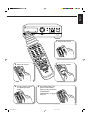
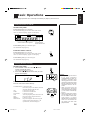
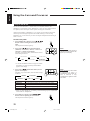
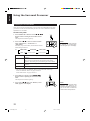
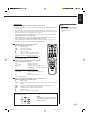
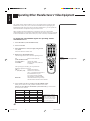
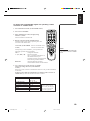
To change the transmittable signals for operating another
manufacturer’s VCR
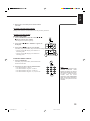
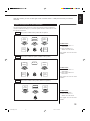
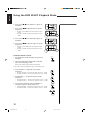
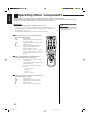
1. Press and hold VCR (in the POWER section).
CATV/SAT
TV
POWER
VCR
AUDIO
CATV
SOUND
CONTROLCD-DISC CONTROL
2. Press VCR.
DAP MODE
3D-PHONIC
EFFECT
3. Enter manufacturer’s code (two digits) using
buttons 1–9, and 0.
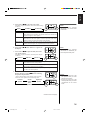
See the list below to find the code.
SEA MODE
SEA PRESET
9
100+
– REAR•R +
+10
10
0
TV
VOLUME
REAR
(L)
CENTER
CH
ONE TOUCH TV/VIDEO
OPERATION
CD
ER/
TUNN
BA D
ON
TAP
E
VCR
TV D
N
SOU
PH
MENU
8
7/P
VCR (in the POWER Turns on and off the VCR.
section)
TEST
6
5
RETURN/ENTER
LIGHT
3
DELAY
4
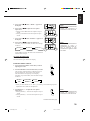
4. Release VCR (in the POWER section).
Following button can be used for operating the VCR:
SURROUND
2
1
MUTING
O
DVD
DVD
MUL
TI
VOLUME
After pressing VCR, you can perform the
following operations on the VCR:
CH +/–
Changes the TV channels on the VCR.
3
Starts playback.
1
Rewinds a video tape.
¡
Fast winds a video tape.
7
Stops operation.
8
Pauses. To resume playing, press 3.
Note:
Refer to the manual supplied with
your VCR.
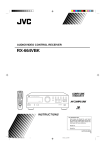
RM-SR665U
REMOTE CONTROL
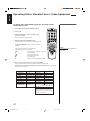
5. Try to operate your VCR by pressing VCR POWER.
When your VCR turns on or off, you have entered the correct code.
If there are more than one code listed for your brand of VCR, try each one until
the correct one is entered.
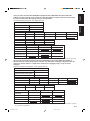
Manufacturer
Codes
Manufacturer
Codes
EMERSON
FISHER
FUNAI
GOLD STAR
HITACHI
JVC
MITSUBISHI
NEC
PANASONIC
11, 26
29
10, 14, 15, 16
12
04
01, 02, 03
13
25
07, 17
PHILIPS
RCA
SAMSUNG
SANYO
SHARP
SONY
SHINTOM
ZENITH
09
05, 06
24
21, 22, 23
27, 28
18, 19, 20
30
08
Manufacturers’ codes are subject to
change without notice. If they are
changed, this remote control cannot
operate the equipment.
47
RX-665VBK(C)24-50
47
98.5.12, 11:31 AM