1
 Button Functions
Some buttons on the remote might have functions that
are referred to by different names on the device you are
controlling. E.G. LCR may be called RECALL, or ENTER
may be called DISPLAY. These differences depend on the
brand and model of your product. Also, this remote can
only operate features that exist on your product. E.G., your
product must have LCR/Recall ability for the LCR button to
operate this feature.
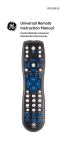
GUIDE displays
satellite or
cable on-screen
program guide.
TV, VCR, etc. Selects
product to be
operated.
MENU-PROG
Brings up the main
menu. If you are ready
in the menu system,
press SELECT to select a
highlighted choice. Use
the arrow buttons to
move through the menu
selections.
Red Indicator
Lights when any
button is pressed.
C H- G u i d e
R S - G u id e
CLEAR
MUTE Turns off the TV
sound while the picture
remains.
M
LCR
VOLUME UP/DOWN
Changes the volume level of
the product, normally the TV.
SETUP
SETUP Used for setup.
0-9
Enter numbers for direct
channel selection. Some
products require ENTER to be
pressed after channel selection.
DVR
ENTER For some TV
models, used after direct
channel number
entry to immediately
change to the selected
channel.
REPLAY Replays the last 8
seconds of a program.
REPLAY
PAGE UP/DOWN TiVo Thumbs
controls.