1
Chapter 8 — Troubleshoot and Maintain the Computer
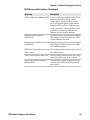
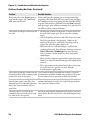
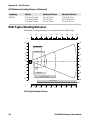
Problems Reading Bar Codes (Continued)
Problem
Possible Solution
When you release the Scan button or If you configure the computer to use continuous/edge
triggering, the Good Read LED stays on. If you configure
scan handle trigger, the Good Read
the computer for level triggering and the Good Read LED
LED does not turn off.
stays on, there may be a problem. Press the Scan button or
pull the trigger again without scanning a bar code label. If
the LED is still on, contact Intermec.
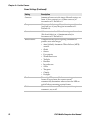
The scanner or imager cannot read the • Position the scanner beam so that it crosses the entire
bar code.
bar code label in one pass. Try to vary the scanning
angle.
• Check the quality of the bar code label. Scan a bar code
label that you know scans properly. Compare the
quality of the two bar code labels. You may need to
replace the label that you cannot scan.
• Make sure the bar code symbology is enabled and
configured correctly. Start Intermec Settings and go to
Data Collection > Symbologies for the scanning
device (scanner, virtual wedge) to check and enable
symbologies.
• Make sure the computer application is expecting input
from a bar code. You may need to type this information
instead.
• The scanner may not be turned on or the scanner may
be unable to scan a specific bar code. Run the
ScanDiagnostic application.
The scanner or imager cannot read the The scanner or imager window may be dirty. Clean the
bar code quickly, or the scanning beam window with a solution of mild soap and water. Wipe dry.
Do not allow abrasive material to touch the window.
seems to be faint or obscured.
You read a valid bar code label to enter The computer may have decoded the bar code label in
another symbology. Scan the bar code label again. Make
data for your application. The data
decoded by the scan module does not sure you scan the entire label.
match the data encoded in the bar
code label.
The input device attached to the
computer does not work well or read
bar code labels very quickly.
120
Set the Scanner Model command to the specific attached
input device. Enable only the bar code symbologies being
used.
CN51 Mobile Computer User Manual