1
Chapter 4 — Maintaining the CN30 Computer
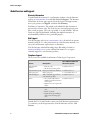
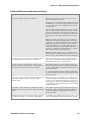
Problems While Configuring 802.1x Security
If you have trouble configuring the computer for 802.1x security, check
these problems and possible solutions.
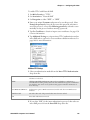
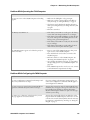
Problems While Configuring 802.1x Security
Problem
Solution
The CN30 Computer indicates that it is authenticated,
but it does not communicate with the host.
Make sure that the CN30 IP address, host IP address,
subnet mask, and default router are properly configured
for your network.
Note: Do not perform a cold-boot on the CN30 Computer. Doing so resets the time and date. You must also
update the time and date for the Certificate of Authority.
The CN30 Computer does not appear to be authenticating and a network connection icon does not appear on
the status bar.
The CN30 Computer may not be communicating with
your access point. Make sure the network name on the
CN30 Computer is the same as the network name (SSID)
of the access point with which you are trying to communicate. The default network name is “INTERMEC.”
The 802.1x security network may not be active. Make
sure that the server software is properly loaded and configured on the server PC. For help, see the documentation
that shipped with your server software.
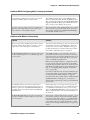
A network connection icon appears in the status bar, but
then disappears.
The CN30 Computer may not be communicating with
the access point that you want it to communicate with.
Make sure that the network name on the CN30 Computer is the same as the network name of the access point
with which you are trying to communicate. The default
network name is “INTERMEC.”
The access point with which you are trying to communicate may not be communicating with the server. Make
sure your access point is turned on, properly configured,
and has 802.1x security enabled.
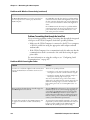
The CN30 Computer indicates that it is not authenticated.
Make sure that:
• The Users Name and Password parameters on your
CN30 Computer match the user name and password
on your authentication server. You may need to reenter
the password on both your CN30 Computer and the
authentication server.
• On your authentication server, the user and group are
allowed and the group policy is allowed to log into the
server. For help, see the documentation that shipped
with your authentication server software.
• The IP address and secret key for your access point
must match the IP address and secret key on your
authentication server. You may need to reenter the IP
address and secret key on both your access point and
authentication server.
• The authentication server software is running on the
server PC.
164
CN30 Mobile Computer User’s Manual