1
D1 – Ethernet/802.11
Windows:
EN
FR
/
Mac:
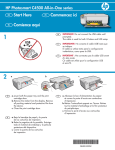
a. Turn on your computer, login if necessary, and
then wait for the desktop to appear.
b. Insert the green CD and follow the onscreen
instructions to install the software.
IMPORTANT: If the startup screen does not
appear, double-click My Computer, double-click
the CD-ROM icon with the HP logo, and then
double-click setup.exe.
c. On the Connection Type screen, make sure
to select through the network.
d. Your firewall software may provide prompts
warning you that HP software is attempting
to access your network. You should respond
so that access is “always” allowed. Then
continue with the HP software installation.
Note: Anti-virus and anti-spyware applications
may block software installation and may need
to be disabled. Remember to turn them back
on again following installation.
a. Allumez l’ordinateur, connectez-vous
si nécessaire et attendez que le bureau s’affiche.
b. Insérez le CD-ROM vert et suivez les instructions
à l’écran pour installer le logiciel.
IMPORTANT : si l’écran de démarrage ne
s’affiche pas, double-cliquez sur l’icône Poste
de travail, puis sur l’icône du CD-ROM ayant
le logo HP, puis sur le fichier setup.exe.
c. Sur l’écran Type de connexion, veillez
à sélectionner Par le réseau.
d. Votre logiciel pare-feu peut générer d’autres
invites vous informant que le logiciel HP
tente d’accéder à votre réseau. Nous vous
recommandons de répondre de manière
à « toujours » autoriser l’accès. Poursuivez
ensuite l’installation du logiciel HP.
Remarque : les applications antivirus et antilogiciels espions peuvent bloquer l’installation
du logiciel ; il se peut que vous deviez les
désactiver. Pensez à les réactiver à l’issue
de l’installation.
EN
FR
a. Turn on your computer, login if necessary,
and then wait for the desktop to appear.
b. Insert the green CD.
c. Double-click the HP Photosmart CD icon
on the desktop.
d. Double-click the HP All-in-One Installer
icon. Follow the onscreen instructions.
e. Complete the Setup Assistant Screen.
a. Allumez l’ordinateur, connectez-vous
si nécessaire et attendez que le bureau
s’affiche.
b. Insérez le CD vert.
c. Double-cliquez sur l’icône du CD
HP Tout-en-un du bureau.
d. Double-cliquez sur l’icône HP All-in-One
Installer. Suivez les instructions affichées
à l’écran.
e. Renseignez l’écran Assistant
de configuration.
HP Photosmart C8100 Tout-en-un série/HP Photosmart C8100 All-in-One series • 11