1
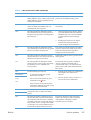
Print on both sides manually .......................................................
Flip Pages Up ..........................................................................................
Booklet Layout .........................................................................................
Book and Booklet Printing ..........................................................
86
88
89
89
Pages per Sheet ....................................................................................... 90
Print Page Borders .................................................................................... 90
Page Order ............................................................................................. 90
Document preview image ......................................................................................... 90
Orientation ............................................................................................................. 91
Color tab features .................................................................................................................. 92
Color Options ......................................................................................................... 93
Automatic ................................................................................................ 93
Manual ................................................................................................... 93
Neutral Grays .......................................................................................... 94
Color Themes ......................................................................................................... 94
Default (sRGB) ......................................................................................... 94
Photo (sRGB) ........................................................................................... 94
Photo (Adobe RGB 1998) ......................................................................... 94
Vivid (sRGB) ............................................................................................ 95
None ...................................................................................................... 95
Document preview image ......................................................................................... 95
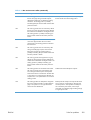
Services tab features ............................................................................................................... 96
Internet Services ...................................................................................................... 97
Device services ....................................................................................................... 97
Device Settings tab features ..................................................................................................... 98
Form to Tray Assignment .......................................................................................... 98
Font Substitution Table ............................................................................................. 99
External Fonts .......................................................................................... 99
Installing external fonts ............................................................. 100
Removing external fonts ........................................................... 100
Installable Options ................................................................................................ 100
Automatic Configuration ......................................................................... 101
Allow Manual Duplexing ......................................................................... 101
Job Separator ........................................................................................ 101
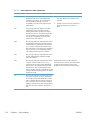
Printing Shortcuts tab features ................................................................................................ 102
Use defined printing shortcuts ................................................................................. 103
General Everyday Printing ....................................................................... 103
Paper source .......................................................................... 103
Paper sizes ............................................................................. 104
Paper type .............................................................................. 104
Print on both sides ................................................................... 106
Eco-print (Two-sided Printing) ................................................................... 106
Factory Defaults ..................................................................................... 106
Envelopes .............................................................................................. 106
vi
ENWW