1
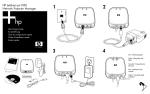
5. On a networked computer, open an internet browser, enter the projector’s
IP address in the URL bar, and press the Enter key.
■
If the projector information page appears, the network connection is
working.
■
If the projector information page does not appear, network
communication is bad. Check the LAN cable. Check the network with
a different device. Connect the module to a different LAN outlet. For
further assistance, see the Administrator's Guide.
If you are not able to fix the problem using these steps and the Administrator’s
Guide, contact HP for assistance. See the support guide on the documentation
CD or go to www.hp.com/support.
Indicator Lights
The indicator lights on the server module provide important information about
the module’s status.
Power/Status Light
Off
Not receiving power.
● Check the power module and power source.
On steady (green)
On and ready, but no network communication.
● Check the LAN 10/100 lights.
Flickering irregularly
(green)
Normal: on and receiving network communication.
Blinking (green)
Module is starting up (up to 15 seconds after applying
power), or no network connection is detected.
● Check the LAN 10/100 lights.
Blinking (orange)
Problem detected during startup.
Unplug, then reconnect power. If the condition
persists, contact HP.
●
LAN 10/100 Lights
Both off
No network connection.
● Check the LAN cable. Check the network with a
different device. Connect the module to a different
LAN outlet.
●
On steady (green)
See the Administrator’s Guide.
Normal: USB is ready.
Fixing Problems 14