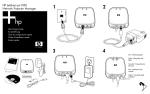
1
4. Plug the power cable from the power module into the server module, then
plug the power module into a power outlet.
5. Check the indicator lights on the server module:
■
The power/status light (2) on top of the server module should light solid
green within 15 seconds to show proper startup. Then it may flicker
irregularly to show network communication.
■
One of the LAN connector lights (3) should turn on to show the network
connection speed.
■
The USB/projector light (1) on top of the server module should light
solid green to show a good USB connection.
If any of these does not occur, see “Indicator Lights” on page 14.
Installing the HP Jetdirect Module 7