1
USB/Projector Light
Off
Module is starting up (up to 15 seconds after applying
power), or a USB problem is detected.
● Make sure a USB cable connects to a projector, and
the projector is connected to power.
●
Try a different USB cable.
●
Unplug, then reconnect power. If the condition
persists, the module or projector is faulty. If possible,
repeat with a different module or projector.
On steady (green)
Normal: USB is ready.
Blinking (green)
USB device is not compatible with the server module.
● Check for Jetdirect compatibility in the specifications
for the projector model and firmware version — or go
to www.hp.com/support and look up the model
number of your Jetdirect server.
Not all HP projectors with a USB connector support
the connection of a Jetdirect module.
Blinking (orange)
Hardware problem.
● Unplug the USB cable from the module, then unplug
and reconnect power. Then reconnect the USB cable.
If the condition persists, continue with the following
steps.
●
Unplug the USB cable at both ends, then unplug and
reconnect power. If the condition persists, the server
module is faulty.
●
Plug the USB cable only into the module, then unplug
and reconnect power. If the condition persists, the
cable is faulty.
●
Plug the USB cable into the module and projector,
then unplug and reconnect power. If the condition
persists, the projector is faulty.
Testing the System
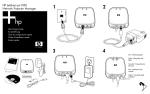
1. Make sure the projector is connected to power, and that the server module
is connected to the LAN and to the projector.
2. Unplug and reconnect power to the server module.
3. Wait at least 15 seconds, then check the indicator lights on the module:
■
If the power/status light is flickering irregularly and the USB/projector
light is solid green, the setup is good.
■
Any other light condition indicates a possible problem. See “Indicator
Lights” on page 14.
Fixing Problems 15