1
1
HP All-in-One overview
The HP All-in-One at a glance....................................................................................................2
Control panel buttons.................................................................................................................3
Status light overview...................................................................................................................4
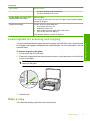
Load originals for scanning and copying....................................................................................5
Make a copy...............................................................................................................................5
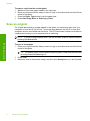
Scan an original..........................................................................................................................6
2
Troubleshooting and support
Uninstall and reinstall the software.............................................................................................7
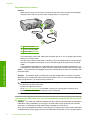
Hardware setup troubleshooting.................................................................................................7
Clear paper jams......................................................................................................................10
Print cartridge troubleshooting..................................................................................................10
Find more information...............................................................................................................10
Setup Guide........................................................................................................................10
Onscreen Help....................................................................................................................10
HP Web site........................................................................................................................11
HP support................................................................................................................................11
HP support by phone..........................................................................................................11
Phone support period...................................................................................................11
After the phone support period.....................................................................................11
Before calling HP Support..................................................................................................11
Technical information...............................................................................................................11
System requirements..........................................................................................................12
Paper specifications...........................................................................................................12
Physical specifications........................................................................................................12
Power specifications...........................................................................................................12
Environmental specifications..............................................................................................12
Regulatory notices..............................................................................................................12
Regulatory model identification number.......................................................................12
Warranty.............................................................................................................................13
1
Contents
Contents