1
Mounting
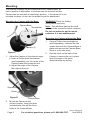
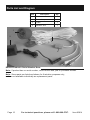
The Security Camera can be mounted with the Camera Base, so
that its position is adjustable, or the base can be removed and the
Camera can be mounted in a stationary position. If the camera is to be
mounted outdoors, do not use the adhesive pad for attachment.
Mounting the Camera with the Base
Camera Base
Screwdriver
WARNING! Check for hidden
wiring before securing.
Note: The adhesive pad can be used
instead of the screws for indoor locations.
Do not use adhesive pad to mount
outdoors, it is not weatherproof.
Mounting the Camera without the Base
1.
Using a Phillips head screwdriver
(sold separately), unthread the two
screws that hold the Camera Base in
place and remove the Camera Base.
Store in a dry safe place.
2.
Use the holes on the back of the
Camera to secure the unit in place.
Note the angle of the holes
when planning any drilling.
Camera (1)
Figure C
1.
Adjust the Camera to the desired angle:
a. Insert a Phillips head screwdriver
(sold separately) into the center of the
Camera base and loosen the bolt.
b. Adjust the angle of the Camera,
then tighten the bolt.
Screwdriver
Screw
Figure D
2.
Camera Base
Mount the Camera to the
chosen location, using the three
included bolts through the three
holes in the Camera Base.
Page 6
For technical questions, please call 1-888-866-5797.
Rev 07i, 08j, 10a, 10l
Item 95914