1
Flight Planning
EICAS
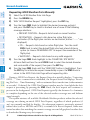
7) Press the ENT Key. The system returns to editing the flight plan with the
new airway inserted.
INVERT AN ACTIVE FLIGHT PLAN
Nav/Com/
XPDR/Audio
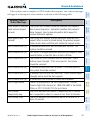
1) Press the FPL Key to display the active flight plan.
2) Press the MENU Key to display the Page Menu.
AFCS
3) Turn the large FMS Knob to highlight ‘Invert Flight Plan’.
GPS Nav
4) Press the ENT Key. The original flight plan remains intact in its flight plan
catalog storage location.
5) With ‘OK’ highlighted, press the ENT Key to invert the flight plan.
Or, for a stored flight plan:
Hazard
Avoidance
a) Press the MFD FPL Key and turn the small FMS Knob to select the
Flight Plan Catalog Page.
Procedures
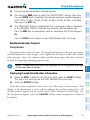
1) Press the FPL Key to display the active flight plan. Press the FMS Knob to
activate the cursor.
Flight
Planning
REMOVE A DEPARTURE, ARRIVAL, APPROACH, OR AIRWAY FROM A FLIGHT
PLAN
Flight
Instruments
6) Turn the FMS Knob to select the desired airway exit point from the list, and
press the ENT Key. ‘LOAD?’ is highlighted.
Additional
Features
b) Press the FMS Knob to activate the cursor.
c) Turn the large FMS Knob to highlight the desired flight plan.
d) Select the EDIT Softkey.
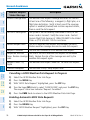
2) Turn the large FMS Knob to highlight the title for the approach, departure,
arrival, or airway to be deleted. Titles appear in white directly above the
procedure’s waypoints.
Abnormal
Operation
3) Press the CLR Key to display a confirmation window.
Annun/
Alerts
Appendix
4) With ‘OK’ highlighted, press the ENT Key to remove the selected procedure
or airway.
Index
190-01107-03 Rev. A
G1000 Cockpit Reference Guide for the Piper PA-46 Mirage/Matrix
31