1
AFCS
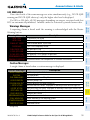
NOTE: If the attitude information required for the default flight director modes
becomes invalid or unavailable, the autopilot automatically disengages.
AFCS
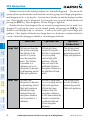
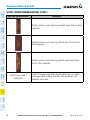
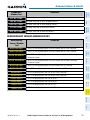
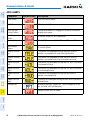
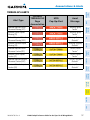
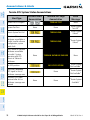
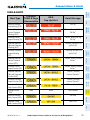
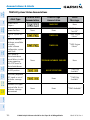
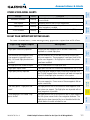
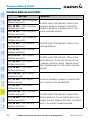
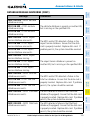
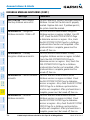
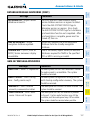
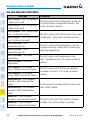
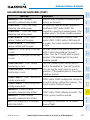
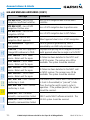
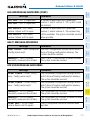
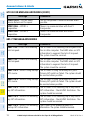
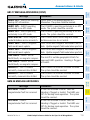
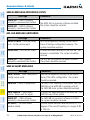
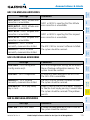
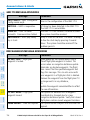
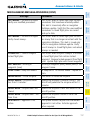
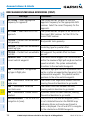
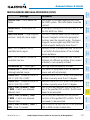
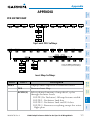
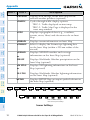
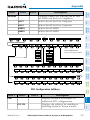
FLIGHT DIRECTOR ACTIVATION
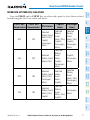
Modes Selected
GPS
VOR
LOC
HDG Key
Heading Select
HDG
Appendix
Approach**
PIT
PIT
GP
GS
PIT
Annun/
Alerts
APR Key
Pitch Hold (default)
Pitch Hold (default)
Glidepath
Glideslope
Pitch Hold (default)
Abnormal
Operation
Backcourse***
PIT
*Valid VNV flight plan must be entered before VNV Key press activates flight director.
***The selected navigation receiver must have a valid LOC signal before BC Key press activates flight
director.
G1000 Cockpit Reference Guide for the Piper PA-46 Mirage/Matrix
13
Index
**The selected navigation receiver must have a valid VOR or LOC signal or active GPS course before
NAV or APR Key press activates flight director.
190-01107-03 Rev. A
Additional
Features
BC Key
Pitch Hold (default)
Hazard
Avoidance
Navigation**
Procedures
NAV Key
ROL
ROL
ROL
GA
ROL
ROL
ROL
GPS
VOR
LOC
BC
Vertical
Pitch Hold (default)
PIT
Pitch Hold (default)
PIT
Pitch Hold (default)
PIT
Go Around
GA
Altitude Hold
ALT
Vertical Speed
VS
Vertical Path Tracking* VPTH
Flight
Planning
FD Key
AP Key
CWS Button
GA Switch
ALT Key
VS Key
VNV Key
Lateral
Roll Hold (default)
Roll Hold (default)
Roll Hold (default)
Go Around
Roll Hold (default)
Roll Hold (default)
Roll Hold (default)
GPS Nav
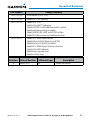
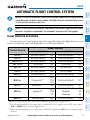
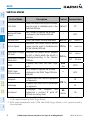
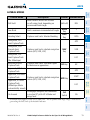
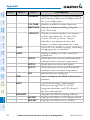
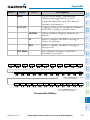
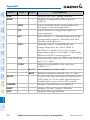
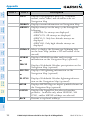
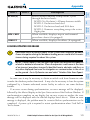
An initial press of a key listed in the following table (when the flight director is not
active) activates the pilot-side flight director in the listed modes.
Control Pressed
Nav/Com/
XPDR/Audio
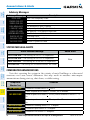
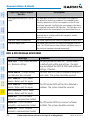
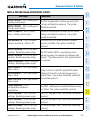
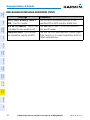
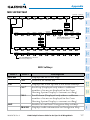
NOTE: If sensor information (other than attitude) required for a flight director
mode becomes invalid or unavailable, the flight director automatically reverts
to the default mode for that axis.
EICAS
Flight
Instruments
AUTOMATIC FLIGHT CONTROL SYSTEM