1
Chapter 9 Operational Settings
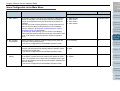
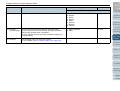
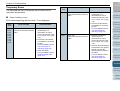
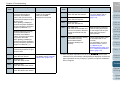
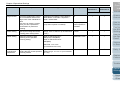
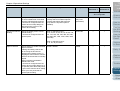
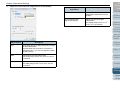
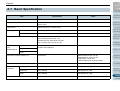
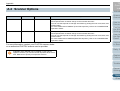
Item
Description
Setting/Value
Factory Default
SCSI or USB
Connector 1
SCSI or USB
Connector 2
3: Configurable
-: Not configurable
Specify whether or not to keep the
operator panel’s paper separation
force setting upon turning the power
off.
Remember / Do not remember
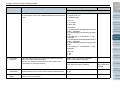
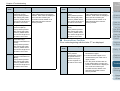
Specify the cycle for cleaning the
scanner.
Also specify whether or not to show
a message for cleaning from the
scanner driver.
1,000 to 255,000 sheets
(in increments of 1,000)
[Show cleaning instructions.] check box
10,000 sheets
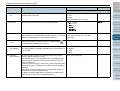
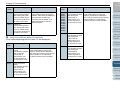
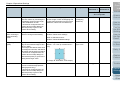
Life Counter Alarm
Setting
Specify the replacement cycles for
the consumables.
Each consumable
10,000 to 2,550,000 sheets
(in increments of 10,000)
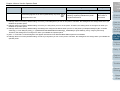
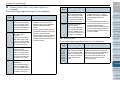
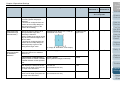
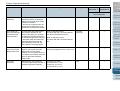
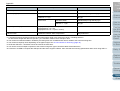
Set the interval for
feeding sheets
If the bottom of the scanned image
is partially missing due to a large
skew when scanning in Automatic
Page Size Detection, specify a
longer interval to feed the
documents.
Specifying a longer interval leaves
more time between each document
to be scanned.
Short (default) - Long
(1 to 4 levels)
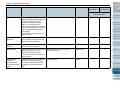
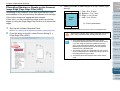
When multifeeds or paper jams
occur frequently, the symptom may
be improved by slowing down the
speed (pick speed) in which the
documents are fed.
It can also be configured from the
operator panel.
Normal / Slower
Retain current
paper thickness
Cleaning Cycle
Pick Speed
Do not remember
3
3
TOP
Contents
Index
Introduction
Scanner
Overview
How to Load
Documents
3
3
600,000 sheets
3
3
How to Use
the Operator
Panel
Short (default)
3
3
Various Ways
to Scan
Not selected
Configuring
the Scan
Settings
Daily Care
Replacing
Consumables
Normal
3
3
Troubleshooting
Operational
Settings
Appendix
Glossary
177