1
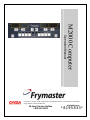
M2000 Computer
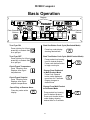
Cooking With Dedicated Display
FR
F Ries
1
FR
1
2
1
3
2
ABC
1
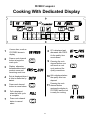
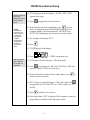
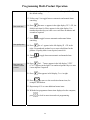
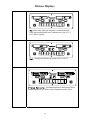
A menu item, such as
FR FRIES shows in
display
2
Press a cook channel
button to begin the
cook cycle.
F Ries
DEF
GHI
6
5
4
JKL
MNO
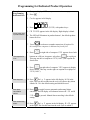
fr fries
1
3
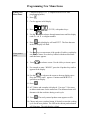
Display alternates
between abbreviated
product name and
remaining cook time.
4
Duty is displayed when it
is time to shake the fry
basket.
duty
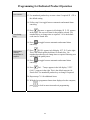
5
Press cook channel
button to cancel alarm.
1
FRis
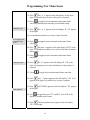
6
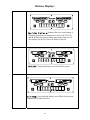
Pull is displayed
when the cook cycle
is complete.
pull
7
Press cook channel
button to cancel
alarm.
1
2:34
7
PQR
STU
8
VWX
9
2
0
YZ-
*+
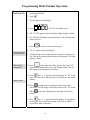
8
Q7 is displayed and
alternates with FRES.
As the quality time
counts down.
9
Pressing the cook
channel button now
will launch a cook
cycle and end the
quality countdown.
10 QA is displayed when
the quality time has
elapsed.
Q7
Q1
1
QA
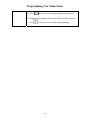
the cook
11 Pressing
channel button
1
restores the display to
FR FRIES and the unit
is ready for cooking.
FR
2-3
Fris
Fris
FRies