1
Quick Start Guide — RCP 2000
Step 1
Turn the equipment off and disconnect it from the power source.
Make sure that the ISS 108/408 or SGS 408 and all attached devices
are turned off and, if applicable, disconnected from the power
source.
Step 2
Set the RCP 2000 on a table or other flat surface.
Step 3
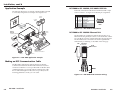
SGS Switcher:
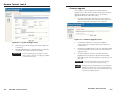
Attach one of the RS-232 cables provided with the RCP 2000 between
the RS-232 Remote port on the rear panel of the SGS and the
To Switcher port on the rear panel of the RCP 2000.
ISS Switcher:
Attach one of the RS-232 cables provided with the RCP 2000 between
the RS-232 port on the rear panel of the ISS and the To Switcher port
on the rear panel of the RCP 2000; or attach a network cable between
the ISS and RCP 2000 rear panel Ethernet ports.
Preview
Monitor
Program
Monitor
Projector
Extron
ISS 408
RAM
PROG
S VIEW
PUTPRE
OUT
M
GRA
R
PRO
DVI
OUT
System
Control
IEW
PREV
R
G
2
RS-23
G
B
Seamless Switcher
B
8
H/HV
7
RNET
ETHE
LINK
ACT
R
H/HV
6
V
R
TS 5
INPU
V
R
G
4
R
G
3
R
G
B
2
R
G
B
1
R
G
R
B
G
B
G
H/HV
H/HV
B
G
H/HV
B
H/HV
B
H/HV
8
B
H/HV
7
6
H/HV
Hz
5
50/60
240 MAX.
100- 1.2A
H/HV
4
3
2
1
DVD Player
H
RE
TU
PIC
LS
RO
T
NT
CON HT
CO
OR
COL
TINT
E
WIP
BRIG
IL
DETA
CUT
E
FAD
SIZE
CEN
TER
R
ME
DIM
OG
PR
Codec
CK
BLA
Extron
RGB 109xi
Interface
VCR
1
2
3
4
EZE
FRE
COM
5
2
1
CK
BLA
EZE
FRE
RA
M
6
3
7
4
8
5
9
7
6
PR
11
10
EV
8
12
9
OLVE
DISS
12
11
10
IEW
ION
ICAT
MUNTx
Rx
Extron
RCP 2000
Remote Control Panel
Laptop
Podium PC
RCP 2000 to ISS connection diagram
RCP 2000 • Quick Start Guide
QS-1