1
Contents
PowerLite 520/525W/530/535W User's Guide............................................................................................ 9
Introduction to Your Projector .................................................................................................................
Projector Features..............................................................................................................................
Product Box Contents....................................................................................................................
Additional Components ................................................................................................................
Optional Equipment and Replacement Parts.................................................................................
Warranty and Registration Information ..........................................................................................
Notations Used in the Documentation ................................................................................................
Where to Go for Additional Information ..............................................................................................
Projector Part Locations .....................................................................................................................
Projector Parts - Front/Top ............................................................................................................
Projector Parts - Rear ....................................................................................................................
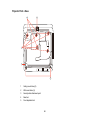
Projector Parts - Base....................................................................................................................
Projector Parts - Control Panel ......................................................................................................
Projector Parts - Remote Control...................................................................................................
10
10
11
13
13
15
15
15
16
17
18
20
21
22
Setting Up the Projector ...........................................................................................................................
Projector Placement...........................................................................................................................
Projector Setup and Installation Options .......................................................................................
Projection Distance........................................................................................................................
Projector Connections........................................................................................................................
Connecting to Computer Sources..................................................................................................
Connecting to a Computer for USB Video and Audio................................................................
Connecting to a Computer for VGA Video.................................................................................
Connecting to a Computer for HDMI Video and Audio ..............................................................
Connecting to a Computer for USB Mouse Control...................................................................
Connecting to a Computer for Sound........................................................................................
Connecting to Video Sources ........................................................................................................
Connecting to an HDMI Video Source ......................................................................................
Connecting to a Component-to-VGA Video Source ..................................................................
Connecting to a Composite Video Source ................................................................................
24
24
24
26
32
33
33
34
35
35
36
36
37
37
38
3