1
P-2000 Basics
COPYRIGHT NOTICE
All rights reserved. No part of this publication may be reproduced, stored in a
retrieval system, or transmitted, in any form or by any means, electronic,
mechanical, photocopying, recording, or otherwise, without the prior written
permission of Seiko Epson Corporation. The information contained herein is
designed only for use with this Epson product. Epson is not responsible for
any use of this information as applied to other equipment.
Neither Seiko Epson Corporation nor its affiliates shall be liable to the
purchaser of this product or third parties for damages, losses, costs, or expenses
incurred by the purchaser or third parties as a result of accident, misuse, or
abuse of this product or unauthorized modifications, repairs, or alterations to
this product, or (excluding the U.S.) failure to strictly comply with Seiko
Epson Corporation’s operating and maintenance instructions.
Seiko Epson Corporation shall not be liable for any damages or problems
arising from the use of any options or any consumable products other than
those designated as Original Epson Products or Epson Approved Products by
Seiko Epson Corporation.
TRADEMARKS
Epson and Epson Print Image Framer are registered trademarks and Photo
Fine and P.I.F. are trademarks of Seiko Epson Corporation.
Epson Store and Epson Connection are service marks of Epson America, Inc.
General notice: Other product names used herein are for identification
purposes only and may be trademarks of their respective owners. Epson
disclaims any and all rights in those marks.
© 2005 Epson America, Inc. 2/05
2
CPD-18999R1
Contents
Contents
3
Introduction
5
About the Software
Replacement Battery
6
6
Getting Started
7
Unpacking Your P-2000
P-2000 Lights and Buttons
Installing the Battery
Charging the Battery
Turning Your P-2000 On and Off
Setting the Language, Date, and Time
Conserving Battery Power
Using the Home Screen
Installing the Software
7
8
9
10
12
12
14
15
16
Viewing and Playing Photos, Video,
and Music
17
Inserting and Removing Memory Cards
Copying Files from a Memory Card
Supported File Formats
Browsing Files on a Memory Card
17
21
24
26
3
Using the P-2000 Screen
Viewing Images
Playing Video and Audio Files
Copying Files to and From Your Computer
28
30
35
36
Creating Custom Albums and
Slide Shows
39
Creating an Album
Creating Custom Slide Shows with Music
Showing Photos and Videos on TV
39
45
47
Solving Problems
49
Power Problems
Viewing Problems
File Operation Problems
Where To Get Help
49
49
50
51
Appendix
53
Important Safety Instructions
FCC Compliance Statement
Declaration of Conformity
MPEG License Agreement
Epson America, Inc. Limited Warranty
53
59
60
61
61
Index
65
4
Introduction
Your new Epson® P-2000 multimedia storage viewer lets
you enjoy photos, videos, and music wherever you go. Its
features include:
◗
Large, high-quality 3.8-inch LCD with Photo Fine™
technology
◗
Support for JPEG files and RAW files from select
digital SLR cameras
◗
MP3 and AAC audio
◗
MPEG4 and Motion JPEG video
◗
40GB hard drive
◗
Two slots for CompactFlash® and SD™ (Secure
Digital) memory cards
◗
Hi-speed USB 2.0 interface for PC or Macintosh®
◗
Direct printing to select Epson printers
◗
Lithium ion battery and AC adapter
◗
VGA output to display pictures on a TV or projector
5
About the Software
The CD-ROM that came with your P-2000 includes the
following software for Windows® and Macintosh:®
◗
Your Epson P-2000 User’s Guide, which has
instructions for all the features of your P-2000,
including printing directly from the P-2000.
◗
A USB driver that lets you transfer files to and from
your computer in Windows 98SE. (If you have a
newer version of Windows or a Macintosh, you don’t
need to install the USB driver.)
◗
Adobe® Acrobat® Reader to view the P-2000 User’s
Guide.
See page 16 for instructions on installing the software.
Replacement Battery
You can purchase a replacement lithium ion battery
(B32B818252) from an Epson authorized reseller. For
product information and to find the nearest authorized
reseller, please call 800-GO-EPSON (800-463-7766) or
browse our catalog of products at www.epson.com, select
the product you are interested in, and click “Where to
Buy.” To purchase online, please visit the Epson Store at
www.epsonstore.com (U.S. sales only). In Canada, please
call 800-463-7766 for a reseller referral.
6
Getting Started
Follow the instructions in this section to install the
batteries and software and get ready to use your P-2000.
Unpacking Your P-2000
Epson P-2000
Viewing stand
Software CD-ROM
Lithium-ion battery
Carrying case
USB cable
Strap
AC adapter and power cord
7
P-2000 Lights and Buttons
Print button
Displays the Print menu.
Charge light
Access light
Turns green
when the battery
is being charged.
Menu button
Displays the
Pop-up menu.
Flashes orange
when you turn
on the P-2000
or access files.
4-way ring
Press to select a
photo or an option
in a menu.
OK button
Selects an
option, opens a
folder or photo,
and zooms into
an image.
Activity light
Flashes blue during power
on, printing, and certain
other operations.
Cancel button
Cancels the current
operation and returns to
the previous screen.
Display button
Displays information,
instructions, or
messages.
Home button
Returns to the
Home screen.
8
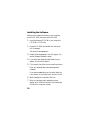
Installing the Battery
1 Turn the P-2000 upside down.
2 Slide the battery cover to the left to open it.
3 Insert the battery into the compartment with the
gold contacts going in first.
9
4 Close the battery cover and slide it to the right until
BATT.
it clicks.
Charging the Battery
After installing the battery, you need to charge it using
the AC adapter. When the power is off, it takes about 3
hours to fully charge the battery. With the power on, it
takes longer.
The Charge light is green while the battery is being
charged. When the battery is fully charged, the light
turns off.
10
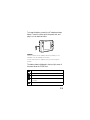
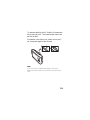
To charge the battery, connect the AC adapter as shown
below. Connect the other end to the power cord, and
plug it in to an electrical outlet.
Caution:
Do not connect the AC adapter when the battery is not
installed; this can damage the P-2000.
Do not remove the AC adapter while you are using the
P-2000.
The battery status is displayed in the top right corner of
the screen when the P-2000 is on.
:
Battery is fully charged.
:
Battery power is about half full.
:
Battery power is low.
:
:
Battery power is running out. Charge the battery using the
AC adapter.
Battery is charging.
11
Turning Your P-2000 On and Off
◗
To turn on the P-2000, slide the Power switch
down and release it. The blue activity light turns on.
◗
To turn off the P-2000, make sure the Access light
is off. Then slide the P power switch down and hold
it until the Access light flashes.
Access light
Activity
light
Setting the Language, Date, and Time
When you turn on the P-2000 the first time, you see the
language setting screen:
Language setting
English (Intl.)
Francais
12
Deutsch
Italiano
Espanol
Nederlands
1 Press the OK button to select English. You see a
message about setting the date.
2 Press the OK button. You see the Date and Time
screen:
Date and time
Year
2004
Month
Jul
Day
26
Hour
13
Minute
Date Format
07
YYYYMMDD
3 Press right or left on the 4-way
ring to change the value for the
selected item.
4 To go to the next item, press
4-way
ring
down on the 4-way ring. Then
press right or left to change that
setting.
5 After you complete the settings, press the OK button.
You see the Home screen. See page 15 for details.
13
Note:
If you remove the battery, the date and time settings will be
erased after about one day. The next time you turn on the
P-2000, the date and time setting screen will be displayed. If
you want to change the settings at any time, select Settings
on the Home screen, then select Date and Time.
Conserving Battery Power
To conserve battery power and protect the LCD screen,
the P-2000 has two power-saving features. If no button
has been pressed and there has been no activity for 10
minutes, the backlight on the LCD screen is turned off.
After 15 minutes, the power is turned off.
Note:
You can change the number of minutes for these settings;
select Settings on the Home screen, then select Power
Save.
◗
If the screen goes dark because the backlight is
turned off, press any button on the P-2000 to turn it
back on.
◗
If the P-2000 has been powered off, you need to
turn it back on with the P power switch.
Note:
The power is also turned off if the P-2000 gets too hot. If
this happens, let it cool before turning it back on.
14
Using the Home Screen
Whenever you turn on the P-2000, the Home screen
appears. You can return to the Home screen at any time
by pressing the Home button.
Use the 4-way ring to highlight one of the icons, then
press the OK button to select it.
View folders for
all your saved files
View or copy files
from a memory card
View your
albums
Battery
status
Home
Saved Data
Albums
Memory Card
See page 43 to
create album
shortcuts here
Latest Data
View most
recently
saved files
Settings
Customize your
P-2000 and check
storage space
15
Installing the Software
Make sure you install the software on your computer
from the CD-ROM that came with the P-2000.
1 Insert the software CD-ROM in your computer’s
CD-ROM or DVD drive.
2 Open the CD-ROM and double-click the Epson
icon if necessary.
You see the license agreement.
3 Read the license agreement, then click Agree. You
see the Software Installation screen.
4 If you don’t have Adobe Acrobat Reader on your
system, click the box to select it.
5 Click Install, then follow the on-screen instructions.
Enter your administrator name and password if
necessary.
If you see a message asking you to restart, select No,
I will restart my computer later, and click Finish.
6 When installation is complete, click Exit.
7 When you see the product registration screen,
register your P-2000 as instructed. At the last screen,
click Done or close your browser.
16
Viewing and Playing Photos,
Video, and Music
Follow the instructions in this section to insert a memory
card, copy files, and view or play them on your P-2000.
Inserting and Removing Memory
Cards
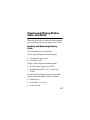
The P-2000 has two memory card slots.
The C/F Card slot supports the following cards:
◗
CompactFlash, Type I and II
◗
Microdrive™ (3.3V)
The SD Card slot supports the following cards:
◗
SD card (Secure Digital) up to 512MB
◗
MultiMedia card (MMC V 2.1 or later) up to
512MB
You can also use the following types of memory cards
with a CompactFlash adapter in the C/F Card slot:
◗
Memory Stick®
◗
SmartMedia™ (3.3 V only)
◗
xD-Picture card™
17
Caution:
Never remove a memory card while the Access light is
flashing. Doing so may cause files to be lost or damaged.
Do not put labels or stickers on memory cards. The sticker
may peel off, preventing the card from being ejected and
damaging the P-2000.
Using the CompactFlash Card Slot
Insert the memory card into the slot with the back of the
card facing the screen. Then push the memory card all
the way into the slot.
Back of card
If you are using a CompactFlash adapter, put the card
into the adapter and insert the adapter into the slot.
Caution:
Make sure you insert memory cards in the correct
orientation. Otherwise, the card and P-2000 may be
damaged.
18
To remove a card from the C/F Card slot, first make sure
the Access light is off. Then press the eject button and
pull out the card.
If the button is not sticking out, press it once to pop it
out, then press it again to eject the card.
Note:
If you are using a CompactFlash adapter, remove the
adapter from the P-2000; do not remove only the memory
card.
19
Using the Secure Digital Card Slot
Insert the memory card into
the slot with the back of the
card facing the LCD. Then
push the memory card all the
way into the slot.
Back of card
Caution:
Make sure you insert memory
cards in the correct orientation.
Otherwise, the card and P-2000
may be damaged.
To remove a card from the SD Card slot, first make sure
the Access light is off. Then press in on the top of the
card. When the card pops out, pull it out of the slot.
20
Copying Files from a Memory Card
After you insert a memory card, you can browse the files
and decide what you want to do with them, or simply
copy all the files on the card to the P-2000.
1 Insert the memory card as described on page 18
or 20.
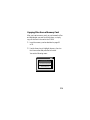
2 Use the 4-way ring to highlight Memory Card on
the Home screen and press the OK button.
You see the following menu:
Home
Saved DataCopy Data from
Albums
Memory Card
Memory Card
Create Album After Copying Data
Browse the Memory Card
Latest Data
Settings
21
3 Select what you want to do by pressing up or down
on the 4-way ring. Then press the OK button.
◗
If you select Copy Data from Memory Card,
copying starts and the following screen appears:
Home
Saved Data
Albums
Memory Card
Copying data...
Cancel
Latest Data
Settings
The files are copied to a folder that is
automatically created on the P-2000. The folder
is named according to the date, for example
20041225.001. Folders are numbered in the
order they are copied.
22
◗
If you select Create Album After Copying
Data, you can select an album or create a new
one. See page 39 for instructions.
◗
If you select Browse the Memory Card, you
see thumbnail images of the files on the card.
See page 26 for more information about
browsing.
Deleting Files After Copying
You can have files automaticaly deleted after you copy
them to the P-2000.
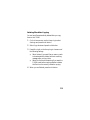
1 On the Home screen, use the 4-way ring to select
Settings and press the OK button.
2 Select Copy Mode and press the OK button.
3 Press left or right on the 4-way ring to choose one of
the following settings:
◗
Select Delete if you want files on memory cards
to be automatically deleted, without a warning
message, after you copy them.
◗
Select Confirm before deleting if you want the
P-2000 to ask before copying whether to delete
the files from the memory card after copying.
4 When you are finished, press the OK button.
23
Supported File Formats
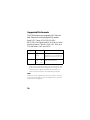
The P-2000 supports non-progressive JPEG files, and
RAW files from the following digital SLR cameras:
Epson R-D1; Canon® EOS-D30, EOS-D60,
EOS-D10D, Kiss Digital, and EOS-1D Mark II; Konica
Minolta® Maxxum-7; Nikon® D100, D1H, D2H, and
D70; and Pentax® *ist D and *ist DS.
*
Image files
Extension
Details
JPEG
.jpg
.jpeg
Minimum size: 160 × 120 pixels
Maximum size: 17.8 megapixels*
Maximum image aspect ratio: 8:1
RAW
.cr2
.crw
.erf
.mrw
.nef
.pef
JPEG data stored in the header of
RAW files is displayed.
Pixels refer to image resolution, not file size (bytes). The
pixel size depends on the capability and settings of the
camera used to capture the image, and whether you
have resized the image in an image-editing program.
Note:
RAW files do not support direct printing, rotation, zooming,
or slide shows. Rotation is also not supported for JPEG files
larger than 8.9 megapixels.
24
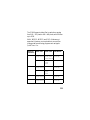
The P-2000 supports video files in resolutions ranging
from 160 × 112 pixels to 640 × 480 pixels, with file sizes
up to 2GB.
WMV, MPEG1, MPEG2, and DVD-Video are not
supported. However, you may be able to convert files
to supported formats using programs such as Apple®
QuickTime™ Pro.
Video file
extensions
Video codec
Audio codec
Max Bit rate
.avi
MPEG-4
(Simple Profile)
AAC, MP3,
ALaw, µLaw
PCM, ADPCM
2.5 Mbps (ave.)
(at 30 fps)
Motion JPEG
ALaw
µLaw
PCM
3 Mbps
MPEG-4
(Simple Profile)
AAC
2.5 Mbps (ave.)
(at 30 fps)
Motion JPEG
ALaw
µLaw
PCM
3 Mbps
.mp4
MPEG-4
(Simple Profile)
AAC
2.5 Mbps (ave.)
(at 30 fps)
.asf
MPEG-4
(Simple Profile)
ADPCM
2.5 Mbps (ave.)
(at 30 fps)
.mov
25
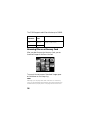
The P-2000 supports audio files with sizes up to 100MB.
Audio file
extensions
Audio
codec
Detail
.m4a
.aac
AAC
(MPEG4)
Maximum bit rate: 320 kbps
(48 kHz, 16 bit Stereo)
.mp3
MP3
Browsing Files on a Memory Card
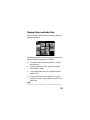
After you select Browse the Memory Card, you see
thumbnail images of the files on the card.
DSC00331.JPG
DSC00330.mpg
DSC00329.JPG
DSC00328.JPG
DSC00327.JPG
DSC00326.JPG
DSC00325.JPG
DSC00324.JPG
DSC00323.JPG
DSC00322.JPG
DSC00321.JPG
To move to the next screen of thumbnail images, press
and hold down on the 4-way ring.
Note:
Although you can play audio and video files on a memory
card, you will get better performance by copying them to the
P-2000 before you play them. See page 35 for instructions.
26
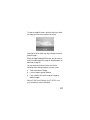
To view an image full screen, use the 4-way ring to select
the image you want, then press the OK button.
Press right or left on the 4-way ring to display the next or
previous image.
When an image is displayed full screen, you can zoom in,
view information about the image, or see a histogram, as
described on page 32.
You can also press the Menu button and do the
following when viewing images on a memory card:
◗
View a slide show of images
◗
Lock an image to prevent deletion
◗
Copy or delete the current image, all images, or
selected images
See the P-2000 User’s Guide on the CD-ROM or on
your computer for more information.
27
Using the P-2000 Screen
After you have copied files from a memory card, you can
view or play them in various ways.
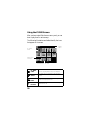
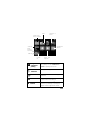
The following illustrations and tables identify the icons
that appear on the screen:
Battery
status
Albums
PC_DATA
folder
Album set as
a shortcut
PC_DATA
Scenery
Flower
Travel
Album1
Travel2
New
Album3
Photo
Favorite
Album4
A folder that includes audio
28
PC_DATA
folder
This is one of the default albums, which you
use for copying files from your computer.
Battery
status
See page 11 for information about battery
status.
Audio
folder
Only folders that do not include image or
video files display this icon.
Album
shortcuts
See page 43 for instructions on creating
album shortcuts.
Video
Folder copied
from a computer
File with P.I.F.™
frame
Audio file
Unsupported
data file
Image
selected
for printing
RAW file
Locked
file
Unsupported
image file
.
Images
selected for
printing
The number next to the icon indicates
the quantity. See the P-2000 User’s
Guide for printing instructions.
Audio and
video files
See page 35 to play audio and video.
RAW files
See page 24 for details about supported
RAW files.
Locked files
Press the Menu button and select Lock
to protect files from deletion.
Files with P.I.F.
frames
P.I.F. (Print Image Framer®) lets you add
frames to your images. Some Epson
digital cameras support this feature.
29
Viewing Images
You can view images in Saved Data or Albums as
thumbnails or full-screen images. To display information
or instructions, press the Display button. Information
and instructions vary depending on the screen.
Home
Saved Data
Albums
Latest Data
Memory Card
Settings
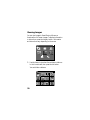
1 Use the 4-way ring to select Saved Data or Albums
in the Home screen, then press the OK button.
You see folders or albums:
Saved Data
30
20040829\002
20040827\001
20040820\001
20040818\003
20040815\001
20040813\001
20040810\002
20040805\001
20040801\005
20040720\002
20040715\003
20040630\001
Note:
On the Saved Data screen, folders are displayed for
every memory card. You can change the setting to
display folders by date. Select Settings on the Home
screen, then select View Mode.
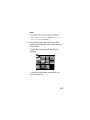
2 Use the 4-way ring to select the folder or album
containing the images you want to view, then press
the OK button.
Thumbnails of the images and other files are
displayed:
Saved Data / 2004.08.26
DSC00331.JPG
DSC00330.mpg
DSC00329.JPG
DSC00328.JPG
DSC00327.JPG
DSC00326.JPG
DSC00325.JPG
DSC00324.JPG
DSC00323.JPG
DSC00322.JPG
DSC00321.JPG
To move to the next screen, press down on the
4-way ring and hold.
31
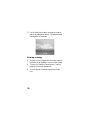
3 Use the 4-way ring to select the image you want to
view, then press the OK button. The selected image
is enlarged to fill the screen.
Zooming an Image
◗
To zoom in on an image shown full screen, press the
OK button. Keep pressing it to zoom in even further.
◗
To zoom out, press the Cancel button. Continue
pressing it to zoom all the way out.
◗
To move around a zoomed image, use the 4-way
ring.
32
Displaying Information
To view information about a full-screen image, press the
Display button. The following information is displayed:
◗
File name
◗
F-stop
◗
Camera model
◗
Shutter speed
◗
Date of photo
◗
Exposure bias
◗
Pixel size
◗
White balance
◗
Focal length
◗
Metering mode
◗
ISO speed rate
◗
Flash
Viewing a Histogram
When an image is displayed full screen, press the
Display button twice to see a histogram that shows the
photo’s distribution of highlights, shadows, and midtones.
33
Displaying Images as a Slide Show
You can display JPEG images as a slide show.
1 Select the folder or album you want to display as a
slide show.
2 Press the Menu button to display the pop-up menu:
Albums
Edit Album Name
Set as Album Shortcut
PC_DATA
Lock
Scenery
Flower
Travel
Start Slide Show
Sort by Album Name
Copy to Memory Card
Album1 Delete Album
Travel2
New
Photo
Favorite
Album3
Album4
3 Select Start Slide Show and press the OK button.
The slide show starts.
Note:
You can select transition effects, timing, and background
music for the slide show. See page 45 for details.
34
Playing Video and Audio Files
Select the video or audio file that you want to play and
press the OK button.
Saved Data / 2004.08.26
DSC00331.JPG
DSC00330.mpg
DSC00329.JPG
DSC00328.JPG
DSC00327.JPG
DSC00326.JPG
DSC00325.JPG
DSC00324.JPG
DSC00323.JPG
DSC00322.JPG
DSC00321.JPG
While playing audio, the screen turns off to conserve the
battery. Press any button to turn it back on.
◗
To raise or lower the volume, press up or down on
the 4-way ring.
◗
To pause the audio or video, press the OK button.
Press it again to restart.
◗
To stop playing and return to the previous screen,
press Cancel.
◗
To play the previous or next audio file, or to fast
forward or rewind a video, press left or right on the
4-way ring.
Note:
Some files may not support fast forwarding and rewinding.
35
Copying Files to and From Your
Computer
You can connect the P-2000 to your computer using the
USB cable that came in the box, and easily copy files
back and forth. You should use the AC adapter when you
connect the P-2000 to your computer.
Note:
If your computer uses Windows 98SE, you need to install
driver software before you connect the P-2000. See page 16
for instructions.
Connecting the P-2000 to Your Computer
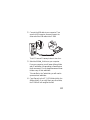
1 Connect the AC adapter to the P-2000 and plug it
in. Then turn on the P-2000 and your computer.
Note:
Make sure the P-2000 is at the Home screen.
36
2 Connect the USB cable to your computer. Then
open the USB connector cover and connect the
other end of the USB cable to the P-2000.
The LCD turns off. Press any button to turn it on.
3 Select the EPSON_PV drive on your computer.
From your computer, you will see an Albums folder
and a Cards folder (corresponding to Saved Data on
the Home screen). Do not change the names of these
folders or any of their subfolders.
To locate files in the Cards folder, you will need to
open a series of subfolders.
4 Copy files only to the PC_DATA folder (within the
Albums folder). If you copy files to any other folder,
the P-2000 will not recognize the files.
37
The PC_DATA folder is one of the default albums
on the P-2000; you cannot rename or delete it or
create an album thumbnail for it.
Disconnecting the P-2000 From Your
Windows Computer
1 Click Unplug or Eject Hardware on the computer
screen.
2 Turn off the P-2000 and remove the USB cable from
your computer.
3 Remove the USB cable from the P-2000.
Disconnecting the P-2000 From Your
Macintosh
1 Drag and drop the P-2000 icon to the trash.
2 Turn off the P-2000 and remove the USB cable from
your Macintosh.
3 Remove the USB cable from the P-2000.
38
Creating Custom Albums and
Slide Shows
You can save your files in albums for special purposes,
such as portfolios. You can also create slide shows with
custom transitions and your own music.
To share your images, slide shows, and videos with a
larger audience, you can connect the P-2000 to a TV or
projector.
Creating an Album
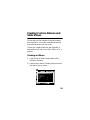
1 Open a folder in Saved Data and select a file to
include in the album.
2 Press the Menu button to display the pop-up menu,
then select Copy to Album.
Saved Data / 2004.08.26
Copy to Album
Set as Folder Thumbnail
DSC00331.JPG
Lock
DSC00329.JPG
DSC00328.JPG
Start Slide Show
Copy to Memory Card
Print Order
Delete DSC00326.JPG DSC00325.JPG
DSC00327.JPG
DSC00324.JPG
DSC00323.JPG
DSC00330.mpg
DSC00322.JPG
DSC00321.JPG
39
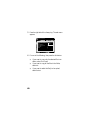
3 Press the right side of the 4-way ring. The sub-menu
appears:
Saved Data / 2004.08.26
Copy to Album
Set as Folder Thumbnail
DSC00331.JPG
Lock
DSC00330.mpg
This Data
All
DSC00329.JPGSelect
DSC00328.JPG
Start Slide Show
Copy to Memory Card
Print Order
Delete
DSC00327.JPG
DSC00326.JPG
DSC00325.JPG
DSC00323.JPG
DSC00322.JPG
DSC00321.JPG
DSC00324.JPG
4 Do one of the following, then press the OK button:
40
◗
If you want to copy only the selected file to an
album, select This Data.
◗
If you want to copy all the files in the folder,
select All.
◗
If you want to select the file(s) to be copied,
select Select.
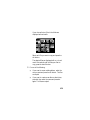
If you choose Select, files in the folder are
displayed as thumbnails.
Select Image for Album
DSC00331.JPG
DSC00330.mpg
DSC00329.JPG
DSC00328.JPG
DSC00327.JPG
DSC00326.JPG
DSC00325.JPG
DSC00324.JPG
Press Menu to finish selection
Select each file you want to copy and press the
OK button.
The selected files are displayed with a
check
mark. After selecting all the files you want to
copy, press the Menu button.
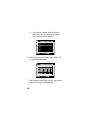
5 Do one of the following:
◗
If you want to use an existing album, select the
one you want and press the OK button. The files
are copied.
◗
If you want to create a new album, select New,
press OK, then select the name and press OK
again. The files are copied.
41
◗
If you want to create an album with a new
name, select New and press the OK button.
Then continue with the next step.
Saved Data / 2004.08.26
Please select an album
DSC00331.JPG
New
DSC00330.mpg
PC_DATA
Scenary
Flower
Travel
DSC00327.JPG
DSC00326.JPG
Album1
Travel2
DSC00323.JPG
DSC00322.JPG
DSC00329.JPG
DSC00328.JPG
DSC00325.JPG
DSC00324.JPG
DSC00321.JPG
6 Select Input name and press the OK button. The
on-screen keyboard appears:
Saved Data / 2004.08.26
T
DSC00330.mpg
CAPS
DSC00331.JPG
A
B
C
D
DSC00329.JPG
DSC00328.JPG
BACKSPACE
E
F
G
1
2
3
H
I
J
K
L
M
N
4
5
6
O
P
Q
R
S
T
U
7
8
9
DSC00327.JPG
V W DSC00326.JPG
X Y Z
Cancel
DSC00323.JPG
DSC00322.JPG
_DSC00325.JPG 0DSC00324.JPG
OK
DSC00321.JPG
7 Select a letter by using the 4-way ring, then press the
OK button to input the selected letter.
42
◗
To switch the letters between uppercase and
lowercase, select CAPS and press the OK
button.
◗
To delete the last letter input, press the Cancel
button or select BACKSPACE on the screen and
press the OK button.
◗
To delete everything that was input, select
Cancel on the screen and press the OK button.
8 After you input the name, select OK on the screen by
using the 4-way ring and press the OK button to save
it. Files are copied to the new album.
Creating an Album Shortcut
You can create shortcuts on the Home screen to allow
quick and easy access to three of your favorite albums.
1 Select the album that you want a shortcut for.
2 Press the Menu button to display the pop-up menu:
Albums
Edit Album Name
Set as Album Shortcut
PC_DATA
Lock
Scenery
Flower
Travel
Start Slide Show
Sort by Album Name
Copy to Memory Card
Album1 Delete Album
Travel2
New
Photo
Favorite
Album3
Album4
43
3 Select Set as Album Shortcut and press OK. The
icon is displayed on the album thumbnail.
Note:
You can also press the Menu button to change the album
name, lock, delete, or copy the album to a memory card, or
sort albums. For more information, see the P-2000 User’s
Guide on the CD-ROM or on your computer.
Rotating Images
You can rotate images that are stored in albums.
1 Press the Menu button to display the pop-up menu,
then select Rotate.
2 Press right on the 4-way ring. The sub-menu
appears.
3 Select Right to rotate the image 90° clockwise or
Left to rotate it 90° counterclockwise. Then press
the OK button.
If you want to rotate a group of images at the same
time select Right-Select (to rotate clockwise) or
Left-Select (to rotate counterclockwise).
Select the images you want to rotate, then press the
Menu button. The images are rotated.
Note:
You cannot rotate JPEG images larger than 8.9 megapixels.
44
Creating Custom Slide Shows with
Music
You can create slide shows of all the images in a folder or
album. You can choose from 5 different transition effects
and 5 different background music selections. You can
also register up to 3 of your own music files to use for
slide shows.
Registering Slide Show Background Music
You can register one of your own audio files to use as
slide show background music.
1 Highlight the audio file you want to use.
2 Press the Menu button. You see the pop-up menu.
3 Select Register to Slide show BGM.
4 Press right on the 4-way ring. The sub-menu
appears.
5 Select one of the User BGM choices. If three audio
files are already registered, the new file will replace
one of the existing files.
6 Press the OK button to register the file and exit the
menu.
45
Creating the Slide Show
You can create a slide show from images in a folder or
album in the P-2000 or on a memory card. The easiest
way to select files for your slide show is to copy them to
an album. See page 39 for instructions.
Then follow these steps to create a slide show and select
transitions and music:
1 Highlight or open the album or folder you want to
use for the slide show.
2 Press the Menu button. You see the pop-up menu.
3 Select Start Slide Show and press OK. The slide
show begins.
4 Press the Menu button. You see the slide show popup menu.
5 Select Slide Show Effect and press right on the
4-way ring. Choose from one of the 5 transition
effects and press the OK button.
6 Repeat step 4 and select Slide Show Duration.
Press right on the 4-way ring and select the timing
for each image: 3, 5, 10, or 30 seconds, or 1, 5, or 30
minutes. Then press OK.
46
7 Repeat step 4 again and select Slide Show BGM.
Select one of the audio files you registered, or select
from one of the 5 default music selections. Then
press OK.
If you don’t want music for your slide show, select
None.
After you press the OK button, your slide show plays
with the transition effect, image duration, and music
you selected.
Note:
You can also choose default slide show settings. Select
Settings on the Home screen, then select Slide Show.
Showing Photos and Videos on TV
You can connect the P-2000 to a TV or projector and
view your images, videos, and slide shows.
You will need a camcorder to TV/VCR audio/video cable
(A/V cable with a 3.5 mm mini-plug to 3 RCA phono
plugs). You can purchase the cable at an electronics store.
47
Follow these steps to connect the P-2000 to your TV:
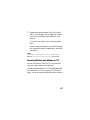
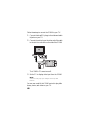
1 Connect the three RCA plugs to the video and audio
IN jacks on your TV.
2 Connect the mini-plug on the other end of the cable
to the A/V Out connector on the side of the P-2000.
The P-2000 LCD screen turns off.
3 Set the TV to display video input from the P-2000.
Note:
Some TVs may crop your images on the top and
bottom.
You can now use all of the P-2000 controls to play slide
shows, photos, and videos on your TV.
48
Solving Problems
Before you call for help, check this list of common
problems and possible solutions. For more
troubleshooting tips, check the P-2000 User’s Guide on
the CD-ROM or on your computer.
Power Problems
The power doesn’t turn on.
◗
The P-2000 may have shut off automatically to
save power. Slide the P power switch down to turn
the P-2000 back on.
◗
The battery may need recharging. Connect the AC
adapter as shown on page 11.
Viewing Problems
The LCD screen is dark.
◗
The screen may have turned off automatically to save
power. Press any button to turn the screen on.
◗
If you have connected the P-2000 to your TV or
projector, the screen turns off.
◗
Try adjusting the screen brightness. Select Settings
on the Home screen, then select LCD Brightness.
49
Images or videos are not displayed correctly, or sound
doesn’t play correctly.
◗
Make sure the file format is supported. See page 24
for details about supported image file formats.
For audio and video, make sure the bit rate and
audio codec of your file are supported. See pages 24
to 26 for details about video and audio files.
You may be able to convert files to supported
formats with software such as QuickTime Pro.
◗
The file may be corrupted.
◗
Make sure the P-2000 is not connected to a
computer or printer. Images are not displayed when
the P-2000 is connected.
File Operation Problems
You have a problem copying files to or from the
P-2000.
◗
Make sure you have sufficient space on the hard
drive. To check the space remaining, select Settings
on the Home screen, then select Hard Drive.
◗
Make sure files are not damaged or corrupted.
◗
If you want to copy files to or from a computer
running Windows 98, you need to install driver
software. See page 16 for instructions.
50
◗
When transferring files from a computer, make sure
the P-2000 is at the Home screen, and copy files to
the PC_DATA folder within the Cards folder.
◗
To locate files in the Cards folder on the P-2000
(Saved Data) from your computer, you need to open
a series of subfolders. See pages 36 to 38.
You can’t rotate an image.
The image must be a JPEG in the Albums folder, and it
cannot be larger than 8.9 megapixels.
Where To Get Help
Epson provides technical assistance 24 hours a day
through the electronic support services and automated
telephone services listed below.
Service
Access
World
Wide Web
From the Internet, you can reach Epson Support at
http://support.epson.com. At this site, you can
download drivers and other files, look at product
documentation, access troubleshooting
information, and receive technical advice through
e-mail.
Automated
Telephone
Services
A variety of automated help services are available
24 hours a day, seven days a week. To use these
services, you must have a touch tone telephone and
call (800) 922-8911.
51
To speak to a technical support representative, dial:
◗
U.S.: (562) 276-4303, 6 AM to 6 PM, Pacific Time,
Monday through Friday.
◗
Canada: (905) 709-3839, 6 AM to 6 PM, Pacific
Time, Monday through Friday.
Toll or long distance charges may apply.
Please have the following information ready:
◗
Product name (Epson P-2000)
◗
Product serial number (on the back of the P-2000)
◗
Proof of purchase (such as a store receipt) and date of
purchase
◗
Computer configuration and operating system
version
◗
Description of the problem
You can purchase parts, manuals, and accessories from
an Epson authorized reseller. For product information
and to find the nearest authorized reseller, please call
800-GO-EPSON (800-463-7766) or browse our catalog
of products at www.epson.com, select the product you
are interested in, and click “Where to Buy.”
To purchase online, please visit the Epson Store at
www.epsonstore.com (U.S. sales only). In Canada, please
call 800-463-7766 for a reseller referral.
52
Appendix
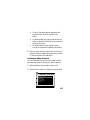
Important Safety Instructions
Using the P-2000
◗ Follow all warnings and instructions marked on this product.
◗ Use only AC adapter model A351H and Lithium ion battery
model EU-97 with this product.
◗ When connecting this product to a computer or other device with
◗
◗
◗
◗
◗
◗
◗
◗
a cable, ensure the correct orientation of the connectors. Each
connector has only one correct orientation. Inserting a connector
in the wrong orientation may damage both devices connected by
the cable.
Do not insert objects into the slots or openings on this product.
Do not touch the components inside this product unless
instructed to do so in the documentation. Never force this
product’s components into place. Although this product is
designed to be sturdy, rough handling can damage it.
Never spill liquid onto this product.
If this product emits unusual noises, odors, or smoke, cancel the
current operation and turn it off immediately. Disconnect the AC
adapter from the product, then unplug the AC adapter from the
power outlet. Contact Epson.
Do not use this product after moving it between extreme
temperatures, which may cause condensation to form on
electronic parts.
If you use this product in places where the use of electronic devices
is limited, such as in airplanes or hospitals, follow all instructions
in those places.
Do not use this product outdoors during a thunderstorm.
To prevent fire or electric shock, do not cover this product with a
blanket or other covering that may give off a static electric shock.
53
◗ To prevent fire or electric shock, do not expose this product or its
options to rain or moisture.
◗ To prevent fire or explosion, do not use this product where
flammable or volatile gas is stored.
Using the Battery
◗ If battery acid gets into your eyes or on your skin, immediately
◗
◗
◗
◗
◗
◗
◗
◗
◗
◗
◗
◗
◗
◗
rinse the affected area thoroughly with water and seek medical
treatment. If a battery is swallowed, seek medical treatment
immediately.
Use only an Epson Lithium-ion battery for the P-2000 according
to the instructions in this manual.
Use only AC adapter model A351H and P-2000 (Model G941) to
charge batteries.
Do not use the battery that comes with this product for other
devices.
To protect against short-circuiting, do not remove the outside
sleeves of the battery.
Do not handle the battery with wet hands or use it near water.
Do not expose the battery to water or high humidity.
Do not drop, puncture, disassemble, mutilate, or short-circuit the
battery.
Do not place the battery near or into fire or water.
Do not use batteries that are leaking or damaged in any way.
Do not charge the battery on devices except this product.
Do not charge the battery near open flame or in very hot
locations.
Keep batteries away from heat sources.
Do not leave the battery in a vehicle to prevent the battery from
overheating.
Do not insert objects into any openings as they may touch
dangerous voltage points or short-circuit components.
54
◗ Prevent the battery from coming into contact with metal objects
that could short-circuit it, such as coins or keys.
◗ Do not insert the battery into power outlets or other power
sources such as car cigarette lighter sockets.
◗ Do not solder wires or terminals directly to the battery.
◗ Do not touch battery terminals.
◗ Keep batteries away from open flame if they leak or smell strange.
◗ If overheating, discoloration, or distortion occur, remove the
battery from this product and do not use it.
◗ Charge the battery before using it if it has not been used for a long
period.
Storing the Battery
◗ When not using this device for a long period, remove the battery
from this product and store it separately.
◗ Do not store batteries where the temperature or humidity is very
high.
◗ Store batteries out of children’s reach.
Disposing of the Battery
Before disposing of the battery, make sure you discharge it
completely.
For users in North America: This mark indicates that the
battery will be recycled by the RBRC. When you are ready
to dispose of the battery, contact the RBRC at
(800) 822-8837.
Warning:
Be sure to securely cover the end of the battery with tape to
prevent combustion or explosion when disposing of it.
Do not incinerate or dispose of the battery in fire.
Do not dispose of batteries as ordinary refuse. Instead, dispose of
them in a collection or recycle box in accordance with local laws.
55
Using the AC Adapter
◗ Use only the type of power source indicated on the AC adapter’s
◗
◗
◗
◗
◗
◗
◗
◗
◗
◗
◗
◗
◗
label, and always supply power directly from a standard, domestic
power outlet with a power cord that meets the relevant local safety
standards.
Place the AC adapter near an electrical outlet where the power
cord can be easily unplugged.
The AC adapter is designed for use and provided with this
product. Do not attempt to use it with other electronic devices
unless specified.
Do not remove the AC adapter from this device during operations.
The AC adapter included is designed for use with this product.
Use of any other adapter could result in fire, electrical shock, or
injury.
Use only adapter model A351H with the P-2000.
Do not connect the AC adapter when the battery is not installed.
Otherwise, the P-2000 may be damaged.
Use only the power source that meets the power requirements
indicated on the label attached to the product. If you are not sure
of the power supply specifications in your area, contact your local
power company or regulatory agency.
Make sure the total amperage of all devices plugged into the power
outlet does not exceed the power outlet’s ampere rating.
Do not use a damaged or frayed AC adapter.
If you use an extension cord with this product, make sure the total
amperage of all devices plugged into the extension cord does not
exceed the cord’s amperage rating.
Never disassemble, modify, or attempt to repair the AC adapter by
yourself.
Do not use power outlets controlled by wall switches or automatic
timers.
Do not use power outlets on the same circuit as large motors or
other appliances that may cause voltage fluctuations.
56
◗ Avoid using outlets on the same circuit as photocopiers or air
control systems that regularly switch on and off.
◗ Position this product’s power cord so that it will not be stepped on
or run over.
◗ Do not place any objects on the power cord and the AC adapter.
◗ Keep the power cord straight at the ends and at the points where it
enters the transformer.
◗ The power cord should be placed to avoid abrasions, cuts, fraying,
crimping, kinking, and other damage.
◗ If you cannot insert the plug into the power outlet, contact an
electrician.
◗ Remove the AC plug from the outlet during lightning storms.
◗ For US and Canadian users: Use the included power cord or a 6 to
10 foot UL-approved type SPT-2 or heavier type, 2 x 18 AWG
cord with a 125 V 10 A plug and 125 V 7 A connector.
Using a Memory Card
◗ Only memory cards designed for the product’s specifications can
be used. (See page 17.)
◗ The methods for using memory cards vary according to card type.
See the documentation included with your memory card for
details.
◗ Do not remove a memory card or turn off the product while the
Access light is flashing.
Using the LCD
◗ The LCD panel on this product may contain a few small bright or
dark spots. These are normal and do not mean that your LCD
panel is damaged in any way.
◗ If the LCD panel on this product is damaged, contact Epson.
◗ If the liquid crystal solution contained in the LCD panel on this
product leaks out and gets onto your hands, wash them
thoroughly with soap and water. If it gets into your eyes, flush
57
them immediately with water. If discomfort or vision problems
remain after a thorough flushing, see a doctor immediately.
◗ Use only a soft, dry cloth to clean the display. Do not use liquid or
chemical cleaners.
Storing, Maintaining, or Transporting the P-2000
◗ Do not store this product outdoors.
◗ Do not store this product near water.
◗ Do not store this product in a location subject to high temperature
or humidity.
◗ Do not store this product in a location subject to rapid changes in
temperature or humidity.
◗ Do not store this product in a location subject to direct sunlight or
strong light sources.
◗ Unplug this product from the power outlet before cleaning it. Use
a damp cloth for cleaning and do not use liquid or aerosol
cleaners.
◗ Remove the battery and unplug this product and refer servicing to
qualified service personnel under the following conditions: The
power cord or plug is damaged; liquid has entered this product or
its options; this product or its options have been dropped or the
case is damaged; this product or its options do not operate
normally or exhibit a distinct change in performance.
WARNING:
The cords included with this product contain chemicals, including
lead, known to the State of California to cause birth defects or other
reproductive harm. Wash hands after handling.
(provided in accordance with Proposition 65 in Cal. Health & Safety
Code § 25249.5 et seq)
58
FCC Compliance Statement
For United States Users
This equipment has been tested and found to comply with the limits
for a class B digital device, pursuant to Part 15 of the FCC Rules.
These limits are designed to provide reasonable protection against
harmful interference in a residential installation. This equipment
generates, uses, and can radiate radio frequency energy and, if not
installed and used in accordance with the instructions, may cause
harmful interference to radio and television reception. However,
there is no guarantee that interference will not occur in a particular
installation. If this equipment does cause interference to radio and
television reception, which can be determined by turning the
equipment off and on, the user is encouraged to try to correct the
interference by one or more of the following measures:
◗ Reorient or relocate the receiving antenna
◗ Increase the separation between the equipment and receiver
◗ Connect the equipment into an outlet on a circuit different from
that to which the receiver is connected
◗ Consult an experienced radio/TV technician for help.
WARNING: The connection of a non-shielded equipment interface
cable to this equipment will invalidate the FCC Certification of this
device and may cause interference levels that exceed the limits
established by the FCC for this equipment. It is the responsibility of
the user to obtain and use a shielded equipment interface cable with
this device. If this equipment has more than one interface connector,
do not leave cables connected to unused interfaces. Changes or
modifications not expressly approved by the manufacturer could void
the user’s authority to operate the equipment.
For Canadian Users
This Class B digital apparatus complies with Canadian ICES-003.
Cet appareil numérique de la classe B est conforme à la norme NMB-003
du Canada.
59
Declaration of Conformity
According to 47CFR, Part 2 and 15 for Class B Personal Computers
and Peripherals; and/or CPU Boards and Power Supplies used with
Class B Personal Computers:
We:
Epson America, Inc.
Located at:
MS 3-13
3840 Kilroy Airport Way
Long Beach, CA 90806
Telephone : (562) 290-5254
Declare under sole responsibility that the product identified herein,
complies with 47CFR Part 2 and 15 of the FCC rules as a Class B
digital device. Each product marketed is identical to the
representative unit tested and found to be compliant with the
standards. Records maintained continue to reflect the equipment
being produced can be expected to be within the variation accepted,
due to quantity production and testing on a statistical basis as
required by 47CFR §2.909. Operation is subject to the following two
conditions: (1) this device may not cause harmful interference, and
(2) this device must accept any interference received, including
interference that may cause undesired operation.
Trade Name:
Epson
Type of Product: Multimedia Storage Viewer
Model:
G941A
Product:
Epson P-2000
60
MPEG License Agreement
This product uses MPEG-3 and MPEG-4 technology.
For MPEG-3 (MPEG-1 Layer 3):
MPEG Layer-3 audio coding technology is licensed from Fraunhofer
IIS and Thomson.
For MPEG-4:
This product is licensed under the MPEG-4 visual patent portfolio
license for the personal and non-commercial use of a consumer for (i)
encoding video in compliance with the MPEG-4 visual standard
(“MPEG-4 video”) and/or (ii) decoding MPEG-4 video that was
encoded by a consumer engaged in a personal and non-commercial
activity and/or was obtained from a video provider licensed by
MPEG LA to provide MPEG-4 video. No license is granted or shall
be implied for any other use. Additional information including that
relating to promotional, internal and commercial uses and licensing
may be obtained from MPEG LA, LLC. See http://
www.mpegla.com.
Epson America, Inc. Limited Warranty
What Is Covered: Epson America, Inc. (“Epson”) warrants to the
first retail purchaser that the Epson product enclosed with this
limited warranty statement, if purchased and used in the United
States or Canada, conforms to the manufacturer’s specifications and
will be free from defects in workmanship and materials for a period of
one (1) year from the date of original purchase. For warranty service,
you must provide proof of the date of original purchase.
What Epson Will Do To Correct Problems: Should your Epson
product prove defective during the warranty period, please call the
Epson ConnectionSM at (562) 276-4303 for warranty repair
instructions and return authorization, if required. An Epson service
technician will provide telephone diagnostic service to determine
whether the unit requires service. If service is needed, Epson will, at
61
its option, repair or exchange the product without charge for parts or
labor. If the product requires repair or replacement, it is your
responsibility to package it in its original container or an equivalent,
along with proof of the date of original purchase and ship it to Epson.
Packaging and shipping costs incurred in presenting your Epson
product for warranty service are your responsibility. Return shipping
costs from the Epson repair facility are Epson’s responsibility. When
warranty service involves the exchange of the product or of a part, the
item replaced becomes Epson property. The replacement product or
part may be new or refurbished to the Epson standard of quality, and,
at Epson’s option, may be another model of like kind and quality.
Epson’s liability for replacement of the covered product will not
exceed the original retail selling price of the covered product.
Exchange products and parts assume the remaining warranty period
of your original product covered by this limited warranty.
What This Warranty Does Not Cover: This warranty does not apply
to refurbished or reconditioned products. This warranty covers only
normal use in the United States and Canada. This warranty is not
transferable and will not apply to products purchased from an end
user. This warranty does not cover damage to the Epson product
caused by parts or supplies not manufactured, distributed or certified
by Epson. This warranty does not cover third party parts,
components or peripheral devices added to the Epson product after
its shipment from Epson. Epson is not responsible for warranty
service should the Epson label or logo or the rating label or serial
number be removed or should the product fail to be properly
maintained or fail to function properly as a result of misuse, abuse,
improper installation, neglect, improper shipping, damage caused by
disasters such as fire, flood, and lightning, improper electrical current,
software problems, interaction with non-Epson products, or service
other than by an Epson Authorized Servicer. If a claimed defect
cannot be identified or reproduced, you will be held responsible for
costs incurred.
62
THE WARRANTY AND REMEDY PROVIDED ABOVE ARE
EXCLUSIVE AND IN LIEU OF ALL OTHER EXPRESS OR
IMPLIED WARRANTIES INCLUDING, BUT NOT LIMITED
TO, THE IMPLIED WARRANTIES OF MERCHANTABILITY,
NON-INFRINGEMENT OR FITNESS FOR A PARTICULAR
PURPOSE. SOME LAWS DO NOT ALLOW THE EXCLUSION
OF IMPLIED WARRANTIES. IF THESE LAWS APPLY, THEN
ALL EXPRESS AND IMPLIED WARRANTIES ARE LIMITED
TO THE WARRANTY PERIOD IDENTIFIED ABOVE.
UNLESS STATED HEREIN, ANY STATEMENT OR
REPRESENTATIONS MADE BY ANY OTHER PERSON OR
FIRM ARE VOID. EXCEPT AS PROVIDED IN THIS
WRITTEN WARRANTY, NEITHER EPSON AMERICA, INC.,
NOR ITS AFFILIATES SHALL BE LIABLE FOR ANY LOSS,
INCONVENIENCE, OR DAMAGE, INCLUDING DIRECT,
SPECIAL, INCIDENTAL OR CONSEQUENTIAL DAMAGES,
RESULTING FROM THE USE OR INABILITY TO USE THE
EPSON PRODUCT, OR FOR LOST DATA OR LOST
SOFTWARE, WHETHER RESULTING FROM BREACH OF
WARRANTY OR ANY OTHER LEGAL THEORY.
In Canada, warranties include both warranties and conditions.
Some jurisdictions do not allow limitations on how long an implied
warranty lasts and some jurisdictions do not allow the exclusion or
limitation of incidental or consequential damages, so the above
limitations and exclusions may not apply to you. This warranty gives
you specific legal rights, and you may also have other rights which
vary from jurisdiction to jurisdiction.
Epson America, Inc., P. O. Box 93012, Long Beach, CA 90809-3012
63
64
Index
A
D
A/V cable, 47
AC adapter
connecting, 11
safety, 56 to 57
Albums, creating, 39 to 43
Audio
file formats, 26
playing, 35
problems, 50
Date and time setting,
B
Battery
charging, 10 to 11
installing, 9 to 10
power, conserving, 14
recycling, 55
replacing, 6
safety, 54 to 55
BGM, slide show, 45
Buttons, 8
12 to 14
Disk space, 50
Display button, 30, 33
E
Epson
help, 51
Store, 6, 52
warranty, 61 to 63
F
File formats, 24 to 26
Files
browsing, 26
copying from memory
card, 21
copying to computer,
36 to 38
problems, 50 to 51
C
H
Cable
A/V, 47
USB, 36 to 38
CompactFlash cards, 18
Computer
connecting, 36 to 38
disconnecting, 38
Hard drive space, 50
Histogram, viewing, 33
Home screen, 15
65
I
P
Images
copying to album,
P.I.F., 29
PC_DATA folder, 37
Power, conserving, 14
Problems, solving, 49 to 51
39 to 43
displaying as slide show, 34
displaying histogram, 33
displaying information, 33
file formats, 24
problems, 50
rotating, 44, 51
showing on TV, 47 to 48
zooming, 32
L
LCD safety, 57
Lights, 8
M
Memory card
adapter, 17
copying files, 21
inserting and removing,
17 to 20
safety instructions, 57
MPEG licence agreement, 61
Music
playing, 35
registering for slide show,
45
66
R
RAW files, 24
Rotating images, 44, 51
S
Safety instructions, 53 to 58
Screen icons, 15, 28 to 29
Secure Digital card, 20
Shortcuts, creating, 43
Slide show
creating, 46 to 47
registering music, 45
starting, 34
Software
description, 6
installing, 16
T
Technical support, 51
Troubleshooting, 49 to 51
Turning P-2000 on/off, 12
TV, connecting to, 48
U
USB
cable, 36 to 38
driver, installing, 6
V
Video
file formats, 25
playing, 35
problems, 50
showing on TV, 47 to 48
W
Warranty, 61 to 63
Z
Zooming images, 32
67
68
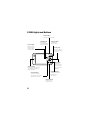
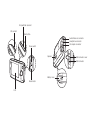
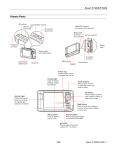
CompactFlash card slot
SD card slot
Eject button
Audio/Video out connector
Headphone connector
AC adapter connector
Power switch
Speaker
USB connector cover
USB connector
Battery cover
Reset button
LCD
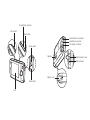
CompactFlash card slot
SD card slot
Eject button
Audio/Video out connector
Headphone connector
AC adapter connector
Power switch
Speaker
USB connector cover
USB connector
Battery cover
Reset button
LCD