1
XP800QG.book Page 2 Thursday, May 17, 2012 3:14 PM
About Your Product
After you set up your XP-800 (see the Start Here sheet), turn to this Quick Guide and your
online User’s Guide for instructions on using your product.
Features
Where to find information
Copy, scan, and fax from the easy-to-use touch
screen.
See this Quick Guide for the basics.
See the online User’s Guide for details.
Easy networking—WiFi, Wi-Fi Direct, and
Ethernet®.
See the Start Here sheet and the online
User’s Guide.
Process large documents with the 30-page
capacity Automatic Document Feeder
See this Quick Guide for the basics.
See the online User’s Guide for details.
Print photos from a USB flash drive, external
hard drive, or CD burner.
See the online User’s Guide for details.
Copy files to and from your computer with the
built-in memory card reader.
Print on card stock and other thick media using
the rear paper feed slot.
See this Quick Guide for the basics.
See the online User’s Guide for details.
Print and scan from anywhere with EPSON
Connect™ Solutions, and Google Cloud Print™.
See www.epson.com/connect and the
online User’s Guide for details.
Adjusting the Control Panel
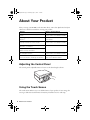
The control panel is adjustable. Raise or lower it to the desired angle as shown.
Using the Touch Screen
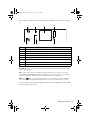
The touch screen makes it easy to use all the features of your product. To save energy, the
screen goes dark after several minutes of inactivity. Touch the screen to wake it up.
2 About Your Product