1
XP800QG.book Page 3 Thursday, May 17, 2012 3:14 PM
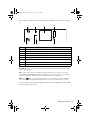
The touch screen displays only the buttons that are available for the task you are working
on.
1
5
2
6
3
7
Number
Description
1
Turns product on/off
2
Returns to the Home menu
3
LCD screen shows menus and status
4
Use the arrow keys to navigate menus
5
Shows wireless network status
6
Opens the CD/DVD menu
7
Cancels/returns to the previous menu
8
Starts copying/printing/scanning/faxing
4
8
Caution: Press the touch screen gently with the tip of your finger; don’t press too hard
or use sharp objects.
Tip: To turn off the “beep” heard when you press a button, or to reduce its volume,
press Setup > Printer Setup > Sound and adjust one of the settings. If you turn off the
sound, the dialing sound made when you transmit a fax is also turned off.
Note: The
light is green when the product is connected to a network. It flashes
when network settings are being adjusted (green for wireless and orange for wired).
For more information on the icons displayed on the screen, press l or r, then select Help
on the product’s touch screen.
About Your Product 3