1
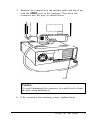
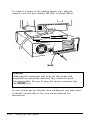
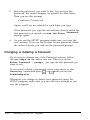
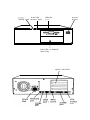
3. Examine the connector on the monitor cable and line it up
with the VIDEO port on the computer. Then insert the
connector into the port, as shown below.
VIDEO
Caution
To avoid damaging the connector, be careful not to bend
the pins when inserting it.
4. If the connector has retaining screws, tighten them.
Setting Up Your System
1-5