1
You can change the angle of the keyboard by adjusting the legs
on the bottom. Turn it over and flip each leg upward until it
locks into place. It is important to select the best angle so you
will prevent wrist fatigue. (You may even want to purchase a
wrist pad--sold at computer stores-for further comfort.)
TO lower the keyboard, press the leg back into its slot.
6
Connecting the Mouse
®
™
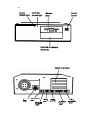
Your computer has an auxiliary port for an IBM PS/2
compatible mouse that uses a round, miniature DIN (6-pin)
connector. If your mouse has this type of connector, you can
connect it to the computer’s built-in port.
Note
If your mouse requires a different interface port, you can
connect it to the built-in serial port or install an option card
that provides the interface. Then disable the built-in mouse
port by changing the setting of jumper J9, and enable the
option card port by changing J12 See Chapter 2 of the
User’s Guide for instructions.
Setting Up Your System
1-13