1
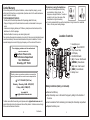
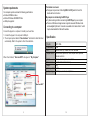
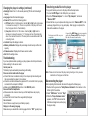
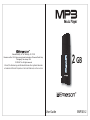
2 GB Manufactured by: AIT Inc. Brooklyn, NY 11232 Emerson and the G-Clef logo are registered trademarks of Emerson Radio Corp. Parsippany, New Jersey USA © 2009 AIT Inc. All rights reserved Microsoft, the Windows logo, and Windows Media are either registered trademarks or trademarks of Microsoft Corporation in the United States and / or other countries User Guide EMP385-2 FCC Part 15 This device complies with Part 15 of the FCC Rules. Operation is subject to the following two conditions: (1) this device may not cause harmful interference, and (2) this device must accept any interference received, including interference that may cause undesired operation. Warning: Changes or modifications to this unit not expressly approved by the party responsible for compliance could void the user's authority to operate the equipment. NOTE: This equipment has been tested and found to comply with the limits for a Class B digital device, pursuant to Part 15 of the FCC Rules. These limits are designed to provide reasonable protection against harmful interference in a residential installation. This equipment generates, uses and can radiate radio frequency energy and, if not installed and used in accordance with the instructions, may cause harmful interference to radio communications. However, there is no guarantee that interference will not occur in a particular installation. If this equipment does cause harmful interference to radio or television reception, which can be determined by turning the equipment off and on, the user is encouraged to try to correct the interference by one or more of the following measures: ● Reorient or relocate the receiving antenna. ● Increase the separation between the equipment and receiver. ● Connect the equipment into an outlet on a circuit different from that to which the receiver is connected. ● Consult the dealer or an experienced radio/TV technician for help. Southern Telecom, Inc. 14C 53rd Street Brooklyn, NY 11232 tel: 718-567-7778 MP3 Music Player Model #: EMP385-2 Introduction Congratulations on purchasing the Emerson MP3 Music Player. This manual contains important safety information and correct operation instructions. Before using the player, read this manual thoroughly and keep it for future reference. Copyright Information Trademarks and trade names used in this instruction manual are owned by their respective companies or organizations. Unauthorized duplication of any recordings whether downloaded from the internet or made from audio CDs is a violation of copyright laws and international treaties. The making of unauthorized copies of copy-protected material, may be an infringement of copyrights and constitute a criminal offence. This equipment should not be used for such purposes. Imortant Safety Information Always follow these basic safety precautions when using your player. This will reduce the risk of product damage and personal injury. ● Do not disassemble, repair or modify the player by yourself. Refer servicing to qualified personnel. ● This device requires a “AAA” size battery, do not dispose of in fire. ● In the event that the battery is leaking, do not handle the device with your bare hands. Contact the service center for help since the liquid may remain in the player. If your body or clothes had contact with the battery liquid, wash it off thoroughly with water. Also, if some liquid gets into your eyes, do not rub your eyes but immediately wash them with clean water and consult a doctor. ● Keep the player away from direct sunlight and any direct heat source. ● Do not expose the unit to rain or moisture. ● Do not use the player in dry environments to avoid static. ● Never apply heavy impact on the player, or place it on a magnet. ● Disconnect from the computer, if you will not be using the player for a long time. ● Clean only with a dry cloth. Make sure the player is turned off before cleaning. Do not use a liquid cleanser. ● Be sure to back up your files to avoid data loss. 1 Warranty service not provided: This warranty does not cover damage resulting from accident, misuse, abuse, improper installation or operation, lack of reasonable care, and unauthorized modification. This warranty is voided in the event any unauthorized person opens, alters, or repairs this product. All products being returned to the authorized service center for repair must be suitably packaged. Limitation of Warranty: ● THE WARRANTY STATED ABOVE IS THE ONLY WARRANTY APPLICABLE TO THIS PRODUCT. ALL OTHER WARRANTIES, EXPRESS OR IMPLIED (INCLUDING ALL IMPLIED WARRANTIES OF MERCHANTABILITY OR FITNESS FOR A PARTICULAR PURPOSE) ARE HEREBY DISCLAIMED. NO VERBAL OR WRITTEN INFORMATION GIVEN BY SOUTHERN TELECOM INC. IT’S AGENTS, OR EMPLOYEES SHALL CREATE A GUARANTY OR IN ANY WAY INCREASE THE SCOPE OF THIS WARRANTY. ● REPAIR OR REPLACEMENT AS PROVIDED UNDER THIS WARRANTY IS THE EXCLUSIVE REMEDY OF THE CONSUMER, SOUTHERN TELECOM INC. SHALL NOT BE LIABLE FOR INCIDENTAL OR CONSEQUENTIAL DAMAGES RESULTING FROM THE USE OF THIS PRODUCT OR ARISING OUT OF ANY BREACH OF ANY EXPRESS OR IMPLIED WARRANTY ON THIS PRODUCT. THIS DISLAIMER OF WARRANTIES AND LIMITED WARRANTY ARE GOVERNED BY THE LAWS OF THE STATE OF NEW YORK, EXCEPT TO THE EXTENT PROHIBITED BY APPLICABLE LAW, ANY IMPLIED WARRANTY OF MERCHANABILITY OR FITNESS FOR A PARTICULAR PURPOSE ON THIS PRODUCT IS LIMITED TO THE APPLICABLE WARRANTY PERIOD SET FORTH ABOVE. How state law relates to this warranty: ● Some states do not allow the exclusion nor limitation of incidental, consequential damages, or limitations on how long an implied warranty lasts so the above limitations or exclusion may not apply to you. ● This warranty gives you specific legal rights, and you also may have other rights that vary from state to state. 14 Limited Warranty Precautions in using the headphones In the unlikely event that this product is defective, or does not perform properly, you may within ninety (90) days from your original date of purchase return it to the authorized service center for repair or exchange. TO OBTAIN WARRANTY SERVICE: - Provide proof of the date of purchase within the package (dated bill of sale). - Prepay all shipping costs to the authorized service center, and remember to insure your return. - Include a return shipping address (no P.O.Boxes), a telephone contact number, and the defective unit within the package. - Describe the defect or reason you are returning the product. Your product will be repaired or replaced, at our option, for the same or similar model of equal value if examination by the service center determines this product is defective. Products received damaged as a result of shipping will require you to file a claim with the carrier. ● Do not use the headphones while driving an automobile or riding a bicycle. It is dangerous, and against the law. To avoid an accident, do not turn up the volume of the headphones too high while walking. ● It is not recommended that you use the headphones at a high volume for an extended time, as this may cause hearing damage. Location of controls 1. Headphone jack 2. [ ] - Power ON/OFF / Play / Pause / Stop 3. LCD Display 4. HOLD/LOCK Switch 5. [] - Previous / Fast Rewind 6. [ MENU ] - Menu Button 7. [] - Next / Fast Forward 8. [ REC] - Record Button 9. Battery Cover The shipping address of the authorized service center is: Southern Telecom Inc. ATTN: Returns Department 14-C 53rd Street Brooklyn, NY 11232 Should you have any questions or problems concerning this product, please contact our customer service department at: 1-877-768-8483 (Toll Free) Monday - Thursday: 9AM - 5PM (EST) Friday: 9AM - 3PM (EST) or via e-mail at [email protected] Battery installation (battery not included) ● Remove the USB cap. To obtain service after the warranty period, please e-mail: [email protected] with product information, date of purchase and nature of the problem. Customer service will reply to the e-mail with service instructions. 13 Continued → ● Open the battery cover on the back of the player by sliding it in the direction of the arrow. ● Insert one alkaline “AAA” size battery (not included) into the battery compartment. ● Replace the battery cover. 2 System requirements Your computer system must meet the following specifications: ● Pentium 200MHz or above ● Microsoft Windows 2000/ME/XP/Vista ● USB port supported Connecting to a computer Connect the player to a computer to transfer your music files. 1. Connect the player to the computer’s USB port. 2. The computer system detects “New hardware” and starts to install the driver automatically. Wait for the system to finish the installation. When it has finished, “Emerson MP3” will appear in “ My Computer”. The buttons do not work ● The player may be locked. Slide the [HOLD / LOCK] switch to the left to deactivate the lock function My computer is not detecting the MP3 Player ● Try disconnecting and then reconnecting the MP3 Player to your computer ● There is a USB mass storage devices recognition issue with Windows Vista acknowledged by Microsoft. A solution is available in the Service Pack 1 which may be downloaded from Microsoft’s website Specification Play file: Flash memory: EQ: Repeat function: MP3 / WMA 2GB Natural, Rock, Pop, Classic, Soft, Jazz, and DBB Normal mode, Repeat one, Folder, Repeat folder, Repeat all, Random, and Intro Output: Double-channel earphone, above 8ohm Power source: 1 x DC 1.5V AAA alkaline battery Weight: 25g Working condition: 0-400C MP3 Player, User Guide, Headphones In the package: Emerson MP3 (G:) “Emerson MP3” 3 12 Changing the player’s settings (continued) ● Backlight: Select from 0 to 30 seconds (selecting “0” will shut the backlight feature). ● Language: Select the desired language. ● Power off: Choose from the following options: a) Off time: Set from 0 to 60 seconds. Use the [] or [] button to decrease or increase the value by 10. If there’s no operation on the player for the set time, the player will turn off automatically. b) Sleep time: Set from 0 to 120 minutes. Use the [] or [] button to decrease or increase the value by 10. The player will turn off automatically when it has reached the set time. The sleep mode is unavailable under USB connecting mode. ● Contrast: Adjust the display’s contrast. ● Memory information: Displays the percentage of used memory and the total capacity. ● Firmware version: Displays the firmware version number. ● Exit: Exit the settings menu. Transferring media files to the player To copy and transfer your music to the player follow the steps below: 1. Connect the MP3 Player to the USB port of your computer. 2. Open the “Windows Explorer” or click on “My Computer”, and locate “Emerson MP3”. 3. Select the files on your computer and simply move it into “Emerson MP3” in the usual way (drag and drop, or copy and paste). After copying is completed, the data will be available on the player. Find your music files on your computer Connect the MP3 Player to your computer, and locate “Emerson MP3” and drag the files into the area shown below. Emerson MP3 Drag or copy files here Troubleshooting Emerson MP3 (G:) If you have problems while operating your player, please check the points below before sending it to the service center. Cannot power on The battery may be exhausted, please change the battery. Files can not be transferred to the player ● Check if the driver is installed correctly in the computer by disconnecting and then reconnecting the player to the computer ● Check the connection between the player and PC, and confirm that it is properly connected to the computer’s USB port ● Make sure the [HOLD/LOCK] switch is in the UNLOCK position No sound from the headphones ● Please ensure the volume is turned up, and the headphones are properly connected ● Check if the format of music file is supported by the player Can not record Check if there is enough memory and battery capacity Display is in the wrong language Please ensure you selected the correct language from the “SYS” (system) menu 11 Locate “Emerson MP3” Note: Please do not disconnect the player during loading as it may cause a malfunction of the player and the files. Disconnecting the player After completing the file transfer, disconnect the player the following way: 1. Double click the green arrow “Safely Remove Hardware” in the task bar on the bottom right of the window. 2. Select “USB Device” and click “Stop”. 3. When the “Stop a Hardware device” appears, click “OK” to disconnect the USB mass storage device, and unplug the player safely. 4 Basic operation Make sure the battery and headphones are installed properly before using the player. Turning on/off ● To turn on the player, press and HOLD the [ ] button until the display turns on. ● To turn off the player, press and HOLD the [ ] button until the display turns off. Adjusting the volume While the music is playing press and HOLD the [] or [] button to enter the volume control interface. ● To increase the volume, press and HOLD the [] button. ● To decrease the volume, press and HOLD the [] button. ● Press the [MENU] button to return to the main music screen. Main menu 1. Use the [] or [] button to select : “MSC” (Music), “REC” (Record), “RPL” (Playback Recordings), “BRO” (Browser), or “SYS” (System). 2. Press the [MENU] button to enter and confirm your selections. 3. Press and HOLD the [MENU] button to return back to the main menu from any mode. Unlock/lock buttons This feature prevents you from accidentally pressing the buttons while using the player on the move. ● To lock the buttons, slide the [HOLD/LOCK] switch to the right. ● To unlock the buttons, slide the [HOLD/LOCK] switch to the left. Windows Media Player To organize and play your music, rip CD tracks to your hard drive, and transfer music to your player, we recommend using Windows Media Player. If Windows Media Player is not installed on your computer, you may download the latest version (Windows Media Player 11) of the player from: Voice Recording and Playback Recording 1. Select “ REC” (record) from the main menu, and press the [MENU] button. 2. Press the [REC] button to start recording. While in recording mode you can: ● Pause/Resume Recording: Press the [REC] button to pause or resume recording. ● Save and start a new recording: Press and HOLD the [REC] button to save the recording and start a new recording. ● Save and exit the recording mode: Press and HOLD the [MENU] button to save the recording and return to the main menu. Playing back voice recordings 1. Select “RPL” (Playback Recordings) from the main menu, and press the [MENU] button. 2. Use the [] or [ button to select the recorded file you wish to listen to. 3. Press the [ ] button to begin playback. While playing back voice recordings you can: ● Pause/Resume Playing: Press the [ ] button to pause or resume playback. ● Skipping Tracks: Use the [] or [] button to skip to the previous or next track. ● Adjust Volume: Use the [] or [] button to increase or decrease the volume. ● Main Menu: Press and HOLD the [MENU] button to return to the main menu. Browser 1. Select “BRO” (Browser) from the main menu and press the [MENU] button. 2. Use the [] or [] button to select a folder or file, and press the [MENU] button. 3. Select “Exit” and press the [MENU] button to return to the main menu. Changing the player’s settings www.microsoft.com/windows/windowsmedia/player/download In the “SYS” (system) mode you can customize and configure your MP3 player. If you are unsure of which version of Windows Media Player is compatible with your operating system, you may use the link below for more information regarding previous versions of the Windows Media Player. 1. Select “SYS” (system) from the main menu, and press the [MENU] button. 2. Use the [] or [] button to select an option, and press the [MENU] button. 3. Use the [] or [] button to select a value, and press the [MENU] button. 4. Select “Exit” and press the [MENU] button to return to the main menu. www.microsoft.com/windows/windowsmedia/player/versions.aspx 5 10 While the music is in the PLAYING MODE, press the [MENU] button to access Music Menu #2. 1. Use the [] or [] button to select among “FF&FB”, “Repeat”, “Equalizer”, “SRS WOW mode”, “Tempo rate”, “Favorite”, and “Exit”. 2. Press the [MENU] button to enter, and confirm your selections. ● FF&FB: While the playback time is blinking, use the [] or [] button to fast rewind or fast forward. ● Repeat: Set the music repeat mode. Use the [] or [] button to select: “Normal”, “Repeat One”, “Folder”, “Repeat Folder”, “Repeat All”, “Random”, or “Intro”, and press the [MENU] button. ● Equalizer: Set the music playing mode. Use the [] or [] button to select: “Natural”, “Rock”, “Pop”, “Classic”, “Soft”, “Jazz”, and “DBB”, and press the [MENU] button. ● SRS WOW mode: Choose one of the 4 SRS options. 1. SRS WOW HD: Updated version of SRS WOW. 2. SRS WOW: Used to improve the timbre of music in the MP3 format. 3. User setting: SRS 3D (0-10), TruBass (0-10), FOCUS (0-10), CENTER (0-10), DEFINITION (0-10), Speaker Size (60Hz/100Hz/150Hz), Limiter (Enable / Disable), Exit. 4. Disable: (SRS WOW). ● Tempo rate: Set the music playing rate. Use the [] or [] button to adjust the tempo of the music from -8 to +8. ● Favorite: Add or delete songs to the “Favorite” playlist, or view songs previously stored in the “Favorite” playlist. Use the [] or [] button to select an option , and press the [MENU] button to confirm. View Favorite: View songs previously stored to the “Favorite” playlist. Add Favorite: Add the current song to the “Favorite” playlist. DEL Favorite: Delete the current song from the “Favorite” playlist. Exit: Return to the main music screen. Getting music on your computer using Windows Media Player 11 1. Open Windows Media Player. 2. Click on the “Rip” tab. Click “Rip” tab to start ripping Default Setting 3. Insert a music CD into the CD-ROM drive of your computer. 4. Click the check boxes to select which tracks to rip. If you would like to rip the entire album, click the check box next to “Album”. 5. Cllick “Start Rip”. Check here to rip entire album Select individual tracks to rip Click “Start Rip” 9 6 Getting music on your MP3 Player using Windows Media Player 11 1. Open Windows Media Player. 2. Windows Media Player will display the music that you have on your computer (you will need to search for your music files if they are not located in the default folder). 3. Connect your MP3 Player to the USB port of the computer. 4. Click on the “Sync” tab. 5. To easily identify your player within Windows Media Player, name it in the “Device Setup” screen. Music Store and playback music on your MP3 Player. See “Transferring media files to the player” (page 4) to transfer songs to the MP3 Player 1. Select “MSC” (music) from the main menu, and press the [MENU] button. ] button to 2. Use the [] or [] button to select a song, and press the [ begin playback. Emerson MP3 Player “Device Setup” window “Sync” Tab While playing music you can: ● Pause/Resume Playing: Press the [ ] button to pause or resume playback. ● Skipping Tracks: Use the [] or [] button to skip to the previous or next track. ● Adjust Volume: Press and HOLD the [] or [] button to enter the volume control interface, and adjust the volume. Press the [MENU] button to exit and return to the main music screen. ● Main Menu: Press and HOLD the [MENU] button to return to the main menu. ● A-B Repeat Function: Drag your songs here Use this feature to loop play a certain section of a song. Click on “Start Sync” 6. Drag the songs you would like to sync to your MP3 Player, and click on the “Start Sync” button. 7. The selected songs will sync to your MP3 Player. Sync in Progress You may also transfer music files by dragging / copying them directly into your player. See “Transferring media files to the player” on page 4. 7 1. While listening to a song or audio press the [REC] button to set the “A” point ( will appear in the display). 2. Press the [REC] button again to set the “B” point. 3. Press the [MENU] button to resume normal playback. Using the music menu While the music is in the STOP MODE, press the [MENU] button to access Music Menu #1. 1. Use the [] or [] button to select among “Local folder”, “Delete file”, “Delete all”, or “Exit”. 2. Press the [MENU] button to enter, and confirm your selections. ● Local folder: Display all of the files in the local disk. ● Delete file: Delete the current file. ● Delete all: Delete all of the files in the current folder. ● Exit: Return to the main music screen. 8