1
T V BASICS
Turning YOUR tv and receiver on and off
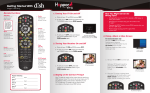
remote Control map
»» SAT Mode
Correct mode for operating your DISH system.
TIP: Press and release the SAT mode
button to ensure you are in the proper
mode for controlling your receiver.
»»
MENU
Access features and settings, including
Parental Controls, My Account and more.
Recall
Go back to the last four channels viewed.
»» Information
Display additional program information.
»»
Color Keys
Use the color keys to
navigate the Guide and DVR.
TIP: Featured apps can be accessed
by pressing the blue color key
while watching live TV.
»» (*)/Format
Change the shape of the picture on
your TV screen to match the frame size
of the program you are watching.
GUIDE «
Display current and future TV program listings.
Press the red TV Power button on your DISH remote to
turn your TV on or off.
2
Press the red Power button on your DISH remote to turn your
Hopper or Joey on or off.
Cancel «
Go back one on-screen menu at a time.
Note: This may not be the previous screen
you were viewing.
Main Menu
View Live TV «
Return to watching live TV. This will also exit
all on-screen menus, even while watching
DVR recordings.
The Main Menu lets you
access all of your Hopper’s
features. Press Menu on
your remote to access
the Main Menu.
search «
Search for a program.
DVR Controls «
Refer to page 8 for details on how to operate your DVR.
ON Demand «
Access On Demand titles, including new releases.
Note: Remote may vary.
4
1
T V BASICS
»»
VOLUME «
Control your TV’s volume.
Changing Channels:
Remote and Program Guide
There are three ways to change channels on your receiver:
1
Enter channel number using the remote keypad.
2
Use the Arrow/Channel buttons on your remote (up/down).
3
Use the Program Guide.
a. Press Guide on your remote.
b. Use the Arrow/Channel buttons on your remote to
navigate the Program Guide.
c. Highlight and select the channel you want to watch.
Exiting Menus
When you’re in an on-screen menu, it’s easy to return to the program
you were watching — just press View Live TV on your remote.
5