1
Other Uses of the Re-Imaging Utility
Running a Factory Reset
A factory reset on terminals can be run to bring the thin client back to the
state it was when it was first unboxed and used.
1
Follow the previous steps to open the boot menu and access the
Re-Imaging Utility. When the boot menu appears, select the flash
drive containing the Re-Imaging Utility and press <Enter>.
2
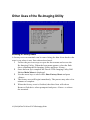
Once the boot up is complete the Devon IT Re-Imaging Utility Dell
Edition Main Menu is displayed.
3
Use the arrow keys to select <15> Run Factory Reset and press
<Enter>.
4
The factory reset will begin immediately. The process may take a few
minutes to complete.
5
When the factory reset is finished, the thin client will reboot
Remove flash drive when prompted and press <Enter> to reboot
the terminal.
18 | Dell OptiPlex FX130 and FX170 Re-Imaging Guide