1
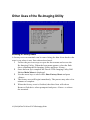
6
Select the option in the list that corresponds to the appropriate
disk image file for the thin client you are re-imaging.
7
Press <Enter> to flash the terminal with the selected image.
8
The message Writing image to disk is displayed, along
with a progress bar showing the current status of the reimaging
process. Do not turn off your thin client during this time.
14 | Dell OptiPlex FX130 and FX170 Re-Imaging Guide