1
Step 1
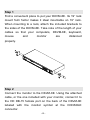
Find a convenient place to put your DKVM-8E. Its 19” rack
mount form factor makes it ideal mountable on 19” rack.
When mounting to a rack, attach the included brackets to
the sides of the DKVM-8E. Take note of the length of your
cables so that your computers, DKVM-8E, keyboard,
mouse
and
monitor
are
distanced
properly.
Step 2
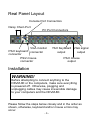
Connect the monitor to the DKVM-8E. Using the attached
cable, or the one included with your monitor, connect it to
the HD DB-15 female port on the back of the DKVM-8E
labeled with the monitor symbol at the CONSOLE
connector.
-6-