1
Chapter 4
Configuring the CiscoWorks 1105 and 1130 WLSE
Configuring the Web Browser
Configuring the Web Browser
Normally, all WLSE tasks are performed in the Web interface. Before you connect
to the Web interface, make sure you are using a supported browser and that the
browser is properly configured.
•
Supported Browsers, page 4-9
•
Configuring Internet Explorer, page 4-10
•
Configuring Netscape Navigator, page 4-11
Supported Browsers
Before connecting to the WLSE web interface, make sure you are using a
supported browser and the browser is properly configured. The supported
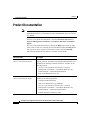
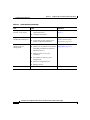
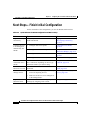
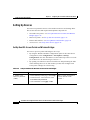
browsers for CD One 2.0 are listed in Table 4-4 on page 4-9. Use the procedures
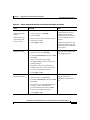
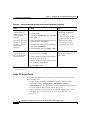
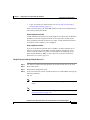
in Configuring Internet Explorer, page 4-10 or Configuring Netscape Navigator,
page 4-11 to configure the browser.
Note
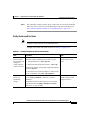
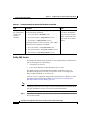
Table 4-4
Using earlier, unsupported versions of Internet Explorer compromises the security
of the WLSE.
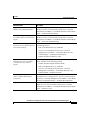
Supported Browsers
Client Operating System
Supported Browsers
Windows 2000, Windows NT, and
Windows XP
Microsoft Internet Explorer 6.0 with Service Pack 1
Japanese Windows 2000 and
Windows NT
Japanese Microsoft Internet Explorer 6.0 with Service Pack 1
Solaris 8 and 9
Netscape Navigator 7.01
Netscape Navigator 7.02
Japanese Netscape Navigator 7.02
Installation and Configuration Guide for the CiscoWorks Wireless LAN Solution Engine
78-15903-01
4-9