1
FIXED MOUNT SCANNER
Programming Manual
International Edition, Rev. A5
Revision History
Rev. No.
Released Date
Rev. A
May 26, 2010
First Release
Rev. A1
Jun. 18, 2010
Page 16
Page 38
Add “UPC/EAN Security Level”
Add “Immediate” parameter (option 5) to "Time Delay to Low Power Mode"
and change the default value from 5 seconds to immediate.
Page 19,20
Page 21
Page 32
Page 36
Page 41
Page 45
Add “Supplement Scan Voting” in Symbology Reading Control
Add “EAN Supplement Control”
Keyboard Layout – Add “Czech (QWERTY)”, remove “Universal”, and rename
Spain (QWERTY) to Spain (Spanish QWERTY), Latin America (QWERTY) to
Spain (Latin America, QWERTY)
Cancel” Power On Indicator” and add “Good Read Indicator”.
“Scan Rate Control ”
Add “NG Message Output”
FuzzyScan Fixed Mount
Scan
Programming
Manual
Rev. A2
Description
Sep. 16, 2010
Rev. A3
Nov 11, 2010
Page 38
Baud Rate – Cancel Baud Rate 300/600 BPS.
Rev. A4
Mar 04, 2011
Page 38
Baud Rate – Revise 57.6K BPS and 115.2K BPS option code from 6.7. to 8.9.
Rev. A5
Mar 22, 2011
Page 17
Page 39
Add ”Code 39 Security Level”
Add “NAK Retry Count”
Add “ACK/NAK Transmission Indication”
© Copyright Cino Group
© Copyright PC Worth Int’l Co., Ltd
Cino makes no warranty of any kind with regard to this publication, including, but not limited to, the implied warranty of
merchantability and fitness for any particular purpose. Cino shall not be liable for errors contained herein or for incidental
consequential damages in connection with the furnishing, performance, or use of this publication. This publication contains
proprietary information that is protected by copyright. All rights are reserved. No part of this publication may be photocopied,
reproduced or translated into any language, in any forms, in an electronic retrieval system or otherwise, without prior written
permission of Cino. All product information and specifications shown in this document may be changed without prior notice.
FuzzyScan Fixed Mount
Scan
Programming
Manual
Warranty
Cino warrants its products against defects in workmanship and materials from the date of shipment, provided that the
product is operated under normal and proper conditions. The warranty provisions and durations are furnished by different
warranty programs. The above warranty does not apply to any product which has been (i) misused; (ii) damaged by accident
or negligence; (iii) modified or altered by the purchaser or other party; (iv) repaired or tampered by unauthorized
representatives; (v) operated or stored beyond the specified operational and environmental parameters; (vi) applied
software, accessories or parts are not supplied by Cino; (vii) damaged by circumstances out of Cino’s control, such as, but
not limited to, lightning or fluctuation in electrical power. Any defective product must follow the warranty program and RMA
procedures to return Cino for inspection.
Regulatory
FCC part 15B
EN55022, EN55024, EN61000-3-2, EN61000-3-3
CNS13438
Industry Canada ICES-003
LED Eye Safety
IEC60825-1, EN60825-1
Table of Contents
Getting Started
Getting Familiar with Your FuzzyScan
Connect to Your Host
Install Your FuzzyScan
Use the Test Mode
Use Your FuzzyScan
1
2
3
4
5
FuzzyScan Fixed Mount
Scan
Programming
Manual
Configure Your FuzzyScan
Bar Code Programming Manual
Programming Procedures
Host Interface Selection
Symbology Reading Control
Keyboard Interface Control
Serial Interface Control
Operation Control
Condensed DataWizard
7
8
12
13
32
36
39
46
Appendix
Symbology ID Table
Keyboard Function Code Table
ASCII Input Shortcut
Host Interface Quick Set
Operation Mode Quick Set
Option Codes
System Commands
Indications
53
54
55
56
56
57
58
59
Getting Familiar with Your FuzzyScan
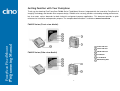
Thank you for choosing Cino FuzzyScan FM400 Series Fixed Mount Scanner. Integrated with the innovative FuzzyScan 2.0
Imaging Technology and durable ultra-compact design, FM400 series not only provides outstanding reading performance,
but also meets various demands for both industrial and general purpose applications. This document provides a quick
reference for installation and operation purpose. The complete documentation is available at www.cino.com.tw.
FuzzyScan Fixed Mount
Scan
Programming
Manual
FM400 Series (Front-view Model)
Power Indicator
Status Indicator
FM400 Series (Side-view Model)
OK/NG Indicator
Test Button
Scan Window
M3 Mounting Hole
1
Connect to Your Host
Both RS232 and USB interfaces are available in different models of FM400 series. Each model is equipped with
corresponding connector to meet various application demands.
USB Models (FM4xx-11x)
Universal Models (FM4xx-98x)
The USB models provide a plug-and-play solution. Both
USB HID and USB COM Port Emulation interfaces are
available for user’s choice.
The universal models support RS232 and USB interfaces
with OK/NG signal outputs and external trigger input.
FuzzyScan Fixed Mount
Scan
Programming
Manual
4-pin Type A
Connector
Pin No.
Signal
Case
FG
Description
Frame Ground
Pin No.
Signal
I/O Type
1
VCC
5Vdc Power Supply
I
---
2
TXD
Transmit Data
O
I/O Type
1
VCC
---
I
3
RXD
Receive Data
I
2
Data -
USB Data -
I/O
4
GND
Signal Ground
---
3
Data +
USB Data +
I/O
5
---
---
---
4
GND
---
---
6
RTS
Request to Send
O
7
OK
OK Signal Output
(3-24Vdc)
O
8
Data +
USB Data +
I/O
External Trigger Input
I
Clear to Send
I
---
---
15-pin D-sub HD
Female Connector
RS232 Models (FM4xx-00x)
The RS232 models support the standard RS232 interface
equipped a 9-pin D-sub connector with power jack for
external 5Vdc power inlet.
9-pin D-sub
Female Connector
Description
Description
9
Trigger
10
CTS
11
---
12
Data -
USB Data -
I/O
I/O Type
13
Shield
Frame Ground
---
14
NG
NG Signal Output
(3-24Vdc)
O
Pin No.
Signal
Case
FG
Frame Ground
---
1
---
---
---
2
TXD
Transmit Data
I
3
RXD
4
---
5
GND
Receive Data
O
---
---
Signal Ground
---
6
---
---
---
7
CTS
Clear to Send
I
8
RTS
Request to Send
O
9
VCC
5Vdc Power Supply
I
15
2
Reserved ---
---
Install Your FuzzyScan
Adjust Reading Angle
Mount Your FuzzyScan
The readability may be impacted by the specular reflection
caused by the perpendicular reading angle. To get the most
optimal reading performance, you are suggested to install
the FM400 at an approximate 15° angle to the
perpendicular line of the target barcode. However, the
reading angle and distance may vary depending on the size
and printing quality of barcodes.
FuzzyScan Fixed Mount
Scan
Programming
Manual
Front-view
There are two M3 mounting holes on the bottom of the
chassis. Please follow below procedures to mount your
scanner.
Side-view
Prepare two appropriate M3 screws (minimal 4mm in
depth) and decide your desired mounting location.
Then adjust the two screws to accommodate 27mm
center width.
Optimize the mounting position by adjusting the
reading angle and distance. Ensure the illumination
envelop is not blocked by any external object.
Use the test mode to verify the actual reading rate. If
the reading rate is not good enough, please adjust the
reading angle and distance to get the optimum
readability.
3
Use the Test Mode
The FuzzyScan FM400 provides an useful test mode which is helpful for you to quickly identify the best mounting position.
Please refer to the descriptions listed below for details.
Test Button
Under normal operation, the Test Button of FM400 just acts as a normal trigger switch of hand-held scanner. You can press
the Test Button to scan the corresponding barcode commands to configure your scanner with ease.
Please note that if you press the Test button for more than 5 seconds, the FM400 will enter the test mode automatically.
Test Mode
FuzzyScan Fixed Mount
Scan
Programming
Manual
Once determine your desired location to install the scanner, you may use the test mode to optimize the mounting position
with ease. Please follow below procedures to use the test mode.
Hold the Test Button over 5 seconds until the status
indicator gives one green blink, then release the button
to activate test mode. The scanner will give 2 short
beeps and the power indicator will flash blue blink per 1
second. The scanner will turn on the light source to scan
barcodes continuously before exit the test mode.
Reading rate
STATUS Indicator
OK/NG Indicator
100%
Steady Green
Steady Green
80 to 99%
Steady Red
Steady Green
50 to 79%
Steady Green
Steady Red
20 to 49%
Steady Orange
Steady Orange
0 to 19%
Steady Red
Steady Red
If the reading rate is not good enough, please adjust the
reading angle and distance to get the optimum
readability. If you would like to exit the test mode, please
press the Test Button once again.
Keep scanner to read the same test barcode. The
scanner will count the Good Read numbers, then output
the information of reading rate and refresh LED
indications every 100 scans. The format of output
message is listed below.
1. If the scanner is unable to read any barcode during
<
Readout data
>
:
<
preset scan input time-out (default is 900ms), the
scanner will count it as a NG reading.
Reading rate (0 to 100) >
2. Under test mode, the OK/NG output signals will not be
At the same time, both Status and OK/NG indicators
will provide the visible reading rate information as well.
You may refer to the table listed below for details.
performed.
4
Use Your FuzzScan
Both FuzzyScan Barcode commands and Serial
commands are available to configure your FM400. The
FuzzyScan barcode commands are a series of proprietary
barcodes which allow you to easily configure the scanner
for most applications. Moreover, the FuzzyScan serial
commands are ideal for precise and complicated reading
control in machine-controllable environments. Please refer
to the relevant documentations for details.
OK/NG Signals
The universal models provide additional OK and NG
outputs for more precise reading control. If the scanner got
a good read, a signal will be outputted through scanner OK
pin. However, if the scanner failed to read the barcode
during a reading cycle or preset scan input time-out, a
signal will be outputted through scanner NG pin.
The OK and NG outputs are designed as NPN signal
outputs and have been preset to active low. If necessary,
you are able to change the active state of OK and NG
outputs to meet your applications.
FuzzyScan Fixed Mount
Scan
Programming
Manual
External Trigger and Serial Trigger
The FM400 provides both external trigger and serial trigger
to activate the scanning processes. Please note that the
external trigger is available for universal models only. The
serial trigger is one of serial commands available for all
models including RS232 serial and USB COM Port
Emulation interfaces.
Operation Modes
The FuzzyScan FM400 series provides five different
operation modes, including trigger, alternative, level,
presentation and force modes to meet various application
demands.
Scan Input Time-out
The scan input time-out is a preset light source on time
available for presentation, alternative and level modes. The
scanner keeps the light source on and continues to scan
until the preset scan input time-out is up. You can adjust the
time-out duration from 100 milliseconds to 99 seconds to
meet various application demands.
Both the presentation and force modes support triggerless
operation, you don’t need to use either external trigger or
serial trigger to activate the scanning. But the trigger,
alternative and level modes have to work with external
trigger or serial trigger to scan barcode.
5
is performed or the preset scan input time-out is up. Once
the light source goes off, the scanner is waiting for the next
trigger to activate scanning again.
Trigger mode
Under trigger mode, the scanner will turn on the light source
to read barcode when it receives an external trigger or a
serial trigger ON command. Once the external trigger has
been released, or the scanner gets a good read or a serial
trigger OFF command, the scanner will stop reading and
wait for the next trigger to activate scanning again.
Presentation mode
Under presentation mode, the scanner will automatically
detect the object movement in the scanner field of view.
Once the scanner detects a similar barcode image, the
scanner will turn on the light source to read barcodes until
the preset scan input time-out is up. For dark
environments, you may adjust the setting of “Presentation
Sensitivity” to increase the detection sensitivity.
FuzzyScan Fixed Mount
Scan
Programming
Manual
Alternative mode
When the scanner receives an external trigger or a serial
trigger ON command under alternative mode, the scanner
will turn on the light source to read barcodes until the
preset scan input time-out is up. The scan input time-out
will be reset after each good read. Once the light source
goes off, the scanner is waiting for the next trigger to
activate scanning again.
Force mode
Under force mode, the scanner continues to read barcodes
without using external trigger or serial trigger. Please note
that the scanner will not stop reading until you switch into
another operation mode.
Level mode
When the scanner receives an external trigger or a serial
trigger ON command under level mode, the scanner will
turn on the light source to read barcodes until a good read
6
Bar Code Programming Menu
System Command
The FuzzyScan bar code commands are specially designed
Proprietary bar code labels which allow you to set the
FuzzyScan internal programming parameters. There are
System Command, Family Code and Option Code for
programming purpose.
The System Command is the highest level bar code
command which directs FuzzyScan to perform immediate
operations, such as entering programming mode
(PROGRAM), exiting programming mode (EXIT), listing
system information (SYSLIST), recovering to factory
preset configurations (M_DEFAULT), and so on. Please
note that all system commands will take a few seconds to
complete the operations. User must wait for the
completion beeps before scanning another bar code.
FuzzyScan Fixed Mount
Scan
Programming
Manual
Each programmable family and bar code command label is
listed on the same page with major system commands. The
detailed explanations and special programming flowchart are
printed on facing or following pages. You can read the
explanation and set the FuzzyScan concurrently.
A supplemental bar code command menu incorporates the
bar code command labels of System Command and Option
Code. As you set the FuzzyScan, open the bar code
command menu to find the option code page. You may scan
the desired family code and option code to set FuzzyScan. If
you want to change the programming family for multiple
settings, you need only turn over the programming page to
find next desired programming family.
Family Code
The Family Code is scanned to select the user desired
programming family. FuzzyScan has already provided
more than one hundred programming families to meet any
specific requirements.
Option Code
The Option Codes is a set of bar code commands
represented by “0–9”, “A–F” and finishing selection (FIN).
For most setting, you must select at least one option code
following the family code selection to set the desired
parameter for the selected programming family.
7
Programming Procedures
FuzzyScan Fixed Mount
Scan
Programming
Manual
As you scan the bar code command to select the desired
parameters, information about the final selected parameters
represented by the bar code commands are stored in the
FuzzyScan’s internal Flash Memory ASIC or non-volatile
memory. If you turn off the unit, the Flash Memory ASIC or
non-volatile memory retains all programming options. You
need not re-program the FuzzyScan if you want to keep the
existing configurations in the next power on.
If the programming family must take multiple scans
selection, cycling scan selection, or dual level selection
procedures, the family of the programming menu will be
marked with the matched representing symbol of
Programming Category (P.C.) in bold font listed in the
following table. You can easily find the bold mark in the
programming menu, and refer to their flowcharts for details.
Before setting the FuzzyScan, please also refer to the
“Beeping Indications” listed in Appendix to understand the
details of programming beeping indications. It will be very
helpful for you to know the existing status while you are
programming the FuzzyScan.
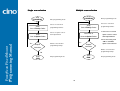
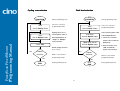
The programming procedures of FuzzyScan are designed
as simple as possible for ease of setting. Most
programming families take the Single Scan Selection
programming procedure. But several programming families
have more complex and flexible programmable options,
and you must take Multiple Scans Selection, Cycling
Scan Selection or Dual Level Selection to complete their
programming procedures. Each kind of programming
procedure is listed in the following pages for your reference.
Please give careful attention to become familiar with each
programming procedure.
Conventions of Programming
Programming Menu
Conventions
Descriptions
Factory Default Value
P.C.
Programming Category
SS : Signle scan selection
MS : Multiple scans selection
CS : Cycling scan selection
DS : Dual level scan selection
8
(
)
Necessary Option Code
[
]
Selectable Option Code
Program & End
System List, Group & Master Default
Scan
“PROGRAM”
Scan
“SYSLIST”
FuzzyScan will enter programming mode,
and inhibit all non-programming functions.
FuzzyScan will list the product information and
revision number to host via selected host interface,
FuzzyScan Fixed Mount
Scan
Programming
Manual
then issue the completion beeping.
Scan
“END”
Scan
“M_DEFAULT”
FuzzyScan will exit programming mode, and store all
parameters in Flash Memory ASIC or non-volatile memory,
then issue the completion beeping.
parameters into factory preset configurations,
then issue the completion beeping.
FuzzyScan will recover all programmable
Please note that the FuzzyScan will take 3-4 seconds to
store parameters in internal Flash Memory ASIC or
non-volatile memory after you scan the “END”. Please
don’t turn off the power before the completion beeping. It
may destroy all configured parameters.
9
Single scan selection
Scan
“PROGRAM”
Scan
One of Family Codes
Multiple scans selection
Scan
“PROGRAM”
Enter programming mode.
Select one of desired
Select one of desired
Scan
programming families.
One of Family Codes
programming families.
1. Select one or several
Select one option code of
Scan
One of Option Codes
Enter programming mode.
Scan One or
Several Option Codes
desired parameter.
option codes to select
desired parameters.
2. If it’s necessary, scan
FuzzyScan Fixed Mount
Scan
Programming
Manual
“FIN” to terminate
Yes
Yes
Want to select another
Repeat
Selection
programming family?
Repeat
Selection
option code selection.
Want to select another
No
No
Scan
“END”
programming family?
Scan
Exit programming mode.
“END”
10
Exit programming mode.
Cycling scan selection
Dual level selection
Scan
“PROGRAM”
Scan
One of Family Codes
Scan
“PROGRAM”
Enter programming mode.
Select one of desired
Scan
One of Family Codes
programming families.
Cycling select one or
Scan
One of Option Codes
desired parameters as
FuzzyScan Fixed Mount
Scan
Programming
Manual
(2nd) Scan One or
Several Option Codes
Scan “FIN”
of desired parameters.
1. Select one or several
parameters.
2. If it’s necessary, scan
Finish cycling selection.
“FIN” to terminate
(If necessary)
option code selection.
Yes
Want to select another
Repeat
Selection
programming family?
Want to select another
programming family?
No
Scan
“END”
programming families.
option codes of desired
scans selection.
Repeat
Selection
Select one of desired
Select several option codes
(1st) Scan
Several Option Codes
several option codes of
“Single” or “Multiple”
Yes
Enter programming mode.
No
Scan
“END”
Exit programming mode.
11
Exit programming mode.
Host Interface Selection
FuzzyScan Fixed Mount
Scan
Programming
Manual
PROGRAM
F_DEFAULT
Family Code Selection
P.C
Host Interface Selection
MS
MS
MS
MS
Parameter Selection
Standard/TTL RS-232 peer-to-peer serial
USB Com Port Emulation
USB HID standard mode
USB HID turbo mode
12
Option Code
06
09
18
19
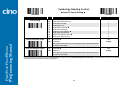
Symbology Reading Control
♦ User Defined Symbol ID ♦
FuzzyScan Fixed Mount
Scan
Programming
Manual
PROGRAM
F_DEFAULT
Family Code Selection
P.C
Symbol ID : 1 character
DS
Parameter Selection
Code 128 (default=B)
UCC/EAN-128 (default=C)
UPC-A (default=A)
EAN-13 (default=F)
Codabar/NW-7 (default=D)
Code 39/Code 32 (default=G)
Code 93 (default=H)
Standard/Industrial 2 of 5 (default=I)
Interleaved 2 of 5 (default=J)
Matrix 2 of 5 (default=K)
China Postal Code (default=L)
German Postal Code (default=M)
IATA (default=O)
Code 11 (default=P)
MSI/Plessey (default=R)
UK/Plessey (default=S)
Telepen (default=T)
GS1 DataBar (default=X)
UPC-E (default=E)
EAN-8 (default=N)
Trioptic Code 39 (Default=W)
UCC Coupon Extended Code (Default=Z)
PDF417/Micro PDF417 (default=V)
Codablock F (default=Y)
Korea Post Code (default =a)
13
Option Code
2nd Option Code
00
01
02
03
04
05
06
07
08
09
10
11
12
13
14
15
16
17
18
19
20
21
22
23
26
(1 character)
(1 character)
(1 character)
(1 character)
(1 character)
(1 character)
(1 character)
(1 character)
(1 character)
(1 character)
(1 character)
(1 character)
(1 character)
(1 character)
(1 character)
(1 character)
(1 character)
(1 character)
(1 character)
(1 character)
(1 character)
(1 character)
(1 character)
(1 character)
(1 character)
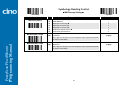
Symbology Reading Control
♦ Symbology ID Transmission ♦
FuzzyScan Fixed Mount
Scan
Programming
Manual
PROGRAM
F_DEFAULT
Family Code Selection
P.C
Symbology ID Transmission
SS
SS
SS
SS
SS
SS
SS
Parameter Selection
Disable symbology ID transmission Enable prefix CINO symbology ID transmission
Enable suffix CINO symbology ID transmission
Enable both prefix and suffix CINO symbology ID transmission
Enable prefix AIM symbology ID transmission
Enable suffix AIM symbology ID transmission
Enable both prefix and suffix AIM symbology ID transmission
14
Option Code
0
1
2
3
4
5
6
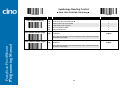
Symbology Reading Control
♦ Readable Bar Code Setting ♦
PROGRAM
Family Code Selection
P.C
Readable Symbology Setting
SS
CS
CS
CS
CS
CS
CS
CS
CS
CS
CS
CS
CS
CS
CS
CS
CS
CS
CS
CS
CS
CS
CS
CS
Remember to scan “FIN” to terminate
FuzzyScan Fixed Mount
Scan
Programming
Manual
F_DEFAULT
this selection. But if you select the
“ Auto ”, FuzzyScan will terminate this
selection automatically.
Parameter Selection
Auto Code 128 *
UPC-A *
UPC-E *
EAN-13 *
EAN-8 *
Codabar/NW-7 *
Code 39 *
Trioptic Code 39
Standard/Industrial 2 of 5
Matrix 2 of 5
Interleaved 2 of 5 *
China Postal Code
German Postal Code
Code 93 *
Code 11
MSI/Plessey
UK/Plessey
Telepen
GS1 DataBar (RSS-14) *
IATA
PDF417/Micro PDF417
Codablock F
Korea Post Code
Option Code
00
01
02
03
04
05
06
07
47
08
38
48
58
68
09
10
11
12
13
14
15
17
18
21
If your application is known, you may select those known symbologies only to increase the reading speed and decrease the possibility of reading error. Furthermore, to add
the “Symbology ID” into the transmitted data is also helpful to identify the specific symbology.
Above symbologies marketed with * are enable as default. When you select “Auto”, the imager only read those symbologies marked with *.
When you set the minimum and maximum length of each symbology, please note the data length of scanned bar code doesn’t include star/stop characters.
15
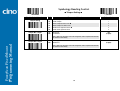
Symbology Reading Control
♦ Code 39/Code 32 Setting ♦
FuzzyScan Fixed Mount
Scan
Programming
Manual
PROGRAM
F_DEFAULT
Family Code Selection
P.C
Parameter Selection
Option Code
Code 39 Family Setting
SS
SS
SS
SS
SS
SS
SS
SS
SS
SS
SS
SS
SS
SS
SS
Disable Code 39
Enable Code 39
Select Standard Code 39 as primary format Select Full ASCII Code 39 as primary format
Select Code 32 (PARAF, Italian Pharmaceutical) as primary format
Disable start/stop symbol transmission Enable start/stop symbol transmission
Disable Code 32 leading A transmission Enable Code 32 leading A transmission
Disable MOD 43 check digit verification Enable MOD 43 check digit verification
Disable check digit transmission Enable check digit transmission
Disable Code 39 buffering Enable Code 39 buffering
0
1
2
3
4
5
6
7
8
9
A
B
C
D
E
Trioptic Code 39 Setting
SS
SS
Disable Trioptic Code 39 Enable Trioptic Code 39
0
1
Code 39 Min. Length
SS
MS
Default (01) 01-Maximum
FIN
(2 digits)
Scan 2 digits from the option code chart in Appendix, then FuzzyScan will terminate
this selection automatically.
Code 39 Max. Length
SS
MS
Default (98) 98-Minimum
FIN
(2 digits)
Scan 2 digits from the option code chart in Appendix, then FuzzyScan will terminate
this selection automatically.
Trioptic Code 39 and Code 39 Full ASCII cannot be enabled simultaneously.
16
Symbology Reading Control
♦ Code 39 Setting ♦
PROGRAM
F_DEFAULT
Family Code Selection
P.C
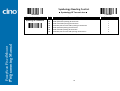
Code 39 Security Level
SS
SS
SS
SS
Parameter Selection
Level 0
Level 1
Level 2 Level 3
Option Code
0
1
2
3
FuzzyScan Fixed Mount
Scan
Programming
Manual
Code 39 Security Level
The scanner offers four levels of decode security for Code39 bar codes:
Level 0: If you are experiencing misread of poorly-printed or serious out-of-spec. bar codes in level 1, please select level 0.
Level 1: If you are experiencing misread of poorly-printed or out-of-spec. bar codes in level 2, please select level 1.
Level 2: This is the default setting which allows the scanner to operate fastest, while providing sufficient security in decoding “in-spec” Code39 bar codes.
Level 3: If you failed to read poorly-printed or out-of-spec. bar codes in level 2, please select level 3. This is the most aggressive setting and may increase the misread.
17
Symbology Reading Control
♦ Codabar/NW-7 Setting ♦
FuzzyScan Fixed Mount
Scan
Programming
Manual
PROGRAM
F_DEFAULT
Family Code Selection
P.C
Parameter Selection
Codabar Setting
SS
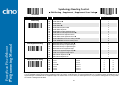
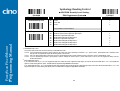
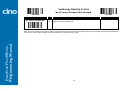
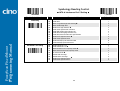
SS
SS
SS
SS
SS
SS
SS
SS
SS
SS
SS
SS
SS
SS
Disable Codabar
Enable Codabar Select Codabar standard format Select Codabar ABC format
Select Codabar CLSI format
Select Codabar CX format
Disable start/stop symbol transmission Enable ABCD/ABCD start/stop symbol transmission
Enable abcd/abcd start/stop symbol transmission
Enable ABCD/TN*E start/stop symbol transmission
Enable abcd/tn*e start/stop symbol transmission
Disable check digit verification Enable check digit verification
Disable check digit transmission Enable check digit transmission
Codabar Min. Length
SS
MS
Default (04) 01-Maximum
Option Code
0
1
2
3
4
5
6
7
8
9
A
B
C
D
E
FIN
(2 digits)
Scan 2 digits from the option code chart in Appendix, then FuzzyScan will terminate
this selection automatically.
Codabar Max. Length
SS
MS
Default (98) 98-Minimum
FIN
(2 digits)
Scan 2 digits from the option code chart in Appendix, then FuzzyScan will terminate
this selection automatically.
18
Symbology Reading Control
♦ UPC-A & UPC-E Setting ♦
FuzzyScan Fixed Mount
Scan
Programming
Manual
PROGRAM
F_DEFAULT
Family Code Selection
P.C
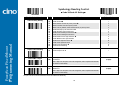
UPC Family Setting
SS
SS
SS
SS
SS
SS
SS
SS
SS
SS
SS
SS
SS
SS
SS
SS
Parameter Selection
Option Code
0
1
2
3
4
5
6
7
8
9
A
B
C
D
E
F
Disable UPC-A
Enable UPC-A Disable UPC-E
Enable UPC-E Disable UPC-E expansion Enable UPC-E expansion
Disable UPC standardization Enable UPC standardization
Disable UPC numeric system
Enable UPC numeric system Disable UPC-A check digit transmission
Enable UPC-A check digit transmission Disable UPC-E check digit transmission
Enable UPC-E check digit transmission Disable UPC “leading 1” portion Enable UPC “leading 1” portion
When enable UPC-E expansion, the UPC-E decoded data will be converted to UPC-A format and affected by related setting, such as UPC standardization, UPC numeric
system, UPC-A check digit transmission.
UPC-E & EAN-8 Expansion
: Expand the 8-digit UPC-E and 8-digit ENA-8 to 12-digit UPC-A and 13-digit EAN-13.
UPC-A Standardization
: Expand the 12-digit UPC-A to 13-digit EAN-13 with 1 zero insertion.
UPC Lead 1 Numeric System
: Enable to read UPC leading with the 1 numeric system, you must enable this option.
WPC Selection
(UPC/EAN/CAN)
UPC-A
UPC-E
EAN-13
EAN-8
Basic Length
Disable
Check Digit
Disable
Numeric System
With 2-digit
Addendum
With 5-digit
Addendum
Enable
Standardization
Enable
Expansion
12
8
13
8
-1
-1
-1
-1
-1
-1
NC
NC
+2
+2
+2
+2
+5
+5
+5
+5
+1
+1
NC
NC
0
+4
0
+5
19
Symbology Reading Control
♦ UPC-A & UPC-E Setting , Supplement Scan Voting♦
♦
PROGRAM
F_DEFAULT
Family Code Selection
P.C
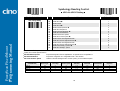
UPC Supplement Setting
SS
SS
SS
SS
SS
SS
SS
SS
Select UPC without supplement digits Select UPC with only 2 supplement digits
Select UPC with only 5 supplement digits
Select UPC with 2/5 supplement digits
Disable force supplement digits output Enable force supplement digits output
UPC Family Addenda Separator Off UPC Family Addenda Separator On
0
1
2
3
4
5
6
7
UPC/EAN Security Level
SS
SS
Level 0
Level 1 Level 2
0
1
FuzzyScan Fixed Mount
Scan
Programming
Manual
SS
Parameter Selection
Option Code
2
Only available for UPC-A & EAN-13
Supplement Scan Voting
SS
SS
SS
SS
SS
SS
SS
None
Level 1
Level 2
Level 3 Level 4
Level 5
Level 6
Level 7
Level 8
Level 9
Level 10
Level 11
Level 12
Level 13
0
1
2
3
4
5
6
7
8
9
A
B
C
D
UPC/EAN Security Level
The scanner offers three levels of decode security for UPC/EAN bar codes:
Level 0: If you are experiencing misread of poorly-printed or out-of-spec. bar codes, especially in characters 1, 2, 7, and 8 in level 1, please select level 0. Selection of this
security level may significantly impair the decoding ability of the scanner.
Level 1: This is the default setting which allows the scanner to operate fastest, while providing sufficient security in decoding “in-spec” UPC/EAN bar codes.
Level 2: If you are experiencing misread of poorly-printed, soiled or damage bar codes in level 1, please select level 2. This is the most aggressive setting and may
increase the misread.
The Supplement Scan Voting is the number of times the same UPC/EAN with 2/5 supplement digits has to be decoded before it is transmitted. It is helpful when decoding
a mix of UPC/EAN symbols with and without supplement digits. This function is effective when you select UPC/EAN with only 2 supplement digits, UPC/EAN with only 5
supplement digits or UPC/EAN with 2/5 supplement digits. The default value is Level 3. When you select higher level, it may impact the reading speed on poorly-printed,
low contrast or damage barcode labels.
20
Symbology Reading Control
♦ EAN Setting , Supplement , Supplement Scan Voting♦
♦
FuzzyScan Fixed Mount
Scan
Programming
Manual
PROGRAM
F_DEFAULT
Family Code Selection
P.C
Parameter Selection
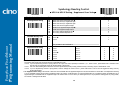
EAN Setting
SS
SS
SS
SS
SS
SS
SS
SS
SS
SS
SS
SS
Disable EAN-13
Enable EAN-13 Disable EAN-8
Enable EAN-8 Disable EAN-8 expansion Enable EAN-8 expansion
Disable EAN-13 check digit transmission
Enable EAN-13 check digit transmission Disable EAN-8 check digit transmission
Enable EAN-8 check digit transmission Disable ISBN/ISSN Conversion reading check Enable ISBN/ISSN Conversion reading check
0
1
2
3
4
5
6
7
8
9
A
B
EAN Supplement Setting
SS
SS
SS
SS
SS
SS
SS
SS
Select EAN without supplement digits Select EAN with only 2 supplement digits
Select EAN with only 5 supplement digits
Select EAN with 2/5 supplement digits
Disable force supplement digits output Enable force supplement digits output
EAN Addenda Separator Off EAN Addenda Separator On
0
1
2
3
4
5
6
7
Supplement Scan Voting
SS
SS
SS
SS
SS
SS
SS
None
Level 1
Level 2
Level 3 Level 4
Level 5
Level 6
Level 7
Level 8
Level 9
Level 10
Level 11
Level 12
Level 13
Option Code
0
1
2
3
4
5
6
7
8
9
A
B
C
D
The Supplement Scan Voting is the number of times the same UPC/EAN with 2/5 supplement digits has to be decoded before it is transmitted. It is helpful when decoding
a mix of UPC/EAN symbols with and without supplement digits. This function is effective when you select UPC/EAN with only 2 supplement digits, UPC/EAN with only 5
supplement digits or UPC/EAN with 2/5 supplement digits. The default value is Level 3. When you select higher level, it may impact the reading speed on poorly-printed,
low contrast or damage barcode labels.
21
Symbology Reading Control
♦ UPC/EAN Security Level Setting ,
EAN Supplement Control♦
♦
PROGRAM
Family Code Selection
P.C
UPC/EAN Security Level
SS
SS
SS
Parameter Selection
Level 0
Level 1 Level 2
F_DEFAULT
Option Code
0
1
2
Only available for UPC-A & EAN-13
FuzzyScan Fixed Mount
Scan
Programming
Manual
EAN Supplement Control
SS
SS
SS
SS
SS
SS
SS
SS
Disable all specific prefix supplement digital output Enable all specific prefix supplement digital output
Enable 491 Supplement Digit Output
Enable 978/979 Supplement Digit Output
Enable 977 Supplement Digit Output
Enable 378/379 Supplement Digit Output
Enable 414/419 Supplement Digit Output
Enable 434/439 Supplement Digit Output
0
1
2
3
4
5
6
7
UPC/EAN Security Level
The scanner offers three levels of decode security for UPC/EAN bar codes:
Level 0: If you are experiencing misread of poorly-printed or out-of-spec. bar codes, especially in characters 1, 2, 7, and 8 in level 1, please select level 0. Selection of this
security level may significantly impair the decoding ability of the scanner.
Level 1: This is the default setting which allows the scanner to operate fastest, while providing sufficient security in decoding “in-spec” UPC/EAN bar codes.
Level 2: If you are experiencing misread of poorly-printed, soiled or damage bar codes in level 1, please select level 2. This is the most aggressive setting and may
increase the misread.
EAN Supplement Control
If you select EAN with only 2, or 5 or 2/5 supplement digits and enable 491 prefix supplement digit output, the scanner will transmit EAN with 2, or 5 or 2/5 supplement
digits bar codes starting with 491 prefix. The EAN without supplement digit will not be transmitted.
If you select EAN with only 2, or 5 or 2/5 supplement digits and enable the other except 491 prefix supplement digit output, the scanner will transmit EAN with 2, or 5, or 2/5
supplement digits bar codes starting with specific prefix. The EAN without supplement digit will be transmitted.
22
Symbology Reading Control
♦ UCC Coupon Extended Code Setting ♦
PROGRAM
F_DEFAULT
Family Code Selection
P.C
UCC Coupon Extended Code
SS
SS
Parameter Selection
Disable UCC Coupon Extended Code Enable UCC Coupon Extended Code
Option Code
0
1
FuzzyScan Fixed Mount
Scan
Programming
Manual
UCC Coupon Extended Code
When UCC coupon extended code function is enabled, scanner decodes UPC-A barcodes starting with digit “5”, EAN-13 barcodes starting with digit “99” and UCC/EAN-128
Coupon Codes. UPC-A, EAN-13 and EAN-128 must be enabled to scan all types of Coupon Codes.
23
Symbology Reading Control
♦ IATA & Interleaved 2 of 5 Setting ♦
FuzzyScan Fixed Mount
Scan
Programming
Manual
PROGRAM
F_DEFAULT
Family Code Selection
P.C
Parameter Selection
IATA Setting
SS
SS
SS
SS
SS
SS
SS
SS
SS
SS
SS
SS
SS
Disable IATA Enable IATA
Select 15-digit fixed length IATA checking Select variable length IATA
Disable check digit verification Enable check digit automatic verification
Enable S/N checking digit verification only
Enable CPN checking digit verification only
Enable CPN, Airline and S/N check digit verification
Disable check digit transmission Enable check digit transmission
Disable start/stop symbol transmission Enable start/stop symbol transmission
0
1
2
3
4
5
6
7
8
9
A
B
C
Interleaved 2 of 5 Setting
SS
SS
SS
SS
SS
SS
SS
SS
SS
Disable Interleaved 2 of 5
Enable Interleaved 2 of 5 Select Interleaved 2 of 5 as primary format Select German Postal Code as primary format
No check character Validate USS check digit
Validate OPCC check digit
Disable check digit transmission Enable check digit transmission
0
1
2
3
4
5
6
7
8
24
Option Code
Symbology Reading Control
♦ Code 25 Family Setting ♦
FuzzyScan Fixed Mount
Scan
Programming
Manual
PROGRAM
F_DEFAULT
Family Code Selection
P.C
Parameter Selection
Code 25 Setting
SS
SS
SS
SS
SS
SS
SS
SS
SS
SS
Disable Standard/Industrial 2 of 5 Enable Standard/Industrial 2 of 5
Disable Matrix 2 of 5 Enable Matrix 2 of 5
Disable China Postal Code Enable China Postal Code
Disable check digit verification Enable check digit verification
Disable check digit transmission Enable check digit transmission
Code 25 Family Min. Length
SS
MS
Default (04) 01-Maximum
Option Code
0
1
2
3
4
5
6
7
8
9
FIN
(2 digits)
Scan 2 digits from the option code chart in Appendix, then FuzzyScan will terminate
this selection automatically.
Code 25 Family Max. Length
SS
MS
Default (98) 98-Minimum
FIN
(2 digits)
Scan 2 digits from the option code chart in Appendix, then FuzzyScan will terminate
this selection automatically.
For Code25 setting, we recommend you to select only one type of Code 25 or set the maximum/minimum bar code length. To decode all types of Code 25 or to variable
length of Code 25 will increase the possibility of reading error.
25
Symbology Reading Control
♦ Code 11 & Code 93 Setting ♦
PROGRAM
F_DEFAULT
Family Code Selection
P.C
Parameter Selection
Code 11 Setting
SS
SS
SS
SS
SS
SS
SS
Disable Code 11 Enable Code 11
Disable check digit verification Select 1-check digit verification
Select 2-check digit verification
Disable check digit transmission Enable check digit transmission
Code 11 Min. Length
SS
MS
Default (04) 01-Maximum
Option Code
0
1
2
3
4
5
6
FIN
(2 digits)
FuzzyScan Fixed Mount
Scan
Programming
Manual
Scan 2 digits from the option code chart in Appendix, then FuzzyScan will terminate
this selection automatically.
Code 11 Max. Length
SS
MS
Default (98) 98-Minimum
FIN
(2 digits)
Scan 2 digits from the option code chart in Appendix, then FuzzyScan will terminate
this selection automatically.
Code 93 Setting
SS
SS
SS
SS
Disable Code 93
Enable Code 93 Disable check digit transmission Enable check digit transmission
Code 93 Min. Length
SS
MS
Default (01) 01-Maximum
0
1
2
3
FIN
(2 digits)
Scan 2 digits from the option code chart in Appendix, then FuzzyScan will terminate
this selection automatically.
Code 93 Max. Length
SS
MS
Default (98) 98-Minimum
FIN
(2 digits)
Scan 2 digits from the option code chart in Appendix, then FuzzyScan will terminate
this selection automatically.
26
Symbology Reading Control
♦ MSI/Plessey Setting ♦
PROGRAM
F_DEFAULT
Family Code Selection
P.C
Parameter Selection
MSI/Plessey Setting
SS
SS
SS
SS
SS
SS
SS
Disable MSI/Plessy Enable MSI/Plessy
Select MOD 10 check digit Select MOD 10-10 check digit
Select MOD 11-10 check digit
Disable check digit transmission Enable check digit transmission
MSI/Plessey Min. Length
SS
MS
Default (04) 01-Maximum
Option Code
0
1
2
3
4
5
6
FIN
(2 digits)
FuzzyScan Fixed Mount
Scan
Programming
Manual
Scan 2 digits from the option code chart in Appendix, then FuzzyScan will terminate
this selection automatically.
MSI/Plessey Max. Length
SS
MS
Default (98) 98-Minimum
FIN
(2 digits)
Scan 2 digits from the option code chart in Appendix, then FuzzyScan will terminate
this selection automatically.
27
Symbology Reading Control
♦ Code 128 & UCC/EAN 128 Setting ♦
PROGRAM
F_DEFAULT
Family Code Selection
P.C
Parameter Selection
Code 128/EAN-128 Setting
SS
SS
SS
SS
SS
SS
Disable Code 128 and UCC/EAN-128
Enable Code 128 and UCC/EAN-128 Disable function code conversion Enable function code conversion
ISBT Concatenation Off ISBT Concatenation On
Code 128/EAN-128 Min. Length
SS
MS
Default (01) 01-Maximum
Option Code
0
1
2
3
4
5
FIN
(2 digits)
Scan 2 digits from the option code chart in Appendix, then FuzzyScan will terminate
this selection automatically.
FuzzyScan Fixed Mount
Scan
Programming
Manual
Code 128/EAN-128 Max. Length
SS
MS
Default (98) 98-Minimum
FIN
(2 digits)
Scan 2 digits from the option code chart in Appendix, then FuzzyScan will terminate
this selection automatically.
28
Symbology Reading Control
♦ UK/Plessey Setting ♦
PROGRAM
F_DEFAULT
Family Code Selection
P.C
Parameter Selection
UK/Plessey Setting
SS
SS
SS
SS
SS
SS
SS
SS
Disable UK/Plessey Enable UK/Plessey
Select UK/Plessey Standard Format Select UK/Plessey CLSI Format
Disable Convert X to A-F Enable Convert X to A-F
Disable check digit transmission Enable check digit transmission
UK/Plessey Min. Length
SS
MS
Default (04) 01-Maximum
Option Code
0
1
2
3
4
5
6
7
FIN
(2 digits)
FuzzyScan Fixed Mount
Scan
Programming
Manual
Scan 2 digits from the option code chart in Appendix, then FuzzyScan will terminate
this selection automatically.
UK/Plessey Max. Length
SS
MS
Default (98) 98-Minimum
FIN
(2 digits)
Scan 2 digits from the option code chart in Appendix, then FuzzyScan will terminate
this selection automatically.
29
Symbology Reading Control
♦ Telepen Setting ♦
PROGRAM
F_DEFAULT
Family Code Selection
P.C
Parameter Selection
Telepen Setting
SS
SS
SS
SS
SS
SS
Disable Telepen Enable Telepen
Select Telepen Numeric mode Select Telepen Full ASCII mode
Disable check digit transmission Enable check digit transmission
Telepen Min. Length
SS
MS
Default (04) 01-Maximum
Option Code
0
1
2
3
4
5
FIN
(2 digits)
Scan 2 digits from the option code chart in Appendix, then FuzzyScan will terminate
this selection automatically.
FuzzyScan Fixed Mount
Scan
Programming
Manual
Telepen Max. Length
SS
MS
Default (98) 98-Minimum
FIN
(2 digits)
Scan 2 digits from the option code chart in Appendix, then FuzzyScan will terminate
this selection automatically.
30
Symbology Reading Control
♦ GS1 DataBar Setting ♦
PROGRAM
F_DEFAULT
Family Code Selection
P.C
Parameter Selection
GS1 DataBar Setting
SS
SS
SS
SS
SS
SS
Disable GS1 DataBar (RSS-14)
Enable GS1 DataBar (RSS-14) Disable GS1 DataBar Limited
Enable GS1 DataBar Limited Disable GS1 DataBar Expanded
Enable GS1 DataBar Expanded GS1 DataBar Min. Length
SS
MS
Default (04) 01-Maximum
Option Code
0
1
2
3
4
5
FIN
(2 digits)
Only available for Expanded GS1 Databar.
FuzzyScan Fixed Mount
Scan
Programming
Manual
Scan 2 digits from the option code chart in Appendix, then FuzzyScan will terminate
this selection automatically.
GS1 DataBar Max. Length
SS
MS
Default (74) 74-Minimum
FIN
(2 digits)
Only available for Expanded GS1 Databar.
Scan 2 digits from the option code chart in Appendix, then FuzzyScan will terminate
this selection automatically.
31
Symbology Reading Control
♦ Linear-stacked & Korea Post Code Setting ♦
FuzzyScan Fixed Mount
Scan
Programming
Manual
PROGRAM
F_DEFAULT
Family Code Selection
P.C
Parameter Selection
Composite Codes Setting
SS
SS
SS
SS
Disable composite codes Enable composite codes
UPC Composite Mode: UPC never linked UPC Composite Mode: UPC always linked
0
1
2
3
PDF417/MicroPDF417 Setting
SS
SS
SS
SS
Disable PDF417
Enable PDF417 Disable MicroPDF417 Enable MicroPDF417
0
1
2
3
Codablock F Setting
SS
SS
Disable Enable
0
1
Korea Post Code Setting
SS
SS
Disable Enable
0
1
Length fixed in 6 characters.
Composite Codes Setting
If UPC Composite Mode: UPC never linked is selected, UPC barcodes are transmitted regardless of whether a MicroPDF417 symbol is detected.
If UPC Composite Mode: UPC always linked is selected, UPC barcodes are only transmitted when the MicroPDF417 is detected.
32
Option Code
Keyboard Interface Control
♦ Keyboard Layout (Language) Setting ♦
FuzzyScan Fixed Mount
Scan
Programming
Manual
PROGRAM
F_DEFAULT
Family Code Selection
P.C
Keyboard Layout
SS
SS
SS
SS
SS
SS
SS
SS
SS
SS
SS
SS
SS
SS
SS
SS
SS
SS
Parameter Selection
Option Code
USA (QWERTY) France (AZERTY)
Germany (QWERTZ)
United Kingdom - UK (QWERTY)
Canadian French (QWERTY)
Spain (Spanish, QWERTY)
Sweden/Finland (QWERTY)
Portugal (QWERTY)
Norway (QWERTY)
Spain (Latin America, QWERTY)
Italy (QWERTY)
Netherlands (QWERTY)
Denmark (QWERTY)
Belgium (AZERTY)
Switzerland-Germany (QWERTY)
Iceland (QWERTY)
Japan (DOS/V)
Czech (QWERTY)
00
01
02
03
04
05
06
07
08
09
10
11
12
13
14
15
16
17
Please refer to the ASCII/HEX Table listed in the Appendix to determine HEX codes for characters, symbols, and functions to be used as preamble or postamble.
To set preamble or postamble as function key output, you must enable the “Function Key Emulation” feature as listed in page 3-25 first.
Keyboard Interface Message String :
Preamble
Data Length
Prefix Symbol ID
Scanned Data
Suffix Symbol ID
Postamble
Record Suffix
1-15 characters
2-3 digits
1 or 2 characters
Variable length
1 or 2 characters
1-15 characters
1 character
33
Keyboard Interface Control
♦ Record Suffix, Preamble, Postamble & Caps Lock ♦
PROGRAM
F_DEFAULT
Family Code Selection
P.C
Parameter Selection
Record Suffix
SS
SS
SS
SS
SS
SS
None
RETURN TAB
SPACE
ENTER (Numeric Key Pad)
User defined character (1 character)
Preamble
SS
MS
None 1-15 characters
Option Code
0
1
2
3
4
5, (00-7F)
FIN
[00-7F], [FIN]
Maximum 15-character input; scan “FIN” to terminate this selection.
FuzzyScan Fixed Mount
Scan
Programming
Manual
Postamble
SS
MS
None 1-15 characters
FIN
[00-7F], [FIN]
Maximum 15-character input; scan “FIN” to terminate this selection.
Caps Lock Control
SS
SS
SS
“Caps Lock Off” State “Caps Lock On” State
Auto Detect (PC/AT, PS/2, Keyboard Replacement and DOS/V Machines only)
0
1
2
Caps Lock Release Control
SS
SS
“Caps Lock On, Caps Off” “Caps Lock On, Shift Off”
0
1
The function of “Caps Lock Control” and “Key Pad Emulation” are only available for IBM PC/AT, PS/VP, PS/2 series personal computers and compatible machines.
While selecting the other host interfaces, these selections don’t perform the above functions for you.
Please check the actual Caps Lock state in use while software application is running. If the Caps Lock state is off, select “Caps Lock Off” state, then FuzzyScan will
perform normal data transmission. If the Caps Lock state is on, select “Caps Lock On” state. Select “Auto Detect”, FuzzyScan will perform special transmission
handshaking without changing the status of Caps Lock switch.
34
Keyboard Interface Control
♦ Delay Setting ♦
PROGRAM
F_DEFAULT
Family Code Selection
P.C
Intermessage Delay
SS
MS
Parameter Selection
None 1-99 (x5) msec.
Option Code
FIN
(2 digits)
Scan 2 digits from the option code chart in Appendix, then FuzzyScan will terminate
this selection automatically.
Intercharacter Delay
SS
MS
None 1-99 (x5) msec.
FIN
(2 digits)
Scan 2 digits from the option code chart in Appendix, then FuzzyScan will terminate
this selection automatically.
FuzzyScan Fixed Mount
Scan
Programming
Manual
Interfunction Delay
SS
MS
None 1-99 (x5) msec.
FIN
(2 digits)
Scan 2 digits from the option code chart in Appendix, then FuzzyScan will terminate
this selection automatically.
Intermessage Delay is a time delay between messages output by FuzzyScan. Increasing this delay will help host applications process the incoming data on time.
Intercharacter Delay is a time delay between data characters output by FuzzyScan. These two parameters are used to synchronize data communication when : 1) the data
transmission speed is too fast, characters may be skipped; 2) multitasking operation system or host computers in a network may slow down the keyboard handling; 3)
various notebook or desktop PC systems require different timing parameter settings. Please always add one extra unit as safety margin when adjusting these two
parameters.
Interfunction Delay is a time delay between the transmission of each segment of the message string.
35
Keyboard Interface Control
♦ Emulation Setting & Upper/Lower Case Setting ♦
PROGRAM
F_DEFAULT
Family Code Selection
P.C
Function Key Emulation
SS
SS
Parameter Selection
Enable ASCII 00-31 code as keyboard function code output Ctrl-Output
Option Code
0
1
FuzzyScan Fixed Mount
Scan
Programming
Manual
Refer to Appendix – Keyboard Function Code Table for details.
Key Pad Emulation
SS
SS
Disable key pad emulation Enable numeric output as key pad (Num Lock On) output
0
1
Upper/Lower Case
SS
SS
SS
SS
Normal case (neglect the upper/lower case control) Inverse case (change all characters output to inverse case)
Upper case (force all characters output as upper case)
Lower case (force all characters output as lower case)
0
1
2
3
36
Serial Interface Control
♦ Record Suffix, Preamble, Postamble Setting ♦
PROGRAM
F_DEFAULT
Family Code Selection
P.C
STX/ETX Control
SS
SS
Parameter Selection
Option Code
Disable STX/ETX transmission Enable STX/ETX transmission
0
1
FuzzyScan Fixed Mount
Scan
Programming
Manual
STX/ETX are two characters used to indicate the starting and ending of the total
data frame transmitted via serial interface.
Record Suffix
SS
SS
SS
SS
SS
SS
MS
None
CR (0DH) LF (0AH)
CRLF (0D0AH)
TAB (09H)
SPACE (20H)
User defined character (1 character)
Preamble
SS
MS
None 1-15 characters
0
1
2
3
4
5
6, (00-7F)
FIN
[00-7F], [FIN]
Maximum 15-character input; scan “FIN” to terminate this selection.
Postamble
SS
MS
None 1-15 characters
FIN
[00-7F], [FIN]
Maximum 15-character input; scan “FIN” to terminate this selection.
Serial Interface Message String (RS232, USB COM) :
STX
Preamble
Data Length
Prefix Symbol ID
Scanned Data
Suffix Symbol ID
Postamble
ETX
Record Suffix
1 character
1-15 characters
2-3 digits
1 or 2 characters
Variable length
1 or 2 characters
1-15 characters
1 character
1 character
37
Serial Interface Control
♦ Delay Setting ♦
PROGRAM
F_DEFAULT
Family Code Selection
P.C
Intermessage Delay
SS
MS
Parameter Selection
None 1-99 (x5) msec.
Option Code
FIN
(2 digits)
Scan 2 digits from the option code chart in Appendix, then FuzzyScan will terminate
this selection automatically.
Intercharacter Delay
SS
MS
None 1-99 (x5) msec.
FIN
(2 digits)
Scan 2 digits from the option code chart in Appendix, then FuzzyScan will terminate
this selection automatically.
FuzzyScan Fixed Mount
Scan
Programming
Manual
Interfunction Delay
SS
MS
None 1-99 (x5) msec.
FIN
(2 digits)
Scan 2 digits from the option code chart in Appendix, then FuzzyScan will terminate
this selection automatically.
Intermessage Delay is a time delay between messages output by FuzzyScan. Increasing this delay will help host applications process the incoming data on time.
Intercharacter Delay is a time delay between data characters output by FuzzyScan. These two parameters are used to synchronize data communication when : 1) the data
transmission speed is too fast, characters may be skipped; 2) multitasking operation system or host computers in a network may slow down the keyboard handling; 3)
various notebook or desktop PC systems require different timing parameter settings. Please always add one extra unit as safety margin when adjusting these two
parameters.
Interfunction Delay is a time delay between the transmission of each segment of the message string.
38
Serial Interface Control
♦ Protocol, ACK/NAK Setting ♦
FuzzyScan Fixed Mount
Scan
Programming
Manual
PROGRAM
F_DEFAULT
Family Code Selection
P.C
Parameter Selection
Handshaking Protocol
SS
SS
SS
SS
None (free running mode) RTS/CTS (hardware handshaking)
ACK/NAK (software handshaking)
Xon/Xoff (software handshaking)
NAK Retry Count
SS
SS
3 times 0~255 times
ACK/NAK Transmission Indication
SS
SS
Disable
Enable Option Code
0
1
2
3
FIN
(3 digits)
0
1
USB COM doesn’t support RTS/CTS handshaking protocol.
When the ACK/NAK Software Handshaking option is selected, the FuzzyScan waits for an ACK (acknowledge) or NAK (not acknowledge) from the host computer after
each data transmission. If the NAK is received, FuzzyScan will re-send the data until receiving ACK.
NAK Retry Count
After transmitting data, the scanner expects a NAK response from the host up to the preset “Serial Response Time-out”. If the scanner doesn’t get a response, the scanner
will issue an error indication and discard the data. When a NAK is received, the scanner transmits the same data again and waits for either an ACK or NAK. The scanner
issues an error indication and discards the data under following two conditions:
1) After preset NAK retry counts is received within the preset serial response time-out.
2) If the preset time-out is up but the preset NAK retry counts haven’t come to the end.
The default retry counts are three times. If you program “0 time”, the scanner won’t resend the data to the host when the scanner receives a NAK. The scanner will discard
the data. If you program “255 times”, the scanner can receive unlimited NAKs from the host within the pre-set serial response time-out.
This function is not available for batch mode. When you enable this function in on-line mode, the out-of-range function will be disable automatically.
ACK/NAK Transmission Indication:
Disable: There’s neither LED nor beeping indication for this setting.
Enable: There’s a specific LED and beeping indication for this setting.
39
Serial Interface Control
♦Time Out Setting, Baud Rate, Data Frame♦
♦
FuzzyScan Fixed Mount
Scan
Programming
Manual
PROGRAM
F_DEFAULT
Family Code Selection
P.C
Parameter Selection
Option Code
Serial Response Time-out
SS
SS
SS
MS
None
200 mseconds
500 mseconds 1 second
2 seconds
5 seconds
User defined value (seconds)
0
1
2
3
4
5
6, (2 digits)
Baud Rate (BPS)
SS
SS
SS
SS
38.4K BPS
19.2K BPS
9600 BPS 4800 BPS
2400 BPS
1200 BPS
57.6K BPS
115.2K BPS
0
1
2
3
4
5
8
9
Data Frame
SS
SS
SS
SS
SS
SS
SS
SS
8, None, 1 8, Odd, 1
8, Even, 1
8, Space, 1
8, Mark, 1
8, None, 2
7, Odd, 1
7, Even, 1
7, Space, 1
7, Mark, 1
7, None, 2
7, Odd, 2
7, Even, 2
7, Space, 2
7, Mark, 2
0
1
2
3
4
5
6
7
8
9
A
B
C
D
E
When the RTS/CTS Hardware Handshaking option is selected, the RTS (request to send) and CTS (clear to send) signals will be issued before normal data
communication. This option is very helpful to ensure the reliability of data communication.
The Serial Response Time-out is a pre-defined delay time for FuzzyScan to wait for handshaking, acknowledgment or non-acknowledgment from the host computer.
40
Operation Control
♦ Operation Mode Setting ♦
FuzzyScan Fixed Mount
Scan
Programming
Manual
PROGRAM
F_DEFAULT
Family Code Selection
P.C
Operation Mode
SS
SS
SS
SS
SS
Parameter Selection
Trigger mode Presentation mode
Alternative mode
Force mode
Level mode
Option Code
1
2
3
5
8
Trigger Mode (External Triggering) When the scanner receives an external trigger or a serial trigger ON command under trigger mode, the scanner will turn on the light
source to read barcode until gets a good read, a serial trigger OFF command or a release of external trigger. Once the light source goes off, the scanner is waiting for the
next trigger to activate scanning again.
Presentation Mode (Auto Detection) Under presentation mode, the scanner will automatically detect the object movement in the scanner field of view. Once the scanner
detected a similar barcode image, the scanner will turn on the light source to read barcodes until the preset scan input time-out is up. For dark environments, you may
adjust the setting of “Presentation Sensitivity” to increase the detection sensitivity
Alternative Mode (Periodic Power Off) When the scanner receives an external trigger or a serial trigger ON command under alternative mode, the scanner will turn on the
light source to read barcodes until the preset scan input time-out is up. The scan input time-out will be reset after each good read. Once the light source goes off, the
scanner is waiting for the next trigger to activate scanning again.
Force Mode (Continued Power On) Under force mode, the scanner continues to read barcodes without using external trigger or serial trigger. Please note that the scanner
will not stop reading until you switch into another operation mode.
Level Mode (Auto Power Off) When the scanner receives an external trigger or a serial trigger ON command under level mode, the scanner will turn on the light source to
read barcodes until a good read is performed or the preset scan input time-out is up. Once the light source goes off, the scanner is waiting for the next trigger to activate
scanning again.
41
Operation Control
♦ Buzzer, Indicator, Inverse Reading♦
♦
FuzzyScan Fixed Mount
Scan
Programming
Manual
PROGRAM
F_DEFAULT
Family Code Selection
P.C
Buzzer Tone Adjust
SS
SS
SS
SS
SS
SS
SS
Buzzer tone – mute
Buzzer tone – low
Buzzer tone – medium Buzzer tone – high
Buzzer tone - extremely high
Power-on beep No power-on beep
0
1
2
3
4
5
6
Power On Indicator
SS
SS
Disable (LED off)
LED steady on LED flash
0
1
2
Good Read Indicator
SS
SS
Disable
Enable 0
SS
SS
Disable Enable
0
1
Inverse Reading
Parameter Selection
Option Code
1
42
Operation Control
♦Dollar Sign, Redundancy, Scan Rate Control ♦
FuzzyScan Fixed Mount
Scan
Programming
Manual
PROGRAM
F_DEFAULT
Family Code Selection
P.C
Parameter Selection
Dollar Sign Control
SS
SS
SS
SS
SS
Dollar sign output as “ $ “ Dollar sign output as “ “
Dollar sign output as “ € “
Dollar sign output as “ £ “
Dollar sign output as “ ¢ “
0
1
2
3
4
Redundancy
SS
SS
SS
SS
SS
SS
None
Level 1 Level 2
Level 3
Level 4
Level 5
To prevent potential miss reading.
0
1
2
3
4
5
Scan Rate Control
SS
SS
Dynamic Fixed
0
1
¥
Option Code
The Redundancy is the number of times the same bar code label has to be decoded before it is transmitted.
Scan Rate Control: The scanner will have better motion tolerance when you select “Fixed” scan rate. It’s suitable for application which needs higher motion tolerance on
the move. But this may impact to the reading distance.
43
Operation Control
♦ Delay Setting ♦
F_DEFAULT
PROGRAM
Family Code Selection
P.C
Reread Delay
SS
SS
SS
SS
SS
SS
Disable
Immediate time out Short time out
Medium time out
Long time out
Force verification
0
1
2
3
4
5
SS
SS
SS
SS
SS
SS
SS
None 200 msec.
500 msec.
1 sec.
1.5 sec.
2 sec.
3 sec.
0
1
2
3
4
5
6
(Double San Verification)
FuzzyScan Fixed Mount
Scan
Programming
Manual
Good Read Delay
Parameter Selection
Option Code
The Reread Delay (Double Scan Verification) is designed to inhibit FuzzyScan from reading the same bar code label twice in pre-defined short duration. Force Verification
will not allow reading of the same bar code twice.
This Good Read Delay is the minimum amount of time before the imager can read another bar code.
44
Operation Control
♦ Time-out and Duration Setting ♦
FuzzyScan Fixed Mount
Scan
Programming
Manual
PROGRAM
F_DEFAULT
Family Code Selection
P.C
Parameter Selection
Scan Input Time-out
SS
SS
SS
SS
SS
MS
100 msec.
200 msec.
300 msec.
400 msec.
500 msec.
Hands Free Time-out
SS
SS
SS
SS
SS
Short Medium
Long
Extremely long
Disable
0
1
2
3
4
Good Read Duration
SS
SS
SS
SS
SS
Short
Medium Long
Extremely long
Extremely short
0
1
2
3
4
600 msec.
700 msec.
800 msec.
900 msec. Option Code
0
1
2
3
4
5
6
7
8
User define: 1-99 sec.
9, (2digits)
The Scan Input Time-out is a preset light source time out counter for Alternative Mode, Presentation Mode and Level Mode. The scanner keeps the light source on till the
preset light source on time is up. You can adjust this parameter to meet your own application requirement.
The presentation mode and force mode will be automatically changed to manual trigger mode when you activate the trigger. You can remain the scanner in manual trigger
mode by setting the Hands Free Time-Out. Once the time-out duration is up (if there’s no any trigger operation), the imager will revert to the original presentation or force
mode.
45
Operation Control
♦ Presentation Scanning Setting ♦
PROGRAM
F_DEFAULT
Family Code Selection
P.C
Presentation Sensitivity
SS
SS
SS
SS
SS
Parameter Selection
Level 1
Level 2
Level 3
Level 4
Level 5 Level 6
Level 7
Option Code
0
1
2
3
4
5
6
FuzzyScan Fixed Mount
Scan
Programming
Manual
The presentation sensitivity is used to configure the sensitivity level when the scanner is set as presentation mode. The higher lever means higher sensitivity for detecting
the barcode.
46
Operation Control
♦ OK/NG Signal and Beeping Control ♦
FuzzyScan Fixed Mount
Scan
Programming
Manual
PROGRAM
F_DEFAULT
Family Code Selection
P.C
Parameter Selection
Option Code
OK/NG Signal Active State
SS
SS
SS
SS
OK low/NG low OK low/NG high
OK high/NG low
OK high/NG high
0
1
2
3
OK/NG Signal Output Control
SS
SS
SS
SS
Disable OK and NG output
Enable NG output
Enable OK output
Enable OK and NG output 0
1
2
3
NG Message Output
SS
SS
SS
None
Message “NG”
User defined message (1~15 characters)
2,
[
0
1
00- 7F
]
Maximum 15-character input ; scan “FIN” to terminate this section.
OK/NG Signal Duration
SS
SS
SS
SS
SS
MS
10 msec.
20 msec.
30 msec.
40 msec.
50 msec.
60 msec.
70 msec.
80 msec.
90 msec.
100 msec. User define: 1-99 (x50) msec.
OK/NG Beeping Control
SS
SS
SS
SS
Disable OK and NG beep
Enable OK and NG beep Enable OK beep and disable NG beep
Enable NG beep and disable OK beep
47
0
1
2
3
4
5
6
7
8
9
A, (2 digits)
0
1
2
3
FuzzyScan Fixed Mount
Scan
Programming
Manual
The OK/NG Signal Active State can control the logic level in digit circuits design, you can adjust the active-high or active-low state for OK and NG signal outputs. The OK
and NG signals are NPN outputs.
The OK/NG Signal Output Control can control the OK/NG signal outputs and OK/NG indications of the scanner. If you disable OK or NG signal output, the scanner OK or
NG indication will be disabled.
The OK/NG Signal Duration can control the OK/NG signal duration and OK/NG indication duration of the scanner.
48
Condensed DataWizard
♦ Preamble, Postamble, Data Length & Symbol ID Trans. ♦
PROGRAM
F_DEFAULT
Family Code Selection
P.C
Preamble
SS
MS
Parameter Selection
None 1-15 characters
Option Code
FIN
[00-7F], [FIN]
Maximum 15-character input; scan “FIN” to terminate this selection.
Postamble
SS
MS
None 1-15 characters
FIN
[00-7F], [FIN]
Maximum 15-character input; scan “FIN” to terminate this selection.
FuzzyScan Fixed Mount
Scan
Programming
Manual
Data Length Transmission
SS
SS
Disable Enable 2 digits data length transmission
0
1
If data length exceeds 99, 3-digit data length will be transmitted.
Symbology ID Transmission
SS
SS
SS
SS
SS
SS
SS
Disable symbology ID transmission Enable prefix symbology ID transmission
Enable suffix symbology ID transmission
Enable both prefix and suffix symbology ID transmission
Enable prefix AIM symbology ID transmission
Enable suffix AIM symbology ID transmission
Enable both prefix and suffix AIM symbology ID transmission
0
1
2
3
4
5
6
DataWizard is the most powerful, Artificial-Intelligence based data editing expert system provided specially for the FuzzyScan family bar code readers. Through DataWizard,
you can process the scanned data prior the transmissions in many ways as: Insert, Delete, Match, Verify, Replace, Reorganize, and Repeat Transmission. It will help
you to arrange the transmission of scanned data to any specific format without software modification.
Due to the resources used by this system, Full-feature DataWizard is only supported by PowerTool. Through the PowerTool, all settings and configurations can be done
on-screen, under Windows 95/98/NT/2000/XP environment.
A Condensed Version DataWizard is provided by each FuzzyScan series. Through this menu, the condensed DataWizard can be utilized via bar code menu readings with
ease.
Please note that all “Character” input should be referred to the ASCII/HEX Table listed in Appendix to find matched HEX value.
If you have any problem to use DataWizard, please refer to following pages for details and consult your local FuzzyScan vendor or our web site for any assistance.
49
Condensed DataWizard
♦ Data Formatter Setting ♦
PROGRAM
F_DEFAULT
Family Code Selection
P.C
Formatter Control
SS
MS
MS
1st Insertion
SS
DS
Parameter Selection
Option Code
2nd Option Code
Disable Select one bar code symbology
Select all bar code symbologies
FIN
(2 digits)
00
automatic termination
automatic termination
Disable Enable
FIN
(2 digits)
[1-3 characters], [FIN]
2-digits identified position; max. 3 insertion characters
FuzzyScan Fixed Mount
Scan
Programming
Manual
2nd Insertion
SS
DS
Disable Enable
FIN
(2 digits)
2-digits identified position; max. 3 insertion characters
3rd Insertion
SS
DS
Disable Enable
SS
DS
Disable Enable
[1-3 characters], [FIN]
position
FIN
(2 digits)
2-digits identified position; max. 3 insertion characters
[1-3 characters], [FIN]
position
FIN
(2 digits)
2-digits identified position; max. 3 insertion characters
4th Insertion
position
[1-3 characters], [FIN]
position
The Data Formatter is used to edit the scanned raw data prior to transmitting the data to the host computers or terminals. It allows you to select desired bar code
symbologies for formatter control, and provides Multiple Position Insertion and Multiple Character Insertion (max three characters) in the identified position.
While the Data Formatter is enabled, it arranges only scanned data without Preamble, Postamble, STX, ETX, Data Length, Prefix/Suffix Symbology ID or Record Suffix.
All of the above programmable parameters perform the same function depending on your setting.
Regarding the “Bar Code Selection” and “Position Calculation” of data formatter, please refer to page 49 for details.
Please note that all “Character” input should be referred to the ASCII/HEX Table listed in Appendix to find matched HEX value.
50
Condensed DataWizard
♦ Data Verifier Setting ♦
PROGRAM
F_DEFAULT
Family Code Selection
P.C
Verifier Control
SS
MS
MS
SS
DS
Identified Data Length
Parameter Selection
Option Code
2nd Option Code
Disable Select one bar code symbology
Select all bar code symbologies
FIN
(2 digits)
00
automatic termination
automatic termination
Disable Enable
FIN
(2 digits)
Determine the identified data length for verification.
FuzzyScan Fixed Mount
Scan
Programming
Manual
1st Identified Character
SS
DS
Disable Enable
FIN
(2 digits)
2-digits checking position; 1 identified character
2nd Identified Character
SS
DS
Disable Enable
3rd Identified Character
SS
DS
position
FIN
(2 digits)
2-digits checking position; 1 identified character
Disable Enable
[00-7F]
position
FIN
(2 digits)
2-digits checking position; 1 identified character
[00-7F]
[00-7F]
position
The Data Verifier is used to provide advanced verification for error-free scanning and to work as an Embedded Data Transmitting Filter.
All data must conform to the Identified Bar Code Symbologies, Identified Data Length, and one to three Identified Characters in the checking position. Otherwise, the
FuzzyScan will not transmit the data to the host computers or terminals, but will instead issue 3 long beeps for verification error and skip the scanned data.
The Data Verifier checks only scanned data without Preamble, Postamble, STX, ETX, Data Length, Prefix/Suffix Symbology ID or Record Suffix.
Regarding the “Bar Code Selection” and “Position Calculation” of Data Verifier, please refer to page 49 for details.
Please note that all “Character” input should be referred to the ASCII/HEX Table listed in Appendix to find matched HEX value.
51
Condensed DataWizard
♦ Data Replacer Setting ♦
PROGRAM
F_DEFAULT
Family Code Selection
P.C
Replacer Control
SS
MS
MS
1st Replacement
SS
DS
Parameter Selection
Option Code
2nd Option Code
Disable Select one bar code symbology
Select all bar code symbologies
FIN
(2 digits)
00
automatic termination
automatic termination
Disable Enable
FIN
(2 digits)
[00-7F]
2-digits identified position; 1 replacement character
FuzzyScan Fixed Mount
Scan
Programming
Manual
2nd Replacement
SS
DS
Disable Enable
FIN
(2 digits)
2-digits identified position; 1 replacement character
3rd Replacement
SS
DS
position
Disable Enable
position
FIN
(2 digits)
2-digits identified position; 1 replacement character
[00-7F]
[00-7F]
position
The Data Replacer is used to edit the scanned raw data prior to transmitting the data to the host computers or terminals. It allows you to select desired bar code
symbologies for replacer control, and provides Multiple Position Replacement in the identified position.
All data must conform to the Identified Bar Code Symbologies, and one to three Identified Characters in the identified position While the Data Replacer is enabled, it
arranges only scanned data without Preamble, Postamble, STX, ETX, Data Length, Prefix/Suffix Symbology ID or Record Suffix.
Regarding the “Bar Code Selection” and “Position Calculation” of Data Replacer, please refer to page 49 for details.
Please note that all “Character” input should be referred to the ASCII/HEX Table listed in Appendix to find matched HEX value.
52
Condensed DataWizard
♦ Data Organizer Setting ♦
PROGRAM
Family Code Selection
P.C
Organizer Control
SS
MS
MS
SS
DS
1st Organization
2nd Organization
FuzzyScan Fixed Mount
Scan
Programming
Manual
F_DEFAULT
Include/Exclude Control
SS
DS
SS
DS
Parameter Selection
Option Code
2nd Option Code
Disable Select one bar code symbology
Select all bar code symbologies
FIN
(2 digits)
00
automatic termination
automatic termination
Disable Enable
FIN
(2 digits)
2-digits identified position;
Forward/backward data transmission setting
position
direction
Disable Enable
FIN
(2 digits)
2-digits identified position;
Forward/backward data transmission setting
position
direction
Transmitted data excluded the data of identified position Transmitted data included the data of identified position
0 (Forward) 1 (Backward)
0 (Forward) 1 (Backward)
0
1
The Data Organizer is used to edit the scanned raw data prior to transmitting the data to the host computers or terminals. It allows you to select desired bar code
symbologies for organizer control, and provides maximum two identified positions to send the data forward or backward. It also allows you to control the transmitted data
including or excluding the data of identification position. Please refer to the application example listed in page 37 for details.
While the Data Organizer is enabled, it arranges only scanned data without Preamble, Postamble, STX, ETX, Data Length, Prefix/Suffix Symbology ID or Record
Suffix.
Regarding the “Bar Code Selection” and “Position Calculation” of Data Organizer, please refer to page 49 for details.
Please note that all “Character” input should be referred to the ASCII/HEX Table.
53
[Data Verifier, Data Replacer, Data Organizer]
Select a Bar Code Symbology
If there is a 11-character data string, please refer to the
following to calculate the actual position for identification.
FuzzyScan Fixed Mount
Scan
Programming
Manual
You can select one or all types of bar code symbologies to
use Condensed DataWizard for advanced transmission
arrangement. If you scan “00” to select all types, the
FuzzyScan will arrange all incoming data to meet your
pre-defined format. If you want to select only one type bar
code, please select one of the option code listed below.
Code 128 : 01
EAN-8 : 05
Code 93 : 09
UCC/EAN 128 : 31
EAN-8 with 2 supple : 35
Code 11 : 10
UPC-A : 02
EAN-8 with 5 supple.: 45
MSI/Plessey : 11
UPC-A with 2 supple.: 32
Codabar/NW-7 : 06
UK/Plessey : 12
UPC-A with 5 supple.: 42
Code 39 : 07
Telepen : 13
UPC-E : 03
Code 32 : 37
GS1 Data Bar : 14
UPC-E with 2 supple.: 33
Trioptic Code 39: 47
IATA : 15
UPC-E with 5 supple.: 43
Matrix 2 of 5 : 38
Coupon Code : 16
EAN-13 : 04
Interleaved 2 of 5 : 48
PDF417/MicroPDF417: 22
EAN-13 with 2 supple. : 34
China Postal Code : 58
Codablock: 23
EAN-13 with 5 supple. : 44
German Postal Code : 68
Korea Post Code: 26
X
X
X
X
X
X
X
X
X
X
X
00
01
02
03
04
05
06
07
08
09
10
Application Example
If your bar code label is a 16-digit Interleaved 2 of 5 which
includes the information of 6-digit date code, 6-digit serial
number and 4-digit unit price, you want the FuzzyScan do
the following for you without software modification:
Apply only Interleaved 2 of 5 to the condensed
DataWizard.
Check bar code is actually with 16-digit length.
Allow bar code output whose date code is leading with
“9”.
Position Calculation
Three outputs with “TAB” suffix.
[Data Formatter]
The date code output should skip “9” and replaced it by
“A”.
If there is a 5-character input data string, refer to the following
to calculate the actual position for insertion:
X
00
X
01
X
02
X
03
The serial number output should be led with “SN”.
X
04
The unit price output should be skipped the first 2
digits.
05
Test Bar Code : 9 8 1 0 2 5 1 2 3 4 5 6 9 8 7 6
Actual Output : A81025[TAB]SN123456[TAB]76[TAB]
54
Programming Procedure
[Data Verifier]
[Data Replacer]
Scan “Program” to enter the programming mode.
Scan “Replacer Control” and set bar code symbology
to “48”.
Scan “Verifier Control” and set bar code symbology to “48”
(Interleaved 2 of 5).
Scan “1st Replacement” and set the identified position
to “00”, then replaced character to “41” (Hex Code of
A).
FuzzyScan Fixed Mount
Scan
Programming
Manual
Scan “Identified Data Length” and set the length to “16”.
Scan “1st Identified Character” and set the identified
position to “00”, then set the identified character to “39”
(Hex Code of 9).
[Data Organizer]
[Data Formatter]
Scan “Organizer Control” and set bar code symbology
to “48”.
Scan “Formatter Control” and set bar code symbology to
“48”.
Scan “1st Organization” and set the identified position
to “16”, then set the data transmission to “0” (forward).
Scan 1st Insertion” and set the identified position to “06”,
then inserted characters to “09” (Hex Code of TAB), “53”
(Hex Code of S), “4E” (Hex Code of N).
Scan “2nd Organization” and set the identified position
to “17”, then set the data transmission to “1”
(backward).
Scan “2nd Insertion” and set the identified position to “12”,
then inserted character to “09”. In the final, you must scan
“FIN” (Finish) code to terminate this selection.
Scan “END” (Exit) to terminate the programming.
[Important Notice]
Scan “3rd Insertion” and set the identified position to “16”,
Please note that Condensed DataWizard will follow the
preset working flow as below:
then inserted character to “09”. In the final, you must scan
“FIN” (Finish) code to terminate this selection.
Verifier
Formatter Replacer
Organizer
So when you set the identified position in Data Organizer,
you must consider the inserted data which you already set
via Data Formatter.
55
Symbology ID Table
Each AIM Code Identifier contains the three-character string ]cm where:
] = Flag Character
c = Code Character
m = Modifier Character
Cino ID
Code Family
Primary Format
AIM ID
Code
Code
Modified
Character
Character
Character
UPC-A
UPC-A with 2 supple.
A
UPC-A with 5 supple.
UPC
E
UPC-E
UPC-E with 2 supple.
E
UPC-E with 5 supple.
FuzzyScan Fixed Mount
Scan
Programming
Manual
Cino ID
Code Family
m
EAN/JAN-8
1
EAN/JAN-8 with 2 supple.
2
EAN/JAN-8 with 5 supple.
m
EAN/JAN
Codabar
Code 25
IATA
Code 128
B
C
Code
Code
Modified
Character
Character
Character
4
N
E
1
EAN/JAN-13 with 2 supple.
EAN/JAN-13 with 5 supple.
1
2
EAN/JAN-13
2
Example: A UPC-A bar code 012345678950 with 2 supplement 12 is
transmitted as ]E0012345678950]E112
Code 128
Primary Format
AIM ID
m
F
E
1
2
Example: A EAN/JAN-8 bar code 49123562 with 5 supplement 12345 is
transmitted as ]E449123562]E212345
m
Code 93
Code 93
H
G
m
UCC/EAN-128
C
1
Code 11
Code 11
P
H
m
Codabar/NW-7
D
F
m
MSI/Plessey
MSI/Plessey
R
M
m
Standard/Industrial 2 of 5
I
S
0
UK/Plessey
UK/Plessey
S
P
0
Matrix 2 of 5
K
X
0
Telepen
Telepen
T
B
m
Interleaved 2 of 5
J
I
m
GS1 DataBar
GS1 Databar
0
X
0
Composite Code
e
L
Composite
X
China Postal Code
Code 39
G
A
m
German Postal Code
M
I
3
Code 39 Trioptic
W
X
0
IATA
O
R
m
UCC Coupon Code
Z
Example : A UPC-A 512345678900 + UCC/EAN-128 81010123451297
UCC Coupon bar code is transmitted as]E0512345678900]C181010123451297
Example: A EAN-13 9923456789019 + UCC/EAN-128 81010123451297
bar code is transmitted as ]E09923456789019]C181010123451297
Code 39
Code 32
G
A
0
PDF417
PDF417/Micro PDF417
V
L
0
Codablock
Codablock F
Y
O
0
Korea Post
Korea Post Code
a
X
0
Remark: Above examples are given for the transmission of AIM ID.
56
FuzzyScan Fixed Mount
Scan
Programming
Manual
Keyboard Function Code Table
No.
ANSI
ASCII
00
NUL
00H
01
SOH
02
Key Function
No.
ANSI
ASCII
Key Function
RESERVED
16
DLE
10H
F7
01H
CTRL (Left)
17
DC1
11H
F8
STX
02H
ALT (Left)
18
DC2
12H
F9
03
ETX
03H
SHIFT
19
DC3
13H
F10
04
EOT
04H
CAPS LOCK
20
DC4
14H
F11
05
ENQ
05H
NUM LOCK
21
NAK
15H
F12
06
ACK
06H
ESC
22
SYN
16H
INS (Insert) (Edit)
07
BEL
07H
F1
23
ETB
17H
DEL (Delete) (Edit)
08
BS
08H
BACK SPACE
24
CAN
18H
HOME (Edit)
09
HT
09H
TAB
25
EM
19H
END (Edit)
10
LF
0AH
F2
26
SUB
1AH
PAGE UP (Edit)
11
VT
0BH
F3
27
ESC
1BH
PAGE DOWN (Edit)
12
FF
0CH
F4
28
FS
1CH
UP (Edit)
13
CR
0DH
ENTER (CR)
29
GS
1DH
DOWN (Edit)
14
SO
0EH
F5
30
RS
1EH
LEFT (Edit)
15
SI
0FH
F6
31
US
1FH
RIGHT (Edit)
To emulate the keyboard function key input for user definable parameters, user must configure actual content using the
Reserved ASCII 0 – 31 characters, and also Enable the “Function Key Emulation”. Otherwise, the Ctrl output will be done
by the scanner. Please refer to the above Keyboard Function Code Table which is for IBM PC/XT/AT, PS/2, PS/VP,
COMPAQ PC, HP Vectra PC, Notebook PC, APPLE and PowerMac, and WYSE PC Enhanced or fully compatible machines.
57
ASCII Input Shortcut
To configure the user definable parameters of FuzzyScan via
programming menu, FuzzyScan will ask you to scan your
desired ASCII value in HEX form. You have to refer to the
“HEX/ASCII Table” for details.
HEX/ASCII Reference Table
H
0
1
2
3
4
5
6
7
0
NUL
DLE
SPACE
0
@
P
`
p
Example:
1
SOH
DC1
!
1
A
Q
a
q
If you want the scanned data output leading with a Dollar
Sign, you have to set the “Preamble” to “$”. The configuration
procedure is listed below for reference.
2
STX
DC2
"
2
B
R
b
r
3
ETX
DC3
#
3
C
S
c
s
4
EOT
DC4
$
4
D
T
d
t
5
ENQ
NAK
%
5
E
U
e
u
6
ACK
SYN
&
6
F
V
f
v
7
BEL
ETB
'
7
G
W
g
w
8
BS
CAN
(
8
H
X
h
x
9
HT
EM
)
9
I
Y
i
y
A
LF
SUB
*
:
J
Z
j
z
B
VT
ESC
+
;
K
[
k
{
C
FF
FS
,
<
L
\
l
|
D
CR
GS
-
=
M
]
m
}
E
SO
RS
.
>
N
^
n
~
F
SI
US
/
?
O
_
o
DEL
L
Scan the system command – PROGRAM listed on page
3-24 to enter programming mode.
Scan family code – PREAMBLE to select this family.
FuzzyScan Fixed Mount
Scan
Programming
Manual
Refer to the Hex/ASCII Table, you will find the HEX value
of “$” is 24.
Scan the option code – 2 listed on the fold out back cover.
Scan the option code – 4 listed on the fold out back cover.
Scan the system command – FIN (Finish) to terminate
Preamble setting.
Scan the system command – End to exit the programming
mode for normal operation.
Example : ASCII “A” → HEX “41”; ASCII “a” → “61”
: High Byte of HEX Value
: Low Byte of HEX Value
58
Host Interface Quick Set
RS232 Serial
USB Com Port Emulation
USB HID Standard Mode
FuzzyScan Fixed Mount
Scan
Programming
Manual
USB HID Turbo Mode
Operation Mode Quick Set
Trigger Mode
Force Mode (Continued power on)
Alternative Mode (Periodic power off)
Presentation Mode (Auto sensing)
Level Mode (Auto power off)
59
Option Codes
0
8
4
C
1
9
5
D
FuzzyScan Fixed Mount
Scan
Programming
Manual
2
A
6
E
3
B
7
F
FIN (Finish)
END (Exit)
60
System Commands
PROGRAM
(Enter Programming Mode)
System Information List
(SYSLIST)
Save User Default
FIN (Finish)
PowerTool Host Link
FuzzyScan Fixed Mount
Scan
Programming
Manual
User Default
END
(Exit Programming Mode)
Factory Default
Master Default
Factory Default: After scanning” Factory Default” command, all parameters will be returned to factory default value.
Master Default: After scanning “Master Default” command, the scanner will remain the pre-set parameters of Host Interface Selection, Keyboard Interface
Control (except Record Suffix; Preamble; Postamble), Serial Interface Control (except Record Suffix; Preamble; Postamble), and Wand/Laser Emulation
Control, the rest of parameters will be returned to default value.
User Default: After scanning” Save User Default” command, all current parameters will be stored to the flash memory. Once you change the parameter and
would like to return to previous setting, please scan “User Default”.
61
Indications
Power Indicator
Status Indicator
OK/NG Indicator
Normal Operation
Power on
Power
Steady blue
Indicators
Status
Off
Off
Power on beep
Good read (OK reading)
Off
Off
1 green blink
1 good read beep
No read (NG reading)
Off
Off
1 red blink
1 no read beep
100%
Indicators
Status
Steady Green
OK/NG
Steady Green
80 to 99%
Steady Red
Steady Green
Steady Green
Steady Red
20 to 49%
Steady Orange
Steady Orange
0 to 19%
Steady Red
Steady Red
FuzzyScan Fixed Mount
Scan
Programming
Manual
Descriptions
OK/NG
Beeper
Test Mode Reading Rate Information
Reading Rate
50 to 79%
Power
1 blue blink per 1 sec.
62
Beeper
One short beep
www.cino.com.tw
Fixed Mount Scanner Programming Manual
CINO GROUP
PC WORTH INT’L CO., LTD.