1
CONNECTING TO EXTERNAL EQUIPMENT
IMPORTANT!
Connecting to a Television
• Be sure to turn off both the camera and the other
equipment before making any connections.
• Check the documentation that comes with your other
equipment for information you may need to know
when making connections.
• Leaving the same image displayed on a television or
computer display screen for very long periods can
cause the image to be “burned in” on the screen.
When this happens, a faint after-image remains on the
screen, even after you disconnect the camera. To
avoid this, you should not leave the same image displayed on such a screen for very long periods.
• This camera does not support cable transfer of data
with other CASIO digital cameras.
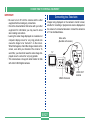
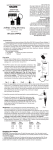
Images being displayed on the camera’s monitor screen,
whether for recording or playback can also be displayed on
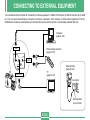
the screen of a connected television. Connect the camera to
a TV as illustrated below.
Video cable
(Bundled with camera.)
TV
USB
INPUT
L
R
VIDEO OUT
DIGITAL
DC IN 6V
VIDEO
AUDIO
VIDEO IN terminal
E-127
VIDEO OUT
terminal