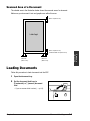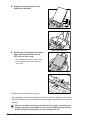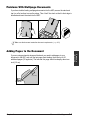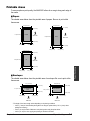
1
User’s Manual
Copyright
This User’s Guide is copyrighted by Canon Computer Systems, Inc. (CCSI) with all
rights reserved. Under the copyright laws, this User’s Guide may not be reproduced in
any form, in whole or part, without prior written consent of CCSI.
© 2000 Canon Computer Systems, Inc.
Disclaimer
Canon Computer Systems, Inc. has reviewed this User’s Guide thoroughly in order to
make it an easy to use guide for your Canon MultiPASS C555 system. All statements,
technical information, and recommendations in this guide and in any guides or related
documents are believed reliable, but the accuracy and completeness thereof are not
guaranteed or warranted, and they are not intended to be, nor should they be
understood to be, representations or warranties concerning the products described.
Your MultiPASS C555 and the software media included with your system have been
sold to you subject to the limited warranties set forth in the warranty and license
agreement enclosed with the respective products. All software is licensed AS IS, as
described in the license agreement enclosed with the software media. Further, CCSI
reserves the right to make changes in the specifications of the products described in
this guide at any time without notice and without obligation to notify any person of such
changes.
Trademarks
Canon and BJ are registered trademarks. BCI, Bubble Jet, MultiPASS, and UHQ are
trademarks of Canon Inc.
All other product and brand names are registered trademarks, trademarks or service
marks of their respective owners.
As an ENERGY STAR® Partner, Canon U.S.A., Inc. has
determined that this product meets the ENERGY STAR® guidelines
for energy efficiency.
ii
Preface
Users in the U.S.A.
Pre-Installation Requirements for Canon Facsimile
Equipment
A. Location
Supply a suitable table, cabinet, or desk. See the Appendix for the unit’s dimensions
and weight.
B. Order Information
1. Only a single line, touch-tone or rotary telephone set is to be used.
2. Order an RJ11-C modular jack (USOC code), which should be installed by the
telephone company. If the RJ11-C jack is not present, installation cannot occur.
3. Order a normal business line from your telephone company’s business
representative. The line should be a regular voice grade line or the equivalent.
Use one line per unit.
DDD (DIRECT DISTANCE DIAL) LINE
-orIDDD (INTERNATIONAL DIRECT DISTANCE DIAL) LINE IF YOU
COMMUNICATE OVERSEAS
n
Canon recommends an individual line following industry standards, e.g. the 2500 (Touch
Tone) or 500 (Rotary/Pulse Dial) telephones. A dedicated extension off a PBX unit without
“Call Waiting” can be used with your MultiPASS C555. Key telephone systems are not
recommended because they send non-standard signals to individual telephones for ringing
and special codes, which may cause a fax error.
C. Power Requirements
This equipment should be connected to a standard 120-volt AC, three-wire grounded
outlet only. The socket outlet shall be installed near the equipment and shall be
easily accessible. Do not connect this unit to an outlet or power line shared with
other appliances that cause “electrical noise.” Air conditioners, electric typewriters,
copiers, and machines of this sort generate electrical noise which often interferes
with communications equipment and the sending and receiving of documents.
Connection of the Equipment
This equipment complies with Part 68 of the FCC rules. On the rear panel of this
equipment is a label that contains, among other information, the FCC Registration
Number and Ringer Equivalence Number (REN) for this equipment. If requested, this
information must be given to the telephone company. This equipment may not be used
on coin service provided by the telephone company. Connection to party lines is
subject to state tariffs.
Preface
iii
An FCC compliant telephone cord and modular jack are provided with this equipment.
This equipment is designed to be connected to the telephone network or premises
wiring using a compatible modular jack which is Part 68 compliant. See Installation
instructions for details.
The REN is used to determine the quantity of devices which may be connected to the
telephone line. Excessive RENs on the telephone line may result in the devices not
ringing in response to an incoming call. In most, but not all areas, the sum of the RENs
should not exceed five (5.0). To be certain of the number of devices that may be
connected to the line, as determined by the total RENs, contact the telephone company
to determine the maximum REN for the calling area.
In Case of Equipment Malfunction
Should any malfunction occur which cannot be corrected by the procedures described in
this User’s Guide, disconnect the equipment from the telephone line or unplug the power
cord. The telephone line should not be reconnected or the power cord plugged in until the
problem is completely resolved. Users should contact Canon Authorized Service Facilities
for servicing of equipment. Information regarding Authorized Service Facility locations can
be obtained by calling the Canon Computer Systems Customer Care Center.
Rights of the Telephone Company
Should the equipment cause harm to the telephone network, the telephone company
may temporarily disconnect service. The telephone company also retains the right to
make changes in facilities and services which may affect the operation of this
equipment. When such changes are necessary, the telephone company is required to
give adequate prior notice to the user.
FCC Notice
MultiPASS C555: Facsimile Transceiver, Model H12197
This device complies with Part 15 of the FCC Rules. Operation is subject to the
following two conditions:
(1) This device may not cause harmful interference, and
(2) this device must accept an interference received, including interference that may
cause undesired operation.
n
iv
This equipment has been tested and found to comply with the limits for a class B digital
device, pursuant to Part 15 of the FCC Rules. These limits are designed to provide
reasonable protection against harmful interference in a residential installation. This
equipment generates, uses and can radiate radio frequency energy and, if not installed and
used in accordance with the instructions, may cause harmful interference to radio
communications. However, there is no guarantee that interference will not occur in a
particular installation. If this equipment does cause harmful interference to radio or
television reception, which can be determined by turning the equipment off and on, the user
is encouraged to try to correct the interference by one or more of the following measures:
• Reorient or relocate the receiving antenna.
Preface
• Increase the separation between the equipment and receiver.
• Connect the equipment into an outlet on a circuit different from that to which the receiver
is connected.
• Consult the dealer or an experienced radio/TV technician for help.
Use of shielded cable is required to comply with class B limits in Subpart B of Part 15
of FCC Rules.
Do not make any changes or modifications to the equipment unless otherwise specified
in the User’s Guide. If such changes or modifications should be made, you could be
required to stop operation of the equipment.
Canon U.S.A. Inc.
One Canon Plaza, Lake Success, NY 11042, U.S.A.
TEL No. (516) 328-5600
The Telephone Consumer Protection Act of 1991 makes it unlawful for any person to
use a computer or other electronic device to send any message via a telephone fax
machine unless such message clearly contains in a margin at the top or bottom of each
transmitted page or on the first page of the transmission, the date and time it is sent
and an identification of the business or other entity, or other individual sending the
message and the telephone number of the sending machine or such business, other
entity, or individual.
To automatically enter this information into your MultiPASS C555, follow the instructions
in Chapter 3 of this User’s Guide.
Preface
v
Users in Canada
Pre-Installation Requirements for Canon Facsimile
Equipment
A. Location
Supply a suitable table, cabinet, or desk. See the Appendix for the unit’s dimensions
and weight.
B. Order Information
1. Provide only a single-line to touch-tone or rotary telephone set terminated with a
standard 4-pin modular phone plug. (Touch-tone is recommended if available in
your area.)
2. Order an RJ11-C modular jack (USOC code), which should be installed by the
telephone company. If the RJ11-C jack is not present, installation cannot occur.
3. Order a normal business line from your telephone company’s business
representative. The line should be a regular voice grade line or equivalent. Use
one line per unit.
DDD (DIRECT DISTANCE DIAL) LINE
-orIDDD (INTERNATIONAL DIRECT DISTANCE DIAL) LINE IF YOU
COMMUNICATE OVERSEAS
n
Canon recommends an individual line following industry standards [e.g., the 2500 (touch
tone) or 500 (rotary/pulse dial) telephones]. A dedicated extension off a PBX without
“Camp On” signals is also permissible with your MultiPASS C555. Key telephone systems
are not recommended because they send non-standard signals to individual telephones for
ringing and special codes, which may cause a fax error.
C. Power Requirements
The power outlet should be a three-prong grounded receptacle (Single or Duplex). It
should be independent from copiers, heaters, air conditioners or any electric
equipment that is thermostatically controlled. The rated value is 120 volts and 15
amperes. The RJ11-C modular jack should be relatively close to the power outlet to
facilitate installation.
Notice
The Industry Canada label identifies certified equipment. This certification means that
the equipment meets telecommunications networks protective, operational and safety
requirements as prescribed in the appropriate Terminal Equipment Technical
Requirements document(s). The Department does not guarantee the equipment will
operate to the user’s satisfaction.
vi
Preface
Before installing this equipment, users should ensure that it is permissible to be
connected to the facilities of the local telecommunications company. The equipment
must also be installed using an acceptable method of connection. The customer should
be aware that compliance with the above conditions may not prevent degradation of
service in some situations.
Repairs to certified equipment should be coordinated by a representative designated by
the supplier. Any repairs or alterations made by the user to this equipment, or
equipment malfunctions, may give the telecommunications company cause to request
the user to disconnect the equipment.
Users should ensure for their own protection that the electrical ground connections of
the power utility, telephone lines and internal metallic water pipe system, if present, are
connected together. This precaution may be particularly important in rural areas.
c
n
Users should not attempt to make such connections themselves, but should contact
the appropriate electric inspection authority, or electrician, as appropriate.
This Class B digital apparatus meets all requirements of the Canadian InterferenceCausing Equipment Regulations.
Cet appareil numérique de la classe B respecte toutes les exigences du Règlement sur le
matériel brouilleur du Canada.
The Ringer Equivalence Number (REN) assigned to each terminal device provides an
indication of the maximum number of terminals allowed to be connected to a telephone
interface. The termination on an interface may consist of any combination of devices
subject only to the requirement that the sum of the Ringer Equivalence Numbers of all
the devices does not exceed 5. The REN of this product is 0.3.
CANON CANADA INC.
1-800-263-1121
24 HOURS A DAY, SEVEN DAYS A WEEK
Preface
vii
Contents
Chapter 1: Introduction
Welcome ................................................................................................................1-2
Main Features of the MultiPASS............................................................................1-3
Using Your Documentation ....................................................................................1-5
How to Use This Guide......................................................................................1-5
Type Conventions Used in This Guide ..............................................................1-6
Customer Support..................................................................................................1-7
Important Safety Instructions .................................................................................1-7
Chapter 2: Setting Up
Choosing a Location for the MultiPASS ................................................................2-2
Dimensions ........................................................................................................2-2
Unpacking the MultiPASS......................................................................................2-2
Do You Have Everything?..................................................................................2-2
Removing Shipping Materials ................................................................................2-4
Assembling the MultiPASS ....................................................................................2-5
Making Connections ..............................................................................................2-6
Connecting the Telephone Line and External Devices......................................2-6
Connecting the MultiPASS to Your PC ..............................................................2-7
Connecting the Power Cord ..............................................................................2-8
Main Components of the MultiPASS .....................................................................2-9
Front View..........................................................................................................2-9
Back View ........................................................................................................2-10
Inside View ......................................................................................................2-10
Operation Panel ...............................................................................................2-11
One-Touch Speed Dialing/Special Function Buttons...................................2-12
Installing the BJ Cartridge ...................................................................................2-13
Guidelines........................................................................................................2-13
Installing the BJ Cartridge in the MultiPASS ...................................................2-14
Loading Paper .....................................................................................................2-17
Paper Guidelines .............................................................................................2-17
Loading Paper in the Multi-Purpose Tray ........................................................2-19
Testing the MultiPASS .........................................................................................2-20
Chapter 3: Registering Information
Methods of Registering Information in the MultiPASS...........................................3-2
Guidelines for Entering Numbers, Letters, and Symbols ......................................3-3
Correcting a Mistake..........................................................................................3-5
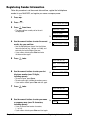
Registering Required Sender Information .............................................................3-6
What is Sender Information? .............................................................................3-6
Registering Sender Information.........................................................................3-7
Printing a List to Check the Sender Information................................................3-8
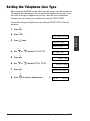
Setting the Telephone Line Type ...........................................................................3-9
viii
Preface
Chapter 4: Document Handling
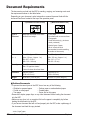
Document Requirements .......................................................................................4-2
Scanned Area of a Document ...........................................................................4-3
Loading Documents...............................................................................................4-3
Problems With Multipage Documents ...............................................................4-5
Adding Pages to the Document.........................................................................4-5
Chapter 5: Paper Handling
Print Media Requirements .....................................................................................5-2
Printable Areas ..................................................................................................5-3
Selecting Print Media.............................................................................................5-4
Setting the Paper Thickness Lever........................................................................5-6
Loading Paper .......................................................................................................5-7
Loading Envelopes ................................................................................................5-8
Using Canon Specialty Print Media .....................................................................5-10
Specialty Print Media Guidelines.....................................................................5-10
Printing on High Resolution Paper...................................................................5-11
Using the Cleaning Sheet ............................................................................5-11
Printing on Fabric Sheets ................................................................................5-13
Printing on Banner Paper ................................................................................5-14
Chapter 6: Speed Dialing
What is Speed Dialing? .........................................................................................6-2
Speed Dialing Methods .....................................................................................6-2
One-Touch Speed Dialing......................................................................................6-3
Registering Numbers for One-Touch Speed Dialing .........................................6-3
Using One-Touch Speed Dialing .......................................................................6-5
Coded Speed Dialing.............................................................................................6-6
Registering Numbers for Coded Speed Dialing ................................................6-6
Using Coded Speed Dialing ..............................................................................6-8
Group Dialing.........................................................................................................6-9
Creating Groups ................................................................................................6-9
Using Group Dialing ........................................................................................6-12
Speed Dialing Lists ..............................................................................................6-13
Printing Speed Dialing Lists.............................................................................6-13
Chapter 7: Sending Faxes
Preparing to Send a Fax........................................................................................7-2
Documents You Can Fax...................................................................................7-2
Adjusting the Quality of Your Faxes ..................................................................7-2
Setting Color or Black & White Transmission................................................7-2
Setting the Scanning Resolution ...................................................................7-2
Setting the Scanning Contrast.......................................................................7-4
Dialing Methods .................................................................................................7-5
Preface
ix
Sending Methods...................................................................................................7-6
Memory Sending................................................................................................7-6
Manual Sending.................................................................................................7-7
Canceling Sending.................................................................................................7-9
Redialing When the Line is Busy.........................................................................7-10
Manual Redialing .............................................................................................7-10
Canceling Manual Redialing........................................................................7-10
Automatic Redialing.........................................................................................7-10
What is Automatic Redialing?......................................................................7-10
Canceling Automatic Redialing....................................................................7-10
Setting the Options for Automatic Redialing ................................................7-11
Sequential Broadcasting......................................................................................7-13
Sending a Document to More Than One Destination .....................................7-13
Sending a Document Using Group Dialing......................................................7-14
Delayed Sending .................................................................................................7-15
Sending Other Documents While the MultiPASS is Set for
Delayed Sending ..........................................................................................7-15
Documents Stored in Memory .............................................................................7-16
Printing a List of Documents in Memory .........................................................7-16
Printing a Document in Memory ......................................................................7-16
Deleting a Document From Memory ...............................................................7-18
Chapter 8: Receiving Faxes
Different Ways to Receive a Fax ...........................................................................8-2
Receiving Both Faxes and Telephone Calls Automatically:
Fax/Tel Mode..................................................................................................8-3
Setting Fax/Tel Mode.....................................................................................8-3
Setting the Options for Fax/Tel Mode ............................................................8-4
Receiving Faxes Manually: MANUAL MODE....................................................8-6
Setting MANUAL MODE................................................................................8-6
Receiving a Fax Manually .............................................................................8-6
Receiving Faxes Automatically: FAX ONLY MODE ..........................................8-8
Setting FAX ONLY MODE .............................................................................8-8
Receiving With an Answering Machine: ANS.MACHINE MODE ......................8-9
Setting ANS.MACHINE MODE......................................................................8-9
Using the MultiPASS With an Answering Machine........................................8-9
Receiving Using the Distinctive Ring Pattern Detection
Feature: DRPD.............................................................................................8-10
Types of Ring Patterns ................................................................................8-10
Setting DRPD ..............................................................................................8-10
How DRPD Responds to Calls....................................................................8-13
Communicating Using DRPD ......................................................................8-13
Receiving Faxes to the MultiPASS Suite.........................................................8-14
When Your PC is Off ...................................................................................8-14
x
Preface
Receiving in Color................................................................................................8-15
Setting Color Reception...................................................................................8-15
Receiving While Registering, Copying, or Printing..............................................8-16
Receiving Faxes in Memory When a Problem Occurs........................................8-16
Canceling Receiving ............................................................................................8-16
Chapter 9: Special Features
Special Dialing .......................................................................................................9-2
Dialing Through a Switchboard .........................................................................9-2
Dialing an Overseas Number (With Pauses).....................................................9-2
Switching Temporarily to Tone Dialing...............................................................9-3
Chapter 10: Making Copies
Documents You Can Copy ..................................................................................10-2
Copying Documents ............................................................................................10-2
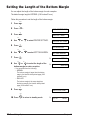
Setting the Length of the Bottom Margin.............................................................10-4
Chapter 11: Reports and Lists
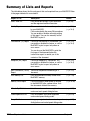
Summary of Lists and Reports ............................................................................11-2
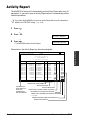
Activity Report ......................................................................................................11-3
Transmission (TX) Report ....................................................................................11-4
Multi-Transaction (TX/RX) Report....................................................................11-5
Reception (RX) Report.........................................................................................11-5
Chapter 12: Maintenance
Periodic Cleaning.................................................................................................12-2
Cleaning the MultiPASS’ Exterior ....................................................................12-2
Cleaning the MultiPASS’ Interior......................................................................12-2
Cleaning Inside the ADF (Automatic Document Feeder)............................12-2
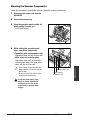
Cleaning the Scanner Components ............................................................12-5
Cleaning the Rollers ....................................................................................12-6
BJ Cartridge.........................................................................................................12-7
BJ Cartridges and BJ Tanks ............................................................................12-7
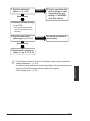
When to Replace a BJ Cartridge or BJ Tank...................................................12-8
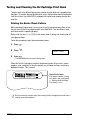
Testing and Cleaning the BJ Cartridge Print Head........................................12-10
Printing the Nozzle Check Pattern ............................................................12-10
Cleaning the BJ Cartridge Print Head .......................................................12-11
Replacing the BJ Cartridge............................................................................12-12
Replacing a BJ Tank......................................................................................12-15
Transporting the MultiPASS...............................................................................12-18
Preface
xi
Chapter 13: Troubleshooting
If You Cannot Solve the Problem ........................................................................13-2
Clearing Jams......................................................................................................13-3
Jams in the ADF ..............................................................................................13-3
Jams in the Multi-Purpose Tray.......................................................................13-4
LCD Messages ....................................................................................................13-5
Printing Problems ..............................................................................................13-13
Print Quality Problems .......................................................................................13-15
Color Printing and Color Copying Problems......................................................13-17
Paper Feeding Problems ...................................................................................13-18
Faxing Problems................................................................................................13-20
Sending Problems .........................................................................................13-20
Receiving Problems.......................................................................................13-21
Telephone Problems ..........................................................................................13-23
Copying Problems .............................................................................................13-24
General Problems..............................................................................................13-25
If the Power Goes Out .......................................................................................13-26
Chapter 14: Summary of Settings
Understanding the Menu System ........................................................................14-2
Accessing the Menus ......................................................................................14-2
User Settings Menu .............................................................................................14-3
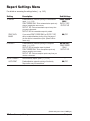
Report Settings Menu ..........................................................................................14-4
TX (Transmission) Settings Menu .......................................................................14-5
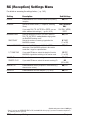
RX (Reception) Settings Menu ............................................................................14-6
Printer Settings Menu ..........................................................................................14-7
System Settings Menu.........................................................................................14-7
Appendix: Specifications
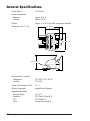
General Specifications ..........................................................................................A-2
Printer ....................................................................................................................A-3
BJ Cartridges.........................................................................................................A-4
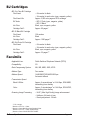
Facsimile ...............................................................................................................A-4
Telephone ..............................................................................................................A-5
Copier ....................................................................................................................A-6
Scanner .................................................................................................................A-7
Glossary .............................................................................................................G-1
Index .....................................................................................................................I-1
xii
Preface
Introduction
This chapter introduces you to your MultiPASS. You will find a summary of its
features and details on how to use this guide.
Welcome ....................................................................................................1-2
Main Features of the MultiPASS .............................................................1-3
Using Your Documentation ......................................................................1-5
How to Use This Guide ..........................................................................1-5
Type Conventions Used in This Guide...................................................1-6
Customer Support ....................................................................................1-7
Important Safety Instructions .................................................................1-7
Chapter 1
Introduction
1-1
Introduction
Chapter 1
Welcome
Thank you for purchasing the Canon MultiPASS C555 (hereafter referred to as the
MultiPASS).
The MultiPASS is a complete multifunction system for your home or small office. It
combines the following essential office machines into a single, convenient, compact
desktop unit:
•
•
•
•
•
•
Color Printer
Plain Paper Color Fax Machine
PC Color Fax*
Color Copier
Color Scanner
Telephone**
With its multitasking ability, the MultiPASS enables you to perform a number of
operations simultaneously. For example, you can print, scan a document, or make
copies at the same time you are sending a fax or receiving a fax into memory.
* PC black & white fax transmission/reception. PC color fax reception only. Windows only.
Mac driver will not support PC fax function.
** Requires a telephone, an extension phone, or an answering machine connected to the MultiPASS.
1-2
Introduction
Chapter 1
■ Color Printer Features
• Canon Bubble Jet (BJ) printing for first-rate crisp printing, vibrant colors, and simple
maintenance
• 720 (horizontal) × 360 (vertical) dpi high-resolution color printing at exceptional speed
• Wide variety of print media available for printing (e.g. glossy photo paper,
transparencies, back print film, etc.)
• Convenient multi-purpose tray holds up to 100 sheets* of plain paper or other print
media
• Excellent photo quality printing with the Photo BJ cartridge
• Economy black & white printing with the Black BJ cartridge for longer BJ cartridge life
■ Plain Paper Color Fax Features
• Automatic switching between fax and voice calls
• Color faxing to and from fax machines that support color faxing
• Increased transmission speed with G3 data encoding—up to approximately six
seconds** per page for black & white transmissions
• 42-page** memory for storing faxes
• Canon’s Ultra High Quality (UHQ™) Image Processing System for enhanced definition
in faxed photos
• Error Correction Mode (ECM) reduces transmission errors when sending to or
receiving from fax machines with ECM capability
• Automatic dialing and broadcasting—one-touch, coded speed dialing, and group dialing
• Answering machine connection possible to receive both messages and faxes
automatically
• Automatic reduction of received faxes when paper in the MultiPASS does not match
transmitted page size
■ PC Color Fax Features
• PC black & white sending and receiving, as well as reception of color faxes directly to
your PC
• Canon’s exclusive software package, the MultiPASS Suite, provides you with a “PC
Fax” to print, fax, scan, and use the telephone from within your PC’s Windows®
environment
n
For more details on the MultiPASS Suite features, 1 MultiPASS Suite User’s Guide.
* 20 lb. (75 g/m2) paper
** Based on ITU-T No. 1 Chart, standard mode.
Chapter 1
Introduction
1-3
Introduction
Main Features of the MultiPASS
■ Color Copier Features
• Color copying
• Black & white copying—up to 99 copies
• 360-dpi high-resolution copying (single copies)
• Copy reduction—70%, 80%, or 90%
• Copy enlargement in COLOR SNAPSHOT mode—150% or 200%
■ Color Scanner Features
• TWAIN compatible to scan images using any graphics or optical character recognition
(OCR) applications that also support the TWAIN standard
• 600 × 600 dpi full color and 256-level grayscale scanning
• ADF (Automatic Document Feeder) for scanning up to 20 pages (letter or A4) at a
time when using Windows® applications that support the TWAIN scanning standard
and multipage scans
• Adjustable resolution for documents scanned into your PC
■ Telephone Features
• Connection for a telephone and one other external device (extension phone,
answering machine, or data modem)
• One-touch and coded speed dialing for easy and efficient calling
1-4
Introduction
Chapter 1
Your MultiPASS includes the following documentation to help you use your MultiPASS
quickly and easily:
• MultiPASS C555 User’s Guide (this guide): Provides detailed information on how to
set up, operate, maintain, and troubleshoot your MultiPASS.
• MultiPASS Suite for Windows® Software User’s Guide: Describes how to use your
MultiPASS to print, fax, and scan from within your PC’s Windows® environment. Refer
to this guide whenever you need information about printing, faxing, or scanning using
your PC.
How to Use This Guide
To make the best use of this guide in learning how to set up and operate your
MultiPASS, be sure to do the following:
• Read this chapter to learn about the MultiPASS’ main features and for guidelines on
using the unit safely.
• Carefully follow the instructions in Setting Up (1 Chapter 2) to get your MultiPASS
unpacked, assembled, and ready to operate.
• See Registering Information (1 Chapter 3) to learn how to enter information in the
MultiPASS via the operation panel and how to register the required sender
information.
• See Document Handling (1 Chapter 4) for details on the document requirements for
your MultiPASS, and how to load documents for automatic and manual feed.
• See Paper Handling (1 Chapter 5) for details on paper and other print media you can
use with your unit, and instructions for loading these in the MultiPASS.
• See Speed Dialing (1 Chapter 6) to learn how to register numbers for speed dialing
and how to use speed dialing to send documents.
• See (1 Chapters 7 through 10) to master the MultiPASS’ operating procedures, such
as sending and receiving faxes, special dialing, and making copies.
• See Reports and Lists (1 Chapter 11) to learn about the reports and lists that can
be automatically or manually printed from your MultiPASS.
• See Maintenance (1 Chapter 12) to become familiar with procedures for cleaning the
MultiPASS, replacing the BJ cartridge and BJ tanks, and transporting the MultiPASS.
• If your unit is not operating properly, see Troubleshooting (1 Chapter 13) to try to
solve the problem.
• See Summary of Settings (1 Chapter 14) to learn how to change default settings on
your MultiPASS, and how to customize your unit to your needs.
• See Specifications (1 Appendix) for the MultiPASS’ technical specifications.
If you still have questions about how to use your MultiPASS, please contact the
Customer Care Center. They will be happy to answer your questions.
Chapter 1
Introduction
1-5
Introduction
Using Your Documentation
Type Conventions Used in This Guide
Please read the list below of symbols, terms, and abbreviations used in this guide. A
complete glossary of terms is included at the end of this guide.
c
n
Cautions tell you how to avoid actions that could injure you or damage your
MultiPASS. In order to use your unit safely, always observe these cautions.
Notes provide advice on using the MultiPASS more effectively, describe operating
restrictions, and tell you how to avoid minor difficulties. Reading these is recommended to
make the most of your unit and its functions.
(1 p. n-nn)
A number preceded by an arrow and enclosed in parenthesis
references a page number in this guide which contains more
information on the topic of the previous sentence.
1 MultiPASS Suite
User’s Guide
Refer to the MultiPASS Suite for Windows® Software User’s
Guide for details on the topic of the previous sentence.
default
A setting that remains in effect unless you change it.
document or fax
The original sheet(s) of paper you send or receive with the unit.
menu
A list of settings from which you select an item to set up or
change. A menu has a title which appears in the LCD.
d and u buttons
Used to select an item in a menu. Press d to select the next
item, and press u to select the previous item.
transaction number
When you send or receive a document, your unit automatically
assigns the document a unique transaction number. A
transaction number is a four-digit number that will help you
keep track of documents you send and receive.
TX/RX NO.
TX/RX NO. is the abbreviation used for Transaction number.
TX
Denotes Sending.
RX
Denotes Receiving.
In addition, this guide uses distinctive typefaces to identify buttons and information in
the LCD.
• The buttons you press appear as illustrations or in this typface: Stop.
• Information in the LCD appears in this typeface: USER SETTINGS.
1-6
Introduction
Chapter 1
Your MultiPASS is designed with the latest technology to provide trouble-free operation.
If you encounter a problem with the unit’s operation, try to solve it by using the
information in Troubleshooting (1 Chapter 13). If you cannot solve the problem or if
you think your MultiPASS needs servicing, contact the Customer Care Center.
Getting Help From Canon
Canon Computer Systems, Inc. offers a full range of customer technical support*
options:
• For e-mail technical support, the latest driver downloads and answers to frequently
asked questions (www.ccsi.canon.com)
• 24-hour, 7-day-a-week automated support for troubleshooting issues on most current
products (1-800-423-2366)
• 24-hour, Fax-On-Demand System for product specifications and technical information
(1-800-526-4345)
• Free technical support Monday – Saturday (excluding holidays) for products still
under warranty** (1-757-413-2848)
• Technical support 7 days a week (excluding holidays) for products no longer under
warranty, at $9.99 per call (1-757-413-2848)
Note: Within Canada, call for technical support 24 hours a day, 7 days a week
(1-800-OK-CANON).
*Support program specifics subject to change without notice.
**Refer to individual product information for warranty details.
Chapter 1
Introduction
1-7
Introduction
Customer Support
Important Safety Instructions
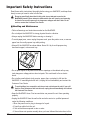
Read these safety instructions thoroughly before using your MultiPASS, and keep them
handy in case you need to refer to them later.
c
Except as specifically described in this guide, do not attempt to service the
MultiPASS yourself. Never attempt to disassemble the unit: opening and removing
its interior covers will expose you to dangerous voltages and other risks. For all
service, contact the Customer Care Center.
■ Handling and Maintenance
• Follow all warnings and instructions marked on the MultiPASS.
• Do not subject the MultiPASS to strong physical shock or vibration.
• Always unplug the MultiPASS before moving or cleaning it.
• To avoid paper jams, never unplug the power cord, open the printer cover, or remove
paper from the multi-purpose tray while printing.
• Always lift the MultiPASS as shown below. Never lift it by its multi-purpose tray,
document support, or document tray.
• Do not push objects of any kind into the slots or openings on the cabinet as they may
touch dangerous voltage points or short out parts. This could result in fire or electric
shock.
• Do not allow small objects (such as pins, paper clips, or staples) to fall into the
MultiPASS. If something does fall into it, unplug the unit immediately and contact the
Customer Care Center.
c
To avoid spillage in or around the unit, do not eat or drink near the unit. If you spill
liquid or if any substance falls into the unit, unplug the unit immediately and contact
the Customer Care Center.
• Keep the MultiPASS clean. Dust accumulation can prevent the unit from operating
properly.
• Unplug the MultiPASS from the wall outlet and refer service to qualified personnel
under the following conditions:
– When the power cord or plug is damaged or frayed.
– If liquid has spilled into the unit.
– If the unit has been exposed to rain or water.
– If the unit does not operate normally when you have followed the instructions in this
1-8
Introduction
Chapter 1
■ Location
• Place the MultiPASS on a flat, stable, vibration-free surface that is strong enough to
support its weight (approx. 11.2 lb./5.1 kg).
• Place the MultiPASS in a cool, dry, clean, well ventilated place.
– Make sure the area is free from dust.
– Make sure the location is not affected by extreme temperature changes, and always
stays between 50° and 90.5°F (10° and 32.5°C).
– Make sure the area’s relative humidity is always between 20% and 85%.
• Keep the MultiPASS away from direct sunlight as this can damage it. If you have to
place it near a window, install heavy curtains or blinds.
• Do not use the MultiPASS near water. Make sure that no wet or humid objects come
into contact with the unit.
• Do not use or store the MultiPASS outdoors.
• Do not install the MultiPASS near devices that contain magnets or generate magnetic
fields, such as speakers.
• If possible, place the MultiPASS near an existing telephone outlet to avoid the
expense of installing a new one.
• Place the MultiPASS near a standard 120 V AC power outlet. The socket outlet shall
be installed near the equipment and shall be easily accessible.
• Place the MultiPASS near the PC you will be connecting it to. Make sure you can
reach it easily as you will be using it as a printer, fax machine, copier, and scanner.
• To ensure reliable operation of the MultiPASS and to protect it from overheating (which
can cause it to operate abnormally and create a fire risk), do not block the exhaust
vent and never block or cover any openings on the unit by placing it on a bed, sofa,
rug, or other similar surface. Do not place the unit in a closet or built-in installation, or
near a radiator or other heat register unless proper ventilation is provided. Install the
unit approximately 4 inches (10 cm) away from walls and other equipment.
• Do not stack boxes or furniture around the power outlet. Keep the area free so you
can reach the outlet quickly. If you notice anything unusual (smoke, strange odors,
noises) around the MultiPASS, unplug the unit immediately. Contact the Customer
Care Center.
• Do not allow anything to rest on the power cord, and do not place the unit where the
cord will be walked on. Make sure the cord is not knotted or kinked.
Chapter 1
Introduction
1-9
Introduction
guide. Adjust only those controls that are covered by the operating instructions in this
guide. Improper adjustment of other controls may result in damage and may require
extensive work by a qualified technician to restore the product to normal operation.
– If the unit has been dropped or the cabinet has been damaged.
– If the unit exhibits a distinct change in performance, indicating a need for servicing.
■ Power Supply
• Plug the MultiPASS into a standard 120 V AC 60 Hz, three-prong grounded outlet.
Only operate the MultiPASS from the type of power source indicated on the unit’s
label. If you are not sure of the type of power available, consult your local power
company.
• Use only the power cord that came with the unit. Using a longer cord or extension
cord can cause the unit to malfunction. If you must use an extension cord with the
MultiPASS, make sure that the total of the ampere ratings on the products plugged
into the extension cord does not exceed the extension cord ampere rating. Also,
make sure the total ampere rating of all products plugged into the wall outlet does not
exceed the current amperage of the circuit breaker.
• The MultiPASS is equipped with a three-prong, grounding-type plug provided with a
third (grounding) pin. This plug will only fit into a grounding-type outlet. This is a
safety feature. If you are unable to insert the plug into your outlet, contact an
electrician to replace your outlet. Do not defeat the safety purpose of the groundingtype plug by breaking off the third prong or using a 3-to-2 adapter.
• Do not plug the MultiPASS into the same circuit as an appliance such as an air
conditioner, electric typewriter, television, or copier. Such devices generate electrical
noise that can interfere with your MultiPASS’ ability to send and receive faxes.
• During electrical storms, disconnect the power cord from the power outlet. (Please
note that any documents stored in the unit’s memory will be deleted when you unplug
the unit.)
• Unplug the MultiPASS only by pulling on the plug itself. Never pull on the cord.
• Whenever you unplug the MultiPASS, wait at least five seconds before you plug it in
again.
• Check the plug frequently and make sure that it is firmly plugged into the socket.
c
1-10
This product emits low level magnetic flux.
If you use a cardiac pacemaker and feel abnormalities, please move away from this
product and consult your doctor.
Introduction
Chapter 1
Setting Up
This chapter explains how to prepare your MultiPASS for use.
Choosing a Location for the MultiPASS.................................................2-2
Dimensions.............................................................................................2-2
Unpacking the MultiPASS ........................................................................2-2
Do You Have Everything? ......................................................................2-2
Removing Shipping Materials .................................................................2-4
Assembling the MultiPASS ......................................................................2-5
Making Connections ................................................................................2-6
Connecting the Telephone Line and External Devices...........................2-6
Connecting the MultiPASS to Your PC...................................................2-7
Connecting the Power Cord ...................................................................2-8
Main Components of the MultiPASS ......................................................2-9
Front View ..............................................................................................2-9
Back View.............................................................................................2-10
Inside View ...........................................................................................2-10
Operation Panel....................................................................................2-11
One-Touch Speed Dialing/Special Function Buttons .......................2-12
Installing the BJ Cartridge.....................................................................2-13
Guidelines.............................................................................................2-13
Installing the BJ Cartridge in the MultiPASS ........................................2-14
Loading Paper.........................................................................................2-17
Paper Guidelines ..................................................................................2-17
Loading Paper in the Multi-Purpose Tray.............................................2-19
Testing the MultiPASS............................................................................2-20
Chapter 2
Setting Up
2-1
Setting Up
Chapter 2
Choosing a Location for the MultiPASS
Before unpacking your MultiPASS, read the guidelines in Important Safety Instructions
(1 p. 1-7) to make sure you choose a location best suited for the MultiPASS.
Dimensions
Make sure the location you choose provides enough space around the MultiPASS for
adequate ventilation, and to allow paper to flow freely into and out of the unit. Install the
MultiPASS approximately 4 inches (10 cm) away from walls and other equipment. For
the dimensions of the MultiPASS, (1 p. A-2).
Unpacking the MultiPASS
Follow the directions below to unpack the MultiPASS properly, and to make sure you
have all its components and documentation.
n
When lifting the MultiPASS out of the box, or when you need to move it, lift it from the
bottom and hold it firmly and level.
Do You Have Everything?
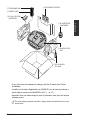
As you unpack the MultiPASS, save the carton and packing material in case you want
to move or ship the unit in the future.
Carefully remove all items from the box. You should have someone help by holding the
box while you lift the MultiPASS and its protective packaging out of the box.
Make sure you have the following documentation as well as the items shown on the
next page:
• QUICK START GUIDE
• STAND-ALONE FAX MANUAL
• CANON CREATIVE CD for MultiPASS C555
• LIMITED WARRANTY CARD
The following items are in MultiPASS SUITE SOFTWARE/PRINTER DRIVER CD-ROM:
• MultiPASS C555 USER’S GUIDE (This guide)
• MultiPASS SUITE FOR WINDOWS SOFTWARE USER’S GUIDE
2-2
Setting Up
Chapter 2
e TELEPHONE LINE
r DOCUMENT SUPPORT
w POWER CORD
t BJ CARTRIDGE
CONTAINER
y MultiPASS C555
UNIT
u BCI-21 BLACK
BJ TANK
• If any of the items are damaged or missing, notify the Customer Care Center
immediately.
• In addition to the items shipped with your MultiPASS, you will need to purchase a
printer cable to connect your MultiPASS to a PC. (1 p. 2-7)
• Important! Save your sales receipt for proof of purchase in case your unit requires
warranty service.
n
Chapter 2
The actual shipping materials may differ in shape, quantity, and position from the ones
shown above.
Setting Up
2-3
Setting Up
q BC-21e COLOR BJ
CARTRIDGE
Removing Shipping Materials
The MultiPASS has been packed with protective material to protect it during shipping.
Remove this material as follows and keep it in case you need to transport the unit in
the future:
1
Remove the
shipping tapes
from the top of
the MultiPASS.
2
Remove the
protective piece
from the multipurpose tray.
4
Remove the
shipping tape
and protective
piece from the
output tray.
5
Open the document tray, then remove the
shipping tapes and protective sheets.
6
Open the operation panel
partially by gently pulling it
toward you (it only opens
slightly). Then remove the
protective sheet from the ADF.
Close the operation panel by
pressing it down from the
center until it locks into place.
n
2-4
7
3
Remove the
shipping tape
and protective
piece from the
bottom of the unit.
Open the printer cover, then remove
the shipping tape from the side of the
unit.
Close the printer cover and document
tray.
The actual shipping materials may differ in shape, quantity, and position from the ones
shown above.
Setting Up
Chapter 2
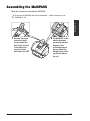
Assembling the MultiPASS
Follow this procedure to assemble the MultiPASS:
To see how the MultiPASS will look fully assembled, 1 Main Components of the
MultiPASS, p. 2-9.
Setting Up
n
1
Chapter 2
Hold the document
support so that it
curves toward the
back of the unit and
fit the tabs of the
support into the
slots above the ADF.
2
The MultiPASS comes
with the document
tray already attached.
However, if you
accidentally remove
the tray, attach it by
fitting the slots on the
tray into the tabs on
the unit.
Setting Up
2-5
Making Connections
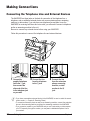
Connecting the Telephone Line and External Devices
The MultiPASS has three jacks on the back for connection of the telephone line, a
telephone, and an additional external device such as an extension phone, answering
machine, or data modem. If you only have one telephone line and plan to use the
MultiPASS for receiving both faxes and voice calls, you will need to connect a telephone
and/or an answering machine to the unit.
Be sure to connect any external device before using your MultiPASS.
Follow this procedure to connect the telephone line and external devices:
1
Connect the
supplied telephone
line to the L jack,
then connect the
other end of the line
to the telephone jack
on your wall.
n
2-6
2
Connect the line
from the telephone
to the h jack.
3
Connect the line
from the extension
phone, answering
machine, or data
modem to the t
jack.
• If you have connected an external device to the MultiPASS, be sure to select the correct
receive mode. (1 Chapter 8, Receiving Faxes)
• To connect an extension phone as well as an answering machine, connect the extension
phone to the answering machine, and then the answering machine to the MultiPASS.
• If you connect a modem to your MultiPASS and you use it extensively or others access
your PC frequently through the modem, you may want a dedicated telephone line for
your modem.
Setting Up
Chapter 2
Connecting the MultiPASS to Your PC
Setting Up
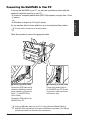
To connect the MultiPASS to your PC, you will need to purchase a printer cable that
matches the interface connector on your PC:
• A Centronics®-compatible parallel cable (IEEE 1284-compliant) no longer than 6.6 feet
(2 meters)
-or• A USB cable no longer than 16.4 feet (5 meters)
You can purchase either of these cables from your local authorized Canon dealer.
n
You only need to connect one of the above cables.
Follow this procedure to connect the appropriate cable:
■ Connecting a USB Cable
Connect the USB cable during
software installation to ensure
proper operation of the printer
driver. (1 MultiPASS Suite
User’s Guide)
Connect the USB cable to the
MultiPASS and PC.
n
Chapter 2
■ Connecting a Parallel Cable
Connect the parallel cable to
the MultiPASS and PC. Be sure
to secure the cable connectors
with the wire clips.
If using a USB cable, make sure your PC is running Microsoft Windows® 98/Me or
Windows® 2000, preinstalled by a computer manufacturer on purchase. (The USB port
operation also needs to be assured by the manufacturer.)
Setting Up
2-7
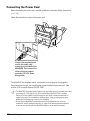
Connecting the Power Cord
Before connecting the power cord, read the guidelines in Important Safety Instructions.
(1 p. 1-8)
Follow this procedure to connect the power cord:
Connect the supplied power
cord to the power cord
connector on the back of the
MultiPASS. Then connect the
other end into a properly
grounded 120 V AC threeprong outlet.
The MultiPASS has no power switch, so its power is on as long as it is plugged in.
Once connected, though, the unit still needs to warm up before you can use it. Wait
until the LCD no longer displays PLEASE WAIT.
n
2-8
• The MultiPASS is equipped with a three-prong, grounding-type plug provided with a third
(grounding) pin. This plug will only fit into a grounding-type outlet. This is a safety
feature. If you are unable to insert the plug into your outlet, contact an electrician to
replace your outlet. Do not defeat the safety purpose of the grounding-type plug by
breaking off the third prong or using a 3-to-2 adapter.
• Do not plug the MultiPASS into the same circuit as an appliance such as an air
conditioner, electric typewriter, television, or copier. Such devices generate electrical
noise that can interfere with your MultiPASS’ ability to send and receive faxes.
Setting Up
Chapter 2
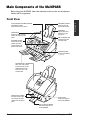
Main Components of the MultiPASS
Before using your MultiPASS, take a few moments to look over the unit and become
familiar with its components.
DOCUMENT SUPPORT
Holds documents as
they feed into the ADF.
ADF (AUTOMATIC DOCUMENT FEEDER)
and PRINTER COVER
Holds documents to be scanned.
PAPER REST
Supports print media
stacked in the multipurpose tray.
PAPER GUIDE
Keeps print media in position.
Adjust to the width of the print
media.
MULTI-PURPOSE TRAY
Holds plain paper and
other print media.
DOCUMENT GUIDES
Keep the document in
position when being
scanned. Adjust to the
width of the document.
OPERATION PANEL
Controls the MultiPASS.
(1 p. 2-11)
DOCUMENT TRAY
When open, holds scanned
documents as they exit the
MultiPASS. When closed,
serves as a cover for the
operation panel.
PAPER OUTPUT GUIDES
Hold high resolution paper
when using the Photo BJ
cartridge. Also hold banner
paper.
OUTPUT TRAY
Holds printed pages as
they exit the MultiPASS.
OUTPUT TRAY EXTENSION
Holds printed pages as they
exit the MultiPASS.
Chapter 2
Setting Up
2-9
Setting Up
Front View
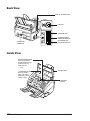
Back View
PARALLEL INTERFACE PORT
USB PORT
TELEPHONE JACK
POWER CORD
CONNECTOR
EXTENSION PHONE/
ANSWERING MACHINE/
DATA MODEM JACK
TELEPHONE LINE JACK
Inside View
PAPER THICKNESS LEVER
Adjusts the gap between
the print head and the print
media to suit the print
media’s thickness.
(1 p. 5-6)
C (CARTRIDGE) BUTTON
Moves the cartridge
holder to the center for
replacement of the BJ
cartridge or tanks.
PRINTER COVER
CARTRIDGE
HOLDER
2-10
Setting Up
Chapter 2
Operation Panel
ABC
01
DEF
2
1
■ One-Touch Speed Dialing/Special Function Buttons
(1 p. 2-12)
Dial fax/telephone numbers pre-registered for one-touch
speed dialing. Also used to perform special functions.
3
02
Alarm
04
GHI
JKL
4
5
Memory Reference
6
07
Redial /Pause Coded Dial
7
05
06
MNO
TUV
PRS
03
Data Registration
Color / B&W
Receive Mode
OPER
0
Report
9
SYMBOLS
+
09
08
Copy
WXY
8
Space
10
11
12
Image Quality
Stop
Hook
#
Start
Cleaning
Clear
Function
Set
Resume
Tone
■ LCD
Displays messages and prompts during
operation. Also displays selections, text,
numbers, and names when registering
information.
■ Redial/Pause Button (1 pp. 7-10, 9-2)
Redials the last number that was dialed with
the numeric buttons. Also enters pauses
between or after the fax/telephone number
when dialing or registering numbers.
■ Coded Dial Button (1 pp. 6-8, 6-12)
Press this button and a two-digit code to dial
a pre-registered fax/telephone number or
group.
■ Color/B&W Button (1 pp. 7-2, 7-3, 10-2)
Sets the unit for color or black & white
transmission or copying. For color
transmission or color copying, press this
button to turn on its light.
■ Hook Button
Engages or disengages the telephone line.
Chapter 2
■ Alarm Light
Flashes when an error occurs, or when the
MultiPASS is out of paper or ink.
■ Receive Mode Button
(1 Chapter 8, Receiving Faxes)
Selects the receive mode.
■ Copy Button (1 p. 10-2)
Sets the MultiPASS to make copies.
■ Image Quality Button (1 pp. 7-3, 10-2)
Selects the resolution setting the MultiPASS
uses for the document you are sending. Also
selects the image quality setting (resolution
and paper type) for the document you are
copying.
■ Stop Button
Cancels sending, receiving, registering data,
copying and other operations, and returns the
MultiPASS to standby mode.
■ Start Button
Starts sending, receiving, scanning, and
copying.
Setting Up
2-11
Setting Up
■ Document Feed Lever (1 p. 4-2)
Sets the ADF to a (automatic document feed) for feeding
multipage documents, or to m (manual document feed) for
feeding single sheets.
■ Numeric Buttons
Enter numbers when
dialing or registering
fax/telephone numbers.
Also enter characters
when registering names.
One-Touch Speed Dialing/Special Function Buttons
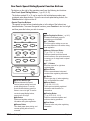
The buttons on the right of the operation panel have the following two functions:
• One-Touch Speed Dialing Buttons (1 pp. 6-5, 6-12)
The buttons marked 01 to 12 can be used to dial fax/telephone numbers preregistered under these buttons. To use the one-touch speed dialing buttons, the
Function button’s light must be off.
• Special Function Buttons
The special function buttons (marked under or to the sides of the buttons) are
described below. To access the special functions, press Function to turn on its light
and then press the button you wish to access.
01
02
03
Data Registration
04
05
Memory Reference
07
06
Space
+
08
09
11
12
Report
10
Cleaning
Clear
Function
Set
Resume
■ Function Button/Light
Switches between the special
function buttons and the one-touch
speed dialing buttons. To use the
special function buttons, press this
button to turn on its light. To use the
one-touch speed dialing buttons,
press to turn off its light.
■ Set Button
Selects and registers settings or
information during data registration.
■ Resume Button
Form-feeds paper when printing, and
resumes printing after an error is
corrected.
2-12
Setting Up
■ Data Registration Button (1 p. 14-2)
Accesses the different menus for
customizing your MultiPASS.
■ u, d Buttons
Scroll through the settings so you can
see other selections in the menus during
data registration.
■ Memory Reference Button
(1 pp. 7-16, 7-17, 7-18, 8-14)
Performs operations with documents
stored in memory. Also prints documents
in memory you no longer want to upload
to your PC.
■ l, r Buttons
Move the cursor left or right when
registering data.
■ Space Button
Enters a space between letters and
numbers when registering information.
■ + Button
Enters a plus sign (+) when registering
your unit fax/telephone number.
■ Report Button
(1 pp. 3-8, 6-13, 11-3)
Prints reports containing registered
information and information on
transactions.
■ Cleaning Button
(1 pp. 5-12, 12-10, 12-11)
Prints the nozzle check pattern and
performs cleaning operations.
■ Clear Button
Clears an entire entry when registering
information.
Chapter 2
Installing the BJ Cartridge
Install the BJ cartridge as explained in this section.
Guidelines
Follow these guidelines to ensure optimum performance of your BJ cartridges and
tanks:
• Store BJ cartridges and tanks at room temperature.
• Keep BJ cartridges in their sealed packaging until you are ready to use them.
• Once opened, use BJ tanks within six months and BJ cartridges within one year.
• Do not remove BJ cartridges and tanks from the MultiPASS unnecessarily, or the ink
in them may harden.
• Do not leave empty BJ tanks in a Color BJ cartridge. Remove them immediately when
they run out of ink, and replace them with new ones. Do not leave a Color BJ
cartridge with either of its BJ tanks missing as the ink in the BJ cartridge will dry and
adversely affect print quality.
• To change a BJ cartridge, be sure to press C (inside the unit) to move the cartridge
holder to the center.
• Make sure the cartridge holder is in its home position (on the right side of the unit)
when you are not using the MultiPASS. If it is not in its home position, press C (inside
the unit). Leaving the cartridge holder out of its home position will cause the BJ
cartridge to remain uncapped and dry out.
• When changing BJ cartridges, always store the unused BJ cartridge in the BJ
cartridge container provided with your MultiPASS.
c
• Keep BJ cartridges and tanks out or children’s reach. If a child inadvertently
ingests ink, consult a physician immediately.
• Do not touch the precision components on the BJ cartridge.
B
Ca
rtriInk
CoCl-2 dge
lor 1
Ma
Japde
an in
B
Ca
rtriInk
Cl-2 dge
Blac
k 1
Ma
Japde
an in
Col
Car
or
trid
BJ
ge
BC
-2
1e
Ma
de
in
Jap
an
DO NOT TOUCH THIS AREA.
Chapter 2
Setting Up
2-13
Setting Up
For additional information on BJ cartridges and tanks, and for instructions on replacing,
see BJ Cartridge (1 p. 12-6).
c
The ink in the BJ cartridges and tanks is difficult to clean up if spilled. Follow these
precautions when handling:
• Carefully remove packaging from BJ cartridges and tanks.
• Do not attempt to disassemble or refill BJ cartridges or tanks.
• Do not shake or drop BJ cartridges or tanks, or tip the print head downward.
Installing the BJ Cartridge in the MultiPASS
When there is no BJ cartridge installed in the MultiPASS, the LCD displays PUT IN
CARTRIDGE.
Follow this procedure to install the BJ cartridge:
1
Make sure the MultiPASS is plugged in.
2
Open the document tray.
3
Lift the document guides to open the
printer cover.
DOCUMENT GUIDES
• If the printer cover does not open easily,
slide the document guides outward and
then open the printer cover.
n
2-14
When you plug in the MultiPASS for
the first time, the cartridge holder
automatically moves to the center of
the unit so you can install the BJ
cartridge. If the cartridge holder is not
in the center, press C (inside the unit).
Setting Up
Chapter 2
• Do not try to manually move or stop
the cartridge holder since this may
damage the unit.
• Do not touch the components
shown or any metal parts since this
may adversely affect operation of
the unit and/or affect print quality.
RIBBON CABLE
GUIDE RAIL
ROUND SHAFT
CIRCUIT
BOARD
4
Raise the blue cartridge lock lever on
the cartridge holder.
5
Remove the BJ cartridge from
its package, then remove the orange
protective cap q and tape w.
c
• Discard the cap and tape. Never attempt
to reattach them to the BJ cartridge print head.
• Install the BJ cartridge immediately after
removing the cap and tape.
• Spilled ink can stain any surface; protect
yourself and your work area.
6
B
Ca Ink
rtr
Cl- idge
Col
or 21
Ma
Ja de
pa in
n
CaColor
rtri BJ
dg
e
B
Ca Ink
rtr
Cl- idge
Bla
ck 21
Ma
Ja de
pa in
n
BC
Ma
de
-21
in
Ja
pa
e
n
1
2
DO NOT TOUCH
THESE PRECISION
COMPONENTS.
With the label facing outward, insert
the BJ cartridge into the cartridge
holder. Lower the blue cartridge lock
lever until it locks into position.
C
In
Bart k
Cri
C l-dg
o 2e
M lo 1
r
ad
Ja
e
pa
in
n
C
BartInk
BCl-rid
la 2ge
M c1
a
Jad k
e
p
a in
n
Chapter 2
Setting Up
2-15
Setting Up
c
7
Press C.
• The cartridge holder moves to its home
position on the right side of the unit and
begins cleaning the BJ cartridge print head.
This process takes about 55 seconds.
c
8
Close the printer cover.
9
Close the document tray.
n
2-16
Do not try to manually move or stop
the cartridge holder since this may
damage the unit.
If you need to unplug the MultiPASS, wait until the unit is in standby mode (date and
receive mode displayed in the LCD). Otherwise the cartridge holder may not be in its home
position causing the BJ cartridge to remain uncapped and dry out.
Setting Up
Chapter 2
Loading Paper
This section describes how to load plain paper in the multi-purpose tray so that you can
begin using your MultiPASS.
Paper Guidelines
• Store all print media wrapped and on a flat surface until ready to use. Keep opened
packs in their original packaging, in a cool, dry location.
• Store paper at 64.4°–75.2°F (18°–24°C), 40%–60% relative humidity.
• To avoid paper jams and poor print quality, do not print on damp, curled, wrinkled, or
torn paper.
• Use cut-sheet paper only, not paper that comes on a roll.
• Do not use paper thicker than can be used for the MultiPASS (1 p. 5-2). Thick paper
can come into contact with the print head nozzles and cause damage to the BJ
cartridge.
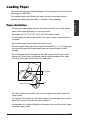
• Do not load paper beyond the paper limit mark (P) or beyond the tab on the multipurpose tray. Doing so may cause paper feeding or printing problems. Also, make
sure there are no gaps on either side of the paper stack.
NO GAP HERE
PAPER LIMIT MARK
TAB
• If the print media has a print side, set it in the multi-purpose tray with the print side
facing upward.
• The capacity of the output tray is 50 sheets of paper. To prevent paper jams, remove
paper from the output tray before the count reaches 50.
• Let the paper run out before refilling the multi-purpose tray. Avoid mixing “new” paper
with paper already loaded.
Chapter 2
Setting Up
2-17
Setting Up
For complete details on the different print media you can use and instructions for
selecting and loading other print media, (1 Chapter 5, Paper Handling).
• Do not leave paper stacked in the multi-purpose tray for long periods of time since it
may bend or curl over time, and cause paper jams or misfeeding problems.
• Certain environmental conditions, such as extreme temperatures or humidity, can
cause some print media to misfeed in the multi-purpose tray. If you have trouble with
print media becoming skewed or multiple sheets being fed, do not stack them in the
multi-purpose tray, but feed them one sheet at a time.
• Depending on the density of the printed pages, the ink may need time to dry. Within
two or three seconds, the ink becomes smudge resistant. After drying for several
minutes, the ink becomes water-resistant.
• If your printed page contains a large amount of graphics, the ink on the page may be
damp due to the print density. Leave the page in the output tray for 30 to 60 seconds
to allow the ink to dry. Then remove the page being careful not to touch the document
tray (if it is open). Should you dirty the document tray when removing the page, wipe
it clean with a clean, soft, lint-free cloth moistened with water or diluted dishwashing
detergent solution.
• Printing dense graphics on light paper stock may cause the paper to curl. Try using
heavier stock.
• If paper curls after printing, remove it immediately; otherwise paper jams may occur.
• The platen (a roller inside the unit) may become inked if you print data beyond the
width of the page. If this happens, clean the platen with a soft cloth. (1 Cleaning
Inside the ADF (Automatic Document Feeder), p. 12-2)
2-18
Setting Up
Chapter 2
Loading Paper in the Multi-Purpose Tray
Follow this procedure to load paper in the multi-purpose tray:
1
Make sure the paper thickness lever is
set to p (left).
• For details, (1 p. 5-6).
2
Do not set the paper thickness lever
while the MultiPASS is printing since
this will cause problems.
Raise the paper rest until it stops q,
then move the paper guide to the left
to match the size of your paper w.
3
Prepare a stack of paper by fanning
the edge that will feed into the unit
first, and then tapping the stack on a
flat surface to even its edges.
4
Insert the stack into the multi-purpose
tray until it stops q, so that the right
edge of the stack is aligned with the
right side of the multi-purpose tray.
Slide the paper guide snugly against
the left edge of the stack w.
C
In
Bart k
Cri
C l-dg
o 2e
M lo 1
r
Setting Up
c
a
Jd
ae
p
a in
n
C
BartInk
BCl-rid
la 2ge
M c1
a
Jd k
ae
p
a in
n
1
2
1
2
• The multi-purpose tray holds up to 100
sheets of 20 lb. (75 g/m2) plain paper.
• Make sure the stack is below the paper limit
mark ( P ).
The MultiPASS is now ready to print.
Chapter 2
PAPER LIMIT MARK
Setting Up
2-19
Testing the MultiPASS
After you have assembled the MultiPASS, installed the BJ cartridge, and loaded the
paper, you can make sure the MultiPASS is printing properly by making several copies
of a document. For instructions, (1 Chapter 10, Making Copies).
If you have problems printing, (1 Chapter 13, Troubleshooting).
2-20
Setting Up
Chapter 2
Chapter 3
This chapter describes the methods and guidelines for entering information in the
MultiPASS. You will also find instructions for entering the sender information which
is required before using your unit.
Methods of Registering Information in the MultiPASS .........................3-2
Guidelines for Entering Numbers, Letters, and Symbols.....................3-3
Correcting a Mistake ..............................................................................3-5
Registering Required Sender Information .............................................3-6
What is Sender Information?..................................................................3-6
Registering Sender Information..............................................................3-7
Printing a List to Check the Sender Information ....................................3-8
Setting the Telephone Line Type .............................................................3-9
Chapter 3
Registering Information
3-1
Registering
Information
Registering Information
Methods of Registering Information in the
MultiPASS
To customize the MultiPASS to your particular needs, you can adjust the general
operation, sending, receiving, printing, system settings, and speed dialing settings.
There are two methods of adjusting these settings:
■ Method 1: Using the MultiPASS operation panel
You can adjust settings directly via the operation panel of the MultiPASS. Detailed
instructions are described in this guide. Adjusting settings through the operation panel
is convenient when you do not have your MultiPASS connected to a PC.
■ Method 2: Using the MultiPASS Suite Software
You can adjust settings using the MultiPASS Suite software included with your
MultiPASS. For detailed instructions, 1 MultiPASS Suite User’s Guide.
Before adjusting any settings, decide whether you prefer to make changes from the
operation panel or from the MultiPASS Suite. Using both—the operation panel and
the MultiPASS Suite—may cause confusion. Changes made to settings through the
operation panel will not be displayed in the MultiPASS Suite, and changes made in
the MultiPASS Suite will override any corresponding settings made through the
operation panel.
n
3-2
If your MultiPASS is connected to a PC, we recommend using the MultiPASS Suite to
adjust settings.
Registering Information
Chapter 3
Guidelines for Entering Numbers, Letters,
and Symbols
When you come to a step that requires you to enter a name or number, refer to the
table below to determine which numeric button to press for the character you want:
Button
Letters (:A)
Numbers (:1)
1
1
ABC
2
ABCabc
2
3
DEFdef
3
4
GHIghi
4
5
JKLjkl
5
MNOmno
6
7
PQRSpqrs
7
8
TUVtuv
8
WXYZwxyz
9
DEF
Registering
Information
GHI
JKL
MNO
6
PRS
TUV
WXY
9
OPER
0
0
SYMBOLS
#
Letter input (:A)
Number input (:1)
Tone
n
If you pause for more than 60 seconds between entering characters, the unit will
automatically return to standby mode.
■ Changing Between Number Mode and Letter Mode
Press
to select number mode (:1) or letter
mode (:A).
Tone
_
:1
(Number mode)
_
:A
(Letter mode)
Chapter 3
Registering Information
3-3
■ Entering Letters
1
Press
2
Press the numeric button that contains the
letter you want.
Tone
to switch to letter mode (:A).
_
:A
Ex:
C
:A
Ex:
CA
:A
_
:1
Ex:
1_
:1
Ex:
10_
:1
Ex:
#
:1
• Press repeatedly until the letter you want
appears. Each button cycles through the
letters it contains.
• If you are unsure which button to press for the
letter you want, (1 p. 3-3).
3
Continue entering other letters using the
numeric buttons.
• If the next letter you want to enter is under a
different numeric button, simply press that
button until the letter you want appears.
-orIf the next letter you want to enter is under the
same numeric button you just pressed, press
r to move the cursor to the right. Then press
the same numeric button repeatedly until the
letter you want appears.
• To enter a space, press Space.
■ Entering Numbers
1
Press
to switch to number mode (:1).
Tone
2
Press the numeric button that contains the
number you want.
• To enter a space, press Space.
3
Continue entering other numbers using the
numeric buttons.
■ Entering Symbols
SYMBOLS
1
Press # repeatedly until the symbol
you want appears.
2
To enter another symbol, press these buttons:
06
to move the cursor to the right, then press Ex:
#–
+
:1
SYMBOLS
#
3-4
repeatedly until the symbol you want appears.
Registering Information
Chapter 3
Correcting a Mistake
You can clear an entire entry by pressing Clear. Alternatively, follow this procedure to
correct individual characters:
04
06
1
Use
or +
to move the cursor
under the incorrect character.
Ex:
CANEN
:A
2
Use the numeric buttons to enter the correct
character over the incorrect character.
Ex:
CANON
:A
3
When you
have finished making corrections,
Set
press
to register your new entry.
Registering
Information
Memory Reference
Chapter 3
Registering Information
3-5
Registering Required Sender Information
In the United States, FCC rules governing the use of facsimile equipment state that the
following sender information must be printed on every facsimile transmission:
• Your fax number
• Your personal name or company name
• The time and date of transmission
Your MultiPASS has been designed to print this information at the top of every fax you
send. You must therefore register your unit’s telephone/fax number, your personal
name or company name, and the current date and time before using your MultiPASS.
This section gives details on registering the sender information.
What is Sender Information?
When you receive a fax, you may notice that the name of the person or company who
sent you the fax, their fax/telephone number, and the date and time of transmission will
be printed in small type at the top of each page. This information is called the Sender
information or the Transmit Terminal Identification (TTI). Similarly, you must register
your details in your MultiPASS so that whenever you send a fax, the other party knows
who sent it, and when it was sent. Below is an example of how your sender information
would print on a fax sent by you:
12/27/2000 10:12 FAX 123 4567
DATE AND TIME
Date and time of
transmission.
CANON
CANON CANADA
001
THE SLEREXE COMPANY LIMITED
SAPORS LANE•BOOLE•DORSET•BH25 8ER
TELEPHONE BOOLE (945 13) 51617 – FAX 123456
FAX/TELEPHONE
NUMBER
Your fax/telephone
number.
You can select FAX or
TEL to be displayed in
front of the number.
(1 TELEPHONE #
MARK, p. 14-3)
UNIT NAME
Your name or
company name.
n
3-6
Our Ref. 350/PJC/EAC
DESTINATION
If you used memory sending and
dialed the fax number using onetouch or coded speed dialing, the
other party’s name appears here.
PAGE NUMBER
The page number
of the fax.
• You can set the sender information to print inside or outside the image area. (1 TTI
POSITION, p. 14-3)
• You can enter the sender information from the operation panel (1 next page) or from the
MultiPASS Suite. (1 MultiPASS Suite User’s Guide)
Registering Information
Chapter 3
Registering Sender Information
Follow this procedure to set the current date and time, register the fax/telephone
number for your MultiPASS, and register your name or company name:
Function
1
Press
2
Press
.
01
Data Registration
.
DATA REGSTRATION
Set
Press
three times.
USER SETTINGS
• The date and time currently set for the unit
are displayed.
4
Use the numeric buttons to enter the correct
month, day, year, and time.
DATE & TIME
Ex:
12/20/2000 13:30
Ex:
12/27/2000 15:00
Registering
Information
3
• Use the month/day/year format. Use the 24-hour
format for the time (e.g. 1:00 p.m. as 13:00), and
enter only the last two digits of the year.
• If you make a mistake, press Clear and enter
the date and time again.
Set
5
Press
twice.
DATA ENTRY OK
UNIT TELEPHONE #
TEL=
6
Use the numeric buttons to enter your fax/
telephone number (max. 20 digits,
including spaces).
Ex:
TEL=
123 4567
• To enter a space, press Space.
• To enter a plus sign (+) before the number, press +.
• If you make a mistake, press Clear and start again.
Set
7
Press
twice.
DATA ENTRY OK
UNIT NAME
8
Use the numeric buttons to enter your name
or company name (max. 24 characters,
including spaces).
Ex:
_
:A
CAN0N
:A
• If you are unsure how to enter characters,
(1 p. 3-3).
• If you make a mistake, press Clear and start again.
Chapter 3
Registering Information
3-7
Set
9
Press
.
DATA ENTRY OK
TX TERMINAL ID
Stop
10 Press
to return to standby mode.
Ex: 12/27
FaxTel
Printing a List to Check the Sender Information
You can print the User’s Data List to check the sender information you have registered
in the MultiPASS and also to check the current settings of your unit.
Follow this procedure to print the User’s Data List:
Function
1
Press
.
07
2
Press
.
Report
08
3
Use
4
Press
ACTIVITY REPORT
02
or
to select USER DATA LIST.
USER DATA LIST
Set
.
PRINTING REPORT
• The MultiPASS prints the User’s Data List.
The sender information is shown at the beginning of the list. The current settings of the
MultiPASS are listed after this.
12/27/2000 17:23 FAX 123 4567
CANON
001
*****************************
*** USER’S DATA LIST ***
*****************************
1.USER SETTINGS
UNIT TELEPHONE #
UNIT NAME
TX TERMINAL ID
TTI POSITION
TELEPHONE # MARK
SCANNING CONTRAST
OFFHOOK ALARM
VOLUME CONTROL
CALLING VOLUME
KEYPAD VOLUME
ALARM VOLUME
LINE MONITOR VOL.
RX CALL LEVEL
TEL LINE TYPE
3-8
Registering Information
123 4567
CANON
OUTSIDE IMAGE
FAX
STANDARD
ON
2
2
2
2
HIGH
TOUCH TONE
Chapter 3
Setting the Telephone Line Type
Before using your MultiPASS to make calls or send documents, you need to make sure
the telephone line type setting of your unit matches the telephone line you have. If you
are unsure of the type of telephone line you have, check with your local telephone
company. Your unit is factory-set to operate with a tone line (TOUCH TONE).
If you need to change the telephone line type setting to ROTARY PULSE, follow this
procedure:
Function
1
Press
2
Press
3
Press
.
01
.
DATA REGSTRATION
Registering
Information
Data Registration
Set
twice.
USER SETTINGS
DATE & TIME
08
4
Use
5
Press
02
or
to select TEL LINE TYPE.
TEL LINE TYPE
Set
.
TOUCH TONE
08
6
Use
7
Press
02
or
to select ROTARY PULSE.
ROTARY PULSE
Set
.
REPORT SETTINGS
Stop
8
Chapter 3
Press
to return to standby mode.
Ex:
12/27
FaxTel
Registering Information
3-9
Chapter 4
Document Handling
This chapter gives details on the requirements for documents you load into the
MultiPASS. Whether you are sending, copying, or scanning a document, read this
section carefully for information on the types of documents you can load, and
instructions on loading documents for your specific needs.
Chapter 4
Document Handling
Document
Handling
Document Requirements .........................................................................4-2
Scanned Area of a Document ................................................................4-3
Loading Documents .................................................................................4-3
Problems With Multipage Documents ....................................................4-5
Adding Pages to the Document .............................................................4-5
4-1
Document Requirements
The documents you load into the ADF for sending, copying, and scanning must meet
the requirements shown in the table below.
Depending on your document, select automatic or manual document feed with the
document feed lever located at the top of the operation panel.
a (Automatic Document Feed)
m (Manual Document Feed)
Type of
document
Multipage documents of the same
thickness and weight.
• Thick paper
• Documents with uneven surfaces
• Photographs
• Small documents (e.g. business
cards, postcards)
• Special types of paper
(Use of a carrier sheet is
recommended to avoid scratching
the surface of documents)
Size
Max. 8.5 × Approx. 39 in.
(Max. 216 mm × Approx. 1 m)
Min. 8.27 × 5.83 in.
(Min. 210 × 148 mm)
Max. 8.5 × Approx. 39 in.
(Max. 216 mm × Approx. 1 m)
Min. 3.15 × 1.77 in.
(Min. 80 × 45 mm)
Quantity
Max. 20 letter- or A4-size sheets*
Max. 10 legal-size sheets*
1 sheet for sizes other than these.
1 sheet
Thickness
0.003 to 0.005 in.
(0.08 to 0.13 mm)
0.003 to 0.017 in.
(0.08 to 0.43 mm)
Weight
20 to 24 lb. (75 to 90 g/m2)
24 to 90.7 lb. (90 to 340 g/m2)
(W × L)
■ Problem Documents
• To prevent document jams in the ADF, do not use any of the following:
– Wrinkled or creased paper
– Carbon paper or carbon-backed paper
– Curled or rolled paper
– Coated paper
– Torn paper
– Onion skin or thin paper
• Remove all staples, paper clips, or any other fasteners before loading the document
into the ADF.
• Make sure any glue, ink, or correction fluid on the paper is completely dry before
loading the document into the ADF.
• If you have a document that will not feed properly into the ADF, make a photocopy of
the document and load the copy instead.
* 20 lb. (75 g/m2) paper
4-2
Document Handling
Chapter 4
Scanned Area of a Document
The shaded area in the illustration below shows the scanned area of a document.
Make sure your document’s text and graphics are within this area.
MAX. 0.16" (MAX. 4.0 mm)
Letter/Legal
MAX. 0.18"
(MAX. 4.5 mm)
Document
Handling
MAX. 0.16" (MAX. 4.0 mm)
COLOR FAX: MAX. 0.24" (MAX. 6.0 mm)
MAX. 0.18"
(MAX. 4.5 mm)
Loading Documents
Follow this procedure to load documents into the ADF:
1
Open the document tray.
2
Set the document feed lever to
a (automatic) or m (manual) document
feed.
• If you are unsure which to select, (1 p. 4-2).
Chapter 4
Document Handling
4-3
3
Adjust the document guides to the
width of the document.
(Automatic document feed)
(Manual document feed)
4
Gently insert the document, face down
(top of the document first), into the
ADF until you hear a beep.
• Tap multipage documents on a flat surface
to even the edges before inserting them
into the ADF.
(Automatic document feed)
The document is now ready for scanning.
(Manual document feed)
• For a multipage document, the pages are fed one by one from the bottom of the stack.
• Wait until all pages of your document have been scanned completely before starting a
new job.
c
4-4
When you have finished scanning your document, be sure to slide the document guides
outward. Leaving the document guides near the center of the ADF may obstruct opening
the ADF (Automatic Document Feeder), and cause damage to the unit.
Document Handling
Chapter 4
Problems With Multipage Documents
If you have trouble feeding multipage documents into the ADF, remove the stack and
tap it on a flat surface to even the edges. Then “slant” the stack so that its front edge is
bevelled and insert the stack into the ADF.
n
Make sure the document meets the document requirements. (1 p. 4-2)
If you are using automatic document feed and you need to add pages to your
document in the ADF, wait until the last page starts feeding, then load up to 20
additional pages (10 legal size). The last and first page should overlap by about one
inch (2.5 cm).
1" (2.5 cm)
Chapter 4
Document Handling
4-5
Document
Handling
Adding Pages to the Document
Chapter 5
Paper Handling
This chapter describes how to select, prepare, and load print media in the
MultiPASS. It also gives details on special print media.
Chapter 5
Paper Handling
Paper Handling
Print Media Requirements .......................................................................5-2
Printable Areas .......................................................................................5-3
Selecting Print Media ...............................................................................5-4
Setting the Paper Thickness Lever .........................................................5-6
Loading Paper...........................................................................................5-7
Loading Envelopes...................................................................................5-8
Using Canon Specialty Print Media ......................................................5-10
Specialty Print Media Guidelines..........................................................5-10
Printing on High Resolution Paper .......................................................5-11
Using the Cleaning Sheet.................................................................5-11
Printing on Fabric Sheets .....................................................................5-13
Printing on Banner Paper .....................................................................5-14
5-1
Print Media Requirements
You can stack the following media in the multi-purpose tray:
Paper Thickness
Lever Position
Print Media
Size
Weight
Capacity
Plain paper
Letter
(8.5 × 11 in./
215.9 × 279.4 mm)
Legal
(8.5 × 14 in./
215.9 × 355.6 mm)
A4
(8.27 × 11.69 in./
210 × 297 mm)
17–24 lb.
(64–90 g/m2)
Approx. 100 sheets*
(Max. 0.4 in./10 mm stack)
p (Left)
17–24 lb.
(64–90 g/m2)
Approx. 100 sheets*
(Max. 0.4 in./10 mm stack)
p (Left)
17–24 lb.
(64–90 g/m2)
Approx. 100 sheets*
(Max. 0.4 in./10 mm stack)
p (Left)
U.S. Commercial
No. 10
(9.5 × 4.1 in./
241.3 × 104.1 mm)
European DL
(8.66 × 4.33 in./
220 × 110 mm)
10 envelopes
e (Right)
10 envelopes
e (Right)
Glossy photo
paper
Letter, A4
1 sheet
p (Left)
Banner paper
8.5 × 11 in.
(216 × 279 mm)
Max. length:
66 in. (1676 mm)
2 to 6 sheets (joined)
p (Left)
High resolution
paper
Letter, A4
Approx. 10 sheets
p (Left)
Bubble Jet
paper
Letter, A4
Approx. 100 sheets
(Max. 0.4 in./10 mm stack)
p (Left)
Fabric sheet
9.5 × 14 in.
(241 × 356 mm)
1 sheet
e (Right)
Transparencies
Letter, A4
50 sheets
p (Left)
Back print film
Letter, A4
10 sheets
p (Left)
High gloss
film
Letter, A4
1 sheet
p (Left)
Envelopes
* 20 lb. (75 g/m2) paper
5-2
Paper Handling
Chapter 5
Printable Areas
To ensure optimum print quality, the MultiPASS allows for a margin along each edge of
the media.
■ Papers
The shaded areas below show the printable area of papers. Be sure to print within
these areas.
8.5" (215.9 mm)
8.5" (215.9 mm)
0.12" (3 mm)
0.12" (3 mm)
11" (279.4 mm)
LETTER
FEED
DIRECTION
FEED
DIRECTION
LEGAL
14" (355.6 mm)
0.28" (7 mm)*
0.25" (6.4 mm)
0.25" (6.4 mm)
0.28" (7 mm)*
0.25" (6.4 mm)
0.25" (6.4 mm)
8.27" (210 mm)
0.12" (3 mm)
A4
FEED
DIRECTION
0.28" (7 mm)*
0.13" (3.4 mm)
0.13" (3.4 mm)
■ Envelopes
The shaded areas below show the printable area of envelopes. Be sure to print within
these areas.
9.5" (241.3 mm)
8.66" (220 mm)
0.12" (3 mm)
0.12" (3 mm)
4.1" (104.1 mm)
U.S. COMMERCIAL
NO. 10
4.33" (110 mm)
EUROPEAN DL
0.28" (7 mm)
0.25" (6.4 mm)
1.24" (31.4 mm)
FEED
DIRECTION
0.28" (7 mm)
0.25" (6.4 mm)
0.41" (10.4 mm)
FEED
DIRECTION
* The length of the lower margin varies depending on the printing conditions:
– 0.28 in. (7 mm) for black & white printing when not using the printer driver (0.16 in. (4 mm) when
printing from memory).
– 0.63 in. (16 mm) for black & white and color printing when using the printer driver.
– 0.83 in. (21 mm) for color copying and printing of received color faxes.
Chapter 5
Paper Handling
5-3
Paper Handling
11.69" (297 mm)
Selecting Print Media
This section describes the different print media you can use with your MultiPASS. To
achieve the best possible printing performance of your MultiPASS, be sure to select the
correct print media.
n
• Be sure to test print media before purchasing large quantities.
■ Plain Paper
The MultiPASS supports letter, legal, and A4-size paper in portrait orientation. You can
use regular copier paper, cotton bond paper, and typical letterhead. Your unit does not
require special ink jet paper, and produces letter quality print on most plain paper. Always
use paper without curls, folds, staples, or damaged edges. Copier paper has a preferred
side for printing. Look at the label on the package to see which side to print on.
■ Envelopes
The MultiPASS can print on U.S. Commercial No. 10 envelopes and European DL
envelopes.
The following envelopes are not recommended because they may cause jams or
smears, resulting in damage to your unit:
• Envelopes with windows, holes, perforations, cutouts, and double flaps.
• Envelopes made with special coated paper or deeply embossed paper.
• Envelopes with peel-off sealing strips.
• Envelopes with letters enclosed.
You may be able to stack envelopes of other sizes in the multi-purpose tray. However,
Canon cannot guarantee consistent performance on envelope sizes other than U.S.
Commercial No. 10 and European DL.
■ Glossy Photo Paper GP-301
Canon Glossy Photo Paper GP-301 is a high gloss, thick paper that produces the look
and feel of a photograph. Use this paper with the Photo BJ cartridge to print photorealistic images.
■ Banner Paper
Canon Banner Paper is specifically designed for printing one continuous sheet in a
banner format. The connected sheets are divided by perforations and you can print
from two to six sheets at a time. Canon Banner Paper is specially designed for use with
Bubble Jet printers and produces bright and vivid color images.
■ High Resolution Paper HR-101S/HR-101N*
Canon High Resolution Paper HR-101S/HR-101N is designed to produce nearphotographic quality print output with sharp and vivid graphics. For best results, use
this paper with the Photo BJ cartridge.
* The Canon High Resolution Paper HR-101N will be released in the near future.
5-4
Paper Handling
Chapter 5
■ Bubble Jet Paper LC-301
Canon Bubble Jet Paper LC-301 has been developed for high quality printing with
minimal or no smearing or running when in contact with water or damp surfaces. This
specially coated paper produces bright and vivid colors and stands up to normal office
highlighters, unlike images printed on other paper.
■ Fabric Sheet FS-101
Canon Fabric Sheet FS-101 is a machine-washable white cotton sheet for printing
images or scanned photographs. Create your own designs for cross stitch and
needlework, or make your own pillow covers, scarves, flags, and other items.
■ Back Print Film BF-102
Canon Back Print Film BF-102 has been specially developed for Bubble Jet printers.
This unique mylar-based translucent sheet is designed to deliver sharp, brilliant, highintensity color images suitable for business presentations, design work, or professional
reports. Back print film is printed on the back (non-glossy) side of the film in mirror
image and then viewed from the front (glossy) side using a backlit device, such as a
light box.
■ Transparencies CF-102
Canon Transparencies CF-102 produce excellent contrast, sharpness, and color,
creating crisp and professional overhead presentations.
Do not use normal transparencies in the MultiPASS as they do not absorb ink and may
cause ink to run.
■ Starter Kit
Canon Starter Kit contains an assortment of different papers for you to try out.
■ Photo Kit
Canon Photo Kit contains a Photo BJ cartridge, a BJ cartridge container, and 60 sheets
of Canon High Resolution Paper.
Chapter 5
Paper Handling
5-5
Paper Handling
■ High Gloss Film HG-101
Canon High Gloss Film HG-101 features a bright white finish that lends striking visual
power to charts, graphs, and photographic images. It creates a sharper and more vivid
color output than is possible with coated paper. Use of this film gives your presentation
materials and graphics a professional look. This film provides the best color print quality
for the Color BJ cartridge.
Setting the Paper Thickness Lever
The paper thickness lever adjusts the gap between the print head and the print media
to suit the print media’s thickness. Before printing, be sure to set the paper thickness
lever.
For details on which position to set the paper thickness lever for the print media you
are using, (1 p. 5-2).
n
If the paper thickness lever is not set correctly before printing, smudging and poor print
quality may result.
Follow this procedure to set the paper thickness lever:
1
Open the document tray.
2
Lift the document guides to open the
ADF (Automatic Document Feeder).
DOCUMENT GUIDES
• If the ADF (Automatic Document Feeder)
does not open easily, slide the document
guides outward and then open the printer
cover.
3
Press C.
c
• Do not try to manually move or stop
the cartridge holder since this may
damage the unit.
• Do not touch the components
shown or any metal parts since this
may adversely affect operation of
the unit and/or affect print quality.
ROUND SHAFT
GUIDE RAIL
RIBBON CABLE
5-6
Paper Handling
Chapter 5
4
Set the paper thickness lever.
• For details on which position to set for the
print media you are using, (1 p. 5-2).
C
In
Bart k
Cri
C l-dg
o 2e
M lo 1
r
a
Jd
ae
p
a in
n
C
BartInk
BCl-rid
la 2ge
M c1
a
Jd k
ae
p
a in
n
p (LEFT)
POSITION
e (RIGHT)
POSITION
Press C.
5
• The cartridge holder moves to its home
position on the right side of the unit and
begins cleaning the BJ cartridge print head.
This process takes about 55 seconds*.
Do not try to manually move or stop
the cartridge holder since this may
damage the unit.
6
Close the ADF (Automatic Document Feeder).
7
Close the document tray.
Loading Paper
You can load paper in the multi-purpose tray to feed it automatically into the MultiPASS.
For details, (1 p. 2-19).
You can also load other types of print media in the multi-purpose tray. (1 p. 5-2)
* For the Black BJ cartridge, the cleaning process takes about 15 seconds.
Chapter 5
Paper Handling
5-7
Paper Handling
c
Loading Envelopes
You can load up to 10 envelopes in the multi-purpose tray for automatic feeding into the
MultiPASS. For details on the types of envelopes you can load, (1 p. 5-4).
Follow this procedure to load envelopes in the multi-purpose tray:
1
Make sure the paper thickness lever is
set to e (right).
• For details, (1 p. 5-6).
c
2
Do not set the paper thickness lever
while the MultiPASS is printing since
this will cause problems.
C
In
Bart k
Cri
C l-dg
o 2e
M lo 1
r
a
Jd
ae
p
a in
n
C
BartInk
BCl-rid
la 2ge
M c1
a
Jd k
ae
p
a in
n
Prepare the envelopes as follows:
❚ Arrange the stack of envelopes on a
firm, clean surface, and press down
firmly on the edges to make the
folds crisp.
• Press all the way around the envelopes to
remove any curls and expel air from inside
the envelopes. Also, press firmly on the
area that corresponds to the edges of the
back flap.
❚ Remove any curling from the
envelopes by holding the edges of
the envelopes diagonally and
bending them gently.
❚ Press on the back flaps of the
envelopes so that they are flat
and not curled.
FLAP
5-8
Paper Handling
Chapter 5
3
Insert the stack of envelopes into the
multi-purpose tray until it stops q,
so that the right edge of the stack is
aligned with the right side of the multipurpose tray. Slide the paper guide
snugly against the left edge of the
stack w.
1
2
• Insert the envelopes with the print side up
(flaps should not be visible).
• Feed the top of the envelope (return address
portion) into the multi-purpose tray first.
• Make sure the stack is below the paper limit
mark (P).
PAPER LIMIT MARK
Paper Handling
The MultiPASS is now ready to print.
Chapter 5
Paper Handling
5-9
Using Canon Specialty Print Media
This section provides guidelines for printing on Canon specialty print media and
describes special procedures required for high resolution paper, fabric sheets, and
banner paper.
Specialty Print Media Guidelines
n
Be sure to read any instructions that come with your Canon specialty print media, as these
provide important information on how to achieve the highest print quality.
Follow these guidelines:
• When feeding transparencies or back print film, remove each sheet after it is
delivered, being careful not to touch the document tray. (Should you dirty the
document tray when removing the sheets, wipe the document tray clean with a clean,
soft, lint-free cloth moistened with water or diluted dishwashing detergent solution.)
Do not allow film sheets to stack up in the output tray.
• Let the printed sheets of film or paper dry completely before storing them.
Drying time:
– Canon High Gloss Film HG-101, Canon Glossy Photo Paper GP-301: 10 minutes
– Canon Transparencies CF-102, Canon Back Print Film BF-102: 15 minutes
– Canon Fabric Sheet FS-101: 1 hour
• When your output has dried completely,
cover its printed side with a sheet of plain
(not coated) paper before storing it. This is
recommended even if you place the sheets
of film in a clear file or plastic holder.
• When loading transparencies or back print film, insert one sheet of plain paper as the
last sheet in the stack.
• Do not leave film in the multi-purpose tray for long periods of time. Dust and dirt may
accumulate on the film resulting in spotty printing.
• To avoid smudging caused by fingerprints, use a pair of thin cloth gloves while loading
and handling film.
• To avoid fading, do not expose printed film to prolonged sunlight.
• Store all print media flat. Do not remove them from their protective packaging until
you are ready to use them.
• Store unused film at temperatures between 59° and 86°F (15° and 30°C). The relative
humidity should be between 10% and 70%.
5-10
Paper Handling
Chapter 5
Printing on High Resolution Paper
To load high resolution paper in the MultiPASS, follow the same procedure as for
loading paper in the multi-purpose tray (1 p. 2-19). However, before printing, be sure
to raise both paper output guides as shown below:
The paper output guides support the printed sheet as it exits the unit. This will keep the
sheet from sagging and pulling through the unit as it exits, which can lead to poor print
quality. When you finish printing on high resolution paper, lower the paper output
guides.
n
Always lower the paper output guides when using the MultiPASS as a fax machine, or they
can cause received faxes to pile up and jam.
Some types of high resolution paper require you to clean the MultiPASS’ rollers after
using a package of this paper. Refer to the instructions included with the high resolution
paper. If you need to clean the rollers, see below.
Read the instructions provided with the high resolution paper to see if you are required
to clean the MultiPASS’ rollers after using a package of this paper. A cleaning sheet
may be included with the high resolution paper.
The cleaning sheet removes paper dust from the unit’s rollers helping to prevent paper
feeding problems.
Follow this procedure to load and use the cleaning sheet:
1
Make sure the paper thickness lever is
set to p (left).
• For details, (1 p. 5-6).
c
Chapter 5
Do not set the paper thickness lever
while the MultiPASS is printing since
this will cause problems.
C
In
Bart k
Cri
C l-dg
o 2e
M lo 1
r
a
Jd
ae
p
a in
n
C
BartInk
BCl-rid
la 2ge
M c1
a
Jd k
ae
p
a in
n
Paper Handling
5-11
Paper Handling
Using the Cleaning Sheet
2
Remove the backings from the two
tapes on the cleaning sheet.
3
With the sticky side toward you and
going into the multi-purpose tray first,
insert the cleaning sheet into the
multi-purpose tray until it stops q, so
that the right edge of the sheet is
aligned with the right side of the multipurpose tray. Slide the paper guide
snugly against the left edge of the
sheet w.
1
2
Function
4
Press
5
Press
.
10
.
Cleaning
08
NOZZLE CHECK
02
6
Use
or
CLEANING.
7
Press
to select ROLLER
ROLLER CLEANING
Set
.
• The MultiPASS feeds the cleaning sheet into
the unit and cleans the rollers.
5-12
Paper Handling
Chapter 5
Printing on Fabric Sheets
Canon Fabric Sheet FS-101 comes with a booklet that describes special handling
procedures. Be sure to read this booklet for special information on fabric sheets.
n
• Do not use the fixing agent provided with the Canon Fabric Sheet FS-101. This agent is
not necessary when printing with the MultiPASS.
• Do not touch newly printed fabric sheets until the ink has dried completely. This takes
about an hour.
Follow this procedure to load a fabric sheet in the multi-purpose tray:
1
Make sure the paper thickness lever is
set to e (right).
• For details, (1 p. 5-6).
2
Do not set the paper thickness lever
while the MultiPASS is printing since
this will cause problems.
With the cloth side toward you and
the open end at the top, insert one
fabric sheet into the multi-purpose
tray until it stops q, so that the right
edge of the sheet is aligned with the
right side of the multi-purpose tray.
Slide the paper guide snugly against
the left edge of the sheet w.
3
Your MultiPASS is now ready to print.
Set your PC to print on the fabric
sheet.
4
When the fabric sheet is printed, let it
dry for about an hour to allow the ink
to dry completely.
5
When dry, peel the film backing from
the printed fabric sheet.
Chapter 5
C
In
Bart k
Cri
C l-dg
o 2e
M lo 1
r
a
Jd
ae
p
a in
n
C
BartInk
BCl-rid
la 2ge
M c1
a
Jd k
ae
p
a in
n
OPEN END AT
THE TOP
1
2
Paper Handling
c
Paper Handling
5-13
Printing on Banner Paper
Banner paper is a continuous sheet of paper with perforations at equal distances along
its length, where it can be cut to the length required. For best results, use Canon
Banner Paper.
To set up a print job on banner paper, you must decide on the number of sheets you
need. You can print banners from two to six sheets in length.
n
Always leave an extra sheet at the end of the banner—just in case the type runs over.
The shaded portion of the illustration below shows the maximum recommended printing
area of banner paper.
APPROX. 66"/1676 mm (6 SHEETS MAX.)
2 SHEETS MIN.
11" (279 mm)
0.25"
(6.4 mm)
8.5"
(216 mm)
0.25"
(6.4 mm)
0.5" (12 mm)
n
0.5" (12 mm)
• To prevent ink from running over the edges of the sheet, print within the margins shown
in the illustration above.
• Printing on banner paper may require considerable amounts of ink. If you think your BJ
tanks may run out of ink, use new BJ tanks.
• For best print results on banner paper, use light design patterns.
Follow this procedure to load banner paper in the multi-purpose tray:
1
Place the MultiPASS near the edge of a
table so that the paper can flow over
the edge as it exits the unit.
• Make sure the paper rest is raised.
PAPER REST
5-14
Paper Handling
Chapter 5
2
Raise both paper output guides.
3
Make sure the paper thickness lever is
set to p (left).
• For details, (1 p. 5-6).
c
4
Do not set the paper thickness lever
while the MultiPASS is printing since
this will cause problems.
C
In
Bart k
Cri
C l-dg
o 2e
M lo 1
r
a
Jd
ae
p
a in
n
C
BartInk
BCl-rid
la 2ge
M c1
a
Jd k
ae
p
a in
n
Cut the banner paper along one of the
perforations to the length required.
5
Chapter 5
Paper Handling
• Your banner can be up to six sheets
(66 inches/1676 mm) long.
Place the banner paper behind the unit
on a flat surface.
Paper Handling
5-15
6
Gently fold along the perforations
between the first and second sheets.
7
Insert the first sheet into the multipurpose tray until it stops q, so that
the right edge of the sheet is aligned
with the right side of the multi-purpose
tray. Slide the paper guide against the
left edge of the sheet, leaving a 0.04
inch (1 mm) gap between the paper
guide and the edge of the sheet w.
• Make sure the sheet is under the tab on the
multi-purpose tray.
• Make sure the sheets behind the unit are
aligned with the multi-purpose tray.
8
2
1
TAB
Your MultiPASS is now ready to print.
Set your PC to print on the banner
paper.
• Allow the paper to flow over the edge of the
table as it exits the MultiPASS.
n
5-16
Be sure to lower the paper output guides when you finish printing on banner paper.
Paper Handling
Chapter 5
Chapter 6
Speed Dialing
This chapter describes how to register and use the speed dialing features of your
MultiPASS.
Speed Dialing
What is Speed Dialing?............................................................................6-2
Speed Dialing Methods ..........................................................................6-2
One-Touch Speed Dialing ........................................................................6-3
Registering Numbers for One-Touch Speed Dialing ..............................6-3
Using One-Touch Speed Dialing ............................................................6-5
Coded Speed Dialing................................................................................6-6
Registering Numbers for Coded Speed Dialing .....................................6-6
Using Coded Speed Dialing ...................................................................6-8
Group Dialing ............................................................................................6-9
Creating Groups .....................................................................................6-9
Using Group Dialing .............................................................................6-12
Speed Dialing Lists ................................................................................6-13
Printing Speed Dialing Lists .................................................................6-13
Chapter 6
Speed Dialing
6-1
What is Speed Dialing?
Speed dialing allows you to streamline and customize dialing procedures by registering
a fax/telephone number and name under a button or code. You can then dial that
number by pressing only one or a few buttons.
Speed Dialing Methods
The three speed dialing methods available with your MultiPASS are as follows:
■ One-Touch Speed Dialing (2 p. 6-3)
One-touch speed dialing allows you to send a document or dial a telephone number by
pressing only one button. You can register up to 12 destinations for one-touch speed
dialing.
■ Coded Speed Dialing (2 p. 6-6)
Coded speed dialing allows you to send a fax or dial a telephone number by pressing
Coded Dial followed by a two-digit code of your choice. While coded speed dialing
requires you to press more buttons, it allows you to register up to 100 destinations.
■ Group Dialing (2 p. 6-9)
Group dialing allows you to dial a group of registered one-touch and/or coded speed
dialing fax numbers. By registering a group for one-touch or coded speed dialing, you
press only one or three buttons to send the same fax to several destinations.
The following pages describe how to register numbers for speed dialing and how to
send using speed dialing.
n
• You can also register numbers for speed dialing from the MultiPASS Suite.
(1 MultiPASS Suite User’s Guide)
• Any settings adjusted from the MultiPASS operation panel will not be displayed in the
MultiPASS Suite.
• Settings changed from the MultiPASS Suite will override any settings made from the
operation panel.
6-2
Speed Dialing
Chapter 6
One-Touch Speed Dialing
Registering Numbers for One-Touch Speed Dialing
One-touch speed dialing allows you to dial a fax/telephone number at the press of one
button. You can register up to 12 fax/telephone numbers; one for every one-touch
speed dialing button on the operation panel.
n
You can also register fax/telephone numbers for one-touch speed dialing from the
MultiPASS Suite. (1 MultiPASS Suite User’s Guide)
Follow this procedure to register numbers and names for one-touch speed dialing:
Function
1
Press
2
Press
.
01
Data Registration
08
3
Use
4
Press
.
DATA REGSTRATION
02
or
to select TEL REGISTRATION.
TEL REGISTRATION
Set
twice.
1-TOUCH SPD DIAL
01=
08
5
02
Use
or
to select a one-touch
speed dialing button (01 to 12).
Ex:
04=
• If a one-touch speed dialing button has
already been registered, the number
registered under that button appears.
• If a group is already registered under a onetouch speed dialing button, GROUP DIAL
appears.
Press
twice.
Speed Dialing
Set
6
TELEPHONE NUMBER
TEL=_
Chapter 6
Speed Dialing
6-3
7
Use the numeric buttons to enter the fax/
telephone number you want to register (max.
120 digits, including spaces and pauses).
Ex:
TEL=20 545 8545_
• To enter a space, press Space. Spaces are
optional and are ignored during dialing.
• To enter a pause, press Redial/Pause.
• To correct a mistake in the number, press l to
delete the rightmost digit.
• To delete an entire entry or to change a
previous entry, press Clear.
• If you have already registered a number and
you only want to change the name, ignore this
step.
• To cancel one-touch speed dialing for the
button you selected, press Clear then Set.
Press Stop to return to standby mode. The
fax/telephone number and name registered
under that button will be deleted.
Set
8
Press
twice.
DATA ENTRY OK
NAME
9
Use the numeric buttons to enter the name
that goes with the number (max. 16
characters, including spaces).
Ex:
_
:A
Canon EUROPA
:A
• If you are unsure how to enter characters,
(1 p. 3-3).
• If you have already registered a name and
want to keep the same name, ignore this step.
Set
10 Press
.
DATA ENTRY OK
Ex:
05=
11 To continue registering other one-touch
speed dialing buttons, repeat the procedure
from step 5.
Stop
-orPress
to return to standby mode.
n
6-4
Ex:
12/27
FaxTel
You can print the 1-Touch Spd Dial List showing all the numbers and names registered for
one-touch speed dialing (1 p. 6-13). Keep this list near your MultiPASS so you can refer
to it easily when dialing.
Speed Dialing
Chapter 6
Using One-Touch Speed Dialing
To use this feature, you must first register a number for one-touch speed dialing.
(1 p. 6-3)
Follow this procedure to send documents using one-touch speed dialing:
1
Open the document tray.
2
Adjust the document feed lever for the
document you are loading. (2 p. 4-2)
3
Prepare the document and load it, face
down, in the ADF. (2 p. 4-3)
MEMORY USED 0%
(Currently used memory)
• For color sending, press Color/B&W to
turn on its light. (1 p. 7-2)
• To adjust the resolution and contrast,
(1 pp. 7-2, 7-4).
4
Press the one-touch speed dialing button
assigned to the number you wish to fax.
DOCUMENT READY
(Standby to scan)
Ex:
TEL=905 795 1111
• The number registered under that one-touch
speed dialing button is displayed.
• If you press the wrong button, press Stop,
then press the correct button.
• If no fax number is assigned to the one-touch
speed dialing button you press, the LCD
displays NO TEL #. If this happens, make
sure you pressed the correct button and that
the number you want to dial is registered
under that button.
Start
5
Press
to begin scanning for sending,
or wait a few seconds for the MultiPASS to
begin scanning automatically.
n
Chapter 6
Speed Dialing
• If you prefer the MultiPASS never to scan a
document automatically after a few seconds,
disable the TIME OUT setting. (1 p. 14-5)
You can also use one-touch speed dialing to send a document to more than one
destination at a time. (1 Sequential Broadcasting, p. 7-13)
Speed Dialing
6-5
Coded Speed Dialing
Registering Numbers for Coded Speed Dialing
Coded speed dialing allows you to dial a fax/telephone number by pressing only three
buttons. First you press Coded Dial and then you enter a two-digit code under which
you have registered a fax/telephone number. You can register up to 100 fax/telephone
numbers for coded speed dialing.
n
You can also register fax/telephone numbers for coded speed dialing from the MultiPASS
Suite. (1 MultiPASS Suite User’s Guide)
Follow this procedure to register numbers and names for coded speed dialing:
Function
1
Press
2
Press
.
01
Data Registration
08
3
Use
4
Press
5
Use
DIAL.
6
Press
.
DATA REGSTRATION
02
or
to select TEL REGISTRATION.
TEL REGISTRATION
Set
.
1-TOUCH SPD DIAL
08
02
or
to select CODED SPEED
CODED SPEED DIAL
Set
.
08
7
A00=
02
Use
or
to select a coded speed
dialing code (00 to 99).
Ex:
A01=
• If a coded speed dialing code has already
been registered, the number registered under
that code appears.
• If a group is already registered under a coded
speed dialing code, GROUP DIAL appears.
Set
8
Press
twice.
TELEPHONE NUMBER
TEL=_
6-6
Speed Dialing
Chapter 6
9
Use the numeric buttons to enter the fax/
telephone number you want to register (max.
120 digits, including spaces and pauses).
Ex:
TEL=3 3758 2111_
• To enter a space, press Space. Spaces are
optional and are ignored during dialing.
• To enter a pause, press Redial/Pause.
• To correct a mistake in the number, press l to
delete the rightmost digit.
• To delete an entire entry or to change a
previous entry, press Clear.
• If you have already registered a number and
you only want to change the name, ignore this
step.
• To cancel coded speed dialing for the code
you selected, press Clear then Set. Press
Stop to return to standby mode. The
fax/telephone number and the name
registered under that code will be deleted.
Set
10 Press
twice.
DATA ENTRY OK
NAME
11 Use the numeric buttons to enter the name
Ex:
that goes with the number (max. 16
characters, including spaces).
_
:A
Canon Inc.
:A
• If you are unsure how to enter characters,
(1 p. 3-3).
• If you have already registered a name and
want to keep the same name, ignore this step.
Set
.
DATA ENTRY OK
Ex:
A02=
Ex:
12/27
Speed Dialing
12 Press
13 To continue registering other coded speed
dialing codes, repeat the procedure from
step 7. Stop
-orPress
to return to standby mode.
n
Chapter 6
FaxTel
You can print the Coded Speed Dial List showing all the numbers and names registered for
coded speed dialing (1 p. 6-13). Keep this list near your MultiPASS so you can refer to it
when dialing.
Speed Dialing
6-7
Using Coded Speed Dialing
To use this feature, you must first register a number for coded speed dialing. (1 p. 6-6)
Follow this procedure to send documents using coded speed dialing:
1
Open the document tray.
2
Adjust the document feed lever for the
document you are loading. (2 p. 4-2)
3
Prepare the document and load it, face
down, in the ADF. (2 p. 4-3)
MEMORY USED 0%
(Currently used memory)
• For color sending, press Color/B&W to
turn its light. (1 p. 7-2)
• To adjust the resolution and contrast,
(1 pp. 7-2, 7-4).
DOCUMENT READY
(Standby to scan)
Coded Dial
4
Press
5
Use the numeric buttons to enter the two-digit
code assigned to the number you wish to fax.
.
• The number registered under that coded speed
dialing code is displayed.
• If you enter the wrong code, press Stop. Then
press Coded Dial and enter the correct code.
• If no fax number is assigned to the coded
speed dialing code you enter, the LCD
displays NO TEL #. If this happens, make
sure you entered the correct code and that
the number you want to dial is registered
under that code.
A
Ex:
A01
Ex:
TEL=03 3758 2111
Start
6
Press
to begin scanning for sending,
or wait a few seconds for the MultiPASS to
begin scanning automatically.
• If you prefer the MultiPASS never to scan a
document automatically after a few seconds,
disable the TIME OUT setting. (1 p. 14-5)
n
6-8
You can also use coded speed dialing to send a document to more than one destination at
a time. (1 Sequential Broadcasting, p. 7-13)
Speed Dialing
Chapter 6
Group Dialing
Creating Groups
If you frequently send the same document to several destinations, you can create a
group of these destinations and register them under a speed dialing button or code.
This enables you to press a single one-touch speed dialing button, or press Coded
Dial and enter a two-digit code to send the same document to all the destinations in
the group.
n
• You can only group numbers that have already been registered for one-touch or coded
speed dialing.
• A group can contain up to 111 destinations.
• You can also create groups from the MultiPASS Suite. (1 MultiPASS Suite User’s Guide)
Follow this procedure to create groups:
Function
1
Press
2
Press
.
01
Data Registration
08
.
DATA REGSTRATION
02
3
Use
4
Press
5
Use
6
Press
7
Select a one-touch speed dialing button or
coded speed dialing code under which you
want to register the group.
❚ To register a group under a one-touch
speed dialing button:
or
to select TEL REGISTRATION.
TEL REGISTRATION
Set
.
08
1-TOUCH SPD DIAL
02
or
to select GROUP DIAL.
GROUP DIAL
Set
Ex:
01=1-TOUCH SPD
Ex:
03=
Speed Dialing
08
.
02
Use
or
to select the button under
which you want to register the group (01 to 12).
• If a one-touch speed dialing button has
already been registered, 1-TOUCH SPD or
GROUP DIAL appears.
Chapter 6
Speed Dialing
6-9
❚ To register a group under a coded speed
dialing code:
Coded Dial
Press
, then use the numeric buttons to
enter the code under which you want to register
the group (00 to 99).
Ex:
A21=
• If a coded speed dialing code has already been
registered, CODED SPEED or GROUP DIAL appears.
If you wish to register a group under a button
or code already registered for speed dialing,
or you want to re-enter a group, you must
delete the previous information first.
(1 pp. 6-3, 6-6)
n
Set
8
Press
twice.
TELEPHONE NUMBER
TEL=
9
Enter the one-touch and/or coded speed dialing
numbers you want to register in the group.
❚ To enter a destination registered for onetouch speed dialing:
Function
Press
, then press the one-touch speed
Ex:
dialing button(s) assigned to the number(s) Function
you want to register the group.Then press
again.
01=905 795 1111
❚ To enter a destination registered for coded
speed dialing:
Coded Dial
Press
, then use the numeric buttons to
enter the two-digit code assigned to the
number you want to register in the group.
Repeat this process to enter additional codes.
Ex:
A01=03 3758 2111
• The number registered under the button or code
you enter appears, or GROUP DIAL appears if you
select a group.
• You cannot enter numbers not registered for onetouch or coded speed dialing (i.e. with the numeric
buttons).
• You can enter buttons or codes that have groups
registered under them.
• To add destinations to a group already registered,
simply enter them as explained in this step.
• If you enter the wrong destination, or if you want to
delete a destination already registered in a group,
use d or u to select that entry, then press Clear.
• To cancel group dialing for the button or code you
selected, press Clear until all entries are deleted.
6-10
Speed Dialing
Chapter 6
Set
10 Press
twice.
NAME
_
11 Use the numeric buttons to enter a name for
Ex:
the group (max.16 characters, including
spaces).
:A
Canon GROUP 2_ :1
• If you are unsure how to enter characters,
(1 p. 3-3).
• To enter a new name for a group already
registered, press Clear, then enter the new name.
Set
12 Press
.
DATA ENTRY OK
Ex:
04=1-TOUCH SPD
13 To continue registering other groups, repeat
the procedure from step 7.
Stop
-orPress
to return to standby mode.
12/27
FaxTel
You can print the Group Dial List showing all the numbers and names registered for group
dialing (1 p. 6-13). Keep this list near your MultiPASS so you can refer to it when dialing.
Speed Dialing
n
Ex:
Chapter 6
Speed Dialing
6-11
Using Group Dialing
To use this feature, you must first register a group of fax numbers for one-touch or
coded speed dialing. (1 p. 6-9)
Follow this procedure to send a document to a group of destinations registered under a
one-touch speed dialing button or coded speed dialing code:
1
Open the document tray.
2
Adjust the document feed lever for the
document you are loading. (2 p. 4-2)
3
Prepare the document and load it, face
down, in the ADF. (2 p. 4-3)
MEMORY USED 0%
(Currently used memory)
• For color sending, press Color/B&W to
turn on its light. (1 p. 7-2)
• To adjust the resolution and contrast,
(1 pp. 7-2, 7-4).
4
DOCUMENT READY
(Standby to scan)
Enter the group registered under a onetouch speed dialing button or coded speed
dialing code.
❚ To enter a group registered under a onetouch speed dialing button:
Press the one-touch speed dialing button
assigned to the group you wish to fax.
TEL=GROUP DIAL
• If you press the wrong button, press Stop,
then press the correct button.
❚ To enter a group registered under a coded
speed dialing code:
Coded Dial
Press
, then use the numeric buttons to
enter the two-digit code assigned to the group
you wish to fax.
• If you enter the wrong code, press Stop. Then
press Coded Dial and enter the correct code.
Ex:
A21=
TEL=GROUP DIAL
Start
5
Press
to begin scanning for sending,
or wait a few seconds for the MultiPASS to
begin scanning automatically.
• If you prefer the MultiPASS never to scan a
document automatically after a few seconds,
disable the TIME OUT setting. (1 p. 14-5)
6-12
Speed Dialing
Chapter 6
Speed Dialing Lists
You can print lists of destinations registered for one-touch and coded speed dialing,
and group dialing. Keep these lists near your MultiPASS so you can refer to them when
dialing.
Printing Speed Dialing Lists
Follow this procedure to print speed dialing lists:
Function
1
Press
2
Press
.
07
.
Report
08
3
Use
4
Press
ACTIVITY REPORT
02
or
to select SPEED DIAL LIST.
SPEED DIAL LIST
Set
.
08
5
1-TOUCH LIST
02
Use
or
to print.
to select the list you want
Ex:
CODED DIAL LIST
• You can select from the following:
– 1-TOUCH LIST
– CODED DIAL LIST
– GROUP DIAL LIST
Set
Press
.
• If you selected 1-TOUCH LIST or CODED DIAL
LIST above, select in what order you want the
destinations to be printed:
Press T to print the list with the names of the
destinations in alphabetical order.
-orPress # to print the list in code or button order.
• The MultiPASS prints the list.
SORTED OUTPUT
YES=(A)
NO=(#)
Speed Dialing
6
Samples of the lists are shown on the following page.
Chapter 6
Speed Dialing
6-13
■ 1-Touch Spd Dial List
12/27/2000 17:23 FAX 123 4567
CANON
001
***********************************
12/27/2000 17:23 FAX 123
4567
CANON
*** 1-TOUCH SPD DIAL LIST
***
NO.
[
[
[
[
[
01]
03]
04]
05]
12]
001
***********************************
***********************************
CONNECTION TEL
CONNECTION
LIST
*** 1-TOUCH SPD DIAL
***ID
***********************************
Canon CANADA
905 795 1111
GROUP DIAL
2 50921
NO.
1 432 2060
12]
2 887 0166[
[
01]
[
03]
[
04]
[
05]
2 887 0166
905 795 1111
GROUP DIAL
2 50921
1 432 2060
Canon
CONNECTION TEL Canon
Canon
Canon
UNSORTED LIST: DESTINATIONS LISTED
IN BUTTON ORDER.
EUROPA
ITALIA
OPTICS
AUSTRALIA Canon
Canon
Canon
Canon
Canon
CONNECTION ID
AUSTRALIA
CANADA
EUROPA
ITALIA
OPTICS
SORTED LIST: DESTINATIONS LISTED IN
ALPHABETICAL ORDER.
■ Coded Speed Dial List
12/27/2000 17:23 FAX 123 4567
CANON
001
************************************
12/27/2000 17:23 FAX 123
4567 SPEED DIAL LIST
CANON
CODED
***
***
NO.
[A
[A
[A
[A
[A
[A
00]
01]
02]
03]
21]
32]
001
************************************
************************************
CONNECTION TEL
ID
CODED SPEEDCONNECTION
DIAL LIST
***
***
************************************
Canon DEUTSCH.
2131 1250
03 3758 2111
1 49 39 25 NO.
25
516p488 6700
[ A 00]
GROUP DIAL
[ A 02]
81 773 3173
[ A 21]
[ A 01]
[ A 03]
[ A 32]
Canon
CONNECTION TEL Canon
Canon
2131 1250
Canon
1 49 39 25 25
Canon
GROUP DIAL
03 3758 2111
516p488 6700
81 773 3173
TOKYO
FRANCE
U.S.A.
GROUP 1
UK
UNSORTED LIST: DESTINATIONS LISTED
IN CODE ORDER.
CONNECTION ID
Canon
Canon
Canon
Canon
Canon
Canon
DEUTSCH.
FRANCE
GROUP 1
TOKYO
U.S.A.
UK
SORTED LIST: DESTINATIONS LISTED IN
ALPHABETICAL ORDER.
■ Group Dial List
12/27/2000 17:23 FAX 123 4567
CANON
001
*****************************
GROUP DIAL LIST
***
***
*****************************
[
03] Canon GROUP 2
[ A 21] Canon GROUP 1
6-14
Speed Dialing
[
[A
[A
[A
04]
00]
02]
32]
2 50921
2131 1250
1 49 39 25 25
81 773 3173
[
01] 905 795 1111
[A 03] 516p488 6700
Canon
Canon
Canon
Canon
ITALIA
DEUTSCH.
FRANCE
UK
Canon CANADA
Canon U.S.A.
Chapter 6
Chapter 7
Sending Faxes
This chapter describes how to use your MultiPASS to send faxes.
Chapter 7
Sending Faxes
Sending Faxes
Preparing to Send a Fax ..........................................................................7-2
Documents You Can Fax........................................................................7-2
Adjusting the Quality of Your Faxes .......................................................7-2
Setting Color or Black & White Transmission ....................................7-2
Setting the Scanning Resolution ........................................................7-2
Setting the Scanning Contrast ...........................................................7-4
Dialing Methods......................................................................................7-5
Sending Methods......................................................................................7-6
Memory Sending ....................................................................................7-6
Manual Sending......................................................................................7-7
Canceling Sending ...................................................................................7-9
Redialing When the Line is Busy ..........................................................7-10
Manual Redialing..................................................................................7-10
Canceling Manual Redialing.............................................................7-10
Automatic Redialing..............................................................................7-10
What is Automatic Redialing? ..........................................................7-10
Canceling Automatic Redialing.........................................................7-10
Setting the Options for Automatic Redialing.....................................7-11
Sequential Broadcasting .......................................................................7-13
Sending a Document to More Than One Destination ..........................7-13
Sending a Document Using Group Dialing ..........................................7-14
Delayed Sending.....................................................................................7-15
Sending Other Documents While the MultiPASS is Set for
Delayed Sending...............................................................................7-15
Documents Stored in Memory ..............................................................7-16
Printing a List of Documents in Memory ..............................................7-16
Printing a Document in Memory...........................................................7-16
Deleting a Document From Memory ....................................................7-18
7-1
Preparing to Send a Fax
Documents You Can Fax
For information on the types of documents you can fax, their requirements, and details
on loading documents, (1 Chapter 4, Document Handling).
Adjusting the Quality of Your Faxes
Canon’s Ultra High Quality (UHQ™) imaging technology enables you to send documents
that are very close to the quality of the original. The MultiPASS allows you to send a
document in color or black & white, and to adjust the resolution and contrast to best
suit your particular document.
Setting Color or Black & White Transmission
Your MultiPASS can send faxes in black & white. It can also send faxes in color to fax
machines with color capability. Before sending a document, you need to adjust whether
the document will be sent in color, or in black & white only.
■ To send in black & white:
Make sure the Color/B&W button’s light is off. If not, press Color/B&W to turn it off.
■ To send in color (to fax machines that support color fax reception):
Press Color/B&W to turn on its light.
n
If you attempt to send a color document to a fax machine that does not support color
faxing, the document will not be sent and the LCD will display TRY AGAIN IN B&W. Try
sending again in black & white. Alternatively, you can enable the COLOR DIRECT TX
setting (1 p. 14-5) that converts color faxes to black & white if the other party’s fax
machine does not support color faxing.
Setting the Scanning Resolution
Resolution is a measure of the fineness or clarity of a printout. Low resolutions may
cause text and graphics to have a jagged appearance, while higher resolutions provide
smoother curves and lines, crisp text and graphics, and a better match to traditional
typeface designs.
n
7-2
The higher the resolution, the higher the output quality, but the slower the scanning speed.
Sending Faxes
Chapter 7
■ For black & white sending, set the resolution as follows:
Color / B&W
1
Make sure the light above
is turned off.
• If not, press Color/B&W to turn it off.
Image Quality
2
Press
to select the resolution
setting you want.
Ex:
FAX PHOTO
• You can select from the following:
– FAX STANDARD
Suitable for most text-only documents.
– FAX FINE
Suitable for fine-print documents.
– FAX PHOTO
Suitable for documents that contain images
such as photos. With this setting, areas of
the document that contain photos are
automatically scanned with 64 levels of gray,
rather than just two (black & white). This
gives a much better reproduction of photos,
though the transmission time is longer.
After about 10 seconds, the LCD returns to standby mode.
■ For color sending, set the resolution as follows:
Color / B&W
1
Press
2
Press
to select the resolution
setting you want.
to turn on its light.
Image Quality
Ex:
FAX FINE
• You can select from the following:
– FAX STANDARD
Provides standard color resolution.
– FAX FINE
Provides a higher quality color resolution.
After about 10 seconds, the LCD returns to standby mode.
You can change the resolution setting while the document is being scanned for sending.
However, please note that your new setting will only be effective from the next page
scanned.
Sending Faxes
n
Chapter 7
Sending Faxes
7-3
Setting the Scanning Contrast
Contrast is the difference in brightness between the lightest and darkest parts of a
printed document. You can adjust the contrast the MultiPASS uses to send or copy
black & white documents. Adjust according to how light or dark your document is.
n
For sending, you can also set the scanning contrast from the MultiPASS Suite.
(1 MultiPASS Suite User’s Guide)
Follow this procedure to set the scanning contrast:
Function
1
Press
2
Press
3
Press
.
01
Data Registration
.
DATA REGSTRATION
Set
twice.
USER SETTINGS
DATE & TIME
08
02
4
Use
5
Press
6
Use
or
to select the scanning
contrast you want.
or
to select SCAN CONTRAST.
SCAN CONTRAST
Set
.
08
Ex:
STANDARD
Ex:
DARKER
02
• You can select from the following:
– STANDARD
Adequate for most documents.
– DARKER
Suitable for light documents.
– LIGHTER
Suitable for dark documents.
Set
7
Press
.
OFFHOOK ALARM
Stop
8
7-4
Press
to return to standby mode.
Sending Faxes
Ex:
12/27
FaxTel
Chapter 7
Dialing Methods
There are several ways of dialing the number of the party you want to send to. They
are as follows:
• Regular Dialing
Dial a fax number by using the numeric buttons, just like dialing a telephone number.
• One-Touch Speed Dialing
Dial a fax number by pressing the one-touch speed dialing button (01 to 12) that the
number is assigned to. For details on registering and using one-touch speed dialing,
(1 pp. 6-3, 6-5).
• Coded Speed Dialing
Dial a fax number by pressing Coded Dial followed by the two-digit code (00 to 99)
that the number is assigned to. For details on registering and using coded speed
dialing, (1 pp. 6-6, 6-8).
• Group Dialing
Send a document to a predefined group of fax numbers. (The numbers must already
be registered under one-touch speed dialing buttons or coded speed dialing codes.)
For details on creating groups and using group dialing, (1 pp. 6-9, 6-12).
Sending Faxes
• PC Dialing
Dial a fax number from your PC using the MultiPASS Suite. (1 MultiPASS Suite
User’s Guide)
Chapter 7
Sending Faxes
7-5
Sending Methods
This section describes the methods and advantages of the two main sending methods:
Memory sending and Manual sending.
Memory Sending
Memory sending is a quick and easy way to send a document. The MultiPASS scans
the document into its memory, and as the first page of a multipage document is being
scanned, the unit begins calling the other party and transmitting the information even
as the remaining pages are being scanned.
Since the MultiPASS is multitasking, you can even scan a document into memory while
sending another document, receiving a document, or while the MultiPASS is
automatically printing a report.
The MultiPASS has enough memory to store up to 42 pages* (fewer if the document
contains many graphics or particularly dense text).
Follow this procedure for memory sending:
1
Open the document tray.
2
Adjust the document feed lever for the
document you are loading. (2 p. 4-2)
3
Prepare the document and load it, face
down, in the ADF. (2 p. 4-3)
MEMORY USED 0%
(Currently used memory)
• For color sending, press Color/B&W to
turn on its light. (1 p. 7-2)
• To adjust the resolution and contrast,
(1 pp. 7-2, 7-4).
• You may not be able to use memory sending if
the percentage shown in the LCD is close to
100%. Use manual sending instead. (1 p. 7-7)
4
Dial the other party’s fax number.
• For dialing methods, (1 p. 7-5).
• If you enter the wrong number, press Stop,
then enter the correct number.
• If you must first dial a digit to get an outside
line (“9”, for example), add a pause after that
digit by pressing Redial/Pause, as shown in
the LCD on the right.
DOCUMENT READY
(Standby to scan)
Ex:
TEL=
9p7654321
* Based on ITU-T No. 1 Chart, standard mode.
7-6
Sending Faxes
Chapter 7
Start
5
Press
to begin scanning for
sending, or if you used speed dialing,
wait a few seconds for the MultiPASS to
begin scanning automatically.
• If you prefer the MultiPASS never to scan a
document automatically after a few seconds,
disable the TIME OUT setting. (1 p. 14-5)
• To cancel sending once dialing has started,
press Stop then T. (1 p. 7-9)
n
• You can scan up to 30 different documents for memory sending.
• When an error occurs during sending, the document is automatically deleted from
memory, even if it is not sent completely.
• If you attempt to send a color document to a fax machine that does not support color
faxing, the document will not be sent and the LCD will display TRY AGAIN IN B&W. Try
sending again in black & white. Alternatively, you can enable the COLOR DIRECT TX
setting (1 p. 14-5) that converts color faxes to black & white if the other party’s fax
machine does not support color faxing.
Manual Sending
Manual sending allows you to talk to the other party before sending the document. This
method is useful if the other party must manually set their fax machine to receive
before they can receive a fax.
Follow this procedure for manual sending:
For this mode, you need to have a telephone or an extension phone connected to your
MultiPASS. (1 p. 2-6)
1
Open the document tray.
2
Adjust the document feed lever for the
document you are loading. (2 p. 4-2)
3
Prepare the document and load it, face
down, in the ADF. (2 p. 4-3)
• For color sending, press Color/B&W to
turn on its light. (1 p. 7-2)
• To adjust the resolution and contrast,
(1 pp. 7-2, 7-4).
MEMORY USED 0%
(Currently used memory)
DOCUMENT READY
(Standby to scan)
Sending Faxes
n
Hook
4
Press
.
• You can also lift the handset of the extension
phone connected to your unit instead of pressing
Hook.
Chapter 7
TEL=
Sending Faxes
7-7
5
Dial the other party’s fax/telephone number.
• For dialing methods, (1 p. 7-5).
• If you make a mistake during dialing, press
Hook or hang up the handset and start again
from step 4.
6
Ex:
TEL=
7654321
When you hear the other party answer the
call, pick up the handset to start talking.
• If you pressed Hook in step 4 instead of lifting
the handset, you will hear the other party’s
voice but they will not be able to hear you
through the speaker. Pick up the handset to
talk to the other party.
• If you hear a high-pitched signal instead of the
other party’s voice, press Start. If you picked
up the handset to dial, press Start and hang
up the handset. The MultiPASS will begin
sending the document.
7
When you are ready to send the document,
ask the other party to press the start button
on their fax unit.
8
When you hear the highStart
pitched signal of the
other party’s fax unit press
on the
MultiPASS and then hang up the handset.
• The unit begins sending the document.
Start
n
7-8
• If the
button is not pressed within 60 seconds, the Color/B&W light will
automatically shut itself off.
• Be sure to hang up the handset after you press Start on the MultiPASS; otherwise the
call will be disconnected.
• The unit will beep if the handset is not hung up properly. Make sure the handset is
seated properly in its cradle. If you do not want the unit to beep, disable the OFFHOOK
ALARM setting. (1 p. 14-3)
• If you attempt to send a color document to a fax machine that does not support color
faxing, the document will not be sent and the LCD will display TRY AGAIN IN B&W. Try
sending again in black & white. Alternatively, you can enable the COLOR DIRECT TX
setting (1 p. 14-5) that converts color faxes to black & white if the other party’s fax
machine does not support color faxing.
Sending Faxes
Chapter 7
Canceling Sending
Follow this procedure if you want to stop sending a document before transmission is
completed:
■ Cancel manual sending as follows:
Stop
1
Press
.
• The transmission is canceled.
• The MultiPASS prints an Error TX Report.
(1 p. 11-4)
■ Cancel memory sending as follows:
Stop
1
Press
.
• The MultiPASS asks you to confirm that you
want to cancel sending.
2
Press
Tone
CANCEL? AYES #NO
YES=(A) NO=(#)
to cancel sending.
• Sending is not canceled until you press T.
• If you change your mind and want to continue
sending, press #.
• To cancel transmission of a document waiting
to be sent from memory (because the unit is
waiting to redial), (1 Canceling Automatic
Redialing, p. 7-10).
• To cancel transmission of a document waiting
to be sent from memory, (1 Deleting a
Document From Memory, p. 7-18).
• The MultiPASS prints an Error TX Report.
(1 p. 11-4)
When you cancel sending, you may need to open the operation panel to remove the
document from the ADF. (1 p. 13-3)
Sending Faxes
n
Chapter 7
Sending Faxes
7-9
Redialing When the Line is Busy
There are two methods of redialing: Manual redialing and Automatic redialing. This
section explains these two methods.
Manual Redialing
Press Redial/Pause to dial the last number you dialed with the numeric buttons. (This
starts redialing regardless of whether automatic redialing is enabled.)
Canceling Manual Redialing
To cancel manual redialing, press Stop.
Automatic Redialing
What is Automatic Redialing?
When you are sending using memory sending and the other party’s line is busy, the
unit waits the specified time and then dials the same number again. You can set the
MultiPASS to redial several times if previous attempts fail because of a busy signal.
This feature is called Automatic redialing.
After the initial dial attempt, the MultiPASS is factory-set to wait two minutes and then
try to dial again. If the second attempt fails because the line was busy, the MultiPASS
will again wait for two minutes and make a final attempt to complete the call.*
Automatic redialing can be turned off and on. The number of redialing attempts and the
time interval between attempts can also be adjusted. (1 p. 7-11)
If all redialing attempts are unsuccessful, the MultiPASS will cancel the transmission
and print an Error TX Report to remind you that the transmission was not completed.
(1 p. 11-4)
n
The automatic redialing feature can also be set up from the MultiPASS Suite.
(1 MultiPASS Suite User’s Guide)
When automatic redialing is in use, the LCD alternately displays AUTO REDIAL and the
transaction number (TX/RX NO.) while it is waiting to redial.
Canceling Automatic Redialing
Automatic redialing cannot be canceled with the Stop button while the unit is waiting to
redial.
Follow this procedure to cancel automatic redialing:
1
Wait until the MultiPASS begins redialing.
DIALING
* Even if the MultiPASS is set to redial several times, it will redial only once if there is no tone or there is a
ring back tone during the first attempt.
7-10
Sending Faxes
Chapter 7
Stop
2
Press
.
CANCEL? AYES #NO
• The MultiPASS asks you to confirm that you
want to cancel.
3
Press
YES=(A) NO=(#)
to cancel redialing.
Tone
• Redialing is not canceled until you press T.
• If you change your mind and want to continue
redialing, press #.
• The MultiPASS prints an Error TX Report.
(1 p. 11-4)
n
If you want to cancel a transmission while the unit is waiting to redial, (1 Deleting a
Document From Memory, p. 7-18).
Setting the Options for Automatic Redialing
You can set the following options for automatic redialing:
• Whether or not the MultiPASS redials automatically.
• The number of times the MultiPASS attempts to redial.
• The time interval between redialing attempts.
Follow this procedure to adjust the automatic redialing settings:
Function
1
Press
2
Press
3
Press
4
Use
5
Press
.
01
Data Registration
.
DATA REGSTRATION
Set
.
08
USER SETTINGS
02
to select TX SETTINGS.
or
TX SETTINGS
Set
.
08
6
Use
7
Press
ECM TX
02
or
to select AUTO REDIAL.
AUTO REDIAL
.
• To disable automatic redialing, use d or u to
select OFF, then press Set. Press Stop to
return to standby mode.
• To enable automatic redialing, use d or u to
select ON. Continue with the steps on the next
page.
Chapter 7
Ex:
Sending Faxes
Set
ON
Sending Faxes
7-11
Set
8
9
Press
twice.
Use the numeric buttons to enter the
number of times you want the unit to
redial.
REDIAL TIMES
Ex:
2TIMES
Ex:
5TIMES
• You can select from 1 to 10 times.
• The default setting is twice.
Set
10 Press
twice.
11 Use the numeric buttons to enter the time
REDIAL INTERVAL
Ex:
2MIN.
Ex:
5MIN.
interval between redialings.
• You can select from 2 to 99 minutes.
• The default setting is 2 minutes.
Set
12 Press
.
TIME OUT
Stop
13 Press
7-12
to return to standby mode.
Sending Faxes
Ex:
12/27
FaxTel
Chapter 7
Sequential Broadcasting
Sending a Document to More Than One Destination
This feature allows you to scan a document once and send it to several destinations.
You can send the document to a maximum of 113 destinations using a combination of
the following dialing methods:
• One-touch speed dialing: up to 12 destinations
• Coded speed dialing: up to 100 destinations
• Regular dialing (using the numeric buttons): one destination
You can enter the destinations in any order. (Be sure to press Set after your entry with
the numeric buttons.)
n
If you frequently send the same document to the same group of destinations, you can
group them and register these numbers for group dialing. You can register up to 111 fax
numbers with group dialing and send the same document to these numbers at the press of
one or three buttons. (1 p. 6-9)
Follow this procedure to send a document to more than one destination:
1
Open the document tray.
2
Adjust the document feed lever for the
document you are loading. (2 p. 4-2)
3
Prepare the document and load it, face
down, in the ADF. (2 p. 4-3)
MEMORY USED 0%
(Currently used memory)
• For color sending, press Color/B&W to
turn on its light. (1 p. 7-2)
• To adjust the resolution and contrast,
(1 pp. 7-2, 7-4).
4
Enter up to 113 fax numbers using any of
the following methods:
❚ One-touch speed dialing:
Press the desired one-touch speed dialing
button(s).
DOCUMENT READY
(Standby to scan)
Ex:
TEL=905 795 1111
❚ Coded speed dialing:
Coded Dial
• Be sure to press Coded Dial before each code.
Chapter 7
Ex:
A01
Sending Faxes
Press
, then use the numeric buttons to
enter the two-digit code. Repeat this process to enter
additional codes.
TEL=03 3758 2111
Sending Faxes
7-13
❚ Regular dialing:
Use the numeric buttons
to enter the fax
Set
number, then press
to add the number
to the broadcast list.
Ex:
TEL=2 887 0166
• You can only enter one fax number this way.
• If you enter an incorrect destination, press
Function, then Clear. Then press Function
again, and enter the correct destination.
• You must enter the second number within
five seconds of entering the first number. All
subsequent numbers must be dialed within
10 seconds. If you wait longer than these
times, the MultiPASS begins scanning the
document for sending. If you prefer the
MultiPASS not to do this, disable the TIME
OUT setting. (1 p. 14-5)
• If you want to review the numbers you
entered, press Function and use d or u to
scroll through the numbers.
n
Start
5
Press
to begin scanning for sending,
or wait a few seconds for the MultiPASS to
begin scanning automatically.
• If you prefer the MultiPASS never to scan a
document automatically after a few seconds,
disable the TIME OUT setting. (1 p. 14-5)
• To cancel sending, press Stop then T. Sending to
all destinations you specified in step 4 will be
canceled. (You cannot cancel only one
destination.)
n
• If a number is busy, the unit will continue sending to the other destinations and then
redial the number that was busy.
• If the MultiPASS’ memory becomes full while scanning your document, MEMORY FULL
will appear in the LCD. If this happens, remove the remainder of the document from the
ADF (you may need to open the operation panel to do so), then divide the document into
several sections and send each section separately.
• The document is automatically deleted from memory when the MultiPASS completes
sending the document to all destinations.
• If you attempt to send a color document to a fax machine that does not support color
faxing, the document will not be sent, the LCD will display TRY AGAIN IN B&W, and
transmission to that destination will be canceled. Try sending again in black & white.
(This occurs even if the COLOR DIRECT setting is enabled.)
Sending a Document Using Group Dialing
If you frequently send faxes to the same group of people, you can create a group.
Groups are stored under one-touch speed dialing buttons or coded speed dialing
codes. For details, (1 p. 6-9).
7-14
Sending Faxes
Chapter 7
Delayed Sending
You can use your MultiPASS to send faxes at a preset time. This feature is called
Delayed sending or Timer sending. By using this feature, you can take advantage of
lower long distance rates at night, for example.
n
• You can only set this feature from the MultiPASS Suite. (1 MultiPASS Suite User’s
Guide)
• To use this feature, your PC must be turned on and connected to the MultiPASS.
Sending Other Documents While the MultiPASS is Set
for Delayed Sending
The MultiPASS is a multitasking unit, so you can send, receive, print, or copy other
documents even when you have set the MultiPASS for delayed sending.
Sending Faxes
To print, copy, or send other documents after setting the MultiPASS for delayed
sending, simply follow the procedures described in this guide.
Chapter 7
Sending Faxes
7-15
Documents Stored in Memory
Printing a List of Documents in Memory
The MultiPASS can print a list of documents stored in memory, along with the
transaction number (TX/RX NO.) of each document. Once you know the transaction
number of a document in memory, you can print it or delete it. These procedures are
described later in this chapter.
Follow this procedure to print a list of documents in memory:
Function
1
Press
2
Press
3
Press
.
04
Memory Reference
.
DOC. MEMORY LIST
Set
.
• The MultiPASS prints the Doc. Memory List.
12/27/2000 23:42 FAX 123 4567
PRINTING REPORT
CANON
001
******************************
*** DOC. MEMORY LIST ***
******************************
TX/RX NO
MODE
0046
0047
0048
TRANSMIT
TRANSMIT
B’CAST
0049
B’CAST
CONNECTION TEL/ID
[A
COL [
[
[A
[
01]
04]
01]
02]
03]
Canon
Canon
Canon
Canon
Canon
TOKYO
ITALIA
CANADA
FRANCE
GROUP 2
PGS.
SET TIME
3 12/27 23:24
2 12/27 23:24
1 12/27 23:38
1 12/27 23:39
Printing a Document in Memory
Before printing a document, make sure you have the correct BJ cartridge installed.
7-16
Black & White
Document in Memory
Color Document
in Memory
Color BJ cartridge
Printing possible.
Printing possible.
Black BJ cartridge
Printing possible.
Printing possible
if converted to black
& white.
Photo BJ cartridge
Printing possible.
Printing possible.
Sending Faxes
Chapter 7
Follow this procedure to print a document stored in memory:
Function
1
Press
.
04
2
Press
Memory Reference
08
.
DOC. MEMORY LIST
02
3
Use
4
Press
5
Use
or
to select the transaction
number (TX/RX NO.) of the document you
want to print.
to select PRINT DOCUMENT.
or
PRINT DOCUMENT
Set
.
08
Ex:
TX/RX NO.
Ex:
TX/RX NO. A0003
0001
02
• The marks before the transaction number
(TX/RX NO.) mean the following:
– (No mark): Black & white document
– A: Color document
– #: Black & white document being sent or
printed
– &: Color document being sent or printed
• If you are unsure of the transaction number
(TX/RX NO.), print the Doc. Memory List.
(1 p. 7-16)
• Use l or r to display details of the
transaction (destination, for example).
Set
6
Press
.
1ST PG ONLY?
YES=(A) NO=(#)
7
Press
to print the first page only, or press
to print all pages of the document.
Tone
SYMBOLS
#
• The MultiPASS prints the document.
• If you are printing a color document and have the
Black BJ cartridge installed, these messages
alternate in the LCD:
Press T to print the document in black & white
with the Black BJ cartridge, or press # to cancel
printing. The unit returns to step 5.
Chapter 7
To continue printing other documents in
memory, repeat the procedure from step 5.
Stop
-orPress
to return to standby mode.
YES=(A) NO=(#)
Ex:
12/27
Sending Faxes
8
CONVERT CLR>B&W?
FaxTel
Sending Faxes
7-17
Deleting a Document From Memory
Follow this procedure to delete a document from memory:
Function
1
Press
2
Press
3
Use
or
DOCUMENT.
4
Press
.
04
Memory Reference
08
.
DOC. MEMORY LIST
02
to select DELETE
DELETE DOCUMENT
Set
.
08
5
Ex:
TX/RX NO.
Ex:
TX/RX NO. A0004
0001
02
Use
or
to select the transaction
number (TX/RX NO.) of the document you
want to delete.
• The marks before the transaction number
(TX/RX NO.) mean the following:
– (No mark): Black & white document
– A: Color document
– #: Black & white document being sent or
printed
– &: Color document being sent or printed
• If you are unsure of the transaction number
(TX/RX NO.), print the Doc. Memory List.
(1 p. 7-16)
• Use l or r to display details of the
transaction (destination, for example).
Set
6
Press
.
OK TO DELETE?
• The MultiPASS asks you to confirm that you want
to delete the document.
7
Press
Tone
YES=(A) NO=(#)
to delete the document.
ERASING END
• If you change your mind and want to keep the
document in memory, press #.
• The MultiPASS deletes the document.
8
7-18
To continue deleting other documents in
memory, repeat the procedure from step 5.
Stop
-orPress
to return to standby mode.
Sending Faxes
Ex:
12/27
FaxTel
Chapter 7
Receiving Faxes
This chapter explains the different methods for receiving faxes and also contains
useful information on fax reception.
Different Ways to Receive a Fax .............................................................8-2
Receiving Both Faxes and Telephone Calls Automatically:
Fax/Tel Mode.......................................................................................8-3
Setting Fax/Tel Mode..........................................................................8-3
Setting the Options for Fax/Tel Mode.................................................8-4
Receiving Faxes Manually: MANUAL MODE.........................................8-6
Setting MANUAL MODE ....................................................................8-6
Receiving a Fax Manually ..................................................................8-6
Receiving Faxes Automatically: FAX ONLY MODE ...............................8-8
Setting FAX ONLY MODE ..................................................................8-8
Receiving With an Answering Machine: ANS.MACHINE MODE ...........8-9
Setting ANS.MACHINE MODE...........................................................8-9
Using the MultiPASS With an Answering Machine ............................8-9
Receiving Using the Distinctive Ring Pattern Detection
Feature: DRPD..................................................................................8-10
Types of Ring Patterns.....................................................................8-10
Setting DRPD ...................................................................................8-10
How DRPD Responds to Calls.........................................................8-13
Communicating Using DRPD ...........................................................8-13
Receiving Faxes to the MultiPASS Suite .............................................8-14
When Your PC is Off ........................................................................8-14
Receiving in Color ..................................................................................8-15
Setting Color Reception .......................................................................8-15
Receiving While Registering, Copying, or Printing .............................8-16
Receiving Faxes in Memory When a Problem Occurs........................8-16
Canceling Receiving ..............................................................................8-16
Chapter 8
Receiving Faxes
8-1
Receiving Faxes
Chapter 8
Different Ways to Receive a Fax
The MultiPASS provides you with several modes for receiving faxes. To determine which
mode best suits your requirements, refer to the table below:
Receive Mode
Main Use Operation
Requirements
Details
Fax/Tel Mode
Fax/Tel
Automatically switches
between fax and voice
calls. Receives faxes
automatically and
rings for voice calls.
Extension phone
connected to the
MultiPASS.
(1 p. 8-3)
MANUAL MODE
Tel
MultiPASS rings for
every call, whether a
fax call or a voice
call. For a fax call, you
have to manually
activate reception of
the fax.
Extension phone
connected to the
MultiPASS.
(1 p. 8-6)
FAX ONLY MODE Fax
MultiPASS answers
all calls as fax calls.
It receives faxes
automatically and
disconnects voice
calls.
Separate telephone
line for fax use only.
(1 p. 8-8)
ANS.MACHINE
MODE
Fax/Tel
Receives faxes
automatically and
routes voice calls to
the answering
machine.
Answering machine
connected to the
MultiPASS.
(1 p. 8-9)
DRPD
Fax/Tel
Allows you to have
separate fax and
telephone numbers
which you distinguish
by the type of ring.
Subscription to a
DRPD service.
Extension phone
connected to
the MultiPASS.
(1 p. 8-10)
Upload to PC
PC Fax
Directs faxes to your
PC.
PC connected to
the MultiPASS and
MultiPASS Suite
installed.
(1 MultiPASS Suite
User’s Guide)
(1 p. 8-15)
Once you have decided which mode is suitable for your needs, set the mode as described
in this chapter. You can change the mode at any time.
8-2
Receiving Faxes
Chapter 8
Set this mode if you want your MultiPASS to automatically switch between voice and
fax calls.
n
For this mode, you need to have an extension phone connected to your MultiPASS.
(1 p. 2-6)
Setting Fax/Tel Mode
Your MultiPASS is factory-set to Fax/Tel Mode. If you have not changed the receive
mode to FAX ONLY MODE or DRPD, simply follow this procedure:
Receive Mode
1
to select Fax/Tel Mode.
Press
• After a few seconds, the LCD changes to this
display:
Fax/Tel Mode
Ex:
12/27
FaxTel
If Fax/Tel Mode does not appear in the LCD when you press Receive Mode, follow
this procedure to set this mode:
Function
1
Press
.
01
2
Press
Data Registration
.
DATA REGSTRATION
Set
3
Press
.
USER SETTINGS
08
4
02
Use
to select RX SETTINGS.
or
RX SETTINGS
Set
5
Press
.
ECM RX
08
6
02
Use
to select RX MODE.
or
RX MODE
Set
7
Press
.
08
8
Ex:
FAX ONLY MODE
02
Use
or
to select FAX/TEL AUTO SW.
FAX/TEL AUTO SW
Set
9
Press
.
RING START TIME
Stop
10 Press
to return to standby mode.
11 Confirm that FaxTel is displayed in the LCD.
• If FaxTel is not displayed, press Receive
Mode to select Fax/Tel Mode. After a few
seconds, the LCD returns to standby mode.
Chapter 8
Ex:
12/27
FaxTel
Ex:
12/27
FaxTel
Receiving Faxes
8-3
Receiving Faxes
Receiving Both Faxes and Telephone Calls
Automatically: Fax/Tel Mode
Setting the Options for Fax/Tel Mode
If you set Fax/Tel Mode, you can control precisely how the MultiPASS handles
incoming calls by adjusting the following settings:
• Adjust the time the unit takes to check whether a call is from a fax machine or a
telephone (RING START TIME setting).
• Adjust the length of time the unit rings when the call is a voice call (F/T RING TIME
setting).
• Set whether the MultiPASS switches to receive mode after the ring time set in F/T
RING TIME has elapsed (DEFAULT ACTION setting).
n
These options can also be set from the MultiPASS Suite. (1 MultiPASS Suite User’s
Guide)
■ What Happens When Fax/Tel Mode is Selected
Type of call
Telephone
Telephone charges
begin for the caller.
Fax
Fax
Sending document
manually
Sending document
automatically
The MultiPASS answers without ringing.
The MultiPASS listens for the fax tone.
(For 8 sec.)
The fax tone
is detected.
RING START TIME
(Factory default
setting = 8 sec.)
The fax tone is not detected.
The MultiPASS starts ringing.
F/T RING TIME
(Factory default
setting = 15 sec.)
The document is
received automatically.
(The fax tone is
detected and the
MultiPASS switches
to receive mode.)
Pick up the
handset to talk.
If you don’t pick up the handset
(within 15 sec.).
DEFAULT ACTION
Choose between:
RECEIVE (factory default setting) and DISCONNECT.
DISCONNECT
The MultiPASS
disconnects the call.
RECEIVE
(Factory default setting)
Not all fax machines are capable of sending a
fax tone. For those cases if you set the
DEFAULT ACTION to RECEIVE, the MultiPASS
switches to receive mode automatically and
starts receiving the document. If no document
comes in, it disconnects the call after
approximately 40 seconds.
8-4
Receiving Faxes
Chapter 8
1
Follow steps 1 to 9 (1 p. 8-3).
2
Press
3
Use the numeric buttons to enter the
time the unit waits before ringing when
it receives a call.
Receiving Faxes
Follow this procedure to set the Fax/Tel Mode options:
RING START TIME
Set
.
Ex:
8SEC
Ex:
9SEC
• You can select from 0 to 30 seconds.
• The default setting is eight seconds.
Set
4
5
Press
twice.
F/T RING TIME
Use the numeric buttons to enter the time
the unit rings while waiting for someone
to pick up the extension phone.
Ex:
15SEC
Ex:
30SEC
• You can select from 10 to 45 seconds.
• The default setting is 15 seconds.
Set
6
Press
twice.
08
7
DEFAULT ACTION
Ex:
RECEIVE
Ex:
DISCONNECT
02
Use
or
DISCONNECT.
to select RECEIVE or
• This setting tells the unit what to do if no one
picks up the extension phone within the
specified ring time set in step 5.
• Select RECEIVE to receive the call, or
DISCONNECT to disconnect the call.
• The default setting is RECEIVE.
Set
8
Press
.
INCOMING RING
Stop
9
Chapter 8
Press
to return to standby mode.
Ex:
12/27
FaxTel
Receiving Faxes
8-5
Receiving Faxes Manually: MANUAL MODE
In MANUAL MODE, if you connect a telephone or an extension phone to your
MultiPASS, you can receive voice calls as well as manually activate reception of faxes.
You can activate reception from the MultiPASS or from the telephone or extension
phone connected to the unit (this is called Remote receiving).
n
• For this mode, you need to have an extension phone connected to your MultiPASS.
(1 p. 2-6)
• Make sure the REMOTE RX setting is enabled (1 p. 14-6). You can also enable this
setting from the MultiPASS Suite. (1 MultiPASS Suite User’s Guide)
Setting MANUAL MODE
Follow this procedure to set the receive mode to MANUAL MODE:
Receive Mode
1
Press
to select MANUAL MODE.
• After a few seconds, the LCD changes to this
display:
MANUAL MODE
Ex:
12/27
Manual
Ex:
12/27
Manual
Receiving a Fax Manually
Follow this procedure to receive a fax manually:
1
Make sure Manual is displayed in the LCD.
(2 above)
2
Make sure you have connected an extension
phone to the MultiPASS. (2 p. 2-6)
3
When you hear the extension phone ring,
pick up the handset.
4
❚ If you hear a person’s voice:
Start your conversation. If the caller wants to
send a fax after talking to you, ask them to
press the start button on their fax machine.
Start
When you hear a slow beep, press
on the MultiPASS to begin receiving the fax.
Hang up the handset.
• If the extension phone is located away from
your unit, dial 25 (the remote receiving ID) on
the telephone or extension phone and hang up.
• The MultiPASS receives the fax.
8-6
Receiving Faxes
Chapter 8
Receiving Faxes
❚ If you hear a slow beep tone or silence:
Someone is trying to send you a fax.
Start
If the telephone is close to your unit, press
on the MultiPASS to begin receiving the fax. Hang
up the handset.
• If the extension phone is located away from
your unit, dial 25 (the remote receiving ID) on
the telephone or extension phone and hang up.
• The MultiPASS begins receiving the fax.
n
Chapter 8
• You can change the number for the remote receiving ID (00 to 99), or disable remote
receiving. (1 REMOTE RX, p. 14-6)
• The unit will beep if the handset is not hung up properly. Make sure the handset is
seated properly in its cradle. If you do not want the unit to beep, disable the OFFHOOK
ALARM setting. (1 p. 14-3)
• Be sure to hang up the handset after you press Start or dial the remote receiving ID;
otherwise the call will be disconnected.
• If you have an answering machine connected to your MultiPASS that can carry out
remote-control operations (controlling your answering machine from a remote telephone),
the security code for this function may be the same as the remote receiving ID . If so,
make sure you change the MultiPASS’ remote receiving ID to make it distinct from the
answering machine’s security code. (1 REMOTE RX ID, p. 14-6)
Receiving Faxes
8-7
Receiving Faxes Automatically: FAX ONLY MODE
If you have a separate telephone line for the MultiPASS, set FAX ONLY MODE for the
MultiPASS to answer all calls as fax calls.
Setting FAX ONLY MODE
Follow this procedure to set the receive mode to FAX ONLY MODE:
Function
1
Press
2
Press
3
Press
.
01
Data Registration
.
DATA REGSTRATION
Set
.
USER SETTINGS
08
4
Use
5
Press
6
Use
7
Press
8
Use
9
Press
02
to select RX SETTINGS.
or
RX SETTINGS
Set
.
ECM RX
08
02
to select RX MODE.
or
RX MODE
Set
.
Ex:
08
FAX/TEL AUTO SW
02
or
to select FAX ONLY MODE.
FAX ONLY MODE
Set
.
INCOMING RING
Stop
10 Press
to return to standby mode.
11 Confirm that FaxOnly is displayed in the LCD.
• If FaxOnly is not displayed, press Receive
Mode to select FAX ONLY MODE. After a few
seconds, the LCD returns to standby mode.
Ex:
12/27
FaxOnly
Ex:
12/27
FaxOnly
The MultiPASS assumes all incoming calls are from fax machines sending faxes. It
receives the documents automatically and disconnects all voice calls.
n
8-8
In FAX ONLY MODE, you can control whether or not the MultiPASS rings when it receives
a fax call (1 INCOMING RING, p. 14-6). You can also set this option from the MultiPASS
Suite (1 MultiPASS Suite User’s Guide). Please note that even if you enable this option,
the MultiPASS will only ring if you have an extension phone connected to it.
Receiving Faxes
Chapter 8
Connecting an answering machine to the MultiPASS allows you to receive faxes and
telephone messages while you are out of the office.
In ANS.MACHINE MODE, the MultiPASS allows the answering machine to answer
incoming calls, then listens for the fax tone and automatically receives the fax if it
detects this tone.
Setting ANS.MACHINE MODE
n
For this mode, you need to have an answering machine or a telephone with an answering
machine connected to your unit. (1 p. 2-6)
Follow this procedure to set the receive mode to ANS.MACHINE MODE:
Receive Mode
1
Press
MODE.
to select ANS.MACHINE
• After a few seconds, the LCD changes to this
display:
ANS.MACHINE MODE
Ex:
12/27
AnsMode
Using the MultiPASS With an Answering Machine
Follow these guidelines when using the MultiPASS with an answering machine:
• Set the answering machine to answer on the first or second ring.
• When recording the outgoing message on the answering machine:
– The entire message must be no longer than 15 seconds.
– In the message, tell your callers how to send a fax. For example:
“Hello. I can’t answer the phone right now, but please leave a message after the
beep. I’ll return your call as soon as possible. If you would like to send a fax, press
the start button on your fax machine after you leave your message. Thank you.”
Chapter 8
Receiving Faxes
8-9
Receiving Faxes
Receiving With an Answering Machine:
ANS.MACHINE MODE
Receiving Using the Distinctive Ring Pattern
Detection Feature: DRPD
Some telephone companies offer a Distinctive Ring Pattern (DRP) service whereby they
assign two or more telephone numbers with distinctive ring patterns to a single telephone
line. If your telephone company offers such a service, you can have both a fax number(s)
and a telephone number(s) for your MultiPASS using only one telephone line.
Your MultiPASS will automatically monitor incoming calls and based on the distinctive
ring pattern, it will determine if the call is from a fax machine trying to send a document
or from a telephone trying to make a voice call.
Use the information in this section to set up the MultiPASS for use with a DRP service.
For more details on the DRP service, contact your local telephone company. (Your
telephone company may have a different name for this service. Also, this service may
not be offered in all areas.)
Types of Ring Patterns
Your telephone company will assign a distinctive ring pattern to each number when you
order the DRP service. The setting you make in the MultiPASS must match the setting
assigned by the telephone company.
You can set the MultiPASS for the following ring patterns:
• NORMAL RING
Ring type of normal telephone line (Recommended for voice calls.)
• DOUBLE RING
Two short rings at regular intervals (Recommended for fax calls.)
• SHORT-SHORT-LONG (Triple ring)
Short-short-long rings at regular intervals
• SHORT-LONG-SHORT (Triple ring)
Short-long-short rings at regular intervals
• OTHER RING TYPE
Patterns other than those described above
Setting DRPD
Follow this procedure to set the receive mode to DRPD:
n
You can also set DRPD from the MultiPASS Suite. (1 MultiPASS Suite User’s Guide)
1
Press
2
Press
3
Press
Function
.
01
Data Registration
.
DATA REGSTRATION
Set
8-10
.
Receiving Faxes
USER SETTINGS
Chapter 8
4
Use
5
Press
6
Use
7
Press
Receiving Faxes
08
02
to select RX SETTINGS.
or
RX SETTINGS
Set
.
ECM RX
08
02
to select RX MODE.
or
RX MODE
Set
.
Ex:
08
8
Use
9
Press
FAX/TEL AUTO SW
02
to select DRPD.
or
DRPD
Set
.
08
NORMAL RING
02
10 Use
or
to select the type of ring
pattern you want to set.
Ex:
DOUBLE RING
• You can select from the following:
– NORMAL RING
– DOUBLE RING
– SHORT-SHORT-LONG
– SHORT-LONG-SHORT
– OTHER RING TYPE
Set
11 Press
twice.
UNIT TELEPHONE #
TEL=
12 Use the numeric buttons to enter the fax/
telephone number assigned for receiving a
call for the ring pattern you selected in step
10 (max. 20 digits, including spaces).
Ex:
TEL=
123 4567
• This number is transmitted to the caller’s fax
machine and displayed in the caller’s LCD as
verification.
• To enter a space, press Space.
• To enter a plus sign (+) before the number,
press +.
• If you make a mistake, press Clear and start
again.
Chapter 8
Receiving Faxes
8-11
13 Press
twice.
DATA ENTRY OK
UNIT NAME
14 Use the numeric buttons to enter your name
Ex:
or company name for the ring pattern you
selected in step 10 (max. 24 characters,
including spaces).
_
:A
CANON
:A
• This name is transmitted to the caller’s fax
machine and displayed in the caller’s LCD as
verification.
• If you are unsure how to enter characters,
(1 p. 3-3).
• If you make a mistake, press Clear and start
again.
Set
15 Press
twice.
DATA ENTRY OK
RX MODE
08
Ex:
FAX
Ex:
FAX/TEL AUTO SW
Ex:
SHORT-SHORT-LONG
Ex:
12/27
02
16 Use
or
to select the type of call to
be received for the ring pattern you selected
in step 10.
• You can select from the following:
– TEL
– FAX
– FAX/TEL AUTO SW
Set
17 Press
.
18 To continue registering other ring patterns,
repeat the procedure from step 10.
Stop
-orPress
to return to standby mode.
n
8-12
DRPD
If the RX MODE setting is set to DRPD, only DRPD will be displayed in the LCD when
Receive Mode is pressed.
Receiving Faxes
Chapter 8
When there is an incoming call, the MultiPASS checks the incoming ring pattern and
determines the type of pattern being received. The MultiPASS may require up to 10
seconds to determine the pattern type. During this time, any telephone device
connected to the MultiPASS reacts according to how you registered the setting.
Your Setting
Incoming Call From Fax
Incoming Call From Telephone
TEL
Rings to alert you to pick up
the handset of the telephone.
Press Start to receive the fax
(similar to MANUAL MODE).
Rings to alert you to pick up the
handset of the telephone or
extension phone and take the
call.
FAX
Receives the fax.
Answers as a fax machine.
FAX/TEL
AUTO SW
Switches to receive mode for
fax transmission signals.
Rings to alert you to pick up the
handset of the telephone or
extension phone and take the
call.
Communicating Using DRPD
Using the MultiPASS with a DRP service is almost the same as using it with a normal
telephone line.
When you turn on DRPD, the receive mode defaults to DRPD.
When someone calls using the number assigned for telephone communication, the
MultiPASS rings in the pattern you registered for voice calls. When you hear this pattern,
simply pick up the handset of the telephone or extension phone connected to the
MultiPASS and talk. If you do not pick up the handset, the MultiPASS continues to ring
until the other party hangs up.
When someone sends a fax using the number assigned for fax communication, the
MultiPASS receives the fax automatically.
Chapter 8
Receiving Faxes
8-13
Receiving Faxes
How DRPD Responds to Calls
Receiving Faxes to the MultiPASS Suite
When your PC is on, you can set the MultiPASS Suite to automatically upload incoming
faxes from the MultiPASS to your PC. (1 MultiPASS Suite User’s Guide)
When Your PC is Off
If you have set the MultiPASS Suite to upload to faxes from your MultiPASS to your
PC, you can set the MultiPASS to either save the faxes in memory or upload them to
your PC when your computer is off.
If you want to print a fax stored in memory instead of uploading it to your PC, follow
this procedure:
Function
1
Press
2
Press
.
04
Memory Reference
08
3
Use
4
Press
.
DOC. MEMORY LIST
02
or
to select FILE PRINT.
FILE PRINT
Set
.
• The MultiPASS prints all received faxes that
were to be uploaded to your PC.
n
8-14
• For your MultiPASS to receive faxes in memory, the MEMORY RX setting must be
enabled. (1 MEMORY RX, p. 14-6)
Receiving Faxes
Chapter 8
Your MultiPASS has been factory-set to receive faxes in color from fax machines with
color capability. When receiving a fax, your MultiPASS detects if the incoming fax is a
color or black & white transaction, and prints the fax accordingly.
For automatic printing of received color faxes, you need to have the Color or Photo BJ
cartridge installed in your unit. If you have the Black BJ cartridge installed, the
MultiPASS will receive the color fax in memory. Once received, the LCD will alternate
REC’D IN MEMORY and INSTALL BC-21e.
Replace the Black BJ cartridge with the Color BJ cartridge (1 p. 12-12). The unit then
automatically prints the color fax stored in memory.
Setting Color Reception
Your MultiPASS is factory-set to receive in color when you receive color faxes from fax
machines that have color capability.
Follow this procedure to disable or enable color reception:
Function
1
Press
2
Press
3
Press
.
01
Data Registration
.
DATA REGSTRATION
Set
.
USER SETTINGS
08
4
Use
5
Press
6
Use
7
Press
8
Use
9
Press
02
to select RX SETTINGS.
or
RX SETTINGS
Set
.
ECM RX
08
02
to select COLOR RX.
or
COLOR RX
Set
.
08
Ex:
ON
Ex:
OFF
02
or
to select OFF or ON.
Set
.
PRINTER SETTINGS
Stop
10 Press
Chapter 8
to return to standby mode.
Ex:
12/27
FaxTel
Receiving Faxes
8-15
Receiving Faxes
Receiving in Color
Receiving While Registering, Copying, or
Printing
Since the MultiPASS is a multitasking device, it can receive faxes and voice calls while
you are entering your user information, making copies, or printing.
If you receive a fax while you are copying or printing, the MultiPASS stores the
incoming fax in memory. Then, as soon as you finish copying or printing, the MultiPASS
automatically prints the fax. If you are registering information, the fax is printed as soon
as it is received, and does not go into memory.
Receiving Faxes in Memory When a
Problem Occurs
If the MultiPASS encounters a problem when it is receiving a fax, the unit automatically
stores the unprinted pages of the fax in memory, and the LCD displays REC’D IN
MEMORY as well as one or more messages. For details on the action to take,
(1 p. 13-5).
n
• The MultiPASS memory can store up to approximately 42 pages.*
• You can set the MultiPASS not to store faxes in memory if a problem occurs during
reception. (1 MEMORY RX, p. 14-6)
• Once the pages are printed, they are deleted from memory.
• If the memory becomes full, you will not be able to receive the remaining pages. Contact
the other party and ask them to send the fax again.
Canceling Receiving
Follow this procedure if you want to stop receiving a fax before reception is completed:
Stop
1
Press
.
CANCEL? AYES #NO
• The MultiPASS asks you to confirm that you
want to cancel.
2
Press
Tone
YES=(A) NO=(#)
to cancel receiving.
• Receiving is not canceled until you press T.
• If you change your mind and want to continue
receiving, press #.
TX/RX CANCELLED
Ex:
TX/RX NO.
5003
* Based on ITU-T No. 1 Chart, standard mode.
8-16
Receiving Faxes
Chapter 8
Special Features
This chapter describes the special features of the MultiPASS.
Special Dialing ....................................................................................9-2
Dialing Through a Switchboard........................................................9-2
Dialing an Overseas Number (With Pauses)...................................9-2
Switching Temporarily to Tone Dialing .............................................9-3
Chapter 9
Special Features
9-1
Special Features
Chapter 9
Special Dialing
This section explains special dialing features, such as dialing through a switchboard,
dialing overseas numbers, and switching temporarily to tone dialing.
Dialing Through a Switchboard
A PBX (Private Branch Exchange) is an on-site telephone switchboard. If your MultiPASS
is connected through a PBX or other telephone switching system, you have to dial the
outside line access number first, and then dial the number of the party you are calling.
Dialing an Overseas Number (With Pauses)
When you dial or register an overseas number, you may need to insert a pause within
and/or after the number. The length and location of the pause depends on the
telephone system of your country.
Follow this procedure to dial an overseas number with pauses:
1
Open the document tray.
2
Adjust the document feed lever for the
document you are loading. (2 p. 4-2)
3
Prepare the document and load it, face
down, in the ADF. (2 p. 4-3)
MEMORY USED 0%
(Currently used memory)
• For color sending, press Color/B&W to
turn on its light. (1 p. 7-2)
• To adjust the resolution and contrast,
(1 pp. 7-2, 7-4).
4
Use the numeric buttons to dial the
international access code.
DOCUMENT READY
(Standby to scan)
Ex:
TEL=
011
Ex:
TEL=
011P
• If you enter the wrong number, press Stop,
then enter the correct number.
• For details on international access codes,
contact your local telephone company.
Redial /Pause
5
If necessary, press
to enter a pause.
• A pause entered within a number (p) is two
seconds long.
• For a longer pause, press Redial/Pause again
for another two-second pause. Alternatively,
you can change the length of the pause.
(1 MID PAUSE SET, p. 14-5)
9-2
Special Features
Chapter 9
6
Use the numeric buttons to dial the country
code, the area code, and the fax/telephone
number of the other party.
Ex:
TEL= 011p811234
Ex:
TEL= 011p811234P
• If you enter the wrong number, press Stop
and start again from step 4.
If necessary, press
to enter a pause.
• A pause at the end of a number (P) is fixed to
ten seconds.
Special Features
Redial /Pause
7
Start
8
Press
to begin scanning for sending.
• To cancel the transmission once dialing has
started, press Stop then T. (1 p. 7-9)
n
To take advantage of the speed dialing features of your MultiPASS, register frequently
used overseas numbers for one-touch or coded speed dialing. (1 pp. 6-3, 6-6)
Switching Temporarily to Tone Dialing
Many information services for banks, airline reservations, hotel reservations, etc.,
require tone dialing for their services. If your MultiPASS is connected to a rotary pulse
line, follow this procedure to set the unit temporarily for tone dialing:
Hook
1
Press
.
TEL=
• You can also lift the handset of the extension
phone connected to your unit instead of
pressing Hook.
2
Use the numeric buttons to dial the
telephone number of the information
service.
Ex:
TEL=
7654321
Ex:
TEL=
7654321T
• The unit connects using the pulses required by
your telephone line.
3
When the recorded message of the
information service answers, press
to switch to tone dialing.
Tone
• When T is pressed, T is displayed in the LCD.
• If you pressed Hook in step 1, you can pick
up the handset of the extension phone if you
need to talk to the other party.
Chapter 9
Special Features
9-3
4
Use the numeric buttons to enter the
numbers requested by the information
service.
Ex:
TEL=7654321TA34
• Numbers entered after pressing T will be
dialed using tone dialing.
Hook
5
When you have finished, press
to disconnect the call.
• If you used the telephone or extension phone,
hang up the handset to disconnect the call.
• Tone dialing is canceled when you disconnect
the call.
9-4
Special Features
Chapter 9
Chapter 10
This chapter describes how to use your MultiPASS to make copies and explains
how to adjust settings for copying and printing.
Documents You Can Copy .....................................................................10-2
Copying Documents...............................................................................10-2
Setting the Length of the Bottom Margin ............................................10-4
Chapter 10
Making Copies
10-1
Making Copies
Making Copies
Documents You Can Copy
For information on the types of documents you can copy, their requirements, and
details on loading documents, (1 Chapter 4, Document Handling).
Copying Documents
One of the MultiPASS’ convenient features is its ability to make high-quality black &
white and color copies.
Follow this procedure to make copies:
1
Open the document tray.
2
Adjust the document feed lever for the
document you are loading. (2 p. 4-2)
3
Prepare the document and load it, face
down, in the ADF. (2 p. 4-3)
MEMORY USED 0%
(Currently used memory)
DOCUMENT READY
(Standby to scan)
Copy
4
Press
5
❚ For color copying:
.
COPY
100%
01
Color / B&W
Press
to turn on its light, then press
Ex:
COLOR DRAFT
Image Quality
to select the image quality setting you want.
• You can select from the following:
– PLAIN PAPER
For color copying on plain paper.
– HIGH RES. PAPER
For color copying on high-resolution paper.
– COLOR SNAPSHOT
For copying color photos that are narrower
than a letter-size page. Use high-resolution
paper with this setting.
– COLOR DRAFT
For high-speed color copying at a lower
resolution.
• If you have the Photo BJ cartridge installed,
you can only select HIGH RES. PAPER and
COLOR SNAPSHOT.
10-2
Making Copies
Chapter 10
❚ For black & white copying:
Color / B&W
Make sure the
button’s light is off,
Ex:
Image Quality
then press
B&W TEXT
to select the image quality
setting you want.
6
To make a reduction or enlargement of your
08
document, press
, then use
Ex:
COPY
80%
01
Ex:
COPY
80%
05
02
Function
Making Copies
• If the Color/B&W button’s light is on, press
Color/B&W to turn it off.
• You can select from the following:
– B&W TEXT
Suitable for most text documents.
– B&W PHOTO
Suitable for documents that contain photographs.
• You cannot copy in black & white if you have the
Photo BJ cartridge installed and the PHOTO INK
PRINT setting is disabled.
or
to select the percentage you want.
• You can select from the following:
– 70%
– 80%
– 90%
– 100%
– 150% (COLOR SNAPSHOT mode only)
– 200% (COLOR SNAPSHOT mode only)
(Please note that although you can select 150%
and 200% in other modes, you can only make
enlargements in COLOR SNAPSHOT mode.) The
percentage setting will automatically revert to
100%.
7
If you want to make multiple black & white
copies, use the numeric buttons to enter the
number of copies.
• You can make up to 99 black & white copies.
• You can only make one color copy at a time.
Start
8
Press
to begin copying.
• To stop copying, press Stop. You may then
need to open the operation panel to remove
the document. (1 p. 13-3)
n
Chapter 10
COPY
• You will be unable to make multiple copies if MEMORY FULL appears in the LCD. Print
or delete any documents stored in memory (1 pp. 7-16, 7-18, 8-14) to free up
space in the MultiPASS’ memory, then start again. Also, if you are copying multiple pages
with many graphics, separate the pages into smaller stacks or make the desired number
of copies one at a time as needed.
• You can also adjust the scanning contrast of documents you are copying. (1 p. 7-4)
Making Copies
10-3
Setting the Length of the Bottom Margin
You can adjust the length of the bottom margin for color reception.
The default margin length is NORMAL (0.83 inches/21 mm).
Follow this procedure to set the length of the bottom margin:
Function
1
Press
2
Press
3
Press
.
01
Data Registration
.
DATA REGSTRATION
Set
.
USER SETTINGS
08
02
4
Use
5
Press
6
Use
7
Press
8
Use
or
to select the length of the
bottom margin for color reception.
to select PRINTER SETTINGS.
or
PRINTER SETTINGS
Set
.
RX REDUCTION
08
02
to select BOTTOM MARGIN.
or
BOTTOM MARGIN
Set
.
08
Ex:
NORMAL
02
Ex:
SMALLER
• You can select from the following:
– NORMAL
The bottom margin is larger than the bottom
margin of a black & white printed page (0.83
inches/21 mm).
– SMALLER
The bottom margin is the same length as
the bottom margin of a black & white printed
page (0.28 inches/7 mm).
Set
9
Press
.
PHOTO INK PRINT
Stop
10 Press
10-4
to return to standby mode.
Making Copies
Ex:
12/27
FaxTel
Chapter 10
Chapter 11
Reports and Lists
This chapter describes the reports and lists that can be printed from your
MultiPASS.
Chapter 11
Reports and Lists
Reports and Lists
Summary of Lists and Reports .............................................................11-2
Activity Report ........................................................................................11-3
Transmission (TX) Report ......................................................................11-4
Multi-Transaction (TX/RX) Report ........................................................11-5
Reception (RX) Report ...........................................................................11-5
11-1
Summary of Lists and Reports
The table below shows the lists and reports that can be printed from your MultiPASS. Refer
to the pages indicated for more details.
11-2
Report or List
Description
Details
User’s Data List
Lists the current settings of your MultiPASS
and the registered sender information.
(1 p. 3-8)
Activity Report
Shows recent facsimile transactions performed
by your MultiPASS.
Prints automatically after every 20 transactions.
You can enable or disable automatic printing
of this report. You can also manually set the
MultiPASS to print it.
(1 p. 11-3)
(1 p. 14-4)
Transmission (TX) Report
Prints after transmission of a document. You
can enable or disable this feature, or set the
MultiPASS to print a report only when an
error occurs.
You can also set the MultiPASS to print the
first page of the document below the
transmission report to remind you of the
contents of the document.
(1 p. 11-4)
(1 p. 14-4)
Reception (RX) Report
Prints after reception of a document. You
can enable or disable this feature, or set the
MultiPASS to print a report only when an
error occurs.
(1 p. 11-5)
(1 p. 14-4)
Multi-Transaction (TX/RX)
Report
Prints after sequential broadcasting of a
document.
(1 p. 11-5)
Doc. Memory List
Lists the documents currently stored in the
MultiPASS’ memory.
(1 p. 7-16)
Memory Clear Report
Prints automatically when power is restored
to the MultiPASS after a power failure. Lists
the documents deleted from memory.
(1 p. 13-26)
1-Touch Spd Dial List
Lists the numbers and names registered
under one-touch speed dialing buttons.
(1 p. 6-13)
Coded Speed Dial List
Lists the numbers and names registered
under coded speed dialing codes.
(1 p. 6-13)
Group Dial List
Lists groups registered under one-touch speed
dialing buttons and coded speed dialing codes.
(1 p. 6-13)
Reports and Lists
Chapter 11
Activity Report
The MultiPASS is factory-set to automatically print an Activity Report after every 20
transactions. If you want to print an Activity Report before it is automatically printed,
follow this procedure:
n
If you prefer the MultiPASS not to print an Activity Report after every 20 transactions,
disable the AUTO PRINT setting. (1 p. 14-4)
Function
1
Press
2
Press
3
Press
.
07
.
Report
ACTIVITY REPORT
Set
.
PRINTING REPORT
• The MultiPASS prints an Activity Report.
12/27/2000 15:00 FAX 123 4567
CANON
Reports and Lists
Transactions in the Activity Report are listed chronologically.
001
*****************************
ACTIVITY REPORT
***
***
*****************************
ST. TIME
A 12/27
A 12/27
A 12/27
A 12/27
A 12/27
A 12/27
A 12/27
A 12/27
12/27
12/27
CONNECTION TEL
13:43
13:45
13:51
14:05
14:10
14:16
14:27
14:30
14:53
14:57
12/27 14:59
905 795
905 795
03 3758
2 887
905 795
2 887
20 545
20 545
03 3758
2 887
1111
1111
2111
0166
1111
0166
8545
8545
2111
0166
1 432 2060
CONNECTION ID
Canon
Canon
Canon
Canon
Canon
Canon
Canon
Canon
Canon
Canon
CANADA
CANADA
TOKYO
AUSTRALIA
CANADA
AUSTRALIA
EUROPA
EUROPA
TOKYO
AUSTRALIA
CANON OPTICS
NO.
5001
5002
0001
0001
5003
5004
0002
0003
5005
0004
MODE
PGS.
AUTO RX
AUTO RX
B’CAST
B’CAST
AUTO RX
AUTO RX
TRANSMIT
TRANSMIT
AUTO RX
TRANSMIT
ECM
ECM
ECM
ECM
ECM
ECM
COL
COL
ECM
COL
0005 TRANSMIT
COL
1
1
3
3
1
4
1
1
1
3
RESULT
OK
OK
OK
OK
OK
OK
OK
OK
OK
NG
3
0 NG
0
00’33
00’24
01’18
01’18
00’18
00’59
01’20
04’12
01’16
00’51
STOP
00’01
#018
TRANSACTION (TX/RX) NUMBER
IF MARKED WITH
AN ASTERISK,THE
ENTRY HAS
APPEARED ON A
PREVIOUS REPORT.
TRANSACTION MODE
COLOR TRANSACTION
TRANSACTION VIA ERROR CORRECTION MODE
THE NUMBER OF THE PAGE WITH AN ERROR
ERROR CODE: DESCRIBES THE NATURE OF THE ERROR
(1 p. 13-5)
Stop WAS PRESSED DURING THE TRANSACTION.
TRANSACTION DURATION
Chapter 11
Reports and Lists
11-3
Transmission (TX) Report
The MultiPASS is factory-set to print a transmission (TX) report only when an error
occurs during sending. To change this setting, (1 TX REPORT, p. 14-4).
If you set the MultiPASS to print a report, a TX Report or an Error TX Report, similar to
the ones below, will be printed depending on the setting you select.
12/27/2000 14:59 FAX 123 4567
CANON
001
***********************
*** TX REPORT
***
***********************
TRANSMISSION OK
TX/RX NO
CONNECTION TEL
CONNECTION ID
ST. TIME
USAGE T 14:59 FAX 123 4567
12/27/2000
PGS. SENT
RESULT
0003 :COLOR TX
1 432 2060
Canon OPTICS
12/27 14:59
00’00
CANON
0
NG
#018
BUSY/NO SIGNAL
001
*******************************
ERROR TX REPORT
***
***
*******************************
TX FUNCTION WAS NOT COMPLETED
TX/RX NO
CONNECTION TEL
CONNECTION ID
ST. TIME
USAGE T
PGS. SENT
RESULT
0004
20 545 8545
Canon EUROPA
12/27 14:59
00’18
1
NG
THE SLEREXE COMPANY LIMITED
SAPORS LANE•BOOLE•DORSET•BH25 8ER
TELEPHONE BOOLE (945 13) 51617 – FAX 123456
Our Ref. 350/PJC/EAC
Dr. P. N. Cundall,
Mining Surveys Ltd.,
Holroyd Road,
Reading,
Berks.
27 December, 2000
“:COLOR TX” INDICATES A
COLOR TRANSMISSION.
OK: TRANSMISSION SUCCESSFUL
NG: SOME OR NO PAGES SENT
NUMBER OF PAGES SENT
TRANSMISSION DURATION
TRANSMISSION TIME
11-4
Reports and Lists
IF YOU ENABLE THE PRINT WITH IMAGE SETTING
(1 p. 14-4), THE FIRST PAGE OF THE DOCUMENT
WILL PRINT ON THE REPORT TO REMIND YOU OF
THE CONTENTS OF THE DOCUMENT. (ONLY FOR
BLACK & WHITE DOCUMENTS)
Chapter 11
Multi-Transaction (TX/RX) Report
If the transmission was a sequential broadcast, a Multi TX/RX Report, similar to the one
below, will be printed.
12/27/2000 17:23 FAX 123 4567
CANON
001
********************************
MULTI TX/RX REPORT
***
***
********************************
0054
1
–––––
[
01]905 795 1111
[ A 01]03 3758 2111
[ A 02]1 49 39 25 25
–––––
ERROR INFORMATION
Canon CANADA
Canon TOKYO
Canon FRANCE
Reception (RX) Report
The MultiPASS is factory-set not to print a reception (RX) report even if an error occurs
during reception. To change this setting, (1 RX REPORT, p. 14-4).
If you set the MultiPASS to print a report, an RX Report, similar to the one below, will
be printed.
12/27/2000 14:59 FAX 123 4567
CANON
001
***********************
*** RX REPORT
***
***********************
RECEPTION OK
TX/RX NO
CONNECTION TEL
CONNECTION ID
ST. TIME
USAGE T
PGS.
RESULT
OK: RECEPTION SUCCESSFUL
NG: SOME OR NO PAGES RECEIVED
5004 :COLOR RX
905 795 1111
Canon CANADA
12/27
14:59
01’59
4
OK
“:COLOR RX” INDICATES A
COLOR RECEPTION.
NUMBER OF PAGES RECEIVED
RECEPTION DURATION
RECEPTION TIME
Chapter 11
Reports and Lists
11-5
Reports and Lists
TX/RX NO
PGS.
TX/RX INCOMPLETE
TRANSACTION OK
Chapter 12
Maintenance
This chapter explains periodic cleaning procedures and replacement of BJ
cartridges and tanks.
Chapter 12
Maintenance
Maintenance
Periodic Cleaning ...................................................................................12-2
Cleaning the MultiPASS’ Exterior .........................................................12-2
Cleaning the MultiPASS’ Interior ..........................................................12-2
Cleaning Inside the ADF (Automatic Document Feeder).................12-2
Cleaning the Scanner Components .................................................12-5
Cleaning the Rollers .........................................................................12-6
BJ Cartridge ............................................................................................12-7
BJ Cartridges and BJ Tanks .................................................................12-7
When to Replace a BJ Cartridge or BJ Tank .......................................12-8
Testing and Cleaning the BJ Cartridge Print Head ............................12-10
Printing the Nozzle Check Pattern .................................................12-10
Cleaning the BJ Cartridge Print Head ............................................12-11
Replacing the BJ Cartridge ................................................................12-12
Replacing a BJ Tank...........................................................................12-15
Transporting the MultiPASS ................................................................12-18
12-1
Periodic Cleaning
Your MultiPASS requires little periodic maintenance. This section describes the
necessary cleaning procedures for your MultiPASS. Please note the following before
cleaning your unit:
• Be sure to disconnect the power cord before cleaning the MultiPASS. Since
documents in memory are erased when the power is disconnected, print any
documents stored in memory before disconnecting the power cord. (1 pp. 7-16, 8-14)
• Do not use tissue paper, paper towels, or similar materials for cleaning; they can stick
to the components or generate static charges.
c
Never use volatile liquids such as thinners, benzene, acetone, or any other chemical
cleaner to clean the interior of the MultiPASS; these can damage the MultiPASS
components.
Cleaning the MultiPASS’ Exterior
Follow this procedure to clean the MultiPASS’ outer casing:
1
Disconnect the power cord from the
MultiPASS.
2
Wipe the MultiPASS’ exterior with a clean,
soft, lint-free cloth moistened with water or
diluted dishwashing detergent solution.
3
When you are finished, reconnect the power
cord.
Cleaning the MultiPASS’ Interior
Cleaning Inside the ADF (Automatic Document Feeder)
To prevent ink spots and paper dust from accumulating inside the MultiPASS and
affecting print quality, clean the unit’s print area periodically.
Follow this procedure to clean inside the MultiPASS:
12-2
1
Disconnect the power cord from the
MultiPASS.
2
Open the document tray.
Maintenance
Chapter 12
3
Lift the document guides to open the
ADF (Automatic Document Feeder).
DOCUMENT GUIDES
• If the ADF (Automatic Document Feeder)
does not open easily, slide the document
guides outward and then open the ADF
(Automatic Document Feeder).
• Or slide the Document Feed Lever to either
the automatic or manual setting.
Do not touch the components
shown or any metal parts since this
may adversely affect operation of
the unit and/or affect print quality.
ROUND SHAFT
RIBBON CABLE
GUIDE RAIL
4
Use a clean, soft, dry, lint-free cloth to
remove any ink or paper debris from
the unit’s interior (shaded area),
especially around the platen.
• Be careful not to touch the BJ cartridge or
its holder.
5
Check the small black rollers. If they
are dirty, clean them with a soft, dry
toothbrush.
6
When you are finished, close the ADF
(Automatic Document Feeder).
Chapter 12
Maintenance
12-3
Maintenance
c
12-4
7
Close the document tray.
8
Reconnect the power cord.
Maintenance
Chapter 12
Cleaning the Scanner Components
Follow this procedure to periodically check and clean the scanner components:
1
Disconnect the power cord from the
MultiPASS.
2
Open the document tray.
3
Open the operation panel partially by
gently pulling it toward you.
4
While holding the operation panel
open, clean these components:
• Separation guide and separation roller
Wipe with a clean, soft, dry, lint-free cloth.
• White sheet and scanning glass
Wipe with a clean, soft, lint-free cloth
moistened with water, then wipe with a
clean, soft, dry, lint-free cloth.
• If the scanner components are dirty,
n
c
Chapter 12
the documents you send or copy will
also be dirty.
• Be sure to use a soft cloth to avoid
scratching the components.
SEPARATION GUIDE
SEPARATION ROLLER
WHITE SHEET
SCANNING GLASS
Do not use tissue paper, paper
towels, or similar materials for
cleaning; they can stick to the
components or generate static
charges.
Maintenance
12-5
Maintenance
• It only opens slightly.
5
Clean the shaded area of the operation
panel.
• Dirt and dust particles that collect on the
underside of the operation panel affect the
quality of the documents you copy or send.
6
Use a clean, soft, dry, lint-free cloth
to wipe up paper dust from the areas
(shaded) surrounding the separation
roller.
SEPARATION ROLLER
7
When you are finished, close the
operation panel by pressing it down
from the center.
• Be sure to close the operation panel until it
locks into place, or the unit will not function
properly.
8
Close the document tray.
9
Reconnect the power cord.
Cleaning the Rollers
You may need to clean the MultiPASS’ rollers after using a package of high resolution
paper. This process removes paper dust from the unit’s rollers, preventing paper feed
problems. For details, (1 Using the Cleaning Sheet, p. 5-11).
12-6
Maintenance
Chapter 12
BJ Cartridge
BJ Cartridges and BJ Tanks
Canon offers several BJ cartridges and tanks for use with the MultiPASS.
■ BC-21e Color BJ Cartridge (Included with the MultiPASS)
B
Ca
rtrInk
Cl- idge
Col
or 21
Ma
Ja de
pa in
n
B
BC
-2
1e
Ma
de
in
Ja
pa
n
Ca
rtrInk
BlaCl-2 idge
ck 1
Ma
Ja de
pa in
n
CaColor
rtri BJ
dg
e
Contains the print head unit and two replaceable BJ tanks, one
color (cyan, magenta, yellow) and one black. When you run out
of ink, you can replace the BJ tanks without having to replace the
print head unit.
■ BC-20 Black BJ Cartridge (Sold separately)
Contains the print head unit and black ink only. Use this BJ
cartridge for fast, black ink printing. When you run out of ink,
replace the entire BJ cartridge.
Contains the print head unit and color and black inks. Use this
BJ cartridge for photo-realistic color printing. When used with
Canon High Resolution Paper, this BJ cartridge produces images
comparable to photographs. When you run out of ink, replace the
entire BJ cartridge.
■ BCI-21 Black BJ Tank (Included with the MultiPASS)
CartriInk
dge
BC
Bla l-21
ck
Ma
de
Japa
n in
Contains the black ink for the Color BJ cartridge. When the Black
BJ tank of the Color BJ cartridge runs out, replace with this tank.
■ BCI-21 Color BJ Tank (Included with the MultiPASS)
CartriInk
dge
BC
Col l-21
or
Ma
de
Japa
n in
Chapter 12
Contains the color ink for the Color BJ cartridge. When the Color
BJ tank of the Color BJ cartridge runs out, replace with this tank.
Maintenance
12-7
Maintenance
■ BC-22e Photo BJ Cartridge (Sold separately)
n
• To help ensure the maximum life of your BJ cartridges, always follow the guidelines for
cartridge maintenance. (1 p. 2-13)
• For optimum printing results and to avoid printing problems, Canon recommends that you
only use the Canon BJ cartridges and tanks mentioned in this guide.
When to Replace a BJ Cartridge or BJ Tank
How frequently you need to replace a BJ cartridge or tank depends on how you use
your MultiPASS. If you print many graphics, halftones, or grayscales, you will need to
replace them more often than if you print mainly text.
In general, you will need to replace a BJ cartridge in the following situations:
• If you have been using a BJ cartridge for over a year.
• If your printed output is not crisp and clear or has gaps in the characters (missing
dots).
• If your color printouts appear to be missing a color.
• If the message CHANGE CARTRIDGE appears in the LCD.
In general, you will need to replace a BJ tank in the Color BJ cartridge in the following
situations:
• If you have been using a BJ tank for over six months.
• If your output is blank.
• If your printouts appear to be missing a color.
• If the messages BLACK INK EMPTY and/or COLOR INK EMPTY appear in the LCD.
Refer to the flow chart on the next page to check if the BJ cartridge or tank(s) need
replacing.
12-8
Maintenance
Chapter 12
1 Print the nozzle check
pattern. (--> p. 12-10)
Satisfactory
Unsatisfactory
2 There is no problem with
the BJ cartridge or tanks.
Try adjusting the print
settings. (--> MultiPASS
Suite User’s Guide)
2 Perform print head cleaning.
(--> p. 12-11)
• You can clean the print head
up to five consecutive times if
necessary.
3 Print the nozzle check
pattern again. (--> p. 12-10)
Satisfactory
You should now be able to
print properly.
Unsatisfactory
4 Replace the BJ cartridge or
n
Chapter 12
• To help ensure the maximum life of your BJ cartridges, always follow the guidelines for
cartridge maintenance. (1 p. 2-13)
• For optimum printing results and to avoid printing problems, Canon recommends that you
only use the Canon BJ cartridges and tanks mentioned in this guide.
• For BJ cartridge yields, (1 p. A-4).
Maintenance
12-9
Maintenance
tank(s). (--> pp. 12-12, 12-15)
Testing and Cleaning the BJ Cartridge Print Head
The print head in the BJ cartridge contains nozzles through which ink is propelled onto
the paper. To maintain the best possible print quality, these nozzles need to be cleaned
from time to time. Your MultiPASS is equipped with a print head cleaning function that
does this.
Printing the Nozzle Check Pattern
Before cleaning the print head, you may want to print the nozzle check pattern to test
the print head of the BJ cartridge installed in the MultiPASS. This test shows if each
print head nozzle is operating properly.
Refer to the flow chart (1 p. 12-8) for the correct order of testing and cleaning the BJ
cartridge print head.
Follow this procedure to print the nozzle check pattern:
Function
1
Press
2
Press
3
Press
.
10
.
Cleaning
NOZZLE CHECK
Set
.
• The MultiPASS prints the nozzle check pattern.
When the Color BJ cartridge is installed, the pattern includes all four colors; yellow,
magenta, cyan, and black. In the color pattern you will notice that lines are missing
between the colors. This is normal.
24
24
24
24
24
24
64
n
12-10
24
YELLOW
MAGENTA
CYAN
BLACK
Nozzle Check Pattern
If the pattern is broken, missing,
or a specific color is not printed,
(1 Cleaning the BJ Cartridge
Print Head, p. 12-11).
Print the nozzle check pattern again after cleaning the BJ cartridge print head to check if
cleaning corrected the problem.
Maintenance
Chapter 12
Cleaning the BJ Cartridge Print Head
If your printouts become faint or streaked, or if their quality otherwise deteriorates, print
the nozzle check pattern to see if the print head nozzles are operating properly
(1 p. 12-10). If the pattern is broken, missing, or a specific color is not printed, clean the
BJ cartridge print head.
Refer to the flow chart (1 p. 12-9) for the correct order of testing and cleaning the BJ
cartridge print head.
n
• To maintain the best possible print quality, clean the BJ cartridge print head from time to
time.
• Cleaning the print head consumes a small amount of ink. Cleaning too often reduces the
amount of ink in the BJ cartridge.
• If your printing is faint, you can often correct the problem by adjusting the print settings.
(1 MultiPASS Suite User’s Guide)
Follow this procedure to clean the BJ cartridge print head:
Function
1
Press
2
Press
.
10
.
Cleaning
08
NOZZLE CHECK
02
3
Use
or
CLEANING.
4
Press
to select HEAD
Ex:
HEAD CLEANING
.
• The MultiPASS cleans the print head.
n
Chapter 12
• You can clean the print head up to five consecutive times if necessary.
• After cleaning, print the nozzle check pattern to check if cleaning corrected the problem.
(1 p. 12-10)
• If cleaning does not improve print quality, replace the BJ cartridge (1 p. 12-12) or
tank(s). (1 p. 12-15)
Maintenance
12-11
Maintenance
Set
Replacing the BJ Cartridge
This section describes how to replace the BJ cartridge. Before replacing the BJ cartridge,
be sure to read the section When to Replace a BJ Cartridge or BJ Tank. (1 p. 12-8)
n
• The procedure explained here is the same for replacing an old BJ cartridge with a new
one, or simply exchanging the BJ cartridge for one of the optional BJ cartridges.
• Do not replace the BJ cartridge while the MultiPASS is printing or performing another
operation.
• You only need to replace the Color BJ cartridge when the print head is damaged or when
you have printed approximately 2000 pages. If ink runs out in this BJ cartridge, you can
replace individual BJ tanks (color or black) without having to replace the entire BJ
cartridge. (1 p. 12-15)
Follow this procedure to replace the BJ cartridge:
1
Make sure the MultiPASS is plugged in.
2
Open the document tray.
3
Lift the document guides to open the
ADF (Automatic Document Feeder).
DOCUMENT GUIDES
• If the ADF (Automatic Document Feeder)
does not open easily, slide the document
guides outward and then open the ADF
(Automatic Document Feeder).
• Or slide the Document Feed Lever to either
the automatic or manual setting.
4
12-12
Press C.
Maintenance
Chapter 12
c
5
• Do not try to manually move or stop
the cartridge holder since this may
damage the unit.
• Do not touch the components
shown or any metal parts since this
may adversely affect operation of
the unit and/or affect print quality.
• The MultiPASS has an automatic
protection feature that helps keep it
from overheating. If the cartridge
holder does not move, unplug the
MultiPASS and let it cool for several
minutes. Then plug it in again and
press C to move the cartridge holder.
ROUND SHAFT
GUIDE RAIL
RIBBON CABLE
Raise the blue cartridge lock lever on
the cartridge holder and remove the
BJ cartridge.
c
• Discard the old BJ cartridge immediately
according to the local laws and regulations
for disposal of consumables. You may want to
place it in a plastic bag to keep any residual
ink from spilling.
• Spilled ink can stain any surface; protect
yourself and your work area.
6
Colo
r Slot
Blac
k Slot
Ink
Cartridg
BCl-2 e
Color1
Mad
e
Japa in
n
Colo
Cart r BJ
ridge
Ink
Cartridg
BCl-2 e
Black1
Mad
e
Japa in
n
Maintenance
• If removing a BJ cartridge to use one of the
optional BJ cartridges, be sure to store the
BJ cartridge in the container provided with
your MultiPASS. Otherwise the ink will dry
and affect print quality.
Made
in Japa
n
BC-2
1e
Remove the new BJ cartridge from its
package, then remove the orange
protective cap q and tape w.
c
• Discard the cap and tape. Never attempt
to reattach them to the BJ cartridge print head. 1
• Install the BJ cartridge immediately after
removing the cap and tape.
• Spilled ink can stain any surface; protect
yourself and your work area.
Chapter 12
2
DO NOT TOUCH
THESE PRECISION
COMPONENTS.
Maintenance
12-13
7
With the label facing outward, insert
the BJ cartridge into the cartridge
holder. Lower the blue cartridge lock
lever until it locks into position.
8
Press C.
• The cartridge holder moves to its home
position on the right side of the unit and
begins cleaning the BJ cartridge print head.
This process takes about 55 seconds.
c
9
Do not try to manually move or stop
the cartridge holder since this may
damage the unit.
Close the ADF (Automatic Document Feeder).
10 Close the document tray.
n
12-14
If you need to unplug the MultiPASS, wait until the unit is in standby mode (date and
receive mode displayed in the LCD). Otherwise the cartridge holder may not be in its home
position causing the BJ cartridge to remain uncapped and dry out.
Maintenance
Chapter 12
Replacing a BJ Tank
This section describes how to replace a BJ tank in an installed Color BJ cartridge.
Before replacing a BJ tank, be sure to read the section When to Replace a BJ
Cartridge or BJ Tank. (1 p. 12-8)
n
• Do not leave empty BJ tanks in a Color BJ cartridge. Remove them immediately when
they run out of ink, and replace them with new ones. Do not leave a Color BJ cartridge
with either of its BJ tanks missing as the ink in the BJ cartridge will dry and adversely
affect print quality.
• Do not replace BJ tanks while the MultiPASS is printing or performing another operation.
Leave the Color BJ cartridge installed in the MultiPASS and follow this procedure to
replace a BJ tank:
1
Make sure the MultiPASS is plugged in.
2
Open the document tray.
3
Lift the document guides to open the
ADF (Automatic Document Feeder).
DOCUMENT GUIDES
4
Maintenance
• If the ADF (Automatic Document Feeder)
does not open easily, slide the document
guides outward and then open the ADF
(Automatic Document Feeder).
Press C.
Chapter 12
Maintenance
12-15
c
• Do not try to manually move or stop
the cartridge holder since this may
damage the unit.
• Do not touch the components
shown or any metal parts since this
may adversely affect operation of
the unit and/or affect print quality.
• The MultiPASS has an automatic
protection feature that helps keep it
from overheating. If the cartridge
holder does not move, unplug the
MultiPASS and let it cool for several
minutes. Then plug it in again and
press C to move the cartridge holder.
n
ROUND SHAFT
GUIDE RAIL
RIBBON CABLE
The Color BJ tank is on the left, and
the Black BJ tank is on the right.
Color Slot
Black Slot
Ink
Cartridge
Ink
Cartridge
BCl-21
Color
BCl-21
Black
Made in
Japan
Made in
Japan
Made in Japan
Color BJ
Cartridge
BCI–21 COLOR
BJ TANK
5
BC-21e
BCI–21 BLACK
BJ TANK
Pull forward the tab on the BJ tank to
release it, then remove it from its slot.
c
• Do not remove the BJ cartridge from the
MultiPASS.
• Do not remove both BJ tanks together.
Remove and replace each one individually
to ensure that they are inserted in the
correct slot. Inserting them in the wrong
slot will cause colors to print incorrectly.
• If a partially used BJ tank must be
removed for some reason, keep the BJ
tank installed in a BJ cartridge. Otherwise the ink will dry and adversely affect
print quality.
• Discard the old BJ tank immediately according to the local laws and
regulations for disposal of consumables. You may want to place it in a plastic
bag to keep any residual ink from spilling.
• Spilled ink can stain any surface; protect yourself and your work area.
C
BartInk
BCl-rid
la 2ge
M c1
a
Jd k
ae
p
a in
n
12-16
Maintenance
Chapter 12
6
Remove the new BJ tank from its
package, then remove the orange
protective cap.
c
• Discard the cap. Never attempt to reattach
it to the BJ tank.
c
Do not touch the ink port on the
BJ tank.
• Spilled ink can stain any surface; protect
yourself and your work area.
DO NOT TOUCH
7
Insert the BJ tank into the empty slot
in the Color BJ cartridge, then press
firmly on the BJ tank tab until it clicks
into position.
C
In
Bart k
Cri
C l-dg
o 2e
M lo 1
ad
Ja r
e
pa
in
n
C
C
BartInk
ri
BCl-d
la 2ge
M c1
a k
BartInk
BCl-rid
la 2ge
M c1
a
Jad k
Jad
e
p
a in
n
8
Maintenance
e
p
a in
n
Press C.
• The cartridge holder moves to its home
position on the right side of the unit and
begins cleaning the BJ cartridge print head.
This process takes about 55 seconds.
c
9
Do not try to manually move or stop
the cartridge holder since this may
damage the unit.
Close the ADF (Automatic Document Feeder).
10 Close the document tray.
n
Chapter 12
If you need to unplug the MultiPASS, wait until the unit is in standby mode (date and
receive mode displayed in the LCD). Otherwise the cartridge holder may not be in its home
position causing the BJ cartridge to remain uncapped and dry out.
Maintenance
12-17
Transporting the MultiPASS
Whenever you plan to transport the MultiPASS, you need to prepare it so it will not be
damaged during the move.
Follow this procedure to prepare and pack your MultiPASS and its components:
1
Disconnect the power cord.
2
DO NOT remove the BJ cartridge from the MultiPASS. With the cartridge
holder in its home position on the right side of the unit, tape the BJ cartridge
and cartridge holder to the side of the unit.
3
Disconnect the extension phone, answering machine, or data modem from
the MultiPASS (if connected). (2 p. 2-6)
4
Disconnect the telephone line. (2 p. 2-6)
5
Disconnect the parallel cable or USB cable from the MultiPASS. (2 p. 2-7)
6
Remove the document support. (2 p. 2-5)
7
Make sure the document tray is closed. (You do not need to remove this tray.)
8
Replace all tapes and shipping materials you removed when you first
unpacked the MultiPASS. (2 p. 2-4)
9
Pack the MultiPASS and all its components in the original shipping carton.
(2 p. 2-3)
n
12-18
• Do not remove the BJ cartridge from the MultiPASS or ship a BJ cartridge or tank from
which you have removed the protective cap and tape. An opened BJ cartridge or BJ tank
that is not installed in the MultiPASS or in the BJ cartridge container may leak, and the
print head may dry out. Also, if you do not tape the BJ cartridge to the side of the
MultiPASS, ink may spill into the unit.
• If you no longer have the shipping carton your MultiPASS came in, pack the unit in a
suitably sized, sturdy cardboard box, and use bubble wrap or other suitable packing
materials. (If you use foam peanuts, be sure to wrap the MultiPASS in plastic first to
prevent the packing materials from entering any openings on the unit.)
Maintenance
Chapter 12
Chapter 13
Troubleshooting
If your MultiPASS is not operating properly, use the information in this chapter to try
and solve the problem.
Chapter 13
Troubleshooting
Troubleshooting
If You Cannot Solve the Problem ..........................................................13-2
Clearing Jams .........................................................................................13-3
Jams in the ADF ...................................................................................13-3
Jams in the Multi-Purpose Tray............................................................13-4
LCD Messages ........................................................................................13-5
Printing Problems.................................................................................13-13
Print Quality Problems.........................................................................13-15
Color Printing and Color Copying Problems.....................................13-17
Paper Feeding Problems......................................................................13-18
Faxing Problems...................................................................................13-20
Sending Problems ..............................................................................13-20
Receiving Problems............................................................................13-21
Telephone Problems.............................................................................13-23
Copying Problems ................................................................................13-24
General Problems .................................................................................13-25
If the Power Goes Out ..........................................................................13-26
13-1
If You Cannot Solve the Problem
If you have a problem with your MultiPASS and you cannot solve it by referring to the
information in this chapter, contact the Customer Care Center.
Canon’s support personnel are trained in the technical support of Canon’s products and
should be able to help you with your problem.
n
c
Attempting to repair the MultiPASS yourself may void the limited warranty. See the limited
warranty card for details.
If the MultiPASS makes strange noises, emits smoke or strange smells, unplug it
immediately and contact the Customer Care Center. Do not attempt to disassemble
or repair the unit yourself.
If you need to contact Canon directly, make sure you have the following information:
• Product name
MultiPASS C555
• Serial number
The serial number is on the label located at the back of the unit.
• MultiPASS Suite version number
1 MultiPASS Suite User’s Guide
• Place of purchase
• Nature of problem
• Steps you have taken to solve the problem and the results
13-2
Troubleshooting
Chapter 13
Clearing Jams
On occasion, the document feeding into the MultiPASS’ ADF or the paper in the multipurpose tray may misfeed or jam. If this happens, you can usually fix the problem using
one of the procedures described in this section.
n
You do not need to unplug the MultiPASS when clearing paper jams.
Jams in the ADF
When a document jams or misfeeds in the ADF, the LCD displays CHECK DOCUMENT.
Follow this procedure to clear the document jam:
Stop
1
Press
2
Open the operation panel partially by
gently pulling it toward you.
.
• It only opens slightly.
• Do not try to pull the document out without
opening the operation panel since you may
tear or smudge the document.
3
While holding the operation panel open,
remove the document.
• Pull it gently in either direction.
• If a multipage document is loaded, remove
the entire document from the ADF.
If the paper does not pull out easily, do
not force it. Contact the Customer Care
Center.
4
Troubleshooting
n
When you are finished, close the
operation panel by pressing it down
from the center.
• Be sure to close the operation panel until it
locks into place, or the unit will not function
properly.
Resume
5
Press
Chapter 13
to start the operation again.
Troubleshooting
13-3
Jams in the Multi-Purpose Tray
If paper or other print media jams in the multi-purpose tray, the LCD displays CLEAR
PAPER JAM.
Follow this procedure to clear the paper jam:
1
Close the document tray if necessary.
2
Gently pull any jammed paper out of
the unit as shown.
3
Remove the paper stack from the multipurpose tray and reload it. (1 p. 2-17)
• Make sure the stack is below the paper limit
mark ( P ).
Resume
4
Press
to start the operation again.
• If you are printing from a Windows®
application, follow the instructions displayed
by the software on your PC.
n
13-4
If the paper jam occurred while a fax was being received into the MultiPASS’ memory, that
fax will print automatically when the jam is cleared and you press Resume.
Troubleshooting
Chapter 13
LCD Messages
The following messages are displayed in the LCD when the MultiPASS is performing a
function or encounters an error. The error code appears in the Activity Report. (1 p. 11-3)
Error Code Cause
Action
AUTO REDIAL
—
The unit is waiting to
redial the other party’s
number because the line
was busy or the other
party did not answer
when you tried to send
the document.
Wait for the unit to
automatically redial the
number. If you want to
cancel automatic redialing,
wait until the unit starts
dialing the number, press
Stop then T. (1 p. 7-10)
BLACK INK EMPTY
—
The Black BJ tank in the
Color BJ cartridge is
empty or its ink may
have dried out.
Clean the BJ cartridge print
head (1 p. 12-11). If the
message remains in the
LCD, replace the Black BJ
tank (1 p. 12-15). The unit
will then print automatically
any faxes received in
memory.
BUSY/NO SIGNAL
#005/018
The telephone number
you dialed is busy.
Try sending the document
at a later time.
The fax number dialed
was incorrect.
Check the fax number and
dial again.
The other party’s fax
machine is not working.
Contact the other party and
have them check their fax
machine.
The other party is not
using a G3 machine.
Contact the other party and
ask them to send or
receive the document
using a G3 machine.
Set your unit to the setting
The touch tone/rotary
pulse setting on your unit that matches your
telephone line. (1 p. 3-9)
is incorrect.
The receiving fax
machine did not answer
within 55 seconds (after
all automatic redialing
attempts).
Chapter 13
Contact the other party and
have them check their fax
machine. You can try to
send the document
manually (1 p. 7-7). For
an overseas call, add
pauses to the registered
number. (1 p. 9-2)
Troubleshooting
13-5
Troubleshooting
Message
Message
Error Code Cause
Action
CALLING
—
The unit is calling the other
party’s fax machine.
If you want to cancel the
transmission, press Stop
then T. (1 p. 7-9)
CART. RETURN
—
The cartridge holder is
returning to its home
position.
Wait until this message no
longer appears before
starting an operation.
CARTRIDGE JAMMED
—
The cartridge holder cannot
move. This is normally due
to a
paper jam.
Clear the paper jam or
whatever is obstructing the
cartridge holder and then
press Resume. Do not
attempt to move the
cartridge holder manually.
CHANGE CARTRIDGE
#052
You pressed C and the
cartridge holder is moving
to the center
of the unit.
Wait until the cartridge
holder stops, then replace
the BJ cartridge or tanks
(1 pp. 12-12, 12-15).
When you are finished,
press C and close the
printer cover. Wait for the
unit to return to standby
mode.
The BJ cartridge is empty
or its ink may have dried
out.
Clean the BJ cartridge print
head (1 p. 12-10). If the
message remains in the
LCD, replace the BJ cartridge
(1 p. 12-12). The unit then
prints automatically any faxes
received in memory.
You opened the printer cover
during an operation. Also
appears after CHANGE
CARTRIDGE displays.
Close the printer cover.
—
CHECK COVER
CHECK DOCUMENT
#001
The document is jammed in Remove the document you
are trying to send or copy
the ADF.
(1 p. 13-3) and start again.
The document feed
lever is set to m (manual
document feed) for a
multipage document.
CHECK PAPER SIZE
13-6
Troubleshooting
—
Set the document feed
lever to a (automatic
document feed). (1 p. 4-2)
The size of the paper in the Load the correct paper size
multi-purpose tray and that or change the PAPER SIZE
setting. (1 p. 14-7)
specified in the PAPER
SIZE setting are different.
Chapter 13
Message
CHECK PRINTER
Error Code Cause
—
Action
There may be an
obstruction that is not
allowing the cartridge
holder mechanism to
move.
Check for a paper clip or
other small object, or that
the orange protective cap
and tape are removed from
the BJ cartridge. Check
also for a paper jam and
clear the jam if necessary
(1 p. 13-4). Then press
Resume and start again.
The BJ cartridge may
be defective.
Press Resume. Reinstall
the BJ cartridge (1 p. 2-13)
and start again.
Printer malfunction
Contact the Customer Care
Center.
CLEAR PAPER JAM
—
There is a paper jam.
Clear the paper jam
(1 p. 13-4) and reload
paper in the multi-purpose
tray. Press Resume.
COLOR INK EMPTY
—
The Color BJ tank in
the Color BJ cartridge
is empty or its ink may
have dried out.
Clean the BJ cartridge print
head (1 p. 12-11). If the
message remains in the
LCD, replace the Color BJ
tank (1 p. 12-15). The unit
will then print automatically
any faxes received in
memory.
CONVERT CLR>B&W?
—
The unit is confirming
that it is all right to
convert a color document
to black & white and print
it with the Black BJ
cartridge.
Press T to convert the
color document to black &
white and print, or press #
to cancel.
Chapter 13
Troubleshooting
13-7
Troubleshooting
In either case, if the error
does not clear, try
unplugging the unit. Wait
several minutes, then plug
it back in. Also, try installing
a new BJ cartridge.
(1 p. 12-12)
Message
Error Code Cause
Action
—
The unit is dialing the
receiving fax machine.
Press Stop then T if you
want to cancel the
transmission.
#003
The document is longer
than 39.4 inches
(1 meter).
Use a copier to make a
reduced copy of the
document and then send
the copy.
DOCUMENT READY
—
The document in the
ADF is ready for faxing,
scanning, or copying.
Send the document, scan
the document, or make the
copy.
ECM RX
—
The unit is receiving
a fax using Error
Correction Mode (ECM).
ECM receptions may take
longer than normal
receptions. Turn off ECM if
you need to receive
quickly, or if you know your
local lines are in good
condition. (1 ECM RX,
p. 14-6)
ECM TX
—
The unit is sending a
fax using Error
Correction Mode (ECM).
ECM transmissions may
take longer than normal
transmissions. Turn off
ECM if you need to
transmit quickly, or if you
know your local lines are in
good condition. (1 ECM
TX, p. 14-5)
HANG UP PHONE
—
The handset of the
extension phone is off
hook.
Place the handset properly
in its cradle.
INSTALL BC-21e
—
You tried to make color
copies with the installed
Black BJ cartridge.
Remove the Black BJ
cartridge and install the
Color BJ cartridge.
(1 p. 12-12)
DIALING
DOC. TOO LONG
13-8
Troubleshooting
Chapter 13
Error Code Cause
INSTALL BC-21e
(Continued)
Action
You tried to print a
received color fax with
the installed Black BJ
cartridge.
Remove the Black BJ
cartridge and install the
Color BJ cartridge
(1 p. 12-12). If you do not
have this BJ cartridge
available, you can convert
a received color fax in
memory to black & white
and print the fax with the
Black BJ cartridge.
(1 p. 7-16)
You disabled the PHOTO
INK PRINT setting
(1 p. 14-7) and tried to
print a received color fax
with the installed Photo
BJ cartridge.
Remove the Photo BJ
cartridge and install the
Color BJ cartridge.
Alternatively, enable the
PHOTO INK PRINT setting.
(1 p. 14-7)
You tried to make a color
copy in PLAIN PAPER or
COLOR DRAFT mode with
the installed Black BJ
cartridge.
Remove the Black BJ
cartridge and install the
Color BJ cartridge.
(1 p. 12-12)
INSTALL BC21/22e
—
You tried to make a color
copy in HIGH RES.
PAPER or COLOR
SNAPSHOT mode with
the installed Black BJ
cartridge.
Remove the Black BJ
cartridge and install the
Color or Photo BJ
cartridge. (1 p. 12-12)
INSTALL BC21e/20
—
You disabled the PHOTO
INK PRINT setting
(1 p. 14-7) and tried to
make a black & white
copy, print a received
black & white fax, print a
report, or print a black &
white document in
memory with the installed
Photo BJ cartridge.
Remove the Photo BJ
cartridge and install the
Color or Black BJ cartridge
(1 p. 12-12). Alternatively,
enable the PHOTO INK
PRINT setting. (1 p. 14-7)
LINE IN USE
—
The unit is set to Fax/Tel
Mode and you are
receiving a voice call.
Answer the call.
Chapter 13
Troubleshooting
13-9
Troubleshooting
Message
Message
Error Code Cause
LOAD PAPER
MEMORY FULL
MEMORY USED nn %
Action
—
The multi-purpose tray is
empty.
Load paper in the multipurpose tray (1 p. 2-17).
Make sure the stack is
below the paper limit mark
(P). Then press Resume.
#037
The unit’s memory is full
because it has received
too many documents, or
a very long or detailed
document.
Print any documents stored
in memory (1 p. 7-16).
Then start again.
The unit’s memory is full
because you tried to
send or copy too many
pages at once, or a very
long or detailed
document.
Divide the document and
send or copy each part
separately. To free up space
in the unit’s memory, print or
delete any documents in
memory you no longer
need. (1 pp. 7-16, 7-18,
8-14)
Shows the percentage
of memory currently
in use.
If you need more space,
wait for the unit to send
any faxes. Also, print or
delete any documents in
memory you no longer
need. (1 pp. 7-16, 7-18,
8-14)
—
NO ANSWER
#005
The receiving fax
machine does not
answer.
Make sure you dialed the
correct number. Try again
later.
NO RX PAPER
#012
The other party’s fax
machine is out of paper
or its memory is full.
Contact the other party and
have them load paper in
their fax machine or free
up space in their fax
machine’s memory.
NO TEL #
#022
The one-touch speed
dialing button or coded
speed dialing code you
entered has not been
registered.
Register the one touch
speed dialing button or
coded speed dialing code.
(1 pp. 6-3, 6-6)
13-10
Troubleshooting
Chapter 13
Error Code Cause
Action
#025
In manual sending, you
entered a speed dialing
number that is assigned
to a group.
Use regular dialing, or
enter a one touch speed
dialing button or coded
speed dialing code that
only has one fax/telephone
number registered.
PHOTO INK IN USE
—
The Photo BJ cartridge
is installed in the unit.
Change to a different BJ
cartridge type if necessary.
(1 p. 12-12)
PLEASE WAIT
—
The unit is warming up.
Wait until the date and
receive mode appear in the
LCD, then start your
operation.
PRINT W/ BC-22e?
—
You disabled the PHOTO
INK PRINT setting
(1 p. 14-7) and the unit
is confirming that it is all
right to print a color
document in memory
with the installed Photo
BJ cartridge.
Press T to print the color
document with the Photo
BJ cartridge, or press # to
cancel printing.
Alternatively, enable the
PHOTO INK PRINT setting.
(1 p. 14-7)
PUT IN CARTRIDGE
—
The BJ cartridge is not
installed correctly.
Make sure the BJ cartridge
is installed correctly and
that the blue cartridge lock
lever is down. (1 p. 2-13)
The BJ cartridge is not
installed.
Install a BJ cartridge.
(1 p. 2-13)
NOT AVAILABLE
REC’D IN MEMORY
—
The unit received the fax
in memory because
paper or ink ran out, a
paper jam occurred, or
the incorrect BJ cartridge
was installed.
Load paper in the multipurpose tray (1 p. 2-17),
replace the BJ cartridge or
tank(s) (1 pp. 12-12,
12-15), clear the paper jam
(1 p. 13-4), or install the
correct BJ cartridge.
(1 p. 12-12)
RECEIVED IN FILE
—
Your PC was off and a
document was received
in the unit’s memory.
Upload the document to
your PC, or print the
document. (1 p. 8-15)
Chapter 13
Troubleshooting
13-11
Troubleshooting
Message
Message
Error Code Cause
Action
The MultiPASS Status
Monitor is not running.
On the Windows® desktop,
click Start and point to
Programs. On the
Programs menu, point to
MultiPASS Suite, then click
MultiPASS Status Monitor.
—
An error has occurred in
the telephone line or in
the system.
Start the procedure again
from the beginning.
TRY AGAIN IN B&W
#085
You tried sending a color
document to a machine
that does not support
color faxing.
Try sending again in black
& white (1 p. 7-2).
Alternatively, enable the
COLOR DIRECT TX setting.
(1 p. 14-5)
TX/RX CANCELLED
—
You pressed Stop to
cancel the transmission.
If required, try sending
again.
TX/RX NO. nnnn
—
When the unit sends or
receives a fax, it assigns
it a unique identification
number (nnnn).
Write the number down if
you will need it later.
TX/RX NO. nnnn
SCANNING P.nnn
MEMORY FULL
—
The unit is sending a
document and its
memory is full.
The unit continues to send
the document as memory
becomes available.
—
During printing, the BJ
cartridge print head may
have become too hot.
Allow the unit to cool down.
The unit will resume
printing when it has cooled
down.
RECEIVED IN FILE
(Continued)
START AGAIN
(Three messages toggle.)
WAIT COOLING
13-12
Troubleshooting
Chapter 13
Printing Problems
■ The MultiPASS displays an error message.
The MultiPASS may have a paper jam.
• Clear the paper jam. (1 p. 13-4)
• If the MultiPASS has no paper jam, unplug the unit and wait five seconds, then plug it
in again. If the problem is fixed, the Alarm light will turn off, the cartridge holder will
move to its home position on the right side of the unit, and the LCD will return to
standby mode. If the Alarm light remains lit, contact the Customer Care Center.
■ Data from the PC is not printed.
The power cord may not be plugged in securely.
• Check that the power cord is plugged securely into the MultiPASS and into the wall
outlet (1 p. 2-8). If the unit is plugged into a power strip, make sure the power strip is
plugged in and turned on.
The printer cable may not be securely connected to the MultiPASS and PC.
• Check the printer cable connection. (1 p. 2-7)
The printer cable may not be the correct type.
• Make sure you have the correct printer cable type. (1 p. 2-7)
The MultiPASS may have been plugged in or the PC may have been turned on
when you connected the printer cable.
• Unplug the MultiPASS and turn off the PC. Plug the unit back in and turn the PC back
on again.
• If you are using a USB cable, make sure you connect it during software installation to
ensure proper operation. (1 MultiPASS Suite User’s Guide)
The BJ cartridge or tanks may not be installed properly.
• Make sure the BJ cartridge and tanks are installed properly. (1 p. 2-13)
The BJ cartridge print head may need cleaning.
• Refer to the flow chart (1 p. 12-9) and clean the BJ cartridge print head if necessary.
(1 p. 12-11)
The BJ cartridge or tanks may need to be replaced.
• Determine if the problem is with the BJ cartridge or tanks (1 p. 12-8), and replace if
necessary. (1 pp. 12-12, 12-15)
For the following, 1 MultiPASS Suite User’s Guide:
– The application you are printing from may not be set up properly.
– The MultiPASS may not be set as the default printer or the selected printer.
– The printer driver may be configured with the wrong port.
Chapter 13
Troubleshooting
13-13
Troubleshooting
The orange protective tape may not be removed from the BJ cartridge.
• Be sure to remove the orange protective tape from the BJ cartridge before you install
it. (1 p. 2-15)
– The PC’s parallel interface port may be disabled.
– Another hardware device or software application is attempting to communicate
with the same parallel interface port to which the MultiPASS is connected.
■ The BJ cartridge moves, but ink does not appear.
The orange protective tape may not be removed from the BJ cartridge.
• Be sure to remove the orange protective tape from the BJ cartridge before you install
it. (1 p. 2-15)
The BJ cartridge or tanks may not be installed properly.
• Make sure the BJ cartridge and tanks are installed properly. (1 p. 2-13)
The nozzles on the BJ cartridge print head may be clogged.
• Refer to the flow chart (1 p. 12-9) and clean the BJ cartridge print head if necessary.
(1 p. 12-11)
The BJ cartridge or tanks may need to be replaced.
• Determine if the problem is with the BJ cartridge or tanks (1 p. 12-8), and replace if
necessary. (1 pp. 12-12, 12-15)
■ The printed output is not what you expected.
The printer cable may not be securely connected to the MultiPASS and PC.
• Check the printer cable connection. (1 p. 2-7)
The printer cable may not be the correct type.
• Make sure you have the correct printer cable type. (1 p. 2-7)
The printer cable may be too long.
• Make sure you have the correct length cable. (1 p. 2-7)
For the following, 1 MultiPASS Suite User’s Guide:
– There may be a communication problem between the MultiPASS and your PC.
– You may not be using the correct printer driver.
– Another hardware device or software application is attempting to communicate
with the same parallel interface port to which the MultiPASS is connected.
– You may not have the best media type selected.
– Previous software settings may not be cleared.
■ Printout does not match paper size.
Paper may not be loaded and aligned correctly in the multi-purpose tray.
• Make sure the paper is loaded and aligned correctly. (1 p. 2-17)
For the following, 1 MultiPASS Suite User’s Guide:
– The application’s page size and margin settings may be incorrect.
– The MultiPASS printer driver may not be selected.
n
13-14
If the BJ cartridge print head prints on the platen, clean the ink off the platen by launching
Notepad and setting the application to print 2 or 3 blank sheets of paper.
Troubleshooting
Chapter 13
■ The MultiPASS suspends printing after each line.
The BJ cartridge print head may have become too hot. If this happens, the
MultiPASS may be slowing its printing speed at the end of each line to protect
the BJ cartridge print head.
• Stop your print operation and wait several minutes to allow the MultiPASS to cool.
Then start your operation again.
■ Print jobs vanish or you are printing garbage.
For the following, 1 MultiPASS Suite User’s Guide:
– Another Windows® application on the PC may be trying to communicate with the
printer port the MultiPASS Server is using. This conflict can result in strange
printing behavior.
– The Status Monitor (MPService in Windows NT 4.0 and Windows 2000) may not
be loaded.
■ The printout curls.
Your page may include a large amount of ink.
• Leave the page in the output tray for 30 to 60 seconds to allow the ink to dry. Then
remove the page being careful not to touch the document tray (if it is open). Allow the
page to dry further, then roll it in the opposite direction of the curl. (Should you dirty
the document tray when removing the page, wipe it clean with a clean, soft, lint-free
cloth moistened with water or diluted dishwashing detergent solution.)
• The paper you are using may be too thin. Printing dense graphics on light paper stock
may cause the paper to curl. Try using heavier stock.
■ Your PC indicates a device time-out.
The Status Monitor is not running.
• Start the MultiPASS Status Monitor from Start | Programs | Canon MultiPASS Suite 3.2.
Print Quality Problems
■ The print quality is not what you expect; print is not clear, is
splashed, has missing dots or white streaks.
The print media you are using may not be supported by the MultiPASS.
• Make sure you are using the recommended print media. (1 p. 5-2)
You may be printing on the wrong side of the paper.
• Some papers have a “right” side for printing. If the print quality is not as clear as you
would like it to be, try turning the paper over and printing on the other side.
Chapter 13
Troubleshooting
13-15
Troubleshooting
A device time-out occurs when the PC sends data to the MultiPASS, but the unit
does not respond. The MultiPASS may be unplugged, not connected to the PC, or
have a paper jam.
• Make sure the MultiPASS is plugged in (1 p. 2-8), and that the printer cable is
securely connected to the unit and PC (1 p. 2-7). Clear any paper jams (1 p. 13-4),
and make sure paper is loaded properly in the multi-purpose tray. (1 p. 2-17)
The nozzles on the BJ cartridge print head may be clogged.
• Refer to the flow chart (1 p. 12-9) and clean the BJ cartridge print head if necessary.
(1 p. 12-11)
The BJ cartridge or tanks may not be installed properly.
• Make sure the BJ cartridge and tanks are installed properly. (1 p. 2-13)
The BJ cartridge or tanks may need to be replaced.
• Determine if the problem is with the BJ cartridge or tanks (1 p. 12-8), and replace if
necessary. (1 pp. 12-12, 12-15)
The BJ cartridge print head may be worn out.
• Determine if the problem is with the BJ cartridge print head (1 p. 12-8) and replace
the BJ cartridge if necessary. (1 p. 12-12)
■ Output appears jagged.
The resolution selected via the printer driver may be Draft.
• 1 MultiPASS Suite User’s Guide
■ Fonts do not print as smoothly rounded characters.
For the following, 1 MultiPASS Suite User’s Guide:
– Bitmapped fonts designed for dot matrix printers do not print smoothly rounded
characters when used with high resolution printers like the MultiPASS.
– Certain MS fonts, such as MS Serif, will print jagged.
■ Output is faint.
You may be using Draft print quality.
• 1 MultiPASS Suite User’s Guide
■ Printing takes too long.
You may be using Fine mode.
• 1 MultiPASS Suite User’s Guide
Your computer may be running low on resources.
• Close all unnecessary applications.
Your computer may not have enough disk space to spool the print job.
• Search for and delete all .TMP files.
■ The printout contains blurred or smudged ink.
The print media you are using may not be supported by the MultiPASS.
• Make sure you are using the recommended print media. (1 p. 5-2)
You may be printing on the wrong side of the paper.
• Some papers have a “right” side for printing. If the print quality is not as clear as you
would like it to be, try turning the paper over and printing on the other side.
13-16
Troubleshooting
Chapter 13
■ The print side is rubbed and stained.
The paper thickness lever is not set correctly.
• When you print images that contain large quantities of ink, the paper may curl and
rub. Set the paper thickness lever to e (right). (1 p. 5-6)
Color Printing and Color Copying Problems
■ The MultiPASS prints only in black. (You are printing from an
application that supports color printing but your output is black
ink only.)
The BJ cartridge or tanks may not be installed properly.
• Make sure the BJ cartridge and tanks are installed properly. (1 p. 2-13)
The BJ cartridge print head may need cleaning.
• Refer to the flow chart (1 p. 12-9) and clean the BJ cartridge print head if necessary.
(1 p. 12-11)
For the following, 1 MultiPASS Suite User’s Guide:
– The MultiPASS printer driver may not be selected.
– The application you are using may not support color printing.
The printer may have a BC-20 Black BJ Cartridge.
• Insert a BC-21e Color or BC-22e Photo BJ Cartridge and change the BJ Cartridge
setting in Printer Properties.
■ Colors are broken or uneven.
For the following, 1 MultiPASS Suite User’s Guide:
– The print mode may be wrong.
– If you are printing a thin line with a nonprimary color, your software may be
telling the MultiPASS to place a color every other dot, with a space in between.
For the following, 1 MultiPASS Suite User’s Guide:
– The MultiPASS printer driver may not be selected.
– The printer driver may not be selecting the right media.
n
Some colors are impossible to match exactly, though the MultiPASS is designed to come
as close as possible.
■ Colors are missing.
The BJ cartridge print head may need cleaning.
• Refer to the flow chart (1 p. 12-9) and clean the BJ cartridge print head if necessary.
(1 p. 12-11)
■ Colors in a line are uneven or different from previous lines.
Chapter 13
Troubleshooting
13-17
Troubleshooting
■ Colors print incorrectly.
The print settings may not be the best for the images you are printing.
• 1 MultiPASS Suite User’s Guide
• Experiment with different settings and different types of paper.
■ Hue changes.
The nozzles on the BJ cartridge print head may be clogged.
• Refer to the flow chart (1 p. 12-9) and clean the BJ cartridge print head if necessary.
(1 p. 12-11)
The BJ cartridge or tanks may need to be replaced.
• Determine if the problem is with the BJ cartridge or tanks (1 p. 12-8), and replace if
necessary. (1 pp. 12-12, 12-15)
■ Blue looks like purple.
Blue prints out as purple because of the difference in color technology used by
the screen and the MultiPASS; the screen uses RGB (Red, Green, Blue) color and
the MultiPASS uses CMYK (Cyan, Magenta, Yellow, Black) color. Due to the
technology differences, when cyan and magenta are mixed together, blue prints
dark blue or purple compared to the screen.
• 1 MultiPASS Suite User’s Guide
■ Color images are missing some detail.
Check to see if your MultiPASS printer driver is set to Plain Paper, Color Mode,
and Halftoning is set to Diffusion.
• 1 MultiPASS Suite User’s Guide
Paper Feeding Problems
■ Paper does not load.
The multi-purpose tray may contain too many sheets.
• Make sure the paper stack in the multi-purpose tray is below the paper limit mark (P).
(1 p. 2-17)
Paper may not be loaded correctly.
• Make sure the paper stack is loaded properly in the multi-purpose tray, and that the
paper guide is adjusted correctly. (1 p. 2-17)
■ Paper is loaded skewed. (Printing is skewed.)
Paper may not be loaded correctly.
• Make sure the paper stack is loaded properly in the multi-purpose tray, and that the
paper guide is adjusted correctly. (1 p. 2-17)
• Make sure the right edge of the paper stack is aligned with the right side of the multipurpose tray and the paper guide is aligned with the left edge of the stack. (1 p. 2-19)
• Make sure the paper exit path is clear.
13-18
Troubleshooting
Chapter 13
■ Multiple sheets load into the MultiPASS at the same time.
Paper may not be loaded correctly.
• Make sure the paper stack is loaded properly in the multi-purpose tray, and that the
paper guide is adjusted correctly. (1 p. 2-17)
Sheets of paper may be sticking together.
• Be sure to fan the paper stack before loading it in the multi-purpose tray. This keeps
the sheets of paper from sticking together. (1 p. 2-19)
The multi-purpose tray may contain too many sheets.
• Make sure the paper stack in the multi-purpose tray is below the paper limit mark (P).
(1 p. 2-17)
• Do not exceed the maximum loading capacity of the multi-purpose tray. (1 p. 5-2)
• Do not force the paper stack into the multi-purpose tray.
Different types of paper may be loaded in the multi-purpose tray.
• Load only one type of paper.
• Make sure you load paper that meets the paper requirements for the MultiPASS.
(1 Chapter 5, Paper Handling)
■ Transparencies or back print film do not feed correctly.
The transparencies or back print film may not be loaded correctly.
• Make sure they are loaded properly (1 p. 2-17). Do not load more than 50
transparencies or 10 back print film sheets in the multi-purpose tray.
■ Repeated paper jams occur.
The paper you are using may be causing the jams.
• Be sure to fan the paper stack before loading it in the multi-purpose tray. This keeps
the sheets of paper from sticking together. (1 p. 2-19)
• Check that the paper you are using and your printing environment are within the
specifications of the unit. (1 Chapter 5, Paper Handling)
Envelopes may not be loaded correctly.
• Make sure the envelopes are loaded properly (1 p. 5-8). Do not load more than 10
envelopes in the multi-purpose tray.
You may need to choose the envelope setting in your printer driver.
• 1 MultiPASS Suite User’s Guide
The envelopes you are using may not meet the requirements for the MultiPASS.
• Envelopes must be U.S. Commercial No. 10 or European DL envelopes. (1 p. 5-4)
The envelope may not be feeding properly.
• Slide the paper thickness lever to the right.
Chapter 13
Troubleshooting
13-19
Troubleshooting
■ Envelopes do not load.
Faxing Problems
Sending Problems
■ You cannot send a fax.
The MultiPASS may have overheated.
• Unplug the MultiPASS and let it cool for several minutes. Then plug it back in and try
sending again.
The MultiPASS may not be set for the type of telephone line in use (pulse/tone).
• If you have a pulse line, make sure the MultiPASS is set for pulse dialing. (1 p. 3-9)
The document may not have been loaded correctly into the ADF.
• Remove the document, stack it if necessary, and load it into the ADF correctly.
(1 p. 4-3)
• Check that the document feed lever is set for the type of document you are sending.
(1 p. 4-2)
• Make sure the operation panel is closed.
The one-touch speed dialing button or coded speed dialing code you entered
may not be registered for the feature you want to use.
• Check the one-touch speed dialing button or coded speed dialing code and make
sure it is registered correctly. (1 Chapter 6, Speed Dialing)
You dialed or have been provided with an incorrect number.
• Dial the number again, or check that you have the correct number.
The other party’s fax machine may be out of paper.
• Call the other party and ask them to make sure paper is loaded in their fax machine.
You may have sent a document in color to a fax machine that does not support
color faxing.
• If you attempt to send a color document to a fax machine that does not support color
faxing, the document will not be sent and the LCD will display TRY AGAIN IN B&W.
Try sending again in black & white. Alternatively, you can enable the COLOR DIRECT
TX setting (1 p. 14-5) that converts color faxes to black & white if the other party’s
fax machine does not support color faxing.
There may be other documents being sent from memory.
• Allow time for those documents to finish sending.
An error may have occurred during sending.
• Print an Activity Report and check for an error. (1 p. 11-3)
The telephone line may not be working properly.
• Make sure there is a dial tone when you press Hook or when you lift the handset of
the extension phone connected to the MultiPASS. If there is not dial tone, contact
your local telephone company.
13-20
Troubleshooting
Chapter 13
The receiving fax machine may not be a G3 fax machine.
• Make sure the receiving fax machine is compatible with the MultiPASS (which is a G3
fax machine).
■ Images on received faxes from the MultiPASS are spotted or dirty.
The receiving fax machine may not be working properly.
• Check the MultiPASS by making a copy (1 p. 10-2). If the copy is clear, the problem
may be in the receiving fax machine.
The document may not have been loaded correctly into the ADF.
• Remove the document, stack it if necessary, and load it into the ADF correctly.
(1 p. 4-3)
■ Cannot send using Error Correction Mode (ECM).
The other party’s fax machine may not support ECM.
• Some fax machines do not support ECM. If the other party’s fax machine does not
support ECM, then the document is sent in normal mode without error checking.
ECM may be disabled.
• Make sure ECM is on. (1 ECM TX, p. 14-5)
■ Errors occur frequently while sending.
The telephone lines may be in poor condition, or you may have a bad connection.
• Lower the transmission speed. (1 TX START SPEED, p. 14-7)
Receiving Problems
The MultiPASS may not be set to receive automatically.
• For the MultiPASS to receive faxes automatically, the receive mode must be set to
FAX ONLY MODE, Fax/Tel Mode, ANS.MACHINE MODE, or DRPD (1 Chapter 8,
Receiving Faxes). If you have set ANS.MACHINE MODE, confirm that an answering
machine is connected to the MultiPASS and that it is turned on with an outgoing
message properly recorded. (1 p. 8-9)
The MultiPASS may have a document stored in memory.
• Print out any documents stored in memory. (1 pp. 7-16, 8-14)
The MultiPASS Suite may have received the fax.
• 1 MultiPASS Suite User’s Guide
An error may have occurred during reception.
• Check the LCD for an error message. (1 p. 13-5)
• Print an Activity Report and check for an error. (1 p. 11-3)
The multi-purpose tray may be empty.
• Make sure paper is loaded in the multi-purpose tray. (1 p. 2-17)
Chapter 13
Troubleshooting
13-21
Troubleshooting
■ Cannot receive a fax automatically.
The telephone line may not be connected properly.
• Make sure all line connections are secure. (1 p. 2-6)
■ The MultiPASS does not switch automatically between telephone
and fax reception.
The MultiPASS may not be set to switch automatically between telephone and fax
reception.
• For the MultiPASS to switch automatically, the receive mode must be set to Fax/Tel
Mode, ANS.MACHINE MODE, or DRPD (1 Chapter 8, Receiving Faxes). If you
have set ANS.MACHINE MODE, confirm that an answering machine is connected to
the MultiPASS and that it is turned on with an outgoing message properly recorded.
(1 p. 8-9)
An error may have occurred during reception.
• Check the LCD for an error message. (1 p. 13-5)
• Print an Activity Report and check for an error. (1 p. 11-3)
The multi-purpose tray may be empty.
• Make sure paper is loaded in the multi-purpose tray. (1 p. 2-17)
The sending fax machine may not send the CNG signal that tells the MultiPASS
that the incoming signal is a fax.
• Some fax machines cannot send the CNG signal that tells your MultiPASS the
incoming call is from a fax machine. In such cases, you will have to receive the fax
manually. (1 p. 8-6)
■ Cannot receive a document manually.
You may have disconnected the call by pressing Start or dialing the remote
receiving ID after hanging up the handset of the extension phone.
• Always press Start or dial the remote receiving ID before hanging up the handset.
Otherwise you will disconnect the call.
■ Print quality is poor.
You may not be using the correct type of paper.
• Make sure you load paper that meets the paper requirements for the MultiPASS.
(1 Chapter 5, Paper Handling)
The BJ cartridge print head may need cleaning.
• Refer to the flow chart (1 p. 12-9) and clean the BJ cartridge print head if necessary.
(1 p. 12-11)
The sending fax machine may not be functioning properly.
• The sending fax machine usually determines the fax’s quality. Call the sender and
have them make sure the top cover and scanning glass of their fax machine are
clean.
Error Correction Mode (ECM) may be disabled.
• Make sure ECM is on. (1 ECM RX, p. 14-6)
13-22
Troubleshooting
Chapter 13
■ Faxes do not print.
The orange protective tape may not be removed from the BJ cartridge.
• Be sure to remove the orange protective tape from the BJ cartridge before you install
it. (1 p. 2-15)
The BJ cartridge or tanks may not be installed properly.
• Make sure the BJ cartridge and tanks are installed properly. (1 p. 2-13)
The BJ cartridge print head may need cleaning.
• Refer to the flow chart (1 p. 12-9) and clean the BJ cartridge print head if necessary.
(1 p. 12-11)
The BJ cartridge or tanks may need to be replaced.
• Determine if the problem is with the BJ cartridge or tanks (1 p. 12-8), and replace if
necessary. (1 pp. 12-12, 12-15)
■ Fax images print blotched or uneven.
The telephone lines may be in poor condition, or you may have a bad connection.
• Error Correction Mode (ECM) sending/receiving should eliminate such problems.
However, if the telephone lines are in poor condition, you may have to try again.
The sending fax machine may not be functioning properly.
• The sending fax machine usually determines the fax’s quality. Call the sender and
have them make sure the top cover and scanning glass of their fax machine are
clean.
■ Cannot receive using Error Correction Mode (ECM).
The other party’s fax machine may not support ECM.
• Some fax machines do not support ECM. If the other party’s fax machine does not
support ECM, then the document is received in normal mode without error checking.
ECM may be disabled.
• Make sure ECM is on. (1 ECM RX, p. 14-6)
The telephone lines may be in poor condition, or you may have a bad connection.
• Lower the reception speed. (1 RX START SPEED, p. 14-7)
The sending fax machine may not be functioning properly.
• Call the sender and have them check that their fax machine is functioning properly.
Telephone Problems
■ You cannot dial.
The telephone line may not be connected properly.
• Make sure all line connections are secure. (1 p. 2-6)
Chapter 13
Troubleshooting
13-23
Troubleshooting
■ Errors occur frequently while receiving.
The power cord may not be plugged in securely.
• Check that the power cord is plugged securely into the MultiPASS and into the wall
outlet (1 p. 2-8). If the unit is plugged into a power strip, make sure the power strip is
plugged in and turned on.
The MultiPASS may not be set for the type of telephone line in use (pulse/tone).
• If you have a pulse line, make sure the MultiPASS is set for pulse dialing. (1 p. 3-9)
■ The telephone or extension phone disconnects while you are
talking.
The power cord may not be plugged in securely.
• Check that the power cord is plugged securely into the MultiPASS and into the wall
outlet (1 p. 2-8). If the unit is plugged into a power strip, make sure the power strip is
plugged in and turned on.
Copying Problems
■ The MultiPASS will not make a copy.
The BJ cartridge or tanks may need to be replaced.
• Determine if the problem is with the BJ cartridge or tanks (1 p. 12-8), and replace if
necessary. (1 pp. 12-12, 12-15)
You may be trying to make copies with the incorrect BJ cartridge installed in the
MultiPASS.
• The MultiPASS cannot make copies in color while the Black BJ cartridge is installed.
Replace the BJ cartridge with the Color BJ cartridge. (1 p. 12-12)
• If you have disabled the PHOTO INK PRINT setting (1 p. 14-7), you will be unable
to make black & white copies with the Photo BJ cartridge. Replace the Photo BJ
cartridge with the Color or Black BJ cartridge. Alternatively, enable the PHOTO INK
PRINT setting. (1 p. 14-7)
The document may not have been loaded correctly into the ADF.
• Remove the document, stack it if necessary, and load it into the ADF correctly.
(1 p. 4-3)
• Check that the document feed lever is set for the type of document you are copying.
(1 p. 4-2)
• Make sure the operation panel is closed.
The BJ cartridge or tanks may not be installed properly.
• Make sure the BJ cartridge and tanks are installed properly. (1 p. 2-13)
The MultiPASS may not be operating properly.
• Print the nozzle check pattern. (1 p. 12-10)
13-24
Troubleshooting
Chapter 13
■ MEMORY FULL appears in the LCD when making multiple copies.
The MultiPASS’ memory is full.
• Print or delete any documents stored in memory (1 pp. 7-16, 7-18, 8-14) to
free up space in the MultiPASS’ memory, then start again.
The document you are copying may have too many graphics.
• If multiple pages are being copied, separate the pages into smaller stacks. If not,
make the desired number of copies one at a time as needed.
General Problems
■ The MultiPASS has no power.
The power cord may not be plugged in securely.
• Check that the power cord is plugged securely into the MultiPASS and into the wall
outlet (1 p. 2-8). If the unit is plugged into a power strip, make sure the power strip is
plugged in and turned on.
The power cord may not be supplying power.
• Check the power cord by substituting with another, or by using a voltmeter to test it
for continuity.
■ The MultiPASS will not print reports.
The BJ cartridge or the Black BJ tank may need to be replaced.
• Determine if the problem is with the BJ cartridge or Black BJ tank (1 p. 12-8), and
replace if necessary. (1 pp. 12-12, 12-15)
The Photo BJ cartridge is installed in the MultiPASS and the PHOTO INK PRINT
setting is disabled.
• If you have disabled the PHOTO INK PRINT setting (1 p. 14-7), you cannot print
reports with the Photo BJ cartridge. Replace the Photo BJ cartridge with the Color or
Black BJ cartridge. Alternatively, enable the PHOTO INK PRINT setting. (1 p. 14-7)
The power cord may not be plugged in securely.
• Check that the power cord is plugged securely into the MultiPASS and into the wall
outlet (1 p. 2-8). If the unit is plugged into a power strip, make sure the power strip is
plugged in and turned on. If the LCD remains blank, unplug the unit, wait five
seconds, then plug it in again.
Chapter 13
Troubleshooting
13-25
Troubleshooting
■ Nothing appears in the LCD.
If the Power Goes Out
If power is suddenly lost due to an outage or accidental unplugging, a built-in battery
retains the user data settings and the speed dialing settings. However, any sent or
received documents stored in memory will be lost.
During a power failure, functions are limited as follows:
• You cannot make telephone calls using the MultiPASS control panel.
• You cannot send, receive, or copy documents.
• You can only use the MultiPASS to receive voice calls if you connected a telephone
or extension phone to your unit.
When power is restored to the MultiPASS, the unit will automatically print a list of
documents that were stored in memory at the time of the power failure.
12/27/2000 17:23 FAX 123 4567
CANON
001
************************************
MEMORY CLEAR REPORT
***
***
************************************
MEMORY FILES DELETED
TX/RX NO
n
13-26
MODE
0023
B’CAST
0024
TRANSMIT
CONNECTION TEL/ID
COL
[
01] Canon CANADA
[
05] Canon OPTICS
[A 32] Canon UK
PGS.
SET TIME
3
12/27
16:03
1
12/27
16:08
If there is no paper in the multi-purpose tray when power is restored, the LCD displays
LOAD PAPER. If this happens, press Resume to return to standby mode. (The Memory
Clear Report will not be printed.)
Troubleshooting
Chapter 13
Chapter 14
Summary of Settings
This chapter explains how to access the different menus of your MultiPASS, and
contains tables of all the settings you can adjust through the menu system of your
MultiPASS.
Summary of
Settings
Understanding the Menu System..........................................................14-2
Accessing the Menus ...........................................................................14-2
User Settings Menu ................................................................................14-3
Report Settings Menu ............................................................................14-4
TX (Transmission) Settings Menu.........................................................14-5
RX (Reception) Settings Menu ..............................................................14-6
Printer Settings Menu ............................................................................14-7
System Settings Menu ...........................................................................14-7
Chapter 14
Summary of Settings
14-1
Understanding the Menu System
The MultiPASS menu system allows you to customize the way your unit operates. It
consists of six menus, each containing settings that control different functions of your
MultiPASS.
n
If your MultiPASS is connected to a PC, we recommend you use the MultiPASS Suite to
adjust settings. (1 p. 3-2)
Accessing the Menus
Follow this procedure to access the different menus:
Function
1
Press
2
Press
.
01
Data Registration
.
DATA REGSTRATION
Set
3
Press
4
Use
.
08
USER SETTINGS
02
or
to select the menu you want.
Ex:
• You can select from the following:
–USER SETTINGS (1 p. 14-3)
–REPORT SETTINGS (1 p. 14-4)
–TX SETTINGS (1 p. 14-5)
–RX SETTINGS (1 p. 14-6)
–PRINTER SETTINGS (1 p. 14-7)
–SYSTEM SETTINGS (1 p. 14-7)
RX SETTINGS
Set
5
Press
to access the settings under the
menu you selected.
6
Refer to the appropriate table (2 following
pages) and use these guidelines to select
and register settings:
❚ Use d or u to move through the settings.
❚ To register a setting or access sub-settings,
press Set.
❚ To return to a previous level, press Data Registration.
Ex:
ECM RX
• In order for your settings to be registered, be sure to press
Set after making a selection or entering information.
• If at any stage you wish to return to standby mode, press
Stop.
• If you pause for more than 60 seconds while accessing a
menu, the unit will automatically return to standby mode.
Stop
7
14-2
When you are finished, press
return to standby mode.
Summary of Settings
to
Ex:
12/27
FaxTel
Chapter 14
User Settings Menu
For details on accessing the settings below, (1 p. 14-2).
Setting
Description
Sub-Settings
DATE & TIME
Sets the current date. (1 p. 3-7)
–
UNIT TELEPHONE #
Enters the fax/telephone number you want to appear at
the top of each fax page you send. (1 p. 3-7)
–
UNIT NAME
Enters the name or company name you want to appear
at the top of each fax page you send. (1 p. 3-7)
–
TX TERMINAL ID
Sets the options for the identification header (TTI).
–
TTI POSITION
Selects the position for the identification header (TTI)
that appears on every page you send.* (1 p. 3-6)
OUTSIDE IMAGE: TTI positioned outside the image
area.
INSIDE IMAGE: TTI positioned inside the image area.
OUTSIDE IMAGE/
INSIDE IMAGE
TELEPHONE #
MARK
Selects the prefix for the identification header (TTI) fax
or telephone number. (1 p. 3-6)
FAX/TEL
SCAN CONTRAST
Selects the scanning contrast. (1 p. 7-4)
STANDARD: Select for normal documents.
DARKER: Select for light documents.
LIGHTER: Select for dark documents.
OFFHOOK ALARM
Enables/disables the off hook alarm. This alarm alerts
you that the handset of the extension phone is not
seated properly in its cradle.
VOLUME CONTROL
Sets the options for the MultiPASS sounds.
STANDARD/
DARKER/
LIGHTER
ON/OFF
–
CALLING VOLUME
Selects the volume of the ring produced when the
MultiPASS detects a voice call.
KEYPAD VOLUME
Selects the volume of the keypad touch beep.
(To turn off the sound, select 0.)
0/1/2/3
ALARM VOLUME
Selects the volume of the error alarm sound.
(To turn off the sound, select 0.)
0/1/2/3
LINE MONITOR
VOL
Selects the volume of the line monitor (sound during
dialing). (To turn off the sound, select 0.)
0/1/2/3
RX CALL LEVEL
Selects the volume of incoming calls.
TEL LINE TYPE
Selects the dialing method the MultiPASS uses to
match the telephone line type you have. (1 p. 3-9)
1/2/3
HIGH/STANDARD
(Default settings are shown in bold type.)
* Can only be adjusted for black & white transmissions. For color transmissions, the TTI information is positioned
inside the image area.
Chapter 14
Summary of Settings
14-3
Summary of
Settings
TOUCH TONE/
ROTARY PULSE
Report Settings Menu
For details on accessing the settings below, (1 p. 14-2).
Setting
Description
Sub-Settings
TX REPORT
Enables/disables automatic printing of a transmission
report. (1 p. 11-4)
PRINT ERROR ONLY: Prints a transmission report only
when a transmission error occurs.
OUTPUT YES: Prints a transmission report every time
you send a document.
OUTPUT NO: No transmission report is printed.
PRINT ERROR
ONLY/
OUTPUT YES/
OUTPUT NO
PRINT WITH
IMAGE
If you select PRINT ERROR ONLY or OUTPUT YES
above, enables/disables printing of the first page of
the fax with the transmission report. (Black & white
faxes only.)
RX REPORT
Enables/disables automatic printing of a reception
report. (1 p. 11-5)
OUTPUT NO: No reception report is printed.
PRINT ERROR ONLY: Prints a reception report only
when a reception error occurs.
OUTPUT YES: Prints a reception report every time you
receive a document.
ACTIVITY REPORT
Sets the Activity Report option. (1 p. 11-3)
AUTO PRINT
Enables/disables automatic printing of the Activity
Report after every 20 transactions.
ON/OFF
OUTPUT NO/
PRINT ERROR
ONLY/
OUTPUT YES
–
ON/OFF
(Default settings are shown in bold type.)
14-4
Summary of Settings
Chapter 14
TX (Transmission) Settings Menu
For details on accessing the settings below, (1 p. 14-2).
Description
Sub-Settings
ECM TX
Enables/disables Error Correction Mode (ECM) during
transmission.
ON/OFF
MID PAUSE SET
Selects the length of the pause entered when you press
Redial/Pause.
2 SEC
(1 to 15)
AUTO REDIAL
Enables/disables automatic redialing if the other party’s
line is busy on the first attempt. (1 p. 7-10)
ON/OFF
REDIAL TIMES
Selects the number of redial attempts.*
2 TIMES
(1 to 10)
REDIAL INTERVAL
Selects the period of time between redial attempts.
2 MIN.
(2 to 99)
TIME OUT
Enables/disables automatic scanning of documents
after the fax number is entered.
ON: Scanning begins automatically five seconds after
entering the fax number (10 seconds if sending to
multiple destinations).
OFF: Scanning does not start automatically. (You need
to press Start to begin scanning.)
ON/OFF
COLOR DIRECT TX
Enables/disables sending of color documents to fax
machines that do not have color faxing capability. (The
document is converted to black & white.)
OFF: Color documents cannot be sent to fax machines
that do not support color faxing.
ON: Color documents can be sent to fax machines that
do not support color faxing. (The document is converted
to black & white.)
OFF/ON
(Default settings are shown in bold type.)
* Even if the MultiPASS is set to redial several times, it will redial only once if there is no tone or there is a ring back
tone during the first attempt.
Chapter 14
Summary of Settings
14-5
Summary of
Settings
Setting
RX (Reception) Settings Menu
For details on accessing the settings below, (1 p. 14-2).
Setting
Description
ECM RX
Enables/disables Error Correction Mode (ECM) during
reception.
RX MODE
Selects the receive mode. (1 Chapter 8, Receiving
Faxes)
INCOMING RING
RING COUNT
MAN/AUTO SWITCH
F/T RING TIME
REMOTE RX
Sub-Settings
ON/OFF
FAX/TEL AUTO
SW/
If you select FAX/TEL AUTO SW or DRPD, you can
select additional sub-settings. (1 pp. 8-4, 8-10)
FAX ONLY MODE/
DRPD
When the MultiPASS is set to FAX ONLY MODE or
FAX/TEL AUTO SW, enables/disables ringing when
the MultiPASS receives a call.*
OFF/ON
Selects the number of incoming rings before the
MultiPASS answers.
2 TIMES
(1 to 99)
When the MultiPASS is set to MANUAL MODE,
determines if the MultiPASS switches to fax receive
mode after it rings for a specified time.
OFF/ON
If you select ON above, selects the length of time the
MultiPASS rings before switching to fax receive mode.
15 SEC
(1 to 99)
Enables/disables remote receiving.
ON/OFF
If you select ON above, selects the remote receiving ID.
25
(00 to 99)
MEMORY RX
Enables/disables memory reception of a document (e.g.
when an error occurs).
ON/OFF
COLOR RX
Enables/disables color fax reception. (1 p. 8-16)
ON/OFF
REMOTE RX ID
(Default settings are shown in bold type.)
* Even if you have set INCOMING RING to ON, the MultiPASS will only ring if you have connected a telephone or
an extension phone to your unit.
14-6
Summary of Settings
Chapter 14
Printer Settings Menu
For details on accessing the settings below, (1 p. 14-2).
Setting
Description
RX REDUCTION
Enables/disables reduction of faxes to fit on the
recording paper.
REDUCE
DIMENSION
Sub-Settings
Selects the direction of the reduction.
ON/OFF
VERTICAL ONLY/
HORIZ & VERTICAL
PAPER SIZE
Selects the size of the paper loaded in the multipurpose tray.
ECONOMY PRT
Enables/disables economy printing for black & white
printing with the Black BJ cartridge. Enabling this
setting decreases ink consumption resulting in a longer
Black BJ cartridge life.
BOTTOM MARGIN
Selects the length of the bottom margin for color
copying and color reception. (1 p. 10-4)
PHOTO INK PRINT
Enables/disables printing of received faxes, documents
in memory, reports, and black & white copying with the
Photo BJ cartridge.
LTR/LGL/A4
OFF/ON
NORMAL/
SMALLER
ON/OFF
System Settings Menu
For details on accessing the settings below, (1 p. 14-2).
Setting
Description
Sub-Settings
DATE SETUP
Selects the date format displayed in the LCD and
printed on the faxes you send.
MM/DD/YYYY
DD/MM YYYY
YYYY MM/DD
DISPLAY LANGUAGE
Selects the language of the LCD messages.
TX START SPEED
Selects the speed at which the MultiPASS starts
transmitting. Select a lower speed if you have
difficulties connecting over long distance or
noisy lines.
14400bps/
9600bps/
7200bps/
4800bps/
2400bps
RX START SPEED
Selects the speed at which the MultiPASS starts
receiving. Select a lower speed if you have
difficulties connecting over long distance or
noisy lines.
14400bps/
9600bps/
7200bps/
4800bps/
2400bps
(Default settings are shown in bold type.)
Chapter 14
Summary of Settings
14-7
Summary of
Settings
ENGLISH/
FRENCH/
SPANISH
Specifications
The MultiPASS specifications are listed in this Appendix.
General Specifications ............................................................................A-2
Printer........................................................................................................A-3
BJ Cartridges............................................................................................A-4
Facsimile ...................................................................................................A-4
Telephone..................................................................................................A-5
Copier ........................................................................................................A-6
Scanner .....................................................................................................A-7
Appendix
Specifications
A-1
Specifications
Appendix
General Specifications
• Power Source:
120 V/60 Hz
• Power Consumption
Maximum:
Standby:
Approx. 43.0 W
Approx. 6.9 W
• Weight:
Approx. 11.2 lb./5.1 kg (With components attached)
• Dimensions (W × D × H):
22.6" (573 mm)
13.4" (340 mm)
14.4" (367 mm)
10.9" (277 mm)
18.9" (480 mm)
A-2
• Environmental Conditions
Temperature:
Humidity:
50°–90.5°F (10°–32.5°C)
20%–85%
• Liquid Crystal Display (LCD):
16 × 1
• Display Languages:
English/French/Spanish
• Applicable Standards
Electrical Safety:
Radiation:
PTT:
Other:
UL, C-UL
FCC Part 15 Class B, IC
FCC Part 68, IC
Energy Star compliant
Specifications
Appendix
• Printing Method:
Bubble Jet ink on-demand
• Paper Handling:
Automatic feed
• Multi-Purpose Tray Capacity:
(1 p. 5-2)
• Print Media Size:
(1 p. 5-2)
• Recommended Print Media
Glossy Photo Paper:
Banner Paper:
High Resolution Paper:
Bubble Jet Paper:
Fabric Sheet:
Back Print Film:
High Gloss Photo Film:
Transparencies:
Assortment:
Envelopes:
• Print Media Weight:
• Print Speed**
BC-21e Color BJ Cartridge:
BC-20 Black BJ Cartridge:
Specifications
Printer
Canon Glossy Photo Paper GP-301
Canon Banner Paper
Canon High Resolution Paper HR-101S/HR-101N*
Canon Bubble Jet Paper LC-301
Canon Fabric Sheet FS-101
Canon Back Print Film BF-102
Canon High Gloss Film HG-101
Canon Transparencies CF-102
Canon Starter Kit
U.S. Commercial No. 10,
European DL
17 to 30 lb. (64 to 105 g/m2)
– Draft mode: Approx. 2 pages/minute
– Standard mode: Approx. 1.5 pages/minute
– Draft mode: Approx. 5 pages/minute
– Standard mode: Approx. 4 pages/minute
• Maximum Print Width:
8 in. (203.2 mm)
• Resolution
Color:
Black:
720 × 360 dpi
720 × 360 dpi (with Smoothing)
• Printable Areas:
(1 p. 5-3)
* The Canon High Resolution Paper HR-101N will be released in the near future.
** Based on Canon standard pattern.
Appendix
Specifications
A-3
BJ Cartridges
• BC-21e Color BJ Cartridge
Print Head:
Print Head Life:
BJ Tanks:
Ink Color:
Cartridge Yield*:
• BC-20 Black BJ Cartridge
Print Head:
Ink Color:
Cartridge Yield*:
• BC-22e Photo BJ Cartridge
Print Head:
Ink Color:
Cartridge Yield*:
– 64 nozzles for black
– 24 nozzles for each color (cyan, magenta, yellow)
Approx. 2,000 color pages at 30% coverage
– BCI-21 Color (cyan, magenta, yellow)
– BCI-21 Black
Black, cyan, magenta, yellow
Approx. 80 pages*
128 nozzles
Black
Approx. 1000 pages**
– 64 nozzles for black
– 24 nozzles for each color (cyan, magenta, yellow)
Black, cyan, magenta, yellow
Approx. 22 pages***
Facsimile
• Applicable Line:
Public Switched Telephone Network (PSTN)
• Compatibility:
G3
• Data Compressing System:
MH, MR, MMR, JBIG, JPEG
• Modem Type:
Fax modem
• Modem Speed:
14400/9600/7200/4800/2400 bps
Automatic fallback
• Transmission Speed
Black & White:
Color:
• Scanning Image Processing:
Approx. 6 seconds/page† at 14.4 Kbps, ECM-MMR,
transmitting from memory
Approx. 2 minutes/page†† at 14.4 Kbps, ECM-JPEG,
transmitting from memory
– UHQ™ (Ultra High Quality) image enhancement
– Halftones: 64 levels of gray
– Density adjustment: 3 levels
* 7.5% coverage
** Based on ITU-T No. 1 Chart.
*** Based on Canon Multi Drop Head Standard Chart.
†
Based on ITU-T No. 1 Chart, standard mode.
††
Based on Canon COLOR FAX TEST SHEET.
A-4
Specifications
Appendix
Specifications
• Transmission/Reception Memory: – 672 KB DRAM, MR storage
– Up to 42* pages
– Up to 30 documents
– LCD displays memory used
– Direct transmission when memory full
• Fax Scanning Speed:
5.8 seconds/page*
• ADF:
(1 p. 4-2)
• Fax Resolution
Black & White Standard Mode:
Black & White Fine Mode:
Color Standard Mode:
Color Fine Mode:
203 pels/in. × 98 lines/in. (8 pels/mm × 3.85 lines/mm)
203 pels/in. × 196 lines/in. (8 pels/mm × 7.7 lines/mm)
200 × 200 dpi
200 × 200 dpi
• Dialing:
– Automatic dialing:
One-touch speed dialing (12 destinations)
Coded speed dialing (100 destinations)
Group dialing (Maximum: 111 destinations)
– Regular dialing (with numeric buttons)
– Automatic redialing
– Manual redialing
– Pause button
• Networking:
– Sequential broadcast (up to 113 destinations)
– Automatic reception
– Non-ring reception
– ECM deactivation
– DRPD (Distinctive Ring Pattern Detection)
– Report/Reference
– Activity Report (up to 20 transactions)
– Non-delivery report
– TTI (Transmit Terminal Identification)
• Ink Saver:
Economy mode for black & white printing with the
Black BJ cartridge
Telephone
• Connection:
– Telephone
– Extension phone/answering machine (CNG
detecting signal)/data modem
* Based on ITU-T No. 1 Chart, standard mode.
Appendix
Specifications
A-5
• Features:
– Automatic Fax/Tel switchover
– DRPD (Distinctive Ring Pattern Detection)
– Remote reception by telephone
– Remote receiving ID (Default: 25)
– Tone button
– Pause button
– Redial button
Copier
• Scanning Resolution
B&W TEXT:
B&W PHOTO:
COLOR DRAFT:
PLAIN PAPER:
HIGH. RES. PAPER:
COLOR SNAPSHOT:
Black & White Direct Copy:
Black & White Memory Copy:
• Printing Resolution:
360 × 360 dpi
• ADF:
(1 p. 4-2)
• Default Size:
100%
• Reduction:
70%, 80%, 90%
• Enlargement:
150%, 200% (COLOR SNAPSHOT mode only)
• Copy Speed
Black & White Copy:
Letter size: Approx. 3 pages/minute
Color Copy:
• No. of Copies
Black & White:
Color:
A-6
360 × 360 dpi
360 × 360 dpi with halftone
360 × 180 dpi, full color
360 × 360 dpi, full color
360 × 360 dpi, full color
360 × 360 dpi, full color
360 × 360 dpi
203 pels/in. × 196 lines/in.
(8 pels/mm × 7.71 lines/mm)
Specifications
– COLOR DRAFT mode, letter size:
Approx. 3 seconds/page
– PLAIN PAPER mode, letter size:
Approx. 9 minutes/page
– HIGH RES. PAPER mode, letter size:
Approx. 9 minutes/page
– COLOR SNAPSHOT mode, 4 × 6 in.:
Approx. 3 minutes, 50 seconds/page
Maximum 99 copies
1 copy
Appendix
• Scanning Method:
Solid-state electronic scanning by contact image
sensor
• Scanning Image Processing
Halftones:
Color:
256 levels of gray
16,777,216 colors
• ADF:
(1 p. 4-2)
• Resolution
Optical:
Enhanced:
300 dpi
30–600 dpi (set from within application)
• Effective Scanning Width:
8.42 in. (214 mm)
• Compatibility:
TWAIN
• Scanning Speed
B&W Text (30–150 dpi):
B&W Text (151–300 dpi):
B&W Text (301–600 dpi):
Grayscale (30–150 dpi):
Grayscale (151–300 dpi):
Grayscale (301–600 dpi):
Color (30–150 dpi):
Color (151–300 dpi):
Color (301–600 dpi):
8.2 seconds/page
10.9 seconds/page
21.7 seconds/page
8.2 seconds/page
10.9 seconds/page
21.7 seconds/page
16.3 seconds/page
32.6 seconds/page
65.2 seconds/page
• Scanned Area:
(1 p. 4-3)
Appendix
Specifications
A-7
Specifications
Scanner
Glossary
Glossary
■A
AC
Alternating current. The type of electrical current available from a wall outlet.
Activity Report
A journal of the MultiPASS’ fax transactions, both sent and received.
ADF
Automatic Document Feeder. The device included in the MultiPASS that automatically
feeds the document being faxed, copied, or scanned into the MultiPASS.
Application program
Software prepared for a specific function or set of functions. Examples include wordprocessing programs and the MultiPASS Suite. Developers who make application
programs include drivers that support different types of printers.
Auto FAX/TEL switching
See Fax/Tel switching.
Automatic dialing
Dialing fax or telephone numbers by using a shortcut of pressing one or three buttons.
To use automatic dialing, you must register the numbers. See also One-touch speed
dialing, Coded speed dialing, and Group dialing.
Automatic image reduction
The MultiPASS can print the date, time, name or company name, and a fax/telephone
number at the top of the faxes it receives. To prevent this information from crowding the
faxed image on the page and possibly lengthening the fax, the MultiPASS automatically
reduces the size of the image on the page.
Automatic redialing
When the receiving fax machine is busy, the MultiPASS waits a specified time and then
automatically redials the number. You define the number of times the unit redials and
the length of time between redialings.
■B
Bi-directional parallel interface port
An interface connection that is capable of both sending and receiving. For example,
when you print or send a fax from your PC, data goes from your PC to the MultiPASS;
when you scan or receive a fax into your PC, data goes from the MultiPASS to your PC.
Glossary
G-1
BJ cartridge
The printing mechanism that contains the print head unit and holds the ink(s).
BJ tank
The special type of ink container housed by the BJ cartridge. The Color BJ cartridge
contains two BJ tanks: one color—BCI-21 Color (which includes cyan, magenta, and
yellow) and one black—BCI-21 Black.
bps
Bits per second. Refers to the speed with which a fax machine sends and receives
data.
Broadcasting
Transmitting documents to more than one destination.
Bubble Jet (BJ) printing
An ink jet type printer that heats the ink to a boiling point in a nozzle to form a bubble.
When the bubble expands, there is no room left in the nozzle for the ink and the ink is
projected onto paper.
■C
CCITT/ITU-TS
Formerly known as CCITT, Consultative Committee for International Telegraph and
Telephone. CCITT has been replaced by ITU-TS (International Telecommunications
Union-Telecommunications Sector), a committee created to set international standards
for telecommunications.
Centronics®
An interface standard for parallel data transmission. The interface on the MultiPASS is
a Centronics®-type parallel interface.
CNG
Stands for Calling Signal. This is a signal sent by fax machines to identify the call as a
fax transmission. When the receiving fax machine detects this signal, it automatically
starts receiving the fax. The majority of fax machines in use today can send and detect
CNG signals.
Coded speed dialing
An automatic dialing method that allows you to dial a fax or telephone number by
pressing Coded Dial and a two-digit code using the numeric buttons.
cps
Characters per second. A unit of measurement that indicates the printer’s speed.
Cursor
The underline symbol you see in the LCD when you register numbers and names in the
MultiPASS.
G-2
Glossary
■D
Delayed sending
The ability to send a document at a preset time in the future. You do not have to be in
your office to use delayed sending to one or more destinations. (You can only set up
one delayed transmission at a time from the MultiPASS Suite.)
Dialing methods
Ways of pressing one or more buttons to access a number to connect to an outside
party or fax machine. Dialing methods include one-touch, coded speed dialing, group
dialing, and regular dialing.
Document
The sheet of paper containing the data that you send to, or receive from a unit.
dpi
Dots per inch. A unit of measurement for indicating a printer’s resolution.
DRPD
Distinctive Ring Pattern Detection. Allows you to assign different ring patterns to
distinguish voice and fax calls using your telephone company’s special services.
Dual access (Multitasking)
Enables the MultiPASS to receive a fax (in memory), even if it is copying or printing a
document. Also enables you to scan other faxes into memory, make copies, print
reports, print documents, or register information while the MultiPASS sends a fax from
memory.
■E
ECM
Error Correction Mode. The ability of your MultiPASS to reduce system and line errors
when sending or receiving from another fax machine with ECM capability. ECM is most
effective in areas where the telephone lines are in poor condition or there is frequent
interference on the line.
Extension phone
A telephone connected to the MultiPASS, usually placed away from the unit. You can
use an extension phone to manually activate reception of a fax.
Glossary
G-3
Glossary
dB(A)
Stands for decibel level (a decibel being a unit of measurement for the intensity of the
sound coming from the unit), adjusted for background noise.
■F
Factory default
The MultiPASS is preprogrammed in the factory with settings that we recommend.
These are known as factory default settings. You can customize your MultiPASS by
changing the factory default settings.
Fax/Tel switching
The ability of the MultiPASS to automatically detect whether a call is from a fax
machine or telephone. With this feature, one telephone line can be shared by both the
telephone and the fax machine.
FINE
The resolution setting for documents with very small characters and lines.
Font
A complete set of characters of the same size and type; a particular implementation of
a typeface. For example, 12-point Courier bold.
Form feed
A printer function that automatically ejects the current page and advances the printer to
the top of the next page.
■G
G3, Group 3 fax machine
Defined by ITU-T. Uses encoding schemes to transmit image data while reducing the
amount of data that needs to be transmitted, thus reducing transmission time. G3 fax
machines can transmit one page in less than one minute. Encoding schemes for G3
fax machines are Modified Huffman (MH), Modified READ (MR), and Modified Modified
READ (MMR).
Graphic
A written, printed, or electronically displayed symbol or drawing. Also, characters or text
that have been generated by a computer graphics application program.
Grayscale
Representing color in black & white as a result of different intensities of color. Different
colors and intensities of colors appear as different shades of gray.
Group dialing
A dialing method that enables you to dial up to 111 registered one-touch speed dialing
or coded speed dialing numbers together as a group. This means that you can press
just one or three buttons to enter numbers when sending the same document to many
destinations.
G-4
Glossary
■H
Halftone
Using this method, the MultiPASS produces shades of gray or of colors by mapping
dots to be printed. For color printing, different colored dots of ink are placed closely
together to create illusions of other colors.
IEEE 1284
IEEE 1284 is the new specification standard for computer-to-peripheral bi-directional
parallel interface communications. The new standard was adopted by IEEE, Institute of
Electrical and Electronic Engineers, Inc., in 1993. Some of the benefits it provides are:
bi-directional communication between PCs and peripheral devices, a higher speed data
transfer rate, and protection against data loss due to noise interference.
Ink Jet printer
A nonimpact printer that ejects ink onto paper to form characters. The MultiPASS has a
special type of ink jet printer built in called a Bubble Jet printer.
Intensity
The amount of color. More intense or more saturated colors are more pure. Less
intense or less saturated colors are less vivid.
Interface port
The MultiPASS comes with one IEEE 1284, bi-directional parallel interface port, located
at the back of the unit. You attach the parallel cable that connects your PC and the
MultiPASS to this port.
ITU-T No. 1 Chart
A test chart, defined by ITU-TS, used to measure the transmission speed as well as the
transmitting and receiving memory capacity of a fax machine.
ITU-TS
International Telecommunications Union-Telecommunications Sector. A committee
created to set international standards for telecommunications.
■J
Jack
The telephone receptacles on your wall and MultiPASS used to connect the telephone
line, a telephone, and an extension phone, answering machine, or data modem.
■L
Landscape orientation
Refers to printing across the length of the page (as opposed to portrait orientation,
which is printing across the width of the page).
Glossary
G-5
Glossary
■I
Line feed
A printer function that advances the paper one line.
■M
Manual receiving
A method of receiving faxes in which you manually activate reception from the
MultiPASS, or from a telephone or an extension phone connected to the MultiPASS.
Manual redialing
When you use regular dialing, you can redial a number “manually” by simply pressing
Redial/Pause. The last number dialed with the numeric buttons is the number redialed.
Memory broadcast
Allows you to send a scanned fax to as many as 113 destinations, using a combination
of one-touch speed dialing, coded speed dialing, and regular dialing.
Memory sending
Scans a document into memory before the MultiPASS dials the number(s) and sends it.
This method allows you to retrieve your document immediately after scanning.
Modem
A device that converts (MOdulates) digital data for transmission over telephone lines. At
the receiving end, this device converts the modulated data (DEModulates) to digital
format that the PC understands.
MultiPASS Suite software
Canon’s exclusive software package that allows you to use the MultiPASS with your
Windows® software applications. You must install the MultiPASS Suite to use your
MultiPASS as a printer, scanner, and PC fax.
■N
Noise
A term applied to a variety of problems that impair the operation of telephone lines
used for faxing.
Noise level
See dB(A).
Numeric buttons
The round, numbered buttons on the operation panel marked the same as a standard
telephone keypad. Press them to perform regular dialing. They are also used to enter
numbers, letters, and symbols when registering numbers and names, and for entering
two-digit codes for coded speed dialing.
G-6
Glossary
■O
On-line
The printer’s communication status in which it is being controlled by your PC and is
ready to receive data.
One-touch speed dialing
An automatic dialing method that allows you to dial a fax or telephone number by
pressing a single one-touch speed dialing button. The MultiPASS can store up to 12
numbers for one-touch speed dialing.
One-touch speed dialing buttons
The buttons numbered 01 to 12 on the operation panel, each of which may be
registered with a fax or telephone number. Once a number is registered, you press one
button to dial the entire number.
■P
Page orientation
Refers to the direction of print on the page. Printing across the width of a page is called
portrait orientation. Printing across the length of a page is called landscape orientation.
Pause
A timing entry required for registering certain overseas or long distance numbers and
for dialing out through some telephone systems or switchboards. Pressing
Redial/Pause enters a pause between or after digits of a fax/telephone number.
PC fax
An electronic way to send and receive faxes. A PC fax is sent from or received in a PC.
Using the MultiPASS allows you to send and receive PC faxes and the MultiPASS Suite
lets you save, sort, and print the PC faxes.
Photo
The document setting you use for sending or copying documents with intermediate
tones, such as photographs.
Platen
The printer component that holds the paper in position during ink transfer.
Portrait orientation
Refers to printing across the width of the page (letter style). This is the opposite of
landscape orientation, which is printing across the length of the page.
Glossary
G-7
Glossary
Off-line
The printer’s communication status in which you cannot transfer data from your PC to
the printer.
Print head
The printing mechanism of the BJ cartridge that contains print nozzles and ejects the
ink for printing.
Print head capping
An automatic protection function that prevents the BJ cartridge print head from drying
out or becoming clogged with dust.
Printable area
The area of a sheet of paper on which the MultiPASS can reproduce text or graphics
(the printing area is smaller than the paper).
Printer driver
Software that sends printing instructions to a printer (in this case, the MultiPASS). The
printer driver keeps track of the attributes of a printer and the codes the program must
send to access those attributes.
Pulse
See Rotary pulse.
■Q
Quick-on-line sending
Quick-on-line sending is the easiest and quickest way to send a document. After a
document is loaded into the ADF, the MultiPASS begins scanning the entire document
into memory. As the first page of a multipage document is being scanned, your
MultiPASS begins calling the other party, and transmits the information even as the
remaining pages are being scanned.
■R
RAM
Random Access Memory. Memory that is used for temporary storage of information
such as: documents you want to print, scanned and received documents, and
downloaded fonts.
Receiving
Receiving transmission is also defined as RX or Reception. This refers to how the
MultiPASS receives a fax.
Reception
See Receiving.
Redialing-automatic
See Automatic redialing.
Redialing-manual
See Manual redialing.
G-8
Glossary
Reduction mode
See Automatic image reduction.
Regular dialing
Pressing the individual numeric buttons to dial a fax or telephone number. Also known
as Manual dialing.
Remote receiving ID
The two-digit code that enables you to manually activate reception of a fax using a
telephone or an extension phone connected to the MultiPASS. (The default code is 25.)
Remote reception
Activating reception of a fax by answering a telephone or an extension phone that is
connected to the MultiPASS, but that is not located near the MultiPASS. You need to
dial the remote receiving ID to start reception of a fax.
Report
A document printed by the MultiPASS containing information about the faxes it has sent
or received.
Resolution
The density of dots for any given output device. Expressed in terms of dots per inch
(dpi). Low resolution causes font characters and graphics to have a jagged
appearance. Higher resolution means smoother curves and angles, as well as a better
match to traditional typeface designs. Resolution values are represented by horizontal
data and vertical data, for example, 360 × 360 dpi.
Rotary pulse
A telephone dialing system where a dial is rotated to send pulses to the telephone
switching system. When you pulse dial, you hear clicks. When you touch-tone dial, the
most common dialing system, you hear tones.
RX
See Receiving.
■S
Scanning contrast
A setting that darkens or lightens the scanning of documents.
Sender ID
Information printed at the top of a fax (also called TTI or Transmit Terminal ID). This
data appears only if the sending fax machine has been programmed with the
information.
Glossary
G-9
Glossary
Registering
A process by which you place fax or telephone numbers, names, and other information
in the MultiPASS’ memory.
Sending
Sending transmission is also defined by TX or Transmit. A fax document that has been
scanned by a fax machine and sent over telephone lines, in the form of electrical
pulses, to another fax machine is a sending transmission. The MultiPASS also allows
you to send a black & white document directly from your PC (PC faxing).
Sending speed
The rate at which faxes are transmitted through the telephone line. See also bps.
Smoothing mode
A printer mode in which the printer enhances the horizontal resolution of black ink.
STANDARD
A document setting for sending normal typewritten or printed documents containing
only text and no drawings, photographs, or illustrations.
Standby
The mode in which the MultiPASS is on and ready to use. All operations start from
standby mode when the LCD displays the date and reception mode.
■T
Timed sending
See Delayed sending.
Tone/pulse setting
The ability to set the MultiPASS to match the telephone dialing system your telephone
line uses: touch-tone or rotary pulse.
Transaction number
A unique number assigned to each document sent (TX NO.) or each fax received (RX
NO.) by the MultiPASS and used to identify that particular fax.
Transmit
See Sending.
TTI
Transmit Terminal ID. See Sender ID.
TWAIN
An industry standard that allows you to input image data directly from a scanner or
other input device. Because your MultiPASS supports TWAIN, you can use the
scanning features of the MultiPASS with any Windows® application that also supports
TWAIN.
TX
See Sending.
G-10
Glossary
■U
USB port
This port, located at the back of the MultiPASS, is for connecting the MultiPASS to your
PC. Connect a USB cable to the USB ports on the MultiPASS and PC.
Glossary
G-11
Glossary
UHQ™
Ultra High Quality. An exclusive Canon digital image processing system that
incorporates 64 shades of gray along with a special edge enhancement feature which
ensures that text and photos are transmitted with ultimate clarity.
i
Index
A
Accessing, menus: 14-2
Activity Report
description: 11-2
printing: 11-3
sample: 11-3
ACTIVITY REPORT setting: 14-4
ADF: 2-9
adding pages in: 4-5
capacity: 4-2
jams in: 13-3
loading documents in: 4-3, 4-4
Alarm light: 2-11
ALARM VOLUME setting: 14-3
ANS.MACHINE MODE
description: 8-2
setting: 8-9
using MultiPASS in: 8-9
AnsMode display. See ANS.MACHINE
MODE
Answering machine
connecting: 2-6
jack: 2-10
using MultiPASS with: 8-9
Area
printable: 5-3
scanned document: 4-3
Index
Assembling, MultiPASS: 2-5
AUTO PRINT setting: 14-4
AUTO REDIAL
message: 13-5
setting: 7-11, 14-5
Automatic
document feed: 4-2, 4-3, 4-4
Document Feeder. See ADF
redialing. See Automatic redialing
Automatic redialing
canceling: 7-10, 7-11
description: 7-10
setting options for: 7-11, 7-12
Index
u button: 2-12
d button: 2-12
l button: 2-12
r button: 2-12
+ button: 2-12
C (cartridge) button: 2-10
1-Touch Spd Dial List
description: 11-2
printing: 6-13
sample: 6-14
B
Back print film: 5-2, 5-5
Banner paper: 5-2, 5-4
printing: 5-14 to 5-16
BJ
cartridge container: 2-3, 12-13
cartridge. See BJ cartridge
tank. See BJ tank
BJ cartridge: 2-3. See also individual BJ
cartridge names
container: 2-3, 12-13
guidelines: 2-13, 2-14
installing: 2-13 to 2-16
print head. See Print head
replacing: 12-12 to 12-14
types: 12-7
when to replace: 12-8, 12-9
BJ tank: 2-3. See also individual BJ tank
names
replacing: 12-15 to 12-17
types: 12-7
when to replace: 12-8, 12-9
Black
BJ cartridge: 12-7
I-1
BJ tank: 2-3, 12-7
Black & white copying: 10-2, 10-3
Black & white sending
setting: 7-2
setting resolution: 7-2, 7-3
BLACK INK EMPTY message: 13-5
BOTTOM MARGIN setting: 10-4, 14-7
Broadcasting, sequential: 7-13, 7-14
Bubble Jet paper: 5-2, 5-5
BUSY/NO SIGNAL message: 13-5
Buttons: 2-11, 2-12. See also individual
button names
numeric: 2-11
one-touch speed dialing: 2-11, 2-12, 6-5,
6-12
special function: 2-11, 2-12
C
Cable
Parallel: 2-7
USB: 2-7
CALLING message: 13-6
CALLING VOLUME setting: 14-3
Canceling
automatic redialing: 7-10, 7-11
manual redialing: 7-10
receiving: 8-16
sending: 7-9
Canon specialty print media. See Specialty
print media
Capacity
ADF: 4-2
multi-purpose tray: 5-2
Card, limited warranty: 2-2
CART. RETURN message: 13-6
Cartridge holder: 2-10
CARTRIDGE JAMMED message: 13-6
CD-ROM
MultiPASS Suite printer driver: 2-2
MultiPASS Suite software: 2-2
CHANGE CARTRIDGE message: 13-6
CHECK DOCUMENT message: 13-6
CHECK PAPER SIZE message: 13-6
CHECK PRINTER message: 13-7
I-2
Cleaning
button: 2-12, 5-12, 12-10, 12-11
inside printer cover: 12-2, 12-3
MultiPASS’ exterior: 12-2
MultiPASS’ interior: 12-2 to 12-5
periodic: 12-2 to 12-5
print head: 12-11
rollers: 5-11, 5-12, 12-5
scanner components: 12-5, 12-6
sheet: 5-11, 5-12
Clear button: 2-12
CLEAR PAPER JAM message: 13-7
Coded Dial button: 2-11, 6-8, 6-12
Coded Speed Dial List
description: 11-2
printing: 6-13
sample: 6-14
Coded speed dialing
description: 6-2, 7-5
registering numbers for: 6-6, 6-7
using: 6-8
Color
BJ cartridge: 2-3, 12-7
BJ tank: 12-7
copier features: 1-4
copying. See Color copying
fax features: 1-3
PC fax features: 1-3
printer features: 1-3
printing, problems: 13-17, 13-18
reception. See Color reception
scanner features: 1-4
sending. See Color sending
Color copying: 10-2, 10-3
problems: 13-17, 13-18
setting length of bottom margin: 10-4,
14-7
COLOR DIRECT TX setting: 14-5
COLOR INK EMPTY message: 13-7
Color reception
setting: 8-16
setting length of bottom margin: 10-4,
14-7
COLOR RX setting: 8-16, 14-6
Index
D
Data modem
connecting: 2-6
jack: 2-10
Data Registration button: 2-12, 14-2
DATE & TIME setting: 3-7, 14-3
DATE SETUP setting: 14-7
Delayed sending: 7-15
Deleting document from memory: 7-18
Index
Dialing
coded speed: 6-2, 6-6 to 6-8, 7-5
group: 6-2, 6-9 to 6-12, 7-5
methods: 7-5
one-touch speed: 6-2, 6-3 to 6-5,
7-5
overseas number: 9-2, 9-3
PC: 7-5
regular: 7-5
special: 9-2 to 9-4
speed: 6-2 to 6-12
switching temporarily to tone: 9-3, 9-4
through switchboard: 9-2
with pauses: 9-2, 9-3
DIALING message: 13-8
Dimensions, MultiPASS: 2-2
DISPLAY LANGUAGE setting: 14-7
Doc. Memory List
description: 11-2
printing: 7-16
sample: 7-16
DOC. TOO LONG message: 13-8
Document
adding pages in ADF: 4-5
deleting from memory: 7-18
feed. See Document feed
feed lever: 2-11, 4-2
guides: 2-9
in memory: 7-16 to 7-18
loading: 4-3, 4-4
printing document in memory: 7-16, 7-17
printing list of documents in memory:
7-16
problem: 4-2
problems with multipage: 4-5
quantity: 4-2
requirements. See Document
requirements
scanned area: 4-3
size: 4-2
support: 2-3, 2-5, 2-9
thickness: 4-2
tray: 2-5, 2-9
type: 4-2
I-3
Index
Color sending
setting: 7-2
setting resolution: 7-2, 7-3
Color/B&W button: 2-11, 7-2, 7-3, 10-2, 10-3
Components, MultiPASS: 2-9 to 2-12
Connecting
answering machine: 2-6
data modem: 2-6
extension phone: 2-6
MultiPASS to PC: 2-7
parallel cable: 2-7
power cord: 2-8
telephone: 2-6
telephone line: 2-6
USB cable: 2-7
Connections: 2-6 to 2-8
Connector, power cord: 2-8, 2-10
Container, BJ cartridge: 2-3, 12-13
Contrast, setting scanning: 7-4
Conventions, type: 1-6
CONVERT CLR>B&W? message: 13-7
Copier
color features: 1-4
features: 1-4
Copy button: 2-11, 10-2
Copying: 10-2, 10-3
document requirements: 4-2
problems: 13-17, 13-18, 13-24, 13-25
setting scanning contrast: 7-4
while receiving: 8-16
Cord, power: 2-3, 2-8
Correcting mistake: 3-5
Cover, printer: 2-9, 2-10
Customer support: 1-7
weight: 4-2
Document feed
automatic: 4-2, 4-3, 4-4
manual: 4-2, 4-3, 4-4
DOCUMENT READY message: 13-8
Document requirements
copying: 4-2
scanning: 4-2
sending: 4-2
Documentation, using: 1-5, 1-6
DRPD
communicating with: 8-14
description: 8-2
how it responds to calls: 8-14
setting: 8-10 to 8-13
types of ring patterns: 8-10
FAX ONLY MODE
description: 8-2
setting: 8-8
Fax/Tel Mode
description: 8-2
setting: 8-3
setting options for: 8-4, 8-5
FaxOnly display. See FAX ONLY MODE
FaxTel display. See Fax/Tel Mode
Features, MultiPASS: 1-3, 1-4
Feed lever, document: 2-11, 4-2
Feeding, paper problems: 13-18, 13-19
Film. See individual film names
Function
button: 2-12
light: 2-12
E
G
ECM RX
message: 13-8
setting: 14-6
ECM TX
message: 13-8
setting: 14-5
ECONOMY PRT setting: 14-7
Envelopes: 5-2, 5-4
loading: 5-8, 5-9
printable area: 5-3
Error TX Report, sample: 11-4
Extension phone
connecting: 2-6
jack: 2-10
Extension, output tray: 2-9
Glossy photo paper: 5-2, 5-4
Group Dial List
description: 11-2
printing: 6-13
sample: 6-14
Group dialing
creating groups: 6-9 to 6-11
description: 6-2, 7-5
using: 6-12
Guide
document: 2-9
paper: 2-9
paper output: 2-9, 5-11
Guidelines
BJ cartridge: 2-13, 2-14
entering letters: 3-3 to 3-5
entering numbers: 3-3 to 3-5
entering symbols: 3-3 to 3-5
paper: 2-17, 2-18
specialty print media: 5-10
F
F/T RING TIME setting: 14-6
Fabric sheet: 5-2, 5-5
printing: 5-13
Fax
color features: 1-3
PC color features: 1-3
PC features: 1-3
plain paper features: 1-3
I-4
H
Handling, safety instructions: 1-7, 1-8
HANG UP PHONE message: 13-8
High gloss film: 5-2, 5-5
Index
I
Image Quality button: 2-11, 7-3, 10-2, 10-3
INCOMING RING setting: 14-6
INSIDE IMAGE setting: 14-3
INSTALL BC-21e message: 13-8, 13-9
INSTALL BC21/22e message: 13-9
INSTALL BC21e/20 message: 13-9
Installing, BJ cartridge: 2-13 to 2-16
J
Jack
answering machine: 2-10
data modem: 2-10
extension phone: 2-10
telephone: 2-10
telephone line: 2-10
Jams
clearing: 13-3, 13-4
in ADF: 13-3
in multi-purpose tray: 13-4
K
KEYPAD VOLUME setting: 14-3
Kit
photo: 5-5
starter: 5-5
L
LCD: 2-11
messages: 13-5 to 13-12. See also
individual message names
Letter mode: 3-3
Letters, entering: 3-3, 3-4
Lever
document feed: 2-11, 4-2
paper thickness: 2-10, 5-2, 5-6, 5-7
Light
Alarm: 2-11
Index
Function: 2-12
Limited warranty card: 2-2
Line, telephone: 2-3, 2-6, 3-9
LINE IN USE message: 13-9
LINE MONITOR VOL setting: 14-3
List. See individual list names
LOAD PAPER message: 13-10
Loading
documents: 4-3, 4-4
envelopes: 5-8, 5-9
paper: 2-17 to 2-19, 5-7
Location
choosing: 2-2
safety instructions: 1-8, 1-9
M
Maintenance, safety instructions: 1-7, 1-8
MAN/AUTO SWITCH setting: 14-6
Manual display. See MANUAL MODE
Manual document feed: 4-2, 4-3, 4-4
MANUAL MODE
description: 8-2
receiving in: 8-6, 8-7
setting: 8-6
Manual redialing: 7-10
canceling: 7-10
Manual sending: 7-7, 7-8
canceling: 7-9
Margin, setting bottom: 10-4, 14-7
Memory
Clear Report. See Memory Clear Report
deleting document from: 7-18
documents in: 7-16 to 7-18
printing document in: 7-16, 7-17
printing list of documents in: 7-16
receiving when problem occurs: 8-16
Reference button: 2-12, 7-16, 7-17, 7-18,
8-15
sending. See Memory sending
Memory Clear Report
description: 11-2
sample: 13-26
MEMORY FULL message: 13-10
MEMORY RX setting: 14-6
I-5
Index
High resolution paper: 5-2, 5-4
cleaning sheet: 5-11, 5-12
printing: 5-11
Holder, cartridge: 2-10
Hook button: 2-11
HORIZ & VERTICAL setting: 14-7
Memory sending: 7-6, 7-7
canceling: 7-9
MEMORY USED nn % message: 13-10
Menu system, understanding: 14-2
Menus. See also individual menu names
accessing: 14-2
Messages, LCD: 13-5 to 13-12. See also
individual message names
MID PAUSE SET setting: 14-5
Mistake, correcting: 3-5
Multi TX/RX Report. See also MultiTransaction (TX/RX) Report
sample: 11-5
Multi-purpose tray: 2-9
capacity: 5-2
jams in: 13-4
loading paper: 2-19
Multi-Transaction (TX/RX) Report: 11-2,
11-5
MultiPASS: 2-3
assembling: 2-5
back view: 2-10
C555 User’s Guide (this guide): 1-5, 1-6,
2-2
choosing location: 2-2
cleaning: 12-2 to 12-5
components: 2-9 to 2-12
connecting to PC: 2-7
dimensions: 2-2
features: 1-3, 1-4
front view: 2-9
inside view: 2-10
registering information in: 3-2
Suite. See MultiPASS Suite
testing: 2-20
transporting: 12-18
unpacking: 2-2, 2-3
weight: 1-8
MultiPASS Suite
for Windows® Software User’s Guide: 1-5,
2-2
printer driver CD-ROM: 2-2
receiving faxes to: 8-2, 8-15
registering information via: 3-2
I-6
software CD-ROM: 2-2
N
NO ANSWER message: 13-10
NO RX PAPER message: 13-10
NO TEL # message: 13-10
NOT AVAILABLE message: 13-11
Nozzle check pattern
printing: 12-10
when to print: 12-9
Number mode: 3-3
Numbers, entering: 3-3, 3-4
Numeric buttons: 2-11
O
OFFHOOK ALARM setting: 14-3
One-touch speed dialing
buttons: 2-11, 2-12, 6-5, 6-12
description: 6-2, 7-5
registering numbers for: 6-3, 6-4
using: 6-5
Operation panel: 2-9, 2-11, 2-12
registering information via: 3-2
Output tray: 2-9
extension: 2-9
OUTSIDE IMAGE setting: 14-3
Overseas number, dialing: 9-2, 9-3
P
Paper: 5-2, 5-4. See also individual paper
names
feeding problems: 13-18, 13-19
guide: 2-9
guidelines: 2-17, 2-18
loading: 2-17 to 2-19, 5-7
output guides: 2-9, 5-11
plain. See Plain paper
printable area: 5-3
rest: 2-9
thickness lever. See Paper thickness
lever
PAPER SIZE setting: 14-7
Paper thickness lever: 2-10
position: 5-2
setting: 5-6, 5-7
Index
Index
PRINT WITH IMAGE setting: 14-4
Printer
color features: 1-3
cover: 2-9, 2-10
driver, MultiPASS Suite CD-ROM: 2-2
features: 1-3
Settings menu: 14-7
Printing
1-Touch Spd Dial List: 6-13, 6-14
Activity Report: 11-3
area of envelopes: 5-3
area of paper: 5-3
banner paper: 5-14 to 5-16
Coded Speed Dial List: 6-13, 6-14
Doc. Memory List: 7-16
document in memory: 7-16, 7-17
fabric sheet: 5-13
Group Dial List: 6-13, 6-14
high resolution paper: 5-11
list of documents in memory: 7-16
list to check sender information: 3-8
nozzle check pattern: 12-10
problems: 13-13 to 13-15, 13-17, 13-18
speed dialing lists: 6-13, 6-14
User’s Data List: 3-8
while receiving: 8-16
Problems
cannot solve: 13-2
color copying: 13-17, 13-18
color printing: 13-17, 13-18
copying: 13-17, 13-18, 13-24, 13-25
document: 4-2
general: 13-25
multipage documents: 4-5
paper feeding: 13-18, 13-19
print quality: 13-15, 13-16
printing: 13-13 to 13-15, 13-17, 13-18
receiving: 13-21 to 13-23
receiving in memory when: 8-16
sending: 13-20, 13-21
telephone: 13-23, 13-24
PUT IN CARTRIDGE message: 13-11
I-7
Index
Parallel
cable: 2-7
interface port: 2-10
Pauses, dialing with: 9-2, 9-3
PBX: 9-2
PC
color fax features: 1-3
connecting to MultiPASS: 2-7
dialing: 7-5
fax features: 1-3
when off: 8-15
Photo BJ cartridge: 12-7
PHOTO INK IN USE message: 13-11
PHOTO INK PRINT setting: 14-7
Photo kit: 5-5
Plain paper: 5-2, 5-4
color fax features: 1-3
fax features: 1-3
PLEASE WAIT message: 13-11
Port
parallel interface: 2-10
USB: 2-10
Power
cord. See Power cord
failure: 13-26
supply, safety instructions: 1-9
Power cord: 2-3
connecting: 2-8
connector: 2-8, 2-10
Print head
cleaning: 12-11
testing: 12-10
Print media. See also individual print media
names
Canon specialty: 5-10 to 5-16
quantity: 5-2
requirements: 5-2
selecting: 5-4, 5-5
size: 5-2
specialty: 5-10 to 5-16
type: 5-2
weight: 5-2
Print quality problems: 13-15, 13-16
PRINT W/ BC-22e? message: 13-11
Q
Quality
adjusting: 7-2 to 7-4
print problems: 13-15, 13-16
Quantity
document: 4-2
print media: 5-2
R
REC’D IN MEMORY message: 13-11
Receive Mode button: 2-11
RECEIVED IN FILE message: 13-11, 13-12
Receiving
ANS.MACHINE MODE: 8-2, 8-9
canceling: 8-16
color: 8-16
DRPD: 8-2, 8-10 to 8-14
FAX ONLY MODE: 8-2, 8-8
Fax/Tel Mode: 8-2, 8-3 to 8-5
in memory when problem occurs: 8-16
MANUAL MODE: 8-2, 8-6, 8-7
methods: 8-2
problems: 13-21 to 13-23
to MultiPASS Suite: 8-2, 8-15
while copying: 8-16
while printing: 8-16
while registering: 8-16
Reception (RX) Report: 11-2, 11-5
REDIAL INTERVAL setting: 7-12, 14-5
REDIAL TIMES setting: 7-12, 14-5
Redial/Pause button: 2-11, 7-10, 9-2, 9-3
Redialing
automatic: 7-10 to 7-12
manual: 7-10
REDUCE DIMENSION setting: 14-7
Registering
coded speed dialing: 6-6, 6-7
information in MultiPASS: 3-2
methods: 3-2
one-touch speed dialing: 6-3, 6-4
sender information: 3-6 to 3-8
via MultiPASS Suite: 3-2
via operation panel: 3-2
while receiving: 8-16
I-8
Regular dialing: 7-5
REMOTE RX ID setting: 14-6
REMOTE RX setting: 14-6
Replacing
BJ cartridge: 12-12 to 12-14
BJ tank: 12-15 to 12-17
Report. See also individual report names
button: 2-12, 3-8, 6-13, 11-3
Settings menu: 14-4
Requirements
document: 4-2
print media: 5-2
Resolution, setting scanning: 7-2, 7-3
Rest, paper: 2-9
Resume button: 2-12, 13-3, 13-4
RING COUNT setting: 14-6
Rollers, cleaning: 5-11, 5-12, 12-6
ROTARY PULSE setting: 3-9, 14-3
RX (Reception) Settings menu: 14-6
RX CALL LEVEL setting: 14-3
RX MODE setting: 14-6
RX REDUCTION setting: 14-7
RX Report. See also Reception (RX) Report
sample: 11-5
RX REPORT setting: 14-4
RX START SPEED setting: 14-7
S
Safety instructions
handling: 1-7, 1-8
location: 1-8, 1-9
maintenance: 1-7, 1-8
power supply: 1-10
SCAN CONTRAST setting: 14-3
Scanned area, document: 4-3
Scanner
color features: 1-4
components, cleaning: 12-5, 12-6
features: 1-4
Scanning
contrast, setting: 7-4
document requirements: 4-2
resolution, setting: 7-2, 7-3
Selecting print media: 5-4, 5-5
Index
Index
description: 6-2
group dialing: 6-2, 6-9 to 6-12, 7-5
lists: 6-13, 6-14
methods: 6-2
one-touch: 6-2, 6-3 to 6-5, 7-5
START AGAIN message: 13-12
Start button: 2-11
Starter kit: 5-5
Stop button: 2-11
Support
customer: 1-7
document: 2-3, 2-5, 2-9
Switchboard, dialing through: 9-2
Symbols, entering: 3-3, 3-4
System Settings menu: 14-7
Index
Sender information
description: 3-6
printing list to check: 3-8
registering: 3-6 to 3-8
sample: 3-6
Sending
canceling: 7-9
delayed: 7-15
document requirements: 4-2
manual: 7-7, 7-8
memory: 7-6, 7-7
methods: 7-6 to 7-8
preparing for: 7-2 to 7-5
problems: 13-20, 13-21
sequential broadcasting: 7-13, 7-14
setting for black & white: 7-2
setting for color: 7-2
setting scanning contrast: 7-4
setting scanning resolution: 7-2, 7-3
timer. See Delayed sending
to more than one destination: 7-13, 7-14
using coded speed dialing: 6-8
using group dialing: 6-12
using one-touch speed dialing: 6-5
Sequential broadcasting: 7-13, 7-14
Set button: 2-12
Sheet
cleaning: 5-11, 5-12
fabric: 5-2, 5-5, 5-13
Shipping materials, removing: 2-4
Size
document: 4-2
print media: 5-2
Software, MultiPASS Suite CD-ROM: 2-2
Space button: 2-12
Special
dialing: 9-2 to 9-4
function buttons: 2-11, 2-12. See also
individual button names
Specialty print media: 5-10 to 5-16. See
also individual print media names
guidelines: 5-10
Speed dialing
coded: 6-2, 6-6 to 6-8, 7-5
T
TEL LINE TYPE setting: 3-9, 14-3
Telephone
connecting: 2-6
features: 1-4
jack: 2-10
line. See Telephone line
problems: 13-23, 13-24
TELEPHONE # MARK setting: 14-3
Telephone line: 2-3
connecting: 2-6
jack: 2-10
setting type: 3-9
Testing
BJ cartridge print head: 12-10
MultiPASS: 2-20
Thickness
document: 4-2
lever, paper: 2-10, 5-2, 5-6, 5-7
TIME OUT setting: 14-5
Timer sending. See Delayed sending
Tone dialing, switching to: 9-3, 9-4
TOUCH TONE setting: 3-9, 14-3
Transmission (TX) Report: 11-2, 11-4
Transparencies: 5-2, 5-5
Transporting MultiPASS: 12-18
Tray
document: 2-5, 2-9
I-9
multi-purpose: 2-9, 2-19, 5-2, 13-4
output: 2-9
TRY AGAIN IN B&W message: 13-12
TTI POSITION setting: 14-3
TX (Transmission) Settings menu: 14-5
TX Report. See also Transmission (TX)
Report
sample: 11-4
TX REPORT setting: 14-4
TX START SPEED setting: 14-7
TX TERMINAL ID setting: 14-3
TX/RX CANCELLED message: 13-12
TX/RX NO. nnnn message: 13-12
TX/RX NO. nnnn, SCANNING P.nnn,
MEMORY FULL message: 13-12
Type conventions, this guide: 1-6
VOLUME CONTROL setting: 14-3
W
WAIT COOLING message: 13-12
Weight
document: 4-2
MultiPASS: 1-8
print media: 5-2
U
UNIT NAME setting: 3-7, 14-3
UNIT TELEPHONE # setting: 3-7, 14-3
Unit. See MultiPASS
Unpacking MultiPASS: 2-2, 2-3
USB
cable: 2-7
port: 2-10
User Settings menu: 14-3
User’s Data List
description: 11-2
printing: 3-8
sample: 3-8
User’s Guide
MultiPASS Suite for Windows® Software:
1-5, 2-2
this guide: 1-5, 2-2
using: 1-5, 1-6
V
VERTICAL ONLY setting: 14-7
Volume
ALARM VOLUME setting: 14-3
CALLING VOLUME setting: 14-3
KEYPAD VOLUME setting: 14-3
LINE MONITOR VOL setting: 14-3
RX CALL LEVEL setting: 14-3
VOLUME CONTROL setting: 14-3
I-10
Index