1
How to Use This Manual (e-Manual)
How to Install the e-Manual
This section describes how to install the e-Manual.
●● Macintosh
1. Insert the e-Manual CD-ROM into your computer.
2. Drag-and-drop the [iRADV_500iF_Manual] folder to
the location you want to save the e-Manual.
3. Double-click the [index.html] file inside the
[iRADV_500iF_Manual] folder to display the
e-Manual.
• Depending on the operating system you are using, a
security protection message may appear. In this case,
allow the content to be displayed.
●● Windows
1. Insert the e-Manual CD-ROM in your computer.
2. Select the language for the e-Manual.
3. Select [Install].
If you select [Display Manuals], the e-Manual is
displayed without installation.
4. Read the License Agreement, and then click [Yes].
The e-Manual is saved in the [Documents]* folder
on your computer. If the shortcut icon created on
the Desktop or if the [index.html] file is doubleclicked, the e-Manual is displayed.
* The folder name differs depending on the OS you
are using. For Windows Vista/7, the folder name is
[Documents]. For Windows XP, the folder name is
[My Documents].
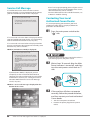
If the e-Manual (CD-ROM) Does Not Start
The CD-ROM auto run function may be disabled. In this case, you must perform the following procedure.
●● Windows XP/Vista
1. Click [Start] on the taskbar ➞ click [My Computer].
2. Double-click the e-Manual icon.
3. Double-click [Maninst.exe].
●● Windows 7
1. Click [Start] on the task bar ➞ click [Computer].
2. Double-click the e-Manual icon.
3. Double-click [Maninst.exe].
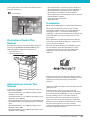
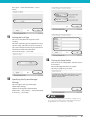
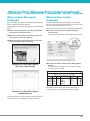
Top Page of the e-Manual
2
3
1
4
Select from functions
The instructions for each function and operation
method are described.
[Top], [Site map], [Help]
Click to refer to the contents, glossary, and how to
use the e-Manual.
[Glossary]
The glossary is displayed.
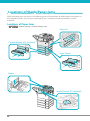
First of all…
5
This section contains required information needed
to use the machine, and information on optional
products and software.
Select from purpose
This section includes an introduction for each
function of the machine and their purpose.