1
Contents
Overview of Machine Functions..................................................................................................................... 1
Available Features............................................................................................................................................................. 1
1 Set Up the Machine to Suit Your Purposes................................................................................................... 2
2 Set Up the Machine........................................................................................................................................... 3
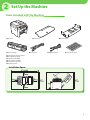
Items Included with the Machine................................................................................................................................ 3
Installation Space.................................................................................................................................................................... 3
Manuals for the Machine..................................................................................................................................................... 4
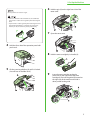
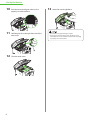
Install Toner Cartridge...................................................................................................................................................... 4
Set Up Paper Cassette and Load Paper...................................................................................................................... 7
Connect Power Cord and Turn On the Machine..................................................................................................... 9
3 Make Fax Settings........................................................................................................................................... 10
Connect Telephone Cables..........................................................................................................................................10
Register User Telephone Number and Unit Name..............................................................................................11
Information About the Keys..............................................................................................................................................11
About Sender Information................................................................................................................................................12
Set Date and Time...........................................................................................................................................................13
Select the Receive Mode that Suits Your Needs...................................................................................................14
About the Receive Modes..................................................................................................................................................14
If You Need to Use Pulse Dialing......................................................................................................................................16
4 Set Up Network Connection.......................................................................................................................... 17
Connect the LAN Cable.................................................................................................................................................17
Compatible LAN Cables......................................................................................................................................................17
Connect the Machine to Network.............................................................................................................................18
Specify the IP Address Settings..................................................................................................................................18
Automatic Setting.................................................................................................................................................................18
Check IP Address Setting...................................................................................................................................................18
Manual Setting......................................................................................................................................................................19
5 Set Up Computers and Software.................................................................................................................. 20
Types of Connection between Computers and the Machine..........................................................................20
Network Connection...........................................................................................................................................................20
USB Connection....................................................................................................................................................................20
About User Software CD-ROM....................................................................................................................................21
Network Connection......................................................................................................................................................23
MF Drivers Installation........................................................................................................................................................23
Color Network ScanGear Installation.............................................................................................................................25
Check Installation.................................................................................................................................................................27
USB Connection...............................................................................................................................................................28
MF Drivers & MF Toolbox Installation............................................................................................................................28
Check Installation.................................................................................................................................................................31
6 Appendix........................................................................................................................................................... 32
User Manual CD-ROM (e-Manual).............................................................................................................................32
System Requirements.........................................................................................................................................................32
Using the User Manual CD-ROM (e-Manual)..............................................................................................................33