1
SMALL OFFICE
REMOTE ACCESS SWITCH
EXAMPLE NETWORKS
Release 7.2
Cabletron Systems
(603) 332-9400 phone
(603) 337-3075 fax
[email protected]
EXAMPLE NETWORKS
!
Only qualified personnel should perform installation
procedures.
CAUTION
NOTICE
You may post this document on a network server for public use as long as no
modifications are made to the document.
Cabletron Systems reserves the right to make changes in specifications and other
information contained in this document without prior notice. The reader should in
all cases consult Cabletron Systems to determine whether any such changes have
been made.
The hardware, firmware, or software described in this manual is subject to change
without notice.
IN NO EVENT SHALL CABLETRON SYSTEMS BE LIABLE FOR ANY
INCIDENTAL, INDIRECT, SPECIAL, OR CONSEQUENTIAL DAMAGES
WHATSOEVER (INCLUDING BUT NOT LIMITED TO LOST PROFITS) ARISING
OUT OF OR RELATED TO THIS MANUAL OR THE INFORMATION
CONTAINED IN IT, EVEN IF CABLETRON SYSTEMS HAS BEEN ADVISED OF,
KNOWN, OR SHOULD HAVE KNOWN, THE POSSIBILITY OF SUCH
DAMAGES.
©Copyright 1998 by Cabletron Systems, Inc. All rights reserved.
Cabletron Systems, Inc.
P.O. Box 5005
Rochester, NH 03866-5005
Order Number:9032448
VIRUS DISCLAIMER
Cabletron Systems has tested its software with current virus checking
technologies. However, because no anti-virus system is 100% reliable, we strongly
caution you to write protect and then verify that the Licensed Software, prior to
installing it, is virus-free with an anti-virus system in which you have confidence.
Cabletron Systems makes no representations or warranties to the effect that the
Licensed Software is virus-free.
Copyright © July 1997, by Cabletron Systems, Inc. All rights reserved.
2
CyberSWITCH
TRADEMARKS
Cabletron Systems, CyberSWITCH, MMAC-Plus, SmartSWITCH, SPECTRUM,
and SecureFast Virtual Remote Access Manager are trademarks of Cabletron
Systems, Inc.
All other product names mentioned in this manual are trademarks or registered
trademarks of their respective companies.
COPYRIGHTS
All of the code for this product is copyrighted by Cabletron Systems, Inc.
© Copyright 1991-1997 Cabletron Systems, Inc. All rights reserved. Printed in the
United States of America.
Portions of the code for this product are copyrighted by the following corporations:
Epilogue Technology Corporation
Copyright 1991-1993 by Epilogue Technology Corporation. All rights reserved.
Livingston Enterprises, Inc.
Copyright 1992 Livingston Enterprises, Inc.
Security Dynamics Technologies Inc.
Copyright 1995 by Security Dynamics Technologies Inc. All rights reserved.
Stac Electronics
Stac Electronics 1993, including one or more U.S. Patents No. 4701745, 5016009,
5126739 and 5146221 and other pending patents.
Telenetworks
Copyright 1991, 92, 93 by Telenetworks. All rights reserved.
FCC NOTICE
This device complies with Part 15 of the FCC rules. Operation is subject to the
following two conditions: (1) this device may not cause harmful interference, and
(2) this device must accept any interference received, including interference that
may cause undesired operation.
NOTE: This equipment has been tested and found to comply with the limits for a
Class A digital device, pursuant to Part 15 of the FCC rules. These limits are
designed to provide reasonable protection against harmful interference when the
equipment is operated in a commercial environment. This equipment uses,
generates, and can radiate radio frequency energy and if not installed in
accordance with the operator’s manual, may cause harmful interference to radio
communications. Operation of this equipment in a residential area is likely to cause
interference in which case the user will be required to correct the interference at his
own expense.
Small Office Remote Access Switch
3
EXAMPLE NETWORKS
WARNING: Changes or modifications made to this device which are not expressly
approved by the party responsible for compliance could void the user’s authority
to operate the equipment.
DOC NOTICE
This digital apparatus does not exceed the Class A limits for radio noise emissions
from digital apparatus set out in the Radio Interference Regulations of the
Canadian Department of Communications.
Le présent appareil numérique n’émet pas de bruits radioélectriques dépassant les
limites applicables aux appareils numériques de la class A prescrites dans le
Règlement sur le brouillage radioélectrique édicté par le ministère des
Communications du Canada.
VCCI NOTICE
This is a Class 1 product based on the standard of the Voluntary Control Council
for Interference by Information Technology Equipment (VCCI). If this equipment
is used in a domestic environment, radio disturbance may arise. When such
trouble occurs, the user may be required to take corrective actions.
CABLETRON SYSTEMS, INC. PROGRAM LICENSE AGREEMENT
IMPORTANT: Before utilizing this product, carefully read this License Agreement.
This document is an agreement between you, the end user, and Cabletron Systems,
Inc. ("Cabletron") that sets forth your rights and obligations with respect to the
Cabletron software program (the "Program") contained in this package. The
Program may be contained in firmware, chips or other media. BY UTILIZING THE
ENCLOSED PRODUCT, YOU ARE AGREEING TO BECOME BOUND BY THE
TERMS OF THIS AGREEMENT, WHICH INCLUDES THE LICENSE AND THE
LIMITATION OF WARRANTY AND DISCLAIMER OF LIABILITY. IF YOU DO
NOT AGREE TO THE TERMS OF THIS AGREEMENT, PROMPTLY RETURN
THE UNUSED PRODUCT TO THE PLACE OF PURCHASE FOR A FULL
REFUND.
4
CyberSWITCH
CONTENTS
Simple Remote Bridging Network
9
Overview 9
Initial Installation Steps 9
Configuring the Simple Remote Bridge
Resources 10
Lines 10
Bridging and Routing Information 11
Bridging 11
IP Routing 11
Configure the CyberSWITCH 12
Save Configuration Files 15
Verify the Installation 16
9
Remote Bridging Network with Security
Overview 17
Initial Installation Steps 17
Resources 19
Lines 19
Device Information 20
Bridging and Routing Information
Bridging 22
IP Routing 22
Configure the CyberSWITCH 23
Configuring the Options 23
Configuring the Security 24
Save Configuration Files 27
Verify the Installation 27
IP Routing Network
17
22
28
Overview 28
Initial Installation Steps 28
System Details 30
Resources 30
Lines 30
Device Information 31
Device Information 33
Bridging and Routing Information 35
Bridging 35
IP Routing 35
Configure the CyberSWITCH 36
Configuring the CyberSWITCH Options
Configuring the Security 40
Save Configuration Files 43
Verify the Installation 44
36
Small Office Remote Access Switch
5
EXAMPLE NETWORKS
IP Routing Network with Remote Bridge Devices
Overview 45
Business Assumptions 45
Initial Installation Steps 45
Resources 47
Lines 47
Device Information 48
Bridging and Routing Information 50
Bridging 50
IP Routing 50
Configure the CyberSWITCH 51
Configuring the CyberSWITCH Options
Configuring the Security 54
Verify the Installation 57
IP Routing Network with PPP Devices
51
58
Overview 58
Initial Installation Steps 58
System Details 60
Resources 60
Lines 60
Bridging and Routing Information 61
Bridging 61
IP Routing 61
Bridging and Routing Information 62
Bridging 62
IP Routing 62
Device Information 63
Configure SITE1 65
Configuring the System Options 65
Finishing the Security Configuration 73
Configure SITE2 74
Configuring SITE2 Options 74
Configuring Security 75
Save Configuration Files 75
Verify the Installation 75
IPX Routing Network
77
Overview 77
Business Assumptions 77
Initial Installation Steps 77
System Details 79
Resources 79
Lines 79
Device Information 80
Bridging and Routing Information
Bridging 83
IP Routing 83
IPX Routing 84
6
CyberSWITCH
83
45
Configure IPX Routing: Masternet (Detroit)
Configure Devices 85
Configure System Options 87
Save Configuration Files 92
Configure the Remote Devices 92
Verify the Installation 92
AppleTalk Routing Network
93
Overview 93
Initial Installation Steps 93
Resources 95
Lines 95
AppleTalk Routing 96
Configure the CyberSWITCH 98
Configuring the Options 98
Configuring Device Information 101
Configuring an AppleTalk Static Route
Save Configuration Files 105
Verify the Installation 105
Index
85
104
106
Small Office Remote Access Switch
7
EXAMPLE NETWORKS
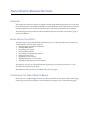
We provide several example networks, beginning with a simple network and progressing to more
complex networks. You may find the configuration instructions provided for each example helpful
when configuring your own network.
We include the following chapters:
•
Simple Remote Bridging Network
An example of a simple network using remote bridge devices to access a CyberSWITCH’s four
basic rate lines.
•
Remote Bridging Network with Security
A bridged network with Calling Line Id security and Bridge MAC Address security enabled.
The network is configured with two devices. One device will be configured to require a Bridge
MAC Address security password, and one device will not. This network uses BRI lines.
•
IP Routing Network
An IP routing network with devices accessing the network from their homes.
•
IP Routing Network with Remote Bridge Devices
A smart bridging interface to allow the two remote bridge devices to connect to an IP subnet.
The CyberSWITCH treats these devices connected to the Smart Bridging network interface as
if they were connected to the same Ethernet segment.
•
IP Routing Network with PPP Devices
Uses IP routing to connect two of our products, both using PPP. Each system is on a separate
LAN. The configuration for this network is designed to allow three different types of accesses.
•
IPX Routing Network
A sample network using IPX protocol to communicate with remote bridges as well as a remote
IPX router.
•
AppleTalk Network
An AppleTalk network made up of two LANs, separated by the WAN.
SIMPLE REMOTE BRIDGING NETWORK
OVERVIEW
This chapter provides an example of a simple network using remote bridge devices to access four
basic rate lines in the CyberSWITCH. Bridges are formed between each of the LANs to which the
remote bridge devices are connected, and the LAN to which the CyberSWITCH is connected.
The following section provides the initial installation steps that would be used with any type of
network installation.
INITIAL INSTALLATION STEPS
The initial steps in the CyberSWITCH installation process are basically the same no matter how
complicated the network. These steps are:
• completing the requirement worksheets
• ordering ISDN service
• powering on the system
• accessing Release Notes
• connecting an administration console
• setting up Telnet access
• upgrading system software
• changing defaults to secure system
• returning configuration to factory defaults
The chapters Accessing the CyberSWITCH and Upgrading System Software (in the User’s Guide)
describe each of these steps in detail.
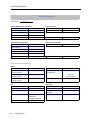
Worksheets for this network are included on the next few pages.
CONFIGURING THE SIMPLE REMOTE BRIDGE
Because this is a simple bridged network, you only need to fill out the System Details and Bridging
and Routing Information worksheets. The worksheets for Example 1 are on the following pages.
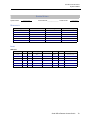
EXAMPLE NETWORKS
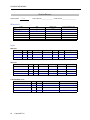
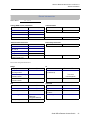
SYSTEM DETAILS
System Name:
PAP Password:_______________ CHAP Secret:___________________
SITE1
RESOURCES
Type
BRI
Ethernet_1
Slot
1
2
Switch type
5ESS
Synchronization type
LINES
BRI Lines
Name
Line1
Slot
1
Port
Line type
1
Call screen
PPP
TEI
SPID
Directory number
Auto
PRI Lines
Name
V.35 and RS232 Lines
Name
10
CyberSWITCH
Slot
Port
Slot
Framing type
Port
Line coding
Device/Network
Sig. method
Line build-out
Idle character
SIMPLE REMOTE BRIDGING NETWORK
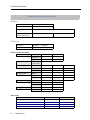
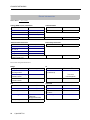
Bridging and Routing Information
BRIDGING AND ROUTING INFORMATION
BRIDGING
Bridging
X enabled
❒ disabled
Mode of Operation
❒ restricted
❒ unrestricted
IP Routing
X enabled
❒ disabled
Mode of Operation
❒ router
X IP host
Bridge Filters
Bridge Dial Out/
Known Connect List
IP ROUTING
Network Interface Information
LAN
Name
IP address
Mask
Unnumbered WAN
❒ need
❒ don’t need
Remote LAN
Name
IP address
Mask
Traditional WAN
Name
IP address
Mask
Direct Host WAN
Name
IP address
192.42.1.6
192.42.1.7
Mask
IP Host Mode
IP address
Mask
Static Routes
Destination network address
Mask
Next hop
❒ default?
❒ default?
❒ default?
❒ default?
Small Office Remote Access Switch
11
EXAMPLE NETWORKS
CONFIGURE THE CYBERSWITCH
Using CFGEDIT, we will guide you through the steps to configure the CyberSWITCH for a simple
remote bridge network. We will execute these steps in the same order as they appear in the
configuration menus.
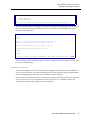
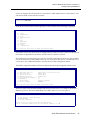
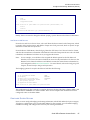
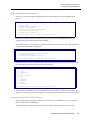
Start the CFGEDIT configuration utility. Type the following command at the system prompt:
cfgedit <return>
The following Main Menu will then be displayed:
Main Menu:
1)
2)
3)
4)
Physical Resources
Options
Security
Save Changes
Select function from above or <RET> to exit:
CONFIGURING THE PHYSICAL R ESOURCE INFORMATION
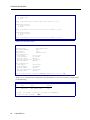
We start with configuring the Physical Resource information. Press 1 at the Main Menu to display
the Physical Resource Configuration Menu:
Physical Resource Menu:
1)
2)
3)
4)
Resources
Data Lines
Access
ISDN Subaddress
Select function from above or <RET> for previous menu:
You may only configure the switch type. The rest of the resource information may only be
displayed.
We will next add the line information. Press 2 at the Physical Resources Menu and press 1 to add a
line. First, you will be prompted for the line name. You will then be asked to select which slot and
port you wish to use. We will use LINE1 as the line name, and slot 1, port 1 as the slot and port
combination:
LINE NAME or press <RET> for previous menu: LINE1
Currently available Ports:
SLOT
Resource Type
-----------------1
BASIC_RATE
Available Ports
----------------1, 2, 3, 4
Switch Type
--------------BRI_5ESS
Slot number from above? 1
Port number from Slot 1? 1
You will then be prompted for the line interface type. For our example, we will be using point-topoint lines. Press 1 as shown below to select this line type.
12
CyberSWITCH
SIMPLE REMOTE BRIDGING NETWORK
Bridging and Routing Information
LINE TYPE = BR_ISDN
1) POINT_TO_POINT
2) POINT_MULTIPOINT
Select Option [default = POINT_TO_POINT] or press <RET> for previous menu: 1
The next item that you need to configure is the Data Link for the line. Depending on the switch type,
there may be more than one Data Link per line. In our example, we use one Data Link with
Automatic TEI Negotiation:
Current DATA LINK Configuration for this line:
id TEI
-- ---There are currently no Data Links configured for this line.
Enter (1) to Add or press <RET> for previous menu: 1
Automatic TEI Negotiation (Y or N) [default = Y]? Y
Current Data Link Configuration for this line:
id TEI
-- ---1 AUTO
(1) Add, (2) Change, (3) Delete a DATA LINK or press <RET> for previous menu?
<RET>
After entering the above information, press <return> to display the line menu.Press <return> twice
to return to the Main Menu.
CONFIGURING THE OPTIONS
The default configuration for the CyberSWITCH is bridging disabled and IP routing enabled. For
reasons we provide below, we want both bridging and IP routing enabled. Under the Option Menu,
select the bridging option and follow the instructions to enable bridging.
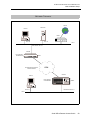
This network is a bridged network, but we are going to configure an IP option (the IP host operating
mode) so that we may use an IP application (such as Telnet, TFTP, or SNMP) to manage the
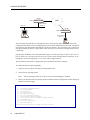
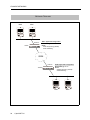
CyberSWITCH. Refer to the graphic below for clarification.
Small Office Remote Access Switch
13
EXAMPLE NETWORKS
CSX150
ISDN
"SITE1"
192.42.1.0
IP Host Interface
192.42.1.6
CSX150
"SITE2"
IP Host Interface
192.42.1.7
Telnet Client
The network illustrated above is a bridged network. Each system, SITE1 and SITE2 have been
configured with all the necessary bridging information. SITE1 and SITE2 have also been configured
in the IP host operating mode, and each have an IP host interface. This will allow each system to be
managed remotely by the PC using Telnet client software (once the initial configuration has been
completed).
Note that the IP address associated with each system is on the same LAN as the PC. This does not
have to be the case. As long as the PC has access to the systems through their IP addresses, it can
manage the systems using Telnet (or one of the other IP applications).
The steps below describe the configuration steps needed for the above example:
To enable the IP Host Operating Mode:
1.
Select IP Operating Mode from the IP configuration menu.
2.
Select IP host operating mode.
Note:
3.
The IP operating mode can not be set to host unless bridging is enabled.
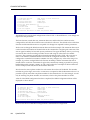
When you select the IP host operating mode, an abbreviated IP configuration will be displayed
(similar to the following):
IP Menu:
1)
2)
3)
4)
5)
6)
7)
8)
9)
10)
11)
IP Routing (Enable/Disable)
IP Operating Mode
IP Interfaces
IP Static Routes
RIP (Enable/Disable)
IP Static ARP Table Entries
Isolated Mode (Enable/Disable)
Static Route Lookup via RADIUS (Enable/Disable)
IP Address Pool
IP Filter Information
DHCP Information
Select function from above or <RET> for previous menu:
14
CyberSWITCH
SIMPLE REMOTE BRIDGING NETWORK
Bridging and Routing Information
To configure the IP host interface:
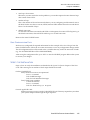
1.
Select IP Interfaces from the IP configuration menu.
2.
Select to add an interface.
3.
Enter the IP address assigned to this interface. For SITE1, this is 192.42.1.6; for SITE2, this is
192.42.1.7.
4.
Enter the subnet mask.
5.
Enter the MTU size.
6.
Select the transmit broadcast address.
If IP RIP is enabled, enter the following additional information:
7.
IP RIP receive control.
8.
IP RIP respond control.
9.
IP RIP v2 authentication control.
10. IP RIP v2 authentication key (required only if the IP RIP v2 authentication control has been
configured with a value other than “No Authentication.“
For more detailed information on the IP host operating mode, refer to the IP Operating Mode section
in the Configuring Basic IP Routing chapter of the User’s Guide.
CONFIGURING THE SECURITY
For this network configuration, we require no security. The default configuration is device security
enabled. To make the required configuration change, select Security from the Main Menu. Then
select Security Level. Finally, select No Security.
SAVE CONFIGURATION FILES
We have now configured all of the required information. Press 4 from the Main menu to save the
changes and then press <RET> to exit. Reboot the system to activate your changes.
Small Office Remote Access Switch
15
EXAMPLE NETWORKS
VERIFY THE INSTALLATION
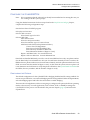
Steps on how to verify the installation are detailed in the System Verification chapter of the User’s
Guide. This section gives an outline of which steps should be executed.
On the CyberSWITCH:
Verify resources are operational
Issue dr command
Look for BRI line messages
Look for LAN initialized messages
Look for Bridge initialized messages
Verify WAN Lines Available
Connect WAN lines
Issue dr command
Look for “Data Link up 1,1” in reports
On each Combinet LAN:
Attempt accessing a resource on the system LAN. This may require that you reboot your machine
and proceed through the logon sequence.
16
CyberSWITCH
REMOTE BRIDGING NETWORK WITH SECURITY
OVERVIEW
This example network is a bridged network with Calling Line Id security and Bridge MAC Address
security enabled. The network is configured with two devices. One device will be configured to
require a Bridge MAC Address security password, and one device will not. This network uses BRI
lines.
Worksheets for this network are included on the following pages.
Note that a Hunt Group is used for the BRI lines pictured in the Network Topology Worksheet.
Remote devices will then only need to configure one telephone number (the Hunt Group number)
for the CyberSWITCH instead of all four phone numbers. If the first line is busy, the next line is
automatically used, and so on until a free line is found. A Hunt Group number can be arranged
through your Service Provider.
INITIAL INSTALLATION STEPS
The initial steps in the CyberSWITCH installation process are basically the same no matter how
complicated the network. These steps are:
• completing the requirement worksheets
• ordering ISDN service
• powering on the system
• accessing Release Notes
• connecting an administration console
• setting up Telnet access
• upgrading system software
• changing defaults to secure system
• returning configuration to factory defaults
The chapters Accessing the CyberSWITCH and Upgrading System Software (in the User’s Guide)
describe each of these steps in detail.
Worksheets for this network are included on the next few pages.
EXAMPLE NETWORKS
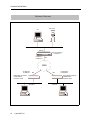
NETWORK TOPOLOGY
File Server
PC
CSX150
Hunt Group Number:
13135551111
13135551111
13135551112
BRI
ISDN
13135551212
13135552121
BRI
BRI
Bridge Ethernet Address:
003456789000
Password: None
Bridge Ethernet Address:
000123456789
Password: JXF30
User Name:
Mike Mann
PC
18
CyberSWITCH
13135556789
13135559876
User Name:
Pat Smith
PC
REMOTE BRIDGING NETWORK WITH SECURITY
Initial Installation Steps
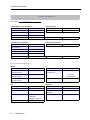
SYSTEM DETAILS
System Name:
Remote Bridge
PAP Password:_______________ CHAP Secret:___________________
RESOURCES
Type
BRI
Ethernet_1
Slot
Switch type
1
2
NI-1
Synchronization type
LINES
BRI Lines
Name
Line1
Slot
Port
Line type
1
1
PPP
Call
screen
TEI
SPID
Directory
number
Auto
3135551111
13135551111*
3135551112
13135551112*
* Hunt Group Number: 13135551111
Small Office Remote Access Switch
19
EXAMPLE NETWORKS
DEVICE INFORMATION
Device Name:
Mike Mann
Calling (ISDN, FR, etc.) Information
Line Protocol
X.25 Information
PVC
HDLC bridge
Base Data Rate
SVC
Initial Data Rate
Max Data Rate
Dial-Out Number(s)
Authentication Information:
PAP Password
Frame Relay Information
DLCI
CHAP Secret
IP Host ID
Bridge Ethernet Address*
000123456789
Bridge Password*
JXF30
CLID(s)
13135551212
13135552121
* HDLC Bridge only
Protocol for this particular device?
Bridge
Bridging enabled?
Make calls
for bridged data?
IP
❒ enabled
❒ disabled
IP enabled?
❒ enabled
❒ disabled
IP Address
(on WAN link)
For IPX RLAN, external
network number
Make calls for IP data?
❒ enabled
❒ disabled
AppleTalk
AppleTalk enabled?
Callable by IPX?
❒ enabled
❒ disabled
AppleTalk Address
IPXWAN protocol?
❒ enabled
❒ disabled
Make calls for
AT data?
IPX routing protocol?
❒ none
❒ RIP/SAP
❒ triggered RIP/SAP
IPX spoofing?
20
CyberSWITCH
❒ disabled
❒ 0.0.0.0 if
unnumbered link
For IP RLAN, IP (Sub-)
network number
IPX
IPX enabled?
❒ enabled
AT Routing Protocol
❒ enabled
❒ disabled
❒ enabled
❒ disabled
❒ enabled
❒ disabled
REMOTE BRIDGING NETWORK WITH SECURITY
Device Information
DEVICE INFORMATION
Device Name:
Pat Smith
Calling (ISDN, FR, etc.) Information
Line Protocol
HDLC bridge
X.25 Information
PVC
Base Data Rate
SVC
Initial Data Rate
Max Data Rate
Dial-Out Number(s)
Authentication Information:
PAP Password
Frame Relay Information
DLCI
CHAP Secret
IP Host ID
Bridge Ethernet Address*
003456789000
Bridge Password*
CLID(s)
13135556789
13135559876
* HDLC Bridge only
Protocol for this particular device?
Bridge
Bridging enabled?
Make calls
for bridged data?
IP
❒ enabled
❒ disabled
IP enabled?
❒ enabled
❒ disabled
IP Address
(on WAN link)
❒ disabled
❒ 0.0.0.0 if
unnumbered link
For IP RLAN, IP (Sub-)
network number
For IPX RLAN, external
network number
IPX
IPX enabled?
❒ enabled
Make calls for IP data?
❒ enabled
❒ disabled
AppleTalk
AppleTalk enabled?
Callable by IPX?
❒ enabled
❒ disabled
AppleTalk Address
IPXWAN protocol?
❒ enabled
❒ disabled
Make calls for
AT data?
IPX routing protocol?
❒ none
❒ RIP/SAP
❒ triggered RIP/SAP
❒ enabled
❒ disabled
❒ enabled
❒ disabled
❒ enabled
❒ disabled
AT Routing Protocol
IPX spoofing?
Small Office Remote Access Switch
21
EXAMPLE NETWORKS
BRIDGING AND ROUTING INFORMATION
BRIDGING
Bridging
X enabled
❒ disabled
Mode of Operation
❒ restricted
❒ unrestricted
Bridge Filters
Bridge Dial Out/
Known Connect List
IP ROUTING
IP Routing
X enabled
❒ disabled
Mode of Operation
❒ router
❒ IP host
Network Interface Information
LAN
Name
IP address
Mask
Unnumbered WAN
❒ need
❒ don’t need
Remote LAN
Name
IP address
Mask
Traditional WAN
Name
IP address
Mask
Direct Host WAN
Name
IP address
Mask
IP Host Mode
IP address
Mask
Static Routes
Destination network address
Mask
❒ default?
❒ default?
❒ default?
❒ default?
22
CyberSWITCH
Next hop
REMOTE BRIDGING NETWORK WITH SECURITY
Configure the CyberSWITCH
CONFIGURE THE CYBERSWITCH
Note:
We are assuming that the software has already been installed and is running. Be sure you
are working from the system prompt.
Using the detailed instructions for these steps found in the Simple Remote Bridging chapter,
complete the following configuration steps.
Start the Run-Time CFGEDIT program
Select physical resources
Select to add a resource
Select Switch type to be NI-1
Select to add a line
Enter the line name
Select slot and port numbers
Select line interface type of “Point-to-Point”
Add Data Links (Data Link explanation follows)
Choose Auto TEI Negotiation
Enter Service Profile ID (SPID) Value
Enter Directory Number for Data Link
Enter Maximum Number of Digits to Verify
Repeat “Add Data Links” for second Data Link
Repeat “Select to add a line” for each additional line
Data links are handled differently on a NI-1 switch. Some BRI lines have only one phone number
(for the Data Link), but can handle two calls (one for each bearer channel). For NI-1 switches, the
BRI line has two phone numbers (one for each bearer channel), and each phone number has its own
SPID. You must enter the number of digits to verify, so that when the system receives a phone call
it can determine on which bearer to accept the phone call. Refer to the System Details worksheet for
the SPIDs, directory numbers, and the number of digits to verify.
CONFIGURING THE OPTIONS
The default configuration for the CyberSWITCH is bridging disabled and IP routing enabled. For
reasons we provide below, we want both bridging and IP routing enabled. Under the Option Menu,
select the bridging option and follow the instructions to enable bridging.
This network is a bridged network, but we are going to configure an IP option (the IP host operating
mode) so that we may use an IP application (such as Telnet, TFTP, or SNMP) to manage the
CyberSWITCH. This process was described in the previous chapter (page 13) and will not be
repeated here.
Small Office Remote Access Switch
23
EXAMPLE NETWORKS
CONFIGURING THE SECURITY
This network has remote devices, and the device information for each of those devices must be
configured. Device security is used, and the remote devices are configured in the on-node
authentication database. Device security using a on-node authentication database are the default
values.
To begin the security configuration, press 3 at the Main CFGEDIT Menu. The Security Menu will
then be displayed as follows:
Security Menu:
1)
2)
3)
4)
5)
6)
Security Level
System Options and Information
Device Level Databases
User Level Databases (Enable/Disable)
Off-node Server Information
Network Login Information
Select function from above or <RET> for previous menu:
CONFIGURING THE SECURITY LEVEL
From the Security Menu, press 1, Security Level. Then press 2 to enable Device Level Security:
Security Level Menu:
1)
2)
3)
4)
No Security
Device Level Security
User Level Security
Device and User Level Security
Select function from above or <RET> for previous menu:
After enabling Device Level Security, return to the Security Menu.
CONFIGURING THE SYSTEM OPTIONS AND INFORMATION
The default configuration for System Options is all security options enabled, which is acceptable
for this network. No System Information or Administration Sessions are required. Therefore, no
changes are necessary.
CONFIGURING THE D EVICE LEVEL DATABASE
From the Security Menu, press 3 to display the Device Level Database Menu. To enable the Onnode Device Database, press 1 and follow the on-screen instructions:
Device Level Databases Menu:
1) On-node Device Database (Enable/Disable)
2) On-node Device Entries
3) Off-node Device Database Location
Select function from above or <RET> for previous menu:
24
CyberSWITCH
REMOTE BRIDGING NETWORK WITH SECURITY
Configure the CyberSWITCH
Press 2 to configure the information for our first device, Mike Mann. Press 1 to add a device. You
will first be asked to enter the Device Name:
Device Name? Mike Mann
After the new device name has been specified, a screen similar to the following is displayed.
Device Table Menu: (Device = "Mike Mann")
1)
2)
3)
4)
5)
6)
7)
8)
9)
10)
ISDN
Frame Relay
X.25
Authentication
IP
IPX
AppleTalk
Bridging
POTS
Compression
Select function from above or <RET> for previous menu:
Information for the new device may be configured in any order. You have control over how much
information is specified for each device, and the order in which it is entered.
We will begin by specifying the type of device. We need to determine if the device will use ISDN
Line Protocol (choice 1), Frame Relay (choice 2), or X.25 (choice 3).This device is an ISDN device, so
we will press 1 for “ISDN Information” from the Device Table Configuration Menu.
The ISDN Configuration Menu will then be displayed with the preconfigured default values:
Device ISDN Menu: (Device = "Mike Mann")
1)
2)
3)
4)
5)
6)
7)
8)
ISDN Line Protocol
Base Data Rate
Initial Data Rate
Maximum Data Rate
Dial Out Phone Number(s)
Subaddress
Profile Name
H0 Call Support
"PPP (Point to Point Protocol)"
"64000 bps"
"64000 bps"
"128000 bps"
""
""
"Default_Profile"
ENABLED
Select function from above or <RET> for previous menu:
We do not want to use the default ISDN Line Protocol of PPP. Press 1 to configure this device’s
ISDN line protocol. The device Mike Mann uses HDLC protocol, so we will press 2:
Device ISDN Line Protocol Menu: (Device = "Mike Mann")
1) PPP (Point to Point Protocol)
2) HDLC Bridge
3) IP Host (RFC1294)
Select option to associate with device "Mike Mann",
or "0" to disable ISDN access for this device [default = 1]? 2
Small Office Remote Access Switch
25
EXAMPLE NETWORKS
The only other item on the Device ISDN Line Protocol Menu that this type of device needs is the
maximum data rate. We will accept the default value of 128,000 bps. No changes are required.
Return to the Device Table Menu.
At the Device Table Menu, press 4 to enter the authentication information needed for this device.
The authentication information needed for each device depends on the device type.
For device “Mike Mann,” we opt to configure a bridge Ethernet address (000123456789), we will
assign a bridge password (JXF30), and configure a first and second calling line Id. After the device
authentication has been entered for device “Mike Mann,” the screen will appear as follows:
Device Authentication Menu: (Device = "Mike Mann")
PPP:
1)
2)
3)
4)
PAP Password
CHAP Secret
Outbound Authentication
User Level Authentication
""
""
ENABLED
DISABLED
IP Host (RFC 1294):
5) IP Host Id
""
HDLC Bridge:
6) Bridge Ethernet Address
7) Bridge Password
"000123456789"
"JXF30"
ISDN:
8) Calling Line Id(s)
"13135551212"
"13135552121"
Select function from above or <RET> for previous menu:
Next, enter the device information for Pat Smith. This device is also an HDLC bridge, and is
configured using the same type of authentication as device Mike Mann, except we will configure
no password for device Pat Smith. Enter 003456789000 for the bridge Ethernet address,
13135556789 for the first calling line Id, and 13135559876 for the second calling line Id.
The following screen will be displayed after information for both devices in our network has been
entered:
CURRENT DEVICE TABLE (Sorted by Device Name in Ascending ASCII Order)
id
Device Name
---------------------------1
"Mike Mann"
2
"Pat Smith"
(1) Add, (2) Change, (3) Delete, (4) Display a Device or press <RET> for previous menu?
26
CyberSWITCH
REMOTE BRIDGING NETWORK WITH SECURITY
Verify the Installation
SAVE CONFIGURATION FILES
We have now configured all of the required information for a bridged system with Calling Line Id
Security and Bridge MAC Address Security enabled. Press 4 at the Main menu to save the changes.
The old configuration files will be stored in the \CONFIG directory with a file extension of .BAK
(e.g., the old NODE.NEI file will be called NODE.BAK).
After you save the configuration files, press <RET> to exit the CFGEDIT program. Reboot the
system to activate your changes.
VERIFY THE INSTALLATION
Steps on how to verify the installation are detailed in the System Verification chapter of the User’s
Guide. This section gives an outline of which steps should be executed.
On the CyberSWITCH:
Verify hardware resources are operational
Issue dr command
Look for BRI messages
Look for LAN initialized messages
Verify WAN Lines Available
Connect WAN lines
Issue dr command
Look for “Data Link up 1,1” in reports
On each HDLC Bridge LAN:
Attempt accessing a resource on the CyberSWITCH LAN. This may require that you reboot
your system and proceed through the logon sequence.
Small Office Remote Access Switch
27
IP ROUTING NETWORK
OVERVIEW
This sample network has an IP network with devices accessing the network from their homes.
INITIAL INSTALLATION STEPS
The initial steps in the CyberSWITCH installation process are basically the same no matter how
complicated the network. These steps are:
• completing the requirement worksheets
• ordering ISDN service
• powering on the system
• accessing Release Notes
• connecting an administration console
• setting up Telnet access
• upgrading system software
• changing defaults to secure system
• returning configuration to factory defaults
The chapters Accessing the CyberSWITCH and Upgrading System Software (in the User’s Guide)
describe these steps in detail.
Worksheets for this network are included on the next few pages.
IP ROUTING NETWORK
Initial Installation Steps
NETWORK TOPOLOGY
LAN 131.1.0.0
File Server
PC
Router 1
131.1.1.16
128.1.1.16
128.1.1.1
WAN Interface 192.1.1.1
BRI
SITE:
San Fran
ISDN
Host
BRI
BRI
BRI
Host
Host
BRI
Host
128.1.1.3
Todd Jones
192.1.1.2
Rick Bear
192.1.1.3
Victoria Moose
128.1.1.2
Jill Smith
Small Office Remote Access Switch
29
EXAMPLE NETWORKS
SYSTEM DETAILS
System Name:
IP Network
PAP Password:_______________ CHAP Secret:___________________
RESOURCES
Type
Slot
1
BRI
Ethernet_1
Switch type
Synchronization type
NTT
3
LINES
BRI Lines
Name
line1
30
Slot
Port
1
1
CyberSWITCH
Line type
Call screen
TEI
Auto
SPID
Directory number
IP ROUTING NETWORK
Device Information
DEVICE INFORMATION
Device Name:
Rick Bear
Calling (ISDN, FR, etc.) Information
Line Protocol
X.25 Information
PVC
Base Data Rate
SVC
Initial Data Rate
Max Data Rate
Dial-Out Number(s)
Authentication Information:
PAP Password
Frame Relay Information
DLCI
CHAP Secret
IP Host ID
RICK
Bridge Ethernet Address*
Bridge Password*
CLID(s)
* HDLC Bridge only
Protocol for this particular device?
Bridge
Bridging enabled?
Make calls
for bridged data?
IP
❒ enabled
❒ disabled
IP enabled?
❒ enabled
❒ disabled
IP Address
(on WAN link)
❒ disabled
192.1.1.2
❒ 0.0.0.0 if
unnumbered link
For IP RLAN, IP (Sub-)
network number
For IPX RLAN, external
network number
IPX
IPX enabled?
X enabled
Make calls for IP data?
❒ enabled
❒ disabled
AppleTalk
AppleTalk enabled?
Callable by IPX?
❒ enabled
❒ disabled
AppleTalk Address
IPXWAN protocol?
❒ enabled
❒ disabled
Make calls for
AT data?
IPX routing protocol?
❒ none
❒ RIP/SAP
❒ triggered RIP/SAP
❒ enabled
❒ disabled
❒ enabled
❒ disabled
❒ enabled
❒ disabled
AT Routing Protocol
IPX spoofing?
Small Office Remote Access Switch
31
EXAMPLE NETWORKS
DEVICE INFORMATION
Device Name:
Jill Smith
Calling (ISDN, FR, etc.) Information
Line Protocol
X.25 Information
PVC
Base Data Rate
SVC
Initial Data Rate
Max Data Rate
Dial-Out Number(s)
Authentication Information:
PAP Password
Frame Relay Information
DLCI
CHAP Secret
IP Host ID
JILL
Bridge Ethernet Address*
Bridge Password*
CLID(s)
* HDLC Bridge only
Protocol for this particular device?
Bridge
Bridging enabled?
Make calls
for bridged data?
IP
❒ enabled
❒ disabled
IP enabled?
❒ enabled
❒ disabled
IP Address
(on WAN link)
For IPX RLAN, external
network number
Make calls for IP data?
❒ enabled
❒ disabled
AppleTalk
AppleTalk enabled?
Callable by IPX?
❒ enabled
❒ disabled
AppleTalk Address
IPXWAN protocol?
❒ enabled
❒ disabled
Make calls for
AT data?
IPX routing protocol?
❒ none
❒ RIP/SAP
❒ triggered RIP/SAP
IPX spoofing?
32
CyberSWITCH
❒ disabled
128.1.1.2
❒ 0.0.0.0 if
unnumbered link
For IP RLAN, IP (Sub-)
network number
IPX
IPX enabled?
X enabled
AT Routing Protocol
❒ enabled
❒ disabled
❒ enabled
❒ disabled
❒ enabled
❒ disabled
IP ROUTING NETWORK
Device Information
DEVICE INFORMATION
Device Name:
Ralph Moose
Calling (ISDN, FR, etc.) Information
Line Protocol
X.25 Information
PVC
Base Data Rate
SVC
Initial Data Rate
Max Data Rate
Dial-Out Number(s)
Authentication Information:
PAP Password
Frame Relay Information
DLCI
CHAP Secret
IP Host ID
RALPH
Bridge Ethernet Address*
Bridge Password*
CLID(s)
* HDLC Bridge only
Protocol for this particular device?
Bridge
Bridging enabled?
Make calls
for bridged data?
IP
❒ enabled
❒ disabled
IP enabled?
❒ enabled
❒ disabled
IP Address
(on WAN link)
❒ disabled
192.1.1.23
❒ 0.0.0.0 if
unnumbered link
For IP RLAN, IP (Sub-)
network number
For IPX RLAN, external
network number
IPX
IPX enabled?
X enabled
Make calls for IP data?
❒ enabled
❒ disabled
AppleTalk
AppleTalk enabled?
Callable by IPX?
❒ enabled
❒ disabled
AppleTalk Address
IPXWAN protocol?
❒ enabled
❒ disabled
Make calls for
AT data?
IPX routing protocol?
❒ none
❒ RIP/SAP
❒ triggered RIP/SAP
❒ enabled
❒ disabled
❒ enabled
❒ disabled
❒ enabled
❒ disabled
AT Routing Protocol
IPX spoofing?
Small Office Remote Access Switch
33
EXAMPLE NETWORKS
DEVICE INFORMATION
Device Name:
Todd Jones
Calling (ISDN, FR, etc.) Information
Line Protocol
X.25 Information
PVC
Base Data Rate
SVC
Initial Data Rate
Max Data Rate
Dial-Out Number(s)
Authentication Information:
PAP Password
Frame Relay Information
DLCI
CHAP Secret
IP Host ID
TODD
Bridge Ethernet Address*
Bridge Password*
CLID(s)
* HDLC Bridge only
Protocol for this particular device?
Bridge
Bridging enabled?
Make calls
for bridged data?
IP
❒ enabled
❒ disabled
IP enabled?
❒ enabled
❒ disabled
IP Address
(on WAN link)
For IPX RLAN, external
network number
Make calls for IP data?
❒ enabled
❒ disabled
AppleTalk
AppleTalk enabled?
Callable by IPX?
❒ enabled
❒ disabled
AppleTalk Address
IPXWAN protocol?
❒ enabled
❒ disabled
Make calls for
AT data?
IPX routing protocol?
❒ none
❒ RIP/SAP
❒ triggered RIP/SAP
IPX spoofing?
34
CyberSWITCH
❒ disabled
128.1.1.3
❒ 0.0.0.0 if
unnumbered link
For IP RLAN, IP (Sub-)
network number
IPX
IPX enabled?
X enabled
AT Routing Protocol
❒ enabled
❒ disabled
❒ enabled
❒ disabled
❒ enabled
❒ disabled
IP ROUTING NETWORK
Bridging and Routing Information
BRIDGING AND ROUTING INFORMATION
BRIDGING
Bridging
❒ enabled
❒ disabled
Mode of Operation
❒ restricted
❒ unrestricted
Bridge Filters
Bridge Dial Out/
Known Connect List
IP ROUTING
IP Routing
X enabled
Mode of Operation
X router
❒ disabled
❒ IP host
Network Interface Information
LAN
Name
SanFran
IP address
128.1.1.1
Mask
Unnumbered WAN
❒ need
❒ don’t need
Remote LAN
Name
IP address
Mask
Traditional WAN
Name
SanJose
IP address
192.1.1.1
Mask
Direct Host WAN
Name
Monterey
IP address
(unnumbered)
Mask
IP Host Mode
IP address
Mask
Static Routes
Destination network address
Mask
Next hop
❒ default?
❒ default?
❒ default?
❒ default?
Small Office Remote Access Switch
35
EXAMPLE NETWORKS
CONFIGURE THE CYBERSWITCH
Note:
The software should have already been installed and you should see the system prompt
before proceeding with these steps.
Using the detailed instructions for these steps found in the Simple Remote Bridging chapter,
complete the following configuration steps.
Start the CFGEDIT program
Select physical resources
Select to add a resource
Select Switch type to be 4ESS
Select to add a line
Enter “Line1” as the line name
Select slot 1, port 1
Add Data Links
Choose Auto TEI Negotiation
Enter SPID Value
Enter Directory Number for Data Link
Enter Maximum Number of Digits to Verify
Repeat “Add Data Links” for second Data Link
The following sections provide instructions for completing the remaining configuration steps.
CONFIGURING THE CYBERSWITCH OPTIONS
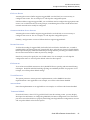
To begin the configuration of the system options, press 2 at the Main Menu. The following options
menu will then be displayed:
Options Menu:
1)
2)
3)
4)
5)
6)
7)
8)
9)
10)
Bridging
IP
IPX Routing
AppleTalk
SNMP
PPP
Call Control Options
Default Line Protocol
Log Options
Compression
Select function from above or <RET> for previous menu:
For this example, we only need IP routing enabled. IP routing is already enabled as fault, so no
change is necessary.
For this example, the only other IP information we need to configure is for IP interfaces. No static
routes are needed because Router 1 supports RIP, which eliminates the need to manually configure
a static route. The next section will provide the instructions needed to configure the necessary IP
interfaces.
36
CyberSWITCH
IP ROUTING NETWORK
Configure the CyberSWITCH
CONFIGURING THE IP INTERFACE INFORMATION
In our example, we need to configure three types of interfaces (refer to the Network Topology
Worksheet). The LAN type network interface represents the system connection to the IP Network
128.1.0.0 on the LAN. The WAN (Direct Host) interface is a logical extension of the LAN IP
network. Direct Host remote IP devices share the same IP address space as the IP network 128.1.0.0
on the LAN. The WAN network interface is a logical interface to an IP network connected to the
CyberSWITCH over the ISDN. The reason we are using both a WAN and a WAN (Direct Host)
Interface is to allow the two devices, Rick Bear and Ralph Moose, to call into somewhere else if need
be.
We will begin by adding the LAN interface. Press 2 at the IP configuration menu to begin the LAN
interface configuration. Press 1 to add an IP interface. Press 1 to select LAN as the type of interface
that you wish to configure.
The interface name is a symbolic name given to the interface. For the LAN interface, you should
use a name that describes the LAN. It could be the name of the site or department. Type SanFran
for this example.
You will then be asked for the IP Address for the interface. In our example, the value you should
enter is 128.1.1.1. You will then be asked for the IP Subnet mask information. In our example, we
are using a Class B address (without any subnetwork addressing) that requires 16 bits of the
address to define the network number. Therefore, press <return> to accept the default of “16”
significant bits. Press <return> to accept the default packet encapsulation type (Ethernet). Press
<return> to accept the default of 1500 as the MTU size.
Press <return> to accept the default transmit broadcast address. For almost all devices, this address
will let the broadcast be transmitted to all devices on the local network. For some older devices, you
may need to try some of the other selections to get the transmission to work correctly.
The rest of the LAN information requested pertains to the system RIP feature. (This information
will not be asked for if you have disabled RIP.) RIP is a protocol used to exchange routing
information among IP devices. Using RIP can automate the maintenance of routing tables on IP
devices and relieve you of having to keep the routing tables up to date manually. Static routes need
to be configured manually if we need to access a WAN network that is not directly connected to the
system, or if we need to access a LAN network through a router that does not support RIP.
RIP determines the shortest path between two points in a network in terms of the number of “hops”
between these points.
For the rest of the required RIP LAN interface information, accept the default values.
Small Office Remote Access Switch
37
EXAMPLE NETWORKS
The interactive LAN interface session should be similar to the following:
1)
2)
3)
4)
5)
LAN
WAN
WAN (Direct Host)
WAN (RLAN)
WAN (UnNumbered)
Select function from above or <RET> for previous menu: 1
INTERFACE NAME or <RET> to cancel? SanFran
Enter the IP Address in dotted decimal notation
or <RET> to cancel? 128.1.1.1
Enter the number of significant bits for the Subnet Mask
[default = 16]?
<RET>
Enter the packet encapsulation type 1) for ETHERNET 2) for SNAP
[default = ETHERNET]?
<RET>
Enter the MTU size in bytes [default = 1500]?
<RET>
Transmit Broadcast Address:
1) 128.1.255.255
2) 128.1.0.0
3) 255.255.255.255
4) 0.0.0.0
5) Specify Explicitly
Enter a Transmit Broadcast Address from the above menu [default = 1]? <RET>
RIP Send Control:
1) Do Not Send.
2) RIP Version 1.
3) RIP Version 1 Compatibility.
4) RIP Version 2.
Enter a RIP Send Control from the above menu [default = 2]?
(
RIP Receive Control:
1) Do Not Receive.
2) RIP Version 1 Only.
3) RIP Version 2 Only.
4) RIP Version 1 or Version 2.
<RET>
Enter a RIP Receive Control from the above menu [default = 4]? <RET>
RIP Respond Control:
1) Do Not Respond.
2) RIP Version 1 Only.
3) RIP Version 2 Only.
4) RIP Version 1 or Version 2.
Enter a RIP Respond Control from the above menu [default = 4]? <RET>
RIP Version 2 Authentication Control:
1) No Authentication.
2) Simple Password.
Enter a RIP Authentication Control from the above menu [default = 1]? <RET>
38
CyberSWITCH
IP ROUTING NETWORK
Configure the CyberSWITCH
After you have entered all of the information for the interface, a summary screen is displayed. You
are asked if you want to save this information. If all of the configured information is accurate, press
<return> to save the information. If any configuration elements need to be changed, press N, and
reconfigure the interface.
Current Configuration for INTERFACE "sanfran":
Interface Type
IP Address
Mask
MTU (bytes)
Encapsulation
LAN Port
Transmit Broadcast
RIP Configuration:
Send Control
Receive Control
Respond Control
v2 Authentication
LAN
128.1.1.1
255.255.0.0
1500
Ethernet
1
128.1.255.255
RIP Version 1
RIP1 or RIP2
RIP1 or RIP2
No Authentication
Are you sure you want to add the INTERFACE "sanfran" (Y or N) [Y]? <RET>
Next, we will configure the system’s WAN interface. This interface is used for the two devices Rick
Bear and Ralph Moose. The interface name is a symbolic name given to the interface. For the WAN
interface, you should use a name that describes the WAN. For this example, both WAN sites are
located in San Jose, so we will enter SanJose for the WAN interface Name.
You will then be asked for the IP Address for the WAN interface. In our example, the value you
should enter is 192.1.1.1 (refer to Network Topology Worksheet). You will then be asked for the IP
Subnet mask information. Press <return> to accept the default of “24” significant bits. Press
<return> to accept the default of 1500 as the MTU size. Press <return> to accept the default transmit
broadcast address.
The last configuration element pertains to the system’s RIP feature. This information will not be
requested if you have disabled the RIP feature. Here, you have a choice of enabling or disabling
host routes propagation. The RIP host routes propagation scheme determines how the WAN local
route will be propagated via RIP. The default value is “Host Routes Propagation is currently
DISABLED.” With the default, WAN local routes are propagated as subnetwork routes. If Host
routes propagation is enabled, host routes will be propagated on other network interfaces only
while each remote IP device is connected to the system.
When the RIP host propagation scheme is enabled, multiple systems on the same LAN will work
properly. RIP information is then advertised as multiple host routes as they connect to the system.
In our example network, there is only one system on the LAN. Therefore, we want to leave host
routes propagation disabled.
The following screen illustrates the host routes propagation portion of the entry of the WAN
interface information:
Host Routes Propagation is currently DISABLED.
By enabling Host Route Propagation for this interface,
host routes will be propagated on other network interfaces
while each remote IP device is connected to the system.
Do you wish to ENABLE Host Route Propagation (Y or N) [default = N]? <RET>
Small Office Remote Access Switch
39
EXAMPLE NETWORKS
The WAN interface summary screen will then be displayed. If all of the configured information is
accurate, press <return> to save the information.
Finally, we will enter the interface information for the WAN (Direct Host) interface. Press 1 to add
another interface. This interface will be used for devices Jill Smith and Todd Jones. The interface
name is a symbolic name given to the interface. For the WAN (Direct Host) interface, you should
use a name that describes the Direct Host WAN. For this example, both Direct Host WAN sites are
located in Monterey, so we will enter Monterey for the interface Name.
You will also need to enter an MTU value. Press <return> to accept the default of 1500. If all of the
configured information is accurate, press <return> to save the information.
After all three interfaces have been configured, the following screen will be displayed:
Current INTERFACE Configuration:
id Name
Type
IP address
Mask
-- -------------- ---------------------- ------------- --------------1 sanfran
LAN
128.1.1.1
255.255.0.0
2 sanjose
WAN
192.1.1.1
255.255.255.0
3 monterey
WAN (Direct Host)
UnNumbered
(128.1.1.1)
(1) Add, (2) Change, (3) Delete, (4) Display a INTERFACE or press <RET> for previous menu?
We have now completed the IP information required for this example. Return to the Main Menu.
CONFIGURING THE SECURITY
This example has remote devices, and the device information for each of those devices must be
configured. Device security is used, and the remote devices are configured in the on-node
authentication database. Device security using a on-node authentication database are the default
values.
To begin the security configuration, press 3 at the Main CFGEDIT Menu to display the Security
Menu. The sections below provide instructions for configuring the needed security information.
CONFIGURING THE SECURITY LEVEL
To begin, press 1 at the Security Menu to display the Security Level Menu. To enable Device level
Security, press 2.
CONFIGURING THE SYSTEM OPTIONS AND INFORMATION
The default configuration for System Options is all security options enabled, which is acceptable
for this network. No System Information or Administration Sessions are required. Therefore, no
changes are necessary.
40
CyberSWITCH
IP ROUTING NETWORK
Configure the CyberSWITCH
CONFIGURING THE D EVICE LEVEL DATABASE
Before beginning, note the following:
The Device Name is the symbolic name for the Device. The Host Id is the information that will be
exchanged when the call is received to ensure only the proper Devices gain access to the system.
The IP Address is simply the IP Address for the device. The IP address must have a valid IP
network interface defined for it.
Press 3 at the Security Menu to display the Device Level Database Menu. To enable the On-node
Device Database, press 1 and follow the on-screen instructions.
To add the remote devices, press 2 (On-node Device Database entries). Press 1 to configure the
information for our first device, Rick Bear:
Device Name? Rick Bear
After the new device name has been specified, a screen similar to the following is displayed. Select
1, ISDN:
Device Table Menu: (Device = "Rick Bear")
1)
2)
3)
4)
5)
6)
7)
8)
9)
10)
ISDN
Frame Relay
X.25
Authentication
IP
IPX
AppleTalk
Bridging
POTS
Compression
Select function from above or <RET> for previous menu:
1
The ISDN Configuration Menu then displays preconfigured default values:
Device ISDN Menu: (Device = "Rick Bear")
1)
2)
3)
4)
5)
6)
7)
8)
ISDN Line Protocol.
Base Data Rate.
Initial Data Rate.
Maximum Data Rate.
Dial Out Phone Number(s).
Subaddress.
Profile Name.
H0 Call Support
"PPP (Point to Point Protocol)"
"64000 bps"
"64000 bps"
"128000 bps"
""
""
"Default_Profile"
DISABLED
Select function from above or <RET> for previous menu:
We do not want to use the default ISDN Line Protocol of PPP. Press 1 to configure this device’s
ISDN line protocol. The device Rick Bear uses RFC 1294 protocol, so we will press 3:
Small Office Remote Access Switch
41
EXAMPLE NETWORKS
Device ISDN Line Protocol Menu: (Device = "Rick Bear")
1) PPP (Point to Point Protocol)
2) HDLC Bridge
3) IP Host (RFC1294)
Select option to associate with device "Rick Bear",
or "0" to disable ISDN access for this device [default = 1]? 3
The only other item on the Device ISDN Line Protocol Menu that this type of device needs is the
maximum data rate. We will accept the default value of 128,000 bps. No changes are required.
Return to the Device Table Menu.
From the Device Table Menu, press 4 to specify Authentication Information:
Device Authentication Menu: (Device = "Rick Bear")
PPP:
1)
2)
3)
4)
PAP Password
CHAP Secret
Outbound Authentication
User Level Authentication
""
""
ENABLED
DISABLED
IP Host (RFC 1294):
5) IP Host Id
""
HDLC Bridge:
6) Bridge Ethernet Address
7) Bridge Password
""
""
ISDN:
8) Calling Line Id(s)
""
Select function from above or <RET> for previous menu:
Since “Rick Bear” is an IP Host Device, you must specify an IP Host Id. Press 5. The following screen
is displayed:
IP Host Id [default = NONE]? RICK
“RICK” is the IP Host Id in our example.
At this point, we now need to specify the IP address for “Rick Bear”. Return to the Device Table
Menu and press 5, IP. Enter Rick’s IP address of 192.1.1.2 at the displayed screen:
IP Address in dotted decimal notation or 0.0.0.0 if the device is
over an unnumbered link [default = NONE]?
192.1.1.2
Configuration is now complete for device “Rick Bear.” Following this example, complete the entry
of information for all remaining devices.
42
CyberSWITCH
IP ROUTING NETWORK
Configure the CyberSWITCH
The following screen will be displayed after all four devices in our example have been entered:
Current Device Table (Sorted by Device Name in Ascending ASCII Order)
id
DEVICE NAME
----------------------------1
"Jill Smith"
2
"Rick Bear"
3
"Todd Jones"
4
"Ralph Moose"
(1) Add, (2) Change, (3) Delete, (4) Display a Device or press <RET> for previous
menu?
Return to the Security Configuration Menu.
CONFIGURING THE U SER LEVEL DATABASES
This network doesn’t require the use of a user level database. Therefore, no changes are necessary.
CONFIGURING THE OFF-NODE SERVER INFORMATION
The default configuration for Off-node Server Information is None (Use On-node). Since this
network doesn’t require the use of an off-node server, no changes are necessary.
CONFIGURING THE N ETWORK LOGIN INFORMATION
This network doesn’t require the use of a user level database so network login information
configuration is not necessary.
SAVE CONFIGURATION FILES
We have now configured all the required information for this example. Press 4 from the Main menu
to save the changes. The old configuration files will be stored in the \CONFIG directory with a file
extension of .BAK (e.g., the old NODE.NEI file will be called NODE.BAK).
After you save the configuration files, press <RET> to exit the CFGEDIT program. Reboot the
system to activate your changes.
Small Office Remote Access Switch
43
EXAMPLE NETWORKS
VERIFY THE INSTALLATION
Steps on how to verify the installation are detailed in the System Verification chapter of the User’s
Guide. This section gives an outline of which steps should be executed for Example 3.
On the CyberSWITCH:
Verify hardware resources are operational
Issue dr command
Look for BRI line messages
Look for LAN initialized messages
Check for IP routing initialized message in log
Verify WAN Lines Available
Connect WAN lines
Issue dr command
Look for “Data Link up 1,1” in reports
On each Remote Host:
• Attempt to access a resource on the CyberSWITCH LAN. This may require that you reboot
your system and proceed through the logon sequence.
• Have the remote hosts ping the CyberSWITCH.
• Have the CyberSWITCH ping the remote hosts (if a connection is up).
44
CyberSWITCH
IP ROUTING NETWORK WITH REMOTE BRIDGE DEVICES
OVERVIEW
This sample network has two remote satellite offices in Monterey and Carmel, California, that need
to be in daily electronic communication with their Corporate Office. Each satellite office has an IP
Host that communicates through a remote bridge using the CyberSWITCH’s WAN Remote LAN
(RLAN) interface. The CyberSWITCH treats these devices connected to the RLAN network
interface as if they were connected to the same Ethernet segment. We will assume in this network
that we only want to route IP traffic onto the corporate LAN, but the same network could be built
to route IPX traffic.
BUSINESS ASSUMPTIONS
•
•
•
•
•
•
•
•
All devices are PPP-compliant.
Corporate Office (central site) is on a PBX; therefore, 9 required to dial out.
No File Servers at Carmel or Monterey sites.
Uses the On-node Device Database for authentication database.
Uses PAP to authenticate remotes; CHAP on central site.
Carmel and Monterey dial into Corporate Office.
Corporate Office supports two BRI lines (4-port BRI card), with NTT custom switch
configuration.
Assumes we want to route IP traffic onto the corporate LAN.
INITIAL INSTALLATION STEPS
The initial steps in the CyberSWITCH installation process are basically the same no matter how
complicated the network. These steps are:
• completing the requirement worksheets
• ordering ISDN service
• powering on the system
• accessing Release Notes
• connecting an administration console
• setting up Telnet access
• upgrading system software
• changing defaults to secure system
• returning configuration to factory defaults
The chapters Accessing the CyberSWITCH and Upgrading System Software (in the User’s Guide)
describe each of these steps in detail.
Worksheets for this network are included on the next few pages.
EXAMPLE NETWORKS
NETWORK TOPOLOGY
Corporate Office
File Server
Host
CSX150
"Corp"
128.1.1.1
Host
Remote Satellite
Offices
RLAN Interface
198.12.10.1
BRI
HDLC Bridge
"Carmel"
BRI
198.12.10.2
ISDN
Host
BRI
HDLC Bridge
"Monterey"
198.12.10.3
IP (Sub-) Network Number
198.12.10.0
46
CyberSWITCH
IP ROUTING NETWORK WITH REMOTE BRIDGE DEVICES
Resources
SYSTEM DETAILS
System Name:
PAP Password:______________
Corp
CHAP Secret:_______________
RESOURCES
Type
Slot
1
2
BRI
Ethernet_1
Switch type
NTT
Synchronization type
LINES
BRI Lines
Name
Slot
Port
Line type
Call screen
TEI
line1
1
1
Auto
line2
1
2
Auto
SPID
Directory number
Small Office Remote Access Switch
47
EXAMPLE NETWORKS
DEVICE INFORMATION
Device Name:
Monterey
Calling (ISDN, FR, etc.) Information
Line Protocol
X.25 Information
PVC
HDLC Bridge
Base Data Rate
SVC
Initial Data Rate
Max Data Rate
Dial-Out Number(s)
Authentication Information:
PAP Password
Frame Relay Information
DLCI
CHAP Secret
IP Host ID
Bridge Ethernet Address*
123123123123
Bridge Password*
q3bay
CLID(s)
* HDLC Bridge only
Protocol for this particular device?
Bridge
Bridging enabled?
Make calls
for bridged data?
For IP RLAN, IP (Sub-)
network number
IP
X enabled
❒ disabled
IP enabled?
❒ enabled
X disabled
IP Address
(on WAN link)
IPX
IPX enabled?
Make calls for IP data?
❒ enabled
❒ disabled
AppleTalk
AppleTalk enabled?
Callable by IPX?
❒ enabled
❒ disabled
AppleTalk Address
IPXWAN protocol?
❒ enabled
❒ disabled
Make calls for
AT data?
IPX routing protocol?
❒ none
❒ RIP/SAP
❒ triggered RIP/SAP
IPX spoofing?
48
CyberSWITCH
X disabled
❒ 0.0.0.0 if
unnumbered link
198.12.10.0
For IPX RLAN, external
network number
❒ enabled
AT Routing Protocol
❒ enabled
❒ disabled
❒ enabled
❒ disabled
❒ enabled
❒ disabled
IP ROUTING NETWORK WITH REMOTE BRIDGE DEVICES
Device Information
DEVICE INFORMATION
Device Name:
Carmel
Calling (ISDN, FR, etc.) Information
Line Protocol
HDLC Bridge
X.25 Information
PVC
Base Data Rate
SVC
Initial Data Rate
Max Data Rate
Dial-Out Number(s)
Authentication Information:
PAP Password
Frame Relay Information
DLCI
CHAP Secret
IP Host ID
Bridge Ethernet Address*
222222222222
Bridge Password*
dharry
CLID(s)
* HDLC Bridge only
Protocol for this particular device?
Bridge
Bridging enabled?
Make calls
for bridged data?
For IP RLAN, IP (Sub-)
network number
IP
X enabled
❒ disabled
IP enabled?
❒ enabled
X disabled
IP Address
(on WAN link)
IPX
IPX enabled?
X disabled
❒ 0.0.0.0 if
unnumbered link
198.12.10.0
For IPX RLAN, external
network number
❒ enabled
Make calls for IP data?
❒ enabled
❒ disabled
AppleTalk
AppleTalk enabled?
Callable by IPX?
❒ enabled
❒ disabled
AppleTalk Address
IPXWAN protocol?
❒ enabled
❒ disabled
Make calls for
AT data?
IPX routing protocol?
❒ none
❒ RIP/SAP
❒ triggered RIP/SAP
❒ enabled
❒ disabled
❒ enabled
❒ disabled
❒ enabled
❒ disabled
AT Routing Protocol
IPX spoofing?
Small Office Remote Access Switch
49
EXAMPLE NETWORKS
BRIDGING AND ROUTING INFORMATION
BRIDGING
Bridging
❒ enabled
X disabled
Mode of Operation
❒ restricted
❒ unrestricted
IP Routing
X enabled
❒ disabled
Mode of Operation
X router
❒ IP host
Bridge Filters
Bridge Dial Out/
Known Connect List
IP ROUTING
Network Interface Information
LAN
Name
CorpOffice
IP address
Mask
128.1.1.1
255.255.0.0
Unnumbered WAN
❒ need
❒ don’t need
Remote LAN
Name
Satellites
IP address
198.12.10.1
Mask
Traditional WAN
255.255.255.0
Name
IP address
Mask
Direct Host WAN
Name
IP address
Mask
IP Host Mode
IP address
Mask
Static Routes
Destination network address
Mask
❒ default?
❒ default?
❒ default?
❒ default?
50
CyberSWITCH
Next hop
IP ROUTING NETWORK WITH REMOTE BRIDGE DEVICES
Configure the CyberSWITCH
CONFIGURE THE CYBERSWITCH
Using the detailed instructions found in the Simple Remote Bridging chapter, complete the
configuration steps listed below.
Note:
The software should have already been installed and the system prompt should be
displayed before beginning the configuration.
Start the CFGEDIT program
Select physical resources
Select to add a resource
Select Switch type to be NI-1
Select to add a line
Select slot 1, port 1
Enter “Line1” as the line name
Add Data Links
Choose Auto TEI Negotiation
Enter SPID Value
Enter Directory Number for Data Link
Enter Maximum Number of Digits to Verify
Repeat “Add Data Links” for second Data Link
The following sections provide instructions for completing the remaining configuration steps.
CONFIGURING THE CYBERSWITCH OPTIONS
To begin the configuration of the system options, press 2 at the Main Menu. The options menu will
then be displayed.
ENABLE/D ISABLE BRIDGING
Whether or not to use bridging depends on network requirements. The RLAN interface will work
either way. For this example, we will assume that we only want to route IP traffic onto the corporate
LAN. Therefore, we will disable bridging on the CyberSWITCH. IP routing is already enabled as
fault, so no change is necessary.
For this example, the only other IP information we need to configure is two IP interfaces. (No static
routes are needed.) The next section will provide the instructions needed to configure the necessary
IP interfaces.
Small Office Remote Access Switch
51
EXAMPLE NETWORKS
CONFIGURING THE IP INTERFACE INFORMATION
In our example, we need to configure two types of interfaces. The LAN interface represents the
system connection to the LAN IP Network 128.1.0.0. The WAN RLAN interface represents the
system connection to the remote IP network 198.12.10.0.
Press 2 at the IP main menu to begin the configuration of the IP interface information. Press 1 to
add an IP interface. Select the LAN interface option from the list of possible interface types.
The interface name is a symbolic name given to the interface. For the LAN interface, use a name
that describes the LAN, such as the name of the site or department. Type CorpOffice for this
example.
You will then be asked for the IP address for the interface. In our example, the value you should
enter is 128.1.1.1. You will then be asked for the IP subnet mask information. In our example, we
are using a Class B address (without any subnetwork addressing) that requires 16 bits of the
address to define the network number. Press <return> to accept the default of “16” significant bits.
Press <return> to accept the default packet encapsulation type (Ethernet). Press <return> to accept
the default of 1500 as the MTU size.
Press <return> to accept the default transmit broadcast address. For almost all devices, this address
will allow the transmission of the broadcast to all devices on the local network. For some older
devices, you may need to try some of the other selections to get the transmission to work correctly.
The rest of the LAN information requested pertains to the system’s RIP capability on the LAN (if
RIP is enabled). For the rest of the required RIP LAN interface information, accept the default
values. If RIP is disabled, no RIP prompts will be displayed.
The sequence of prompts will be similar to the following:
52
CyberSWITCH
IP ROUTING NETWORK WITH REMOTE BRIDGE DEVICES
Configure the CyberSWITCH
1)
2)
3)
4)
5)
LAN
WAN
WAN (Direct Host)
WAN (RLAN)
WAN (UnNumbered)
Select Option or press <RET> for previous menu: 1
INTERFACE NAME or <RET> to cancel? CorpOffice
Enter the IP Address in dotted decimal notation
or <RET> to cancel? 128.1.1.1
Enter the number of significant bits for the Subnet Mask
[default = 16]?
<RET>
Enter the packet encapsulation type 1) for ETHERNET 2) for SNAP
[default = ETHERNET]? <RET>
Enter the MTU size in bytes [default = 1500]? <RET>
Transmit Broadcast Address:
1) 128.1.255.255
2) 128.1.0.0
3) 255.255.255.255
4) 0.0.0.0
5) Specify Explicitly
Enter a Transmit Broadcast Address [default = 1]: <RET>
RIP Send Control:
1) Do Not Send.
2) RIP Version 1.
3) RIP Version 1 Compatibility.
4) RIP Version 2.
Enter RIP Send Control [default = 2]: <RET>
RIP Receive Control:
1) Do Not Receive.
2) RIP Version 1 Only.
3) RIP Version 2 Only.
4) RIP Version 1 or Version 2.
Enter RIP Receive Control [default = 4]: <RET>
RIP Respond Control:
1) Do Not Respond.
2) RIP Version 1 Only.
3) RIP Version 2 Only.
4) RIP Version 1 or Version 2.
Enter RIP Respond Control [default = 4]: <RET>
RIP Version 2 Authentication Control:
1) No Authentication.
2) Simple Password.
Enter a RIP Authentication Control [default = 1]: <RET>
You will then be prompted to verify your input. Make changes if necessary, or, if original input
correct, continue with configuration for RLAN interface.
Press 1 to add the next interface. Configure the information for the WAN (RLAN) interface as
follows:
Small Office Remote Access Switch
53
EXAMPLE NETWORKS
The interface name is a symbolic name given to the interface. For the WAN (RLAN) interface, you
should use a name that describes this interface. Type Satellites for this example.
You will then be asked for the IP address for the interface. In our example, the value you should
enter is 198.12.10.1. You will then be asked for the IP subnet mask value. In our example, we are
using a Class C address (without any subnetwork addressing) that requires 24 bits of the address
to define the network number. Therefore, press <return> to accept the default of “24” significant
bits. Press <return> to accept the default packet encapsulation type (Ethernet). Press <return> to
accept the default of 1500 as the MTU size. Press <return> to accept the default transmit broadcast
address.
The rest of the RLAN interface information requested pertains to the Proxy ARP and, if you have
not disabled RIP, the RIP feature. Accept all of the default values, or modify as needed.
The following screen will summarize the configured interfaces:
Current INTERFACES:
id Name
Type
IP address
Mask
-- ----------------- ---------------------- --------------- --------------1
corpoffice
LAN
128.1.1.1
255.255.0.0
2
satellites
WAN (RLAN)
198.12.10.1
255.255.255.0
(1) Add, (2) Change, (3) Delete, (4) Display a INTERFACE or press <RET> for previous
menu?
Return to the Main Menu.
CONFIGURING THE SECURITY
This example has two remote devices, and the device information for each of those devices must be
configured. Device security is used, and the remote devices are configured in the on-node
authentication database. Device security using an on-node authentication database are the default
values.
Before beginning, note the following:
This is a system configuration using IP Routing and Bridge MAC Address Security. We will disable
IP routing so that the system will recognize particular devices as a remote bridges. When
configuring device-level bridging information for each remote bridge, we will provide the
following elements: Device Name, Device Type, Bridge Ethernet Address and associated
password, and the IP (Sub-) Network Number of the remote LAN.
Note that there may be multiple remote bridges and LAN segments on the subnetwork 198.12.10.0.
(Our example includes two.) When using the RLAN interface, you are only required to enter the
subnetwork address of the IP network when configuring each device. In this example, the host at
Carmel is 198.12.10.2, and the host at Monterey is 198.12.10.3; but when configuring each device
(i.e., bridge) you only enter the IP subnetwork number 198.12.10.0.
To begin the security configuration, press 3 at CFGEDIT’s Main Menu. The Security Configuration
Menu will then be displayed. The sections below provide instructions for configuring security
information.
54
CyberSWITCH
IP ROUTING NETWORK WITH REMOTE BRIDGE DEVICES
Configure the CyberSWITCH
CONFIGURING THE SECURITY LEVEL
To begin, press 1 at the Security Menu, and the Security Level Menu will be displayed. To enable
Device Level Security, press 2.
CONFIGURING THE SYSTEM OPTIONS AND INFORMATION
The default configuration for System Options is all security options enabled, which is acceptable
for this network. No System Information or Administration Sessions are required. Therefore, no
changes are necessary.
CONFIGURING THE D EVICE LEVEL DATABASES
Press 3 at the Security Menu, and the Device Level Database Menu will be displayed. To enable the
On-node Device Database, press 1 and follow the on-screen instructions.
To add the remote devices, press 2 (On-node Device entries). Press 1 to configure the information for
our first device, Monterey. You will be prompted for the device name, followed by the Device Table
Menu:
Device Name? Monterey
Device Table Menu: (Device = "Monterey")
1)
2)
3)
4)
5)
6)
7)
8)
9)
10)
ISDN
Frame Relay
X.25
Authentication
IP
IPX
AppleTalk
Bridging
POTS
Compression
Select function from above or <RET> for previous menu: 1
Select 1, ISDN. The ISDN Menu will display the preconfigured default values:
Device ISDN Menu: (Device = "Monterey")
1)
2)
3)
4)
5)
6)
7)
8)
ISDN Line Protocol
Base Data Rate
Initial Data Rate
Maximum Data Rate
Dial Out Phone Number(s)
Subaddress
Profile Name
H0 Call Support
“PPP (Point to Point Protocol)”
“64000 bps”
“64000 bps”
“128000 bps”
“”
“”
“Default_Profile”
DISABLED
Select function from above or <RET> for previous menu: 1
We do not want to use the default ISDN Line Protocol of PPP. Press 1 to configure this device’s
ISDN line protocol. The device Monterey uses HDLC protocol, so we will press 2:
Small Office Remote Access Switch
55
EXAMPLE NETWORKS
Device ISDN Line Protocol Menu: (Device = "Monterey")
1) PPP (Point to Point Protocol)
2) HDLC Bridge
3) IP Host (RFC1294)
Select option to associate with device "Monterey",
or “0” to disable ISDN access for this device [default = 1]? 2
No other changes are required. Return to the Device Table Menu.
Next, we will configure the Bridge Ethernet Address and Password. At the Device Table Menu
press 4, Authentication. The following screen is displayed:
Device Authentication Menu: (Device = "Monterey")
PPP:
1)
2)
3)
4)
PAP Password
CHAP Secret
Outbound Authentication
User Level Authentication
""
""
ENABLED
DISABLED
IP Host (RFC 1294):
5) IP Host Id
""
HDLC Bridge:
6) Bridge Ethernet Address
7) Bridge Password
""
""
ISDN:
8) Calling Line Id(s)
""
Select function from above or <RET> for previous menu:
5
Press 6 to specify Bridge Ethernet Address (123123123123); and press 7 to specify Bridge Password
(q3bay) at this prompt.
Return to the Device Table Menu and select 5, IP Routing. Disable IP routing for this device.
We will configure bridging options next. Return to the Device Table Menu and press 8, Bridging:
• Select IP (Sub-)Network Number. Respond to the prompt as follows:
IP (Sub-) Network Number in dotted decimal notation or NONE [default = NONE]?
198.12.10.0
•
•
Select Bridging. Enable bridging.
Leave remaining options disabled. (The Make Calls... feature is not supported for RLAN
interfaces; the IPX... options are not applicable for this example.)
Return to the On-node Device Entries Menu. Configuration is now complete for the device
Monterey. Enter the device Carmel in the same way, providing its Bridge Ethernet address and
password.
CONFIGURING THE U SER LEVEL DATABASES
This network doesn’t require the use of a user level database. Therefore, no changes are necessary.
56
CyberSWITCH
IP ROUTING NETWORK WITH REMOTE BRIDGE DEVICES
Verify the Installation
CONFIGURING THE OFF-NODE SERVER INFORMATION
The default configuration for Off-node Server Information is None (Use On-node). Since this
network doesn’t require the use of an off-node server, no changes are necessary.
CONFIGURING THE N ETWORK LOGIN INFORMATION
This network doesn’t require the use of a user level database so network login information
configuration is not necessary.
SAVE CONFIGURATION FILES
We have now configured all necessary information. Press 4 from the Main menu to save the
changes. The old configuration files will be stored in the \CONFIG directory with a file extension
of .BAK (i.e., the old NODE.NEI file will be called NODE.BAK).
After you save the configuration files, press <RET> to exit the CFGEDIT program. Reboot the
system to activate your changes.
VERIFY THE INSTALLATION
Steps on how to verify the installation are detailed in the System Verification chapter of the User’s
Guide. This section gives an outline of which steps should be executed.
On the CyberSWITCH:
Verify hardware resources are operational
Issue dr command
Look for BRI line messages
Look for LAN initialized messages
Check for IP routing initialized message
Verify WAN Lines Available
Connect WAN lines
Issue dr command
Look for “Data Link up 1,1” in reports
On each Remote LAN:
• Attempt to access a resource on the CyberSWITCH LAN. This may require that you reboot
your system and proceed through the logon sequence.
• Have the remote hosts ping the CyberSWITCH.
• Have the CyberSWITCH ping the remote hosts (if a connection is up).
Small Office Remote Access Switch
57
IP ROUTING NETWORK WITH PPP DEVICES
OVERVIEW
This sample network uses IP routing to connect two of our products, both using PPP. Each system
is on a separate LAN. The configuration for this network is designed to allow three different types
of accesses:
• To give Host1 access to resources on LAN2, and to give Host2 access to resources on LAN1.
• To give Host2 access to the Internet which is connected to LAN1.
• To allow Host1 to remotely manage SITE2, and to allow Host2 to remotely manage SITE1.
These accesses are achieved through configuring a combination of interfaces and static routes.
To better understand the layout of this network, refer to the CyberSWITCH Network Topology
Worksheet.
This chapter discusses the configuration process for SITE1 and SITE2. Note that the Network
Topology and the System Details worksheets are identical for both systems. Each system has
unique Routing Information and Device Information worksheets.
INITIAL INSTALLATION STEPS
The initial steps in the CyberSWITCH installation process are basically the same no matter how
complicated the network. These steps are:
• completing the requirement worksheets
• ordering ISDN service
• powering on the system
• accessing Release Notes
• connecting an administration console
• setting up Telnet access
• upgrading system software
• changing defaults to secure system
• returning configuration to factory defaults
The chapters Accessing the CyberSWITCH and Upgrading System Software (in the User’s Guide)
describe each of these steps in detail.
Worksheets for this network are included on the next few pages.
IP ROUTING NETWORK WITH PPP DEVICES
Initial Installation Steps
NETWORK TOPOLOGY
Internet
File Server
Host #1
Router
128.1.1.3
128.1.1.8
128.1.1.7
LAN 1
LAN Interface 128.1.1.1
CSX150
Phone Number:
918105551234
"SITE1"
IP UnNumbered Interface for
SITE1 and SITE2
ISDN
CSX150
Host #2
Z
Phone Number:
913135553232
128.3.3.4
"SITE2"
LAN Interface 128.3.3.1
LAN 2
Small Office Remote Access Switch
59
EXAMPLE NETWORKS
SYSTEM DETAILS
System Name:
Site1
___Site2____
PAP Password:_______________ CHAP Secret:_____df8sfds33_________
_____ikcd98s_____
RESOURCES
Type
BRI
Ethernet_1
Slot
Switch type
1
2
5ESS
Synchronization type
LINES
BRI Lines
Name
Line1
60
Slot
Port
1
1
CyberSWITCH
Line type
Call screen
TEI
Auto
SPID
Directory number
IP ROUTING NETWORK WITH PPP DEVICES
Bridging and Routing Information
BRIDGING AND ROUTING INFORMATION
For SITE 1
BRIDGING
Bridging
❒ enabled
X disabled
Mode of Operation
❒ restricted
❒ unrestricted
IP Routing
X enabled
❒ disabled
Mode of Operation
X router
❒ IP host
Bridge Filters
Bridge Dial Out/
Known Connect List
IP ROUTING
Network Interface Information
LAN
Name
LAN1
IP address
128.1.1.1
Mask
Unnumbered WAN
X need
❒ don’t need
Remote LAN
Name
IP address
Mask
Traditional WAN
Name
IP address
Mask
Direct Host WAN
Name
IP address
Mask
IP Host Mode
IP address
Mask
Static Routes
Destination network address
128.3.0.0
Mask
❒ default?
16
Next hop
0
(SITE2)
❒ default?
❒ default?
Small Office Remote Access Switch
61
EXAMPLE NETWORKS
BRIDGING AND ROUTING INFORMATION
For SITE 2
BRIDGING
Bridging
❒ enabled
X disabled
Mode of Operation
❒ restricted
❒ unrestricted
IP Routing
X enabled
❒ disabled
Mode of Operation
X router
❒ IP host
Bridge Filters
Bridge Dial Out/
Known Connect List
IP ROUTING
Network Interface Information
LAN
Name
LAN2
IP address
128.3.3.1
Mask
Unnumbered WAN
X need
❒ don’t need
Remote LAN
Name
IP address
Mask
Traditional WAN
Name
IP address
Mask
Direct Host WAN
Name
IP address
Mask
IP Host Mode
IP address
Mask
Static Routes
Destination network address
128.1.0.0
Mask
X default?
❒ default?
❒ default?
62
CyberSWITCH
16
Next hop
0
(SITE1)
IP ROUTING NETWORK WITH PPP DEVICES
Device Information
DEVICE INFORMATION
For Site 1
Device Name:
Site2
Calling (ISDN, FR, etc.) Information
Line Protocol
PPP
Base Data Rate
64 Kbps
Initial Data Rate
64 Kbps
Max Data Rate
X.25 Information
PVC
SVC
384 Kbps
Dial-Out Number(s)
913135553232
Authentication Information:
PAP Password
Frame Relay Information
DLCI
CHAP Secret
ikcd98s
IP Host ID
Bridge Ethernet Address*
Bridge Password*
CLID(s)
* HDLC Bridge only
Protocol for this particular device?
Bridge
Bridging enabled?
Make calls
for bridged data?
IP
❒ enabled
❒ disabled
IP enabled?
❒ enabled
❒ disabled
IP Address
(on WAN link)
❒ disabled
unnumbered
X 0.0.0.0 if
unnumbered link
For IP RLAN, IP (Sub-)
network number
For IPX RLAN, external
network number
IPX
IPX enabled?
X enabled
Make calls for IP data?
❒ enabled
❒ disabled
AppleTalk
AppleTalk enabled?
Callable by IPX?
❒ enabled
❒ disabled
AppleTalk Address
IPXWAN protocol?
❒ enabled
❒ disabled
Make calls for
AT data?
IPX routing protocol?
❒ none
❒ RIP/SAP
❒ triggered RIP/SAP
❒ enabled
❒ disabled
❒ enabled
❒ disabled
❒ enabled
❒ disabled
AT Routing Protocol
IPX spoofing?
Small Office Remote Access Switch
63
EXAMPLE NETWORKS
DEVICE INFORMATION
For Site 2
Device Name:
Site1
Calling (ISDN, FR, etc.) Information
Line Protocol
PPP
Base Data Rate
64 Kbps
Initial Data Rate
64 Kbps
Max Data Rate
384 Kbps
Dial-Out Number(s)
X.25 Information
PVC
SVC
918105551234
Authentication Information:
PAP Password
Frame Relay Information
DLCI
CHAP Secret
df8sfds33
IP Host ID
Bridge Ethernet Address*
Bridge Password*
CLID(s)
* HDLC Bridge only
Protocol for this particular device?
Bridge
Bridging enabled?
Make calls
for bridged data?
IP
❒ enabled
❒ disabled
IP enabled?
❒ enabled
❒ disabled
IP Address
(on WAN link)
For IPX RLAN, external
network number
Make calls for IP data?
❒ enabled
❒ disabled
AppleTalk
AppleTalk enabled?
Callable by IPX?
❒ enabled
❒ disabled
AppleTalk Address
IPXWAN protocol?
❒ enabled
❒ disabled
Make calls for
AT data?
IPX routing protocol?
❒ none
❒ RIP/SAP
❒ triggered RIP/SAP
IPX spoofing?
64
CyberSWITCH
❒ disabled
unnumbered
X 0.0.0.0 if
unnumbered link
For IP RLAN, IP (Sub-)
network number
IPX
IPX enabled?
X enabled
AT Routing Protocol
❒ enabled
❒ disabled
❒ enabled
❒ disabled
❒ enabled
❒ disabled
IP ROUTING NETWORK WITH PPP DEVICES
Configure SITE1
CONFIGURE SITE1
Note:
The software should have already been installed and the system prompt should be
displayed before beginning the configuration.
Using the detailed instructions for these steps found in the Simple Remote Bridging chapter,
complete the following configuration steps.
Start the CFGEDIT program
Select physical resources
Select Switch type to be 5ESS
Select to add a line
Enter the line name
Select slot and port numbers
Select line interface type of “Point-to-Point”
Add Data Links
Choose Auto TEI Negotiation
The sections below provide instructions for completing the remaining configuration steps for SITE1
and SITE2.
CONFIGURING THE SYSTEM OPTIONS
To begin the option configuration, press 2 at the Main Menu. The options menu will then be
displayed.
For this example, we only need IP routing enabled. The first thing to do: disable bridging. After
that, we will need to enable IP routing, and configure all the necessary IP routing information. To
disable bridging, press 1 at the Options Menu. Follow the onscreen prompts to disable bridging.
Press <return> to return to the Options Menu.
ENABLING THE INTERNET PROTOCOL (IP ROUTING)
To enable IP routing and configure all the necessary IP routing information, press 2 at the Options
Menu. The abbreviated IP Configuration Menu will then be displayed.
The next step is to enable the Internet Protocol (IP routing). Press 1, and follow the onscreen
instructions for enabling IP routing. The complete IP routing menu will then be displayed.
For this example, the additional IP information we need to configure is IP interfaces and a static
route. The next two section will provide the instructions needed to configure this IP information.
Small Office Remote Access Switch
65
EXAMPLE NETWORKS
CONFIGURING THE IP INTERFACE INFORMATION
In our example, we need to configure two types of interfaces. The LAN interface represents SITE1’s
connection to the LAN IP Network 128.1.1.1. A WAN UnNumbered interface represents SITE1’s
logical connection to SITE2. A WAN UnNumbered interface allows you to configure an IP WAN
interface without assigning an IP address to it. With this feature, unnecessary logical IP (sub)
network numbers for the WAN connections do not have to be created, and therefore saving IP (sub)
network numbers.
First we will add the LAN interface. Press 2 to edit the IP Interface Information. Press 1 to add an
IP interface. Press 1 to select “LAN” as the type of interface.
The interface name is a symbolic name given to the interface. For the LAN interface, you should
use a name that describes the LAN. Enter LAN1 for this example.
You will then be asked for the IP Address for the interface. Enter 128.1.1.1.
For the rest of the entries for this interface, press <return> to accept the default values (including
the default values for the LAN RIP information).
66
CyberSWITCH
IP ROUTING NETWORK WITH PPP DEVICES
Configure SITE1
The screen interaction will resemble the following:
1)
2)
3)
4)
5)
LAN
WAN
WAN (Direct Host)
WAN (RLAN)
WAN (UnNumbered)
Select function from above or <RET> for previous menu: 1
INTERFACE NAME or <RET> to cancel? LAN1
Enter the IP Address in dotted decimal notation
or <RET> to cancel? 128.1.1.1
Enter the number of significant bits for the Subnet Mask
[default = 16]? <RET>
Enter the packet encapsulation type 1) for ETHERNET 2) for SNAP
[default = ETHERNET]? <RET>
Enter the MTU size in bytes [default = 1500]? <RET>
Transmit Broadcast Address:
1) 128.1.255.255
2) 128.1.0.0
3) 255.255.255.255
4) 0.0.0.0
5) Specify Explicitly
Enter a Transmit Broadcast Address [default = 1]: 1
RIP Send Control:
1) Do Not Send.
2) RIP Version 1.
3) RIP Version 1 Compatibility.
4) RIP Version 2.
Enter a RIP Send Control [default = 2]: <RET>
RIP Receive Control:
1) Do Not Receive.
2) RIP Version 1 Only.
3) RIP Version 2 Only.
4) RIP Version 1 or Version 2.
Enter a RIP Receive Control [default = 4]: <RET>
RIP Respond Control:
1) Do Not Respond.
2) RIP Version 1 Only.
3) RIP Version 2 Only.
4) RIP Version 1 or Version 2.
Enter a RIP Respond Control [default = 4]: <RET>
RIP Version 2 Authentication Control:
1) No Authentication.
2) Simple Password.
Enter a RIP Authentication Control [default = 1]: <RET>
After you have entered all of the information for the interface, a summary screen will be displayed.
If all of the configured information is accurate, follow the onscreen prompt to save the information.
Small Office Remote Access Switch
67
EXAMPLE NETWORKS
After you save the LAN interface configuration, press 1 to add the next interface. Configure the
information for the WAN (UnNumbered) interface as follows:
1)
2)
3)
4)
5)
LAN
WAN
WAN (Direct Host)
WAN (RLAN)
WAN (UnNumbered)
Select function from above or <RET> for previous menu: 5
Enter the MTU size in bytes [default = 1500]? <return>
As the above screen shows, not much information is needed to configure a WAN (UnNumbered)
interface. Simply press 5 to select the WAN (UnNumbered) interface type, then press <return> to
accept the default of 1500 as the MTU size.
After you save the interface information, a screen summarizing the configured interfaces will be
displayed.
Normally, at this point, we would configure the necessary static routes. But, because this example
uses an UnNumbered Interface, we must first configure the device that will act as SITE1’s next hop.
We must do this because to add the static route for an UnNumbered interface, you need to enter
SITE2’s device name for the next hop device. To do this, you must already have configured device
SITE2.
Return to the Main Menu to begin the device configuration.
ADDING D EVICE SITE2
Begin by pressing 3 at the Main CFGEDIT Menu. The Security Menu will then be displayed. Then,
press 1 at the Security Menu, and the Security Level Menu will be displayed. To enable Device
Level Security, press 2.
Press 3 at the Security Menu, and the Device Level Database Menu will be displayed. To enable the
On-node Device Database, press 1 and follow the on-screen instructions.
To add the remote devices, press 2 (On-node Device entries). Press 1 to add the device. You will first
be asked to enter the Device Name as shown below:
Device Name? SITE2
After the new device name has been specified, the following screen is displayed.
68
CyberSWITCH
IP ROUTING NETWORK WITH PPP DEVICES
Configure SITE1
Device Table Menu: (Device = "SITE2")
1)
2)
3)
4)
5)
6)
7)
8)
9)
10)
ISDN
Frame Relay
X.25
Authentication
IP
IPX
AppleTalk
Bridging
POTS
Compression
Select function from above or <RET> for previous menu:
Information for the new device may be configured in any order. You have control over how much
information is specified for each device, and the order in which it is entered.
We will begin by specifying the type of device. This device is an ISDN device, so we will press 1 for
ISDN from the Device Table Menu.
The ISDN Menu will then be displayed with the preconfigured default values as shown below:
Device ISDN Menu: (Device = "SITE2")
1)
2)
3)
4)
5)
6)
7)
8)
ISDN Line Protocol
Base Data Rate
Initial Data Rate
Maximum Data Rate
Dial Out Phone Number(s)
Subaddress
Profile Name
H0 Call Support
"PPP (Point to Point Protocol)"
"64000 bps"
"64000 bps"
"128000 bps"
""
""
"Default_Profile"
DISABLED
Select function from above or <RET> for previous menu?
The ISDN Line Protocol default configuration value of “PPP” is what SITE2 uses, so no changes are
required for this parameter.
The last three items on the ISDN Menu (initial data rate, maximum data rate, and first dial out
number) must be configured for each PPP device SITE1 wants to be able to call.
The default values of the Base Data Rate and the initial data rate are acceptable. No changes are
required for these parameters.
We want to change the default maximum data rate for this example. Press 4 to change the
maximum data rate. The maximum data rate is used to limit the total number of channels that can
be committed to a single logical connection. This sets an upper boundary for line and capacity
utilization. This upper boundary allows you to keep one remote device from crowding out other
devices and using an unfair share of available resources. This parameter is enforced on inbound
and outbound calls. SITE1 will not accept or make a call when the added bandwidth will exceed
the configured maximum. The value is configured as a number from 2,400 to 2,048,000. You may
configure any value in this range. For example, if you have configured the base data rate at 64 Kbps,
and the maximum data rate at 512,000, SITE1 would use a maximum of eight calls (connections)
running in parallel to open up bandwidth quickly (512,000 / 64,000 = 8). The value need not be a
multiple of the base data rate. For this example, enter 384,000 for the maximum data rate.
Small Office Remote Access Switch
69
EXAMPLE NETWORKS
Press 5 to enter the first dial out number. A phone number must be defined for each remote device
that will be dialed. This number includes any prefix digits, area codes, or extensions as required to
dial the destination device. It is possible to specify two phone numbers for the remote device. For
this example, we will only be entering one phone number, 913135553232, which is the phone
number for SITE2.
After all of the ISDN configuration has been completed, the ISDN Configuration Menu will be
displayed as follows:
Device ISDN Menu: (Device = "SITE2")
1)
2)
3)
4)
5)
6)
7)
8)
ISDN Line Protocol
Base Data Rate
Initial Data Rate
Maximum Data Rate
Dial Out Phone Number(s)
Subaddress
Profile Name
H0 Call Support
"PPP (Point to Point Protocol)"
"64000 bps"
"64000 bps"
"384000 bps"
"913135553232"
""
"Default_Profile"
DISABLED
Select function from above or <RET> for previous menu?
Return to the Device Table Menu.
At the Device Table Menu, press 4 to enter the authentication information needed for this device.
The authentication information needed for each device depends on the device type.
For device “SITE2”, because we will be configuring CHAP security, we opt to configure a CHAP
secret (ikcd98s). After the secret has been entered, the Device Authentication Configuration Menu
will appear as follows:
Device Authentication Menu: (Device = "SITE2")
PPP:
1)
2)
3)
4)
PAP Password
CHAP Secret
Outbound Authentication
User Level Authentication
""
"ikcd98s"
ENABLED
DISABLED
IP Host (RFC 1294):
5) IP Host Id
""
HDLC Bridge:
6) Bridge Ethernet Address
7) Bridge Password
""
""
ISDN:
8) Calling Line Id(s)
""
Select function from above or <RET> for previous menu:
Again, return to the Device Table Menu.
Next, press 5 to enter the IP Information for device SITE2. SITE2 uses an unnumbered link, so we
will enter the IP address as 0.0.0.0.
70
CyberSWITCH
IP ROUTING NETWORK WITH PPP DEVICES
Configure SITE1
The following screen will be displayed after all information for device SITE2 has been entered:
Current Device Table (Sorted by Device Name in Ascending ASCII Order)
id
DEVICE NAME
----------------------------1
"SITE2"
(1) Add, (2) Change, (3) Delete, (4) Display a Device or press <RET> for previous
menu?
Now that device SITE2 has been configured, we can add the needed static route:
• Return to the Main Menu.
• Press 2 to display the Options Menu.
• Press 2 to display the IP Routing Menu.
• Press 3 to add a static route.
CONFIGURING STATIC ROUTES
SITE1 requires one static route. This static route will give SITE1 access to SITE2 and its associated
resources. The diagram below illustrates this needed static route, and also the default route needed
by SITE2 to gain access to SITE1 and its associated resources.
To begin the static route configuration, press 3 at the IP menu, then press 1 to add a Static Route.
First, you will be asked if the route is the default route. Press N when asked if this is the default
route.
Next, enter the destination IP address of the network to which you want to connect. You should
enter SITE2’s LAN Interface IP address 128.3.0.0.
After you enter the IP address of the LAN, you will be prompted for the Subnet Mask for the
address. Press <return> to accept the default of “16” significant bits.
You will then be prompted for the Next Hop device name for the static route. The Next Hop device
name names the device that provides access to the network on which SITE2 resides. For this static
route, SITE2 is the Next Hop. Because we have configured an IP WAN unnumbered interface for
SITE1 and SITE2, SITE2 is an unnumbered link for SITE1. For unnumbered links you should enter
0 for the Next Hop address. This interface will provide the gateway to this network.
When prompted, enter SITE2 as the device name of the next hop device.
Small Office Remote Access Switch
71
EXAMPLE NETWORKS
Internet
File Server
Host #1
Router
128.1.1.3
128.1.1.8
128.1.1.7
LAN 1
LAN Interface 128.1.1.1
CSX150
"SITE1"
IP UnNumbered Interface for
SITE1 and SITE2
SITE1 needs static route
to SITE2
ISDN
SITE1 needs default route
to SITE2
CSX1200
Host #2
'SITE2"
LAN
POWER
128.3.3.4
SERVICE
TX
RX
B-CHANNELS
10BASE - T
B1
B3
B5
B7
B9
B11
B13 B15
B2
B4
B6
B8
B10 B12
B14 B16
E1 ONLY
E1
D
B17 B19
B21 B23
B18 B20
B22 B24
B25 B27
B29 B31
B26 B28
B30
T1
D
L1
LAN Interface 128.3.3.1
LAN 2
We now need to enter the metric value for this route. The metric value is the administrative distance
to the destination of the entry. The administrative distance is typically measured by the number of
hop counts (number of routers) between the system and the destination, but it is up to you to assign
a proper value to each route entry. If multiple routes exist to the same destination, the route with
the least metric value will be chosen as its primary route. Care must be taken when assigning the
metric value of “0”, because it is interpreted that the destination is reachable directly and therefore
no intermediate router will be used. Press <return> to accept the default metric value of 2.
72
CyberSWITCH
IP ROUTING NETWORK WITH PPP DEVICES
Configure SITE1
Next, select the RIP Propagation Control. This controls how a static route is propagated via RIP.
Press 3 to propagate only when the Next Hop is connected. This flag indicates that the route
information is propagated via RIP only when the next hop router is connected to SITE1.
The screen interaction will resemble the following:
Is this route the DEFAULT Route (Y or N)? N
Enter the Destination IP Address in dotted decimal notation
or <RET> to cancel? 128.3.0.0
Enter the number of significant bits for the subnet mask
[default = 16] <RET>
Enter the Next Hop IP Address in dotted decimal notation or ‘0’ if the Next Hop
is an unnumbered link, or <RET> to cancel? 0
Enter the device name of the Next Hop device
or <RET> to cancel? SITE2
Enter the Metric value for this route [default = 2]? <RET>
RIP Propagation Control:
1) Do Not Propagate.
2) Always Propagate.
3) Propagate only when the Next Hop is connected.
Enter a RIP Propagation Scheme from the above menu [default = 3]? <RET>
A summary of the values you have entered for this static route will be displayed. Respond to the
prompt asking you if you wish to add this static route. If you add this static route the following
screen will then be displayed:
Current STATIC ROUTE Configuration:
id Destination Address Mask
Next Hop
Metric
-- ------------------- ------------------- ------------------- -----1
128.3.0.0
255.255.0.0
(SITE2)
2
(1) Add, (2) Change, (3) Delete, (4) Display a STATIC ROUTE or press <RET> for previous
menu?
SITE1 does not need a static route to the Router on its LAN. This is because SITE1 supports RIP,
and the Router supports RIP. RIP is a protocol that exchanges routing information among IP
devices. Return to the Main Menu. We now need to complete SITE1’s Security configuration.
FINISHING THE SECURITY CONFIGURATION
This example uses device security, and the remote devices are configured in the on-node
authentication database. We enabled device security using an on-node authentication database
when we configured the SITE2 device.
To complete the security configuration, press 3 at the Main CFGEDIT Menu. The Security Menu
will then be displayed. The sections below provide instructions for configuring the remaining
security information.
Small Office Remote Access Switch
73
EXAMPLE NETWORKS
CONFIGURING SYSTEM OPTIONS AND INFORMATION
To configure System Options and Information, press 2 at the Security Menu. By default, all system
options are enabled by default, which is acceptable for this network.
Press “2” at the System Options and Information Menu. This is where we will configure the system
information for SITE1. Enter SITE1 as the system name, and df8sfds33 as the system secret:
System Information Menu:
1) System Name
2) System Password
3) System Secret
is "SITE1"
is ""
is "df8sds33"
Select function from above or <RET> for previous menu?
Return to the Main Menu, and save your configuration changes. Reboot SITE1 to activate your
changes.
CONFIGURE SITE2
The initial configurations of SITE1 and SITE2 are similar. For the initial configuration of SITE2,
duplicate the steps found in the section titled, Configure SITE1 (page 65).
CONFIGURING SITE2 OPTIONS
For this example, we only need IP routing enabled. Unlike the SITE1, we do not need to enable IP
routing for the SITE2. IP routing is enabled as a default for SITE2. We do need to configure IP
interface information.
CONFIGURING THE IP INTERFACE INFORMATION
To configure the IP interface information for SITE2, use the same instructions provided for SITE1
(page 66), with the following exceptions:
IP Interfaces for SITE2:
• Configure the LAN Network Interface
The IP address is 128.3.3.1.
ADDING D EVICE SITE1
Follow the instructions used for configuring device SITE1 (page 68) with the following exceptions:
• Device Name: SITE1
• Dial-Out Phone Number: 918105551234
• CHAP Secret: df8sfds33
74
CyberSWITCH
IP ROUTING NETWORK WITH PPP DEVICES
Verify the Installation
CONFIGURING STATIC ROUTES
To configure the static route information for SITE2, refer to the instructions provided for SITE1
(page 71) with the following exceptions:
Static Route for SITE2:
• Enter Y when asked if this static route is a default route.
• Enter SITE1 for the Next Hop name.
CONFIGURING SECURITY
CONFIGURING SYSTEM OPTIONS AND INFORMATION
Follow the instructions used for configuring the system information for SITE1 (page 74) with the
following system information exceptions:
• System Name: SITE2
• System Secret: ikcd98s
SAVE CONFIGURATION FILES
We have now configured all the required information for SITE2. Return to the Main Menu, save
your configuration files, and exit. Restart the SITE2 to activate the changes.
VERIFY THE INSTALLATION
Steps on how to verify the installation are detailed in the System Verification chapter of the User’s
Guide. This section gives an outline of which steps should be executed for Example 1.
On each system:
Verify resources are operational
Issue dr command
Look for WAN board initialized messages
Look for BRI line messages
Look for LAN initialization messages
Look for Bridge initialization messages
Verify WAN Lines Available
Connect WAN lines
Issue dr command
Look for “Data Link up 1,1” in reports
On SITE1:
Check connectivity to local devices
IP PING 128.1.1.8 (host)
IP PING 128.1.1.3 (server)
IP PING 128.1.1.7 (router)
Check connectivity to SITE2
CALL DEVICE SITE2
Check connectivity to remote devices
IP PING 128.3.3.1 (SITE2)
IP PING 128.3.3.4 (host)
Small Office Remote Access Switch
75
EXAMPLE NETWORKS
On SITE2:
Check connectivity to local devices
IP PING 128.3.3.4 (host)
Check connectivity to SITE1
CALL DEVICE SITE1
Check connectivity to remote devices
IP PING 128.1.1.8 (host)
IP PING 128.1.1.3 (server)
IP PING 128.1.1.7 (router)
IP PING 128.1.1.1 (SITE1)
76
CyberSWITCH
IPX ROUTING NETWORK
OVERVIEW
This sample network uses IPX protocol to allow remote devices and their servers to communicate.
It illustrates a master network in which the central-site CyberSWITCH communicates with:
• Remote bridges using a Remote LAN interface, and
• A remote IPX router using a traditional WAN interface.
To better understand the layout of this network, refer to the following Network Topology
Worksheet. Note that the central-site master network is in Detroit. Tampa and Orlando represent
the bridged sites, and Dallas represents the remote WAN site.
System details appear in the worksheets and are followed by the unique portion of this network’s
configuration procedure.
BUSINESS ASSUMPTIONS
•
•
•
•
•
•
•
•
•
•
All devices are PPP-compliant.
Central site is on a PBX; therefore, 9 required to dial out.
No File Servers at Tampa or Orlando sites.
Uses the On-node Device Database for authentication database.
Uses PAP to authenticate remotes; CHAP on central site.
Assumes Dallas Network supports Triggered RIP/SAP (i.e., compatible with central site).
Central site dials out only to Dallas; Tampa and Orlando dial in to central site.
Central site supports two BRI lines (4-port BRI card), with 5ESS custom switch configuration.
Assumes bridging enabled at system level (at central site) so that the device routes enabled
network-layer protocols and bridges all other packets.
Uses no filtering; unrestricted mode.
INITIAL INSTALLATION STEPS
The initial steps in the CyberSWITCH installation process are basically the same no matter how
detailed the network. These steps are:
• completing the requirement worksheets
• ordering ISDN service
• powering on the system
• accessing Release Notes
• connecting an administration console
• setting up Telnet access
• upgrading system software
• changing defaults to secure system
• returning configuration to factory defaults
The chapters Accessing the CyberSWITCH and Upgrading System Software (in the User’s Guide)
describe each of these steps in detail.
EXAMPLE NETWORKS
NETWORK TOPOLOGY
Server
Detroit Master Network
External # 0100
CSX150
'masternet'
IPX Router
Internal # 111abc
CHAP secret: df8sds33
CSX1200
LAN
POWER
SERVICE
TX
RX
B-CHANNELS
10BASE - T
E1 ONLY
B1
B3
B5
B7
B9
B11
B13 B15
B2
B4
B6
B8
B10 B12
B14 B16
E1
D
B17 B19
B21 B23
B18 B20
B22 B24
B25 B27
B29 B31
B26 B28
B30
T1
D
L1
Remote Bridge
PAP Password: tbpswd
ISDN
Remote IPX Router
Internal # 333def
PAP Password: dnpswd
Tampa Network
External # 0128
Dallas Network
External # 3333
Orlando Network
External # 0128
78
CyberSWITCH
Remote Bridge
PAP Password: obpswd
CSX150
File Server
IPX ROUTING NETWORK
System Details
SYSTEM DETAILS
System Name:
PAP Password:_______________ CHAP Secret:
masternet
df8sds33
RESOURCES
Type
BRI
Ethernet-1
Slot
Switch type
1
3
5ESS
Synchronization type
LINES
BRI Lines
Name
Slot
Port
Line type
line1
1
1
PPP
Call screen
Auto
TEI
SPID
Directory number
3137611111
line2
1
2
PPP
Auto
3137612222
Small Office Remote Access Switch
79
EXAMPLE NETWORKS
DEVICE INFORMATION
Device Name:
dallasnet
Calling (ISDN, FR, etc.) Information
Line Protocol
PPP
Base Data Rate
64000 bps
Initial Data Rate
64000 bps
Max Data Rate
X.25 Information
PVC
SVC
256000 bps
Dial-Out Number(s)
912143339999
Authentication Information:
PAP Password
dnpswd
Frame Relay Information
DLCI
CHAP Secret
IP Host ID
Bridge Ethernet Address*
Bridge Password*
CLID(s)
* HDLC Bridge only
Protocol for this particular device?
Bridge
Bridging enabled?
Make calls
for bridged data?
IP
❒ enabled
X disabled
IP enabled?
❒ enabled
❒ disabled
IP Address
(on WAN link)
For IPX RLAN, external
network number
Make calls for IP data?
X enabled
❒ disabled
AppleTalk
AppleTalk enabled?
Callable by IPX?
X enabled
❒ disabled
AppleTalk Address
IPXWAN protocol?
X enabled
❒ disabled
Make calls for
AT data?
IPX routing protocol?
❒ none
❒ RIP/SAP
X triggered RIP/SAP
IPX spoofing?
80
CyberSWITCH
❒ disabled
❒ 0.0.0.0 if
unnumbered link
For IP RLAN, IP (Sub-)
network number
IPX
IPX enabled?
❒ enabled
AT Routing Protocol
❒ enabled
❒ disabled
❒ enabled
❒ disabled
❒ enabled
❒ disabled
IPX ROUTING NETWORK
Device Information
DEVICE INFORMATION
Device Name:
tampabr
Calling (ISDN, FR, etc.) Information
Line Protocol
PPP
Base Data Rate
64000 bps
Initial Data Rate
64000 bps
Max Data Rate
128000 bps
X.25 Information
PVC
SVC
Dial-Out Number(s)
Authentication Information:
PAP Password
tbpswd
Frame Relay Information
DLCI
CHAP Secret
IP Host ID
Bridge Ethernet Address*
Bridge Password*
CLID(s)
* HDLC Bridge only
Protocol for this particular device?
Bridge
Bridging enabled?
Make calls
for bridged data?
IP
X enabled
❒ disabled
IP enabled?
❒ enabled
X disabled
IP Address
(on WAN link)
IPX
IPX enabled?
❒ disabled
❒ 0.0.0.0 if
unnumbered link
For IP RLAN, IP (Sub-)
network number
For IPX RLAN, external
network number
❒ enabled
0128
❒ enabled
Make calls for IP data?
X disabled
AppleTalk
AppleTalk enabled?
Callable by IPX?
❒ enabled
X disabled
AppleTalk Address
IPXWAN protocol?
❒ enabled
❒ disabled
Make calls for
AT data?
IPX routing protocol?
❒ none
❒ RIP/SAP
❒ triggered RIP/SAP
❒ enabled
❒ disabled
❒ enabled
❒ disabled
❒ enabled
❒ disabled
AT Routing Protocol
IPX spoofing?
Small Office Remote Access Switch
81
EXAMPLE NETWORKS
DEVICE INFORMATION
Device Name:
orlandobr
Calling (ISDN, FR, etc.) Information
Line Protocol
PPP
Base Data Rate
64000 bps
Initial Data Rate
64000 bps
Max Data Rate
128000 bps
X.25 Information
PVC
SVC
Dial-Out Number(s)
Authentication Information:
PAP Password
obpswd
Frame Relay Information
DLCI
CHAP Secret
IP Host ID
Bridge Ethernet Address*
Bridge Password*
CLID(s)
* HDLC Bridge only
Protocol for this particular device?
Bridge
Bridging enabled?
Make calls
for bridged data?
IP
X enabled
❒ disabled
IP enabled?
❒ enabled
X disabled
IP Address
(on WAN link)
IPX
IPX enabled?
0128
❒ enabled
Make calls for IP data?
X disabled
AppleTalk
AppleTalk enabled?
Callable by IPX?
❒ enabled
X disabled
AppleTalk Address
IPXWAN protocol?
❒ enabled
❒ disabled
Make calls for
AT data?
IPX routing protocol?
❒ none
❒ RIP/SAP
❒ triggered RIP/SAP
IPX spoofing?
82
CyberSWITCH
❒ disabled
❒ 0.0.0.0 if
unnumbered link
For IP RLAN, IP (Sub-)
network number
For IPX RLAN, external
network number
❒ enabled
AT Routing Protocol
❒ enabled
❒ disabled
❒ enabled
❒ disabled
❒ enabled
❒ disabled
IPX ROUTING NETWORK
Bridging and Routing Information
BRIDGING AND ROUTING INFORMATION
BRIDGING
Bridging
X enabled
❒ disabled
Mode of Operation
❒ restricted
X unrestricted
Bridge Filters
Bridge Dial Out/
Known Connect List
IP ROUTING
IP Routing
❒ enabled
❒ disabled
Mode of Operation
❒ router
❒ IP host
Network Interface Information
LAN
Name
IP address
Mask
Unnumbered WAN
❒ need
❒ don’t need
Remote LAN
Name
IP address
Mask
Traditional WAN
Name
IP address
Mask
Direct Host WAN
Name
IP address
Mask
IP Host Mode
IP address
Mask
Static Routes
Network type to site to be accessed
Mask
Next hop
Destination network range
Next hop address
Next hop device name
❒ default?
Small Office Remote Access Switch
83
EXAMPLE NETWORKS
IPX ROUTING
IPX Routing Information
IPX routing
❒ disabled
X enabled
Internal network number
111abc
Network Interface Information
LAN name
detroitlan
External network
number
Remote LAN name
External network
number
0100
remotelan
0128
IPX Static Routes
Destination network number
Next hop
❒ Int.
❒ Ext.
❒ Int.
❒ Ext.
❒ Int.
❒ Ext.
❒ Int.
❒ Ext.
❒ Int.
❒ Ext.
❒ Int.
❒ Ext.
NetWare Static Services
Server name
84
CyberSWITCH
Type
Internal network number
Node
number
Socket
number
IPX ROUTING NETWORK
Configure IPX Routing: Masternet (Detroit)
CONFIGURE IPX ROUTING: MASTERNET (DETROIT)
Using the detailed instructions provided in the Simple Remote Bridging chapter, use the CFGEDIT
program to configure Resources and Lines for the Detroit Master Network (masternet).
When complete, continue with the unique configuration elements for this IPX example. These
include:
• configuring appropriate devices,
• configuring a Remote LAN Interface for the Orlando and Tampa sites, and
• configuring RIP and SAP to communicate with the Dallas router
CONFIGURE DEVICES
First, we need to identify the devices to which masternet will connect. We need to configure an IPX
WAN device for the Dallas site, and we need to configure Remote LAN devices for the Tampa and
Orlando sites.
ADD IPX WAN DEVICE
Press 3 at the Security Menu, and the Device Level Database Menu will be displayed. To enable the
On-node Device Database, press 1 and follow the on-screen instructions.
To add the remote devices, press 2 (On-node Device entries). Press 1 to configure the information for
our first device, dallasnet. You will be prompted for the device name, followed by the Device Table
Menu:
Device Name? dallasnet
After the new device name has been specified, a screen similar to the following is displayed.
Device Table Menu: (Device = “dallasnet”)
1)
2)
3)
4)
5)
6)
7)
8)
9)
10)
ISDN
Frame Relay
X.25
Authentication
IP
IPX
AppleTalk
Bridging
POTS
Compression
Select function from above or <RET> for previous menu:
This menu provides various configuration options for the device dallasnet. For purposes of our
example, we will provide the following ISDN and Authentication information.
Small Office Remote Access Switch
85
EXAMPLE NETWORKS
ISDN Information
From the Device Table Menu, select ISDN.
Accept the ISDN Line Protocol default value of PPP, as well as the default values for Base Data Rate
and Initial Data Rate. However, increase the Maximum Data Rate to 256,000 (to use a maximum of
four calls/connections running in parallel). Configure a dial-out number for the Dallas site, which is:
912143339999. We will not use the remaining parameters (subaddress, profile name or HO support)
for this example. Return to the Device ISDN menu (following), and then return to the Device Table
Menu:
Device ISDN Menu: (Device = "dallasnet")
1)
2)
3)
4)
5)
6)
7)
8)
ISDN Line Protocol
Base Data Rate
Initial Data Rate
Maximum Data Rate
Dial Out Phone Number(s)
Subaddress
Profile Name
H0 Call Support
"PPP (Point to Point Protocol)"
"64000 bps"
"64000 bps"
"256000 bps"
"912143339999"
""
"Default_Profile"
DISABLED
Select function from above or <RET> for previous menu:
<RET>
Authentication Information
From the Device Table Menu, select Authentication. Add the Dallas site’s PAP password, which is
dnpswd.
IPX Information
From the Device Table Menu, select IPX. From this configuration menu, insure that IPX routing and
Make calls for IPX data are enabled. You may then enable IPXWAN protocol:
Device IPX Menu:
1)
2)
3)
4)
5)
(Device = "dallasnet")
IPX Routing
Make calls for IPX data
IPXWAN Protocol
Routing Protocol
Spoofing Options
ENABLED
ENABLED
DISABLED
None
Select function from above or <RET> for previous menu?3
Use the IPXWAN protocol for this device (Y or N)
[default = N] ? Y
Next, select Routing Protocol. For this example, we will use the triggered RIP/SAP protocol, and
select a WAN Peer Type of ACTIVE:
86
CyberSWITCH
IPX ROUTING NETWORK
Configure IPX Routing: Masternet (Detroit)
IPX Device Routing Protocol
1)
2)
3)
None
RIP/SAP
Triggered RIP/SAP
Enter selection or press <RET> for previous menu [default=None}: 3
1)
2)
Active
Passive
Triggered RIP/SAP WAN Peer type [default=ACTIVE]:
1
Finally, there is no need to change the default Spoofing Options. Return to the Device Table Menu.
ADD REMOTE LAN DEVICES
From the On-node Device Entries Menu, select Add. Enter the device name for the Tampa site, which
is tampabr. Select Authentication, and add the Tampa site’s PAP password, which is tbpswd. Accept
defaults for ISDN and IPX information.
From the Device Table Menu, select Bridging. Enter the IPX Remote LAN Network Number of 0128,
which is the external network number of the Remote LAN at the Tampa site. Be sure make calls field
is disabled, since Remote LAN does not as yet support this feature.
Note:
In our example, we could have also accepted the default option for the IPX Network
Number, NONE, since the remote LAN has no servers locally attached to it. In this case, the
Remote LAN’s network address would default to 0128, the external network number we
will configure for the Remote LAN interface. For more details, refer to the Configuring IPX
chapter, Network Interface Background Information.
The bridging options for tampabr should now look like the following:
Device Bridge Menu:
1)
2)
3)
4)
5)
6)
(Device = "tampabr")
IP (Sub)Network Number
Bridging
Make calls for bridge data
IPX Remote LAN Network Number
IPX Spoofing Options
AppleTalk Network Number
NONE
ENABLED
DISABLED
0128
Enter selection or press <RET> for previous menu:
The configuration of device tampabr is complete. Return to the On-node Device Entries Menu, and
add the device orlandobr in a similar fashion. After devices tampabr and orlandobr have been
configured, return to the Main Menu.
CONFIGURE SYSTEM OPTIONS
Next, we must configure bridging and routing information, which falls under the Options category.
To begin its configuration, press 2 at the Main Menu. For this example, we will enable bridging,
enable IPX routing, and configure the necessary IPX routing information.
Small Office Remote Access Switch
87
EXAMPLE NETWORKS
ENABLE BRIDGING
1.
2.
3.
Select Options from the Main Menu.
Select Bridging.
Follow screen prompts to insure that bridging is enabled (to support Remote LAN).
ENABLE IPX ROUTING
1.
2.
3.
Select Options from the Main Menu.
Select IPX Routing.
Enable IPX Routing. Press any key to display the complete IPX routing menu:
IPX Menu:
1)
2)
3)
4)
5)
6)
7)
8)
9)
10)
IPX Routing (Enable/Disable)
IPX Internal Network Number
IPX Interfaces
Routing Protocols(Enable/Disable)
IPX Static Routes
NetWare Static Services
IPX Spoofing
Type 20 Protocol
Isolated Mode (Enable/Disable)
Triggered RIP/SAP
Select function from above or <RET> for previous menu:
DEFINE AN INTERNAL NETWORK NUMBER
1.
2.
From the IPX menu, select IPX Internal Network Number.
Enter the Network Number as prompted. For our example, we will assign the Detroit IPX
router masternet a unique internal network number of 111abc.
IPX INTERFACE INFORMATION
In our example, we have three interfaces:
• the LAN interface, the CyberSWITCH connection to the LAN IPX Network 0100
• the Remote LAN interface for connecting to the bridges at Tampa and Orlando
• the traditional WAN interface for connecting to the router at Dallas
CyberSWITCH systems do not require you to configure traditional WAN interfaces for IPX
routing, so no additional interface configuration is needed for the Dallas network. However, you
must configure both the LAN interface and the Remote LAN interface (for access to Tampa and
Orlando). The configurations of both of these interfaces are described in the following sections.
Add a LAN Interface
First we will add the LAN interface. From the IPX Menu, select IPX Interfaces. Select Add. Select LAN
as the type of interface.
The interface name is a symbolic name given to the interface. For the LAN interface, you should
use a name that describes the LAN. Enter detroitlan for this example.
88
CyberSWITCH
IPX ROUTING NETWORK
Configure IPX Routing: Masternet (Detroit)
You will then be asked for the IPX external network number for the LAN interface. Enter 0100.
For the rest of the prompts, press <RET> to accept the default values (including the default values
for the LAN RIP information).
Add a Remote LAN Interface
After completing the LAN interface configuration, select Add to add the next interface for the
Remote LAN. Configure the information for the WAN (Remote LAN) interface as follows:
1) LAN
2) WAN (Remote LAN)
Select function from above or <RET> for previous menu: 2
INTERFACE NAME or <RET> to cancel
?
remotelan
Enter the hexadecimal IPX Network Number or <RET> to cancel
Enter
1)
2)
3)
4)
?
0128
the packet encapsulation type
Ethernet_II
Ethernet_802.2
Ethernet_802.3
Ethernet_SNAP
[default = ETHERNET_802.2]
?
2
Enter the MTU size in bytes [default = 1497]? <RET>
Note that the IPX Network Number in the above screen refers to the external network number of the
Remote LAN (i.e., the bridged sites).
The following menus will be presented if the IPX RIP/SAP protocols are enabled for the system.
For Remote LANs, the remote peer (bridge) is not expected to understand RIP/SAP protocols. In
the event that the remote peer does understand these protocols, we suggest the following
configuration: do not send, receive, and respond. This will allow the remote peer to see NetWare
services when the remote bridge is connected. When not connected, the services will age-out and
eventually go away.
The RIP/SAP menus will appear similar to the following:
RIP Send Control:
1) Do Not Send.
2) Send.
Enter a RIP Send Control from the above menu [default = 2]? 1
RIP Receive Control:
1) Do Not Receive.
2) Send.
Enter a RIP Receive Control from the above menu [default = 2]? 2
RIP Respond Control:
1) Do Not Respond.
2) Send.
Enter a RIP Respond Control from the above menu [default = 2]? 2
Small Office Remote Access Switch
89
EXAMPLE NETWORKS
SAP Send Control:
1) Do Not Send.
2) Send.
Enter a SAP Send Control from the above menu [default = 2]? 1
SAP Receive Control:
1) Do Not Receive.
2) Send.
Enter a SAP Receive Control from the above menu [default = 2]? 2
SAP Respond Control:
1) Do Not Respond.
2) Send.
Enter a SAP Respond Control from the above menu [default = 2]? 2
Finally, you’ll see this screen:
Current Configuration for INTERFACE “remotelan”:
Interface Type
IPX Network Number
MTU (bytes)
Encapsulation
RIP Configuration:
Send Control
Send Frequency
Receive Control
RIP entry aging time
Respond Control
WAN (Remote LAN)
0128
1497
Ethernet 802.2
Do Not Send
60 seconds
Receive
180 seconds
Respond
SAP Configuration:
Send Control
Send Frequency
Receive Control
SAP entry aging time
Respond Control
Do Not Send
60 seconds
Receive
180 seconds
Respond
Are you sure you want to add the INTERFACE "remotelan" (Y or N) ?
<Y>
When you’ve completed the configuration of both interfaces, you’ll see a summary screen similar
to the following:
IPX INTERFACE Menu:
id
1
2
Name
detroitlan
remotelan
Type
LAN
WAN (Remote LAN)
Address
0100
0128
(1) Add, (2) Change, (3) Delete, (4) Display an INTERFACE
<RET>
or <RET> for previous menu:
90
CyberSWITCH
IPX ROUTING NETWORK
Configure IPX Routing: Masternet (Detroit)
IPX STATIC ROUTES
Assuming the router at Dallas supports triggered RIP over the WAN, it is not necessary to
configure static routes. For our example, we will skip this configurable option.
If dallasnet did not support triggered RIP, you would then need to configure the appropriate static
routes. You would follow the on-screen prompts, remembering that routes to both internal and
external networks must usually be configured.
CONFIGURE N ETWARE STATIC SERVICES
Assuming the router at Dallas supports triggered SAP over the WAN, it is not necessary to
configure static services. For our example, we will skip this configurable option.
Similarly, configure static services if dallasnet did not support triggered SAP.
ROUTING PROTOCOLS
To allow the sending of triggered RIP/SAP traffic back and forth to the Dallas site, we need to
enable the RIP/SAP routing protocols. From the IPX Menu, select Routing Protocols (Enable/Disable).
Based upon the display, insure that both RIP processing and SAP processing are enabled. Follow
the on-screen instructions to make any necessary changes.
Note that you may also specify the size of table entries. For our example, we will skip this
configuration since we will accept the default values for these options.
IPX SPOOFING
To avoid excessive ISDN connections, the CyberSWITCH uses spoofing and automatic filtering
techniques. Both IPX and SPX Watchdog spoofing are enabled by default. For purposes of our
example, we will keep these default settings.
TYPE 20 PROTOCOL
This option pertains to certain protocol implementations such as NetBIOS. Since this
implementation is not applicable to our example, we will leave this feature disabled.
ISOLATED MODE
Since this implementation is not applicable to our example, we will leave this feature disabled.
TRIGGERED RIP/SAP
From the IPX menu, select IPX Triggered RIP/SAP. From the resulting screen, you may display
WAN peer list information, or change the global RIP/SAP timer configuration. View the WAN
peer list to assure that dallasnet is properly listed. Skip past the global timer configuration, since we
will accept the default values for this option.
Small Office Remote Access Switch
91
EXAMPLE NETWORKS
SAVE CONFIGURATION FILES
We have now configured all the required information for masternet, the IPX router in Detroit.
Return to the Main Menu, save your configuration files, and exit. Restart the IPX router to activate
the changes.
CONFIGURE THE REMOTE DEVICES
Configure the remote devices in a similar manner as the masternet configuration:
• Keep in mind that the Tampa and Orlando sites are bridges. Be sure to enable bridging, and
configure each one to dial-in to masternet.
• Configure the Dallas site as an IPX router. Verify that it supports Triggered RIP/SAP. Enable
and configure IPX routing, and add masternet as dallasnet’s device.
VERIFY THE INSTALLATION
Steps on how to verify the installation are detailed in the System Verification chapter of the User’s
Guide. This section gives an outline of which steps should be executed.
On each system:
Verify resources are operational
Issue dr command
Look for WAN board initialized messages
Look for BRI line messages
Look for LAN initialization messages
Look for Bridge initialization messages
Verify WAN Lines Available
Connect WAN lines
Issue dr command
Look for “Data Link up 1,1” in reports
Once call connectivity is verified, verify the routing configurations:
On masternet IPX router:
Issue IPX service command to display its SAP table.
Has the CyberSWITCH learned about local servers?
Can it ping them (IPX ping internal network # )?
Has it learned about servers in Dallas?
Issue IPX route command.
Has masternet learned a route to Dallas network?
Can masternet ping a server on the Dallas network?
Can clients in Dallas automatically generate a call and login successfully to server
in Detroit?
Can clients in Detroit automatically generate a call and login successfully to servers in Dallas?
Can remote bridges at Tampa and Orlando dial-in to masternet?
Can clients on their LANs attach and login to servers on masternet?
Do their attempts to login to masternet automatically generate a call?
92
CyberSWITCH
APPLETALK ROUTING NETWORK
OVERVIEW
This chapter provides an example configuration of an AppleTalk Routing network. Our AppleTalk
network is made up of two LANs, separated by the WAN. The MACs on each side of the WAN
need to exchange packets with the MACs on the other side of the WAN. Both LANs also have a
CyberSWITCH (SITE1 and SITE2). When configured for AppleTalk routing, SITE1 and SITE2 will
provide the access the MACs need.
This chapter describes the AppleTalk configuration process for a CyberSWITCH. We will walk you
through the configuration for SITE1. Because the instructions would be similar, we do not describe
SITE2’s configuration.
For further network layout clarification, refer to the AppleTalk Routing Topology Worksheet.
INITIAL INSTALLATION STEPS
The initial steps in the CyberSWITCH installation process are basically the same no matter how
complicated the network. These steps are:
• completing the requirement worksheets
• ordering ISDN service
• powering on the system
• accessing Release Notes
• connecting an administration console
• setting up Telnet access
• upgrading system software
• changing defaults to secure system
• returning configuration to factory defaults
The chapters Accessing the CyberSWITCH and Upgrading System Software (in the User’s Guide)
describe these steps in detail.
Worksheets for this network are included on the next few pages.
EXAMPLE NETWORKS
NETWORK TOPOLOGY
MAC
MAC
CSX150
"SITE1"
SITE1 AppleTalk Configuration
Network Range: 10-13
Zones:
SITE1.Engineering (default)
SITE1.Marketing
ISDN
CSX150
"SITE2"
SITE2 AppleTalk Configuration
Network Range: 45-50
Zones:
SITE2.Engineering (default)
SITE2.Marketing
MAC
94
CyberSWITCH
MAC
APPLETALK ROUTING NETWORK
Initial Installation Steps
SYSTEM DETAILS
System Name:
PAP Password:_______________ CHAP Secret:
SITE1
RESOURCES
Type
BRI
Ethernet-1
Slot
Switch type
Synchronization type
1
2
NI-1
N/A
N/A
N/A
LINES
BRI Lines
Name
Line1
Slot
Port
1
1
Line type
Call
screen
TEI
SPID
Directory number
Auto
3135551111
13135551111*
3135551112
13135551112*
* Hunt Group Number: 13135551111
Small Office Remote Access Switch
95
EXAMPLE NETWORKS
APPLETALK ROUTING
AppleTalk Routing/Port Information
AppleTalk routing
X enabled
LAN
Name
❒ disabled
lanport1
Port number
1
Network type
X extended
❒ nonextended
Netwk range/
number
10-13
AppleTalk
address
(none)
Zone name(s)
WAN
site1.eng
site1.mark
❒ extended
❒ nonextended
❒ extended
❒ nonextended
❒ extended
❒ nonextended
❒ extended
❒ nonextended
❒ extended
❒ nonextended
❒ extended
❒ nonextended
Name
Network type
Netwk range/
number
AppleTalk
address
Zone name(s)
Unnumbered WAN
X need
❒ don’t need
MAC Dial In WAN
Network type
Netwk range/
number
AppleTalk
address
Zone name(s)
AppleTalk Port Static Routes
Network type
to be
accessed
Destination
network
range
Next hop
address
Next hop
name
Number
hops
Zone
name(s)
X extended
❒ nonextended
45-50
0.0
Site2
1
site2.eng
❒ extended
❒ nonextended
❒ extended
❒ nonextended
96
CyberSWITCH
APPLETALK ROUTING NETWORK
Initial Installation Steps
DEVICE INFORMATION
Device Name:
SITE2
Calling (ISDN, FR, etc.) Information
Line Protocol
X.25 Information
PPP
PVC
Base Data Rate
64000 bps
SVC
Initial Data Rate
64000 bps
Max Data Rate
384000 bps
Dial-Out Number(s)
913135553232
Authentication Information:
PAP Password
Frame Relay Information
DLCI
CHAP Secret
hcaz
IP Host ID
Bridge Ethernet Address*
Bridge Password*
CLID(s)
* HDLC Bridge only
Protocol for this particular device?
Bridge
Bridging enabled?
Make calls
for bridged data?
IP
❒ enabled
❒ disabled
IP enabled?
❒ enabled
❒ disabled
IP Address
(on WAN link)
❒ disabled
❒ 0.0.0.0 if
unnumbered link
For IP RLAN, IP (Sub-)
network number
For IPX RLAN, external
network number
IPX
IPX enabled?
❒ enabled
Make calls for IP data?
❒ enabled
❒ disabled
AppleTalk
AppleTalk enabled?
Callable by IPX?
❒ enabled
❒ disabled
AppleTalk Address
IPXWAN protocol?
❒ enabled
❒ disabled
Make calls for
AT data?
IPX routing protocol?
❒ none
❒ RIP/SAP
❒ triggered RIP/SAP
AT Routing Protocol
❒ enabled
❒ disabled
X enabled
❒ disabled
0.0
X enabled
❒ disabled
none
IPX spoofing?
Small Office Remote Access Switch
97
EXAMPLE NETWORKS
CONFIGURE THE CYBERSWITCH
Note:
The software should have already been installed and you need the system prompt before
proceeding with these steps.
Using the detailed instructions for these steps found in the Simple Remote Bridging chapter,
complete the following configuration steps for SITE1.
Start the CFGEDIT program
Select physical resources
Select to add a resource
Select Switch type to be NI-1
Select to add a line
Enter the line name
Select slot and port numbers
Select line interface type of “Point-to-Point”
Add Data Links (Data Link explanation follows)
Choose Auto TEI Negotiation
Enter Service Profile ID (SPID) Value
Enter Directory Number for Data Link
Enter Maximum Number of Digits to Verify
Repeat “Add Data Links” for second Data Link
Repeat “Select to add a line” for each additional line
Data links are handled differently on a NI-1 switch. Some BRI lines have only one phone number
(for the Data Link), but can handle two calls (one for each bearer channel). For NI-1 switches, the
BRI line has two phone numbers (one for each bearer channel), and each phone number has its own
SPID. You must enter the number of digits to verify, so that when the system receives a phone call
it can determine on which bearer to accept the phone call. Refer to the System Details worksheet for
the SPIDs, directory numbers, and the number of digits to verify.
The sections below provide instructions for completing the remaining configuration steps for
SITE1.
CONFIGURING THE OPTIONS
By default, AppleTalk Routing is disabled. Before we can begin configuring the AppleTalk feature,
we must first enable AppleTalk Routing. From the Options Menu, select AppleTalk Routing (Enable/
Disable). Follow the onscreen instructions to enable AppleTalk Routing. The following expanded
screen will then be displayed:
AppleTalk Routing Menu:
1)
2)
3)
4)
AppleTalk Routing (Enable/Disable)
AppleTalk Ports
AppleTalk Static Routes
Isolated Mode (Enable/Disable)
Select function from above or <RET> for previous menu:
We will use this menu to configure SITE1’s AppleTalk information.
98
CyberSWITCH
APPLETALK ROUTING NETWORK
Configure the CyberSWITCH
CONFIGURING APPLETALK PORT INFORMATION
For this example, we need to configure both a LAN and a WAN UnNumbered AppleTalk port. The
LAN AppleTalk port represents SITE1’s connection to its LAN AppleTalk network, allowing SITE1
to exchange packets with the two MACs on the LAN. The WAN UnNumbered port creates a logical
AppleTalk network over WAN that uses unnumbered point-to-point links, allowing SITE1 to
exchange packets with SITE2.
We will begin with configuring the LAN AppleTalk port. Select AppleTalk Ports from the AppleTalk
Routing Menu. Then, press 1 to add a port. You will then be prompted for port information as
shown below:
AppleTalk Port Type:
1) LAN
2) WAN
3) WAN (UnNumbered)
4) WAN (Mac Dial In)
Enter a port type from the above menu or <RET> to cancel? 1
Enter the port name or <RET> to cancel ?
lanport1
Enter the LAN port number or <RET> to cancel?
1
AppleTalk Network Type:
1) Extended Network
2) NonExtended Network
Enter a network type from the above menu or <RET> to cancel? 1
Enter the AppleTalk network range. Use 0-0 to place the port into
discovery mode or <RET> to cancel? 10-13
Enter the suggested AppleTalk address [default = None] ? <RET>
Enter the default zone name or <RET> to cancel ? SITE1.Engineering
Use the following information to clarify each of the port information entries:
•
port type:
Press 1 to select the LAN port type (this indicates that the system is physically connected to an
Ethernet LAN segment.
•
port name:
The port name is a 1 to 16 character device-defined string that will identify the LAN port to the
system administrator. Enter lanport1 for the port name.
•
port number:
Enter 1 for the port number of the AppleTalk LAN port. This is the port number on the Ethernet
resource to which the physical LAN is connected.
•
AppleTalk network type:
Choices are: extended or nonextended network. The extended network allows addressing of
more than 254 nodes and supports multiple zones, whereas the nonextended network allows up
to 254 nodes and supports only one zone.This network requires a range of network numbers and
multiple zones. Select the extended network type.
Small Office Remote Access Switch
99
EXAMPLE NETWORKS
•
AppleTalk network range:
This range specifies the AppleTalk network range of the LAN segment that the port is
connected to. As indicated by the topology worksheet, the network range for SITE1’s LAN is
10-13.
Note:
If we wanted SITE1 to be in discovery mode, we could have entered a range of 0-0. In
the discovery mode, the system is a non-seed router, learning about its network from
a seed router. Each network must have at least one seed router. Entering a network
range for SITE1’s LAN port designates SITE1 as a seed router.
•
suggested AppleTalk address
We want to select the default (none). This means that an unused AppleTalk address will
transparently be assigned to the LAN port. If desired, you can suggest an AppleTalk address
you would like to use for the port. When an address is suggested, that address will be used if,
after a probe is done, it is known that no other device is using that address.
•
default zone name
By assigning multiple zone names, you can logically group nodes on an internet. Each name
can be configured to represent a logical group within that respective internet. As indicated on
the topology worksheet, SITE1 uses two zones: Engineering and Marketing.
Enter SITE1.Engineering as the default zone name, then press 1 to add SITE1.Marketing as the
second zone. The following screen will then be displayed:
Current Zones for PORT "lanport1":
Id
-1
2
Zone name
-------------------------------Site1.Engineering (default)
Site1.Marketing
(1) Add, (2) Change, (3) Delete a Zone
or <RET> for previous menu ? <RET>
Note:
No zone configuration menu is presented for ports in discovery mode.
The LAN AppleTalk port information is now complete. To configure the WAN UnNumbered port
simply press 1 to add a port, then select the WAN UnNumbered port type.
Normally, at this point, we would configure the necessary static routes. But, we can not configure
a static route until we configure device SITE2. This is because a static route using an UnNumbered
port requires a device name for the route’s next hop device. You can not enter a device name of a
device that has not been configured. Device information is configured under the Security Menu.
Return to the main CFGEDIT menu.
100
CyberSWITCH
APPLETALK ROUTING NETWORK
Configure the CyberSWITCH
CONFIGURING DEVICE INFORMATION
Select Security from the Main CFGEDIT Menu. The Security Menu will then be displayed as
follows:
Security Menu:
1)
2)
3)
4)
5)
6)
Security Level
System Options and Information
Device Level Databases
User Level Databases (Enable/Disable)
Off-node Server Information
Network Login Information
Select function from above or <RET> for previous menu: 1
We need to configure device information for our remote device, SITE2. Remote devices are
configured in the on-node authentication database.
After selecting Device Level Database(s) from the Security menu shown above, the following Device
Level Database Menu will be displayed.
Device Level Database Menu:
1) On-node Device Database (Enable/Disable)
2) On-node Device Entries
3) Off-node Device Database Location
Select function from above or <RET> for previous menu: 1
Select On-node Device Entries from the above menu, then select to add a device. Enter SITE2 as the
device name. The following screen will then be displayed.
Device Table Menu: (Device = "SITE2")
1)
2)
3)
4)
5)
6)
7)
8)
9)
10)
ISDN
Frame Relay
X.25
Authentication
IP
IPX
AppleTalk
Bridging
POTS
Compression
Select function from above or <RET> for previous menu: 1
The three areas of information we must configure for device SITE2 are ISDN, Authentication, and
AppleTalk. The following sections will help you configure each of these three areas for device SITE2.
CONFIGURING D EVICE SITE2’S ISDN INFORMATION
We will begin by specifying the type of device. This device is an ISDN device, so we will select
ISDN from the Device Table Menu.
The ISDN Menu will then be displayed with preconfigured default values as shown below:
Small Office Remote Access Switch
101
EXAMPLE NETWORKS
Device ISDN Menu: (Device = "SITE2")
1)
2)
3)
4)
5)
6)
7)
8)
ISDN Line Protocol
Base Data Rate
Initial Data Rate
Maximum Data Rate
Dial Out Phone Number(s)
Subaddress
Profile Name
H0 Call Support
"PPP (Point to Point Protocol)"
"64000 bps"
"64000 bps"
"128000 bps"
""
""
"Default_Profile"
DISABLED
Select function from above or <RET> for previous menu:
The ISDN Line Protocol default configuration value of “PPP” is what SITE2 uses, so no changes are
required for this parameter.
The base data rate, initial data rate, maximum data rate, and first dial out number must be
configured for each PPP device SITE1 wants to be able to call out to. The default values of the base
data rate and the initial data rate are acceptable. No changes are required for these parameters.
We do want to change the default maximum data rate for this example. The maximum data rate is
used to limit the total number of channels that can be committed to a single logical connection. This
sets an upper boundary for line and capacity utilization. This upper boundary allows you to keep
one remote device from crowding out other devices and using an unfair share of available
resources. This parameter is enforced on inbound and outbound calls. SITE1 will not accept or
make a call when the added bandwidth will exceed the configured maximum. The value is
configured as a number from 2,400 to 2,048,000. You may configure any value in this range. For
example, if you have configured the base data rate at 64 Kbps, and the maximum data rate at
512,000, SITE1 would use a maximum of eight calls (connections) running in parallel to open up
bandwidth quickly (512,000 / 64,000 = 8). The value need not be a multiple of the base data rate.
For this example, enter 384,000 for the maximum data rate.
We also need to enter a phone number for each remote device that will be dialed. This number
includes any prefix digits, area codes, or extensions as required to dial the destination device. It is
possible to specify more than one phone number for the remote device. For this example, we will
only be entering one phone number, 913135553232, which is the phone number for SITE2.
After all of the ISDN configuration has been completed, the ISDN Configuration Menu will be
displayed as shown below:
Device ISDN Menu: (Device = "SITE2")
1)
2)
3)
4)
5)
6)
7)
8)
ISDN Line Protocol.
"PPP (Point to Point Protocol)"
Base Data Rate.
"64000 bps"
Initial Data Rate.
"64000 bps"
Maximum Data Rate.
"384000 bps"
Dial Out Phone Number(s)."913135553232"
Subaddress.
""
Profile Name.
"Default_Profile"
H0 Call Support.
DISABLED
Select function from above or <RET> for previous menu:
Return to the Device Table Menu to begin SITE2’s authentication configuration.
102
CyberSWITCH
APPLETALK ROUTING NETWORK
Configure the CyberSWITCH
CONFIGURING D EVICE SITE2’S AUTHENTICATION INFORMATION
At the Device Table Menu, select Authentication. You may then enter the authentication information
needed for this device. The information needed for each device depends on the device type.
For device SITE2, because we will be configuring CHAP security, we will configure a CHAP secret
(ikcd98s). After the secret has been entered, the Device Authentication Menu will appear as follows:
Device Authentication Menu: (Device = "SITE2")
PPP:
1)
2)
3)
4)
PAP Password
CHAP Secret
Outbound Authentication
User Level Authentication
""
"ikcd98s"
ENABLED
DISABLED
IP Host (RFC 1294):
5) IP Host Id
""
HDLC Bridge:
6) Bridge Ethernet Address
7) Bridge Password
""
""
ISDN:
8) Calling Line Id(s)
""
Select function from above or <RET> for previous menu:
Again, return to the Device Table Menu.
CONFIGURING D EVICE SITE2’S APPLETALK INFORMATION
To begin the configuration of device SITE2’s AppleTalk information, select AppleTalk from the
Device Table menu. A menu will then be displayed with preconfigured default values. as shown
below:
Device AppleTalk Menu:
1)
2)
3)
4)
(Device = "SITE2")
AppleTalk Address
AppleTalk Routing
Make calls for AppleTalk data
AppleTalk Routing Protocol
None
DISABLED
DISABLED
None
Select function from above or <RET> for previous menu:
To complete the AppleTalk configuration for device SITE2:
•
•
•
Select AppleTalk Address. Because this device is over an unnumbered link, enter 0.0 for the AppleTalk address.
Select AppleTalk Routing. Follow the on-screen instructions to enable AppleTalk routing for
SITE2.
Select Make calls for AppleTalk Data. Follow the on-screen instructions to enable making calls for
AppleTalk data.
Small Office Remote Access Switch
103
EXAMPLE NETWORKS
After the device’s AppleTalk information has been entered, the menu will appear as follows:
Device AppleTalk Configuration Menu:
1)
2)
3)
4)
AppleTalk Address
AppleTalk Routing
Make calls for AppleTalk data
AppleTalk Routing Protocol
(Device = "SITE2")
0.0
ENABLED
ENABLED
None
Select function from above or <RET> for previous menu:
We will now continue with the AppleTalk Routing configuration. Return to the main AppleTalk
Routing Menu.
CONFIGURING AN APPLETALK STATIC ROUTE
SITE1 requires one static route. This static route will give SITE1 access to SITE2 and its associated
resources.
To add the static route, select AppleTalk Static Routes from the main AppleTalk Routing Menu. Then,
press 1 to add a static route. You will then be prompted for static route information as shown below:
AppleTalk Network Type:
1) Extended Network
2) NonExtended Network
Enter a network type from the above menu or <RET> to cancel? 1
Enter the destination network range or <RET> to cancel? 45-50
Enter the AppleTalk address of the next hop device. Enter "0.0" if the next hop
is over an unnumbered link or <RET> to cancel? 0.0
Enter the device name of the next hop device
or <RET> to cancel? SITE2
Enter the number of hops for this route or <RET> to cancel?
1
Enter the default zone name or <RET> to cancel? SITE2.Engineering
Use the following information to clarify each of the static route information entries:
104
•
AppleTalk network type:
This is SITE2’s network type.
•
destination network range
This is the destination network range assigned to SITE2’s LAN segment. As indicated on the
topology worksheet, SITE2’s network range is 45-50.
•
next hop’s AppleTalk address
The next hop is the device that provides access to the network across the WAN. In this case,
SITE2 will provide access to the network across the WAN for SITE1. Because we are using an
unnumbered link, enter 0.0 for SITE2’s AppleTalk address.
CyberSWITCH
APPLETALK ROUTING NETWORK
Verify the Installation
•
next hop’s device name
Whenever you enter 0.0 for the next hop address, you are then required to enter the next hop’s
device name. Enter SITE2.
•
number of hops
This is the number of devices between the device you are configuring and the network across
the WAN. In this case, there is one site, SITE2, between SITE1 and the network across the WAN.
Enter 1 for the number of hops.
•
default zone name
To enter the zone names associated with SITE2’s LAN segment, first enter SITE2.Engineering as
the default zone name, then add SITE2.Marketing as a second zone name.
Return to the main CFGEDIT menu.
SAVE CONFIGURATION FILES
We have now configured all required information for this example. Select Save Changes from the
main CFGEDIT menu. Follow the on-screen instructions to save any configuration changes made.
The old configuration files will be stored in the \CONFIG directory with a file extension of .BAK
(e.g., the old NODE.NEI file will be called NODE.BAK).
After saving the configuration files, press <RET> to exit the CFGEDIT program. Reboot the system
to activate your changes.
VERIFY THE INSTALLATION
Steps on how to verify the installation are detailed in the System Verification chapter of the User’s
Guide. This section gives an outline of which steps should be executed.
On the CyberSWITCH:
Verify hardware resources are operational
Issue dr command
Look for BRI messages
Look for LAN initialized messages
Verify WAN Lines Available
Connect WAN lines
Issue dr command
Look for “Data Link up 1,1” in reports
On each AppleTalk LAN:
Attempt accessing a resource on the CyberSWITCH LAN. This may require that you reboot
your system and proceed through the logon sequence.
Small Office Remote Access Switch
105
EXAMPLE NETWORKS
INDEX
S
sample networks
AppleTalk Routing 93
IP network 28
IP routing with PPP devices 58
IP routing with remote bridges 45
IPX routing 77
remote bridging with security 17
simple bridging 9
system details worksheet 30, 60, 79
A
AppleTalk routing
example network
93
C
compliance notices 3
Configuring RLAN Users
V
87
VCCI notice
D
DOC notice
4
E
example networks
AppleTalk Routing 93
IP 28
IP routing with PPP devices 58
IP routing with remote bridges 45
IPX routing with PPP devices 77
remote bridging with security 17
simple bridging 9
F
FCC notice
3
I
IP operating mode
example configuration 13,
IPX
configure users 85
Interface Information 88
triggered RIP/SAP 86
R
Remote LAN Interface
106
CyberSWITCH
89
23
4